Uae4arm seems to miss support for more complexe HDF which contains more than partitions and files bigger than 2Gb.
 TuKo1982
All 24 comments
Thanks for reporting this.
Any way to recreate it please? We'll need a way to know it works when it's fixed.
 midwan
on 29 Sep 2016
midwan
on 29 Sep 2016
Juste create an image of an Amiga harddisk or an UAE HDF which is >2Gb and has multiple partitions.
TuKo1982
on 30 Sep 2016
Thanks, I'll try that.
midwan
on 30 Sep 2016
Note to self: Now that the WinUAE 2.8.1 merge is nearly complete, check if that part of the code can be merged into the master/SDL2 branches
midwan
on 24 Feb 2017
There doesn't appear to be any support for real RDB HDF files, only 'partition' HDF's and a max size of 1GB. 4GB is the limit on a real Amiga without 3rd party software or OS >3.1
 TheRobotFactory
on 3 Mar 2017
TheRobotFactory
on 3 Mar 2017
@ChoccyHobNob
Yes, that is the purpose of this issue actually :)
It's coming, it just takes some time to merge everything in, make sure it works, optimize it for ARM, etc.
midwan
on 3 Mar 2017
Update: this still seems to be an issue with the current dev beta (v2.8b)
midwan
on 20 Jan 2018
It might depend on the file i/o functions that Amiberry uses.
This comment from Toni Wilen on old version of UAE might be relevant: http://eab.abime.net/showpost.php?p=1131223&postcount=12
2G limit comes from 32-bit filehandling support. (hardfile.c is really old and very basic)

- C-library fseek() and friends support only up to 2G. They need to be switched to 64-bit versions.
- Normal CMD_READ/CMD_WRITE can do up to 4G-1.
From working with UAE4All2 I found that 2Gb hdf works if I set surfaces = 2 whenever the file size is > 1Gb. But the hdf have to be created with that setting, too. So the user has to set surfaces = 2 when they use WinUAE to create their hdf for this to work. But due to the fseek etc. being used in UAE4All2 I could never get >2Gb hdf to work (see above comment).
 rsn8887
on 20 Jan 2018
rsn8887
on 20 Jan 2018
@rsn8887
Thanks, I suspected something like that actually, but WinUAE seems to work with them (I created a 3GB hdf for testing this).
midwan
on 20 Jan 2018
Today i created a .hdf from a real amiga harddisk with Winuae. Its a 2,44 gb drive with 3 SFS partitions. Works in Winuae but doesnt boot on amiberry. Just displays the kickstart screen.
Tested with amiberry 2.20 beta
 AnalogHero
on 27 Apr 2018
AnalogHero
on 27 Apr 2018
@AnalogHero
Thanks for the report.
midwan
on 29 Apr 2018
+1, I want this too!
 c0d3h4x0r
on 26 Oct 2018
c0d3h4x0r
on 26 Oct 2018
I don't think this is possible under a 32-bit system, which we are running at the moment:
If you're on a 32-bit system, the largest possible single object in memory is 2GB-1byte (i.e. SSIZE_MAX). Per POSIX, the behavior of write for size arguments that cannot fit in ssize_t is not defined; this is because write returns type ssize_t and could not represent the number of bytes written if it were larger. Perhaps more importantly, it's dangerous for an implementation to allow objects so large that their size does not fit in ptrdiff_t, since that would create a situation where pointer arithmetic could invoke integer overflow and thus undefined behavior.
midwan
on 11 Jan 2019
We can look into this again once we have AArch64 support, and it would only work there I'm afraid. Unless we discover some other way of course.
midwan
on 11 Jan 2019
However, RDB support and multiple partitions do work (as long as the HDF is up to 2GB).
Just remember to place the filesystem handler (e.g. FastFileSystem, pfsaio, etc) in the kickstarts folder.
midwan
on 11 Jan 2019
I actually found a way to implement this, so it's done in the current version on master :)
midwan
on 12 Jan 2019
so it's done in the current version on master
Does this mean v2.24 onwards support >2Gb HDFs?
 njt1982
on 9 May 2019
njt1982
on 9 May 2019
Yes, the current version (2.25) has been tested thoroughly with larger HDFs on multiple platforms.
midwan
on 9 May 2019
Thanks @midwan :)
njt1982
on 9 May 2019
Tested it a while ago and works. No problem with sfs filessystem. Thanks for adding this feature!
AnalogHero
on 9 May 2019
Confirmed, this is now working on my end. Thank you!!
c0d3h4x0r
on 11 May 2019
I am using the latest version of Amiberry (v3.0.11) and I cannot make a hard drive file greater 2GB. I put the pfsaio file in the kickstarts folder and I can still only make a 2GB partition even though I can enter an amount greater 2GB. It just stops at 2GBs.
 digitalMedic
on 25 Jan 2020
digitalMedic
on 25 Jan 2020
Do you use new HDInsttool oder new HDToolBox?
Did you use the newest PFS3 (pfs3aio) from the Aminet?
http://aminet.net/package/disk/misc/pfs3aio
Did you copy the PFS3AIO handler to L: in your Amiga System and not in your Kickstart Rom Folder? :-)
For PFS3 did you enter a new DOSTypefor the Filesystem? 0x50445303 => AIO Direct SCSI or 0x50465305 => "Standard" PFS3:
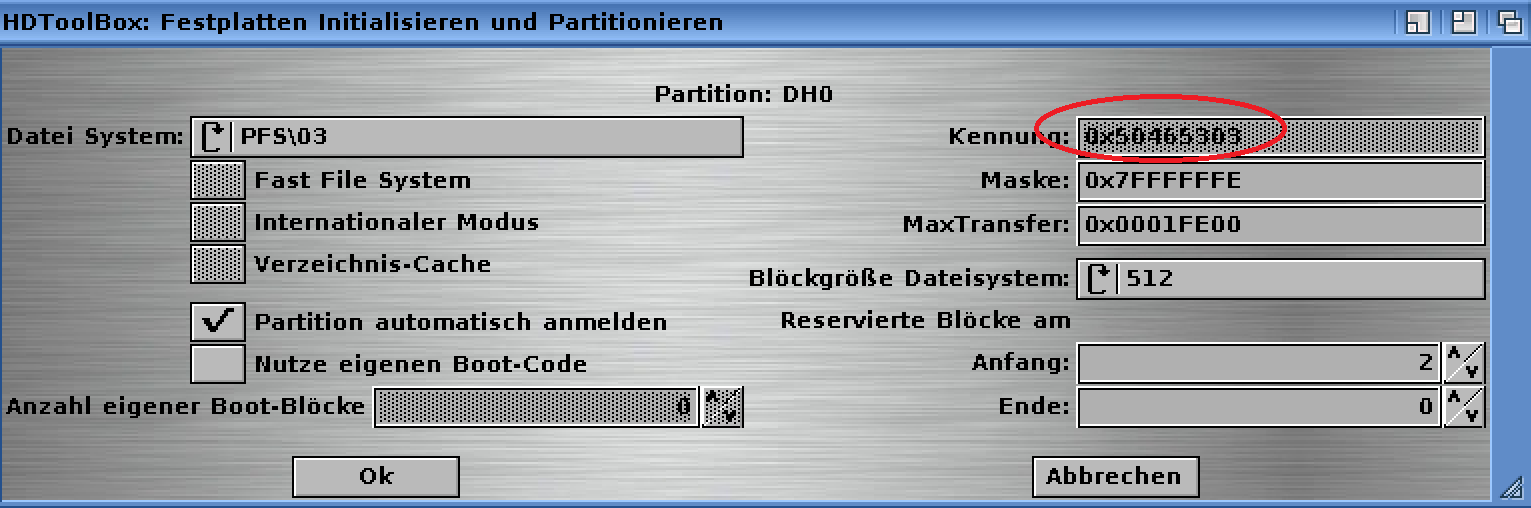
Do you add the PFS3 Filesystem to the MBR? You must add the PFS Filesystem with your HD Install Tool and upload it to the MBR from your Harddisk.
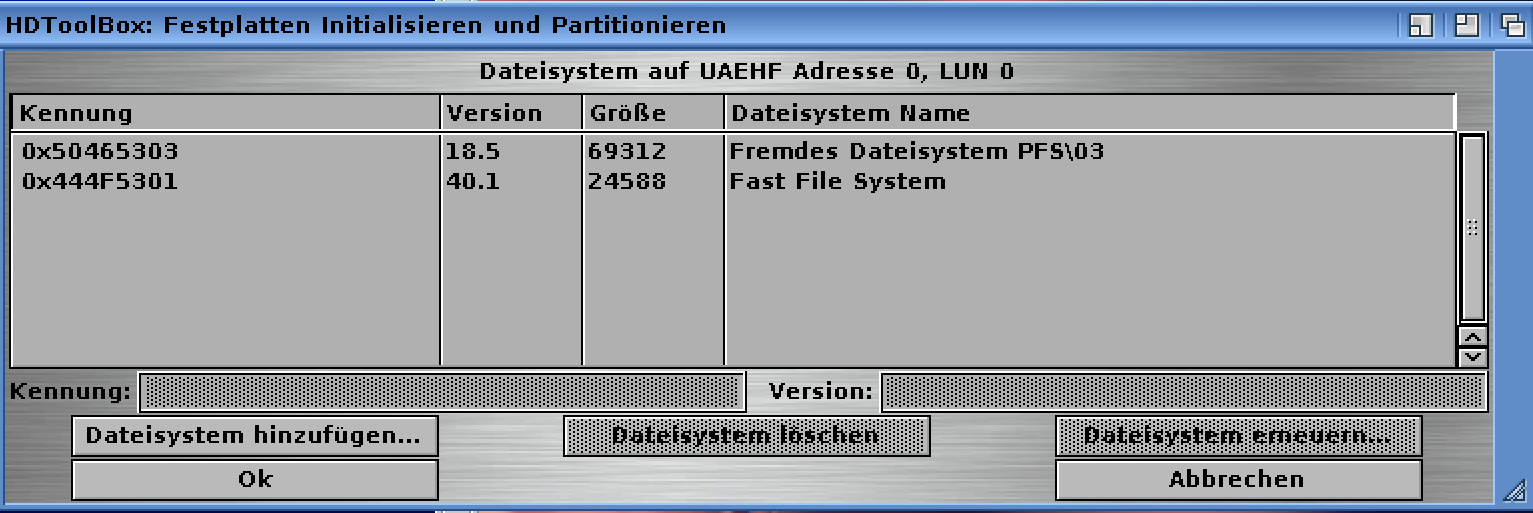
Do you enter the correct Mask for your Controller that you emulate (SCSI, IDE)? 0x50445303 => AIO Direct SCSI or 0x53465305 => "Standard" PFS3:
Did you use Google to find a solution:
http://eab.abime.net/showthread.php?t=64949
After you did all these things you can format your HD with the HD Intall Tool or the normal format command from your workbench.
Pls notice that you can not make partitions greater than 128GB.
Better is to use directorys than a HDF.
Pls notice that you can not use PFS3 for your boot partition. This must be max 2GB and formated with the FastfileSystem.
Here you can see my System:
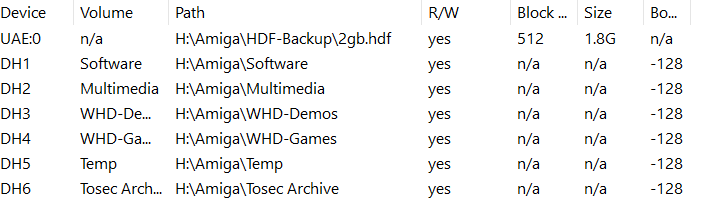
Only the boot partition is a HDF File. The rest are simple directory mounts.
If you are using Kickstart 3.1.4 it does no matter. Your Workbench shows up the correct size from the directorys.
Only a handful old tools can't handle the size and can not write.
Much better to access it over the network.
Best regards
 CypherXG
on 25 Jan 2020
CypherXG
on 25 Jan 2020
Hi, thanks for the reply. I did all of those things. I am quite versed in using the Amiga and using Amiga emulators. I use WinUae all the time. I thought it was odd to put the pfs3aio in the kickstart ROM folder as I wasn't sure why, but that is what was recommended on here by Midwan in the text above. I am able to make a hdf bigger than 2GB on WinUae and on my real Amigas (using OS 3.1.4) without a problem so I have done it often. 😊
I tried making a hdf using the 3.1.4 ROM and the 3.1.4 OS which automatically recognizes hard drives >4GB, but Amiberry still only sees 2GB max whether I make a hdf of 4GB or 8GB. I tried using the UAE controller and the IDE controller in the hdf setup. No matter what I do, the emulator only sees 2GB. Even in the emulator hdf config section, a hdf greater than 2GB shows as 2GB only.
I would rather use a hdf instead of a directory, which I also know how to create, just personal preference I guess. I am able to use pfs3aio as a boot partition on WInUAE and on my actual Amigas.
Thanks for the reply though. 😊
digitalMedic
on 25 Jan 2020
Related issues
 ariath
·
8Comments
ariath
·
8Comments
 Fourdee
·
4Comments
Fourdee
·
4Comments
 phalkon13
·
3Comments
phalkon13
·
3Comments
 henrikstengaard
·
7Comments
henrikstengaard
·
7Comments
 Babbonz
·
3Comments
Babbonz
·
3Comments
Most helpful comment
Yes, the current version (2.25) has been tested thoroughly with larger HDFs on multiple platforms.