Alt-tab-macos: Holding the keys doesn't fast step between thumbnails in the AltTab switcher
Describe the bug
On previous versions (v.4.x) we could just hold the shortcut (say Cmd+Tab) pressed to step fast the selection between windows thumbnails, after the switcher was shown. This was particularly good when we have a lot of open windows. Now (v5.x) holding the keys simply select the next thumbnail and then stop (seems like the "repeat" behavior of holding a key is disabled for the switcher).
Better yet if the switcher could step fast and then stop on the end of the list, like the default behavior of MacOS switcher.
Steps to reproduce the bug
- Activate AltTab with your defined shortcut, say Cmd+Tab;
- While holding Cmd and with the switcher showing, press and hold Tab;
- See that only one step is taken and only the next thumbnail is selected, even holding Tab pressed the switcher doesn't fast select between thumbnails.
 caduellery
All 30 comments
I can confirm this (just wanted to report it myself). Key repeat is not working for trigger key, while working for all other keys. This is something that worked with the 4.x line.
 nfekete
on 26 Aug 2020
nfekete
on 26 Aug 2020
Hey @caduellery! Thanks for reporting this issue!
I'm aware of this. It was introduced by the keyboard rework of v5. With the new way we listen to the keyboard input, I would have to introduce some kind of home-made repeat rate timer, because the OS is not going to send repeated events as it used to.
Also interested to note, modifiers-only shortcuts don't repeat (for example shift). This is standard behavior as modifiers are not inputing text, so they send only 1 event. We could however reuse the same home-made repeat rate timer and give them a repeating behavior. I guess that would be consistent?
 lwouis
on 26 Aug 2020
lwouis
on 26 Aug 2020
I'm aware of this. It was introduced by the keyboard rework of v5. With the new way we listen to the keyboard input, I would have to introduce some kind of home-made repeat rate timer, because the OS is not going to send repeated events as it used to.
Man, I thought that would be simpler... the down side of have a home-made repeat timer is that the OS already have a global config, maybe already customized by the user to his preference.
Also interested to note, modifiers-only shortcuts don't repeat (for example
shift). This is standard behavior as modifiers are not inputing text, so they send only 1 event. We could however reuse the same home-made repeat rate timer and give them a repeating behavior. I guess that would be consistent?
@lwouis IMHO, as non-repeat behavior of modifier keys is the default on every OS, I don't think it is necessary to implement it... it would be a plus, and maybe would need a new preference, so...
Thinking that, maybe, as you'll have to implement the repeat behavior yourself and it will be decoupled from the global keyboard config of OS, it really would deserve a preference setting for this feature... don't know, just ideas...
caduellery
on 27 Aug 2020
It seems there are ways to grab the repeat rate set by the user in System Preferences. So that should be fine to mimic.
It wouldn't be hard then to use the same timer strategy for modifiers-only shortcuts. That way if someone wants to use alt+command instead of alt-tab, then they will get the repeat to navigate quickly
lwouis
on 27 Aug 2020
Here are the default values, and system slider values.
It seems that these values are multiples of 15ms. For example a KeyRepeat value of 2 means 2 x 15 = 30ms delay.
lwouis
on 9 Sep 2020
The behavior is actually correct when I press shift.
E.g. it does flip quickly through the apps in reverse when holding down shift! Is that expected given that it doesn't work going forward? (or is there a way to do the same thing going forward?). Arrow keys also seem to work as expected.
In the meanwhile, until this is fixed, is there place to find binaries of an earlier version?
 avivo
on 14 Sep 2020
avivo
on 14 Sep 2020
I'm surprised you say that shift repeats. It should not. It doesn't on my machine. It doesn't work that way in the OS in general. Modifiers don't repeat events. Imagine what copy-paste would imply if it did
is there place to find binaries of an earlier version?
If you use homebrew, it's standard commands. If you want a manual download, all releases are available on github
lwouis
on 14 Sep 2020
Thanks for those links! But yes, shift and arrow keys definitely repeat. I'm on Mojave 10.14.6.
avivo
on 14 Sep 2020
What keyboard do you have? Do you use any software like Karabiner, BetterTouchTool, etc?
lwouis
on 15 Sep 2020
I've implemented this ticket!
It was really hard, and I took the opportunity to refactor all the messy code in keyboard event management. I'm looking for help to test this build before I release it. Please try it out and let me know if you face any issue.
Here is a list of things that interact with this ticket, and that could break:
- Users can set all sorts of custom shortcuts with:
- Just a key (e.g.
→) - Just modifiers (e.g.
alt+shift) - Both a key and modifiers (e.g.
alt+shift+tab)
- Just a key (e.g.
- Key repeat rate can be customized in
System Preferences > Keyboard
- AltTab should emulate that rate, if the user changes it
- That rate is a multiplier of the screen refresh rate. For the same preference, a 120hz screen will repeat twice as fast as a 60hz. I don't have a fast refresh rate screen to confirm that though.
- Capslock key being active or not shouldn't influence anything
- It should work with or without AltTab's preference
Appearance > Apparition delaybeing0 - It should work with or without AltTab's preference
Controls > Shortcut 1 > Then release = Do nothing
lwouis
on 16 Sep 2020
Oh this is awesome. (Also, FYI, I don't think I use any particular sort of software that would impact this. Perhaps Keyboard Maestro? But I don't think I even had it installed it when I first had this issue. I just an Apple Magic keyboard).
In any case, this build does do it! However, it fails at having other keys like shift work to go backward, arrow keys also IIRC.
avivo
on 17 Sep 2020
@avivo could you please clarify what fails and how it fails? A video of the issues would help a lot.
When you said that the shift key is already repeating for you, I thought that it could be an issue. In this build, I added timer which trigger on some set timing. This is how I emulate key repeats, since the OS is not repeating the keys naturally, for shortcuts (modifiers + key) and for modifiers like shift alone. It only repeats for keys alone like a. Well except you said it was repeating on shift for you.
lwouis
on 17 Sep 2020
My apologies, I was not clear — I meant that the shift key and arrow keys didn't work at all as a result of the change. As in they just exited the switcher! It sounds like Shift still works for you?
avivo
on 18 Sep 2020
I mean of course shift works for me. You can see in the list above, all the scenarios I tested while developing this build. It all works great on my local machine, as well as some other people machines from other tickets where I asked them to try out this build.
I'm worried to release the build since it breaks on your machine. Could you help me understand in details what your setup is, and what's happening? You said it "exited the switcher". So you are pressing alt+tab, then once the switcher is up, you're pressing shift, and that crashes AltTab? The app is no longer in the menubar?
You see here a video would really help because it would bring so much more context that text descriptions fails to convey. You can use a tool like Loom to make it a one click thing to share your screen in motion, or even film with your phone and attach a zip here on Github or from some Google Drive or other cloud storage.
What happens when you restart AltTab after it crashes? It normally should ask for a crash report. Did you send it? That would be really helpful to see what crashed in your particular setup.
lwouis
on 18 Sep 2020
I found a nuanced issue, and fixed it.
lwouis
on 18 Sep 2020
@lwouis the moment I press Shift to try to select previous thumbnail, the switcher vanishes and bring the "selected" window.
caduellery
on 18 Sep 2020
@caduellery I can't explain why it would behave like this on your machine, and not mine. What version of macOS are you running? Do you have an external keyboard? If so, which model/brand? Do you use any software that interacts with the keyboard like Karabineer, BetterTouchTool, KeyboardMaestro, etc?
lwouis
on 20 Sep 2020
I’m using the latest Catalina, on Mac Mini late 2012, with Magic Keyboard
and BetterTouchTool. I’ll try with BTT turned off and give you a feedback.
Em dom, 20 de set de 2020 às 01:14, lwouis notifications@github.com
escreveu:
>
>
@caduellery https://github.com/caduellery I can't explain why it would
behave like this on your machine, and not mine. What version of macOS are
you running? Do you have an external keyboard? If so, which model/brand? Do
you use any software that interacts with the keyboard like Karabineer,
BetterTouchTool, KeyboardMaestro, etc?—
You are receiving this because you were mentioned.
Reply to this email directly, view it on GitHub
https://github.com/lwouis/alt-tab-macos/issues/556#issuecomment-695679086,
or unsubscribe
https://github.com/notifications/unsubscribe-auth/ACQ4GGN7Z3E4TH4FPAP6QATSGV6RPANCNFSM4QMAOFCQ
.--
Carlos Eduardo Matos Ellery
caduellery
on 20 Sep 2020
To clarify the status of this ticket, I'm waiting for 3 issues to be resolved to release my work:
Bug? @caduellery and @avivo have reported that pressing
shiftdoesn't work for them. This is a major concern. I'm waiting on feedback from you guys to get to the bottom of this. Could you please tell me what shortcut you are invoking exactly? The defaultalt+shift, or did you customize it to something else likecmd+shiftoralt+shift+tab? Could you please test on the native laptop keyboard, or Apple external keyboard if not on a laptop? Could you make sure no keyboard-interfering software is running during the test? Another thing that would help, and to share a screenshot of what you get using that web tool. Simply quit AltTab, open the web tool, and press the same shortcut withshiftyou press in AltTab that doesn't work. Keep all the keys pressed after the initial press. Share here what you get; that should help 👍UX. Someone mentioned that when reaching the left or right end of the list, the repeating behavior of the shortcut should stop. That's indeed how the built-in macOS app switcher does it. That's not how Windows 10 alt-tab does it though. The original alt-tab simply repeats and loops around without interruption. I think I'll implement macOS here as I believe it's an improvement to stop and let the user release then press
tabagain if they want to cycle, compared to them being potentially negatively surprised by the cycling around.Bug. I realized that if you set the shortcut to
alt+taband the backwards-cycling shortcut toalt+shift+tab, the second one will not work. This is due to the new implementation, which allow for other modifiers to be pressed and still recognizes the shortcut, thusalt+shift+tabtriggers thealt+tabshortcut. There are many ways to go about fixing this. I'm not sure where I'll go at the moment but I'll figure it out.
lwouis
on 23 Sep 2020
My shortcuts are configured as Cmd+Tab to "Select next window" and Shift+Tab to "Select previous window". Tried this version with BetterTouchTool off and the result is the same (pressing Shift selects a window). Using only Shift to previous gives similar behavior.
Using the default shortcuts (Alt+Tab and Shift), does work nice, even with BTT on. Using Shift+Tab to previous shortcut simply does nothing.
caduellery
on 23 Sep 2020
Pressing Cmd+Shift+Tab gives only this, because when Tab is pressed the MacOS switcher activates and the browser window loses focus:

Pressing only Shift+Tab gives this:

caduellery
on 23 Sep 2020
@caduellery thanks to your support I was able to find some bugs in the event handling!
@caduellery @avivo @nfekete Could you please try out this new build and see if everything works great for you?
I added support for repeat-stops when it reaches end of the list on the left, right, up and down. It works for me when using cmd, alt, shift and shift+tab. It works with the Do nothing preference that continues displaying the UI on release.
lwouis
on 24 Sep 2020
It's working so nice! Thanks!
caduellery
on 24 Sep 2020
I've tried it out quickly. Seems fine for me. My keys are these:
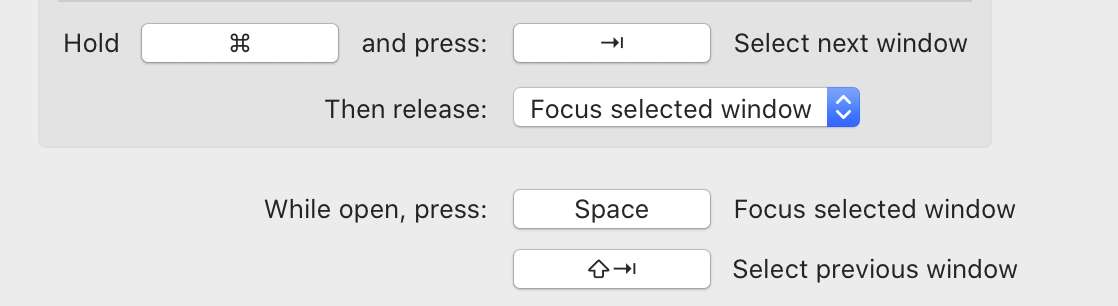
At first I was surprised that, while holding ⌘⇥ and thus moving selection in the alt-tab grid forward on repeat, I was able to change direction back and forth by additionally holding down ⇧ and releasing it respectively. But then I tried the native MacOS app switcher and behaves the same. So nice job in emulating the platform behavior.
nfekete
on 24 Sep 2020
I'm having an issue with this latest test build. It seems that just holding Cmd+tab isn't enough for this to start working. I have to do some finger gymnastics, and have to tap shift before the fast stepping starts, and then the fast stepping works fine. Also, is there any particular reason that it stops at the end of the list? I think an option for it to continuously cycle through all apps wouldn't be the worst idea?
 SoPat712
on 25 Sep 2020
SoPat712
on 25 Sep 2020
Apologies for the delay. The new test build works — very much appreciated!
That said it's still different from the default behavior IIRC. I'm used to holding down shift and then pressing or or holding tab to actually move backwards This implementation has you pressing shift to move — instead of using shift to determine which _direction_ to move.
I also agree that the continuously cycling that was present before was better for me.
avivo
on 25 Sep 2020
I'm having an issue with this latest test build. It seems that just holding Cmd+tab isn't enough for this to start working. I have to do some finger gymnastics, and have to tap shift before the fast stepping starts, and then the fast stepping works fine.
Could you please share a video showing this issue in motion? It's hard to understand from your explanations. I use Loom for this kind of things and it enables me to share my screen with audio commentary in one click, for free.
Also, is there any particular reason that it stops at the end of the list?
I also agree that the continuously cycling that was present before was better for me.
See the discussion above.
I'm used to holding down shift and then pressing or or holding tab to actually move backwards This implementation has you pressing shift to move — instead of using shift to determine which direction to move.
I'm not sure I understand what you describe. By default AltTab uses shift alone to cycle backwards. You press alt then press shift to cycle backwards. Hold shift and you are repeatedly cycling backwards. Using shift alone (without the need to press tab) is an ergonomics improvement over the Windows UX, that I copied from HyperSwitch. Some people want the Windows UX since they are used to it. For those people, they can simply change the preferences to add tab to the shortcut. This is what @nfekete has done for example; see his screenshot above. Maybe you would like to do the same @avivo; or did I not understand properly what you expressed?
lwouis
on 25 Sep 2020
Your suggested solution worked to get the behavior that I thought I had had before (changing the keyboard shortcut for the previous window to shift-tab). Perhaps I just misremembered?
That said, I may have noticed another regression — moving the mouse to hover over an item no longer shows a change in selection to that item. I can still click on an item to open it.
avivo
on 25 Sep 2020
That said, I may have noticed another regression — moving the mouse to hover over an item no longer shows a change in selection to that item. I can still click on an item to open it.
@avivo Isn't this option switched off for you? I switched off too, because I found it annoying that it changes the selection if I accidentally move the mouse while alt-tabbing.

nfekete
on 25 Sep 2020
It is on for me, but still not working. EDIT: And it seems to be working again. Perhaps it's my mouse. Will let you know if I understand it better.
avivo
on 26 Sep 2020
Related issues
 gingerbeardman
·
5Comments
gingerbeardman
·
5Comments
 buttercrab
·
4Comments
lwouis
·
3Comments
buttercrab
·
4Comments
lwouis
·
3Comments
 DaVince
·
3Comments
DaVince
·
3Comments
 valentinocossar
·
3Comments
valentinocossar
·
3Comments
Most helpful comment
It seems there are ways to grab the repeat rate set by the user in System Preferences. So that should be fine to mimic.
It wouldn't be hard then to use the same timer strategy for modifiers-only shortcuts. That way if someone wants to use
alt+commandinstead ofalt-tab, then they will get the repeat to navigate quickly