Alt-tab-macos: Won't open if accessibility access is not checked
Describe the bug
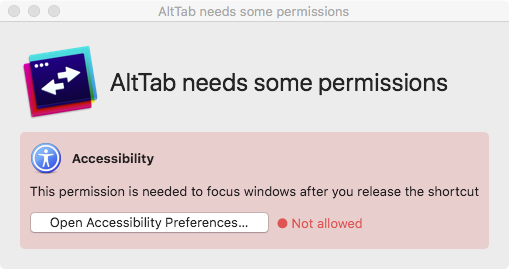
- Won't open if accessibility access is not checked
Screenshots / video
Steps to reproduce the bug
- System Preferences > Security & Privacy > Accessibility > AltTab is unchecked
- Run AltTab
- Observe
Expected
- AltTab should launch and request access to Accessibility
Actual
- Does not launch
Console Logs
Jul 17 13:21:01 matt AltTab[17589]: dyld: lazy symbol binding failed: Symbol not found: _SLSRequestScreenCaptureAccess
      Referenced from: /Applications/AltTab.app/Contents/MacOS/AltTab
      Expected in: /System/Library/PrivateFrameworks/SkyLight.framework/Versions/A/SkyLight
Jul 17 13:21:01 matt AltTab[17589]: dyld: Symbol not found: _SLSRequestScreenCaptureAccess
      Referenced from: /Applications/AltTab.app/Contents/MacOS/AltTab
      Expected in: /System/Library/PrivateFrameworks/SkyLight.framework/Versions/A/SkyLight
 gingerbeardman
All 5 comments
Oh! I think you're not on macOS 10.15 Catalina right? I didn't know this could be an issue. I disabled the new Catalina-added permission checks on older macOS versions, but I guess the way this private API links doesn't work well with that scenario!
Really sorry about the issue! I'll look into it! It's tricky for me because I don't have a mac with an older macOS handy though.
Thank you for the great quality report! The image and logs are super helpful
 lwouis
on 17 Jul 2020
lwouis
on 17 Jul 2020
My pleasure! You're correct: I am on Mojave.
gingerbeardman
on 17 Jul 2020
Hey @gingerbeardman, could you please tell me if that build here start on your system? I tested on a 10.14 VM, and it seems to fix the issue! 🥳
lwouis
on 17 Jul 2020
I released a new version that hopefully fixes the issue on macOS 10.12-14. If it's fixed for you, can you please close the issue? 👍
lwouis
on 17 Jul 2020
Perfect! Many thanks.
gingerbeardman
on 17 Jul 2020
Related issues
 max-sixty
·
4Comments
max-sixty
·
4Comments
 net
·
3Comments
net
·
3Comments
 overseeing
·
4Comments
overseeing
·
4Comments
 DaVince
·
3Comments
DaVince
·
3Comments
 mfn
·
4Comments
mfn
·
4Comments