Alt-tab-macos: AltTab Preferences window is not showing itself in the switcher
Describe the bug
AltTab Preferences window is not showing itself in the AltTab switcher (v5.x).
This is particularly bad when tinkering and testing preferences changes and is a different behavior from previous releases (v4.x).
Steps to reproduce the bug
- Open 'Preferences' window from AltTab menubar icon;
- Activate AltTab with your shortcut (like Alt+Tab);
- See that Preferences window is not present in the windows list of the switcher.
 caduellery
All 2 comments
Hi @caduellery! Thank you for sharing this issue!
I'm well aware of that. It was a conscious regression I decided to make during development of v5. Indeed, with the new keyboard input rework, the app needs to be activated for it to receive local keyboard events. However, everytime you would bring up AltTab, it would activate, and because the main window can't be key, it would focus its preference (or Send Feedback) window as the most recently focused window.
Basically if you had Preferences or Send Feedback open, bringing AltTab up would bring them as the most recently focused in AltTab itself, creating movement in the UI and confusion for the user. I couldn't find a workaround and really wanted to deliver the rework, so I went through.
It's great that you opened this ticket. Now we can track progress on fixing the regression
 lwouis
on 26 Aug 2020
lwouis
on 26 Aug 2020
Wow I found a crazy ramification of this issue: if you hide the currently focused app, using alt+h, for example, the OS is going to activate the next app bellow it. That removes the hidden activation from AltTab. Thus you can no longer use the shortcuts that only work when the AltTab is active.
This constraint on having local shortcuts is pretty hard to satisfy. It is required only for 1 scenario:
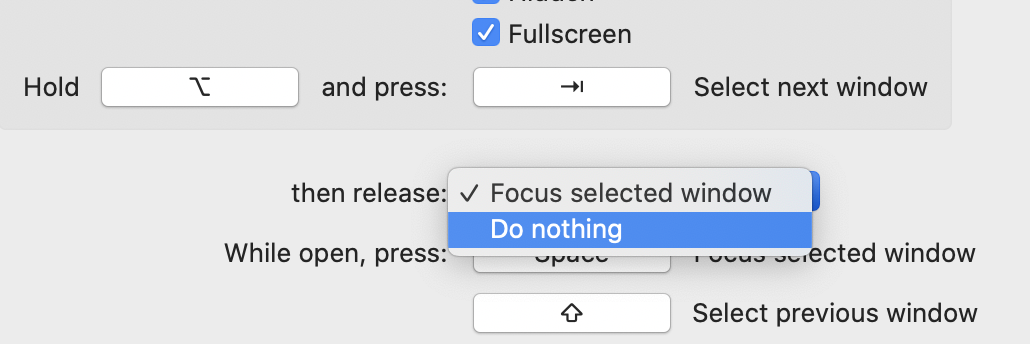
In that scenario, the user releases the modifier(s) and AltTab stays open. Then the keys pressed are not shortcuts. They are just keys like h to hide. That's where we need AltTab to have hidden keyboard focus, to receive these local key presses.
What a puzzle. I wish the implementation didn't have to be such a mess, but that's what I had to go through to work around this terrible Secure Input feature from Apple.
lwouis
on 26 Aug 2020
Related issues
 tlex
·
6Comments
tlex
·
6Comments
 gingerbeardman
·
5Comments
gingerbeardman
·
5Comments
 gingerr
·
6Comments
gingerr
·
6Comments
 mfn
·
4Comments
mfn
·
4Comments
 rway7
·
5Comments
rway7
·
5Comments