Thank you guys for building this and I would like to congratulate you for the progress you have done. Keep it up... 👏️
Expected Behavior
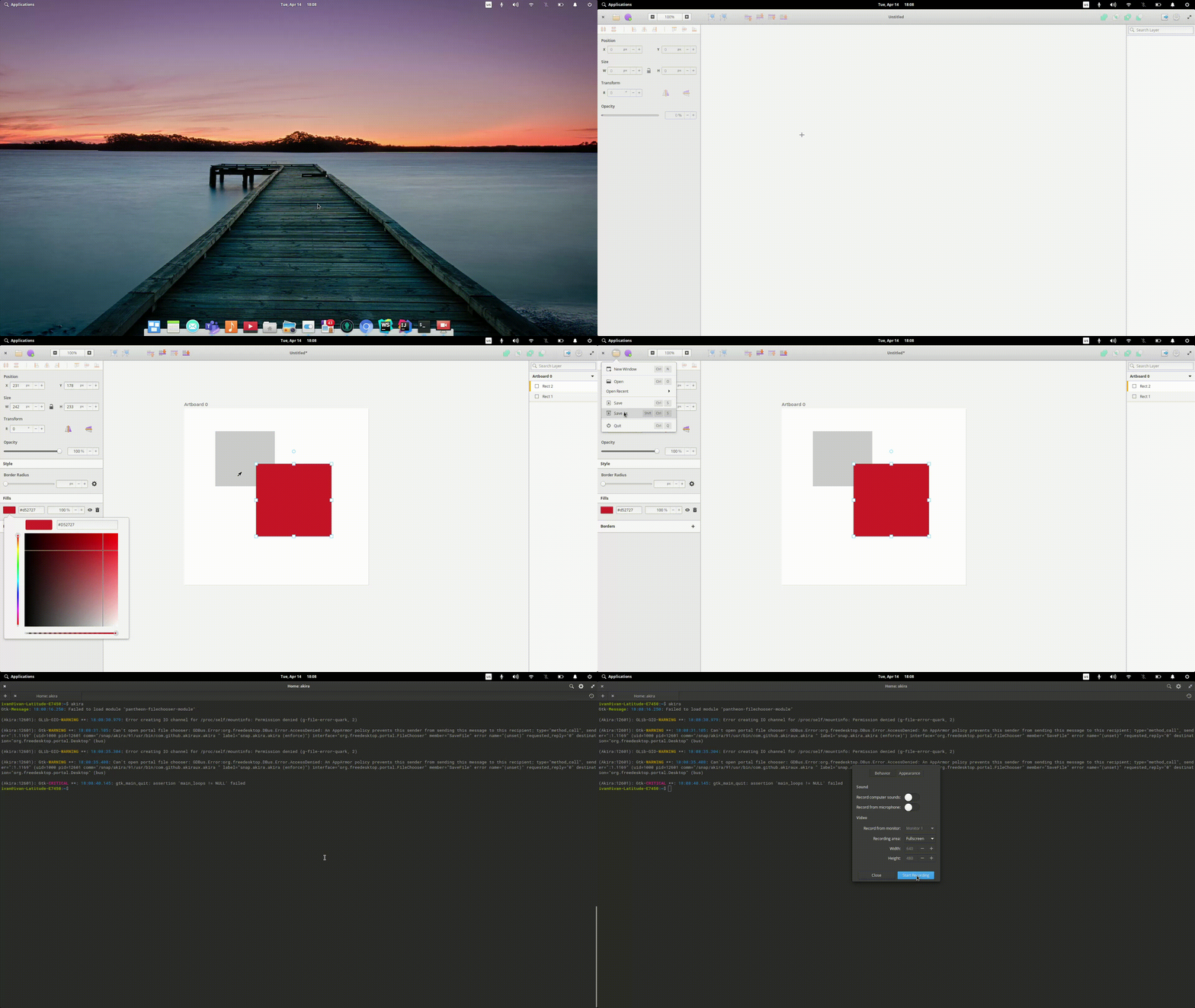
After changing the content of the canvas, clicking save(ctrl+s), or save as (shift+ctrl+s), it should save the project to the file that is already opened or it should popup a save dialog if it is a new project or clicked save as.
Current Behavior
Noting happens but the console bleeds with some warnings about portal file chooser.
Steps to Reproduce (for bugs)
- Install akira (edge) from snap store
- Open your terminal and type
akira, the app should open - Add some items into the canvas
- Hit
ctrl + s/shift + ctrl + s
Context
I don't know if this is happening with the ninja build, but since it has been recently made into master i think it is only the snap that have this issue.
Terminal output:
(Akira:10700): GLib-GIO-WARNING **: 17:44:25.757: Error creating IO channel for /proc/self/mountinfo: Permission denied (g-file-error-quark, 2)

(Akira:10700): Gtk-WARNING **: 17:44:25.837: Can't open portal file chooser: GDBus.Error:org.freedesktop.DBus.Error.AccessDenied: An AppArmor policy prevents this sender from sending this message to this recipient; type="method_call", sender=":1.1113" (uid=1000 pid=10700 comm="/snap/akira/91/usr/bin/com.github.akiraux.akira " label="snap.akira.akira (enforce)") interface="org.freedesktop.portal.FileChooser" member="SaveFile" error name="(unset)" requested_reply="0" destination="org.freedesktop.portal.Desktop" (bus)

(Akira:10700): GLib-GIO-WARNING **: 17:44:31.048: Error creating IO channel for /proc/self/mountinfo: Permission denied (g-file-error-quark, 2)

(Akira:10700): Gtk-WARNING **: 17:44:31.107: Can't open portal file chooser: GDBus.Error:org.freedesktop.DBus.Error.AccessDenied: An AppArmor policy prevents this sender from sending this message to this recipient; type="method_call", sender=":1.1113" (uid=1000 pid=10700 comm="/snap/akira/91/usr/bin/com.github.akiraux.akira " label="snap.akira.akira (enforce)") interface="org.freedesktop.portal.FileChooser" member="SaveFile" error name="(unset)" requested_reply="0" destination="org.freedesktop.portal.Desktop" (bus)

(Akira:10700): Gtk-CRITICAL **: 17:44:34.205: gtk_main_quit: assertion 'main_loops != NULL' failed
Screenshots of the Problem
Your Environment (for bugs)
- Akira Version: latest/edge: master 2020-04-14 (91) 37MB
- OS Info:
Linux ivan-Latitude-E7450 5.3.0-42-generic #34~18.04.1-Ubuntu SMP Fri Feb 28 13:42:26 UTC 2020 x86_64 x86_64 x86_64 GNU/Linux
NAME="elementary OS"
VERSION="5.1.2 Hera"
ID=elementary
ID_LIKE=ubuntu
PRETTY_NAME="elementary OS 5.1.2 Hera"
LOGO=distributor-logo
VERSION_ID="5.1.2"
HOME_URL="https://elementary.io/"
SUPPORT_URL="https://elementary.io/support"
BUG_REPORT_URL="https://github.com/elementary/os/issues/new"
PRIVACY_POLICY_URL="https://elementary.io/privacy-policy"
VERSION_CODENAME=hera
UBUNTU_CODENAME=bionic
 isneezy
All 5 comments
Ah, probably some permissions or "portals" (that's what they're called in a flatpak) are missing.
I'm gonna ping @popey for this, hopefully he can figure it out.
If I'm not wrong, the snap implementation was done before the load/save file feature landed, so probably something is missing.
 Alecaddd
on 14 Apr 2020
Alecaddd
on 14 Apr 2020
Thanks for reporting the issue.
I'm running the same version of Akira here on Ubuntu 20.04 and both Save and Save As do exactly as you'd expect, pop up a file picker dialog. I will do some investigation this evening on an elementary laptop I have and get back to you.
 popey
on 14 Apr 2020
popey
on 14 Apr 2020
Started a conversation on the snapcraft forum to understand the issue better. https://forum.snapcraft.io/t/inconsistent-behaviour-in-gtk-file-open-dialogs/16638
popey
on 15 Apr 2020
This worked for me on my Arch setup, I can save and load files successfully, let me know if I can offer any further information for you.
 abienz
on 16 Apr 2020
abienz
on 16 Apr 2020
So from what I understood, this is a snap specific issue that was already fixed in snapd per https://github.com/snapcore/snapd/pull/8793
we can safely close this one.
 bilelmoussaoui
on 11 Aug 2020
bilelmoussaoui
on 11 Aug 2020
Related issues
Alecaddd
·
6Comments
 eyelash
·
4Comments
eyelash
·
4Comments
 piiskop
·
6Comments
Alecaddd
·
3Comments
Alecaddd
·
4Comments
piiskop
·
6Comments
Alecaddd
·
3Comments
Alecaddd
·
4Comments
Most helpful comment
Thanks for reporting the issue.
I'm running the same version of Akira here on Ubuntu 20.04 and both Save and Save As do exactly as you'd expect, pop up a file picker dialog. I will do some investigation this evening on an elementary laptop I have and get back to you.