@glouel
Thank you again for your continued support of this project! I know the auto update function was a pain to get in. With the newest update (1.4.7b3), I decided to try out this new feature. These are my observations:
1) When clicking the 'check for updates' button, it finds the update and loads the updater screen, however it was not 'focused'. I tried several times with same result.(possibly because it's a sys pref app?)
2) When the update finishes downloading, it asks to install and relaunch, however it does not relaunch (actually, it doesn't close the sys prefs, either.. again, not sure if this is because it's in sys prefs?)
3) Upon closing sys prefs and re-opening, I'm asked to enter my username password to install the update(just the same when manually opening a .saver file.)
4) After entering credentials, the screensaver options could not be opened via the screensaver panel, and I had to close and re-open sys prefs, and then I was able to access the settings for Aerial again.
I'm not sure if this is related to my setup... I have included the log file just in case..
 dVIAN13
All 53 comments
@glouel
Thank you again for your continued support of this project! I know the auto update function was a pain to get in. With the newest update (1.4.7b3), I decided to try out this new feature. These are my observations:
Yeah and it's definitely not perfect which is why I postponed it for a while ;)
- When clicking the 'check for updates' button, it finds the update and loads the updater screen, however it was not 'focused'. I tried several times with same result.(possibly because it's a sys pref app?)
I don't know if this is the expected way Sparkle works or not to be honest (I kinda think it is), that's pretty minor imo.
- When the update finishes downloading, it asks to install and relaunch, however it does not relaunch (actually, it doesn't close the sys prefs, either.. again, not sure if this is because it's in sys prefs?)
This one is painful yes 🥺 Sparkle doesn't manage to close the panel. I don't know if I can help fix that by closing the panel when you click "restart and install", I haven't found how any hook in their API to do that.
If you remember a while back, I had to do a bit of a hack to make the Done button work and close the panel. I'm hopeful I can find a workaround for this. Right now, if you manually close the panel it does restart the System Preferences so it's definitely the Done button.
- Upon closing sys prefs and re-opening, I'm asked to enter my username password to install the update(just the same when manually opening a .saver file.)
What ? I'm not sure why you get asked for username/password, that's probably something linked to your setup I guess. Do you have that with many other apps ? I guess it's consistent that it does it in both cases at least.
- After entering credentials, the screensaver options could not be opened via the screensaver panel, and I had to close and re-open sys prefs, and then I was able to access the settings for Aerial again.
Credential things apart, I had what looked like a crash again at first restart. I haven't had a chance to investigate yet.
 glouel
on 28 Jan 2019
glouel
on 28 Jan 2019
Thanks @glouel
1) You're correct, not a deal breaker, just an observation..
2) No worries. it all works, which is i'm sure is a feat in and of itself.. 😄
3) Yeah, it asks for my login for install rights...
4) Okay.. no worries. we can test next build if you find a bug.. 😉
Thanks again for the improvements!
dVIAN13
on 28 Jan 2019
Something to consider implementing in the Updates pane _might_ be a checkbox to "Check for beta updates", below the "Automatically check for updates" line and indented, and dimmed unless "Automatically check for updates" is checked.
The disadvantage of such a preference, of course, might be an increase in support issues from early adopters who don't understand the concept of beta software, so I'm not sure this would actually be a good idea.
(In the absence of such a preference, I assume that Aerial would _not_ fetch beta updates.)
P.S. @glouel, I'd just like to say once again how impressed I am with all the care you've put into improving Aerial. Last night, running Aerial for the first time in a few weeks (and with my UPS finally connected to the USB port of my iMac), I was delighted by several of the massively helpful features you've newly or recently implemented: override on battery, move old videos, the automatic check for new videos, and open in QuickTime! Thank you very much!
 SeanMSmith
on 31 Jan 2019
SeanMSmith
on 31 Jan 2019
Something to consider implementing in the Updates pane _might_ be a checkbox to "Check for beta updates", below the "Automatically check for updates" line and indented, and dimmed unless "Automatically check for updates" is checked.
I did think about it but it's a mess with Sparkle (the auto updater I use, see here https://github.com/sparkle-project/Sparkle/issues/1348). So the plan right now will be just like homebrew, only deploy full versions there.
I try not to do betas usually but in this case I really want to iron out things before putting it to everyone.
The disadvantage of such a preference, of course, might be an increase in support issues from early adopters who don't understand the concept of beta software, so I'm not sure this would actually be a good idea.
Hopefully betas will be infrequent enough that it doesn't matter.
(In the absence of such a preference, I assume that Aerial would _not_ fetch beta updates.)
Yep that's the current plan. For the 1.4.7betas, you'll get betas obviously but I don't plan for this to last. I still probably need a couple versions to iron out the things mentionned earlier.
P.S. @glouel, I'd just like to say once again how impressed I am with all the care you've put into improving Aerial. Last night, running Aerial for the first time in a few weeks (and with my UPS finally connected to the USB port of my iMac), I was delighted by several of the massively helpful features you've newly or recently implemented: override on battery, move old videos, the automatic check for new videos, and open in QuickTime! Thank you very much!
Thanks !
glouel
on 31 Jan 2019
I try not to do betas usually....
Hopefully betas will be infrequent enough that it doesn't matter.
When Apple changes the videos and messes up the POI timings in our community descriptions, betas give those of us who maintain them an opportunity to update them before a new version of Aerial is officially released.
(I'm assuming that with Aerial's ability to automatically check for new videos, a new version of the Aerial screen saver isn't necessary to play them, but it seems that when Apple updated their JSON and videos last month and again this month, you still had to update Aerial to account for changed video IDs and suchlike.)
On those occasions when you have to release a new version of Aerial to account for Apple updating their JSON and videos, then it might make sense to try to serve users a single update of the Aerial screen saver that includes both your changes and the updated community descriptions… as long as you don't have to wait more than a few days for our updates, of course!
SeanMSmith
on 31 Jan 2019
I try not to do betas usually....
Hopefully betas will be infrequent enough that it doesn't matter.When Apple changes the videos and messes up the POI timings in our community descriptions, betas give those of us who maintain them an opportunity to update them before a new version of Aerial is officially released.
Yes I understand. I fix the IDs in the JSONs as part of the update, but that's about it.
(I'm assuming that with Aerial's ability to automatically check for new videos, a new version of the Aerial screen saver isn't necessary to play them, but it seems that when Apple updated their JSON and videos last month and again this month, you still had to update Aerial to account for changed video IDs and suchlike.)
There are different cases but to sum it up, it usually does work with border effects. Best case scenario, you get the new videos with a bland description ("San Francisco, One"). Worst case scenario, the new version of a video trips the deduplication mechanism and you may get 3 different versions of the video in the UI (one of the Lima videos did that with 1.4.6).
So it's good to update asap if I can.
On those occasions when you have to release a new version of Aerial to account for Apple updating their JSON and videos, then it might make sense to try to serve users a single update of the Aerial screen saver that includes both your changes and the updated community descriptions… as long as you don't have to wait more than a few days for our updates, of course!
It's all a question of timing, multiple languages makes the decision about the cut off for new release more complex in that scenario too.
glouel
on 31 Jan 2019
So back to the original topic, I may have a solution around 2 (not closing/restarting), but I haven't managed to get it to work. Hopefully I'll get there.
Regarding 4 (crash at first launch) I think I got it but will have to double check. We'll be able to check with beta 4.
glouel
on 1 Feb 2019
@glouel Thank you for keeping on top of this! I think those two things alone would help eliminate some of the confusion on if the update worked/applied or not. :)
dVIAN13
on 1 Feb 2019
Hi @glouel,
Thank you again for you continued support! I wanted to confirm the update process. I have included a link to a video, and as you can see, the auto-update didn't fire when I opened, and when I did do it manually, it downloads and then does the 'Install & Relaunch', but then doesn't do anything. further more, I had to then close the Aerial preferences, and then close System Presences for the update to actually kick-off, which then requires Administrator username/password
Like I said, I am unsure if the process is the same for everyone, and if so, should there be more instruction on how the update process works? like an extra line or two in the sparkle window, or after the update completes download? not sure how much control you have at that point.
video link: https://tinyurl.com/y3tr3era
also, apologies for the initial separate issue open, just saw this one was still 'open'.
dVIAN13
on 18 Apr 2019
@dVIAN13 Thanks a lot for the video and no worries about the other issue. I kept this one open since I'm still unhappy about the updater current process.
So, let me recap:
- Auto update didn't fire when I opened : Looking at the video, it says your last update check by Sparkle was yesterday. Sparkle will not try if at least 24h haven't elapsed since last check, so it's likely that. As expected.
Manually launching update found the update : Good !
Clicking Install & Relaunch doesn't quit : I've tried to get in touch with the Sparkle people about this one, see here https://github.com/sparkle-project/Sparkle/issues/1354 I've tried a few things since, like making the done button "default" and "dismiss" (it's really badly defined in macos compared to other ui frameworks), right now I've had it set to "Esc" to close the sheet. That doesn't help with the issue but it's a bit of an improvement. I'm trying to track manually the restart event that gets sent to System preferences right now, maybe that will work. I'll post an update if it gets anywhere.
requires user/pass : are you running a non privileged account or something like that ? I certainly never saw that one here. I guess especially if you install to /Library and not your user folder, that would require privilege elevation
All in all, not much progress at this point but hopefully I'll get there.
glouel
on 18 Apr 2019
@dVIAN13 I got it for the relaunch doesn't quit ;) Will post a build soon, more info here https://github.com/sparkle-project/Sparkle/issues/1354#issuecomment-484597863
glouel
on 18 Apr 2019
@dVIAN13 If you have a sec, can you manually install this : https://github.com/glouel/Aerial/releases/download/v1.4.7beta7/Aerial.saver.zip
It's a fake beta7 with the fixed code. After install, try the update process, it should find current beta 8 and you'll see the relaunch hopefully working as expected. Let me know !
glouel
on 18 Apr 2019
@glouel OMG, you got it! good work by the way, you're amazing!
-and you are correct in that I have the application saving to a directory that requires authentication!
dVIAN13
on 18 Apr 2019
Glorious ! And the directory auth thing explains it then !
This was my showstopper to release the next finale, I started working to day on that enhancement https://github.com/JohnCoates/Aerial/issues/733 so maybe I'll wait for it to be baked before releasing 1.4.8 (won't be named 1.4.7, there's a silly side effect to sparkle, it believes 1.4.7beta1 > 1.4.7 🙈)
glouel
on 18 Apr 2019
yeah, without long build numbers/etc, I could see it not parsing the 'beta' out of it..? next enhancement! choosing whether to update to beta builds or only public releases. ;) just messing. anyways, thanks again for the quick run-down and fix for this update thing!
dVIAN13
on 18 Apr 2019
I hoped to do without the beta/non beta feeds but that didn't look realistic with community descriptions/localisation as pointed by @SeanMSmith, so I'll probably add that yep.
I also wanted to add a silent update option that could work in regular use (so no need to open the control panel to trigger the update popup; it would silent update when you get out of the screensaver). Didn't have much luck with that, and Sparkle is quite sparsely documented (still a super cool project but really hard to get in) but might be possible.
glouel
on 18 Apr 2019
@dVIAN13 @SeanMSmith
I've been looking into silent updating, but sadly you can't really control that as I wish with Sparkle. You can't have silent update just when running the screensaver, and normal check (with the window popping up with release info) in System Preferences.
I can manually trigger a check that pops a window when you get back to desktop, but sadly, our screensaver process gets killed by the system, so the window immediately disappear and you can't update 😱
I did find one workaround, but it's not super pretty. One thing I can do is manually force an immediate check/install for an update. So what I have now, would be add a new checkbox, something like "Automatically update when the screensaver is running" that, if checked, would trigger a check when you launch the screensaver (I can probably respect the once a day check thing, still have to see that one).
The big drawback is, it will kick you out of the screensaver, back to desktop, and install the update immediately (it will then go back to sleep eventually). It's not super pretty, but at least that keeps you updated if you don't go play with the settings all the time (so for 99.9% of people).
I'm unsure if I should implement this, and if so have it checked by default. If it didn't have the drawback, I'd have considered it the best choice for most users (despite my personal hatred for silent/automatic updates !). With the drawback, not so sure.
So welcoming opinions on this one !
glouel
on 19 Apr 2019
@dVIAN13
So I've went ahead and implemented 2 things:
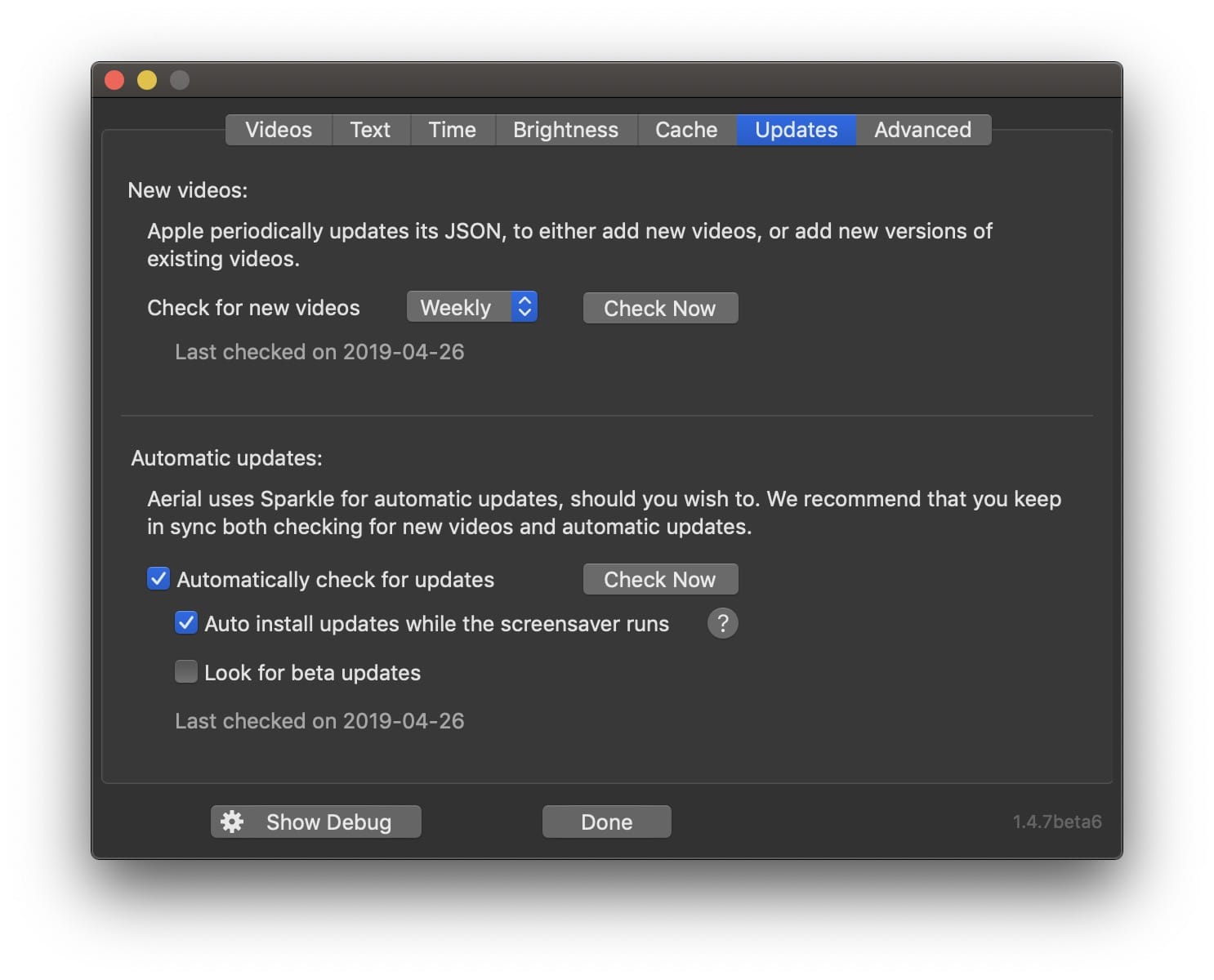
- Beta update track. There's a new checkbox in the update pane, unselected default, that points to a separate beta feed (beta-appcast.xml). Right now it's the same as the normal one (there's an extra message) but starting with 1.4.8, betas will be in this track only.
- Silent update while in screensaver mode. This is what I described ahead, so you stay up to date even if you don't launch control panel. This is enabled by default and there's a help bubble explaining the drawbacks of having it on/off.
This is live in 1.4.7beta 10. Barring any bug I'll move to 1.4.8 for real this time :)
glouel
on 26 Apr 2019
@glouel , this is fantastic!! I think this is a good solution to keep the app updated, without having to have a helper app or open sys prefs to have it check. I look forward to testing it out, and hopefully this will help keep beta to testing and not disrupt the larger community of people who just want the stable builds! 🎉
dVIAN13
on 26 Apr 2019
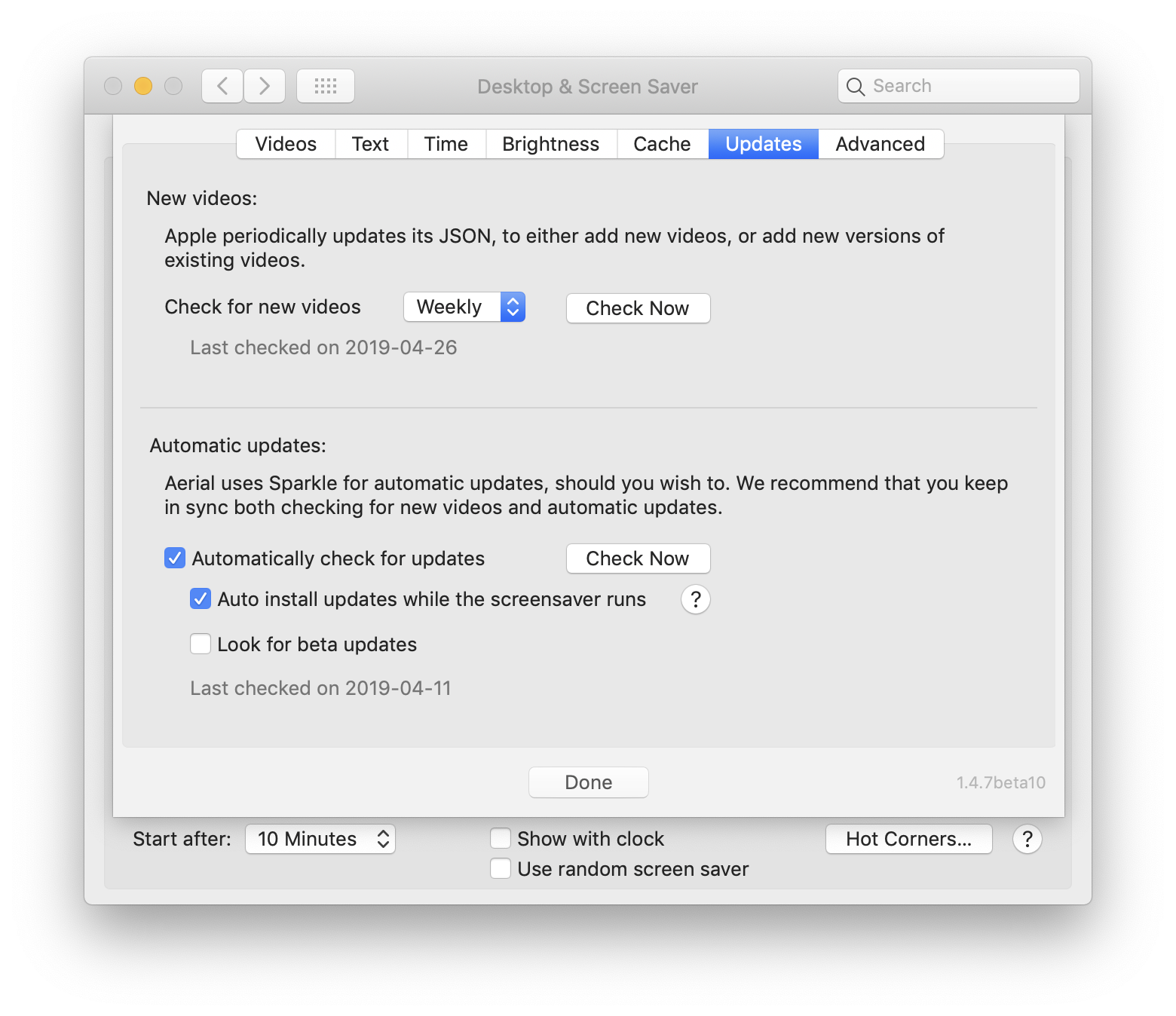
I notice that in the "Automatic updates:" section of the "Updates" pane, the "Last checked" time no longer updates, either after an automatic update or after manually clicking "Check Now":
SeanMSmith
on 27 Apr 2019
@SeanMSmith did you disable auto updates previously ? When Aerial starts (so from a closed system preferences) it should fill that info with what sparkle knows. The date comes directly from Sparkle so a bit puzzled about this one.
However, if you clicked Checked now, yes, it didn't change the text. That's fixed in beta 11 that I will put in the beta track soonish, it will now show "Last checked today" when you click for both (and will go back to showing date at subsequent launches).
In any case, if you clicked check now on beta10 and fully closed down Aerial (the whole syspref) it should show the correct date at next start.
glouel
on 27 Apr 2019
@SeanMSmith I pushed beta11, it's only available in the beta update track as a test. It includes changes mentioned above and your PR.
@dVIAN13 you should be able to test the new silent update thing, just make sure you click the beta track. Also, I put the hour on the last checked field for sparkle, in case you want to have an idea when it should trigger. It will only trigger 24hr+ after the last check so you may only get the update tomorrow, depending.
glouel
on 27 Apr 2019
@glouel, I changed the system date to tomorrow, then tried the silent update, and it worked great!
2 Observations:
1) I am wondering if there is a way to not open the sys prefs for the 'silent' type of update..?
2) If for beta updates(sometimes you release multiple versions in a 24 hour period, albeit not always), I'm wondering if beta is checked, do you remove the 24 hour requirement, so it will update no matter what, or ultimately, give the end user control over frequency.. understanding that would create more work.. for me personally, I don't care if it checks every single time it starts.. others, that want less network traffic can change it, and for those wanting zero traffic can uncheck.. I'll leave that up to you, but simplistically, I was thinking 4 options: 'on startup', 6 hours, 12 hours, daily(24 hours)..
Apologies for rambling.. just thinking out loud. I very much appreciate your continued work on this and making it such a great app!
dVIAN13
on 27 Apr 2019
@glouel, I changed the system date to tomorrow, then tried the silent update, and it worked great!
🎉🎉🎉 Thanks for the very quick feedback !
2 Observations:
- I am wondering if there is a way to not open the sys prefs for the 'silent' type of update..?
I see what you mean, I wasn't fully happy about that either ! The way I force the update is strongly discouraged in their documentation and not really supported, because of that you don't seem to be able to control the relaunching of the app, so I don't think I can improve on that. They mention an alternate way of achieving the update but I don't think it works in our case. Been a while so I think I already tried their suggestion but not 100% sure. Will have a look next week.
- If for beta updates(sometimes you release multiple versions in a 24 hour period, albeit not always), I'm wondering if beta is checked, do you remove the 24 hour requirement, so it will update no matter what, or ultimately, give the end user control over frequency.. understanding that would create more work.. for me personally, I don't care if it checks every single time it starts.. others, that want less network traffic can change it, and for those wanting zero traffic can uncheck.. I'll leave that up to you, but simplistically, I was thinking 4 options: 'on startup', 6 hours, 12 hours, daily(24 hours)..
So, to give you a bit of background, there are two separate ways the update system is triggered. If you launch the System preferences panel and open Aerial's panel, the "regular" system kicks in, this one is set to 24 hours by default. Off the top of my head, minimum is 1 hour.
The silent update thing is separate, I'm manually checking the last check, see if 24hours elapsed, and if so I check for an update and force install it if available. So here, I have full control and can go below 1 hour. Things are a bit messy as if you have multiple screens, you may (or may not) launch multiple instances of Aerial and may or may not trigger the update check multiple times. So always checking -> bad idea as it can mess everything. Also, preview, while a screensaver, won't trigger the update (it did previously, but it made a mess too for the same reasons as on some systems, it's a separate instance from the control panel, and on some others not)
So with that said, there are a few things I could do:
- If you check beta, I could silently drop the time for both methods to 1 hour. That's easy, but not super user friendly.
- I could add a popup to change check frequency for all updates, just like json above. I'd be a bit reluctant to add a 1hr option in here for everyone, but maybe I could show 1hr only if you also check beta, but it's a bit of a mess to do (would need to update the UI live, and if you had beta checked and picked 1hr, then uncheck beta, would need to override your frequency to daily, etc).
- I could add a popup just for beta (greyed out when beta unchecked) that would allow you to change both methods with hourly/twice a day/daily as options for example.
Writing this out, I kinda prefer option 3.
Apologies for rambling.. just thinking out loud. I very much appreciate your continued work on this and making it such a great app!
No worries, thanks for your feedback it's appreciated !
glouel
on 27 Apr 2019
@glouel, I think option 3 is good. thank you for talking through that. obviously I'm not wanting to wait to get your beta updates! 😉 I am also sure others would like this.
Thank you for also thinking through the relaunch observation, appreciate it. Have a great rest of your weekend!
dVIAN13
on 27 Apr 2019
@SeanMSmith did you disable auto updates previously ?
No.
In any case, if you clicked check now on beta10 and fully closed down Aerial (the whole syspref) it should show the correct date at next start.
It did not. To be clear, after the auto-update to v1.4.7beta10, I closed and then re-opened System Preferences, and the "Last checked" time had not updated. Then I manually clicked "Check Now" and then again closed and re-opened System Preferences, and still the "Last checked" time had not updated. (That was the point at which I took the screen shot above.)
SeanMSmith
on 27 Apr 2019
This is weird.
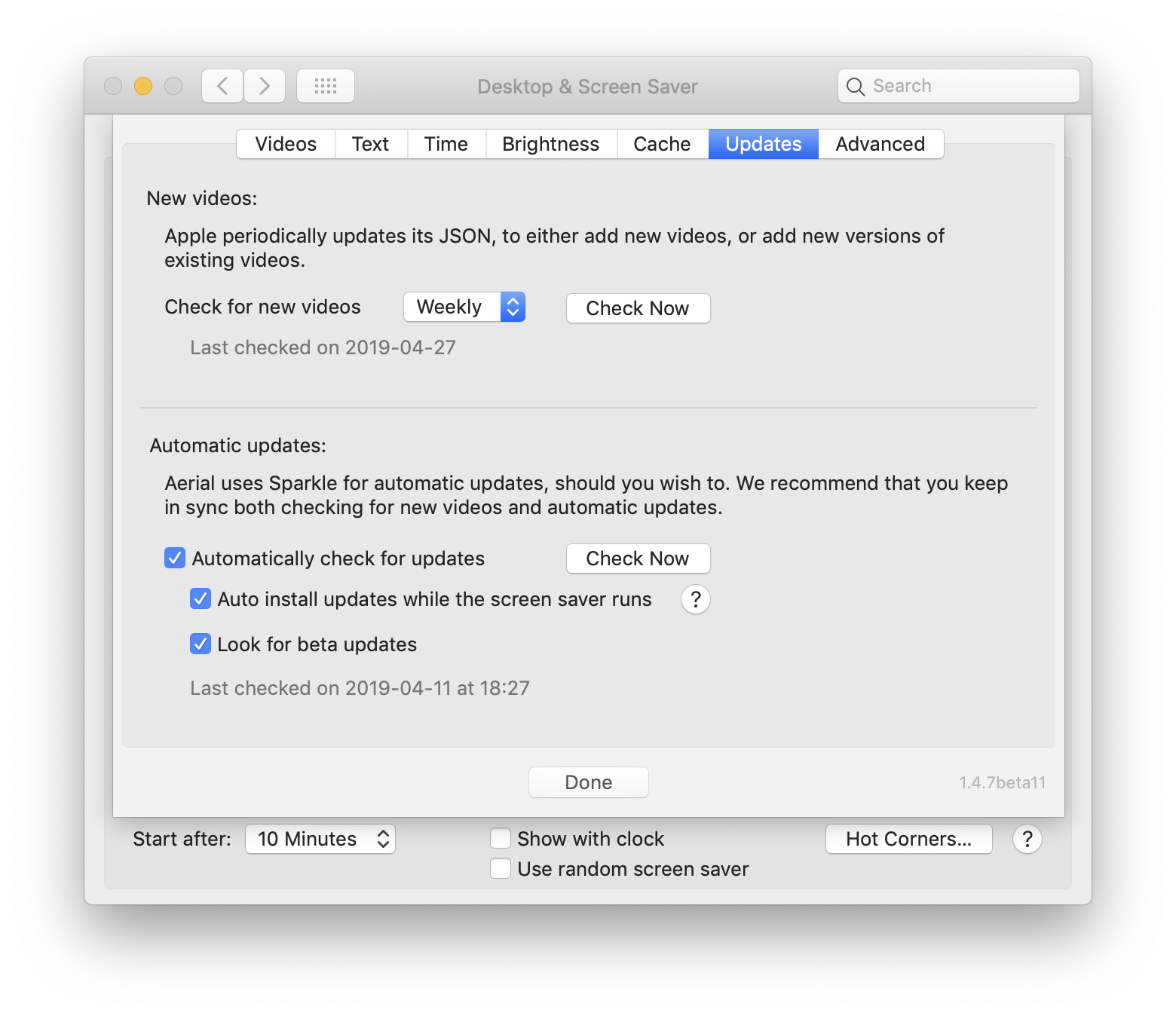
After auto-updating to v1.4.7beta11 and then closing and re-opening System Preferences, the "Last checked" time did not update:
Then, after manually clicking "Check Now", the "Last checked" time updated to say "today":
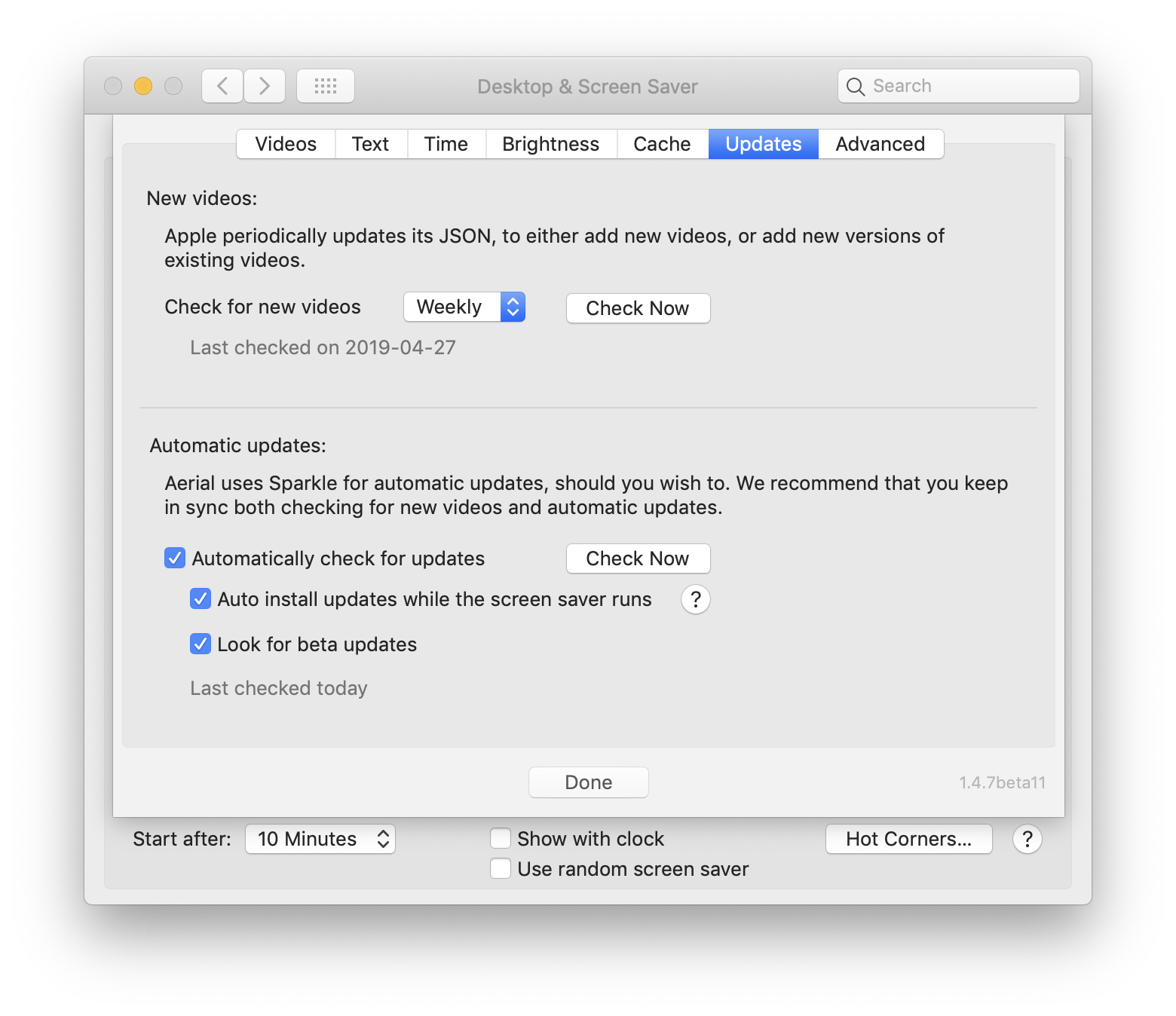
Finally, after closing and re-opening System Preferences, the "Last checked" time reverted to 2019-04-11:
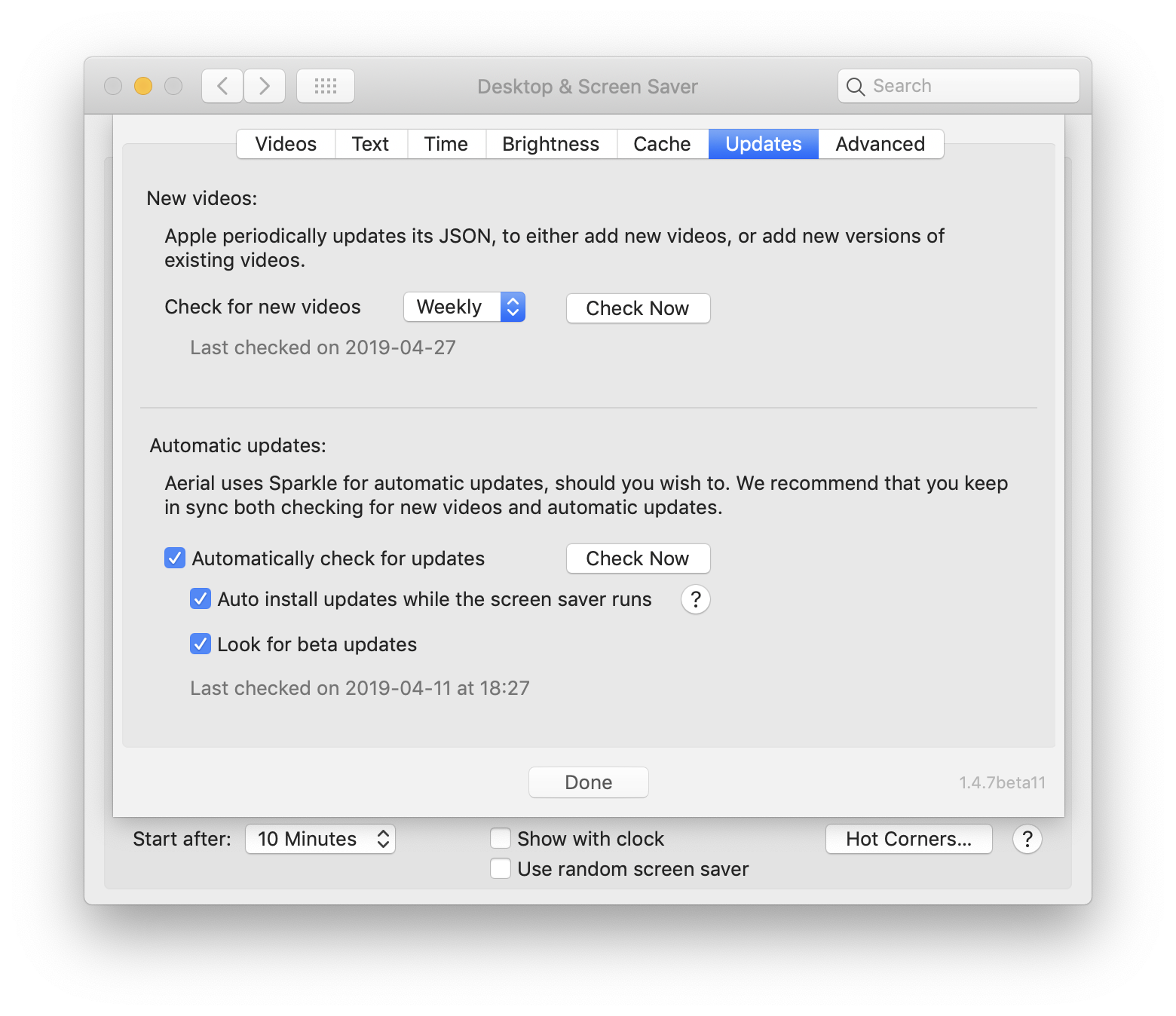
SeanMSmith
on 27 Apr 2019
Ok thanks for the confirmation. The "today" is something I add manually when you click, then it reverts back to the "regular" way of checking the the last checked time that sparkle saves somewhere. It's super weird that the date is stuck here for you, maybe some weird Sparkle bug ?
I would suggest that for the next beta, you let it update while the screensaver is running (the new silent thing). I do reset the timing thing then, it may help fix whatever is stuck on your system.
Can you confirm whether you went silent update from 10 to 11 ? Or "panel" update ?
glouel
on 27 Apr 2019
Can you confirm whether you went silent update from 10 to 11 ? Or "panel" update ?
From 10 to 11, I opened System Preferences and checked "Look for beta updates" (which had been unchecked) in Aerial’s "Screen Saver Options". If I recall correctly, Sparkle’s update notification then immediately popped up, and I clicked on "Install & Relaunch".
I would suggest that for the next beta, you let it update while the screensaver is running (the new silent thing). I do reset the timing thing then, it may help fix whatever is stuck on your system.
I’ll do that and report what happens.
SeanMSmith
on 27 Apr 2019
I’ll give you a heads up before pushing a beta tomorrow or monday, If you get the notification just close it’s window.
glouel
on 27 Apr 2019
@SeanMSmith new beta up just for you, you'll let me know. Hope we can fix this quickly, really need to get a stable build out this week ;)
glouel
on 29 Apr 2019
On my new 2019 iMac (which is what I’ve been testing the last few versions on), the "Last checked" time is still stuck on 2019-04-11 in v1.4.7beta12.
On my old 2015 iMac (whose settings and apps I migrated to the 2019 iMac using Migration Assistant), the "Last checked" time updates correctly. (I should have tested this before. Doh!)
Here’s how I updated on the 2019 iMac:
- I invoked Aerial by moving my cursor into the hot corner configured to "Start Screen Saver", whereupon
- I entered my system password to unlock the screen, whereupon
- I entered my system password for Aerial AutoUpdate, whereupon
- The Screen Saver Preference Pane opened, with Aerial selected
- I clicked "Screen Saver Options…" and then "Updates" and took the following screen shot:
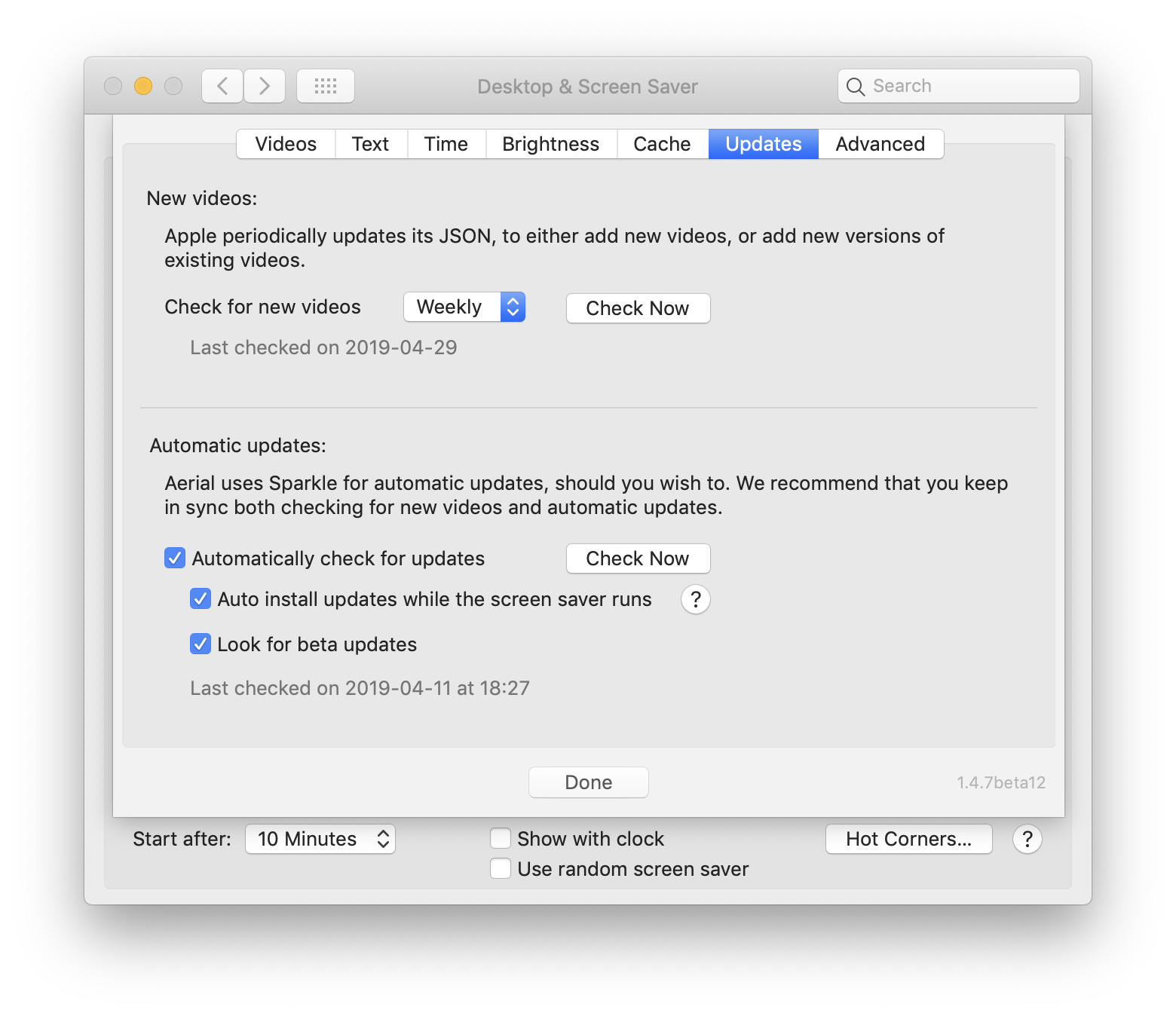
- I then closed and re-opened System Preferences, and took another screen shot identical to the one above.
I wonder why the "New videos: Last checked" time updates correctly correctly on both iMacs, but the "Automatic updates: Last checked" time is stuck on the new iMac.
If this is an isolated issue, it’s probably not worth holding up the release of v1.4.8, but if you have any ideas about what might be going on with my system, I’d sure be curious to find out.
(Edit: Edited for grammar.)
SeanMSmith
on 29 Apr 2019
@SeanMSmith
Well, at that point I'm out of ideas. Answering your question about the difference of the two dates, the date on top, I do manage manually. The second one is purely a Sparkle thing. I ask Sparkle for the date and I display it. Sparkle saves it/updates it on its own.
So right now not much more I can do. I will update to a newer version of Sparkle in the next beta cycle, hopefully it will fix your issue then. I would suggest disabling the "while screen saver runs" if you are concerned about network traffic (because the date is so far back, it will always check for a new version each time the screensaver pops).
I also had a look at the Sparkle issues, to see if anyone had a similar bug but didn't find much. At some point in the past they did have some related issues but they were fixed long before the version we are using now.
I'll keep thinking about it but I'll probably drop 1.4.8 first. Thanks !
glouel
on 29 Apr 2019
@glouel, 🎉 on releasing 1.4.8!!! I'm now thinking a little bit more about the auto update / beta checking...
If you've elected to have beta checking done, after the beta check comes back with nothing new, should it also then check to make sure user is on latest stable release?
For example, today I went to have it auto update from 1.4.7beta12 to 1.4.8, and it did not.. so right now, I am stuck on 1.4.7 branch for the foreseeable future unless I manually upgrade to 1.4.8...
I just wanted to ask your opinion of what options we may have, if any. Thank you again!
dVIAN13
on 30 Apr 2019
@dVIAN13 thanks !! You are way too quick I haven't updated the appcast, which is why you didn't see the update. Give me 10 minutes :) I'll put finals in both the beta and the regular appcast to avoid this don't worry.

glouel
on 30 Apr 2019
@glouel 😉 My apologies, I got excited!
dVIAN13
on 30 Apr 2019
@dVIAN13 no worries, it's certainly exciting ! You can give it a shot now it should work ! Also I've added the beta frequency check we talked about.
glouel
on 30 Apr 2019
@glouel, It worked great!, and now I know to be slightly more patient! 👍 thanks again for your continued support!
dVIAN13
on 30 Apr 2019
Available in 1.4.8 so closing
glouel
on 30 Apr 2019
Today, when Aerial 1.4.7beta12 launched after the release of v1.4.8, I was immediately prompted to enter my password to unlock the screen. Since I was busy doing something else, I did not. After a period of time, the password entry screen timed out, whereupon Aerial relaunched, loaded a new video, and then I was again immediately prompted to enter my password.
This loop repeated about five times before I entered my password on the unlock screen (and would presumably have repeated indefinitely), whereupon Aerial (Autoupdate) prompted me to enter my password, as expected. As soon as I did so, however, Aerial (Autoupdate) immediate prompted me to enter my password again, which I did.
This loop also repeated about five times, interspersed with repeated appearances of the dialog: "Failed to change owner & group on Aerial.saver to match Aerial.saver with authorization." At one point, I noticed three different Aerial (Autoupdate) icons bouncing in my dock side by side.
At the end, I was left with Aerial 1.4.8, but I think this upgrade process is probably not quite what you had in mind.
SeanMSmith
on 30 Apr 2019
@SeanMSmith
Well, I think it's more about your particular setup. It looks like you installed Aerial in a directory that requires your password (maybe /Library instead of ~/Library ? Can you confirm this ? Or some network share of some type ?).
Can you also confirm if you are running some type of restricted account ?
I think it's the cumul of both things, restricted account + install in library that gives you the password. My guess is if you installed to ~ you shouldn't get the prompt and get a regular user experience ? If we can confirm that I guess it's worth mentionning in the install instruction on readme.
glouel
on 30 Apr 2019
Aerial is indeed installed to /Library, but I don't think we should assume that's unusual.
I'm running in an Administrator account.
SeanMSmith
on 30 Apr 2019
@SeanMSmith
Well I had a check and it's indeed just /Library that does it.
I did a check here and now on Mojave (not sure that was the case previously), it explicitely states that you will be required an admin login/password, you can see that here in French:
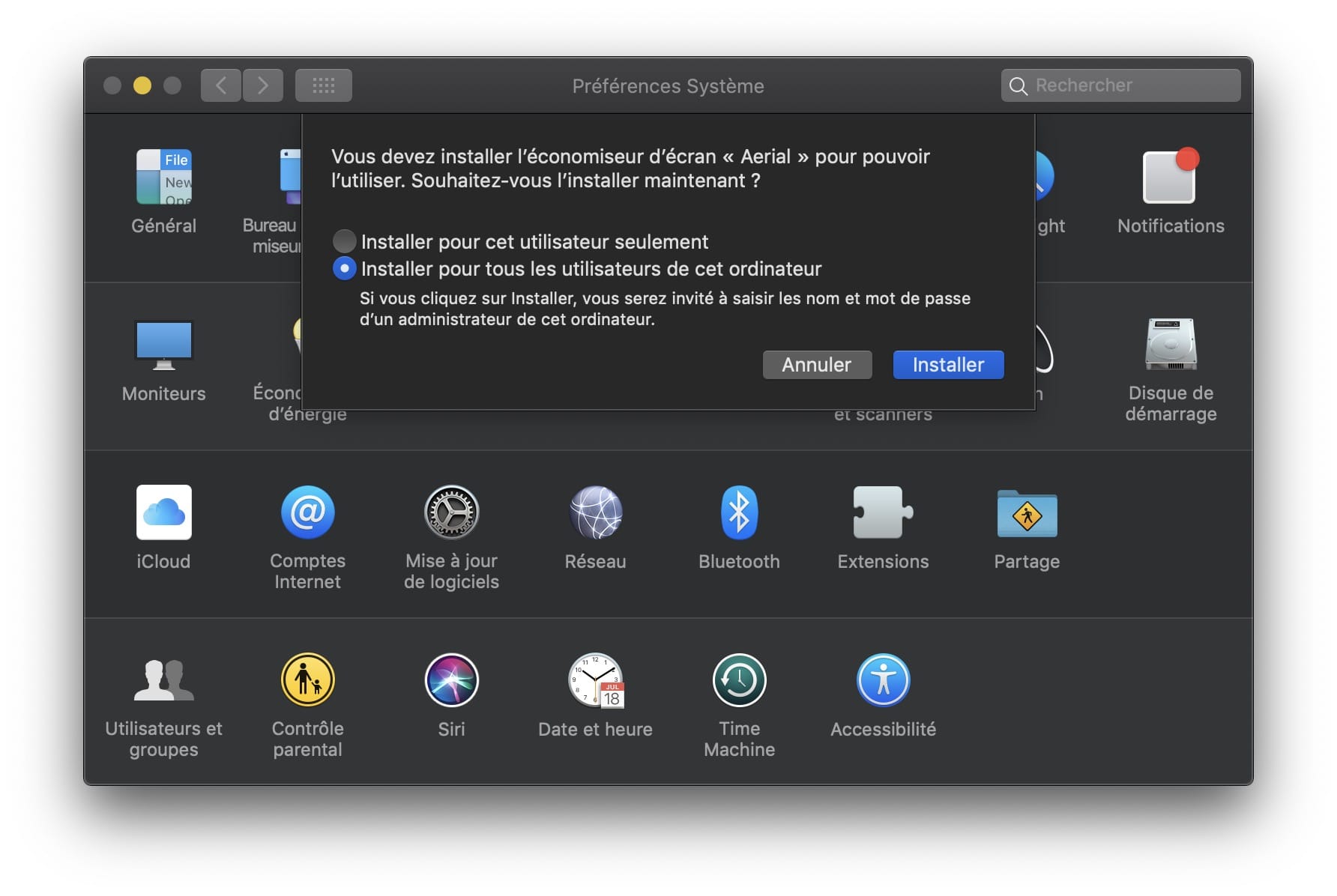
I'm pretty sure that warning is new ?
So I would suggest removing the screensaver from your /Library/ and installing back as a user. This will have 0 impact on where you want to put your cache folder. I was running here with Aerial installed for user account, and cache in Library.
glouel
on 30 Apr 2019
The notice that an Administrator password will be required to install to /Library is not new. Being prompted to enter my password was expected; it’s the endless loop and the multiple Aerial (Autoupdate) processes that was unexpected.
I just invoked Aerial v1.4.7beta12 on my 2015 iMac. On that machine, I was immediately prompted to enter my password on the unlock screen, but after waiting 30 seconds for the unlock screen to time out, Aerial loaded a new video, played it through to the end, and then moved on to the next video, without re-prompting me to unlock the screen.
Perhaps it’s working correctly on my 2015 iMac because there Sparkle’s "Last checked" time gets updated correctly?
SeanMSmith
on 30 Apr 2019
The notice that an Administrator password will be required to install to /Library is not new. Being prompted to enter my password was expected;
Ok must have missed that one.
I just invoked Aerial v1.4.7beta12 on my 2015 iMac. On that machine, I was immediately prompted to enter my password on the unlock screen, but after waiting 30 seconds for the unlock screen to time out, Aerial loaded a new video, played it through to the end, and then moved on to the next video, without re-prompting me to unlock the screen.
Perhaps it’s working correctly on my 2015 iMac because there Sparkle’s "Last checked" time gets updated correctly?
Yeah I skipped that part as I was wondering why you were prompted for a password at all.
Obviously this is linked to your other issue. Whether the install goes through or not, Aerial asks Sparkle to reset the counter (that's why I asked you to try it this way to see if it would fix your april 11th issue). So it should not loop ever, unless you have yor other specific bug. That's why I suggested you should disable that update path on that specific machine for the time being.
glouel
on 30 Apr 2019
@SeanMSmith regarding your date issue, I had another thought, can you please go into
~/Library/Preferences/
You should see in that folder a com.JohnCoates.Aerial.plist. If you open it with Xcode you should see something like this :
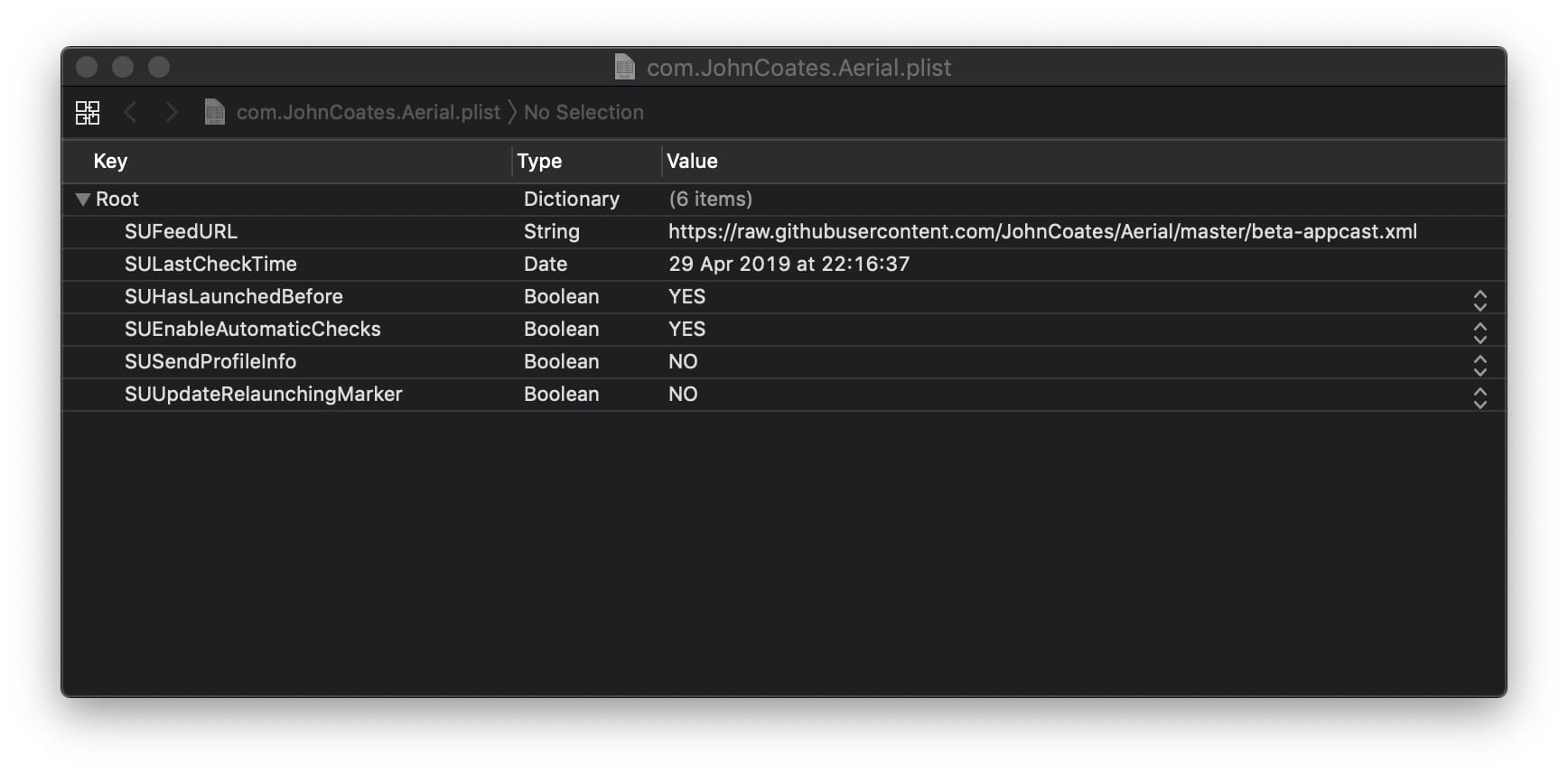
Can you tell me if your April 11th date is in here ? If so, I suggest deleting that file.
Other option, go into ByHost in same directory, you'll find Aerial's main plist. Open with Xcode and look for an SULastCheckTime key. If you see that key, what it is?
glouel
on 30 Apr 2019
In com.JohnCoates.Aerial.plist, SULastCheckTime is 30 Apr 2019 at 1:48:22 PM.
The Updates pane of Aerial is still showing "Last checked on 2019-04-11 at 18:27".
SeanMSmith
on 30 Apr 2019
This is wild. This is where Sparkle stores it's data, so it's storing it correctly, but it keeps reading (and giving Aerial) bad data from somewhere...
Is there a SULastCheckTime in the ByHost plist I mentioned ? Maybe look for a plist in /Library/Preferences ?
glouel
on 30 Apr 2019
Ah! I was looking at ~/Library/Preferences/com.JohnCoates.Aerial.plist.
In ~/Library/Preferences/ByHost/ there are two com.JohnCoates.Aerial.….plist files. One is empty, and the other has SULastCheckTime of 11 Apr 2019 at 6:27:39 PM! That file has a modification time of today, and its permissions appear to be identical to those on the other preference files in ~/Library/Preferences/ByHost as well as in ~/Library/Preferences (my admin account has Read & Write access, and everyone has No Access).
I deleted the SULastCheckTime key from that ByHost/com.JohnCoates.Aerial.….plist file, removed Aerial, and reinstalled Aerial 1.4.7beta12 to /Library/Screen Savers. Then the Updates pane of Aerial showed "Last checked on 2019-04-30 at 14:36". I was not prompted to update to v1.4.8, probably because it had not been 24 hours since Sparkle’s last update check.
I manually clicked "Check Now", and after updating to 1.4.8, Aerial’s Updates pane now shows "Last checked on 2019-04-30 at 15:05". (Recall that previously this "Last checked" time remained stuck even after manually clicking "Check Now".)
Now there is no longer a SULastCheckTime in ~/Library/Preferences/ByHost/com.JohnCoates.Aerial.….plist while the SULastCheckTime in ~/Library/Preferences/com.JohnCoates.Aerial.plist correctly shows 30 Apr 2019 at 3:05:27 PM!
(The following was written before writing the above in response to your most recent post.)
By the way, not that I thought you were suggesting it might, but installing Aerial to ~/Library/Screen Savers instead of /Library/Screen Savers did not unstick Sparkle’s "Last checked" time.
It did, as you suggested, avoid the repeated unlock prompts, although I didn’t test what happens with the beta track selected and an hourly beta update check. It’s _possible_ that someone with my issue and an hourly update check could come into work after a weekend and find 60 or so Aerial (Autoupdate) processes clamoring for attention.
SeanMSmith
on 1 May 2019
Well, awesome that it finally got fixed.
Maybe a previous beta messed things as I was trying to workaround some Sparkle issue. You should be good now, that's great.
As far as I know, moving Aerial.saver back to ~ wouldn't have fixed the issue, as the settings are read in the same place (it would have fixed the password prompt though).
I do understand the 60 mins + weekend thing, but there's not a lot I could do about that one, apart from discouraging people to both use the silent update AND install in /Library at the same time. I'll try to come up with some text for the readme tomorrow. Thanks for the heads up on this and glad we got it fixed in the end!
glouel
on 1 May 2019
Incidentally, I noticed that in v1.4.7beta12 (and I think earlier versions), the "Auto install updates while the screen saver runs" and "Look for beta updates" options are indented from the the "Automatically check for updates" option:
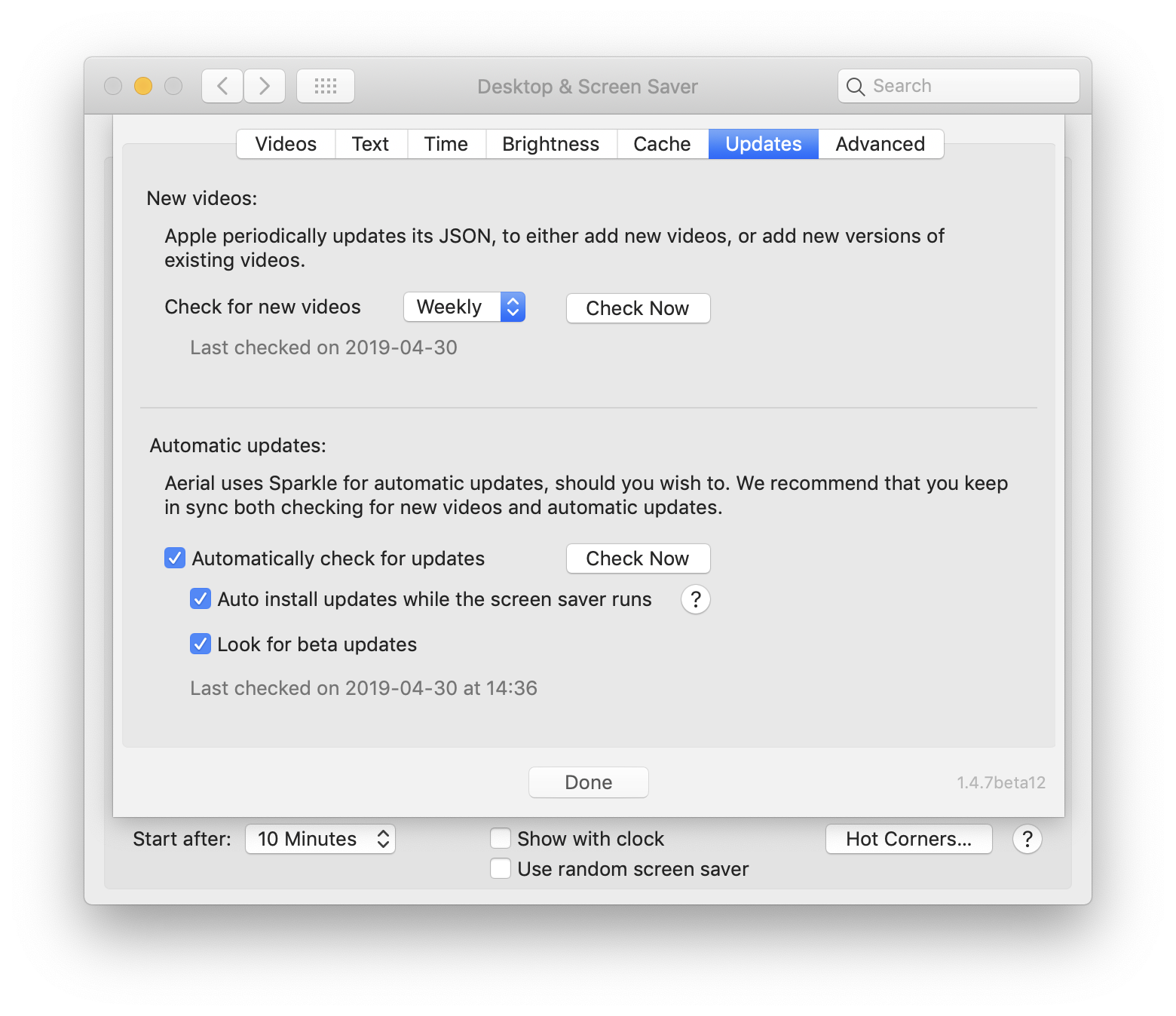
while in v1.4.8 they are all flush left:
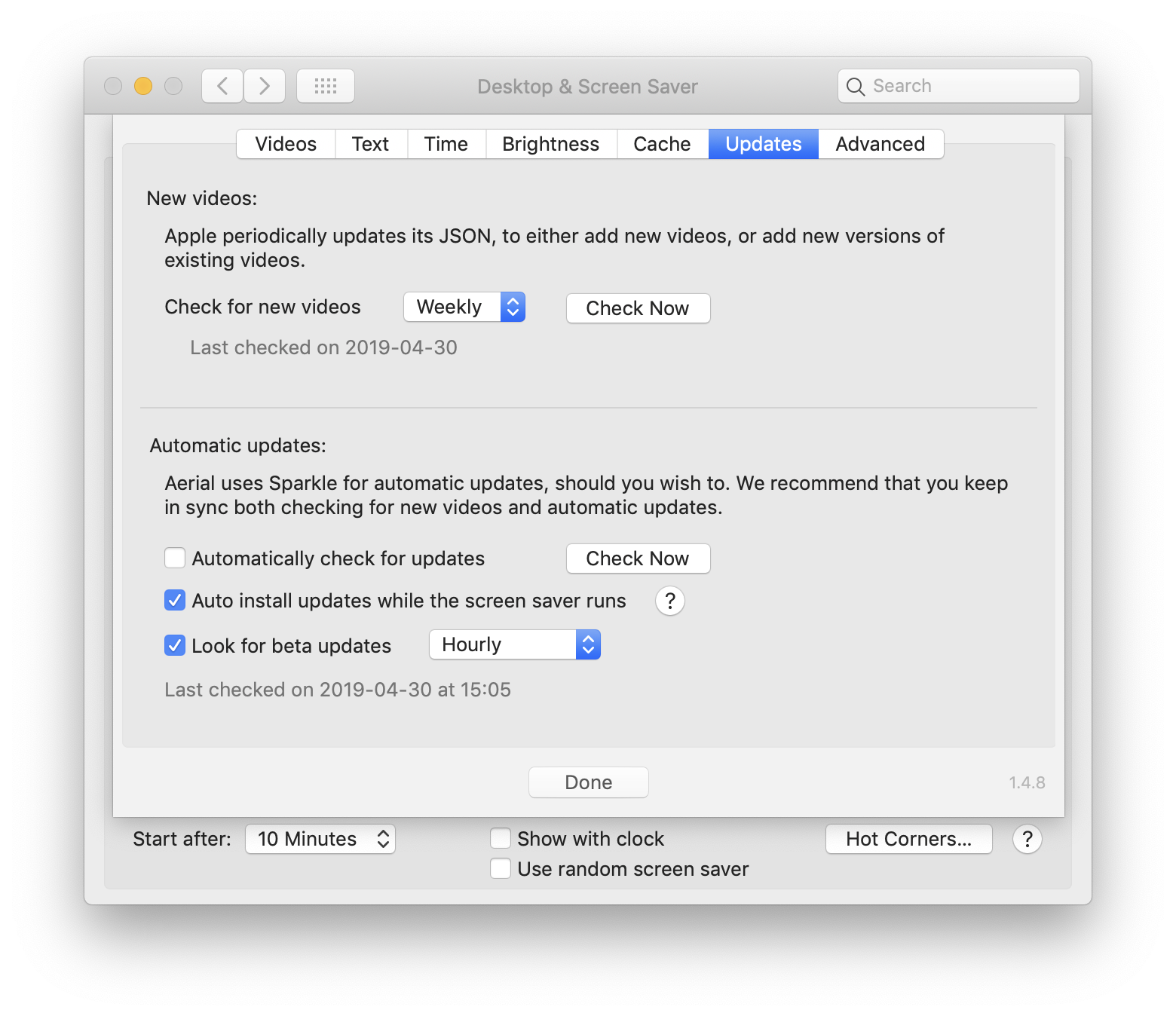
Is this intentional? What happens if "Automatically check for updates" is unchecked but the other two options are checked?
SeanMSmith
on 1 May 2019
Yeah... in the beta, I indented them because my goal was that if automatically check was unchecked, the rest of the options would be unavailable... And while I didn't implement the greyed out thing, I thought it was actually working that way. Except it didn't, those options are independent right now for better or for worse.
- The first checkbox controls the regular Sparkle auto update thing (the one that pops on panel)
- The second one controls the screensaver update path which will always run even if you disable that one on top.
- The third one controls the feed and unlock the hour time for the screensaver update path only (not the regular update path, because I can't change that one). We discussed it with @dVIAN13 above, I didn't feel confortable having the periodic thing enabled for everyone so I put it under beta, although it should be under the second checkbox in theory.
Ideally those should be indented and the first one disable everything. I'll try to get that working in a next version, but since it works separately now, I deindented them. Makes sense ?
glouel
on 1 May 2019
Yes, that makes sense. Thanks for the explanation, and thanks also for helping to get my stuck update time unstuck!
SeanMSmith
on 1 May 2019
Related issues
 vivibro
·
6Comments
vivibro
·
6Comments
 NightRaider73
·
6Comments
NightRaider73
·
6Comments
 sdugoten
·
7Comments
sdugoten
·
7Comments
 Pingren
·
7Comments
Pingren
·
7Comments
 arnsangra
·
3Comments
arnsangra
·
3Comments