Aerial: 'Tearing' of the screen after a couple of seconds of video
General troubleshooting tips
Before logging an issue please check that:
- [x] You have the latest version installed (There may be a beta version that fixes your issue), see here for the latest releases and bug fixes: https://github.com/JohnCoates/Aerial/releases
- [x] Your issue isn't already mentioned in our issues. You may find a workaround there or a similar request already made.
- [x] Your problem isn't mentioned in the troubleshooting section.
If none of this fixes your issue, tell us about the problem you are experiencing or the feature you'd like to request.
Required information
In order to help us sort your issue, we ask that you provide the following information:
- [ ] Mac model:
- [ ] macOS version:
- [ ] Monitor setup:
If appropriate, please enable Debug mode and Log to disk in Advanced tab and replicate your bug, then attach the AerialLog.txt file (You can access this file through the Advanced tab).
Description of issue / Feature request
I am running the latest release (1.4.4) on a MacBook Pro (13-inch, 2017, Four Thunderbolt 3 Ports)
Running 10.13.6
On the laptop screen.
The screen 'tears' into what looks like a buffer error in the code. All the screen is now not viewable. Touch the keyboard and it all reverts to a normal screen.
I turned off the text and that made this happen immediately. When I turned it back on, it looks like perhaps it runs ok until it tries to remove the text.
Disappointing; I hope we can figure this out.
 cwoloszynski
All 17 comments
Can you make a picture or a screenshot of the bug ? There are some known drivers issues on High Sierra. One thing that seemed to help most users was enabling the clock on this pane :
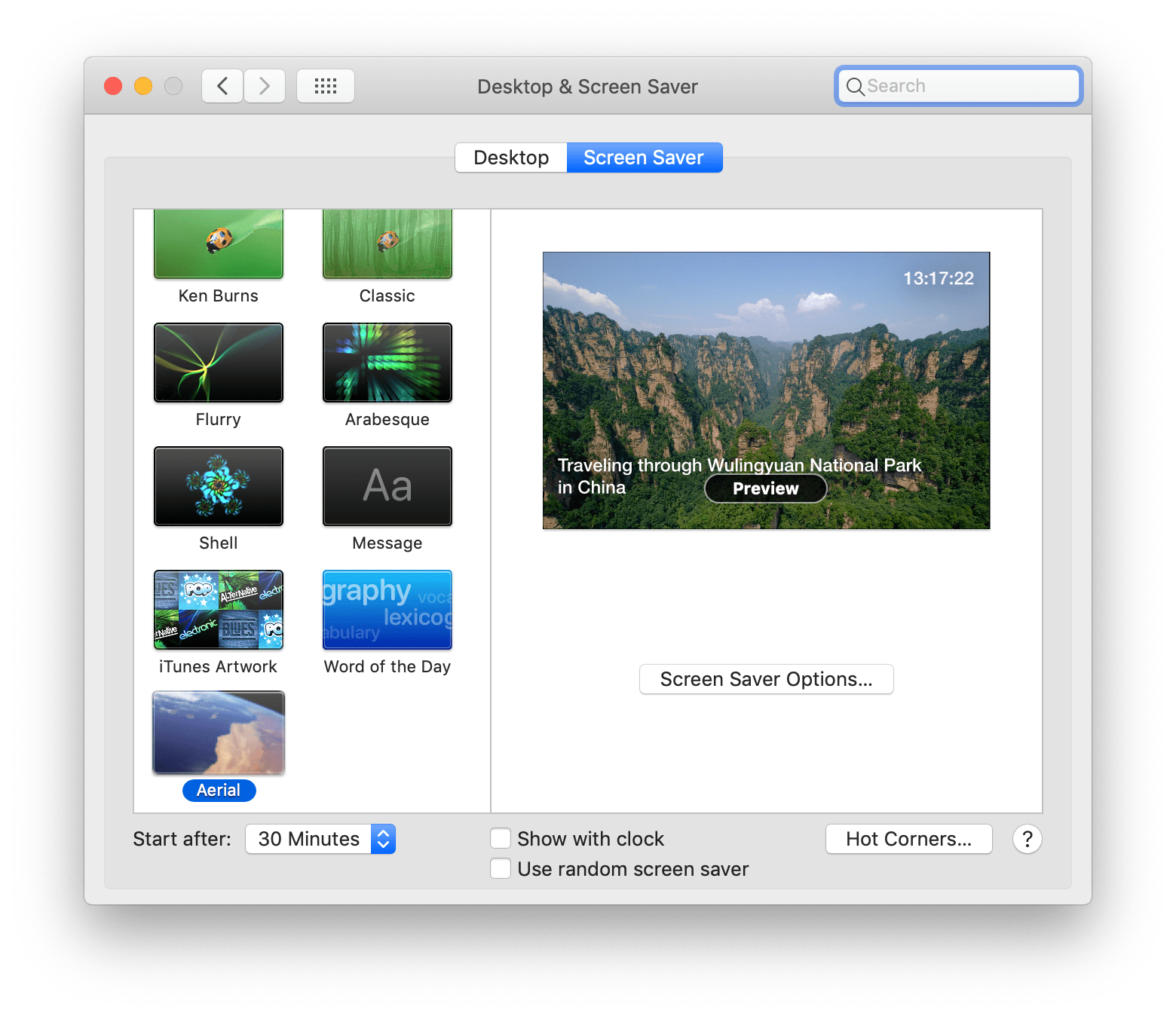
Check the "Show with clock" at the bottom of the screen and let me know if that helps. As far as we know, this is fixed in Mojave although that may not be of much help to you.
We may be able to make a workaround if you seem to think that it happens when the text disappears, by having a . in a corner of the screen maybe, let me know about the clock first please.
 glouel
on 29 Oct 2018
glouel
on 29 Oct 2018
@cwoloszynski I made a quick build with a small grey dot at the bottom left corner of the screen, maybe that will fix your issue, please try this build :
https://github.com/glouel/Aerial/releases/download/v1.4.5test1/Aerial.saver.zip
If it does fix your issue, maybe I can make the dot smaller/fainter (and will make it optional of course as it seems to be a 2017 MBP on High Sierra only thing).
glouel
on 29 Oct 2018
@glouel When did you start signing TEST BUILDS?
 NightRaider73
on 29 Oct 2018
NightRaider73
on 29 Oct 2018
@NightRaider73 this is the first one, but probably will sign everything from now on. If I don't sign the build, the location detection (from the other thread) will silently fail.
glouel
on 29 Oct 2018
Okay I really like it. Its easier to use
NightRaider73
on 29 Oct 2018
I had this exact same issue on a 2017 MacBook Pro (13-inch, 2017, Two Thunderbolt 3 ports) running 10.13.6. Both "Show with Clock" and the quick build solved the issue.
 gronkster
on 30 Oct 2018
gronkster
on 30 Oct 2018
@gronkster oh thanks for checking my quick build ! Would you be willing to test another one where I try to make the small dot fainter ? I don't know if full opacity is needed or not. If it's not I can make it really inconspicuous.
glouel
on 30 Oct 2018
Sure, I’d be happy to.
gronkster
on 30 Oct 2018
@gronkster awesome, this bug has been puzzling me for weeks, cool to see this workaround actually works !
Here it is :
https://github.com/glouel/Aerial/releases/download/v1.4.5beta1/Aerial.saver.zip
The . should no longer be visible, hopefully it will still do the trick !
glouel
on 30 Oct 2018
Hmm...about 25% of the time with the new build I just get a black screen. Not sure if it's because of a different issue, I will revert to the previous build, test some more, and let you know.
gronkster
on 30 Oct 2018
Ha, that's quite possible, let me know thanks ! Maybe because the dot is barely visible, it gets optimized out some of the time and it no longer works. (I hope it's not something with the linted stuff that was also in that beta, hopefully)
glouel
on 30 Oct 2018
@gronkster I made a less faint dot on this build, if you feel like testing it :
https://github.com/JohnCoates/Aerial/releases/tag/v1.4.5beta2
glouel
on 31 Oct 2018
Works better, no black screens so far and I can't see the dot at all. Thanks for the hard work!
gronkster
on 31 Oct 2018
@gronkster thanks for checking so quickly ! There's also now a standalone AerialConfig.app for the other High Sierra issue (textfields). I assume you'll have the same issue as others on High Sierra with this.
glouel
on 31 Oct 2018
I'll be closing this with beta 3
https://github.com/JohnCoates/Aerial/releases/download/v1.4.5beta3/Aerial.saver.zip
@cwoloszynski if you ever come back to check on your issue, you know what to do !
glouel
on 1 Nov 2018
Thanks for fixing this. I'm not sure what happened but I didn't get any notifications on the thread. I need to check my settings on notifications!
I can report that, yes, beta3 definitely addressed the issue for me.
cwoloszynski
on 1 Nov 2018
No worries @cwoloszynski and many thanks for confirming !
glouel
on 1 Nov 2018
Related issues
 jeffehobbs
·
6Comments
jeffehobbs
·
6Comments
 jbis9051
·
6Comments
jbis9051
·
6Comments
 mrmckeb
·
4Comments
mrmckeb
·
4Comments
 vivibro
·
6Comments
vivibro
·
6Comments
 mzdhr
·
3Comments
mzdhr
·
3Comments