Aerial: Videos won't play after manual download (offline mode)
General troubleshooting tips
Before logging an issue please check that:
- [x] You have the latest version installed (There may be a beta version that fixes your issue), see here for the latest releases and bug fixes: https://github.com/JohnCoates/Aerial/releases
- [x] Your issue isn't already mentioned in our issues. You may find a workaround there or a similar request already made.
- [x] Your problem isn't mentioned in the troubleshooting section.
If none of this fixes your issue, tell us about the problem you are experiencing or the feature you'd like to request.
Required information
In order to help us sort your issue, we ask that you provide the following information:
- [x] Mac model: MacBook Pro (13-inch, 2018, Four Thunderbolt 3 Ports)
- 2.7 GHz Intel Core i7
- 16 GB 2133 MHz LPDDR3
- Intel Iris Plus Graphics 655 1536 MB
- [x] macOS version: 10.14.4 (18E226)
- [x] Monitor setup: 2x Lenovo ThinkVision P24h-10
Description of issue / Feature request
First, this is a great screensaver - really beautiful.
I wanted to download/cache all videos in offline mode (https://github.com/JohnCoates/Aerial#offline-mode). First, I took the full list of 4K HDR videos from entries.json, and then downloaded each, as with the below:
curl -O https://sylvan.apple.com/Aerials/2x/Videos/comp_DB_D011_C010_PSNK_DENOISE_v19_HDR_PS_20180914_HDR_4K_HEVC.mov
However, none of the videos will play. They won't open in Quicktime, and they don't play in Safari (even if I just paste the URL into the browser). I've also tried the SDR options as a test and the result is the same.
When attempting to play in Quicktime, It just says "Quicktime can't play" each of the files. I know this may be user error (and I'm expecting it is), but I was hoping someone could point me in the right direction here.
When Aerial caches them (which as I understand, are not in 4K), they work fine.
 mrmckeb
All 4 comments
Hi @mrmckeb
If you check the manual guide closely, by the end it says that for 4K, you are looking for url-4K-SDR (4K HEVC) and not url-4K-HDR in entries.json. I should make it clearer that the HDR videos don't work on Macs as of Mojave.
Those HDR files will not render in either Quicktime nor AVFoundation (which we use in Aerial), right now only the AppleTV version of those APIs can render them (maybe that will change at some point). You can check them in VLC though. This is why Aerial will always download the 4K-SDR. Visually, there's not much difference at all on a Mac (even on a 5K iMac, the videos are aggressively tone mapped and "look" HDR if anything, we talk about it in an issue somewhere) so you are not losing much.
When Aerial caches them (which as I understand, are not in 4K), they work fine.
Aerial can certainly download and cache the 4K videos ! Just pick 4K HEVC in "Preferred video format in the "Videos" panel and download what you want. Most videos are available in 4K, a few aren't (that's the purpose of the 4K badge in the list:
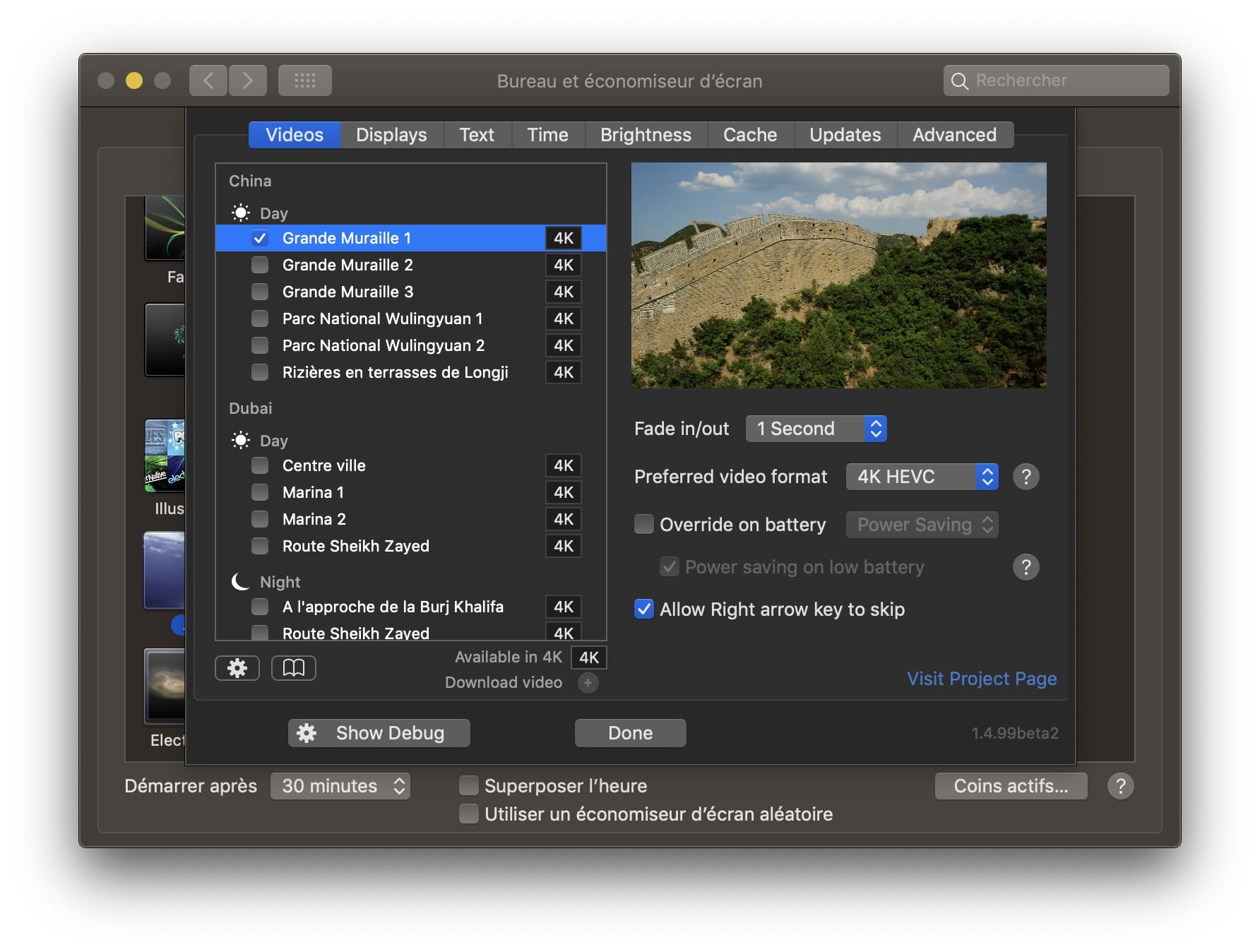
Just use those :)
 glouel
on 14 May 2019
glouel
on 14 May 2019
Thanks, that's great information. I wasn't aware that the HDR videos wouldn't work, and it's definitely easiest to cache with the screensaver itself - I'll just use that.
I did note that the README mentioned SDR only, but didn't understand that it was because HDR wouldn't play. Perhaps that could be updated? I can open a PR if you'd like?
mrmckeb
on 14 May 2019
Yeah I should have made it clearer on readme, need to transition to a wiki so I can go into more details on all of those things. I'll update the readme with a quick note about that thanks.
Edit: added said info
glouel
on 14 May 2019
OK, thank you! I'll close this off and get back to relaxing over some beautiful video footage ;)
mrmckeb
on 14 May 2019
Related issues
 SeanMSmith
·
6Comments
SeanMSmith
·
6Comments
 jeffehobbs
·
6Comments
jeffehobbs
·
6Comments
 sdugoten
·
7Comments
sdugoten
·
7Comments
 savraj
·
4Comments
savraj
·
4Comments
 tempusthales
·
4Comments
tempusthales
·
4Comments
Most helpful comment
Hi @mrmckeb
If you check the manual guide closely, by the end it says that for 4K, you are looking for
url-4K-SDR (4K HEVC)and noturl-4K-HDRinentries.json. I should make it clearer that the HDR videos don't work on Macs as of Mojave.Those HDR files will not render in either Quicktime nor AVFoundation (which we use in Aerial), right now only the AppleTV version of those APIs can render them (maybe that will change at some point). You can check them in VLC though. This is why Aerial will always download the 4K-SDR. Visually, there's not much difference at all on a Mac (even on a 5K iMac, the videos are aggressively tone mapped and "look" HDR if anything, we talk about it in an issue somewhere) so you are not losing much.
Aerial can certainly download and cache the 4K videos ! Just pick 4K HEVC in "Preferred video format in the "Videos" panel and download what you want. Most videos are available in 4K, a few aren't (that's the purpose of the 4K badge in the list:
Just use those :)