Using the newest beta (1.4.1 beta 1) the screensaver still crashes for me if I try to mirror the videos to both of my monitors. It works fine if I let it play different videos to each monitor.
I'm using 4k exclusively and have pre-cached all videos.
I'm running OSX 10.14 (Mojave) and my two external monitors are Dell U3818DW (37.5" 3840x1600) monitors. This is on a Mac Pro with the AMD FirePro D500 graphics cards.
 friedmud
All 9 comments
Yeah, sorry about that, I have a test version that fixes the bug if you want, was waiting on confirmation before releasing it. If you're willing to give it a shot :
https://github.com/glouel/Aerial/releases/download/1.4.1beta2rc1/Aerial.saver.zip
If I may since you have a MacPro, when you click the ? next to preferred video format, do you see a green light in front of H.264 ? (probably red in front of HEVC but that's to be expected).
 glouel
on 15 Oct 2018
glouel
on 15 Oct 2018
Here's what I get from the (?):
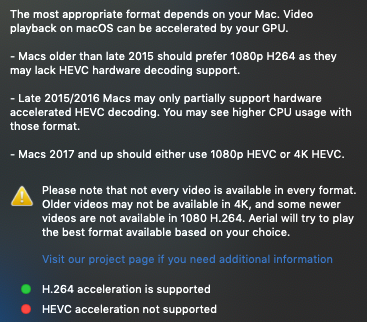
Let me try the new version...
friedmud
on 15 Oct 2018
Ok - the new one works with mirroring (although I got a weird crash of the System Prefs pane the first time I clicked on it - then it worked after that 🤷♂️ ).
friedmud
on 15 Oct 2018
While I've got you here... have you seen any way to set a screensaver a background in Mojave? They seem to have removed the old way of doing that (probably because they added the new dynamic screensaver stuff).
I loved having Aerial as my desktop background!
friedmud
on 15 Oct 2018
Also: thanks for continuing to work on this project! I really appreciate it!
friedmud
on 15 Oct 2018
Did the Panel itself crash ? With a specific message ? Or was the UI of the panel "weird"/not working.
If you try going into the screensaver preferences just after install, and the previous version was in memory, some of the resources won't be loaded and that might cause a crash. Seems to be a MacOS bug with swift screensavers, usually people see a wrong version number and other weird stuff. But it can definitely cause a crash when there's a change to the preferences.
Regarding desktop background, I think someone tried to do that with the old version of Aerial ? There's an issue about that but I haven't looked into it. See here, I'm not sure if it's still running : https://github.com/JohnCoates/Aerial/issues/13
glouel
on 15 Oct 2018
The panel crashed - sorry I didn't capture the message something about "Went wrong". I think that what happened is what you described - that the old version of the screensaver was still running.
Yeah - I used to run Aerial as my background - but that command that's in #13 doesn't exist in OSX Mojave... just a bummer
friedmud
on 15 Oct 2018
Leaving this here for anyone else experiencing the problem :
https://github.com/JohnCoates/Aerial/releases/tag/v1.4.1beta3
I have no idea if there's a way to insert a window behind the desktop in Mojave. I'll keep this in mind for later but don't get your hopes too high ;)
glouel
on 15 Oct 2018
Closing as fixed with the release of 1.4.1
glouel
on 16 Oct 2018
Related issues
 WebVeteran
·
6Comments
WebVeteran
·
6Comments
 sdugoten
·
7Comments
sdugoten
·
7Comments
 Pingren
·
7Comments
Pingren
·
7Comments
 mzdhr
·
3Comments
mzdhr
·
3Comments
 adri430
·
7Comments
adri430
·
7Comments