Perhaps in the Options panel, add come credits and also the version number.
enhancement
 WebVeteran
👍9
All 6 comments
Need version number to verify which version I'm running or if it's even a beta version (see some bug reports asking for version number)
 jomnius
on 9 Jan 2017
jomnius
on 9 Jan 2017
👍5
❤1
+1
 ccharlton
on 9 Mar 2017
ccharlton
on 9 Mar 2017
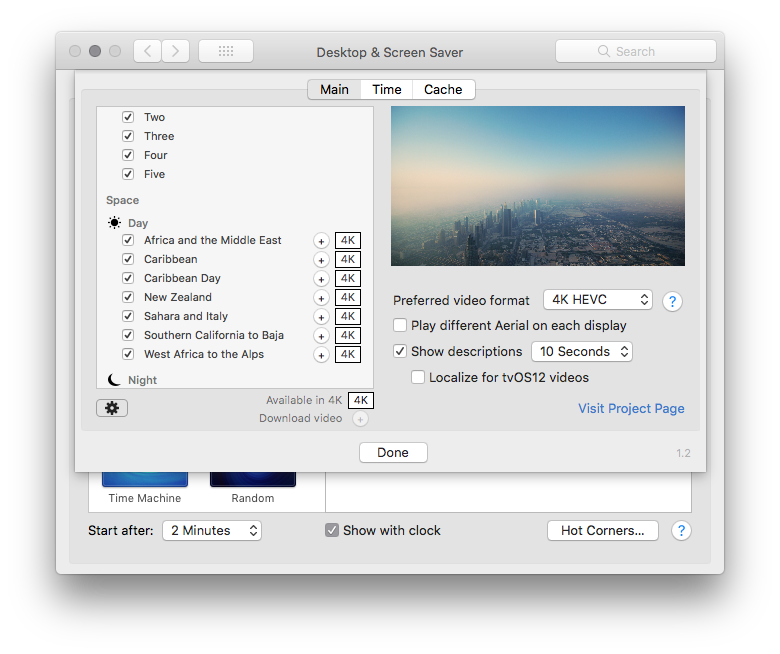
We now have version number on the bottom right corner with 1.4 !
 glouel
on 11 Oct 2018
glouel
on 11 Oct 2018
I downloaded v 1.4 and I can tell it is with the new features. But it says 1.2 in the bottom right.
WebVeteran
on 11 Oct 2018
@WebVeteran Can you close System Preferences and open it again ? It doesn't reload the new version correctly if you don't usually.
glouel
on 11 Oct 2018
Yep you're right. I went back to look just now, since closing Prefs earlier. I see "1.4".
WebVeteran
on 11 Oct 2018
Was this page helpful?
0 / 5 - 0 ratings
Related issues
 sdugoten
·
7Comments
sdugoten
·
7Comments
 adri430
·
7Comments
adri430
·
7Comments
 vom513
·
6Comments
vom513
·
6Comments
 tempusthales
·
4Comments
tempusthales
·
4Comments
 arnsangra
·
3Comments
arnsangra
·
3Comments
Most helpful comment
Need version number to verify which version I'm running or if it's even a beta version (see some bug reports asking for version number)