Aerial: 10.15 "Mojave" beta will not run Aerial
The workaround for "You cannot use this screensaver with this version of the OS" doesn't appear to work in the 10.14 beta.
(Not a complaint, it's a beta, more a heads-up)
 LwsBtlr
All 74 comments
same message but work, some times stuck image
 Vazowskyi
on 6 Jun 2018
Vazowskyi
on 6 Jun 2018
Yeah, I think the author just needs to rip an updated version of the aerial service from the latest iteration of tvOS. I imagine that will remedy this issue.
 innrwrld
on 7 Jun 2018
innrwrld
on 7 Jun 2018
Mine works fine (MB Pro 2015)
 victorlobe
on 8 Jun 2018
victorlobe
on 8 Jun 2018
@victorlobe Yeah, mine works too & honestly now it seems like the aerials service isn't having any issue any longer when I authenticate, so maybe it was just something hokey after the upgrade. Will keep an eye out to see if it continues to be stable.
innrwrld
on 8 Jun 2018
you, no preview. no settings.. :(
 JonoHaysom
on 10 Jun 2018
JonoHaysom
on 10 Jun 2018
Didn’t work me either on Mojave. Tried everything.
 InDeNickOfTime
on 6 Jul 2018
InDeNickOfTime
on 6 Jul 2018
same thing at mine machine... nothing helps
 YunaBraska
on 6 Jul 2018
YunaBraska
on 6 Jul 2018
Was working fine for me with the beta, but after upgrading today it stopped working.

 ghost
on 17 Jul 2018
ghost
on 17 Jul 2018
yea. beta 4 killed it
JonoHaysom
on 17 Jul 2018
Same for me, stopped working after today's update

 Anoonakh
on 17 Jul 2018
Anoonakh
on 17 Jul 2018
It wasn't working, but it is now for me. The Settings pane doesn't work, but with using Alfred and the "screen saver" shortcut enabled the screensaver for me.
No working with the new Beta 3 :(
 mikegazdag
on 17 Jul 2018
mikegazdag
on 17 Jul 2018
Nope, re-installed Aerial - still not working
Anoonakh
on 18 Jul 2018
@JohnCoates, are you able to rework this now that we've found Beta 4 of Mojave to have broken this Aerial service? We all realize that we're running a beta, but honestly, it's pretty likely whatever the cause of the service failure will carry over into production release in the Fall. Thanks in advance.
innrwrld
on 18 Jul 2018
Same here on macOS Mojave 10.14 Public Beta 3 (18A336e)...it worked up until Public Beta 2.
 j0nathanr0gers
on 18 Jul 2018
j0nathanr0gers
on 18 Jul 2018
For the skeptical, this comes from macOS 10.14 beta 4:

 msheaver
on 19 Jul 2018
msheaver
on 19 Jul 2018
Aerial is the best, I'll just change the screen saver to something else until there's a fix. I get the same message when trying to use Google Featured Photos screen saver so it's not just Aerial that has the issue.
 cyberjunkyfreak
on 19 Jul 2018
cyberjunkyfreak
on 19 Jul 2018
Same
 LumpyLi
on 20 Jul 2018
LumpyLi
on 20 Jul 2018
same.
also, i realised i cant stand any other screensaver! risking burn in, but won't use the silly built-in savers!
 wickedguy40
on 21 Jul 2018
wickedguy40
on 21 Jul 2018
This is not specific to Aerial, I've seen several people mentioning that 3rd party screensaver in general stopped working in b4.
 cdstamper
on 23 Jul 2018
cdstamper
on 23 Jul 2018
I think @cdstamper is right. I am anxiously waiting for the next beta. I also downloaded the original code and recompiled it on my computer with the latest Xcode 10 beta, and it still gave the same error.
I still haven't changed my screen saver to anything else. I'd rather see the error message than any other built in screen savers.
ghost
on 23 Jul 2018
Fortunately I'd cached all the videos, so I'm using this as a workaround: http://s.sudre.free.fr/Software/SaveHollywood/about.html
 tobsenmilch
on 24 Jul 2018
tobsenmilch
on 24 Jul 2018
Nice solution @tobsenmilch, I was able to find the video files from here.
mikegazdag
on 24 Jul 2018
@tobsenmilch: Nice find, thanks!
@mikegazdag: Thanks for the video feed .json. Too bad Save Hollywood can’t ingest that automagically.
innrwrld
on 24 Jul 2018
On 24 Jul 2018, at 14:40, Mike Gazdag notifications@github.com wrote:
Nice solution @tobsenmilch, I was able to find the video files from here.
How are you getting those movies? I tried to use curl, but I got a 0 byte file.
--
ɹןʇnqן
[email protected]
LwsBtlr
on 25 Jul 2018
@LwsBtlr A simple wget should do, for example (all in one line):
wget http://a1.phobos.apple.com/us/r1000/000/Features/atv/AutumnResources/videos/comp_GL_G004_C010_v03_6Mbps.mov
 holgr
on 25 Jul 2018
holgr
on 25 Jul 2018
On 25 Jul 2018, at 09:30, Holger Eilhard notifications@github.com wrote:
@LwsBtlr A simple wget should do, for example:
Interesting that curl -O failed. I did forget about wget since it's not installed d by default on OS X anymore.
--
ɹןʇnqן
[email protected]
LwsBtlr
on 25 Jul 2018
@LwsBtlr You have to tell curl to follow the redirects with -L. :-)
curl -L -o out.mov http://a1.phobos.apple.com/us/r1000/000/Features/atv/AutumnResources/videos/comp_GL_G004_C010_v03_6Mbps.mov
holgr
on 25 Jul 2018
Is the screensaver code being actively maintained? I’m pretty much a GitHub newbie, and to me it seems that it hasn't been updated in about two years.
 DominikHoffmann
on 25 Jul 2018
DominikHoffmann
on 25 Jul 2018
On 25 Jul 2018, at 13:28, DominikHoffmann notifications@github.com wrote:
Is the screensaver code being actively maintained? I’m pretty much a GitHub newbie, and to me it seems that it hasn't been updated in about two years.
Well, to be fair, it didn’t need any updating in the last two years as it worked and even picked up new videos as they were added by Apple.
But no, it doesn’t look like it’s being worked on currently.
--
ɹןʇnqן
lbutler@covisp.net
tel:+1.303.219.0564
LwsBtlr
on 26 Jul 2018
Sorry, the failure on maintenance is my fault. I’ve been so bogged down
with client projects that I haven’t been able to find the time to devote to
this project. Wish I could say I had some free time on my schedule coming
up, but it’s more packed than ever. There’s so much I wish I could do with
this project, but deadlines and commitments prevent me from investing time
into Aerial.
On Thu, Jul 26, 2018 at 5:21 PM @lbutlr notifications@github.com wrote:
On 25 Jul 2018, at 13:28, DominikHoffmann notifications@github.com
wrote:Is the screensaver code being actively maintained? I’m pretty much a
GitHub newbie, and to me it seems that it hasn't been updated in about two
years.Well, to be fair, it didn’t need any updating in the last two years as it
worked and even picked up new videos as they were added by Apple.But no, it doesn’t look like it’s being worked on currently.
--
ɹןʇnqן
lbutler@covisp.net
tel:+1.303.219.0564—
You are receiving this because you were mentioned.
Reply to this email directly, view it on GitHub
https://github.com/JohnCoates/Aerial/issues/464#issuecomment-408113895,
or mute the thread
https://github.com/notifications/unsubscribe-auth/AA7EeIuEx7gIDA7nM_tS-aQcL3--tRjzks5uKdBUgaJpZM4Ub6wH
.
 JohnCoates
on 26 Jul 2018
JohnCoates
on 26 Jul 2018
On 26 Jul 2018, at 12:17, John Coates notifications@github.com wrote:
Sorry, the failure on maintenance is my fault. I’ve been so bogged down
with client projects that I haven’t been able to find the time to devote to
this project. Wish I could say I had some free time on my schedule coming
up, but it’s more packed than ever. There’s so much I wish I could do with
this project, but deadlines and commitments prevent me from investing time
into Aerial.
I, for one, am not overly worried about it. It'll get updated when it gets updated. It's not like a super cool screensaver is anything more than a "cool thing my computer can do while I'm not using it."
--
ɹןʇnqן
[email protected]
LwsBtlr
on 27 Jul 2018
Not sure why I am in this email thread but this is the second time I've
gotten added to something from GitHub.
Whatever this project is I have no affiliation with
On Thu, Jul 26, 2018, 11:33 PM @lbutlr notifications@github.com wrote:
On 26 Jul 2018, at 12:17, John Coates notifications@github.com wrote:
Sorry, the failure on maintenance is my fault. I’ve been so bogged down
with client projects that I haven’t been able to find the time to devote
to
this project. Wish I could say I had some free time on my schedule coming
up, but it’s more packed than ever. There’s so much I wish I could do
with
this project, but deadlines and commitments prevent me from investing
time
into Aerial.I, for one, am not overly worried about it. It'll get updated when it gets
updated. It's not like a super cool screensaver is anything more than a
"cool thing my computer can do while I'm not using it."--
ɹןʇnqן
[email protected]—
You are receiving this because you were mentioned.
Reply to this email directly, view it on GitHub
https://github.com/JohnCoates/Aerial/issues/464#issuecomment-408308471,
or mute the thread
https://github.com/notifications/unsubscribe-auth/AK132QPKUo7r79IuF5kE-BgHkK6hzcqxks5uKpgJgaJpZM4Ub6wH
.
 lbutlr
on 27 Jul 2018
lbutlr
on 27 Jul 2018
I've written a quick node app to download all the videos from the JSON file.
 beclamide
on 27 Jul 2018
beclamide
on 27 Jul 2018
@tobsenmilch Thanks for the tip, ive done this but im still getting the weird stuck margin on the video all down the left of my MacBook Pro. very odd, once I use the mouse and the prompt to login comes up the video is realigned and works well. (same thing happened to Aerial Saver)
JonoHaysom
on 28 Jul 2018
for those who are stuck downloading the videos from
http://a1.phobos.apple.com/us/r1000/000/Features/atv/AutumnResources/videos/entries.json
you can use software like Downie to do it, idiot proof ;) https://software.charliemonroe.net/downie.php
JonoHaysom
on 28 Jul 2018
Just curious, has anyone reported this to Apple?
 alistairmcmillan
on 30 Jul 2018
alistairmcmillan
on 30 Jul 2018
Yes it's been reported, and the original bug report got closed last week. Might see some progress in Beta 5
JohnCoates
on 30 Jul 2018
Just an update for the hopeful; Upgraded from Dev Beta 4 to Dev beta 5 of Mojave and did a clean install of Aerial. No dice- Still receiving the same error.
Opening the code in XCode just proved that I know nothing yes, so I promptly closed it again. 😭
 snorbaard
on 31 Jul 2018
snorbaard
on 31 Jul 2018
I did a clean reinstall on Mojave b5 (18A347e) and re-downloaded all of the videos. The screensaver itself seems to work fine now, but the preferences pane won't close after clicking the "Screen Saver Options" button.
 grokdesigns
on 3 Aug 2018
grokdesigns
on 3 Aug 2018
Thanks to tobsenmilch, mikegazdag, & JonoHaysom for helping me to find a workaround.
 DocC3
on 4 Aug 2018
DocC3
on 4 Aug 2018
@grokdesigns Ive done a clean install of Aerial and it had no impact, looks the same as before, completely broken. did you compile the screensaver yourself or Simon download it? @snorbaard has the same issue I do.
JonoHaysom
on 4 Aug 2018
@JonoHaysom, I just downloaded the build from here and let it re-cache all of the videos. As I mentioned, you can't get out of the preference pane, so you have to force quit system preferences, but the screensaver itself seems to be working fine for me now. I wish I knew why that was since I seem to be the minority in this.
grokdesigns
on 4 Aug 2018
Hey @JohnCoates and everyone.. the screensaver works perfectly again in Mojave beta 6.
just wish we could get the location naming feature and the space videos from apple ;)
JonoHaysom
on 6 Aug 2018
Glad to see this.
I was actually already updating my Mac when I saw this.
 kiwis08
on 7 Aug 2018
kiwis08
on 7 Aug 2018
On 06 Aug 2018, at 12:43, kelix notifications@github.com wrote:
Hey @JohnCoates and everyone.. the screensaver works perfectly again in Mojave beta 6.
Including settings? Excellent!
(Downloading now as I’ve been out all day)
--
ɹןʇnqן
lbutler@covisp.net
tel:+1.303.219.0564
LwsBtlr
on 7 Aug 2018
@lwsbtlr, settings still doesn't work for me.
grokdesigns
on 7 Aug 2018
@LwsBtlr yup. settings everything.
JonoHaysom
on 7 Aug 2018
updated to the latest public beta today and didn't do anything - Aerial
works as before.
cheers
peter
On Tue, Aug 7, 2018 at 7:49 PM, kelix notifications@github.com wrote:
@LwsBtlr https://github.com/LwsBtlr yup. settings everything.
—
You are receiving this because you are subscribed to this thread.
Reply to this email directly, view it on GitHub
https://github.com/JohnCoates/Aerial/issues/464#issuecomment-410966910,
or mute the thread
https://github.com/notifications/unsubscribe-auth/ABdq8Yp9aO8moRjthOxJV2BHABbPVbpAks5uOUalgaJpZM4Ub6wH
.
 moooooooo
on 7 Aug 2018
moooooooo
on 7 Aug 2018
Definitely working again in the latest public beta for me. Moreover, I no longer have to use the Show With Clock setting in order to prevent the issues outlined in this thread ...
 owellsjr
on 7 Aug 2018
owellsjr
on 7 Aug 2018
Same for me. Everything works flawlessly on beta 6
On Tue, Aug 7, 2018 at 4:00 PM owellsjr notifications@github.com wrote:
Definitely working again in the latest public beta for me. Moreover, I no
longer have to use the Show With Clock setting in order to prevent the
issues outlined in this thread ...377 https://github.com/JohnCoates/Aerial/issues/377
—
You are receiving this because you are subscribed to this thread.
Reply to this email directly, view it on GitHub
https://github.com/JohnCoates/Aerial/issues/464#issuecomment-411182656,
or mute the thread
https://github.com/notifications/unsubscribe-auth/AJ5Yr22JiDXZX7K89I1bc4LQ1VTy_skIks5uOfHVgaJpZM4Ub6wH
.
 controversial
on 7 Aug 2018
controversial
on 7 Aug 2018
Hi everyone, thanks for the Issue Ticket. For my case, it has been resolved on 10.14 (18A353d).
 thb003
on 8 Aug 2018
thb003
on 8 Aug 2018
Beta 6 gets it working for me as well...the "Done" button for the settings window doesn't work though.
 ihatemyisp
on 11 Aug 2018
ihatemyisp
on 11 Aug 2018
And then, all of a sudden, it works...
 jby
on 12 Aug 2018
jby
on 12 Aug 2018
Can anyone who has already updated confirm if this works with Beta 7?
Thanks
 shubhamvasaikar
on 23 Aug 2018
shubhamvasaikar
on 23 Aug 2018
Yes, it does.
On Thu, Aug 23, 2018 at 1:38 PM Shubham Vasaikar notifications@github.com
wrote:
Can anyone who has already updated confirm if this works with Beta 7?
Thanks—
You are receiving this because you are subscribed to this thread.
Reply to this email directly, view it on GitHub
https://github.com/JohnCoates/Aerial/issues/464#issuecomment-415505592,
or mute the thread
https://github.com/notifications/unsubscribe-auth/AE8f7J-1k7YZfWcCMLknL4nOg12B63Dsks5uTuifgaJpZM4Ub6wH
.
 tarund
on 23 Aug 2018
tarund
on 23 Aug 2018
Now the question is, stick with the solid workaround "Save Hollywood" or go back to Aerial? I think I may use both in mixed case, whereas some systems I may want to stream more than just the nice Apple aerials vs only streaming them. I do like local content though, no need to stream stuff over & over again if you have any sort of cleanup tool that clears app buffers & temp data. Just my 2¢.
innrwrld
on 23 Aug 2018
Works in Beta 8
 bdnk
on 24 Aug 2018
bdnk
on 24 Aug 2018
I can't get any quartz screensavers to work in Mojave. Any tips?
 kidhack
on 19 Oct 2018
kidhack
on 19 Oct 2018
So it looks like you need to include the module name in the Info.plist for the screensaver. For example:
    <key>NSPrincipalClass</key>
    <string>Aerial.AerialView</string>
After doing this, the screensaver works on mojave.
 edwardvalentini
on 3 Nov 2018
edwardvalentini
on 3 Nov 2018
I am getting this issue on my 2018 MacMini but not on my 2017 13" MBP. Latest MacOS Mojave 10.14.5 on both machines.

2018 MacMini (Not Working)
Mac mini (2018)
Processor 3.2 GHz Intel Core i7
Memory 32 GB 2667 MHz DDR4
Graphics Intel UHD Graphics 630 1536 MB
2017 13" MBP (Working)
MacBook Pro (13-inch, 2017, Two Thunderbolt Ports)
Processor 3.2 GHz Intel Core i7
Memory 32 GB 2667 MHz DDR4
Graphics Intel Iris Plus Graphics 640 1536 MB
 thecloudguyllc
on 17 Aug 2019
thecloudguyllc
on 17 Aug 2019
Hi @thecloudguyllc
Please check the first entry in the troubleshooting FAQ : https://github.com/JohnCoates/Aerial/blob/master/Documentation/Troubleshooting.md
This is a macOS bug with Swift libraries, but there's an easy workaround.
 glouel
on 17 Aug 2019
glouel
on 17 Aug 2019
Hi @thecloudguyllc
Please check the first entry in the troubleshooting FAQ : https://github.com/JohnCoates/Aerial/blob/master/Documentation/Troubleshooting.md
This is a macOS bug with Swift libraries, but there's an easy workaround.
Thanks but the work around does not seem to be working this time around. There is a new thread https://github.com/amiantos/lifesaver/issues/4 and this looks specific to Mojave 10.14.5
thecloudguyllc
on 17 Aug 2019
Hi @thecloudguyllc
Please check the first entry in the troubleshooting FAQ : https://github.com/JohnCoates/Aerial/blob/master/Documentation/Troubleshooting.md
This is a macOS bug with Swift libraries, but there's an easy workaround.Thanks but the work around does not seem to be working this time around. There is a new thread amiantos/lifesaver#4 and this looks specific to Mojave 10.14.5
Well...
Here's what I know, this bug arises when you have already loaded a Swift screensaver with a different version of the swift libraries. Because screensavers are plugins to System Preferences, when you load the screensaver panel, the preview loads the screensaver currently selected and it's swift libraries. After that, you cannot select another Swift screensaver and will get that error.
The workaround is fully quitting System Preferences with your new screensaver selected (you need to really close the whole window, not just go back to the main System Preferences pane) and restart System preferences. Picking a system bundled screensaver (preferably an old one) and doing the same should do the trick to. Please try this again. Do not go anywhere else but desktop&screensavers after restarting system preferences.
I haven't had anyone else complain about anything specific to 10.14.5, but most people are using 10.14.6 anyway now. Are you unable to upgrade to that point update ?
The only other thing I could think of is some other System Preferences thing you may have installed that would use Swift. Any chance you have a 3rd party System Preferences extension of some sort, something that show up there that's non standard ?
Again, considering you are the first person to complain about this, I'd suggest double checking what I mentioned above, or look at what may be specific to your setup.
glouel
on 17 Aug 2019
Hi @thecloudguyllc
Please check the first entry in the troubleshooting FAQ : https://github.com/JohnCoates/Aerial/blob/master/Documentation/Troubleshooting.md
This is a macOS bug with Swift libraries, but there's an easy workaround.Thanks but the work around does not seem to be working this time around. There is a new thread amiantos/lifesaver#4 and this looks specific to Mojave 10.14.5
Well...
Here's what I know, this bug arises when you have already loaded a Swift screensaver with a different version of the swift libraries. Because screensavers are plugins to System Preferences, when you load the screensaver panel, the preview loads the screensaver currently selected and it's swift libraries. After that, you cannot select another Swift screensaver and will get that error.
Good info to know. I will research into this deeper tomorrow.
The workaround is fully quitting System Preferences with your new screensaver selected (you need to really close the whole window, not just go back to the main System Preferences pane) and restart System preferences. Picking a system bundled screensaver (preferably an old one) and doing the same should do the trick to. Please try this again. Do not go anywhere else but desktop&screensavers after restarting system preferences.
Aerial is selected in screensaver and I have opened and closed preferences a number of times. In theory a reboot should fix it as well which hasn't worked either.
I haven't had anyone else complain about anything specific to 10.14.5, but most people are using 10.14.6 anyway now. Are you unable to upgrade to that point update ?
After double checking, my MBP is already on 10.14.6 and the Mac mini was still on 10.14.5. Hopeful this was a clue that may fixed the issue but unfortunately I updated the Mac mini 10.14.6 with no luck.
I am providing helpful information on a potential bug. Complaint has a negative connotation to the post I made. We are all developers here trying to help each other improve.
The only other thing I could think of is some other System Preferences thing you may have installed that would use Swift. Any chance you have a 3rd party System Preferences extension of some sort, something that show up there that's non standard ?
My systems are pretty customized but both are configured fairly simularly. I checked for 3rd Party System Preferences and I only have the Logitech Options but it's on both systems. My MBP is a lot more restrictive and underpowered due to it being my employer's laptop but its the one Aerial works fine on. I am not sure why my Mac Mini which is newer, has better resources, and does not have my employer's security tools installed has the issue. However, it is the system I do the most development on and could have a number of tools causing a conflict. I will dig deeper into that tomorrow as well.
Again, considering you are the first person to complain about this, I'd suggest double checking what I mentioned above, or look at what may be specific to your setup.
There is another thread reported on June 6th for the same issue that I posted here. https://github.com/amiantos/lifesaver/issues/4 for you to review as well. But so far it only appears to be the two of us reporting the issue.
I checked all above and will play around with it some more tomorrow. If I come up with something I will let everyone know. I have another monitor with external GPU that currently has my laptop attached and is the only variable I haven't accounted for. I will test to see if Aerial will work on the Mac mini and eGPU. Aerial works both with and without the eGPU on my MBP, however I have had a lot of issues with the Intel Embedded Graphics cards used with external displays so I am wondering if the Mac mini can't render the screensavers with its underpowered graphics card.
thecloudguyllc
on 18 Aug 2019
Ok, first let's try to clear some things up.
- First, can you confirm which version of Aerial you're using ? Latest stable or beta?
- Second, can you clarify whether it's just the preview that doesn't work, or the whole screensaver ? As far as I remember, Aerial still worked if you invoked your screensaver, for example with a hot corner. Can you confirm that does work and you get Aerial then?
- Do you have other 3rd party Swift screensavers installed ? Do they all exhibit the same thing? Did you get the same issue with that other screensaver you linked?
- Did you use Aerial previously, successfully on another version of MacOS on the machine where it doesn't work and then it stopped working?
Aerial is selected in screensaver and I have opened and closed preferences a number of times. In theory a reboot should fix it as well which hasn't worked either.
You may want to try selecting the one that lets you put a message on screen (might be called "Message" in English, the icon is a "Aa" on a black background). Then close SysPref with it selected, then reopen and pick Aerial. This worked for some people as this one, as far as I can recall, is in Obj-C.
After double checking, my MBP is already on 10.14.6 and the Mac mini was still on 10.14.5. Hopeful this was a clue that may fixed the issue but unfortunately I updated the Mac mini 10.14.6 with no luck.
Ok.
I am providing helpful information on a potential bug. Complaint has a negative connotation to the post I made. We are all developers here trying to help each other improve.
A native english speaker, I am not, so please let's make an effort to understand each other.
What I meant was, a lot of people open issues with that specific bug in preview, and so far every time the workaround worked for them (that's why I mention it a few times on the readme page). And it doesn't look like this may be tied to a specific point release of macOS as you upgraded to 10.14.6, so whatever is happening to you looks unique so far. Make sense ?
My systems are pretty customized but both are configured fairly simularly. I checked for 3rd Party System Preferences and I only have the Logitech Options but it's on both systems. My MBP is a lot more restrictive and underpowered due to it being my employer's laptop but its the one Aerial works fine on. I am not sure why my Mac Mini which is newer, has better resources, and does not have my employer's security tools installed has the issue. However, it is the system I do the most development on and could have a number of tools causing a conflict. I will dig deeper into that tomorrow as well.
Ressources should not be the issue in any case. This is more of a plugin initialization issue by SysPref. I really need to make sure that you get Aerial with a hot corner to answer more in depth though (preview and real screensaver are two separate containers running the plugin and they behave differently). Noted for the Logitech software but I can remember a few unrelated issues where people were using it without issue, so unless there was a recent change with it, probably not that.
There is another thread reported on June 6th for the same issue that I posted here. amiantos/lifesaver#4 for you to review as well. But so far it only appears to be the two of us reporting the issue.
Well, it's hard to know if that person tried the workaround I mentioned to you, and it's with another screensaver on top of it. The message itself is pretty common thing to run into, though, as I tried to convey earlier.
I checked all above and will play around with it some more tomorrow. If I come up with something I will let everyone know. I have another monitor with external GPU that currently has my laptop attached and is the only variable I haven't accounted for. I will test to see if Aerial will work on the Mac mini and eGPU. Aerial works both with and without the eGPU on my MBP, however I have had a lot of issues with the Intel Embedded Graphics cards used with external displays so I am wondering if the Mac mini can't render the screensavers with its underpowered graphics card.
The Intel driver has some weird bugs that comes and go, but that's after initialization, and if you are using the latest version I have a workaround in for that corruption bug. This is more of an initialization problem so it's unlikely to be linked to that part of your setup.
Instead, I would probably suggest, if you are using 1.5.0, to give the latest beta a shot. It is now notarized and one reason I can think of of a failed initialization could be if you clamped down your security settings to not run non-notarized software. I never heard of anyone getting this message because of this but who knows.
If nothing works, Console.app, whether looking for a crash log, or looking at output while opening the desktop&screensaver sub panel may give some interesting output. You can filter console with Aerial in that case. Looking for a crashlog, the name will be more generic in the form of something system/screensaver (because we are just a plugin hosted by another process).
Please let me know though about the things I mentioned at the top to better understand what exactly you seem to be experiencing. Thanks!
glouel
on 18 Aug 2019
Fixed, Work Around Below
Ok, first let's try to clear some things up.
- First, can you confirm which version of Aerial you're using ? Latest stable or beta?
Latest Stable
- Second, can you clarify whether it's just the preview that doesn't work, or the whole screensaver ? As far as I remember, Aerial still worked if you invoked your screensaver, for example with a hot corner. Can you confirm that does work and you get Aerial then?
Issue affects the Whole Screen Saver
- Do you have other 3rd party Swift screensavers installed ? Do they all exhibit the same thing? Did you get the same issue with that other screensaver you linked?
No other Swift Screen Savers Installed
- Did you use Aerial previously, successfully on another version of MacOS on the machine where it doesn't work and then it stopped working?
Never worked.
Here is how I fixed the issue. I noticed SwitchResX was installed on my MBP and not on the MacMini. This was installed on my MBP to get the correct resolution on my 49" LG Superwide Monitor. I installed the same software on my MacMini and then reinstalled Aerial and now it works great.
thecloudguyllc
on 19 Aug 2019
Here is how I fixed the issue. I noticed SwitchResX was installed on my MBP and not on the MacMini. This was installed on my MBP to get the correct resolution on my 49" LG Superwide Monitor. I installed the same software on my MacMini and then reinstalled Aerial and now it works great.
Hey @thecloudguyllc
Well, glad you fixed the issue!
With that said, there's a bit of code to detect resolution in Aerial, but not that much, and in preview mode (the syspref panel), there's even less. Maybe that code crashed for some reason (can you clarify what was incorrect about the default resolution ?), if you have a sec to look for a crash log in console, that may prove helpful to others.
Thanks for following up in any case
glouel
on 20 Aug 2019
(can you clarify what was incorrect about the default resolution ?)
For my MBP the software was needed to get the 5120x1440 resolution on the Ultra-Wide Monitor. (This is a known issue with the Intel Graphics Card on Macs). However, my MacMini runs on two 27" 4k monitors. The resolution is 2560x1440 for both monitors and didn't need that software. All I did was install the SwitchResX software on the MacMini, left the monitors at the same resolution, and then reinstalled Aerial.
if you have a sec to look for a crash log in console, that may prove helpful to others.
Can you send me the location data of the crash log? If it didn't get deleted with the re-install I will forward to you.
Pretty sick running Aerial on all the displays now.

thecloudguyllc
on 20 Aug 2019
However, my MacMini runs on two 27" 4k monitors. The resolution is 2560x1440 for both monitors and didn't need that software. All I did was install the SwitchResX software on the MacMini, left the monitors at the same resolution, and then reinstalled Aerial.
Most intriguing! This may be a perspective thing fooling me on your picture, but are those exactly the same monitor ? If you only have two identical monitors, maybe that messed the main display detection algorithm or something. Just thinking out loud. I remember plenty of users who have 2 similar monitors but they usually had a third (like a MBP internal monitor). Could be something like that and installing SwitchResX changed some properties of the displays that maybe made them more unique.
if you have a sec to look for a crash log in console, that may prove helpful to others.
Can you send me the location data of the crash log? If it didn't get deleted with the re-install I will forward to you.
I'm unsure about the exact location on Mojave as I'm running Catalina now and things have moved around. But you can access them this way:
- launch "Console.app"
- Look for "User report" on the left column (it may be hidden), looks like this :
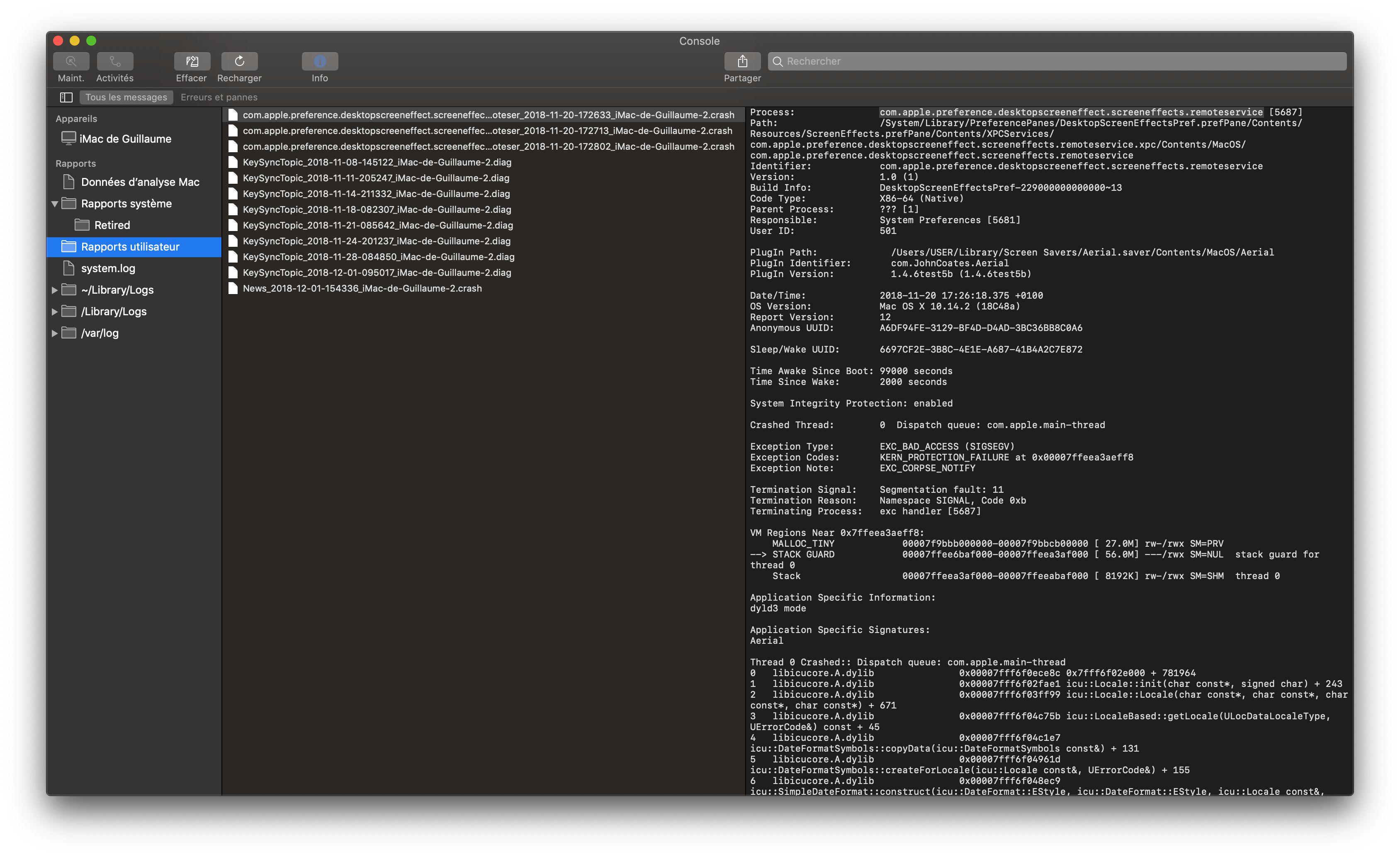
- then look for crash log in right pane. One may be called "com.apple.preference.desktopscreeneffect.remoteservice", but the other has another name that implies screensaver (one is the preference panel, the other the "real" screensaver), can't remember it off the top of my head ! It may be hidden in system reports too (on the left column).
Let me know if you find something around there.
Pretty sick running Aerial on all the displays now.
That looks super cool, very nice setup !
There's a little trick for those kind of setups you may like, if you go to advanced tab on both Aerial settings, there's a Time synchronization checkbox. If you select it on both and have the same list of videos selected on both side, should you launch the screensaver roughly simultaneously, the randomness of the video playlist will be synchronized (so it displays the same videos on both computers) ;)
glouel
on 20 Aug 2019
I don't appear to have a crash log for desktopscreeneffects. I have a few crash reports for Dock and KeySyncTopic. I'll check out the time sync.
thecloudguyllc
on 20 Aug 2019
I have 10.15.5. And I am hit by this exact problem.
It used to work. And then I upgraded macOS to 10.15.6. But there is a nasty bug that will have a nightly kernel panic. So I reinstalled from my Time machine. After that, the error message happens in both preview and actual screensaver.
- I followed the workaround in FAQ and this thread. It didn't work.
- I delete and reinstall Aerial. It didn't work.
Anyone has a suggestion on how to fix this?
 ggbalcal
on 20 Aug 2020
ggbalcal
on 20 Aug 2020
Hey @ggbalcal
So couple of things I'm thinking about. First, most of the time the message appear when you have multiple Swift 3rd party screen savers installed. So sometimes, having just one may help.
Second, in general, the bug I mention in the FAQ, you get that when trying to open the System Preferences panel, but not when the screen saver runs in full screen mode. So try and check if it works that way (those two are separate, it's weird).
3rd thing, someone else had that issue too with 10.15.5 on a brand new machine, they just rebooted (maybe updated, I don't know) and poof it was gone. That's not super helpful but just in case the thread is here : https://github.com/JohnCoates/Aerial/issues/1039
There's some extra information that may help, so let me know.
glouel
on 20 Aug 2020
The last one helped. So here is how I got it fixed
- delete Aerial
- reboot
- reinstall Aerial
- open system preference.
Not it seems everything is ok.
ggbalcal
on 20 Aug 2020
@ggbalcal that's so weird, well I'm glad it fixed it for you, I think there might be something specific in 10.15.5 that they fixed since. Thanks for following up!
glouel
on 20 Aug 2020
Related issues
 jeffehobbs
·
6Comments
jeffehobbs
·
6Comments
 inopinatus
·
8Comments
inopinatus
·
8Comments
 vivibro
·
6Comments
vivibro
·
6Comments
 Pingren
·
7Comments
Pingren
·
7Comments
 SeanMSmith
·
6Comments
SeanMSmith
·
6Comments
Most helpful comment
Sorry, the failure on maintenance is my fault. I’ve been so bogged down
with client projects that I haven’t been able to find the time to devote to
this project. Wish I could say I had some free time on my schedule coming
up, but it’s more packed than ever. There’s so much I wish I could do with
this project, but deadlines and commitments prevent me from investing time
into Aerial.
On Thu, Jul 26, 2018 at 5:21 PM @lbutlr notifications@github.com wrote: