Aerial screensaver starts off smooth but gets choppy after a few minutes
MacOS 10.13.1 macmini 2012 16GB 2.3 GHz Intel Core i7 Intel HD Graphics 4000 1536 MB.
Aerial screensaver showing 2 different views on 2 monitors starts off with beautiful smooth motion, but after a few minutes, gets choppy/jerky. It's like a lag for a second. I have all views cached too.
 amcohen4
All 21 comments
@amcohen4 Does ticking the "Show with clock" option help?
 alistairmcmillan
on 2 Dec 2017
alistairmcmillan
on 2 Dec 2017
I always had set show with click to on.
Sent from my iPhone 7 Plus
On Dec 1, 2017, at 5:42 PM, Alistair McMillan notifications@github.com wrote:
@amcohen4 Does ticking the "Show with clock" option help?
—
You are receiving this because you were mentioned.
Reply to this email directly, view it on GitHub, or mute the thread.
amcohen4
on 2 Dec 2017
Here's some before and after videos
Starts out good:
Minutes later gets choppy:
Sent from my iPhone 7 Plus
On Dec 1, 2017, at 5:42 PM, Alistair McMillan notifications@github.com wrote:
@amcohen4 Does ticking the "Show with clock" option help?
—
You are receiving this because you were mentioned.
Reply to this email directly, view it on GitHub, or mute the thread.
amcohen4
on 2 Dec 2017
just noticing this same issue with the upgrade to MacOS 10.13.2...
 dubyasqrd
on 27 Dec 2017
dubyasqrd
on 27 Dec 2017
Having the same issue, playback starts smooth then becomes choppy after a few minutes. Currently on Mac OS High Sierra 10.13.3 Ticking the Show Clock does not help the issue.
 skiin4kicks
on 20 Feb 2018
skiin4kicks
on 20 Feb 2018
Interestingly (not) but for me ticking the Show Clock really smoothens everything.
 andreineculau
on 26 Feb 2018
andreineculau
on 26 Feb 2018
Same experience here.
- Scaled display (1680x1050).
- With "Show Clock" option disabled, there are top and bottom bars of the video and the middle portion of the video is zoomed in.
- With "Show Clock" enabled, clock is the first thing to display and then the video appears as intended with no zoom or choppiness.
 iomegadrive
on 19 Mar 2018
iomegadrive
on 19 Mar 2018
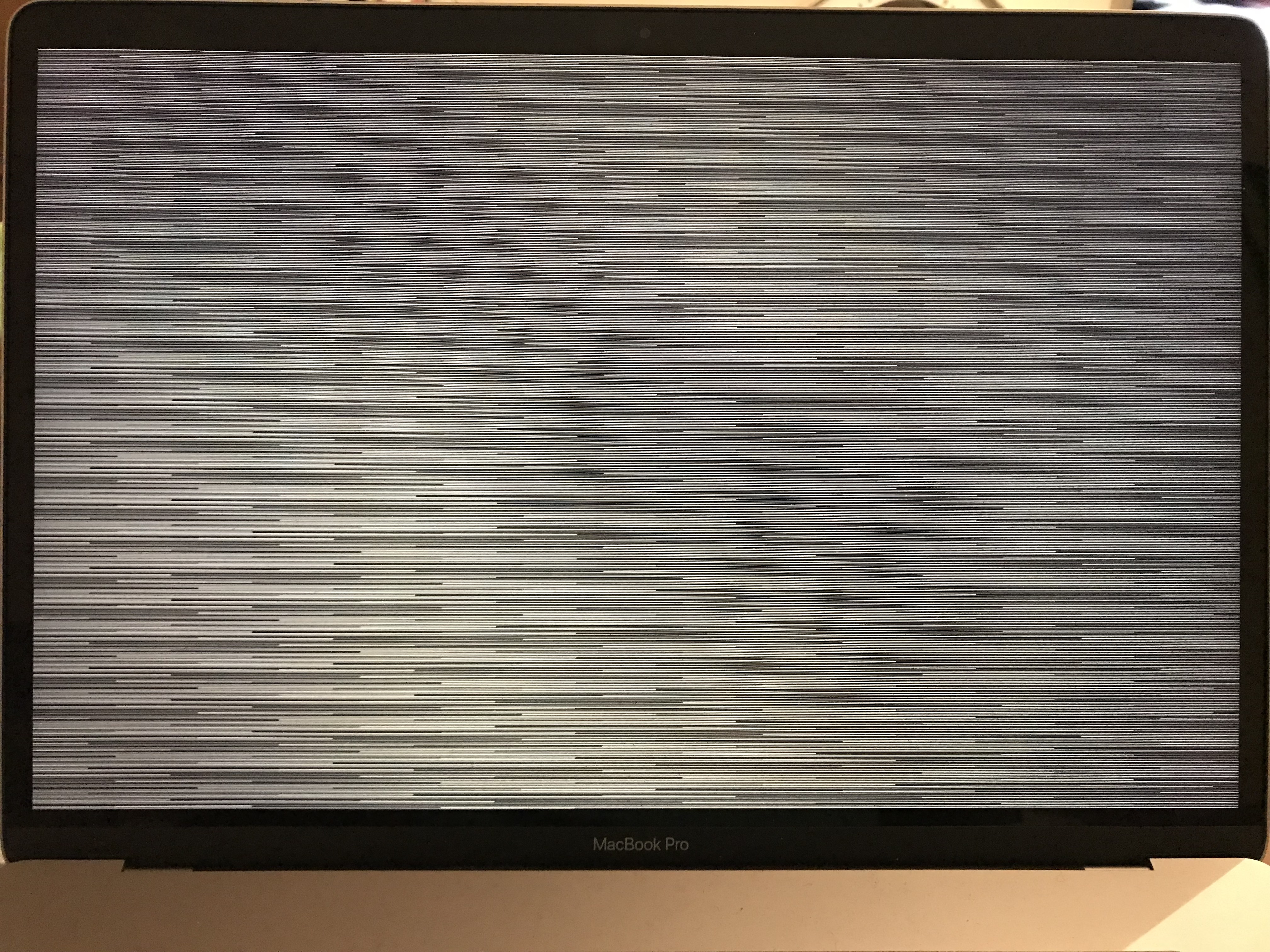
I'm not sure if this is the same issue you have are experiencing but this is what mine looks like about 3 seconds after the screensaver is active.
OS Version: Mac OS High Sierra 10.13.3
 larriebee
on 16 Apr 2018
larriebee
on 16 Apr 2018
No, I haven’t seen this yet although this looks more GPU related. Not sure
On Apr 16, 2018, at 1:59 PM, larriebee notifications@github.com wrote:
I'm not sure if this is the same issue you have are experiencing but this is what mine looks like about 3 seconds after the screensaver is active
https://user-images.githubusercontent.com/3204878/38831974-f16b92e0-41b8-11e8-8233-288cc1ffec05.JPG
—
You are receiving this because you commented.
Reply to this email directly, view it on GitHub https://github.com/JohnCoates/Aerial/issues/428#issuecomment-381729878, or mute the thread https://github.com/notifications/unsubscribe-auth/AGdt4DbvAlA9ktpHcaZ_262PcnnWDn9Qks5tpPgYgaJpZM4Qw9DC.
skiin4kicks
on 17 Apr 2018
@larriebee I had the same issue, try to turn on the clock in the screensaver settings (don't ask why, but it seems to help)
 funfried
on 19 Apr 2018
funfried
on 19 Apr 2018
@larriebee: I had the same issue on MacBook (after a split-second of showing aerial - same scrambled picture) -> when I ticked "Show with clock" - it works - no issues
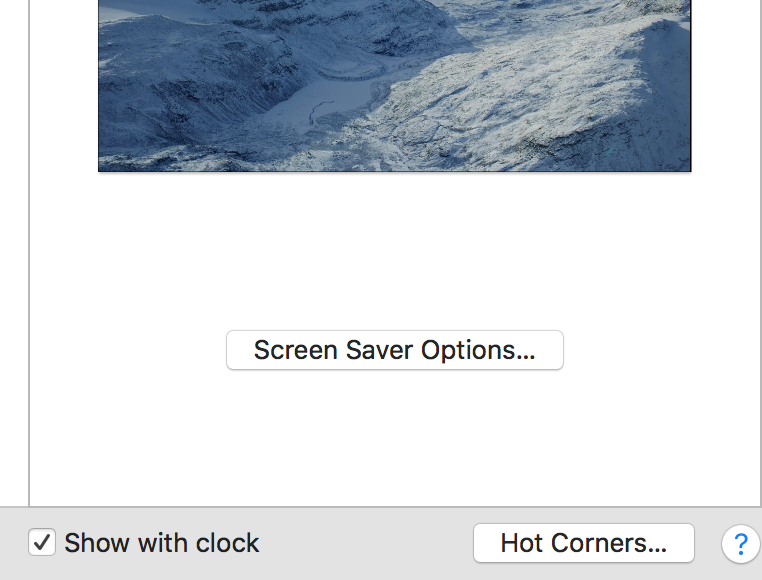
MacOs 10.13.5
 mokwai
on 9 Jun 2018
mokwai
on 9 Jun 2018
Same issue here, and as @mokwai says, ticking Show with clock fixes it, but adds a damn ugly clock to the screensaver, which kinda ruins it. No commits on this repo since Jan, lets hope it gets resurrected.
 fredrivett
on 3 Aug 2018
fredrivett
on 3 Aug 2018
Indeed the show with clock fix it, but I agree there should be another solution as well.
 diegopamio
on 7 Aug 2018
diegopamio
on 7 Aug 2018
To those who still experience lag issues, can you give this build a try :
https://github.com/glouel/Aerial/releases/download/1.4.1test4/Aerial.saver.zip
This should fix issues in 10.13 particularly (10.14 seemed ok in stable 1.4). Also note that iCloud Photos sync can launch while your screensaver runs, part of it is a file converting service (JPEG to HEIF I guess, probably videos too) which can make video playback massively lag.
 glouel
on 14 Oct 2018
glouel
on 14 Oct 2018
Thanks .. Looks great so far (Mohave, later 2012 mac mini, dual 1080p monitors).
On Oct 14, 2018, at 3:14 AM, Guillaume Louel notifications@github.com wrote:
To those who still experience lag issues, can you give this build a try :
https://github.com/glouel/Aerial/releases/download/1.4.1test4/Aerial.saver.zip https://github.com/glouel/Aerial/releases/download/1.4.1test4/Aerial.saver.zip
This should fix issues in 10.13 particularly (10.14 seemed ok in stable 1.4). Also note that iCloud Photos sync can launch while your screensaver runs, part of it is a file converting service (JPEG to HEIF I guess, probably videos too) which can make video playback massively lag.—
You are receiving this because you were mentioned.
Reply to this email directly, view it on GitHub https://github.com/JohnCoates/Aerial/issues/428#issuecomment-429612555, or mute the thread https://github.com/notifications/unsubscribe-auth/AbkkL89beMrubH4RuqyEwHav0YCgj0Kuks5ukw6IgaJpZM4Qw9DC.
amcohen4
on 16 Oct 2018
@glouel
This is fixed in 1.4.1.
But if you are still having this problem try 1.4.2 beta1:
https://github.com/JohnCoates/Aerial/releases/download/v1.4.2beta1/Aerial.saver.zip
 NightRaider73
on 20 Oct 2018
NightRaider73
on 20 Oct 2018
Hello--
I'm still having issues with playback being choppy with or without the
clock. Running the latest version of Mojave on a Mac mini Server (Late
2012) with a Core i7 and Intel Graphics 4000/ Using 1.4.2. beta1.
Thank you - love having this available.
Wesley
On Sat, Oct 20, 2018 at 4:30 PM Guillaume Louel notifications@github.com
wrote:
Closed #428 https://github.com/JohnCoates/Aerial/issues/428.
—
You are receiving this because you commented.
Reply to this email directly, view it on GitHub
https://github.com/JohnCoates/Aerial/issues/428#event-1916394568, or mute
the thread
https://github.com/notifications/unsubscribe-auth/AhRuIgDw3__q0aCzNwwsw4b2wqAZmQmiks5um5XcgaJpZM4Qw9DC
.
dubyasqrd
on 25 Oct 2018
@dubyasqrd
First, can you try latest version ? See here :
https://github.com/glouel/Aerial/releases/download/v1.4.4test2/Aerial.saver.zip
A few issues have been fixed since that beta including that may have contributed to choppiness (especially if you streamed videos).
Then, if it's still choppy, will need more details:
- Is it always choppy from the start or just gets choppy at some point ?
- Are videos cached ?
- Multimonitor ? If so which mode ?
- Are you using 1080p H264 as prefered video format ?
One other factor, iCloud Photo Syncing can start when the screensaver is on and slow down massively video playback, that's described in the troubleshooting section.
glouel
on 25 Oct 2018
I have exactly the same issue on a Mac Mini Late 2012 with 16 GB RAM and 500 GB Samsung 850 Evo SSD. This occurrs both with Mojave and Catalina 10.15.1.
Is it always choppy from the start or just gets choppy at some point ?
It get's choppy after exactly 5 min of playback.Are videos cached ?
Yes, H264 videos all cached. Cached or streamed does not show any change.Multimonitor ? If so which mode ?
Yes, play on All Display, Mirrored, Fill Screen.
Changing those settings does not have any effect on the choppy playback. It always gets stuttering after 5 min. Even disabling one of the displays and leaving it just black and playing the video only on the main display still produces the stuttering after exactly 5 min.Are you using 1080p H264 as prefered video format ?
Yes
I tried increasing the process priority of the Vtdecoderxpcservice with renice, disabling Time Machine, Spotlight, killing iCloud Photo Analysis etc. All this does have no effect and the stuttering always again occurs after exactly 5 min. If it would be a system resource bottleneck, then definitely playing only the video on one display instead of two should have massively reduced the system load. _I am not convinced that it is a CPU/GPU/disk/network resource issue._
The Aerials trace file does not show anything useful, except that it started the Animation.
Enabling the Mac OS based screensaver system clock (in Mac OS setting, not in Aerials settings) does not change anything. I had stuttering after a while, too, on a Macbook Pro 13 inch Mid 2012: Here enabling the Mac OS based clock fix the issue.
The Mac Mini has a Core i5" (3210M) CPU with Intel HD Graphics 4000, then MacBook Pro Mid 2012 has basically same CPU and same integrated Graphics.
Other system standard screensavers like Arabesque show similar behaving.
Too me this looks overall like a strange Mac OS bug since later Mojave versions affecting the Mac Minis.
Best regards,
TurboAsterix
 TurboAsterix
on 8 Nov 2019
TurboAsterix
on 8 Nov 2019
I am using a _MacBook Pro (15-inch, Mid 2010) 2.66 GHz Intel Core i7 8 GB 1067 MHz DDR3 Samsung SSD NVIDIA GeForce GT 330M 512 MB_ and _Intel HD Graphics 288 MB_ with _High Sierra._ I was experiencing problems with "Ariel" screensaver. I have it set to 1080p H246. The video would not play smoothly. It progressed by jumping several frames every few seconds. I tried changing setting on the screensaver parameters to no avail. I then looked at the CPU drivers that are running on my system. As you can see from above there are two; NVIDIA GeForce GT 330M 512 MB_ and _Intel HD Graphics 288 MB. It has been a few years since I added the NVIDIA driver so I checked to see which of the two was active. It turned out that both worked in turn to maximise CPU efficiency. This is controlled via the Energy Saver settings,
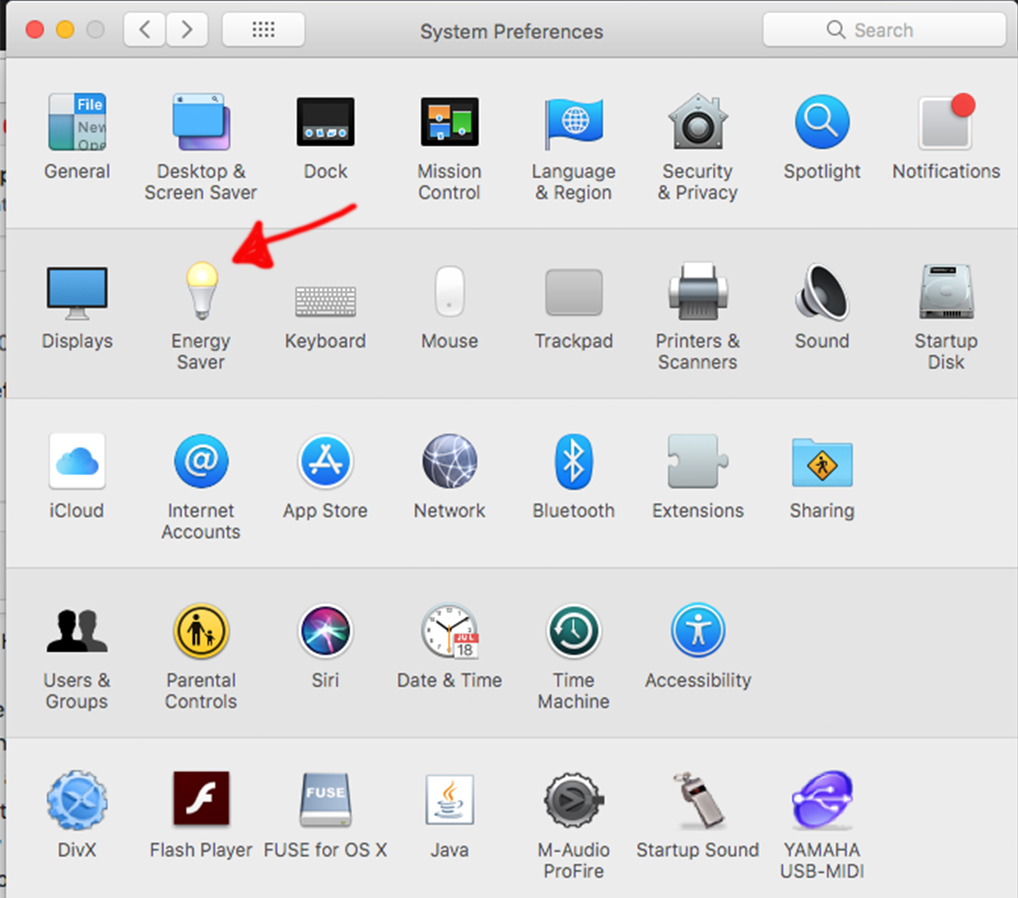
I un-ticked the box that the red arrow points to (below) which activates only the high performance graphics driver.

After I did this, the screensaver ran smoothly.
 jesmcs
on 10 Jan 2020
jesmcs
on 10 Jan 2020
Hi @jesmcs !
I am using a _MacBook Pro (15-inch, Mid 2010) 2.66 GHz Intel Core i7 8 GB 1067 MHz DDR3 Samsung SSD NVIDIA GeForce GT 330M 512 MB_ and _Intel HD Graphics 288 MB_ with _High Sierra._ I was experiencing problems with "Ariel" screensaver. I have it set to 1080p H246. The video would not play smoothly. It progressed by jumping several frames every few seconds. I tried changing setting on the screensaver parameters to no avail.
So that's an Arrandale CPU with a Gen5 graphics (Ironlake). That one had basic H.264 acceleration, it wasn't fully decoded in hardware and possibly buggy if memory serves. First gen with Quick Sync was the next one (Sandy Bridge) : https://en.wikipedia.org/wiki/Intel_Graphics_Technology#Gen5
I then looked at the CPU drivers that are running on my system. As you can see from above there are two; NVIDIA GeForce GT 330M 512 MB_ and _Intel HD Graphics 288 MB. It has been a few years since I added the NVIDIA driver so I checked to see which of the two was active. It turned out that both worked in turn to maximise CPU efficiency. This is controlled via the Energy Saver settings,
I un-ticked the box that the red arrow points to (below) which activates only the high performance graphics driver.
After I did this, the screensaver ran smoothly.
Ok so, my best guess is that with the box unchecked, you were running video decoding on the Intel integrated graphics that has bare bone H.264 decoding which macOS may or may not use.
I would suggest reenabling graphics switching and trying to open one of the cached videos in Quicktime. What you get with Aerial should be the same as what you get with Quicktime. You can open Activity Monitor then.
On the Intel graphics, you will probably see a VTDecoderXPCService in Activity Monitor pegging your CPU and that's why it lags (lack of hardware decoding). By disabling the graphics switching (and forcing the GeForce 330 as always on), Quicktime/Aerial is using your GeForce's hardware decoding unit (NVDEC) to playback the video and that should result in a much lower CPU usage in Activity Monitor.
I hope that makes sense ? Your solution is the correct one in any case, by disabling graphics switching you should get better performance for all video playbacks, including Aerial.
glouel
on 10 Jan 2020
Related issues
 inopinatus
·
8Comments
inopinatus
·
8Comments
 savraj
·
4Comments
savraj
·
4Comments
 ghost
·
5Comments
ghost
·
5Comments
 mrmckeb
·
4Comments
NightRaider73
·
6Comments
mrmckeb
·
4Comments
NightRaider73
·
6Comments
Most helpful comment
just noticing this same issue with the upgrade to MacOS 10.13.2...