Addons-server: “Edit Product Page” isn’t highlighted for an add-on with kanji characters in Developer Hub
Prerequisites:
User should have an account in order to log in and should have an add-on with kanji characters submitted.
STR:
- Access Developer Hub homepage: https://addons.allizom.org/en-US/developers/.
- Click “My Add-ons” from the top menu bar, once the user is logged in.
- Click the “Edit Product Page” link, located at the bottom of the kanji characters add-on.
- Observe the page loaded.
Expected result:
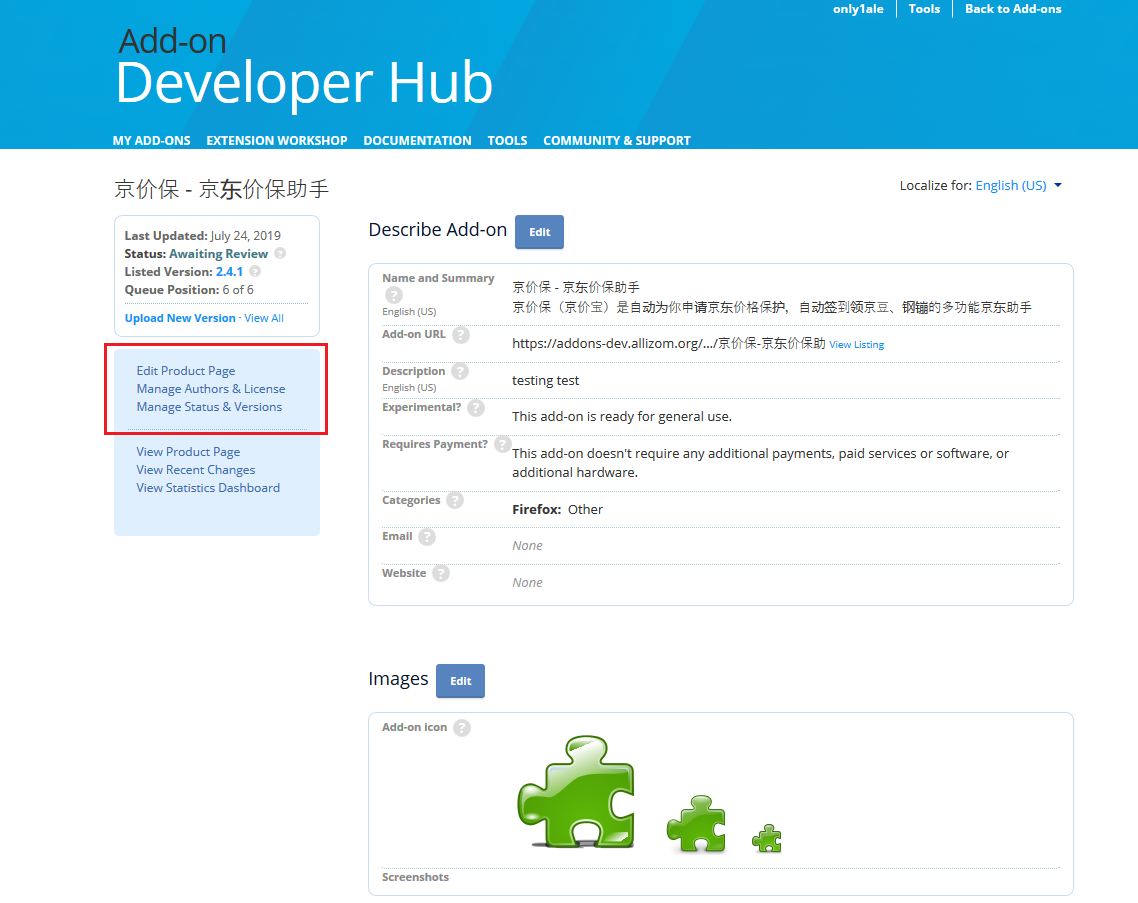
“Edit Product Page”, located on the left side, in the light blue square, should be highlighted.
Actual result:
“Edit Product Page” is not highlighted.
Notes:
Reproduced in amo-dev, amo-stage and amo-prod with Fx68, Win10x64.
Reproduced also for the “Manage Authors & License” and “Manage Status & Versions” links.
This issue is only reproduced when the "Add-on URL" has kanji characters.
 madalincm
All 23 comments
@diox could you please transfer this issue to addons-server?
 willdurand
on 1 Aug 2019
willdurand
on 1 Aug 2019
I think it's just https://github.com/mozilla/addons-server/blob/master/src/olympia/devhub/templates/devhub/includes/addons_edit_nav.html#L30 needs changing. I'd guess request.path is encoded somehow so non-ascii slugs don't match.
 eviljeff
on 21 Aug 2019
eviljeff
on 21 Aug 2019
hi @madalincm ,will i can try to solve this issue as this is my first bug and want to solve this bug as quickly as possible
 harshsingla
on 21 Aug 2019
harshsingla
on 21 Aug 2019
@harshsingla once you get a local instance of addons-server up and running let us know - you'll need it to test it works.
eviljeff
on 21 Aug 2019
https://user-images.githubusercontent.com/44085127/63486819-a4dc9900-c4c6-11e9-9466-1f8fca7d5548.png
hi, @eviljeff as shown the edit product page is highlighted in the website as shown in the image ,you can check tell me what to do next .
thanks
harshsingla
on 22 Aug 2019
@harshsingla the addon slug must contain non-ascii letters to replicate - the issue title references kanji (i.e. Japanese) but I suspect other characters may break it too (I replicated with some Korean)
eviljeff
on 22 Aug 2019
@eviljeff sorry but i didn't get what you want to say ,are you talking about this.
https://user-images.githubusercontent.com/44085127/63571759-cad56c80-c59e-11e9-96e9-0aecd11e98f0.png
harshsingla
on 23 Aug 2019
No, Addon.slug in the model, which is exposed on the developer hub page as "Add-on URL". And, as I said, you need addons-server running locally to test the patch. This is not a good first bug if you don't know django already.
eviljeff
on 23 Aug 2019
okay,but sorry i have window 10 home so i can't use docker that's why i didn't run it locally and can't do more.
thank you.
harshsingla
on 23 Aug 2019
@eviljeff Could I ask you about running locally?
I finished install using docker. I ran docker. And I try to enter addons-server ("http://olympia.test" or "127.0.0.1" or "127.0.0.1:80" and so on). I can't run addons-server.
I wonder that Only me, I can't run addons-server locally.
Note.
I can run addons-frontend (http://olympia.test:3000). And I can see addons-frontend page on the browser.
 junngo
on 25 Aug 2019
junngo
on 25 Aug 2019
check the nginx container is running (restart it if not); look in the /logs/ for other errors if ngnix is running.
eviljeff
on 25 Aug 2019
@eviljeff Thank you for your info. I checked status and log.
Nginx container is terminated only like under status(docker-compose ps).

So, I can't run addons server.
I checked log about nginx log(docker-compose logs).
This problems relate to this Issue[0]?
If not it is, I gonna think more about my problem.
junngo
on 26 Aug 2019
You can just restart nginx when that happens (docker-compose up -d again should do it for you).
PS: Evelf and eviljeff are different users, please be careful when highlighting others in issues.
 diox
on 26 Aug 2019
diox
on 26 Aug 2019
Thank you!!
Thanks to your info, I solved my problem.
Sorry, I gonna be careful about tagging user.
junngo
on 26 Aug 2019
I'm checking this problem now.
I made this case and saw the problem on product page. And I try to make this bug on test(local) site.
When I made this bug on local page, I can't make this bug locally. Because I met 500 error:)
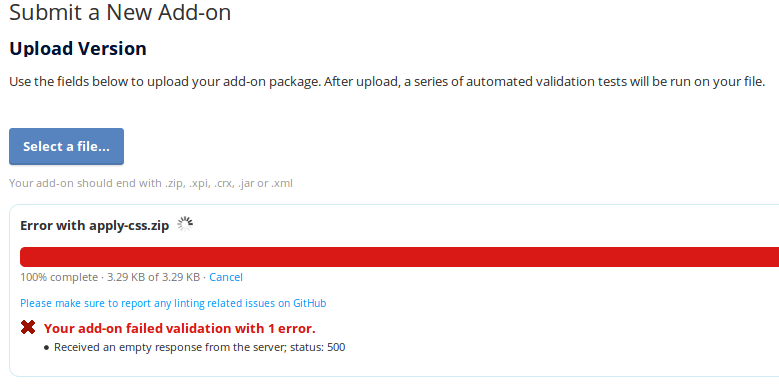
I wanna reproduce on local app. Could you give me tips to make 'my New Add-on' locally?
junngo
on 4 Sep 2019
It should work. You might have more information in the logs (found in the logs/ directory).
diox
on 4 Sep 2019
Hey I am interested in solving this issue. Please guide me.
 Vishal19111999
on 4 Sep 2019
Vishal19111999
on 4 Sep 2019
Please read @eviljeff comments earlier in the issue for more information about how to fix this.
diox
on 4 Sep 2019
I checked 500 error on my app locally. And I solved. The reason is that not enough permission where directory is. The directory place is /code/storage/files/temp. (This is add-on storage locally)
I reviewed about this Issue. As @eviljeff said, this problem not same request.path and url (i.e addon.get_dev_url() value)[0].
e.g)
request.path (IRI) form: 
url (URI) form: developers/addon/%E8%99%8E-%E3%83%A9%E3%82%A4%E3%82%AA%E3%83%B3-test/edit
I have 2 methods to solve this problem.
This is
urlvalue change. I go to theget_dev_url()place and change format(uri -> iri) usinguri_to_irifunction.
(e.guri_to_iri(django_reverse(viewname, urlconf, args, kwargs, current_app))[1] )
But this method have a wide influence.This is
request.pathvalue change. I use thetemplate variable(made iri_to_uri() function) instead ofrequest.pathby adding variable to views.py [2].
I think that this method is appropriate.
If My thought is right, Could I work on it? or If I wrong, Could you give me tips better than this?
[2] https://github.com/mozilla/addons-server/blob/master/src/olympia/devhub/views.py
junngo
on 6 Sep 2019
I think you're on the right path @junngo - changing get_dev_url() would affect too many places so we don't want to do that.
Adding a template variable is a better option (2) though it would need to be added to every view that shows includes the addon_edit_nav template (almost all of the single-addon views). Running uri_to_iri on request.path directly in the template would avoid that though I don't know of an existing jinja template filter to do that - it'd need to be the opposite of iriencode I guess. Do you know of one @diox?
eviljeff
on 6 Sep 2019
it'd need to be the opposite of iriencode I guess. Do you know of one @diox?
Actually... @junngo mentions above that calling iri_to_uri() on request.path should fix it, so I think modifying the template to do <li {% if url in request.path|iriencode %}class="selected"{% endif %}> should work ?
diox
on 6 Sep 2019
I was looking for it.
That is urlencode template filter.
If I use urlencode tag, I can simply fix it on addon_edit_nav template.
junngo
on 6 Sep 2019
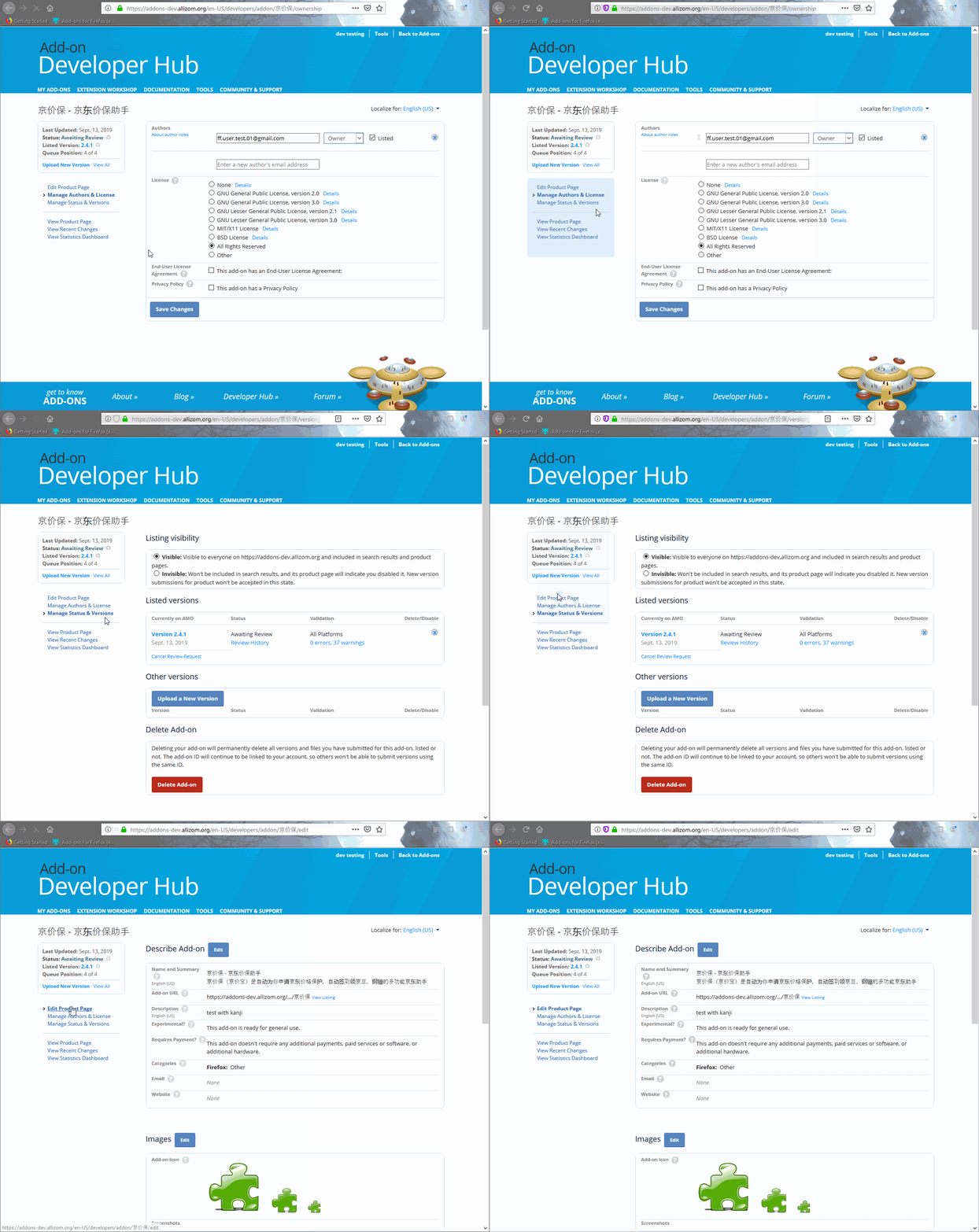
The issue was verified in Amo dev with ff69 on Win10x64.
 alexandra-martin
on 13 Sep 2019
alexandra-martin
on 13 Sep 2019
Related issues
 ioanarusiczki
·
8Comments
diox
·
5Comments
diox
·
5Comments
ioanarusiczki
·
8Comments
diox
·
5Comments
diox
·
5Comments
 jvillalobos
·
7Comments
jvillalobos
·
7Comments
 ValentinaPC
·
4Comments
ValentinaPC
·
4Comments