Addons-frontend: Update Primary Hero loading skeleton to reflect a hero with an image
This is a follow-up to https://github.com/mozilla/addons-frontend/pull/9045.
Describe the problem and steps to reproduce it:
Visit any page on the site, and then visit the home page.
What happened?
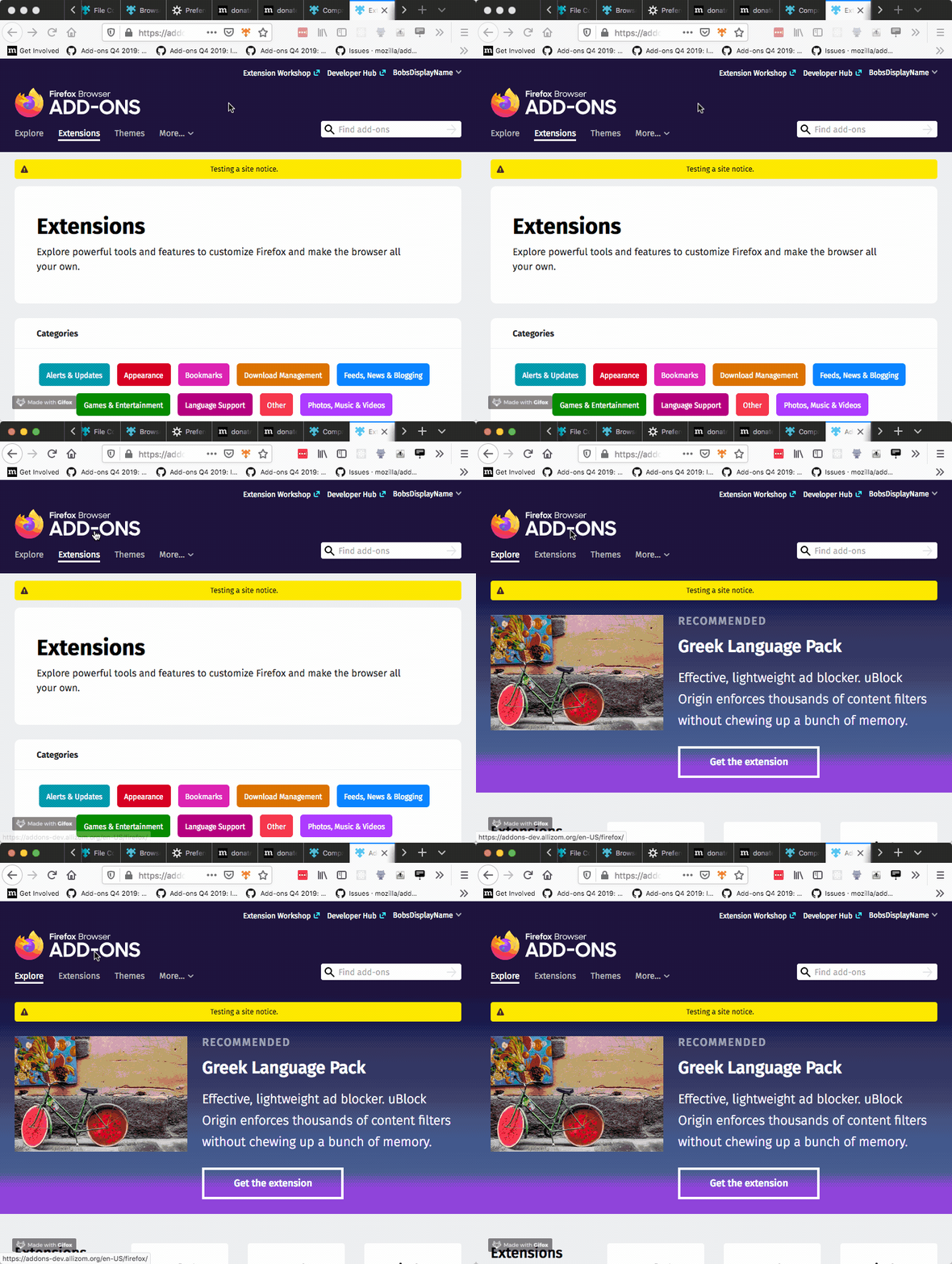
You see a loading skeleton, but it doesn't match the layout of the eventual primary hero element.
What did you expect to happen?
The loading skeleton should more closely match the layout of the primary hero element with an image.
Anything else we should know?
When the loading skeleton for the primary hero element was first implemented, it was believed that, for the most part, the primary hero would not contain an image. That assumption has been reversed and now the primary hero will almost always contain an image, so we should adjust the loading skeleton accordingly.
 bobsilverberg
All 21 comments
@bobsilverberg Can i work on this issue??
 snitin315
on 11 Jan 2020
snitin315
on 11 Jan 2020
@snitin315 hi, I am not sure. Instead, you can find issues by looking at the opened contrib: welcome issues.
 willdurand
on 13 Jan 2020
willdurand
on 13 Jan 2020
Marking this issue as contributor friendly.
willdurand
on 19 Mar 2020
Marking this issue as contributor friendly.
Hello
I am with Outreachy program in May 2020. Is this issue available to work/contribute? Thank yu
 nisamova
on 20 Mar 2020
nisamova
on 20 Mar 2020
Marking this issue as contributor friendly.
Hello
I am with Outreachy program in May 2020. Is this issue available to work/contribute? Thank yu
Yes.
snitin315
on 20 Mar 2020
Marking this issue as contributor friendly.
Hello
I am with Outreachy program in May 2020. Is this issue available to work/contribute? Thank yuYes.
I apologize if it is a bad question. Here is the question: I would like to contribute. What steps should I take to make first contribution? Meaning where would I be able to get more info? Thank you
nisamova
on 20 Mar 2020
First go through the README, setup the project locally and play around with the project to get yourself familiarized.
snitin315
on 20 Mar 2020
I apologize if it is a bad question. Here is the question: I would like to contribute. What steps should I take to make first contribution? Meaning where would I be able to get more info? Thank you
@snitin315 is right. Read the README and make sure you can run this website locally first.
If you are familiar with javascript (and maybe React), this is a probably a good (yet a bit challenging) issue. Otherwise I'd suggest looking for something else (that is a bit easier to get familiar with the language and so on) first.
willdurand
on 20 Mar 2020
@willdurand I am interested in this issue. There is a component LoadingText which contains the placeholder for texts when component loads. For image, instead of making a different component, we can create a generalized component containing both image as well as text loaders. In future, if we further needs any type of loader it can be placed here. Can you please assign me this issue ?
 muskangupta-iitr
on 20 Mar 2020
muskangupta-iitr
on 20 Mar 2020
@muskangupta-iitr so @nisamova expressed interest first so I'd recommend you to try to find something else for now :)
willdurand
on 20 Mar 2020
@muskangupta-iitr so @nisamova expressed interest first so I'd recommend you to try to find something else for now :)
thank you for giving me a chance. I would like to experiment by creating a parent component that will have two child components which are image and text. Apply respective grid styles for each, and default properties as well. Each component should have a default prop so both image and text can further be self-functioning. I will be honest, I am new to React (used it while building Gatsby website, and created a couple React components for hands-on learning projects. I do not have any large working knowledge of React )However, I used and worked with several other javascript front-end libraries.
nisamova
on 20 Mar 2020
@nisamova alright so I would recommend you to start running this project locally (see the README file). Then you should take a look at the HeroRecommendation component. There are a few LoadingText components displayed. Those are the components that produce the loading effects.
The idea would be to not render these LoadingText components like in the video at the top of the issue (it looks like a few lines of loading text) but instead to render these loading indicators where text will appear. I don't know what we'll do for the image, maybe nothing or maybe we'll also use a LoadingText for it. I would start by the text on the right side of the Hero.
willdurand
on 23 Mar 2020
Marking this issue as contributor friendly.
Hello
I am with Outreachy program in May 2020. Is this issue available to work/contribute? Thank yuYes.
@nisamova alright so I would recommend you to start running this project locally (see the README file). Then you should take a look at the
HeroRecommendationcomponent. There are a fewLoadingTextcomponents displayed. Those are the components that produce the loading effects.The idea would be to not render these
LoadingTextcomponents like in the video at the top of the issue (it looks like a few lines of loading text) but instead to render these loading indicators where text will appear. I don't know what we'll do for the image, maybe nothing or maybe we'll also use aLoadingTextfor it. I would start by the text on the right side of the Hero.
I went ahead and added margin-left to.LoadingText in styles.scss. This allowed loading indicators(loading skeleton) shift from center to right side where the text currently renders after the download. As we expected the image space is empty. The changes are reflected in the desktop(not on mobile view yet) only. Is this the possible expected solution for issue #9049? In other words am I in the right direction? If yes I will try to apply this change to the mobile view as well. Thank you
nisamova
on 24 Mar 2020
@willdurand how would you like to check ? should I create a pull request? Thank you
nisamova
on 24 Mar 2020
Yes create a pull request , and move the discussion there.
snitin315
on 24 Mar 2020
@nisamova I think instead of shifting the text to left, you can add another loading test for the image having some height. And giving margin-left a hard coded values isn't a good practice as it will vary according to screen sizes and resolution. You can use flex-box or position.
muskangupta-iitr
on 24 Mar 2020
Hey @willdurand , Is this issue resolved or I can take this?
 Aakash2408
on 16 Aug 2020
Aakash2408
on 16 Aug 2020
Hey @Aakash2408! @willdurand is out on leave until September; you may want to hold off on this issue until he gets back. :)
 caitmuenster
on 19 Aug 2020
caitmuenster
on 19 Aug 2020
@willdurand Shall I take over this issue if no one is currently working upon it .
 Cronus1007
on 13 Nov 2020
Cronus1007
on 13 Nov 2020
Hey @Cronus1007, go ahead and pick this up! We will assign it to you once you submit a PR. :)
caitmuenster
on 13 Nov 2020
@caitmuenster I was approaching it in the manner that all the images doesnt have their loading screen so we can implement LoadingText like something where all the images will get their own shinnerLoadingScreen.
Cronus1007
on 15 Nov 2020
Related issues
 jrbenny35
·
6Comments
jrbenny35
·
6Comments
 AlexandraMoga
·
5Comments
AlexandraMoga
·
5Comments
 atsay
·
6Comments
atsay
·
6Comments
 ioanarusiczki
·
5Comments
bobsilverberg
·
4Comments
ioanarusiczki
·
5Comments
bobsilverberg
·
4Comments