Addons-frontend: Implement improvements to the edit collection flow
Describe the problem and steps to reproduce it:
Go to the My Favorite Add-ons collection (these are the legacy collections we kept from the old AMO for people who had them)
Click Edit Collection
The Save Collection button cannot be clicked
What happened?
I went ahead and removed a few themes in my collection, but the button remained grayed out. I clicked Cancel, and the themes I removed were in fact removed.
What did you expect to happen?
I expect to be able to click the Save Collection button, especially after I've removed some themes. I didn't expect that clicking Cancel would save my changes.
 atsay
atsay
All 10 comments
@atsay I believe the issue you posted above is similar (or the same) to issue https://github.com/mozilla/addons-frontend/issues/5702
Note that @bobsilverberg is mentioning that there are some UX improvements coming around the Add to collection feature, so soon, hopefully, this flow will be less confusing for the users.
 AlexandraMoga
on 27 Jul 2018
AlexandraMoga
on 27 Jul 2018
This is by design as per #5702 but it seems that this is still confusing.
I think we need to get to a point where things are saved automatically across the board or not at all, having a mix of automatic saving and explicit saving is very confusing.
/cc @pwalm for UX input
 muffinresearch
on 27 Jul 2018
muffinresearch
on 27 Jul 2018
I have an idea of how we might address this issue. The problem is that we have an edit form on the left-hand side of the page, which is only used for editing the details of a collection (name, description and slug), and then we have an area on the right which is used for maintaining the add-ons. Perhaps these could work more independently, so we would have an "Edit" button at the top of the list of add-ons on the right-hand side which would "turn on" editing of add-ons in the collection. This would not enable the edit form on the left-hand side, so there would be no "Save" button and no (or at least less) confusion.
So a user could choose to edit the details, by clicking the edit button on the left, which would display the edit form, and/or they could choose to edit add-ons by clicking the edit button on the right. Having said all this, it still seems less than ideal, but perhaps better than what we have right now.
 bobsilverberg
on 27 Jul 2018
bobsilverberg
on 27 Jul 2018
How about just changing the disabled button text to say "Changes Saved"? Although one problem is people might think clicking Cancel will revert their changes.
atsay
on 27 Jul 2018
Another idea: we take https://github.com/mozilla/addons-frontend/pull/5676 to the next level and move the Search box to the top of all add-ons on the right side. This will give us a card to show notifications for actions like removing add-ons. It could say The add-on was removed from the collection to make it clear that you just made an edit.
 kumar303
on 27 Jul 2018
kumar303
on 27 Jul 2018
The editing UX is fairly complicated, but I think the main problem in this particular issue is that there's no feedback after removing an add-on from a collection, so you don't know the change happened right away. You do get some feedback when you add something to a collection. So maybe a simple solution would be to add a notification when an add-on is removed.
The same thing applies to editing a note. While you can see the updated note in the collection view, there's no clear indication that it was saved.
Another thing we could do is change the Cancel button to something like Done Editing, and show an alert if there are unsaved changes that will be discarded.
 jvillalobos
on 30 Jul 2018
jvillalobos
on 30 Jul 2018
Simple ux solution (following Jorge's lead), let's give feedback on removal. So where we say "Added to collection" let's instead say "Removed from collection". Make the message bar grey instead of green. I wouldn't worry about changing the button state.
 pwalm
on 30 Jul 2018
pwalm
on 30 Jul 2018
I have filed #5937 for the notification. There are some other interesting ideas in here, so I don't want to close this yet, but can we demote it from a P2 to a P3 having opened #5937?
bobsilverberg
on 14 Aug 2018
The notification changes will land in https://github.com/mozilla/addons-frontend/pull/5953. As for the Save and Cancel buttons, here are the new suggestions from today's meeting:
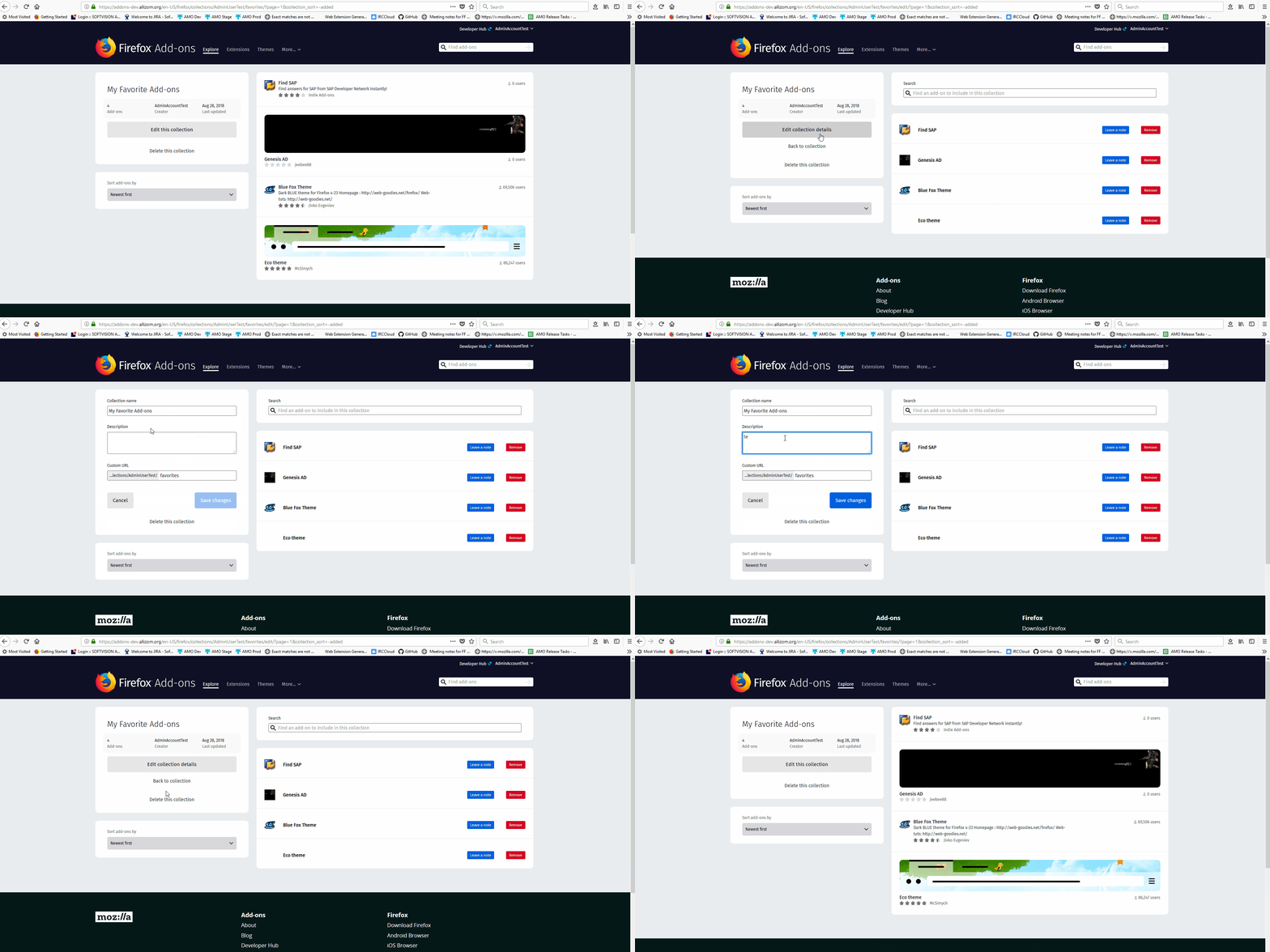
- After clicking "Edit this collection" from the collection details screen, the right-hand side of the screen will switch into edit mode, as it does currently, but the left-hand side will continue to show the read-only details with a button that says "Edit collection details" and a link that says "Back to collection".
- After clicking "Edit collection details" from this page, the read-only details will change to a form for editing the name, description and slug, and a "Save" and a "Cancel" button will be displayed.
- After clicking "Save" or "Cancel" from this page, the form will revert back to the read-only details.
As part of this effort, we will change the button that appears when editing the featured-personas collection with the special permission so that it will become a link that says "Back to collection", rather than a button that says "Done editing".
@atsay @pwalm @jvillalobos @MeridelW please let me know if I've missed anything from our discussion.
bobsilverberg
on 16 Aug 2018
Verified fixed on AMO dev with FF61(Win10)
 ioanarusiczki
on 28 Aug 2018
ioanarusiczki
on 28 Aug 2018
Related issues
bobsilverberg
·
4Comments
ioanarusiczki
·
3Comments
 SeanPrashad
·
6Comments
SeanPrashad
·
6Comments
 ValentinaPC
·
4Comments
ioanarusiczki
·
5Comments
ValentinaPC
·
4Comments
ioanarusiczki
·
5Comments
Most helpful comment
The notification changes will land in https://github.com/mozilla/addons-frontend/pull/5953. As for the Save and Cancel buttons, here are the new suggestions from today's meeting:
As part of this effort, we will change the button that appears when editing the featured-personas collection with the special permission so that it will become a link that says "Back to collection", rather than a button that says "Done editing".
@atsay @pwalm @jvillalobos @MeridelW please let me know if I've missed anything from our discussion.