Addons-frontend: Display permissions on add-on detail page
On the add-on details page, show all permissions for this add-on with helpful information about what each one means.
 tofumatt
All 67 comments
This will be web-ext only.
 muffinresearch
on 13 Sep 2017
muffinresearch
on 13 Sep 2017
I'm nominating this for MVP removal because Firefox already shows you a list of permissions before you install the add-on.
 kumar303
on 20 Sep 2017
kumar303
on 20 Sep 2017
Yeah, I actually asked about removing it altogether but @pwalm pointed out user research that showed knowing permissions beforehand helped users understand the permissions more and think twice about installing an add-on. So we will want to keep it–if anything we should remove it from installs made on AMO. But that’s another issue 😅
tofumatt
on 20 Sep 2017
This one we need to keep and it's fairly small.
muffinresearch
on 22 Sep 2017
The mock-ups show a link for this information. Where do we have to link? The current (old) website displays a popup.
Second question: the API returns the name of the permissions, but is there any doc about how to translate these terms into sentences people can understand? This is what the popup on the old website does. Should we use the webext doc?
 willdurand
on 25 Sep 2017
willdurand
on 25 Sep 2017
Hmm, I don't know 😢
These seem like UX questions–do we not show permissions anywhere in the mocks?
If we don't have mocks for this feature and Firefox already shows them I would take this out of MVP. Yes, I understand there are benefits to showing them pre-install... but we'll want to know how to display them 😄
tofumatt
on 26 Sep 2017
ping @pwalm for UX info about this.
willdurand
on 26 Sep 2017
@tofumatt @willdurand @kumar I've reviewed dropping this from the MVP with @jvillalobos and @deadsquid and we're good to do so as long as it's prioritized towards the top of the post release features. If all find all other MVP issues are done and we still have time and the UX is ready then we should consider adding it pre-release.
muffinresearch
on 26 Sep 2017
Ping @pwalm for UX on this. It's a high priority in the post-release issues.
 jvillalobos
on 3 Nov 2017
jvillalobos
on 3 Nov 2017
Also pinging @designakt and @brassy-, since Philip is on PTO.
jvillalobos
on 3 Nov 2017
It looks like currently we do not even show the link to the list of permissions. The current mock shows a link to all permissions that should be opened in an overlay. Much like in the current AMO.
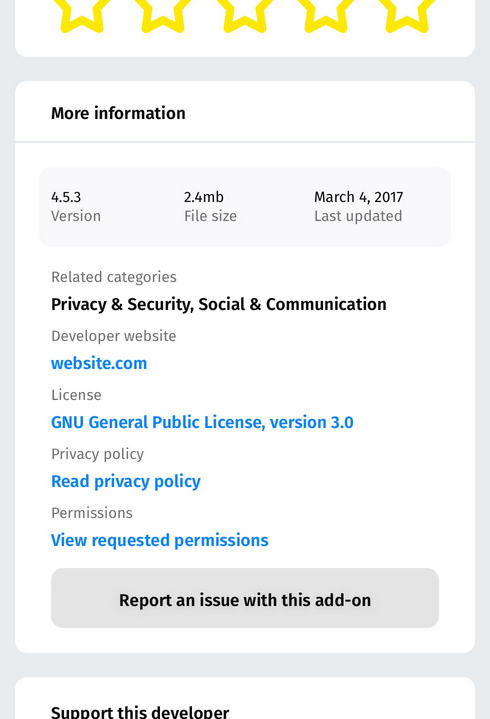
From what I recall from talking to Philip, he intends to make permissions more visible by listing them out on the detail page (with the same copy that is used in the Firefox dialog / and current overlay), and provide a link to more detailed description for people that what to better understand those. (shown in an overlay) I do not however know how he intends to implement this, I would rather wait for him to get back, than start on this without his input.
A safe place to start implementing this would be by creating an overlay, as this will be needed in any case.
 designakt
on 6 Nov 2017
designakt
on 6 Nov 2017
Mock up options:
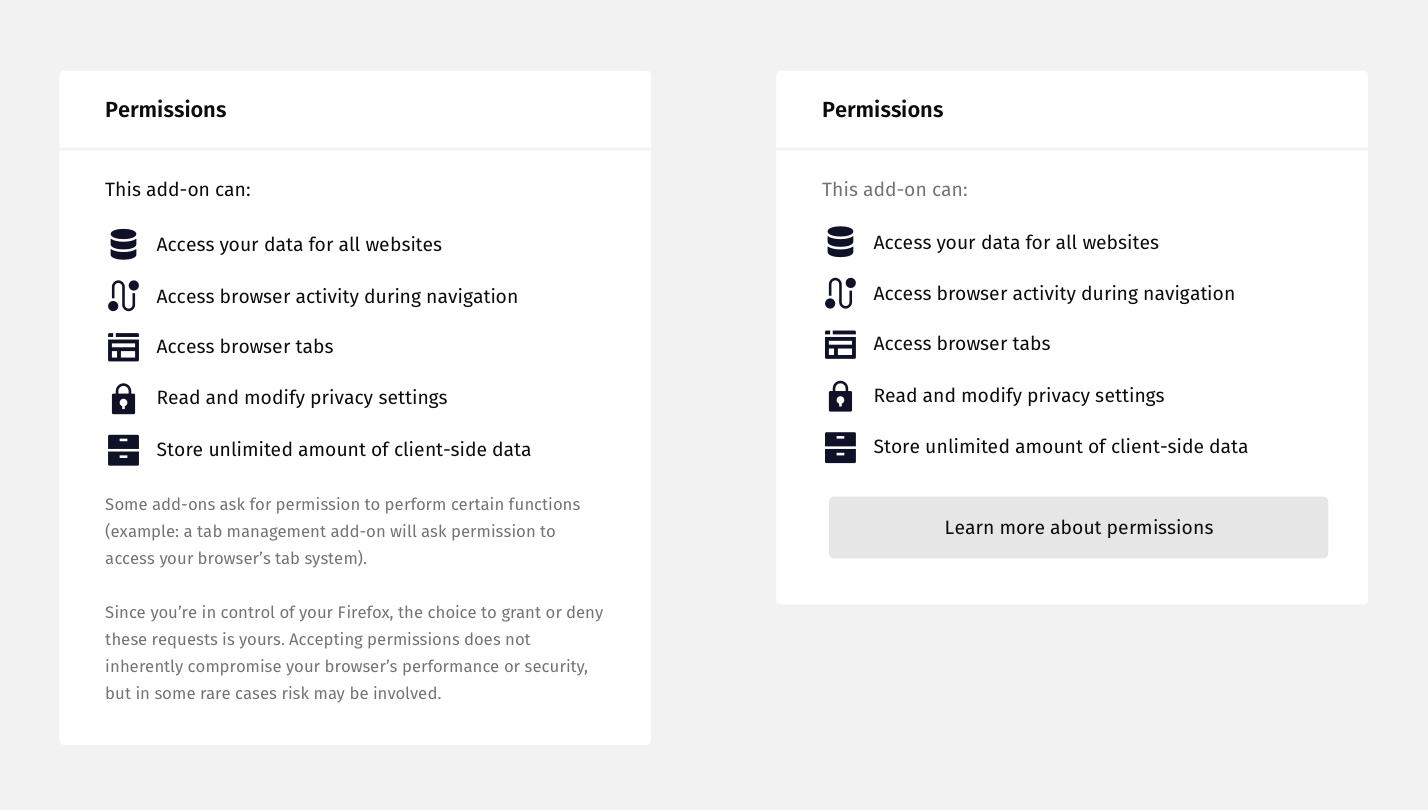
Left: Permissions with description below in smaller body copy.
Right: Permissions with button link to launch modal with description copy, perhaps more in depth permission info.
 pwalm
on 18 Nov 2017
pwalm
on 18 Nov 2017
Maybe the button on the right option should point to a SUMO or MDN page that goes into more detail, rather than a modal on AMO. I don't think we have a good doc page for this. /cc @atsay
jvillalobos
on 20 Nov 2017
Yep, we should have a doc for this. In particular, I regularly hear from people scared of the "Access your data for all websites" permission so we should have a page explaining all of these. Will work with Richard.
 atsay
on 20 Nov 2017
atsay
on 20 Nov 2017
Great, I like any idea that results in less modals. :)
So we'll just add the little "open in new window" icon in the button:
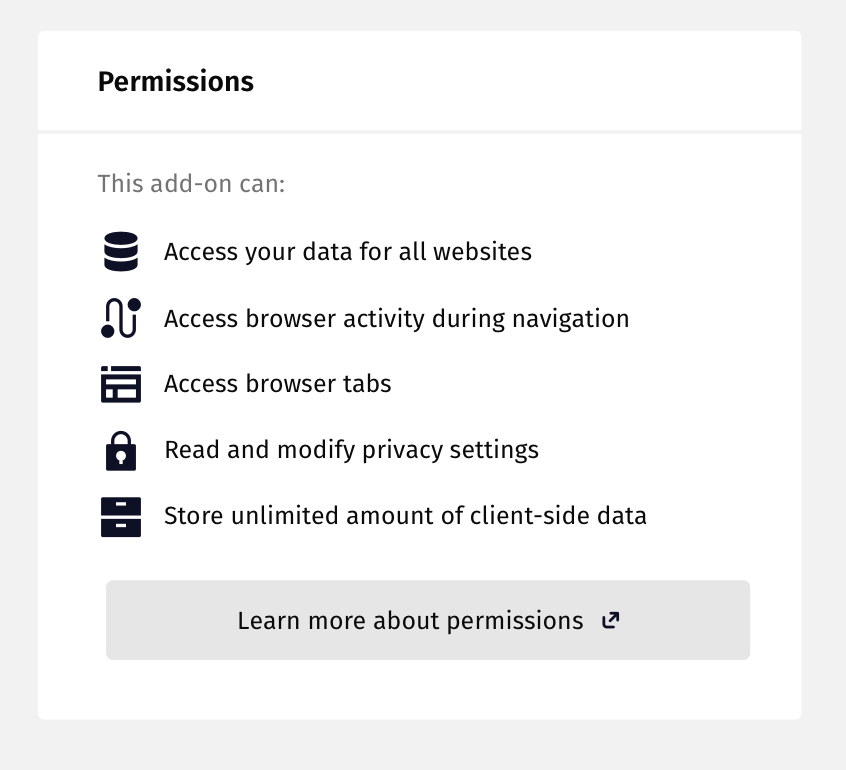
pwalm
on 21 Nov 2017
@pwalm do you have a list of all the permissions with what icon they need to be mapped to?
muffinresearch
on 24 Nov 2017
pwalm
on 24 Nov 2017
Here is the doc Scott created for the permission copy... it contains all the permissions that have a user facing message. (not all permissions are surfaced to the user) _And here is the table of permissions this was based on._
designakt
on 27 Nov 2017
Thank you @designakt
pwalm
on 27 Nov 2017
We'd like to take this opportunity to update some of the warning messages. Will bring it up for discussion in tomorrow's check-in.
atsay
on 27 Nov 2017
However please note that original copy doc was not properly maintained in terms of version history. It does not reflect final copy in some instances, since during the course of the project questions around copy were raised in various forums—comments in that doc that are since 'resolved', bugzilla, github, email, etc.
 devaneymoz
on 27 Nov 2017
devaneymoz
on 27 Nov 2017
@atsay That is great to hear... this research had some findings around copy... that might inform any changes you want to make: https://docs.google.com/document/d/1WpLtV9ShRgAt3ysnaL9jwiH6CKQgR_gG2YdKFhwCDqk/edit#heading=h.yutlq53bsha9
designakt
on 27 Nov 2017
@pwalm mentioned in the status meeting today that this issue is paused while we work out the wording.
kumar303
on 29 Nov 2017
We shouldn't block on the wording. @pwalm just needs the list of permissions we support on AMO so he can work on the icons and we can get the permissions UX done for listing pages.
The wording update can happen in parallel and land later if needed.
jvillalobos
on 29 Nov 2017
Correct, although there are 4 separate docs/instances of permissions referenced in this issue. Get me that list and I can start cranking out icons.
pwalm
on 29 Nov 2017
AMO legacy pulls the list of descriptions of known permissions from mozilla central (https://hg.mozilla.org/mozilla-central/raw-file/tip/browser/locales/en-US/chrome/browser/browser.properties - the properties starting webextPerms.description.) That's about as canonical list as there is.
 eviljeff
on 29 Nov 2017
eviljeff
on 29 Nov 2017
Can we consider making the individual permissions linkable (can target-link to the relevant place in the article), or perhaps having a "Learn more" link or question mark icon next to each permission? In practice, "Access your data for all websites" tends to show up first, so having something right there to take people to more info would be helpful. People who are alarmed by the permission might feel more assuaged by the immediacy and transparency of info.
atsay
on 29 Nov 2017
A (technical) friend of mine was quite alarmed by that permission too. I pointed out that previously add-ons could do much more, but I wonder if we can phrase that permission a bit better in general.
Anyway, we could link to info on each permission but we’d need a list of things to link to. :-)
tofumatt
on 29 Nov 2017
Yep, we can def provide the links. I'd want @pwalm to weigh in on the experience though, whether it's a link or a learn more/question mark next to the permission. The product team is ok with the permission sounding scary (though we still plan to revisit the wording), but the path to getting more info needs to be more accessible.
atsay
on 29 Nov 2017
@atsay,
whether it's a link or a learn more/question mark next to the permission ...
In the 599 Issue, I wanted each description, like _"access your data for all websites"_, to be a link that I could click to explain the permission. I'm neutral whether it opens a new tab or opens a popup. But I strongly encourage a link on the actual description to avoid confusion.
The "confusion" above is a [hypothetical] single page with all descriptions and all the explanations. A user who lands on the hypothetical page may {forget|conflate|mix} which permission description he/she is looking up. Before you know it, a user got the wrong explanation and approved something that should not have been approved.
For completeness to round out my use case/profile... I don't usually use add-on's because it is a matter of governance, policies and procedures. I trust Mozilla, but I trust very few others. If Mozilla provided the functionality in native fashion I would use it. If I have to go to <some third party>, then I can probably live without it.
I run one add-on regularly, and it is the EFF's _HTTPS Everywhere_. The other add-on I often run is an _Ad Blocker_ to stop tracking software (the ads don't bother me that much; its the surreptitious tracking I despise). The _MathML_ add-on was the third I would have ever used. I did not install the _MathML_ plugin because I could not determine what it was doing.
 noloader
on 24 Dec 2017
noloader
on 24 Dec 2017
@pwalm any updates on the iconography? That's probably the main blocker for getting started on this.
muffinresearch
on 30 Jan 2018
On it, will have them ready to go by the end of the week (was waiting on some firefox icon clarification).
pwalm
on 31 Jan 2018
Icons!
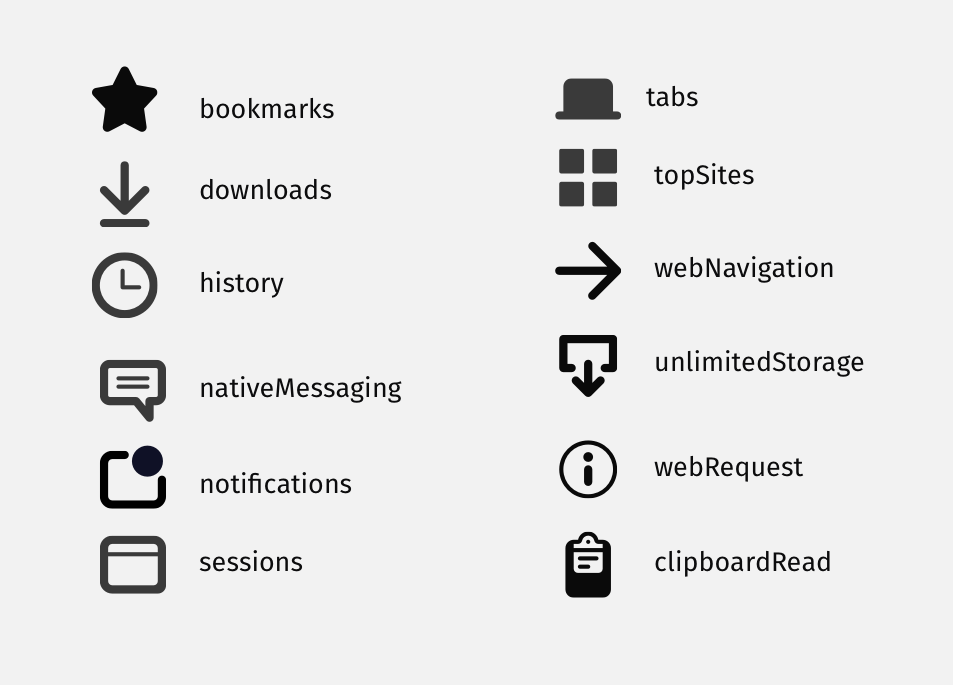
This all of them?
pwalm
on 2 Feb 2018
The icons look nice. They are very handsome.
Please forgive my ignorance... Which one is for Add-On permissions? Or how will this help the "missing add-on permission information"?
noloader
on 2 Feb 2018
Thanks, but I can't take credit. They were designed by some talented individuals on the Firefox UX team.
These are all for various add-on API requests.
pwalm
on 3 Feb 2018
What would be displayed for a permission other than those 12 permission? (MDN shows 35 already, and new permissions are added to Firefox pretty regularly). Is there a generic icon to use?
eviljeff
on 5 Feb 2018
I need someone (@jvillalobos?) to give me a link to the exact list of icons I need to provide for users on AMO. There are 6 different links to lists of permissions in this issue. Give me the exact one, and I will provide icons.
pwalm
on 5 Feb 2018
https://github.com/mozilla/addons-frontend/issues/2757#issuecomment-347951067 has the link to the descriptions for permissions actually used in Firefox - though I don't know which @jvillalobos wants icons for. We'll always need a fallback even if every one currently there has an icon because permissions will be added in the future and there will always be a lag.
eviljeff
on 5 Feb 2018
@eviljeff I don't think we're making unique icons for every instance in that link, just higher level ones. Which I believed to be in this list, but am now unsure.
pwalm
on 5 Feb 2018
Let's discuss on the Tuesday meeting. This was high priority 3 months ago.
jvillalobos
on 9 Feb 2018
I just went over all of the lists and here's what I think is needed:
- @pwalm: I think we're missing two icons: a generic icon for permissions that don't have a specific one, and an icon for host permissions ("Access your data for a specific website or group of sites"), which is a big one.
- Use the copy from Scott's document. For permissions that don't have copy in that doc, use the copy from Firefox.
- Link to the SUMO doc for the "More Info" link.
jvillalobos
on 13 Feb 2018
New icons!
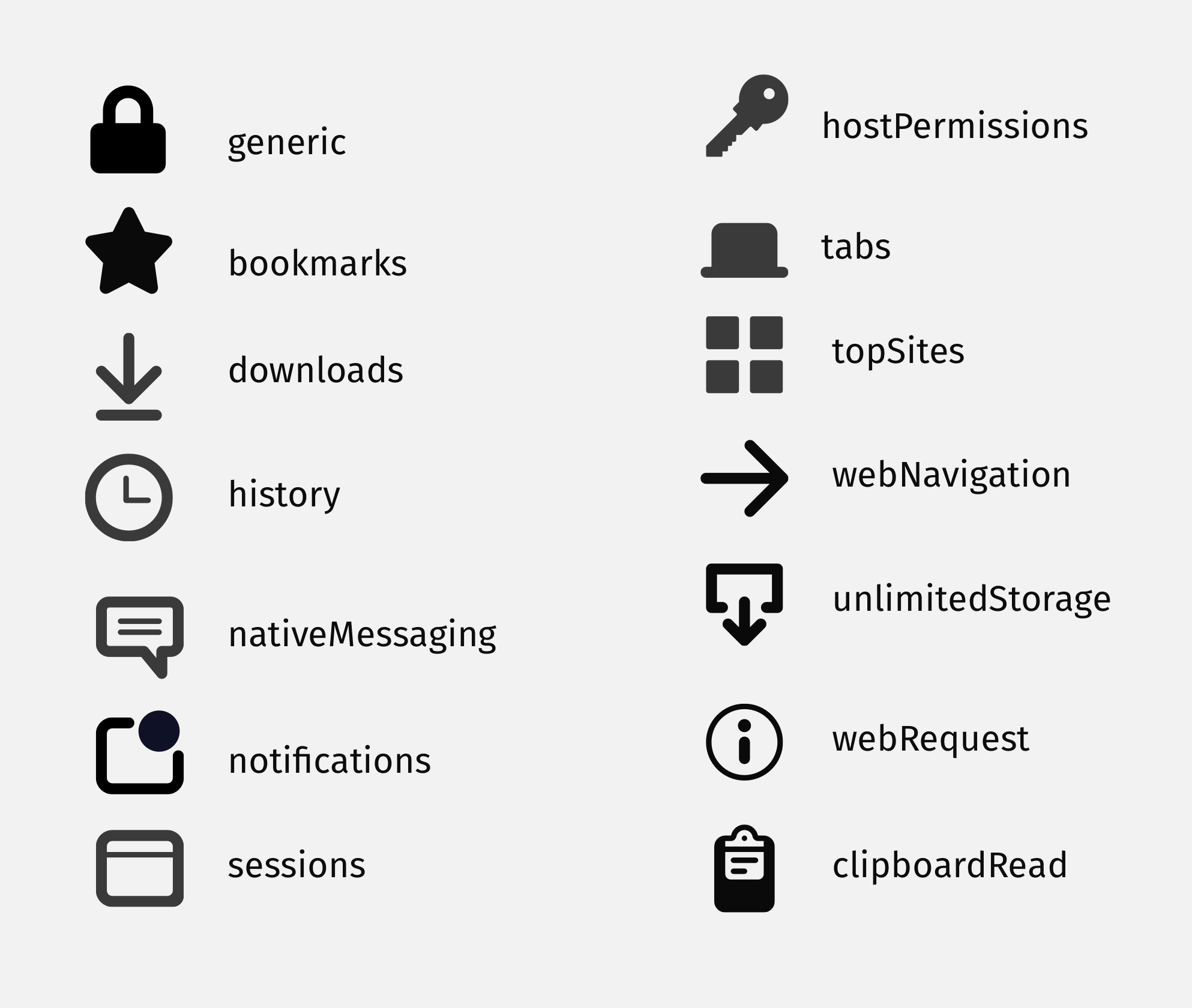
pwalm
on 14 Feb 2018
Came across a newer list, here's the revised icons:
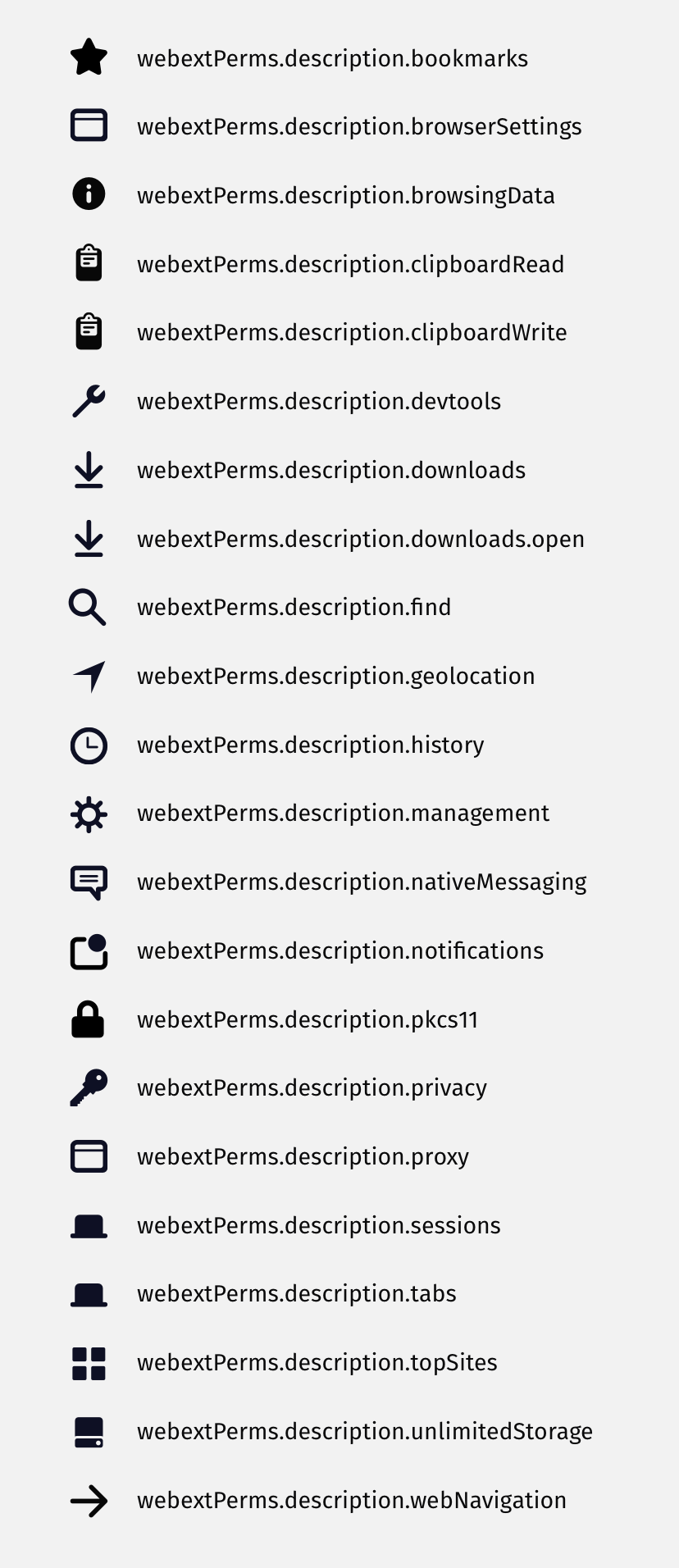
pwalm
on 16 Feb 2018
and here they are with their descriptions, just so everything is synced up:
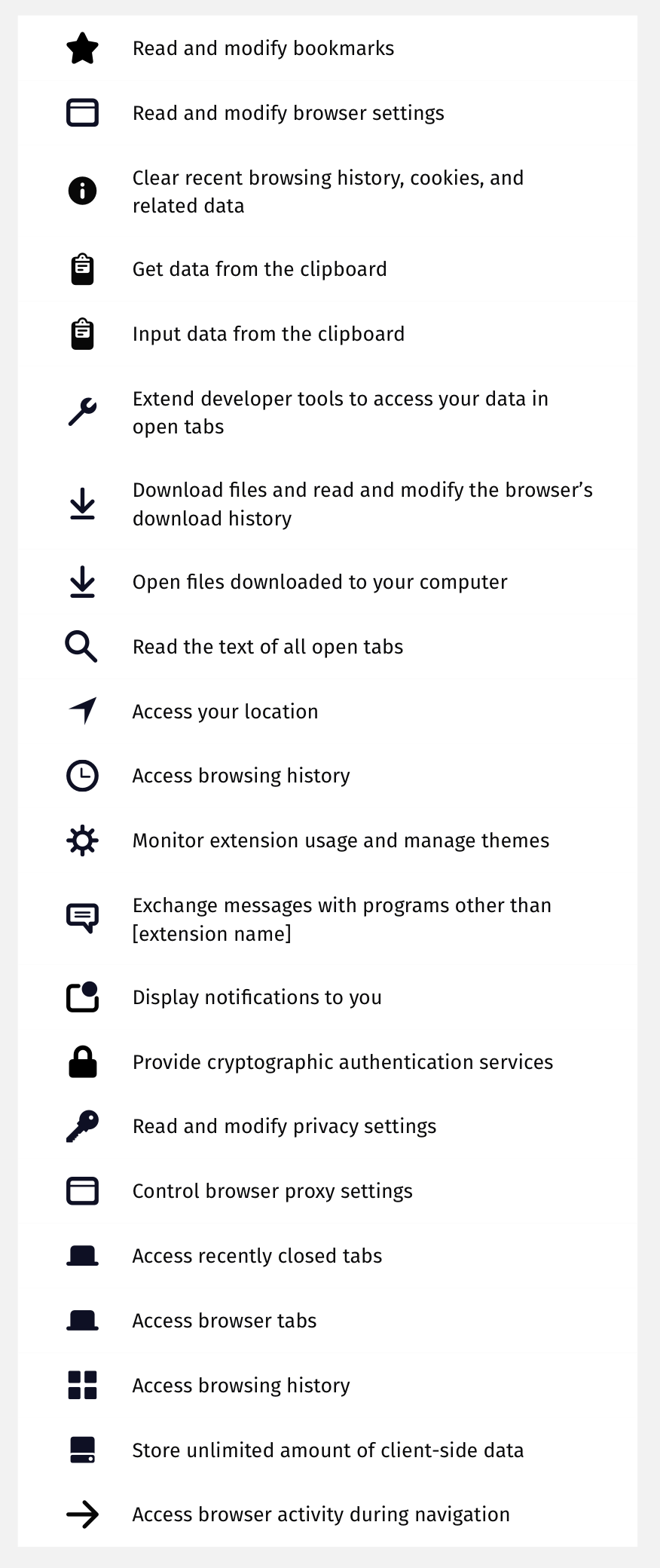
pwalm
on 16 Feb 2018
This list looks complete, but we're missing the text for host permissions. Scott's document suggested we could just use the same text for any requested host permissions: "Access your data for a specific website or group of sites", but Firefox actually presents a number of different customized messages depending on they type(s) of host permissions requested. @devaneymoz Are we happy to stick with the one simple description in all cases?
@pwalm Thanks for all the icons, but I'm not sure how to extract them as individual files from the single png that is attached to this issue. Can you provide them as individual files, and do we want them as svgs as opposed to pngs?
 bobsilverberg
on 20 Feb 2018
bobsilverberg
on 20 Feb 2018
@bobsilverberg are you referring to the following host permissions?
- Access your data for the sites in the "named" domain
- Access your data in # other domains
- Access your data for "named site"
- Access your data on # other sites
If so, these should display on AMO as well.
devaneymoz
on 20 Feb 2018
Yes, I'm referring to the different messages defined at https://searchfox.org/mozilla-central/rev/47cb352984bac15c476dcd75f8360f902673cb98/browser/locales/en-US/chrome/browser/browser.properties#124-148, which match what you've listed above. Thanks. I guess we'll borrow the same logic that Firefox uses to generate these messages.
bobsilverberg
on 20 Feb 2018
@devaneymoz @pwalm Regarding the different messages that can be displayed for host permissions (see https://github.com/mozilla/addons-frontend/issues/2757#issuecomment-367132222, above), I assume they will all get an identical icon? Please let me know if that's not the case.
bobsilverberg
on 22 Feb 2018
A couple more questions for @devaneymoz and/or @pwalm:
There's a new permission called
tabHide. I grabbed the English translation for it from Firefox. I assume we're going to use the sametabs.svgicon for that as we use for thetabsandsessionspermissions?The string for
nativeMessagingdoes a substitution in Firefox. The string isExchange messages with programs other than %Swhere%Sis replaced by the name of the application. E.g., Firefox vs. Nightly. Note that this replacement has nothing to do with the addon itself, which was suggested at https://github.com/mozilla/addons-frontend/issues/2757#issuecomment-366098090. My feeling is that we can just use "Firefox" in all cases, but I want to confirm that. Do we need to use the different brandings of Firefox for this, or can we always just use "Firefox"?
bobsilverberg
on 22 Feb 2018
@bobsilverberg good suggestion to use "Firefox" in all cases. Go for it.
devaneymoz
on 22 Feb 2018
@tofumatt @bobsilverberg Could you provide STR for QA? Perhaps the submission of a new add-on would be sufficient to check new permissions (unfortunately submission on AMO dev is not working right now).
Thank you!
 ioanarusiczki
on 12 Mar 2018
ioanarusiczki
on 12 Mar 2018
I created an add-on on dev which has all of the permissions, and lots of host permissions, so that can be used to verify much of this. It can be found at https://addons-dev.allizom.org/en-US/firefox/addon/all-of-the-permissions. For more granular testing (e.g., of the different ways in which host permissions can be displayed) you might need to submit some new add-ons when that becomes possible.
bobsilverberg
on 12 Mar 2018
@bobsilverberg The implementation looks amazing! Great work. :D
pwalm
on 12 Mar 2018
Thanks @pwalm!
bobsilverberg
on 12 Mar 2018
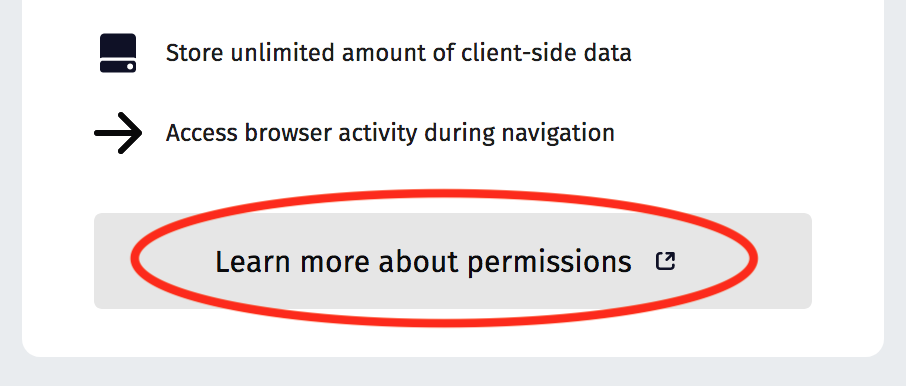
Sorry if I missed this earlier, but I thought we had planned to include a link somewhere on the prompt that goes to this page explaining what the permissions mean? https://support.mozilla.org/en-US/kb/permission-request-messages-firefox-extensions
atsay
on 13 Mar 2018
bobsilverberg
on 13 Mar 2018
Yes, but this is what I see. Is it not yet styled and I am jumping the gun?
atsay
on 13 Mar 2018
Sorry, @atsay, I don't understand. That button is the link, and it looks just like the mock. What is it that you are expecting to see?
bobsilverberg
on 13 Mar 2018
Oh, sorry, I didn't notice that this in your message was a link to an image. That's the dialog in Firefox, not on the AMO site. That's not what this issue was about. I have no idea if anyone is doing any work on that for this.
bobsilverberg
on 13 Mar 2018
@bobsilverberg Hi again!
I've noticed a couples of things so please let me know what you think before I add the verified label:
- "Access your data for all websites" permission is not displayed for your sample. I reused it here and noticed that in the extension's manifest it is an optional permission, could be that, but I uploaded another extension to check this permission here.
- I could not check on " Extend developer tools to access your data in open tabs" permission. I can't find a sample with this permission. I tried with Adblock Plus as mentioned on the Support page but maybe the actual version from prod does not contain it yet?
- I filed #4543 for an issue noticed for an icon.
Thanks!
ioanarusiczki
on 13 Mar 2018
Thanks @ioanarusiczki.
You are correct that "Access your data for all websites" isn't in my example, because when it is found it prevents all the other host permissions from appearing. The code does not look at optional permissions, only required permissions, so that's why you weren't seeing it for your first example. Perhaps that is not correct. @jvillalobos Should the permissions displayed on AMO include optional permissions, or only required permissions? Firefox does not prompt about optional permissions on install, which is why I took the latter approach.
I didn't realize that the devtools permission is not an actual
permissionrequested by the add-on. I think it is automatically detected when an add-on provides a devtools page. This will require some additional work to support, so I suggest filing a follow-up issue to implement it, rather than blocking this feature on it. What do you think @jvillalobos?Thanks, I saw the issue. I'll see if I can address that right away, but I think it's probably fine to land this and treat that as a follow-up.
bobsilverberg
on 13 Mar 2018
@atsay since the dialog you posted is within Firefox, you should file any issues about it in bugzilla. After the AMO changes stabilize, we probably need to reconcile the two a little bit. I have noticed some issues with the Firefox dialog too.
kumar303
on 13 Mar 2018
Firefox does not prompt about optional permissions on install, which is why I took the latter approach.
sgtm
This will require some additional work to support, so I suggest filing a follow-up issue to implement it, rather than blocking this feature on it.
Agree.
jvillalobos
on 13 Mar 2018
I didn't realize that the devtools permission is not an actual permission requested by the add-on. I think it is automatically detected when an add-on provides a devtools page.
mozilla/addons-server#7316
eviljeff
on 13 Mar 2018
Well then I think I'm done here! Marking it verified fixed on AMO dev using FF58 (Win10).
ioanarusiczki
on 13 Mar 2018
@kumar303 @bobsilverberg aha, thanks!
atsay
on 13 Mar 2018
Some input from a user: I think it's important and useful to show permissions "front-and-center," and not wait to show them until the user is installing an add-on (though they should be shown then as well. In fact, I see no reason for the "Rate your experience" section to be off to the left and separate from the user count and ratings display at the top-right, and the fact the permissions are tucked away halfway down the page says something to me about the importance placed on them. Personally, I think the "Rate your experience" section should be merged with the ratings section at top-right and the permissions should be moved into that spot.
I'm also a believer in providing more info, and making it easy/easier to access, so users can make an informed decision, and do it with minimal effort. To that end, it wouldn't be a bad idea to even provide short but informative descriptions about each, either by hovering over them or through an expand/collapse setup.
As for required vs optional permissions, I think it's a terrible idea not to mention permissions an add-on _can_ have just because it doesn't _have_ to have them. This would lead to users installing add-ons thinking they're more limited than they actually are, only to end up unknowingly enabling more permissions they weren't aware it had access to. I think all permissions should be listed, and they should be tagged somehow to indicate whether they're required or optional.
Finally, users should be able to see the permissions used by each add-on by viewing its information page in about:addons, and there should also be a page for viewing what add-ons use each permission (list the permissions with the add-ons that have access to them under each one), similar to newer versions of Android.
I see things like permissions being downgraded all the time, making it harder for users to know what access they're giving out, when it should be the other way, and I don't understand the reasoning behind it. In Google's case (Play Store), I really feel they make those changes with the intent to keep users less informed. I hope that's not the case here but, unless I'm misunderstanding some of the suggestions here and elsewhere, it definitely seems like there's a trend to go in that direction, and some quick searching will show that I'm far from the only one that feels that a lot of changes are not for the better.
 vertigo220
on 28 Apr 2018
vertigo220
on 28 Apr 2018
Related issues
atsay
·
6Comments
 SeanPrashad
·
6Comments
SeanPrashad
·
6Comments
 Sparsh1212
·
5Comments
bobsilverberg
·
4Comments
Sparsh1212
·
5Comments
bobsilverberg
·
4Comments
 jrbenny35
·
6Comments
jrbenny35
·
6Comments