Adaptivecards: [MsTeams][IOS][AdaptiveCard] Action.submit of Column in ColumnSet is not working in IOS Mobile
Platform
IOS
Host
Ms Teams
Hi all,
I am using Action.Submit Property On Column in Column set.
In Android and Windows, Text is echoing back on click on Column but In IOS Clicking on Column is not working as expected.
Please find the Screenshot in Windows:-
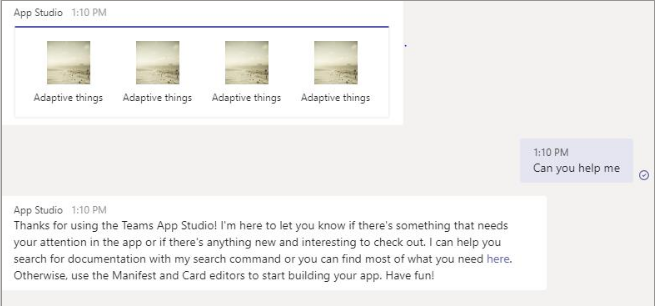
please find the screenshot in IOS where Clicking on Column is not working:-

Adative Card Json:-
{"type":"AdaptiveCard","version":"1.0","body":[{"type":"ColumnSet","columns":[{"type":"Column","width":"stretch","items":[{"type":"Image","altText":"","url":"https://picsum.photos/200/200?image=100","size":"Medium","horizontalAlignment":"Center"},{"type":"TextBlock","text":"Adaptive things","wrap":true,"spacing":"Small","horizontalAlignment":"Center","size":"Small","maxLines":3}],"selectAction":{"type":"Action.Submit","title":"Main Title","data":{"msteams":{"type":"imBack","value":"Can you help me"}}}},{"type":"Column","width":"stretch","items":[{"type":"Image","altText":"","url":"https://picsum.photos/200/200?image=100","size":"Medium","horizontalAlignment":"Center"},{"type":"TextBlock","text":"Adaptive things","wrap":true,"spacing":"Small","horizontalAlignment":"Center","size":"Small","maxLines":3}],"selectAction":{"type":"Action.Submit","title":"Main Title","data":{"msteams":{"type":"imBack","value":"Can you help me"}}}},{"type":"Column","width":"stretch","items":[{"type":"Image","altText":"","url":"https://picsum.photos/200/200?image=100","size":"Medium","horizontalAlignment":"Center"},{"type":"TextBlock","text":"Adaptive things","wrap":true,"spacing":"Small","horizontalAlignment":"Center","size":"Small","maxLines":3}],"selectAction":{"type":"Action.Submit","title":"Main Title","data":{"msteams":{"type":"imBack","value":"Adaptive things"}}}},{"type":"Column","width":"stretch","items":[{"type":"Image","altText":"","url":"https://picsum.photos/200/200?image=100","horizontalAlignment":"Center","size":"Medium"},{"type":"TextBlock","text":"Adaptive things","wrap":true,"spacing":"Small","size":"Small","horizontalAlignment":"Center","maxLines":3}],"selectAction":{"type":"Action.Submit","title":"Main Title","data":{"msteams":{"type":"imBack","value":"Can you help me"}}}}]}],"$schema":"http://adaptivecards.io/schemas/adaptive-card.json"}
Please help,
Thanks.
 Chekrii
All 22 comments
@shalinijoshi19 I just verified that this works on our sample app. I thinks it's Team's issue. It's similar to #3800
 jwoo-msft
on 7 Mar 2020
jwoo-msft
on 7 Mar 2020
Is there any fix for this? One of our features depends on this.
Chekrii
on 7 Mar 2020
Is there any fix for this? One of our features depends on this.
@adumrewal Can you respond to @Chekrii 's question?
jwoo-msft
on 9 Mar 2020
We have acknowledged this issue report. Please continue to follow the issue for updates/progress/questions. @matthidinger / @dclaux / @rebeccaanne / @paulcam206 / @nesalang / @almedina-ms FYI.
![msftbot[bot] picture](https://avatars2.githubusercontent.com/in/26612?v=4&s=40) msftbot[bot]
on 9 Mar 2020
msftbot[bot]
on 9 Mar 2020
Hey @Vikrantsingh01 FYI. This seems to be an example of an issue where an AC customer is blocked on a Teams host app update; Cc - @adumrewal / @Aditya0603
 shalinijoshi19
on 10 Mar 2020
shalinijoshi19
on 10 Mar 2020
Hi,
One more Issue in IOS is that In the above JSON, we are using four column set and each column set is having one image.
Even when we click on the first image or second image, the image from the last column set is popping up in IOS.
Thanks.
Chekrii
on 11 Mar 2020
@Chekrii this issue has been fixed on the Teams iOS client and should be available in the April Store build.
cc- @VikrantSingh01 / @Aditya0603
 adumrewal
on 16 Mar 2020
adumrewal
on 16 Mar 2020
@adumrewal Thanks for the help
Chekrii
on 16 Mar 2020
@nesalang check see if we can close.
jwoo-msft
on 16 Mar 2020
@Subhasish-msft is April store update given for this issue??
I am still facing same issue please update me ASAP
 Sujit-Gaikwad
on 27 Apr 2020
Sujit-Gaikwad
on 27 Apr 2020
@Sujit-Gaikwad , We have active bug for this and currently there is no ETA.
 Subhasish-msft
on 5 May 2020
Subhasish-msft
on 5 May 2020
@Subhasish-msft , with V2.0.9 teams update this is working for iPhone 10 but with same update it is not working for iPhone 6
can you tell me for which all iPhone version it will support???
Sujit-Gaikwad
on 8 May 2020
@Subhasish-msft any update on above comment
Sujit-Gaikwad
on 21 May 2020
I am discussing with engineering team on this. Will post once i receive an update.
Subhasish-msft
on 21 May 2020
@Sujit-Gaikwad can you provide the iOS versions on iPhone 10 and iPhone 6
adumrewal
on 21 May 2020
@adumrewal here are the details
iPhone 6
iOS version 12.4.5
Teams version 2.0.10
iPhone X
iOS version 13.4.1
Teams version 2.0.10
Sujit-Gaikwad
on 21 May 2020
@Sujit-Gaikwad iPhone 6 (iOS: 12.4, Teams version: 2.0.10) and iPhone X (iOS: 13.4, Teams version: 2.0.10) have the same behaviour for the above card. Can you please elaborate on the issue that you are facing? If a screen recording is possible please attach that.
adumrewal
on 22 May 2020
@adumrewal
I'm having issue with column set select action which is not working on iphone 6.
@Sujit-Gaikwad iPhone 6 (iOS: 12.4, Teams version: 2.0.10) and iPhone X (iOS: 13.4, Teams >>version: 2.0.10) have the same behaviour for the above card.
is it means that Adaptive column set action will work on every iphone ?
if it is working fine which all iPhone and iOS version it will aupport
Sujit-Gaikwad
on 22 May 2020
You should expect the same behaviour if both the devices are running the same Teams version and iOS version.
Can you please share a screen recording of the issue you are facing with the complete Teams version number.
adumrewal
on 3 Jun 2020
@Sujit-Gaikwad , Could you please share the recording of the issue that you are facing with complete Teams version number.
Subhasish-msft
on 9 Jun 2020
@Sujit-Gaikwad , Could you please share the recording of the issue that you are facing with >>complete Teams version number.
@Subhasish-msft Sorry, i'm not able to share the recording as my leads not allowing me to do so.
but as per my obsevation this is now working fine with new teams update V2.0.11.
Thanks for your help
Regards,
Sujit sanjay gaikwad.
Sujit-Gaikwad
on 9 Jun 2020
Thanks for your confirmation. I am closing this issue.
Subhasish-msft
on 10 Jun 2020
Related issues
 murcinar
·
5Comments
murcinar
·
5Comments
 jonathanmachado
·
4Comments
jonathanmachado
·
4Comments
 lostromb
·
5Comments
shalinijoshi19
·
5Comments
lostromb
·
5Comments
shalinijoshi19
·
5Comments
 rajjagani021
·
4Comments
rajjagani021
·
4Comments