Adaptivecards: [Android/IOS][] [Adaptive Card rendered blank in Android and IOS MS team mobile app]
Platform
- Android
- IOS
What platform is your issue or question related to? (Delete other platforms).
- Android
- iOS
Author or host
External Bot Sending message to MS Team channel.
What version are you using? Ex: NuGet 1.0.2, or latest main, etc...
Details
I am having an issue to render the Adaptive card in my Android and IOS MS team app. Below is my JSON and it's working fine on MS Team Web and desktop app but not working in the Android/IOS mobile app.
{
  "$schema": "http://adaptivecards.io/schemas/adaptive-card.json",
  "type": "AdaptiveCard",
  "version": "1.0",
  "body": [
    {
      "type": "Container",
      "items": [
        {
          "type": "Container",
          "items": [
            {
              "type": "Image",
              "url": "https://user-photos.imgix.net/avatar/user/original/300a55d8-c50b-44e2-bbf7-9f619a523d38_1603367494.jpeg",
              "size": "medium",
              "horizontalAlignment": "left"
            },
            {
              "type": "Image",
              "size": "large",
              "horizontalAlignment": "center"
            },
            {
              "type": "Container",
              "horizontalAlignment": "left",
              "items": [
                {
                  "type": "TextBlock",
                  "weight": "bolder",
                  "size": "large"
                },
                {
                  "type": "TextBlock",
                  "text": "Raj Jagani is here to meet you."
                },
                {
                  "type": "FactSet",
                  "facts": [
                    {
                      "title": "Location",
                      "value": "HID Location"
                    }
                  ]
                },
                {
                  "type": "RichTextBlock",
                  "inlines": [
                    {
                      "type": "TextRun",
                      "isSubtle": true,
                      "text": "{{DATE(2020-10-22T17:49:50+05:30, LONG)}} {{TIME(2020-10-22T17:49:50+05:30)}}"
                    }
                  ]
                },
                {
                  "type": "TextBlock",
                  "text": ""
                }
              ]
            }
          ]
        }
      ]
    }
  ],
  "actions": []
}
Output
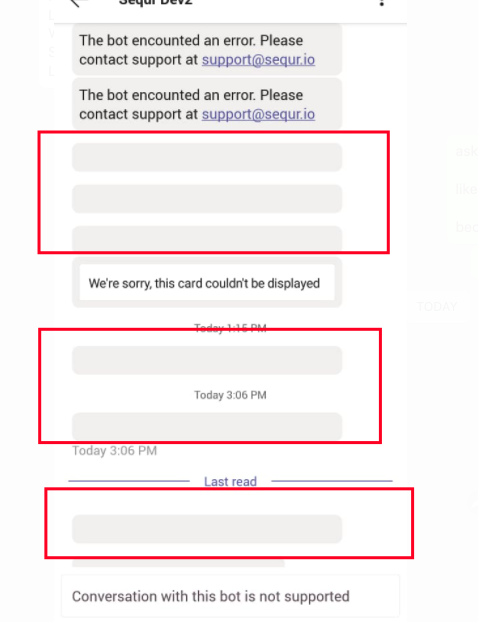
 rajjagani021
All 4 comments
please review this issue for target Milestone, Inconsistencies & Priority upon triage.
![msftbot[bot] picture](https://avatars2.githubusercontent.com/in/26612?v=4&s=40) msftbot[bot]
on 23 Oct 2020
msftbot[bot]
on 23 Oct 2020
@rajjagani021
Your json is missing an URL in Image which is a required property. We've adjusted our rendered to behave consistently in such cases. The change is updated on our end, and the Team is going to take the change in their next sprint post-November.
 jwoo-msft
on 25 Oct 2020
jwoo-msft
on 25 Oct 2020
@jwoo-msft
After adding the URL in the image, Still, the output is the same. It still renders the gray bar only.
rajjagani021
on 26 Oct 2020
@jwoo-msft
I have found the issue in "type": "TextBlock" it missing the text as well and that's why it's not rendering the data properly.
Thanks for the support.
rajjagani021
on 26 Oct 2020
Related issues
 atishayv
·
4Comments
atishayv
·
4Comments
 Jageen
·
7Comments
Jageen
·
7Comments
 schemburkar
·
4Comments
schemburkar
·
4Comments
 cavr
·
5Comments
cavr
·
5Comments
 Har1pr1ya
·
6Comments
Har1pr1ya
·
6Comments