Adaptivecards: Stretch on FactSet
I have a scenario that I would like to use a FactSet but the layout is limited, I would like it to go edge to edge. So I am using a ColumnSet instead. But my data is essectially a FactSet.
 danmarshall
All 12 comments
Dan, I am not sure I understand. Could you clarify? Maybe a screenshot of what you'd like to accomplish?
 dclaux
on 14 Jun 2017
dclaux
on 14 Jun 2017
Surely :)
Here is a FactSet from samples:

I'd like the second column to appear right-aligned to the edge of the container, like the Flight status:

danmarshall
on 14 Jun 2017
Oh, you want horizontal alignment for fact values. Seems reasonable to me.
dclaux
on 14 Jun 2017
Yes, and also that they align to the container. So I suppose there might be 3 modes:
Default: (current functionality)

Horizontal align fact values to the right:

Stretch:
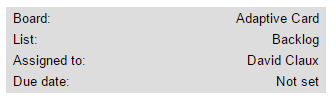
Stretch will make the fact set fill the container. Used in combination with horizontal alignment to the right.
Stretch + horizontal alignment to the left would appear as the current default.
danmarshall
on 14 Jun 2017
FactSet already renders across the entire available width, so adding horizontal alignment support will get us the "Stretch" behavior you have above. I am not sure there is a need for the your second screenshot though.
dclaux
on 14 Jun 2017
Trying to prioritize what we Must-Have for v1, do you guys feel this is important enough to include?
 matthidinger
on 6 Jul 2017
matthidinger
on 6 Jul 2017
Hi Matt, I think it's a nice enhancement but is not a showstopper. Feel free to lower the priority.
danmarshall
on 6 Jul 2017
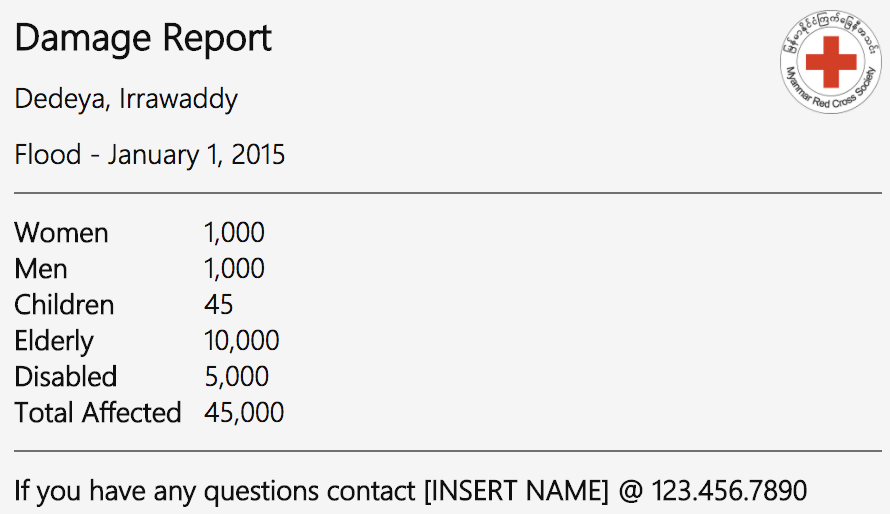
I'm working on something that uses facts with numbers. I would like to be able to right align all numbers similar to a receipt. This screenshot shows the issue of how things currently work.
 dalekunce
on 16 Aug 2017
dalekunce
on 16 Aug 2017
@dalekunce for now, the layout you desire can be accomplished with ColumnSet, one per row. You also have more control over font sizes/color in a ColumnSet. I do agree though that in this simple case FactSet could make it easier.
dclaux
on 16 Aug 2017
Thanks for the feedback! I've added it to the list of things being considered for 1.1
matthidinger
on 16 Aug 2017
@matthidinger any update on this?
 xjose97x
on 27 Mar 2018
xjose97x
on 27 Mar 2018
We would also appreciate an update on this one.
Thanks
 chaim770
on 14 Sep 2020
chaim770
on 14 Sep 2020
Related issues
 murcinar
·
5Comments
murcinar
·
5Comments
 dipja
·
6Comments
dipja
·
6Comments
 jonathanmachado
·
4Comments
jonathanmachado
·
4Comments
 serialoverflow
·
4Comments
serialoverflow
·
4Comments
 jyoti-ms
·
6Comments
jyoti-ms
·
6Comments
Most helpful comment
Oh, you want horizontal alignment for fact values. Seems reasonable to me.