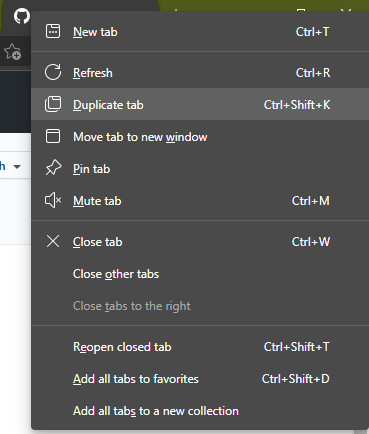
Accessibility-insights-web: Default shortcuts should NOT be the same as browser ones. Example: In Edge, Ctrl+Shift+K is "Duplicate tab" shortcut
Describe the bug
To Reproduce
Steps to reproduce the behavior:
- In Edge, press Ctrl+Shift+K
- Expect the current tab to be duplicated (default shortcut behavior)
- Instead, Accessibility Insights add-on has taken over the shortcut, and just opens
Expected behavior
All shortcuts should not override default Edge shortcuts. Pressing Ctrl+Shift+K should still duplicate the current tab, instead of opening this add-on.
Screenshots

 guillermorueda
All 18 comments
This issue has been marked as ready for team triage; we will triage it in our weekly review and update the issue. Thank you for contributing to Accessibility Insights!
![msftbot[bot] picture](https://avatars.githubusercontent.com/in/26612?v=4&s=40) msftbot[bot]
on 12 Feb 2021
msftbot[bot]
on 12 Feb 2021
Related to issue #3800 .
 RobGallo
on 12 Feb 2021
RobGallo
on 12 Feb 2021
As a workaround, Keyboard shortcuts can be customized by going to edge://extensions/shortcuts or by opening the extension and selecting Keyboard shortcuts in the pop-up menu (detailed instructions to customize keyboard shortcuts)
 ferBonnin
on 16 Feb 2021
ferBonnin
on 16 Feb 2021
@ferBonnin and @peterdur I propose fixing this bug and #3800 by modifying the keyboard shortcuts as follows:
Windows Key | macOS Key | Command
-- | -- | --
Ctrl+Shift+A (was Ctrl+Shift+K) | Option+Shift+A (was Shift+⌘+K) | Activate the extension
Ctrl+Shift+1 | Option+Shift+1 (was Shift+⌘+1) | Show or hide Automated checks
Ctrl+Shift+2 | Option+Shift+2 (was Shift+⌘+2) | Show or hide the visual helper for landmarks
Ctrl+Shift+3 | Option+Shift+3 (was Shift+⌘+3) | Show or hide the visual helper for headings
One advantage to using Option+Shift+[letter/number] combinations is that they're not used by MacOS, Edge, or Chrome. Users who follow our example could choose any letter or number without creating a conflict.
This change is likely to cause some confusion for current users of keyboard shortcuts.
 LiLoDavis
on 19 Feb 2021
LiLoDavis
on 19 Feb 2021
Ctrl+Shift+A (and other Ctrl+Shift+
If it's going to be impossible/too hard to find a shortcut that works consistently across OSs, some options to consider are:
- Have different shortcuts based on OS/browser
- Support shortcuts, and include the "suggested" default values, but make the shortcut functionality optional (and disabled by default). If done this way, the issue isn't just transferred to users (i.e. "you can go to your settings and change the shortcut"), or for users that may sparingly/occasionally use this extension, they can have it without shortcuts instead of opting for uninstalling it to avoid having to deal/maintain shortcuts.
I use the extension no more than once a month, so I took the #2 route, as I can just install it again when I need it and then put it away until I need it again... I'm sure the team rather have the people not having shortcuts than removing the extension) :-)
guillermorueda
on 19 Feb 2021
We don't see ctrl + shift + A in the list of documented shortcuts (and a few weeks ago, ctrl + shift+ K was also not documented) is there more up to date documentation we should be looking at? it would be much easier to find a shortcut that works consistently if we had the complete docs :)
Shortcuts are a way to provide a more usable and accessible experience for some users and having them off by default would be detrimental for this use case; that is not an option we would like to explore
ferBonnin
on 19 Feb 2021
marking this as blocked for continuing the investigation until we have a complete list of shortcuts
ferBonnin
on 19 Feb 2021
@guillermorueda you are correct. I made a mistake when I said Ctrl+Shift+[letter/number] wasn't used. It's only the numbers that aren't used.
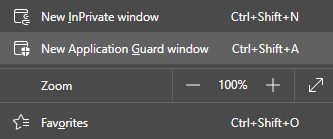
I don't see Ctrl+Shift+A in the list of Keyboard Shortcuts for Microsoft Edge. I don't have New Application Guard window in my Edge menu because I haven't enabled Application Guard. I'll investigate to see whether that shortcut is configurable.
Also, I wanted to be sure you know our shortcuts can be disabled. Go to edge://extensions/shortcuts and clear the shortcut by selecting the X next to it.
LiLoDavis
on 19 Feb 2021
@LiLoDavis, thanks for the quick response/turnaround. Regarding disabling shortcuts, it's not possible (I don't know if there's a way to mark them as optional). When I click on the X to remove it, it gets repopulated with the default when I move the cursor away, effectively not being able to remove it.
I just tried again... It works to remove on the secondary ones, but not on the primary, Ctrl+Shift+K. That one seems to be a mandatory shortcut.
guillermorueda
on 19 Feb 2021
@guillermorueda I see you are correct again - I can't disable the shortcut for activating the extension. It looks like it's cleared, but it resets when I close the window. Other extensions behave the same way.
LiLoDavis
on 19 Feb 2021
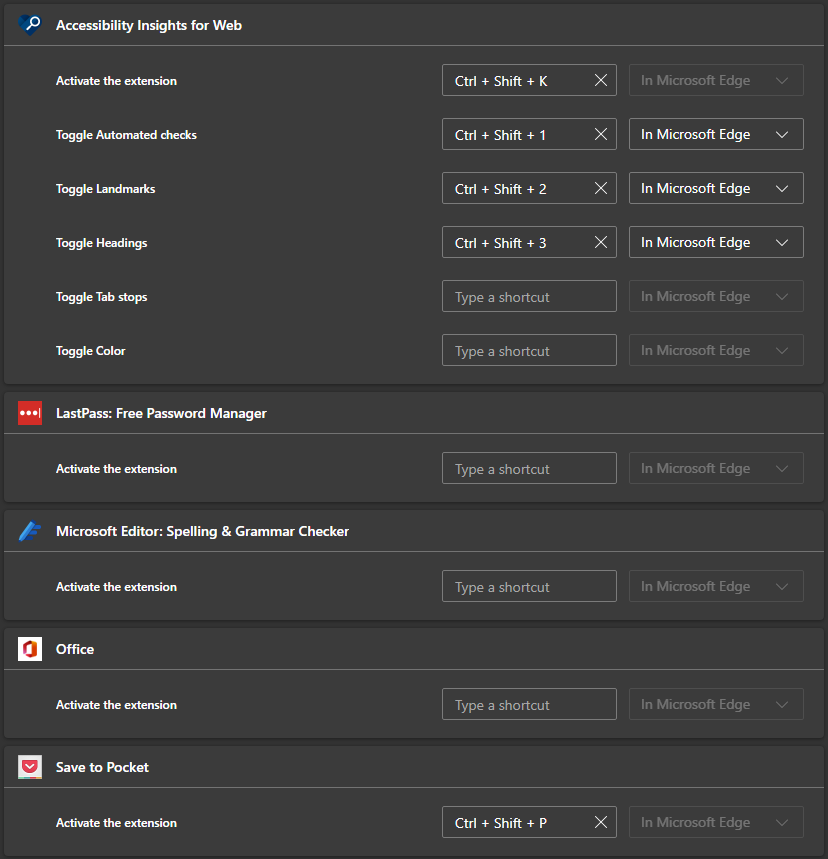
If the extension doesn't define a default shortcut to launch itself, then it's optional.
The ones that don't have a shortcut (LastPass, Office, and Microsoft Editor in the screenshot below) allow me to add one... And then, to remove it again if desired. The ones that have a default shortcut (this one, and Pocket in the screenshot), have the same behavior as this one... Not removable by user.
guillermorueda
on 19 Feb 2021
@ferBonnin @peterdur
New proposal:
Use Alt instead of Ctrl (Windows) and Option instead of Command (Mac).
Windows Key | macOS Key | Command
-- | -- | --
Alt + Shift + K | Option + Shift + K | Activate the extension
Alt + Shift + 1 | Option + Shift + 1 | Show or hide Automated checks
Alt + Shift + 2 | Option + Shift + 2 | Show or hide the visual helper for landmarks
Alt + Shift + 3 | Option + Shift + 3 | Show or hide the visual helper for headings
No known/documented conflicts with Edge or Chrome browsers, Windows or Mac operating systems.
LiLoDavis
on 22 Feb 2021
@guillermorueda, this has been fixed as described in the Canary channel. Please close it out at your convenience. Thanks!
 DaveTryon
on 27 May 2021
DaveTryon
on 27 May 2021
The team requires additional author feedback; please review their replies and update this issue accordingly. Thank you for contributing to Accessibility Insights!
msftbot[bot]
on 27 May 2021
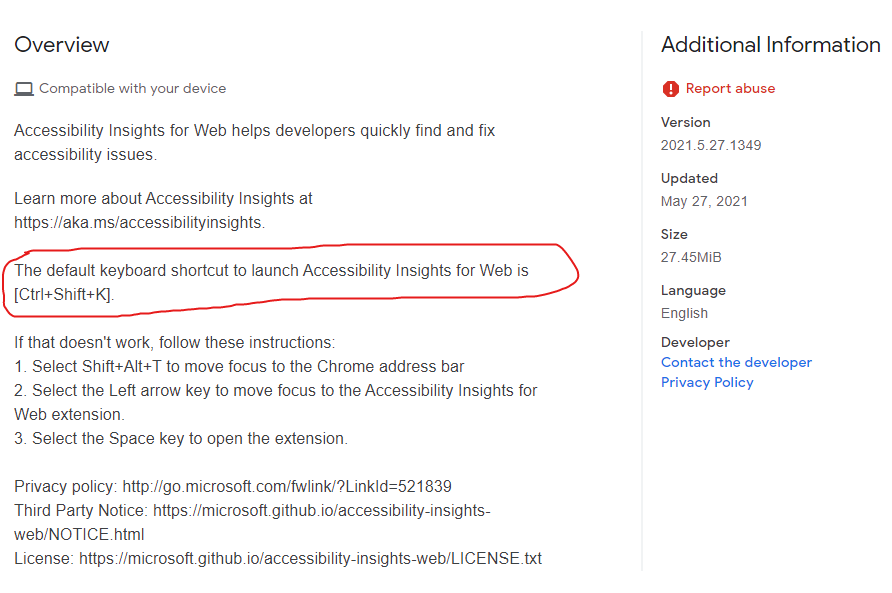
Thanks a lot Dave... Was the code changed but not the documentation? Or am I not understanding it? I thought the change was to use "Alt" key instead of "Ctrl" key. Here's the description of the Canary change released today:
guillermorueda
on 27 May 2021
@guillermorueda documentation changes are also in canary and will be push at the same time we release Accessibility Insights for Web to production
ferBonnin
on 27 May 2021
The team requires additional author feedback; please review their replies and update this issue accordingly. Thank you for contributing to Accessibility Insights!
msftbot[bot]
on 27 May 2021
This issue has been automatically marked as stale because it is marked as requiring author feedback but has not had any activity for 4 days. It will be closed if no further activity occurs within 3 days of this comment. Thank you for contributing to Accessibility Insights!
msftbot[bot]
on 31 May 2021
Related issues
LiLoDavis
·
7Comments
 iamrafan
·
8Comments
iamrafan
·
8Comments
 cglong
·
4Comments
cglong
·
4Comments
 pshrmn
·
5Comments
pshrmn
·
5Comments
 waabid
·
4Comments
waabid
·
4Comments