Accessibility-insights-web: pass/fail radiobuttons in assessment don't show selected state (windows high contrast + edge)
Describe the bug
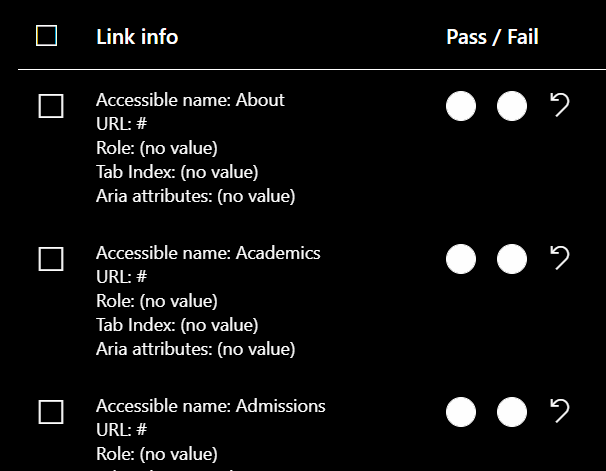
In Edge + Windows HC, the radio buttons in assessments are always white even if selected. It's therefore unclear what the state is. This issue only shows up when Windows high contrast mode is on. Toggling high-contrast mode from the extension itself (in both chrome and edge) produces the right behavior.
To Reproduce
Steps to reproduce the behavior:
- Add Accessibility Insights for Web to Edge
- Turn on Windows High Contrast mode
- Open an assessment whose results have pass/fail radio buttons (e.g. links)
- Notice the radio buttons don't show their state
Screenshots
Context (please complete the following information)
- OS Name & Version: Windows OS 19041.508
- AI-Web Version & Environment: 2.21.1 Production
- Browser Version: Microsoft Edge 86.0.622.31 (Official build) beta (64-bit)
 karanbirsingh
All 10 comments
Potentially related fluentui issues/PRs:
- most similar issue, wontfixed: https://github.com/microsoft/fluentui/issues/13768
- similar issue, fixed in [email protected]: https://github.com/microsoft/fluentui/issues/13767
- PR that fixed 13767: https://github.com/microsoft/fluentui/pull/13846
 dbjorge
on 5 Oct 2020
dbjorge
on 5 Oct 2020
This issue has been marked as ready for team triage; we will triage it in our weekly review and update the issue. Thank you for contributing to Accessibility Insights!
![msftbot[bot] picture](https://avatars.githubusercontent.com/in/26612?v=4&s=40) msftbot[bot]
on 5 Oct 2020
msftbot[bot]
on 5 Oct 2020
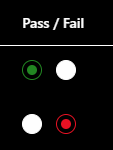
In the latest Fluent UI (7.144.2 as of writing), this issue is sort-of resolved; the choicegroup buttons do use our override colors in that version, but we're providing override colors that don't meet contrast requirements, so it's a different problem rather than a complete fix:
(there are also a variety of other, unrelated high-contrast bugs introduced by upgrading from our current fabric version to fluentUI 7.144.2)
dbjorge
on 5 Oct 2020
This issue requires additional investigation by the Accessibility Insights team. When the issue is ready to be triaged again, we will update the issue with the investigation result and add "status: ready for triage". Thank you for contributing to Accessibility Insights!
msftbot[bot]
on 12 Oct 2020
@iamrafan can we please take a look at the fluent UI update to see if it introduces other HC issues? @dbjorge was this pushed to playground?
 ferBonnin
on 12 Oct 2020
ferBonnin
on 12 Oct 2020
@ferBonnin Just pushed it to playground now (sorry for the delay, needed to fix a few unit tests before it became releasable), should be there as soon as it clears store review.
dbjorge
on 13 Oct 2020
I spent an hour or two investigating more immediate workarounds. It's easy enough to "force" our styles to apply to the button colors even in HC mode (forced-color-adjust: none), but it's not great because we don't actually apply our HC color definitions if you're in windows HC mode but not our app HC mode. We could update our color definitions to apply the HC colors if either our app-setting-based .high-contrast-theme selector is in play or the page matches the media query @media (forced-colors: active), but that still isn't ideal because some of our theme coloring happens via theme colors passed to fabric in JS rather than strictly in CSS. Probably the right way would be something like:
- Add a detector to the background page similar to our unified HC detector that is along the lines of on
window.matchMedia('(forced-colors: active)').addListener(mq => userConfigActionCreator.nativeHighContrastTransition(mq.matches)); - Use that to set our fabric + local HC styles in system mode
- use
forced-color-adjust: noneon the button colors
Note however that would be making an assumption that we want dark HC colors for any forced-color scenario, which still isn't right; we would ideally want to be smarter about being respectful of users that pick a "High Contrast White" theme at the OS level. The right way to do that would be to redo most of our HC coloring in forced-color scenarios to be based on the system colors provided by the OS/browser in forced-color scenarios.
If we really wanted to do a quickest-possible fix for this very specific issue, we could explore a hack on the pass/fail button styles like:
// Temporary hack for issue #3435
.radio-button-inner {
    @include ms-high-color-override {
        forced-color-adjust: none;
        color: HighlightText;
    }
}
.radio-button-outer {
    @include ms-high-color-override {
        forced-color-adjust: none;
        color: Highlight;
    }
}
References:
dbjorge
on 14 Oct 2020
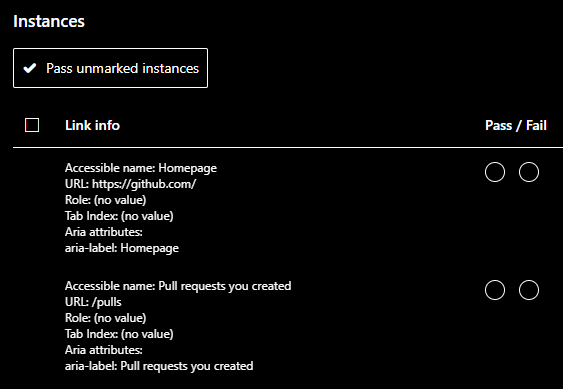
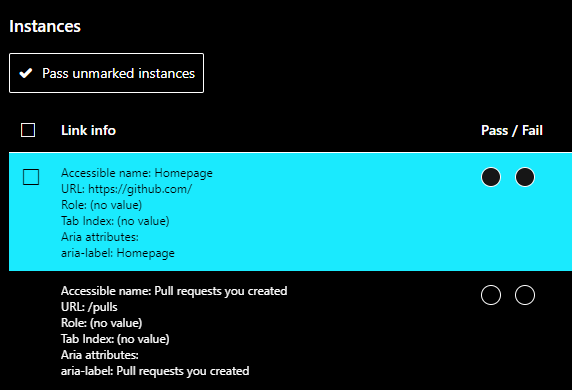
In Edge Version 87.0.664.66 (Official build) (64-bit) with (1) Windows high contrast on and (2) the extension high contrast both on and off, the checkbox to turn on the visualization for a specific instance is not visible (first image) unless I am clicking on the instance (second image).
 lisli1
on 6 Jan 2021
lisli1
on 6 Jan 2021
@ferBonnin to create a feature for OF update.
@iamrafan how did the investigation on playground with the OF update went?
ferBonnin
on 1 Feb 2021
@ferBonnin I will share the investigation document via email
 iamrafan
on 19 May 2021
iamrafan
on 19 May 2021
Related issues
 LiLoDavis
·
6Comments
LiLoDavis
·
6Comments
 mhulse
·
4Comments
LiLoDavis
·
7Comments
mhulse
·
4Comments
LiLoDavis
·
7Comments
 cglong
·
4Comments
iamrafan
·
8Comments
cglong
·
4Comments
iamrafan
·
8Comments
Most helpful comment
@ferBonnin Just pushed it to playground now (sorry for the delay, needed to fix a few unit tests before it became releasable), should be there as soon as it clears store review.