360controller: No devices found
I am using an circa 2011 iMac with high Sierra.
I can attach and see three different wired controllers all of which are defined in the packages info.plost.
So, everything should just work no?
But, I just see no device found.
Any help would be great. Currently using the Rock Candy controller.
 danvtim
All 10 comments
IT turns out I had to enable permission for the extension to run the the security prefs. Now, it's working.
danvtim
on 31 Oct 2017
hello ,could u tell me how to enable permission for the extension to run the the security prefs. my english is not very well. i don't know could u understand what i say. And i just use the translation tool to catch on your mean
 343678573
on 2 Nov 2017
343678573
on 2 Nov 2017
I am running OS 10.11.6. A few days back a security upgrade ran, and since then Controller no longer recognizes my 360 Xbox Controller. Don't know if it was the upgrade or not, but that was the only thing that changed on my computer. Xbox 360 Controller Driver - installed version 0.16.5 - is great program and has allowed me to play games I otherwise would be unable to do. Hopefully something can be done to fix this. Thanks in advance for what you and your compatriots have done and continue doing.
 ArtWeezee
on 5 Nov 2017
ArtWeezee
on 5 Nov 2017
I have the same problem, I'm using wireless receiver to connect XBOX 360 controller.
The controller seems to connect to the receiver (it stops blinking when I press the button, but it still flashes slowly), but the software is still showing (No device found).
 nour-s
on 9 Nov 2017
nour-s
on 9 Nov 2017
Same exact problem here. Drivers worked for me forever, but on a recent fresh install of High Sierra, I cannot get my XBOX 360 controllers to show.
 dmcb
on 10 Nov 2017
dmcb
on 10 Nov 2017
@danvtim what exactly did you do to fix this? It's unclear what you mean by "enable permission for the extension to run the the security prefs". Thanks!
dmcb
on 10 Nov 2017
@dmcb Check this out
https://github.com/360Controller/360Controller/issues/495#issuecomment-343284644
I fixed my problem using that.
nour-s
on 10 Nov 2017
I have a 2017 MacBook Pro, and I have two different controllers I am trying to get to work. My xbox 1 controller will rumble and will light up (if I turn it on). It will not show my controller on there at all. what do I do?
 Melechim
on 20 Nov 2017
Melechim
on 20 Nov 2017
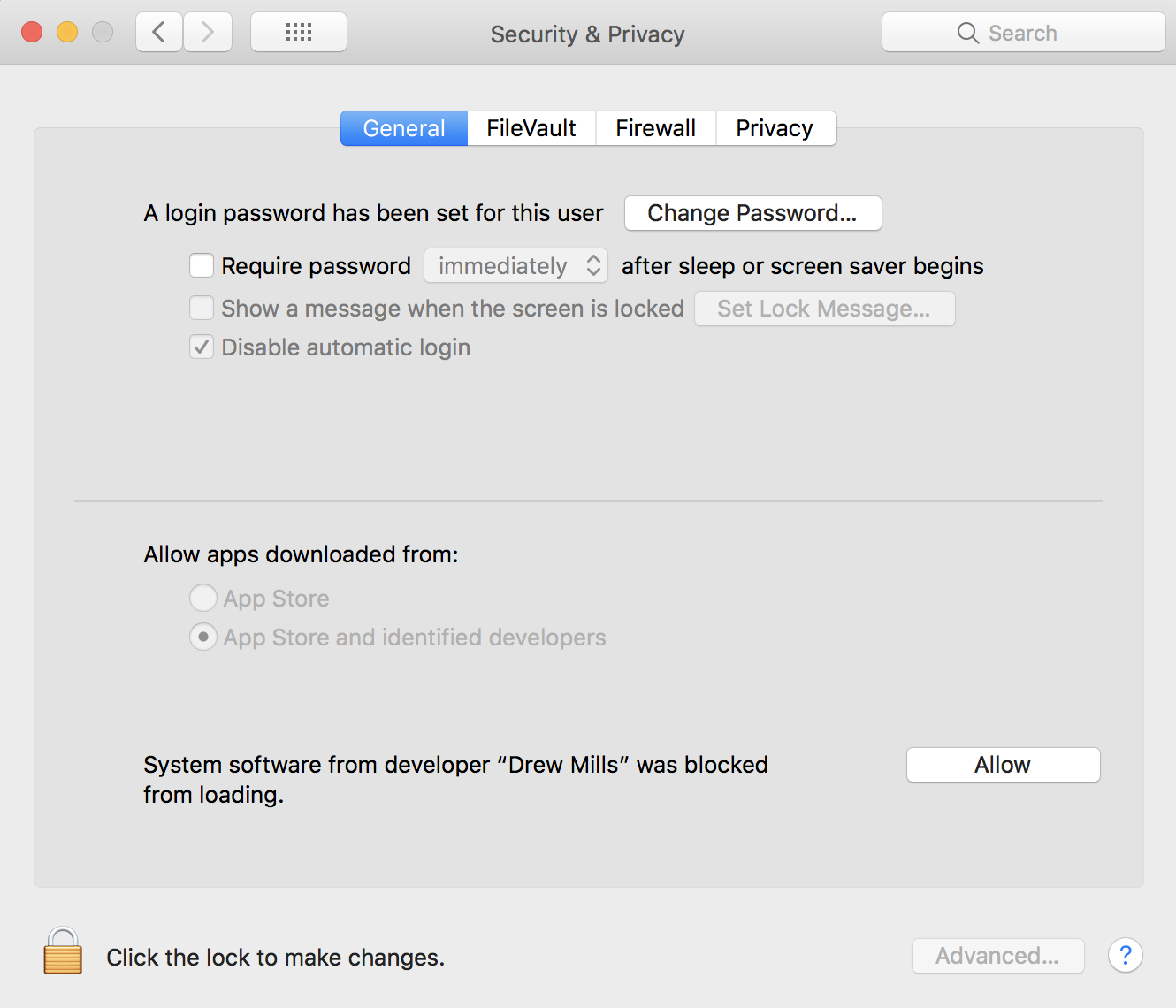
It took me a little while to figure out what @danvtim meant about the permissions. When you install the latest package, have your System Preferences open to the General tab under Security & Privacy. You will see a notification that says "System software from developer "Drew Mills" was blocked from loading." and there will be an "Allow" button. Click on that (you may have to unlock and enter your admin password first) and reboot or unload and reload the kext and you should be up and running. It worked for me!
 iampaulmata
on 21 Nov 2017
iampaulmata
on 21 Nov 2017
PowerA Xbox One controllers are incompatible with macOS 10.11+ thanks to a rewrite of the macOS USB kernel. We cannot resolve this issue. It is a bug in Apple's core OS code.
 FranticRain
on 3 Apr 2018
FranticRain
on 3 Apr 2018
Related issues
 AntB95
·
12Comments
AntB95
·
12Comments
 KorvinSzanto
·
4Comments
KorvinSzanto
·
4Comments
 akiosaito
·
9Comments
akiosaito
·
9Comments
 kdorff
·
14Comments
kdorff
·
14Comments
 lewlepton
·
8Comments
lewlepton
·
8Comments
Most helpful comment
It took me a little while to figure out what @danvtim meant about the permissions. When you install the latest package, have your System Preferences open to the General tab under Security & Privacy. You will see a notification that says "System software from developer "Drew Mills" was blocked from loading." and there will be an "Allow" button. Click on that (you may have to unlock and enter your admin password first) and reboot or unload and reload the kext and you should be up and running. It worked for me!