360controller: Driver hangs when enabling
Type of Controller
Xbox One
OS Version
Mac OS X 10.14.6 (Build 18G95)
Driver Version
360Controller 1.0.0-alpha.4
Connection Method
Wired
Device Name and Info
Device Name: Controller
Product ID: 0x02ea
Vendor ID: 0x045e (Microsoft Corporation)
Response of Controller
N/A
Response in Preference Pane
N/A
Detailed Explaination of Issue
Driver (System Preference) always hangs when trying to "Enable Driver". I've attached a system report for any cases.
Although, the Xbox 360 Controllers panel couldn't find the device, which means "No device found" in the controller select box.
Thanks in advance!
360cont_hang_report.txt
 akiosaito
All 9 comments
Okay so long story short, when you’re pressing the “enable driver” button, it doesn’t actually enable the driver. Rather, it does a debug process to try and diagnose issues with your driver installation. Clearly there’s been some sort of issue, because the driver should be loaded automatically when you plug in a controller, and it shouldn’t crash when you run the diagnostic. So let’s run it by hand and see if we can figure out what the real problem is. Run this command in your terminal and let me know what the output is. It will prompt you for your password, but this is just because it’s a macOS tool that is trying to manually load the driver.
sudo kextutil /Library/Extensions/360Controller.kext
 FranticRain
on 27 Oct 2019
FranticRain
on 27 Oct 2019
Thanks for the prompt reply!
$ sudo kextutil /Library/Extensions/360Controller.kext
Password:
Error copying bundle during staging: -1
Unable to stage kext (/System/Library/Extensions/roller.kext) to secure location.
Notice: /Library/Extensions/360Controller.kext has debug properties set.
Warnings:
Personality CFBundleIdentifier differs from containing kext's (not necessarily a mistake, but rarely done):
ChatPadKeyboardEvents(kernel) kxld[com.mice.driver.Xbox360Controller]: The super class vtable '__ZTV9IOService' for vtable '__ZTV17Xbox360Peripheral' is out of date. Make sure your kext has been built against the correct headers.
(kernel) kxld[com.mice.driver.Xbox360Controller]: The super class vtable '__ZTV11IOHIDDevice' for vtable '__ZTV20ChatPadKeyboardClass' is out of date. Make sure your kext has been built against the correct headers.
(kernel) kxld[com.mice.driver.Xbox360Controller]: The super class vtable '__ZTV11IOHIDDevice' for vtable '__ZTV22Xbox360ControllerClass' is out of date. Make sure your kext has been built against the correct headers.
(kernel) kxld[com.mice.driver.Xbox360Controller]: The __ZTV22Xbox360Pretend360Class was not patched because its parent, the __ZTV22Xbox360ControllerClass, was not patchable.
(kernel) kxld[com.mice.driver.Xbox360Controller]: The __ZTV22XboxOneControllerClass was not patched because its parent, the __ZTV22Xbox360ControllerClass, was not patchable.
(kernel) kxld[com.mice.driver.Xbox360Controller]: The __ZTV22XboxOnePretend360Class was not patched because its parent, the __ZTV22XboxOneControllerClass, was not patchable.
(kernel) kxld[com.mice.driver.Xbox360Controller]: The __ZTV27XboxOriginalControllerClass was not patched because its parent, the __ZTV22Xbox360ControllerClass, was not patchable.
(kernel) Can't load kext com.mice.driver.Xbox360Controller - link failed.
(kernel) Failed to load executable for kext com.mice.driver.Xbox360Controller.
(kernel) Kext com.mice.driver.Xbox360Controller failed to load (0xdc008016).
(kernel) Failed to load kext com.mice.driver.Xbox360Controller (error 0xdc008016).
Failed to load /Library/StagedExtensions/Library/Extensions/360Controller.kext - (libkern/kext) link error.
Check library declarations for your kext with kextlibs(8).
akiosaito
on 27 Oct 2019
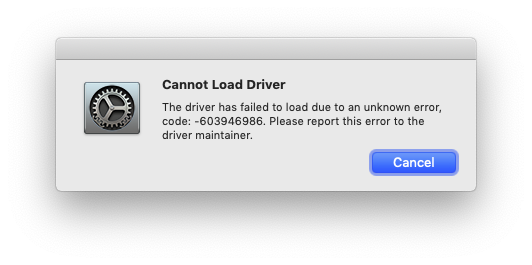
This is a known issue, thankfully. I’m working on a fix and hope to have it out soon.
FranticRain
on 27 Oct 2019
Yeah I've got this too:
 kud
on 3 Nov 2019
kud
on 3 Nov 2019
@kud Thats the same issue. Will be covered in the fix.
FranticRain
on 3 Nov 2019
Thank you! :)
kud
on 3 Nov 2019
This should be resolved in alpha 5. Let me know if it fixes your issue.
FranticRain
on 4 Nov 2019
I'll do, cheers!
kud
on 4 Nov 2019
Confirmed the fix.
Thanks a lot!
akiosaito
on 5 Nov 2019
Related issues
 Zhorack
·
14Comments
Zhorack
·
14Comments
 urbanman2004
·
14Comments
urbanman2004
·
14Comments
 mchlbowyer
·
8Comments
mchlbowyer
·
8Comments
 Powne
·
14Comments
Powne
·
14Comments
 PokeCaptain
·
16Comments
PokeCaptain
·
16Comments
Most helpful comment
This is a known issue, thankfully. I’m working on a fix and hope to have it out soon.