360controller: Macbook air fails boot after 1.0.0-alpha.2
Type of Controller
Xbox 360 wired
OS Version
maybe 10.11.6
Driver Version
1.0.0-alpha.2
Connection Method
Wired
Device Name and Info
MacBook Air 3-4 years old.
Response of Controller
N/A
Response in Preference Pane
N/A
Detailed Explaination of Issue
What i did:
I installed the following driver: https://github.com/360Controller/360Controller/releases/tag/v1.0.0-alpha.2
And restarted.
Result:
The Macbook air boots, sounds the boot sound, shows the Apple logo with loading bar. The bar loads to about 60% then stops and stays. I waited for 20 minutes and then turned it off.
What I tried:
1 safe mode boot. Result: It boots and the bar that earlier went to 60% now goes to what looks like 100% and stays there. I turned off again after 20 minutes.
2 i did hardware test boot by pressing "D" key. Result: It returned only that the battery is getting older.
3 i did "command + option + R + P" keys boot to clear PRAM. Result: screen flashed and rebooted and issue is still there.
I have not tried "V" key boot.
 Zhorack
All 14 comments
Try booting up in Verbose Mode by holding CMD+V at boot. It won’t fix it, but the output may prove useful
 PokeCaptain
on 11 May 2019
PokeCaptain
on 11 May 2019
If you just hold Command + R, you'll get back in to the "Recovery Partition." First, when you get into the recovery partition, open up the disk utility, and find the drive that contains your operating system and files. In most cases, it's Macintosh HD. Click on that disk, and in the top bar, press the "Mount" button. It should prompt you for a password so it can unlock the disk. If you don't remember what it is, it probably is the same as your user login password. Now your disk is mounted.
Now open up the terminal. You need to cd into /Volumes/Macintosh HD/Library/Extensions. Don't forget to swap Macintosh HD with your disk name, if it is different. If you run ls in the directory, it will show you all of the installed extensions.
Delete these by running these commands:
rm -rf 360Controller.kext Wireless360Controller.kext WirelessGamingReceiver.kext
You may also need to delete the preference pane located in /Volumes/Macintosh HD/Library/PreferencePanes. It is called Pref360Control.prefPane. If you were to cd to that directory, you would run this command:
rm -rf Pref360Control.prefPane
Here's all of those steps again in a single line: Make sure to replace Macintosh HD with the name of your hard drive if it is different.
rm -rf "/Volumes/Macintosh HD/Library/Extensions/360Controller.kext" \
"/Volumes/Macintosh HD/Library/Extensions/WirelessGamingReceiver.kext" \
"/Volumes/Macintosh HD/Library/Extensions/Wireless360Controller.kext" \
"/Volumes/Macintosh HD/Library/PreferencePanes/Pref360Control.prefPane"
This was probably caused by some sort of incompatibility with the version I built and 10.11. This should remove all traces of the driver from your system. Let me know if this isn't clear or if you need some more help.
 FranticRain
on 11 May 2019
FranticRain
on 11 May 2019
Had this issue as well with the following system:
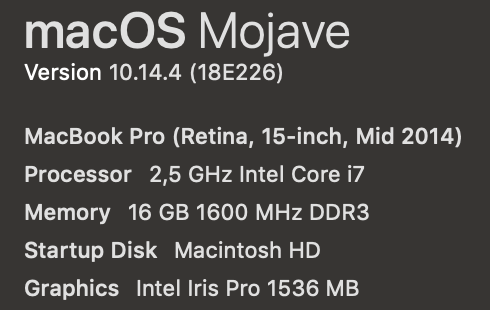
After driver installation I was prompted for a reboot, rebooted and had the same ~20min loading bar (mine eventually went up to 100%) but did not ever get into the OS.
Can confirm that removing the driver as suggested by @FranticRain above does indeed solve this problem and I'm able to boot as normal again
 J-Zeitler
on 11 May 2019
J-Zeitler
on 11 May 2019
I am a newbie at navigating the recovery partition. I tried the commands and got the response "sudo: command not found". What beginner mistake am I making?
Thank you!
Zhorack
on 11 May 2019
@Zhorack I forget if you are root or not in the recovery partition. Try running the commands without sudo and see what happens.
FranticRain
on 11 May 2019
@J-Zeitler Just to confirm, did you have this issue with the alpha version or the old version? If that's happening in the alpha version with 10.14, that's very disappointing to hear.
FranticRain
on 12 May 2019
@FranticRain it worked! Thanks alot! Now, do you believe any version will work for my macbook air?
Zhorack
on 12 May 2019
@Zhorack Stable 0.16.x versions should work. But I'm also going to release a 1.0.0alpha-3 soon that should work on your system. I'd appreciate it if you could give it a shot. I'll leave this open until we can confirm that alpha-3 fixes this issue.
FranticRain
on 12 May 2019
@Zhorack And alpha-3 is now out. Please give it a shot and let me know if it fixes this issue.
FranticRain
on 13 May 2019
@FranticRain I only tried the alpha2, this one: https://github.com/360Controller/360Controller/releases/tag/v1.0.0-alpha.2
then reverted to 0.16.11 which seems to work for my use case. Btw, real props for the deadzone adjustment feature. Makes my old crappy controller with half-broken thumsticks work!
J-Zeitler
on 13 May 2019
@J-Zeitler That's unfortunate. I had hoped that 1.0.0 would have fixed that issue. Now I have no idea what the cause of this hang on boot is...
FranticRain
on 13 May 2019
Saw that you released an alpha3. Could try that one as well, may not have time until the weekend again though. In the meantime, let me know what system checks to run if I get that same behavior again. Perhaps i could provide some logdumps on what the OS tries to do when trying to boot/load the driver
J-Zeitler
on 14 May 2019
alpha-3 shouldn't solve your problems, but you're more than welcome to give it a shot. If you want to try and find out why it's broken, holding down Command + V during boot will give you verbose output during boot. Theoretically it will hang on a line and that will be a clue as to what has gone wrong.
FranticRain
on 14 May 2019
Closing this down since the original poster's issue has been resolved.
FranticRain
on 26 May 2019
Related issues
 JohnGillanders
·
15Comments
JohnGillanders
·
15Comments
 Powne
·
14Comments
Powne
·
14Comments
 dude396
·
5Comments
dude396
·
5Comments
 SolivaTechClub
·
5Comments
SolivaTechClub
·
5Comments
 NachoFornier
·
10Comments
NachoFornier
·
10Comments
Most helpful comment
If you just hold Command + R, you'll get back in to the "Recovery Partition." First, when you get into the recovery partition, open up the disk utility, and find the drive that contains your operating system and files. In most cases, it's
Macintosh HD. Click on that disk, and in the top bar, press the "Mount" button. It should prompt you for a password so it can unlock the disk. If you don't remember what it is, it probably is the same as your user login password. Now your disk is mounted.Now open up the terminal. You need to
cdinto/Volumes/Macintosh HD/Library/Extensions. Don't forget to swapMacintosh HDwith your disk name, if it is different. If you runlsin the directory, it will show you all of the installed extensions.Delete these by running these commands:
You may also need to delete the preference pane located in
/Volumes/Macintosh HD/Library/PreferencePanes. It is calledPref360Control.prefPane. If you were tocdto that directory, you would run this command:Here's all of those steps again in a single line: Make sure to replace
Macintosh HDwith the name of your hard drive if it is different.This was probably caused by some sort of incompatibility with the version I built and 10.11. This should remove all traces of the driver from your system. Let me know if this isn't clear or if you need some more help.