360controller: No devices found
Hi,
I just installed Xbox 360 Controller on my computer but when I'm connecting my controller : "No devices found"
I know that my controller works on PC and I'm using a MacBook Pro 13' on MacOS High Sierra 10.13.4
Thanks for your help
Antoine
 AntB95
All 12 comments
Same issue here. I have never installed 360 controller on this machine before.
Updated to MacOS High Sierra 10.13.4, then downloaded and installed 360 controller.
No controllers were recognized so I dove into the settings.
In the settings I constantly see "no devices found"
Going into advanced tab, under options I see that "enable driver" is unchecked. No matter what I do to check it, it will not save that state.


 onlinewithryan
on 9 Apr 2018
onlinewithryan
on 9 Apr 2018
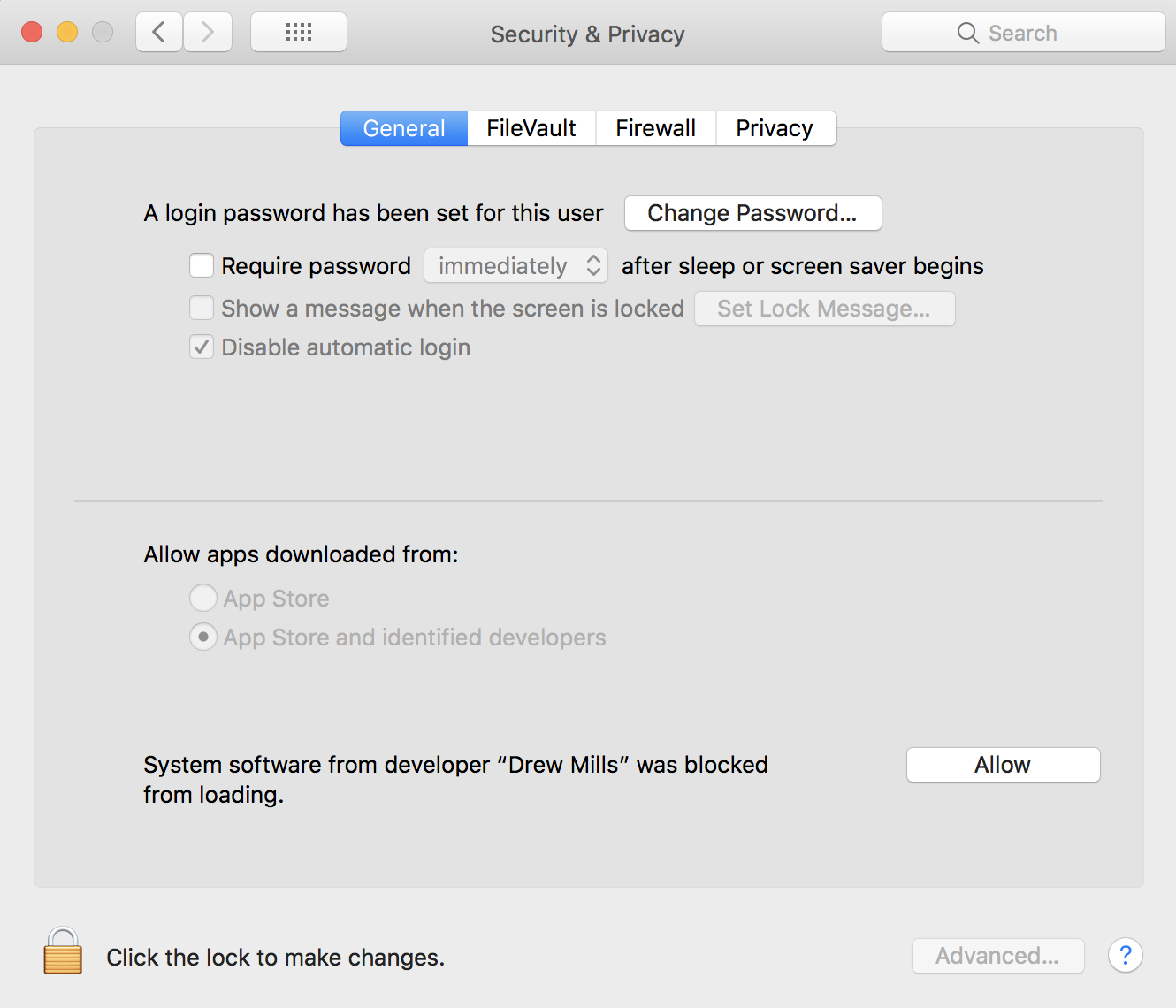
Check the 'Security and Privacy' panel in preferences, the driver might be forbidden to run by system there.
 tommo
on 10 Apr 2018
tommo
on 10 Apr 2018
Before we can help you, please consult the README and provide all necessary information so that we can help you with your issue. https://github.com/360Controller/360Controller#wired-xbox-360-controllers
 FranticRain
on 11 Apr 2018
FranticRain
on 11 Apr 2018
I did read everything but still, there is no solution to my problem in the documentation.
I have an Xbox One Controller. The driver won't find the controller. Withe Bluetooth nor via cable.
The Controller is recognized by my Mac via bluetooth and via cable (its an sending cable). If I connect the controller via bluetooth and start the game it recognizes the controller but one a few btns work.
On the driver side, in the Advanced menu, the Enable Driver option won't say checked when I leave the settings and open the driver again.
 AnasHaw
on 22 Apr 2018
AnasHaw
on 22 Apr 2018
@AnasHaw From the documentation:
Any problems with game compatibility in Bluetooth mode are completely out of our control and are up to you to solve in conjunction with the game developer.
For the wired portion, make a new issue, I assume you are posting here because your preference pane also says "No devices found." Does your controller appear in the "About This Mac" USB report? What is it's product and vendor number? Did you check the security and privacy panel as mentioned earlier in this post?
FranticRain
on 23 Apr 2018
My Controller not detected on the pref pane too. For reference, below the USB info:
Controller:

  Product ID:   0x02a0
  Vendor ID:    0x0738  (Mad Catz, Inc.)
  Version:  1.00
  Serial Number:    3A8D92F8
  Speed:    Up to 12 Mb/sec
  Manufacturer: Microsoft Corporation.
  Location ID:  0x14d20000 / 15
  Current Available (mA):   500
  Extra Operating Current (mA): 0
 mahdaen
on 8 May 2018
mahdaen
on 8 May 2018
Hello everyone!
I have the same issue with my controller. I have found a not very practical or safe work-around. I don't really think it is a viable solution but it might help you figure our how to solve this problem with Mac OS 10.13.4 (at least that's the one I have and the controller doesn't work with usb...).
Searching a solution for another issue on the Steam forums I found this thread:
https://steamcommunity.com/app/353370/discussions/1/1484359403778266904/
A user named Mitchismo posted this solution to their problem (not being able to install some Steam controller drivers):
1) Reboot into Recovery Mode (Command-R at Reboot)
2) Disable SIP (Enter "csrutil disable" in terminal in Recovery Mode)
3) Reboot
4) Run Steam & install the component (successfully)
5) Quit, Reboot into Recovery mode (Command-R at Reboot)
6) Enable SIP (Enter "csrutil enable" in Terminal)
7) Reboot and Enjoy your updated controller.
I thought there could be a similar issue for the xbox 360 driver and it seems like it is! As long as the SIP is disabled you can properly install and use the driver (the controller works again) and as soon as you enable it and reboot the controller stops working. It seems like it is a security issue within Mac OS? I don't really understand any of it but it works :-)
I hope this can help somehow. Good luck and thank you for your awesome work! @FranticRain
 alonsoluis85
on 8 May 2018
alonsoluis85
on 8 May 2018
This process is well known and documented in the README. https://github.com/360Controller/360Controller#adding-third-party-controllers
I don't know what your problem was or why this would help at all in solving it. It is probably tied to not accepting the driver in System Preferences -> Security and Privacy -> General.
FranticRain
on 9 May 2018
Thank you for the quick answer @FranticRain !
Unfortunately during the installation process I never had the option to accept the driver in system preferences. I tried to install it with Mac OS 10.13.4.
I am going to try to install everything again tonight see if I did anything wrong.
Have a great day!
alonsoluis85
on 9 May 2018
This issue involves too many individual issues and seems to have been either abandoned or resolved by its respective participants. Please open a new issue if you still have one.
FranticRain
on 1 Jun 2018
This process is well known and documented in the README. https://github.com/360Controller/360Controller#adding-third-party-controllers
I don't know what your problem was or why this would help at all in solving it. It is probably tied to not accepting the driver in System Preferences -> Security and Privacy -> General.
I have the same problem. I did this before, Allowed the drivers but it still doesn't work
 AnimeShrek568
on 14 Dec 2019
AnimeShrek568
on 14 Dec 2019
I don't even have Steam, its about that Drew Mills stuff?
 jbarros35
on 22 Dec 2019
jbarros35
on 22 Dec 2019
Related issues
 akiosaito
·
9Comments
akiosaito
·
9Comments
 metatrevor
·
7Comments
metatrevor
·
7Comments
 NachoFornier
·
10Comments
NachoFornier
·
10Comments
 justplainmark
·
8Comments
justplainmark
·
8Comments
 KorvinSzanto
·
4Comments
KorvinSzanto
·
4Comments
Most helpful comment
Check the 'Security and Privacy' panel in preferences, the driver might be forbidden to run by system there.