360controller: Wired Xbox One Controller not recognized
I have a wired xbox one controller I have been trying to connect. I just downloaded and installed the 0.16.4 release and I only get "no devices found" under my preferences pane. Please help! I'm hoping this isn't a killer but I am running OSX 10.11.6.
 Opphitter16
All 25 comments
Also the controller does vibrate when I plug it in to the Mac. And I do have an entry for a controller in my system report. If it helps, here are the product and vendor IDs.
Product ID: 0x02d1
Vendor ID: 0x045e (Microsoft Corporation)
Opphitter16
on 14 Oct 2016
Uninstall other Xbox One controller drivers, such as Xone-OSX. Make sure to open the preference pane after you connect the controller. It sometimes has issues with live loading controllers. Does the controller illuminate at all?
 FranticRain
on 14 Oct 2016
FranticRain
on 14 Oct 2016
Ok, I have uninstalled my other drivers and I made sure to open the
preference pane after I connected my controller but nothing has changed as
far as symptoms. I also uninstalled and reinstalled the 0.16.4 release
again. My controller doesn't light up unless I press the button myself and
that doesn't seem to change anything for me. To clarify, my controller did
not light up before I had removed the other drivers either.
On Fri, Oct 14, 2016 at 12:30 AM, Drew Mills [email protected]
wrote:
Uninstall other Xbox One controller drivers, such as Xone-OSX. Make sure
to open the preference pane after you connect the controller. It sometimes
has issues with live loading controllers. Does the controller illuminate at
all?—
You are receiving this because you authored the thread.
Reply to this email directly, view it on GitHub
https://github.com/360Controller/360Controller/issues/369#issuecomment-253707030,
or mute the thread
https://github.com/notifications/unsubscribe-auth/AVxPX4CRX-2xEKYuzEGqi2UIFJb3JWFwks5qzwVQgaJpZM4KWfwo
.
Opphitter16
on 14 Oct 2016
After you plug in the controller, run this command in your terminal: sudo kextstat
It will print out a bunch of lines of data, and I need to see all of that.
FranticRain
on 14 Oct 2016
Hey I think I'm having the same problem as this guy, im may not of uninstalled Xone-OSX but I'm not sure how too, but I copied what my terminal said after I put in the command
Index Refs Address Size Wired Name (Version)
1 81 0xffffff7f80a3e000 0x8c50 0x8c50 com.apple.kpi.bsd (14.5.0)
2 7 0xffffff7f80da3000 0x28c0 0x28c0 com.apple.kpi.dsep (14.5.0)
3 104 0xffffff7f80a03000 0x20500 0x20500 com.apple.kpi.iokit (14.5.0)
4 110 0xffffff7f80a24000 0xbf50 0xbf50 com.apple.kpi.libkern (14.5.0)
5 96 0xffffff7f80a00000 0x2d50 0x2d50 com.apple.kpi.mach (14.5.0)
6 46 0xffffff7f80a30000 0x8590 0x8590 com.apple.kpi.private (14.5.0)
7 62 0xffffff7f80a39000 0x4900 0x4900 com.apple.kpi.unsupported (14.5.0)
8 0 0xffffff7f80ddc000 0xc000 0xc000 com.apple.kec.pthread (1) <7 6 5 4 1>
9 1 0xffffff7f80de8000 0x9000 0x9000 com.apple.kec.Libm (1) <4>
10 3 0xffffff7f80f99000 0xa0000 0xa0000 com.apple.kec.corecrypto (1.0) <7 6 5 4 3 1>
11 24 0xffffff7f81334000 0x9000 0x9000 com.apple.iokit.IOACPIFamily (1.4) <7 6 4 3>
12 30 0xffffff7f80b24000 0x2f000 0x2f000 com.apple.iokit.IOPCIFamily (2.9) <7 6 5 4 3>
13 2 0xffffff7f8291d000 0x5f000 0x5f000 com.apple.driver.AppleACPIPlatform (3.1) <12 11 7 6 5 4 3 1>
14 1 0xffffff7f81039000 0xb000 0xb000 com.apple.driver.AppleFDEKeyStore (28.30) <10 7 6 5 4 3 1>
15 2 0xffffff7f8132d000 0x7000 0x7000 com.apple.iokit.IOReportFamily (31) <5 4 3>
16 7 0xffffff7f80a47000 0x26000 0x26000 com.apple.iokit.IOStorageFamily (2.0) <7 6 5 4 3 1>
17 0 0xffffff7f81424000 0x19000 0x19000 com.apple.driver.DiskImages (398) <16 7 6 5 4 3 1>
18 1 0xffffff7f82250000 0xf000 0xf000 com.apple.driver.AppleCredentialManager (1.0) <7 5 4 3 1>
19 2 0xffffff7f80da9000 0xd000 0xd000 com.apple.driver.AppleMobileFileIntegrity (1.0.5) <7 6 5 4 3 2 1>
20 0 0xffffff7f8225f000 0x23000 0x23000 com.apple.driver.AppleKeyStore (2) <19 18 10 7 6 5 4 3 1>
21 0 0xffffff7f80da6000 0x2000 0x2000 com.apple.security.TMSafetyNet (8) <7 6 5 4 2 1>
22 2 0xffffff7f80db6000 0x5000 0x5000 com.apple.kext.AppleMatch (1.0.0d1) <4 1>
23 1 0xffffff7f80dbb000 0x17000 0x17000 com.apple.security.sandbox (300.0) <22 19 7 6 5 4 3 2 1>
24 0 0xffffff7f80dd2000 0x9000 0x9000 com.apple.security.quarantine (3) <23 22 7 6 5 4 2 1>
25 0 0xffffff7f82993000 0x8000 0x8000 com.apple.nke.applicationfirewall (161) <7 6 5 4 3 1>
26 0 0xffffff7f828f0000 0x3000 0x3000 com.apple.driver.AppleAPIC (1.7) <4 3>
27 3 0xffffff7f812ba000 0x4000 0x4000 com.apple.iokit.IOSMBusFamily (1.1) <5 4 3>
28 0 0xffffff7f82982000 0x7000 0x7000 com.apple.driver.AppleACPIEC (3.1) <27 13 11 5 4 3>
29 0 0xffffff7f82163000 0x4000 0x4000 com.apple.driver.AppleSMBIOS (2.1) <7 4 3>
30 0 0xffffff7f82191000 0x8000 0x8000 com.apple.driver.AppleRTC (2.0) <11 5 4 3 1>
31 5 0xffffff7f81044000 0x76000 0x76000 com.apple.iokit.IOHIDFamily (2.0.0) <14 7 6 5 4 3 2 1>
32 0 0xffffff7f8298c000 0x4000 0x4000 com.apple.driver.AppleACPIButtons (3.1) <31 13 11 7 6 5 4 3 1>
33 1 0xffffff7f82581000 0x5000 0x5000 com.apple.driver.AppleEFIRuntime (2.0) <7 6 5 4 3>
34 1 0xffffff7f82586000 0xb000 0xb000 com.apple.driver.AppleEFINVRAM (2.0) <33 7 6 5 4 3 1>
35 0 0xffffff7f82169000 0x8000 0x8000 com.apple.driver.AppleSmartBatteryManager (161.0.0) <27 11 5 4 3 1>
36 0 0xffffff7f8250c000 0x3000 0x3000 com.apple.driver.AppleHPET (1.8) <11 7 5 4 3>
37 1 0xffffff7f8228d000 0x8000 0x8000 com.apple.driver.AppleIntelLpssDmac (2.0.57) <12 11 5 4 3>
39 1 0xffffff7f822ac000 0xa000 0xa000 com.apple.driver.AppleIntelLpssGspi (2.0.57) <12 11 7 5 4 3>
40 10 0xffffff7f80f11000 0x65000 0x65000 com.apple.iokit.IOUSBFamily (720.4.4) <12 7 5 4 3 1>
41 0 0xffffff7f810ec000 0x22000 0x22000 com.apple.driver.AppleUSBXHCI (710.4.11) <40 12 7 5 4 3 1>
42 1 0xffffff7f822b6000 0x14000 0x14000 com.apple.driver.AppleIntelLpssSpiController (2.0.57) <39 37 11 5 4 3>
43 1 0xffffff7f824df000 0x17000 0x17000 com.apple.driver.AppleHSSPISupport (41.3) <42 11 5 4 3 1>
44 5 0xffffff7f80ed2000 0x2c000 0x2c000 com.apple.iokit.IONetworkingFamily (3.2) <7 6 5 4 3 1>
45 1 0xffffff7f8165d000 0x7000 0x7000 com.apple.driver.mDNSOffloadUserClient (1.0.1b8) <44 4 3 1>
46 1 0xffffff7f81664000 0xab000 0xab000 com.apple.iokit.IO80211Family (730.60) <44 10 7 6 5 4 3 1>
47 0 0xffffff7f81717000 0x5e6000 0x5e6000 com.apple.driver.AirPort.Brcm4360 (930.37.3) <46 45 44 12 7 6 5 4 3 1>
48 5 0xffffff7f811ab000 0xde000 0xde000 com.apple.iokit.IOThunderboltFamily (4.2.2) <5 4 3 1>
49 0 0xffffff7f82078000 0x1b000 0x1b000 com.apple.driver.AppleThunderboltNHI (3.1.7) <48 12 11 5 4 3 1>
50 2 0xffffff7f81fff000 0x24000 0x24000 com.apple.driver.AppleMultitouchDriver (264.6) <31 5 4 3 1>
51 0 0xffffff7f824f9000 0x9000 0x9000 com.apple.driver.AppleHSSPIHIDDriver (41.3) <50 43 31 5 4 3 1>
52 0 0xffffff7f8203a000 0x6000 0x6000 com.apple.driver.AppleTopCaseHIDEventDriver (67) <50 31 6 5 4 3 1>
53 0 0xffffff7f82029000 0x8000 0x8000 com.apple.driver.AppleHIDKeyboard (176.2) <31 4 3>
54 0 0xffffff7f82066000 0x5000 0x5000 com.apple.driver.AppleThunderboltPCIDownAdapter (2.0.2) <48 12 5 4 3 1>
55 1 0xffffff7f820ba000 0xf000 0xf000 com.apple.driver.AppleThunderboltDPAdapterFamily (4.0.6) <48 11 5 4 3 1>
56 0 0xffffff7f820e4000 0x6000 0x6000 com.apple.driver.AppleThunderboltDPInAdapter (4.0.6) <55 48 5 4 3 1>
57 2 0xffffff7f81605000 0x16000 0x16000 com.apple.iokit.IOAHCIFamily (2.7.5) <5 4 3 1>
58 0 0xffffff7f828f5000 0x1b000 0x1b000 com.apple.driver.AppleAHCIPort (3.1.2) <57 12 5 4 3 1>
60 0 0xffffff7f81638000 0x18000 0x18000 com.apple.iokit.IOAHCIBlockStorage (2.7.1) <57 16 6 5 4 3 1>
61 0 0xffffff7f81f48000 0x3000 0x3000 com.apple.driver.XsanFilter (404) <16 5 4 3 1>
62 0 0xffffff7f81e74000 0xa000 0xa000 com.apple.BootCache (36) <7 6 5 4 3 1>
63 0 0xffffff7f82812000 0x6000 0x6000 com.apple.AppleFSCompression.AppleFSCompressionTypeZlib (1.0.0) <6 4 3 2 1>
64 0 0xffffff7f8281a000 0x3000 0x3000 com.apple.AppleFSCompression.AppleFSCompressionTypeDataless (1.0.0d1) <7 6 4 3 2 1>
66 0 0xffffff7f81d76000 0xde000 0xde000 com.apple.driver.CoreStorage (471.30.1) <16 7 6 5 4 3 1>
68 0 0xffffff7f81151000 0x1c000 0x1c000 com.apple.driver.AppleUSBHub (705.4.2) <40 5 4 3 1>
69 1 0xffffff7f810e2000 0xa000 0xa000 com.apple.driver.AppleUSBComposite (705.4.9) <40 4 3 1>
71 3 0xffffff7f80ae2000 0x2b000 0x2b000 com.apple.iokit.IOSCSIArchitectureModelFamily (3.7.5) <5 4 3 1>
72 0 0xffffff7f8114a000 0x7000 0x7000 com.apple.driver.AppleUSBMergeNub (705.4.0) <69 40 4 3 1>
73 1 0xffffff7f80f82000 0x11000 0x11000 com.apple.iokit.IOUSBMassStorageClass (3.7.2) <71 40 16 5 4 3 1>
74 1 0xffffff7f80df1000 0x18000 0x18000 com.apple.iokit.IOSCSIBlockCommandsDevice (3.7.5) <71 16 5 4 3 1>
75 0 0xffffff7f8213d000 0x8000 0x8000 com.apple.driver.AppleUSBCardReader (3.5.5) <74 73 71 40 16 5 4 3 1>
77 15 0xffffff7f813cd000 0x3b000 0x3b000 com.apple.iokit.IOGraphicsFamily (2.4.1) <12 7 5 4 3 1>
78 2 0xffffff7f82327000 0x6f000 0x6f000 com.apple.iokit.IOAcceleratorFamily2 (156.16) <77 12 7 6 5 4 3 1>
79 3 0xffffff7f823a4000 0x7000 0x7000 com.apple.AppleGraphicsDeviceControl (3.10.25) <7 6 5 4 3 1>
80 0 0xffffff7f823ab000 0x54000 0x54000 com.apple.driver.AppleIntelBDWGraphicsFramebuffer (10.0.6) <79 78 77 15 12 11 7 6 5 4 3 1>
81 4 0xffffff7f81414000 0x10000 0x10000 com.apple.iokit.IONDRVSupport (2.4.1) <77 12 7 5 4 3>
82 1 0xffffff7f812a5000 0x13000 0x13000 com.apple.iokit.IOSurface (97.4) <7 5 4 3 1>
83 0 0xffffff7f8241e000 0x79000 0x79000 com.apple.driver.AppleIntelBDWGraphics (10.0.6) <82 78 77 12 7 6 5 4 3 1>
84 0 0xffffff7f82827000 0xa8000 0xa8000 com.apple.driver.AppleCameraInterface (5.36.0) <12 7 6 5 4 3 1>
85 1 0xffffff7f821fd000 0xe000 0xe000 com.apple.driver.AppleSMBusController (1.0.13d1) <27 12 11 5 4 3>
86 0 0xffffff7f8220e000 0xe000 0xe000 com.apple.driver.AppleMCCSControl (1.2.12) <85 77 12 11 7 5 4 3 1>
87 5 0xffffff7f81347000 0x1a000 0x1a000 com.apple.driver.AppleSMC (3.1.9) <11 7 5 4 3 1>
88 1 0xffffff7f827e6000 0x5000 0x5000 com.apple.driver.AppleBacklightExpert (1.1.0) <81 77 12 5 4 3>
89 0 0xffffff7f828e8000 0x5000 0x5000 com.apple.driver.AppleBacklight (170.7.4) <88 87 81 77 12 5 4 3>
90 1 0xffffff7f827e3000 0x3000 0x3000 com.apple.driver.AppleGraphicsControl (3.10.25) <77 12 11 7 5 4 3 1>
92 4 0xffffff7f8133d000 0xa000 0xa000 com.apple.driver.IOPlatformPluginFamily (5.9.1d7) <11 7 6 5 4 3>
93 1 0xffffff7f81363000 0x17000 0x17000 com.apple.driver.X86PlatformPlugin (1.0.0) <92 87 40 11 7 6 5 4 3 1>
96 1 0xffffff7f812c8000 0xe000 0xe000 com.apple.iokit.IOSerialFamily (11) <7 6 5 4 3 1>
98 0 0xffffff7f82248000 0x3000 0x3000 com.apple.driver.AppleLPC (1.7.3) <92 12 5 4 3>
99 0 0xffffff7f80f96000 0x3000 0x3000 com.apple.iokit.IOUSBUserClient (705.4.0) <40 7 5 4 3 1>
100 2 0xffffff7f81e90000 0x78000 0x78000 com.apple.vecLib.kext (1.2.0) <9 6 5 4 3>
101 4 0xffffff7f81f08000 0x30000 0x30000 com.apple.iokit.IOAudioFamily (203.3) <100 5 4 3 1>
102 2 0xffffff7f8253f000 0xc000 0xc000 com.apple.iokit.IOHDAFamily (272.18.1) <5 4 3 1>
103 1 0xffffff7f82552000 0x1c000 0x1c000 com.apple.driver.AppleHDAController (272.18.1) <102 101 77 12 7 6 5 4 3 1>
104 1 0xffffff7f812be000 0x5000 0x5000 com.apple.iokit.IOSlowAdaptiveClockingFamily (1.0.0) <7 6 5 4 3 1>
105 0 0xffffff7f82289000 0x2000 0x2000 com.apple.driver.AppleIntelSlowAdaptiveClocking (4.0.0) <104 4 3>
106 0 0xffffff7f824ce000 0xb000 0xb000 com.apple.driver.AppleHV (1) <7 6 5 4 3 1>
107 0 0xffffff7f824c9000 0x3000 0x3000 com.apple.driver.AppleHWAccess (1) <7 5 4 3>
108 0 0xffffff7f81d70000 0x5000 0x5000 com.apple.Dont_Steal_Mac_OS_X (7.0.0) <87 7 4 3 1>
109 2 0xffffff7f814c7000 0xad000 0xad000 com.apple.iokit.IOBluetoothFamily (4.3.6f3) <15 7 5 4 3 1>
110 0 0xffffff7f80f05000 0x6000 0x6000 com.apple.iokit.IOUserEthernet (1.0.1) <44 6 5 4 3 1>
111 1 0xffffff7f81584000 0x23000 0x23000 com.apple.iokit.IOBluetoothHostControllerUSBTransport (4.3.6f3) <109 40 12 11 7 5 4 3 1>
112 0 0xffffff7f815a7000 0x9000 0x9000 com.apple.iokit.BroadcomBluetoothHostControllerUSBTransport (4.3.6f3) <111 109 40 12 11 7 5 4 3>
113 0 0xffffff7f82158000 0x5000 0x5000 com.apple.driver.AppleSMCLMU (2.0.7d0) <87 77 5 4 3>
117 0 0xffffff7f82098000 0x17000 0x17000 com.apple.driver.AppleThunderboltIP (2.0.2) <48 44 12 5 4 3 1>
119 1 0xffffff7f8256e000 0x13000 0x13000 com.apple.kext.OSvKernDSPLib (1.15) <5 4>
120 1 0xffffff7f82591000 0x131000 0x131000 com.apple.driver.DspFuncLib (272.18.1) <119 101 100 34 6 5 4 3 1>
121 0 0xffffff7f826cc000 0xab000 0xab000 com.apple.driver.AppleHDA (272.18.1) <120 103 102 101 81 77 6 5 4 3 1>
123 0 0xffffff7f81ff6000 0x5000 0x5000 com.apple.driver.AppleUpstreamUserClient (3.6.1) <77 12 11 7 5 4 3 1>
124 0 0xffffff7f82807000 0x7000 0x7000 com.apple.driver.AppleGraphicsDevicePolicy (3.7.7) <90 79 77 12 11 7 6 5 4 3 1>
125 0 0xffffff7f821f0000 0x4000 0x4000 com.apple.driver.AppleOSXWatchdog (1) <12 7 6 5 4 3 1>
128 0 0xffffff7f814b3000 0xa000 0xa000 com.apple.iokit.IOBluetoothSerialManager (4.3.6f3) <96 7 5 4 3 1>
129 1 0xffffff7f8137a000 0x7000 0x7000 com.apple.driver.X86PlatformShim (1.0.0) <93 92 87 7 4 3>
130 0 0xffffff7f827c6000 0x14000 0x14000 com.apple.driver.AGPM (110.19.6) <92 81 79 77 12 5 4 3>
131 0 0xffffff7f821e9000 0x4000 0x4000 com.apple.driver.ApplePlatformEnabler (2.2.0d4) <7 5 4 3>
132 0 0xffffff7f81f40000 0x5000 0x5000 com.apple.driver.AudioAUUC (1.70) <101 77 12 11 7 5 4 3 1>
133 1 0xffffff7f81e80000 0x5000 0x5000 com.apple.kext.triggers (1.0) <7 6 5 4 3 1>
134 0 0xffffff7f81e85000 0x9000 0x9000 com.apple.filesystems.autofs (3.0) <133 7 6 5 4 3 1>
 iwatchhentaifortheplot
on 21 Oct 2016
iwatchhentaifortheplot
on 21 Oct 2016
Assuming that your controller was plugged in when you ran kextstat, then no driver was loaded when your controller was plugged in. Was you controller plugged in when you ran this kextstat? It needs to be immediately after a connect, before the drivers have a chance to be unloaded. Assuming you have a supported controller and no other driver is matching to the controller, the driver will load.
If you previously had Xone-OSX installed and aren't sure if you uninstalled it properly, then there is a 99% chance that you didn't uninstall it properly. The download for Xone-OSX is a DMG that contains two files. One of the files is an uninstall.command. All you have to do is double click on that script, and it will uninstall the driver from your system. Uninstall Xone-OSX and give it another shot.
FranticRain
on 21 Oct 2016
I uninstalled it by doing what you said, restarted and tried again and still controller won't light up
iwatchhentaifortheplot
on 21 Oct 2016
Okay, I need your controller's vendor and product IDs from Apple Menu -> System Preferences -> Xbox 360 Controllers
FranticRain
on 21 Oct 2016
It says No devices found
iwatchhentaifortheplot
on 21 Oct 2016
Sorry, I gave you the wrong path there. Here it is from the README, "...make an issue with the "Product ID" and "Vendor ID" of the controller. These can be found by accessing the Apple menu, selecting "About this Mac", and then selecting "System Report..." on the "Overview" tab. On the left hand side of the new window, select the "USB" option under "Hardware". If the controller is plugged in, there should be an entry in this window called "Controller"."
FranticRain
on 24 Oct 2016
Maybe theres a problem with my usb to micro-usb because when i plug it in there isnt a entry titled controller, only one titled Bluetooth USB Host Controller but i'm assuming thats not it as its still there regardless of if i have the controller plugged in or not
iwatchhentaifortheplot
on 27 Oct 2016
Yeah, that means that you are using a "charge" cable, not a "data" cable. Some micro-usb cables don't have data hookups. And if we can't get data, we can't make a controller work like a controller.
FranticRain
on 27 Oct 2016
okay thanks, i'll look for another cable to see if that one works
iwatchhentaifortheplot
on 27 Oct 2016
For me it says a mb per second count so i am using the right cable but my controller when i plug it in only vibrates and dusnt show a light
 milanvanhorssen
on 5 Dec 2016
milanvanhorssen
on 5 Dec 2016
WAIT I FOUNd it. the controller is in there but it isnt working.
it just says controller
and is made by microsoft

milanvanhorssen
on 5 Dec 2016
I just wanted to verify what @FranticRain said made it work. I had the exact same issue as @iwatchhentaifortheplot and I just found another micro usb cable and as soon as I plugged it in it lit up. It could also detect the controller live with the system preference pane open as well.
I'm on Mac OS X Sierra as well.
 moscoso
on 5 Dec 2016
moscoso
on 5 Dec 2016
Going to go ahead and close this one down. If your device isn't in that list, then you are using a charge cable and you need to change to a data cable. The VID and PID provided are already in the Info.plist, so it should work just fine. If you continue to have issues, make sure to update the firmware for your controller and try again.
FranticRain
on 18 Apr 2017
I am having the same issues. just trying to get controller to connect to plays games. have no knowledge with programming. the controller Product and Vendor ID is as follows: Product ID: 0x02dd
Vendor ID: 0x045e (Microsoft Corporation). When I pull up is recognized in system report but not in driver on system preference. Any help is appreciated. Thank You
 aj-21
on 30 Mar 2018
aj-21
on 30 Mar 2018
It says my controller is there with a vendor Id of 0x045e and product Id of 0x02d1
 twyns
on 6 Apr 2018
twyns
on 6 Apr 2018
@aj-21 @twyns
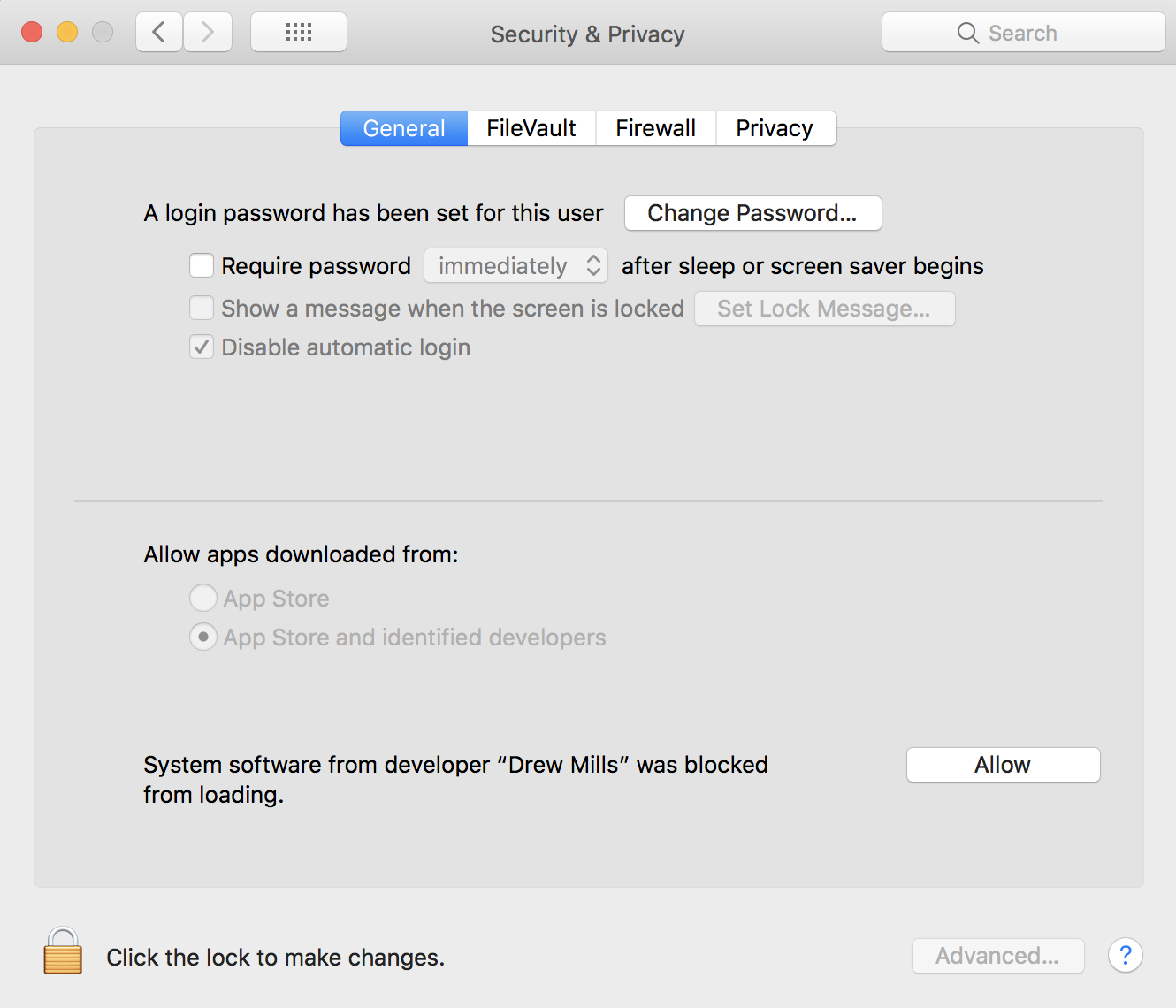
Please ensure that the driver has been allowed in System Preferences -> Security and Privacy -> General. This approval UI is only present in the Security & Privacy preferences pane for 30 minutes after the alert. Until you approve the kext, future load attempts will cause the approval UI to reappear but will not trigger another user alert.
FranticRain
on 6 Apr 2018
Help my controller is all plugged in and it still does not work
 Plzhelpm
on 13 Apr 2018
Plzhelpm
on 13 Apr 2018
I have done everything you said and it still does not turn on or respond to the computer
Plzhelpm
on 13 Apr 2018
@Plzhelpm Make a new issue.
Before we can help you, please consult the README and provide all necessary information so that we can help you with your issue. https://github.com/360Controller/360Controller#xbox-one-controllers-connected-with-usb
FranticRain
on 13 Apr 2018
Sorry, I am new to this, but what do you mean by make an issue. It says my controller is plugged in though.
 That-Radley-Guy
on 18 Apr 2018
That-Radley-Guy
on 18 Apr 2018
Go to the issues tab at the top of the page that you likely used to find this issue, and press the button that says "New Issue." Or, heck, press the big green button ON THIS PAGE that says "New Issue." Make sure that you read the README on the main page of the repository before you make a new issue.
FranticRain
on 18 Apr 2018
Related issues
 phnakarin
·
4Comments
phnakarin
·
4Comments
 danvtim
·
10Comments
danvtim
·
10Comments
 danielfox
·
3Comments
danielfox
·
3Comments
 akiosaito
·
9Comments
akiosaito
·
9Comments
 lewlepton
·
8Comments
lewlepton
·
8Comments
Most helpful comment
@aj-21 @twyns
Please ensure that the driver has been allowed in System Preferences -> Security and Privacy -> General. This approval UI is only present in the Security & Privacy preferences pane for 30 minutes after the alert. Until you approve the kext, future load attempts will cause the approval UI to reappear but will not trigger another user alert.