Zwavejs2mqtt: [HASS] Covers do not work in Home Assistant 2021.3.2
Version
Build/Run method
Docker
zwavejs2mqtt version: 2.1.1
zwavejs version: 6.6.0
Describe the bug
When attempting to use native Home Assistant MQTT discovery with 2021.3.2, cover position will not be read. Logs are complaining about values not being numeric:
2021-03-07 06:34:28 WARNING (MainThread) [homeassistant.components.mqtt.cover] Payload '{"time":1615095262295,"value":0}' is not numeric
2021-03-07 06:34:28 WARNING (MainThread) [homeassistant.components.mqtt.cover] Payload '{"time":1615095262345,"value":0}' is not numeric
2021-03-07 06:34:28 WARNING (MainThread) [homeassistant.components.mqtt.cover] Payload '{"time":1615095262395,"value":4}' is not numeric
2021-03-07 06:34:28 WARNING (MainThread) [homeassistant.components.mqtt.cover] Payload is not supported (e.g. open, closed, opening, closing, stopped): 4
2021-03-07 06:34:28 WARNING (MainThread) [homeassistant.components.mqtt.cover] Payload '{"time":1615095262547,"value":0}' is not numeric
2021-03-07 06:34:28 WARNING (MainThread) [homeassistant.components.mqtt.cover] Payload '{"time":1615095232039,"value":12}' is not numeric
2021-03-07 06:34:28 WARNING (MainThread) [homeassistant.components.mqtt.cover] Payload is not supported (e.g. open, closed, opening, closing, stopped): 12
2021-03-07 06:34:28 WARNING (MainThread) [homeassistant.components.mqtt.cover] Payload '{"time":1615095232125,"value":0}' is not numeric
2021-03-07 06:34:28 WARNING (MainThread) [homeassistant.components.mqtt.cover] Payload '{"time":1615095232664,"value":0}' is not numeric
2021-03-07 06:34:28 WARNING (MainThread) [homeassistant.components.mqtt.cover] Payload '{"time":1615095262295,"value":0}' is not numeric
2021-03-07 06:34:28 WARNING (MainThread) [homeassistant.components.mqtt.cover] Payload is not supported (e.g. open, closed, opening, closing, stopped): 0
2021-03-07 06:34:28 WARNING (MainThread) [homeassistant.components.mqtt.cover] Payload '{"time":1615095262345,"value":0}' is not numeric
2021-03-07 06:34:28 WARNING (MainThread) [homeassistant.components.mqtt.cover] Payload is not supported (e.g. open, closed, opening, closing, stopped): 0
2021-03-07 06:34:28 WARNING (MainThread) [homeassistant.components.mqtt.cover] Payload '{"time":1615095262395,"value":4}' is not numeric
2021-03-07 06:34:28 WARNING (MainThread) [homeassistant.components.mqtt.cover] Payload is not supported (e.g. open, closed, opening, closing, stopped): 4
2021-03-07 06:34:28 WARNING (MainThread) [homeassistant.components.mqtt.cover] Payload '{"time":1615095262547,"value":0}' is not numeric
2021-03-07 06:34:28 WARNING (MainThread) [homeassistant.components.mqtt.cover] Payload is not supported (e.g. open, closed, opening, closing, stopped): 0
2021-03-07 06:34:28 WARNING (MainThread) [homeassistant.components.mqtt.cover] Payload '{"time":1615095232039,"value":12}' is not numeric
2021-03-07 06:34:28 WARNING (MainThread) [homeassistant.components.mqtt.cover] Payload is not supported (e.g. open, closed, opening, closing, stopped): 12
2021-03-07 06:34:28 WARNING (MainThread) [homeassistant.components.mqtt.cover] Payload '{"time":1615095232125,"value":0}' is not numeric
2021-03-07 06:34:28 WARNING (MainThread) [homeassistant.components.mqtt.cover] Payload is not supported (e.g. open, closed, opening, closing, stopped): 0
2021-03-07 06:34:28 WARNING (MainThread) [homeassistant.components.mqtt.cover] Payload '{"time":1615095232664,"value":0}' is not numeric
2021-03-07 06:34:28 WARNING (MainThread) [homeassistant.components.mqtt.cover] Payload is not supported (e.g. open, closed, opening, closing, stopped): 0
More info from Home Assistant folks: https://github.com/home-assistant/core/issues/47132#issuecomment-787070899
 matejdro
All 33 comments
@billiaz
 robertsLando
on 8 Mar 2021
robertsLando
on 8 Mar 2021
@matejdro can you please post the node export? I am interested on this node! and try to understand what causes it
 billiaz
on 8 Mar 2021
billiaz
on 8 Mar 2021
Here you go:
shutter_node_export.txt
matejdro
on 8 Mar 2021
@billiaz
Please take a look at my comment here
I thinks this has something to do with a recently added breaking change.
Regards
Richard
 darootler
on 8 Mar 2021
darootler
on 8 Mar 2021
@darootler if devices returns the numbers, numbers should be supported. is 2021.3.1 and lower versions work? if so! we need to report this to hass. probably template is not decoded as json
Template supports on pushing the "expected" values to HASS, if something is changed, we probably need to update or change too.
from the export of node:
  {
        "cover_position": {
            "type": "cover",
            "object_id": "position",
            "discovery_payload": {
                "state_topic": "zwave/Nano_Shutter_Jedilnica/38/0/currentValue",
                "command_topic": "zwave/Nano_Shutter_Jedilnica/38/0/targetValue/set",
                "position_topic": "zwave/Nano_Shutter_Jedilnica/38/0/currentValue",
                "set_position_topic": "zwave/Nano_Shutter_Jedilnica/38/0/targetValue/set",
                "value_template": "{{ value_json.value | round(0) }}",
                "position_open": 99,
                "position_closed": 0,
                "payload_open": 99,
                "payload_close": 0,
                "device": {
                    "identifiers": [
                        "zwavejs2mqtt_0xee0acda9_node64"
                    ],
                    "manufacturer": "Unknown manufacturer 881",
                    "model": "3 (Unknown product 141)",
                    "name": "Nano_Shutter_Jedilnica",
                    "sw_version": "3.4"
                },
                "name": "Nano_Shutter_Jedilnica_position",
                "unique_id": "zwavejs2mqtt_0xee0acda9_64-38-0-currentValue"
            },
            "discoveryTopic": "cover/Nano_Shutter_Jedilnica/position/config",
            "values": [
                "38-0-currentValue",
                "38-0-targetValue"
            ],
            "persistent": false,
            "ignoreDiscovery": false
        }
}
as you can see we pash the expected values
and current value:
        {
            "id": "64-38-0-currentValue",
            "nodeId": 64,
            "commandClass": 38,
            "commandClassName": "Multilevel Switch",
            "endpoint": 0,
            "property": "currentValue",
            "propertyName": "currentValue",
            "type": "number",
            "readable": true,
            "writeable": false,
            "label": "Current value",
            "stateless": false,
            "min": 0,
            "max": 99,
            "list": false,
            "value": 99,
            "isCurrentValue": true,
            "targetValue": "38-0-targetValue",
            "lastUpdate": 1615180987423,
            "newValue": 99
        },
to me it looks like, HASS is not parsing the json value using:
"value_template": "{{ value_json.value | round(0) }}",
but reads the json a whole
billiaz
on 8 Mar 2021
@billiaz
Here is the breaking change from HASS. If i understand that correctly the problem is that "state_topic" and "position_topic" is reporting the same numeric value (position of the shutter). HASS is expecting a state like "open, closed, opening, closing or stopped".
A potential fix is explained here
I don't know on wich side this has to be fixed, either on zwavejs2mqtt or on the HASS mqtt integration.
For me the last known working HASS release is 2021.2.3.
Regards
Richard
darootler
on 8 Mar 2021
@darootler Thank you for pointing out,
I will post a payload for discovery! if you can add it on your zwavejs2mqtt and check that device, if works! will help me make a patch.
billiaz
on 8 Mar 2021
@darootler
I named the device: Cover_test
uniqueid is:
{
        "cover_position": {
            "type": "cover",
            "object_id": "position",
            "discovery_payload": {
                "command_topic": "zwave/Nano_Shutter_Jedilnica/38/0/targetValue/set",
                "position_topic": "zwave/Nano_Shutter_Jedilnica/38/0/currentValue",
                "set_position_topic": "zwave/Nano_Shutter_Jedilnica/38/0/targetValue/set",
                "position_template": "{{ value_json.value | round(0) }}",
                "position_open": 99,
                "position_closed": 0,
                "payload_open": 99,
                "payload_close": 0,
                "device": {
                    "identifiers": [
                        "zwavejs2mqtt_0xee0acda9_Cover_test"
                    ],
                    "manufacturer": "Unknown manufacturer 881",
                    "model": "3 (Unknown product 141)",
                    "name": "Cover_test",
                    "sw_version": "3.4"
                },
                "name": "Cover_test",
                "unique_id": "zwavejs2mqtt_0xee0acda9_64-38-0-currentValue"
            },
            "discoveryTopic": "cover/Nano_Shutter_Jedilnica/position/config",
            "values": [
                "38-0-currentValue",
                "38-0-targetValue"
            ],
            "persistent": false,
            "ignoreDiscovery": false
        }
}
can you try adding this as a new device in your home assistant tab! and then delete it if works
billiaz
on 8 Mar 2021
I am not sure how to add a device with this payload. I am able to publish a packet to topic „homeassistant/cover/Cover_test/position_1/config“:
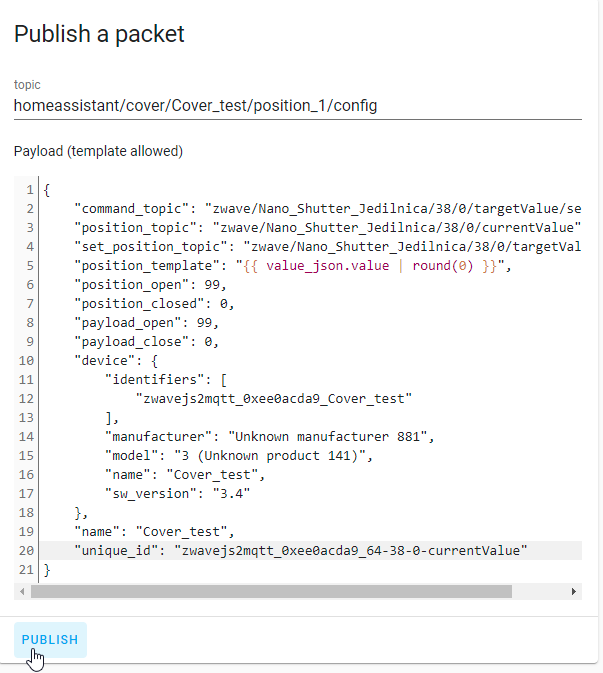
But i am receiving the following error:
homeassistant.exceptions.TemplateError: UndefinedError: 'value_json' is undefined
Regards
Richard
darootler
on 8 Mar 2021
@billiaz
I was able to "fix" this with MQTT Explorer and by just removing "state_topic" and replacing "value_template" with "position_template":
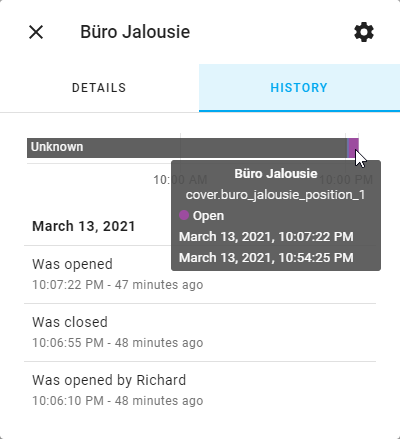
Here is the final payload:
{
  "command_topic": "zwave/Buro/Buro_Jalousie/38/1/targetValue/set",
  "position_topic": "zwave/Buro/Buro_Jalousie/38/1/currentValue",
  "set_position_topic": "zwave/Buro/Buro_Jalousie/38/1/targetValue/set",
  "position_template": "{{ value_json.value | round(0) }}",
  "position_open": 99,
  "position_closed": 0,
  "payload_open": 99,
  "payload_close": 0,
  "device": {
    "identifiers": [
      "zwavejs2mqtt_0xd563c48f_node2"
    ],
    "manufacturer": "Fibargroup",
    "model": "Roller Shutter 3 (FGR223)",
    "name": "Buro-Buro_Jalousie",
    "sw_version": "5.1"
  },
  "name": "Buro-Buro_Jalousie_position_1",
  "unique_id": "zwavejs2mqtt_0xd563c48f_2-38-1-currentValue"
}
Regards
Richard
darootler
on 13 Mar 2021
Thank you! I posted a patch!
billiaz
on 14 Mar 2021
@billiaz
Nice, thank you. Did you also replace "value_template" with "position_template"? I got the following warning when using "value_template" instead of "position_template":
2021-03-13 22:15:31 WARNING (MainThread) [homeassistant.components.mqtt.cover] using 'value_template' for 'position_topic' is deprecated and will be removed from Home Assistant in version 2021.6, please replace it with 'position_template'
Regards
Richard
darootler
on 14 Mar 2021
@darootler no! pff! just pushed a commit for that!
billiaz
on 14 Mar 2021
Great, thank you!
Regards
Richard
darootler
on 14 Mar 2021
I just upgraded to version 2.3.0 and the cover topics now look like this one:
{
  "state_topic": "zwave/Buro/Buro_Jalousie/38/1/currentValue",
  "command_topic": "zwave/Buro/Buro_Jalousie/38/1/targetValue/set",
  "position_topic": "zwave/Buro/Buro_Jalousie/38/1/currentValue",
  "set_position_topic": "zwave/Buro/Buro_Jalousie/38/1/targetValue/set",
  "value_template": "{{ value_json.value | round(0) }}",
  "position_open": 99,
  "position_closed": 0,
  "payload_open": 99,
  "payload_close": 0,
  "position_template": "{{ value_json.value | round(0) }}",
  "device": {
    "identifiers": [
      "zwavejs2mqtt_0xd563c48f_node2"
    ],
    "manufacturer": "Fibargroup",
    "model": "Roller Shutter 3 (FGR223)",
    "name": "Buro-Buro_Jalousie",
    "sw_version": "5.1"
  },
  "name": "Buro-Buro_Jalousie_position_1",
  "unique_id": "zwavejs2mqtt_0xd563c48f_2-38-1-currentValue"
}
And i am receiving the following warning:
2021-03-15 21:32:37 WARNING (MainThread) [homeassistant.components.mqtt.cover] Payload is not supported (e.g. open, closed, opening, closing, stopped): 99
"state_topic" and "value_template" is still there, but "position_template" now seems correct. Is there anything i am missing?
Regards
Richard
darootler
on 15 Mar 2021
I think that the problem is you are receiving 99 as payload but it expectes open closed etc... Maybe hass has also changed something else with the update?
robertsLando
on 16 Mar 2021
If i remove "state_topic" and "value_template" from the payload no more warnings or errors are logged. But for sure both topics will be added again after a while.
Regards
Richard
darootler
on 16 Mar 2021
I just reviewed "configurations.js" and "devices.js". There are also cover configurations, maybe this also has to updated?
  cover_position: {
    type: 'cover',
    object_id: 'position',
    discovery_payload: {
      state_topic: true, # Has this to be removed?
      command_topic: true,
      position_topic: true,
      set_position_topic: true,
      value_template: '{{ value_json.value | round(0) }}', # Has this to be removed?
      position_open: 99,
      position_closed: 0,
      payload_open: '99',
      payload_close: '0'
    }
  },
const COVER = {
  type: 'cover',
  object_id: 'position',
  values: ['38-0-currentValue', '38-0-targetValue'],
  discovery_payload: {
    command_topic: '38-0-targetValue',
    position_topic: '38-0-currentValue',
    set_position_topic: '38-0-targetValue',
    value_template: '{{ (value_json.value / 99 * 100) | round(0) }}', # Has this to be removed?
    position_open: 99,
    position_closed: 0,
    payload_open: '99',
    payload_close: '0'
  }
}
Regards
Richard
darootler
on 16 Mar 2021
Can confirm findings from @darootler. Getting same warnings in 2021.3.2.
Covers do seem to work mostly. One thing that does not work is the reported state (it is always "unknown"):
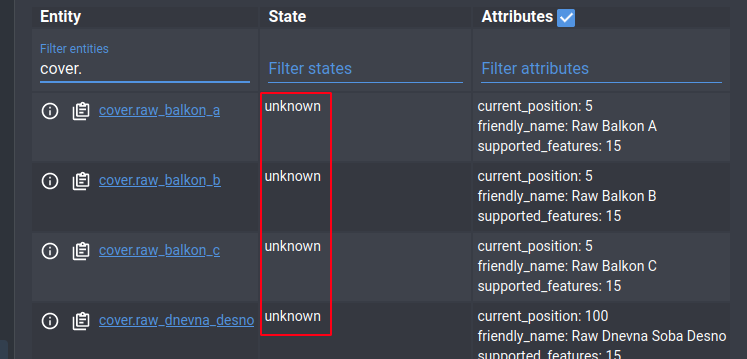
However, note that current_position on the right is reported normally. Setting position also works without issues (which is enough for my use case).
matejdro
on 20 Mar 2021
I am facing the same behavior, covers work (open/close/move slider) but the state is not reported correctly.
Should i open a new issue or should this issue be reopened?
Regards
Richard
darootler
on 20 Mar 2021
@billiaz
robertsLando
on 22 Mar 2021
Any updates here? Could someone please reopen this issue since the problem is partially fixed.
Regards
Richard
darootler
on 7 Apr 2021
@billiaz is a bit off in last weeks, I don't follow the mqtt discovery so much as I see many users are switching to the integration so I prefer to focus on UI and control panel improvements
robertsLando
on 8 Apr 2021
I am able to "workaround" this problem by editing the discovery topic, but everytime i update Z-Wave JS i have to edit all my topics. Not a huge problem but still annoying, i think there is not much to do to fix this problem.
I just remove "state_topic" and "value_template" from the topics and everything is working as expected.
Regards
Richard
darootler
on 8 Apr 2021
This may help or not, but only recently did my Fibaro blinds start working with position -I needed to trigger a calibration in the configuration page. After that all blinds now set and report position.
 Madelaide
on 11 Apr 2021
Madelaide
on 11 Apr 2021
Any update on this topic?
My covers are reporting unknown state as well, and it seems like I can't edit the discovery template from the UI either ( I change template, hit update, hit discovery and it posts the non-updated discovery topic according to logs/mqtt )
 LooSik
on 5 May 2021
LooSik
on 5 May 2021
Same here, unknown state is reported with no possibility to edit discovery template from UI.
 Neonox31
on 4 Jun 2021
Neonox31
on 4 Jun 2021
Found a workaround today !
- Instead of using UI for discovery template, you should edit directly
nodes.jsonfile and restart zwavejs2mqtt, the correct template is sent after. - To fix unknown position, I replaced
value_templatebyposition_templatewith the same value.
Hope it could help 🤞
Neonox31
on 5 Jun 2021
This affected me after updating HASS last night. Needed to change my value_template with position_template.
 Lopton
on 6 Jun 2021
Lopton
on 6 Jun 2021
In this post someone posted the discovery information and there is no "state_topic". He is using a FGR222 and i am using a FGR223, in my discovery topic there is still a "state_topic". I think this should be removed for FGR 223 too, any news/updates here?
Regards
Richard
darootler
on 13 Jun 2021
I have just tested 5.0.2 and it fixed my issue.
 bushvin
on 14 Jun 2021
bushvin
on 14 Jun 2021
@bushvin Another user told me in #1343 that covers are still not working, he suggest to remove state_topic from discovery payload, could it be caused by different hass versions? Maybe he isn't using the latest hass version
robertsLando
on 15 Jun 2021
That's possible.
Mine's currently running 2021-6-3, but I have some updates pending.
bushvin
on 15 Jun 2021
Related issues
 LeoGr13
·
5Comments
LeoGr13
·
5Comments
 eddiezane
·
4Comments
bushvin
·
6Comments
eddiezane
·
4Comments
bushvin
·
6Comments
 dvbit
·
6Comments
dvbit
·
6Comments
 slobberbone
·
3Comments
slobberbone
·
3Comments
Most helpful comment
This may help or not, but only recently did my Fibaro blinds start working with position -I needed to trigger a calibration in the configuration page. After that all blinds now set and report position.