Zwavejs2mqtt: [bug] Fibaro Smart Implant (FGBS-222) IN2 not working
Version
core-2021.4.3
Checklist:
- [ ] I am not using HomeAssistant. Or: a developer has told me to come here.
- [X] I have checked the troubleshooting section and my problem is not described there.
- [X] I have read the changelog problem was not mentioned there.
Build/Run method
- [X] Docker
- [ ] PKG
- [ ] Snap package
- [ ] Manually built (git clone - npm install - npm run build )
zwavejs2mqtt version: 0.11.0?
zwave-js version: 3.2.1?
Describe the bug
Fibaro Smart Implant (FGBS-222) with Device ID 145 in my case, has no working Input 2. Input 1 and Output 1&2 are working fine. Maybe an incorrect mapping?
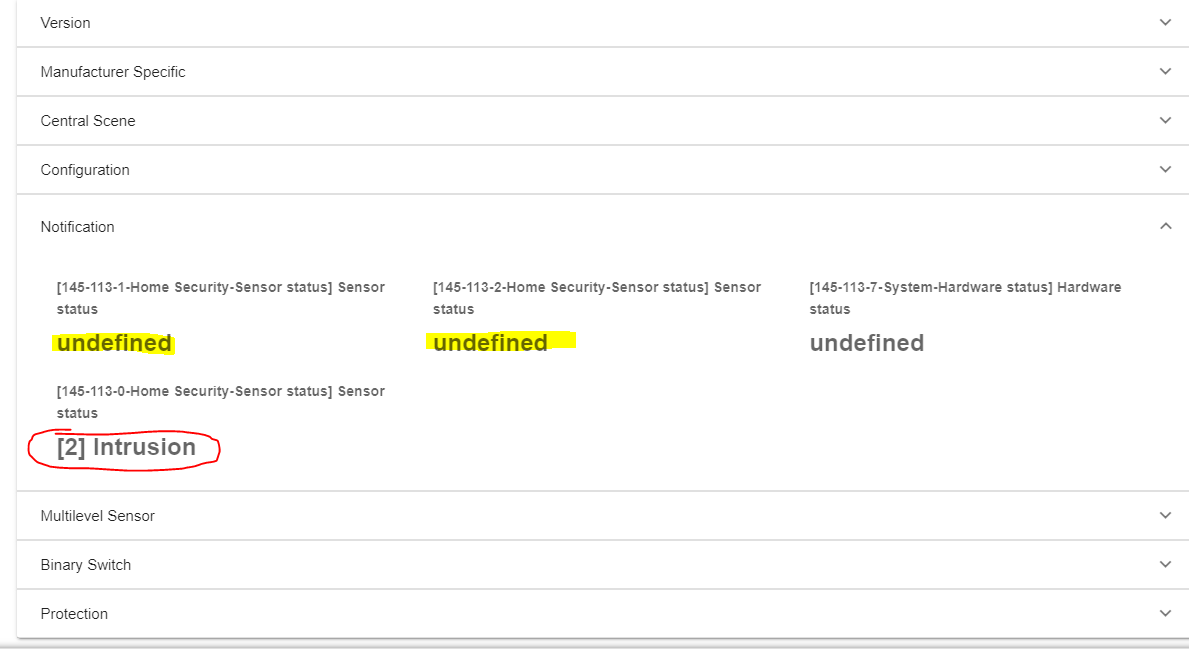
When Input 1 is closed, 145-113-0 (red circle) is switching accordingly to the configuration (normally open or normally closed) between [1] Idle and [2] Intrusion.
When Input 2 is closed, nothing happens. There is also no entry in the zwave log.
145-113-1 and 145-113-2 are staying on undefined the whole time. So my guessing is, that maybe the mapping is wrong? IN1 only switches the global sensor 145-113-0 and IN2 is switching nothing. I think it should be like IN1 switching 145-113-1 & 145-113-0 and IN2 switching 145-113-2 & 145-113-0
There are some threads about this problem in the home assistant forums. I seems like this bug was also persistent in OZW.
To Reproduce
Include Fibaro Smart Implant and change the configuration to normally closed or open alarm input for both inputs. Close and open Input 2 to ground.
 LeoGr13
All 5 comments
@LeoGr13 Please attach logs. cc @AlCalzone
 robertsLando
on 12 Apr 2021
robertsLando
on 12 Apr 2021
Sorry, ofc I forgot about that.
zwavejs2mqtt-store (2).zip
What I also forgot to mention is, that there is a configuration option to reverse operation of IN1 and IN2. If you configure it as reverse operating, only IN2 works. Just to clarify, that I dont believe in a hardware issue or something like this.
A big thanks to all of you, ZwaveJS is great!
LeoGr13
on 12 Apr 2021
Just to be sure, does the log include a re-interview? If not, please do that and post another one. I can take a look later.
 AlCalzone
on 12 Apr 2021
AlCalzone
on 12 Apr 2021
Log did not include a re-interview, so I re-interviewed the device and now everything works.
I feel so sorry for wasting your time, I should have just tried the re-interview before.
Just searched the internet for the problem and found the posts on the forums, where many people had the same problem for a long time and never came up with a solution. So I decided to open an issue..
Maybe this device just needs a re-interview after changing configuration parameters?
IN1 and IN2 are now properly reporting their state, also changing parameters in the protection class works perfectly (to use inputs independently from outputs)
Thank you
These logs include the re-interview and the working inputs:
Logs with reinterview and working.zip
LeoGr13
on 12 Apr 2021
If a config parameter changes device functionality like endpoints, at least a re-interview is necessary.
Usually for these params, the manual indicates that the device needs to be excluded and re-included. This can be a tad annoying but is required by the Z-Wave specifications and sometimes even necessary for the devices to fully accept the changes.
AlCalzone
on 12 Apr 2021
Related issues
 eddiezane
·
4Comments
eddiezane
·
4Comments
 jkaberg
·
7Comments
jkaberg
·
7Comments
 dvbit
·
6Comments
dvbit
·
6Comments
 Lopton
·
5Comments
Lopton
·
5Comments
 Illsley
·
4Comments
Illsley
·
4Comments