Zwavejs2mqtt: FDG211: Scene notification not working and not published to either zwave or MQTT
Version
Build/Run method
- [ X] Docker
- [ ] PKG
- [ ] Manually built (git clone - npm install - npm run build )
zwavejs2mqtt version: 1.3.0
zwavejs version: 6.4.0
Describe the bug
The FIBARO FDG211 has scene capabilities, as an example: when pressing one of the buttons 2/3 times quickly after eachother will generate a scene event being transmitted. This works with HA 2021.1.5 and the zwave integration
To Reproduce
Steps to reproduce the behavior:
- Double or tripple click either button
- No respons at all
Expected behavior
Node will generate scene in zwave so detection and usage is possible.
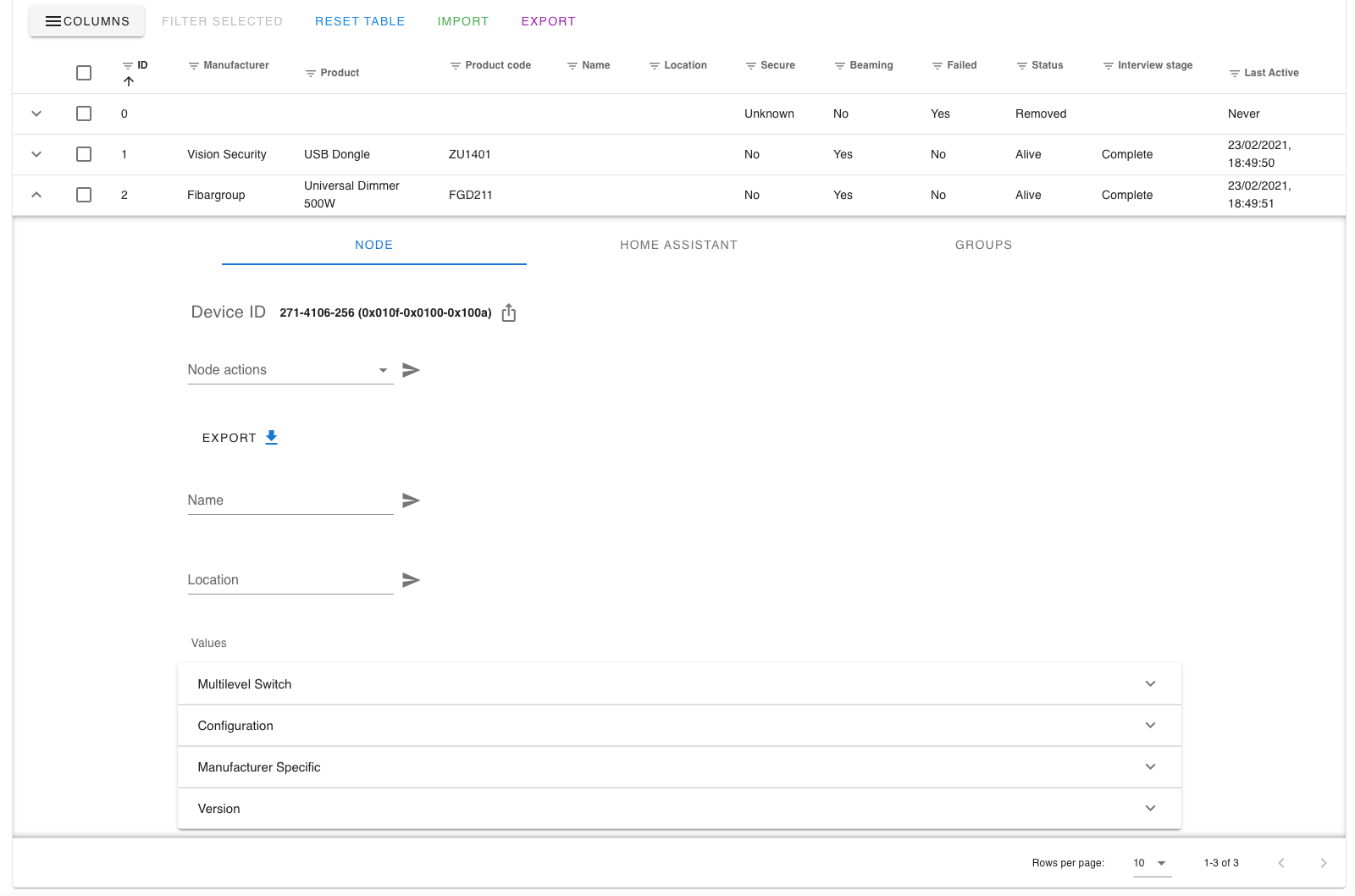
Additional info
Also see https://github.com/zwave-js/zwavejs2mqtt/issues/471
 daballiemo
All 12 comments
Made a new zwave.log from start, then click twice on the switch that has a light fitted and then twice on the switch without light (my "scene" switch).
zwavejs_1.log
daballiemo
on 23 Feb 2021
but did you run using master branch of zwavejs ?
some commit in master branch are not yet released
 bdbogjoe
on 23 Feb 2021
bdbogjoe
on 23 Feb 2021
@daballiemo your log does not indicate that a Scene Activation command was received.
 AlCalzone
on 23 Feb 2021
AlCalzone
on 23 Feb 2021
but did you run using master branch of zwavejs ?
some commit in master branch are not yet released
How can I check this besides running the latest docker container? I am not a pro at this subject
daballiemo
on 23 Feb 2021
@daballiemo your log does not indicate that a Scene Activation command was received.
@AlCalzone, that is exactly my problem; a double click or triple click should fire a scene. But I see nothing, not in zwave so surely not in MQTT.
daballiemo
on 23 Feb 2021
Yeah, but if the command does not reach zwave-js, the device does not send it. Or you need to add an association.
How can I check this besides running the latest docker container?
Then you're likely not running the latest master. I'm not involved with the docker releases, so you'll have to wait for @robertsLando to respond.
AlCalzone
on 23 Feb 2021
Hold the presses! With moving to a new controller I thought it made sense to reset the node. After that is is ofcourse a good idea to enable scenes again.....
I know see the following in the log:
22:09:40.548 SERIAL « 0x010a00040002042b011aff38 (12 bytes)
22:09:40.552 CNTRLR [Node 002] [!] [Scene Activation] sceneId: 26 [Endpoint 0]
2021-02-23 22:09:40.553 INFO ZWAVE: Node 2: value notification: 43-0-sceneId 26
22:09:40.554 CNTRLR [Node 002] [+] [Scene Activation] dimmingDuration: "default" [Endpoint 0]
2021-02-23 22:09:40.554 INFO ZWAVE: Node 2: value added: 43-0-dimmingDuration => [Duration: default]
2021-02-23 22:09:40.555 INFO ZWAVE: Node 2: value added 2-43-0-dimmingDuration => [Duration: default]
22:09:40.557 SERIAL » [ACK] (0x06)
22:09:40.562 DRIVER « [Node 002] [REQ] [ApplicationCommand]
└─[SceneActivationCCSet]
scene id: 26
dimming duration: [Duration: default]
22:09:40.564 CNTRLR « [Node 002] TODO: no handler for application command
22:10:02.221 SERIAL « 0x010a00040002042b0118ff3a (12 bytes)
22:10:02.222 CNTRLR [Node 002] [!] [Scene Activation] sceneId: 24 [Endpoint 0]
2021-02-23 22:10:02.223 INFO ZWAVE: Node 2: value notification: 43-0-sceneId 24
22:10:02.224 CNTRLR [Node 002] [~] [Scene Activation] dimmingDuration: "default" => " [Endpoint 0]
default"
2021-02-23 22:10:02.225 INFO ZWAVE: Node 2: value updated: 43-0-dimmingDuration [Duration: default] => [Duration: default]
22:10:02.225 SERIAL » [ACK] (0x06)
22:10:02.227 DRIVER « [Node 002] [REQ] [ApplicationCommand]
└─[SceneActivationCCSet]
scene id: 24
dimming duration: [Duration: default]
22:10:02.229 CNTRLR « [Node 002] TODO: no handler for application command
daballiemo
on 23 Feb 2021
@AlCalzone & @bdbogjoe thanks for helping out another poor soul ;-)
daballiemo
on 23 Feb 2021
💪🏻
AlCalzone
on 23 Feb 2021
Still wondering though were it ends up in MQTT because I only see some stuff
nodeID_2-43-0-dimmingduration {"time":1614118695044,"value":"default"}
not really any info that relates to the scenes. We'll back to the books again
daballiemo
on 23 Feb 2021
As soon as you have the updated version of zwave-js it should show up under sceneId
AlCalzone
on 23 Feb 2021
thx again and great support 🙏🏻
daballiemo
on 23 Feb 2021
Related issues
 crxporter
·
8Comments
crxporter
·
8Comments
 kaaelhaa
·
4Comments
kaaelhaa
·
4Comments
 jonathan-reisdorf
·
3Comments
jonathan-reisdorf
·
3Comments
 slobberbone
·
3Comments
slobberbone
·
3Comments
 balloob
·
4Comments
balloob
·
4Comments