Zwavejs2mqtt: [question] Trigger scene with fibaro key fob
Just starting to play with zwavejs2mqtt, and so far so good.
But I am struggling with some of mye scene controllers. The fibaro key fob includes with no issues. And it creates several devices in Home Assistant. But when I press a button it only changes state once, and stays at that state. Before when I used zwave2mqtt it would jump back to "standby" or inactive, and just get the activated state for a second or so.
Is there something I am missing or is there something wrong here?
 haavardNO
All 22 comments
@haavardNO Could you provide some logs? BOth zwavejs and zwavejs2mqtt?
 robertsLando
on 11 Jan 2021
robertsLando
on 11 Jan 2021
Yes, I can try.
I can at least pull some logs from the UI of zwavejs2mqtt. How can I get the logs from zwavejs?
haavardNO
on 11 Jan 2021
@haavardNO If you are using docker dev tag, you will find them in store folder if you enable log to file in settings
robertsLando
on 11 Jan 2021
@haavardNO which version of zwavejs2mqtt are you using?
The best way for now to trigger automations on scene button presses is to read the event bus, rather than reading a state change.
Here is an example of a central scene trigger, using a zooz scene switch:
  trigger:
  - platform: event
    event_type: state_changed
    event_data:
      entity_id: sensor.outdoor_frontpath_scene_state_001_scene
  condition:
  - condition: template
    value_template: '{{ trigger.event.data.new_state.state == ''3'' }}'
 jcam
on 12 Jan 2021
jcam
on 12 Jan 2021
@jcam I can try with your template. But if I have activated scene 3, it will hold that value (at least in developer tools). So if there is no change, can the trigger fire?
I am running the latest versions of both Home assistant and zwavejs2mqtt.
haavardNO
on 12 Jan 2021
Yes the trigger will still fire, at least with my testing tonight.
From the developer tools instead of looking at States, go to the Events tab.
In the bottom box enter state_changed, then click start listening.
When you push your scene 3 button, you should see the event trigger with each press, even if the old state and new state are the same.
jcam
on 12 Jan 2021
@robertsLando and @jcam I am running in to some challanges getting to that log file. I dont know how to access the store folder. I am running zwavejs2mqtt in docker. I have not been able to trigger an automation with the example above.
When I send a scene command (number 4) on the keyfob I get this in the UI debug:
10:00:56.692 SERIAL « 0x010b00040047055b0359800437 (13 bytes)
10:00:56.694 SERIAL » [ACK] (0x06)
10:00:56.696 DRIVER « [Node 071] [REQ] [ApplicationCommand]
└─[CentralSceneCCNotification]
sequence number: 89
key attribute: KeyPressed
scene number: 4
10:00:56.701 CNTRLR [Node 071] [~] [Central Scene] scene[004]: 0 => 0
2021-01-12 10:00:56.702 INFO ZWAVE: Node 71: value updated: 91-0-scene-004 0 => 0
10:00:56.703 CNTRLR « [Node 071] received CentralScene notification {
"nodeId": 71,
"ccId": "Central Scene",
"ccCommand": "0x03",
"payload": "0x598004"
}
In home assistant I get the following event:
Event 0 fired 10:05 AM:
{
    "event_type": "state_changed",
    "data": {
        "entity_id": "sensor.nodeid_71_scene_state_004_scene",
        "old_state": {
            "entity_id": "sensor.nodeid_71_scene_state_004_scene",
            "state": "0",
            "attributes": {
                "id": "71-91-0-scene-004",
                "nodeId": 71,
                "commandClass": 91,
                "commandClassName": "Central Scene",
                "endpoint": 0,
                "property": "scene",
                "propertyName": "scene",
                "propertyKey": "004",
                "type": "number",
                "readable": true,
                "writeable": false,
                "label": "Scene 004",
                "min": 0,
                "max": 255,
                "list": true,
                "states": [
                    {
                        "text": "KeyPressed",
                        "value": 0
                    },
                    {
                        "text": "KeyReleased",
                        "value": 1
                    },
                    {
                        "text": "KeyHeldDown",
                        "value": 2
                    },
                    {
                        "text": "KeyPressed2x",
                        "value": 3
                    },
                    {
                        "text": "KeyPressed3x",
                        "value": 4
                    }
                ],
                "value": 0,
                "lastUpdate": 1610442056702,
                "friendly_name": "garage-keyfob_scene_state_004_scene"
            },
            "last_changed": "2021-01-12T08:50:05.601602+00:00",
            "last_updated": "2021-01-12T09:00:56.721616+00:00",
            "context": {
                "id": "1c560e95956793342d470841f350a1a6",
                "parent_id": null,
                "user_id": null
            }
        },
        "new_state": {
            "entity_id": "sensor.nodeid_71_scene_state_004_scene",
            "state": "0",
            "attributes": {
                "id": "71-91-0-scene-004",
                "nodeId": 71,
                "commandClass": 91,
                "commandClassName": "Central Scene",
                "endpoint": 0,
                "property": "scene",
                "propertyName": "scene",
                "propertyKey": "004",
                "type": "number",
                "readable": true,
                "writeable": false,
                "label": "Scene 004",
                "min": 0,
                "max": 255,
                "list": true,
                "states": [
                    {
                        "text": "KeyPressed",
                        "value": 0
                    },
                    {
                        "text": "KeyReleased",
                        "value": 1
                    },
                    {
                        "text": "KeyHeldDown",
                        "value": 2
                    },
                    {
                        "text": "KeyPressed2x",
                        "value": 3
                    },
                    {
                        "text": "KeyPressed3x",
                        "value": 4
                    }
                ],
                "value": 0,
                "lastUpdate": 1610442332770,
                "friendly_name": "garage-keyfob_scene_state_004_scene"
            },
            "last_changed": "2021-01-12T08:50:05.601602+00:00",
            "last_updated": "2021-01-12T09:05:32.781012+00:00",
            "context": {
                "id": "cfa27fe2a33a1c2936b5c6bccca5bce3",
                "parent_id": null,
                "user_id": null
            }
        }
    },
    "origin": "LOCAL",
    "time_fired": "2021-01-12T09:05:32.781012+00:00",
    "context": {
        "id": "cfa27fe2a33a1c2936b5c6bccca5bce3",
        "parent_id": null,
        "user_id": null
And the trigger I have set up is as follows
alias: Garage open keyfob test
  description: Open garage from keyfob
  trigger:
  - platform: event
    event_type: state_changed
    event_data:
      entity_id: sensor.nodeid_71_scene_state_004_scene
  condition:
  - condition: template
    value_template: 'value_template: ''{{ trigger.event.data.new_state.state == ''0''
      }}'
  action:
  - service: script.garage_open_if_closed
    data: {}
  mode: single
I'm working on this: https://github.com/zwave-js/zwavejs2mqtt/pull/215
robertsLando
on 12 Jan 2021
@robertsLando excellent.
Just FYI, it is exactly the same behavior on my Aeotech Wallmote.
haavardNO
on 12 Jan 2021
@haavardNO the trigger condition looks like it picked up a copy paste error:
value_template: 'value_template: ''{{ trigger.event.data.new_state.state == ''0''
}}'
it shouldn't be value_template: 'value_template ...
if you're editing it through the UI mode, set that field to just {{ trigger.event.data.new_state.state == '0' }}
jcam
on 12 Jan 2021
@jcam that did the trick. When I look at it now it looks obvious. I guess I should convert to just edit it the code. Right now I am doing a little of both...
Thanks for spotting it.
haavardNO
on 12 Jan 2021
I bounce back and forth between UI mode and code too. I think I prefer the UI mode, and then just look at code if UI doesn't work.
jcam
on 12 Jan 2021
Not sure if it is relevant if @robertsLando is working on a fix. But I have some strange behaviour with the solution described by @jcam . Two times today when I have restarted home assistant, the garage door has opened... The last time I checked the loggs, and found the following:
2021-01-12 20:00:23 ERROR (MainThread) [homeassistant.components.mqtt] Timed out waiting for mid 1
2021-01-12 20:00:23 ERROR (MainThread) [homeassistant.components.mqtt] Timed out waiting for mid 2
2021-01-12 20:00:23 ERROR (MainThread) [homeassistant.helpers.event] Error while processing state changed for binary_sensor.kitchen_multisensor_05_contact
Traceback (most recent call last):
File "/usr/src/homeassistant/homeassistant/helpers/event.py", line 257, in _async_state_change_dispatcher
hass.async_run_hass_job(job, event)
File "/usr/src/homeassistant/homeassistant/core.py", line 433, in async_run_hass_job
hassjob.target(*args)
File "/usr/src/homeassistant/homeassistant/helpers/event.py", line 198, in state_change_listener
hass.async_run_hass_job(
File "/usr/src/homeassistant/homeassistant/core.py", line 433, in async_run_hass_job
hassjob.target(*args)
File "/config/custom_components/entity_controller/__init__.py", line 550, in sensor_state_change
if self.matches(new.state, old.state):
AttributeError: 'NoneType' object has no attribute 'state'
2021-01-12 20:00:23 ERROR (MainThread) [homeassistant.helpers.event] Error while processing state changed for binary_sensor.attic_multisensor_06_contact
Traceback (most recent call last):
File "/usr/src/homeassistant/homeassistant/helpers/event.py", line 257, in _async_state_change_dispatcher
hass.async_run_hass_job(job, event)
File "/usr/src/homeassistant/homeassistant/core.py", line 433, in async_run_hass_job
hassjob.target(*args)
File "/usr/src/homeassistant/homeassistant/helpers/event.py", line 198, in state_change_listener
hass.async_run_hass_job(
File "/usr/src/homeassistant/homeassistant/core.py", line 433, in async_run_hass_job
hassjob.target(*args)
File "/config/custom_components/entity_controller/__init__.py", line 550, in sensor_state_change
if self.matches(new.state, old.state):
AttributeError: 'NoneType' object has no attribute 'state'
2021-01-12 20:00:23 ERROR (MainThread) [homeassistant.helpers.event] Error while processing state changed for binary_sensor.bedroom_multisensor_07_contact
Traceback (most recent call last):
File "/usr/src/homeassistant/homeassistant/helpers/event.py", line 257, in _async_state_change_dispatcher
hass.async_run_hass_job(job, event)
File "/usr/src/homeassistant/homeassistant/core.py", line 433, in async_run_hass_job
hassjob.target(*args)
File "/usr/src/homeassistant/homeassistant/helpers/event.py", line 198, in state_change_listener
hass.async_run_hass_job(
File "/usr/src/homeassistant/homeassistant/core.py", line 433, in async_run_hass_job
hassjob.target(*args)
File "/config/custom_components/entity_controller/__init__.py", line 550, in sensor_state_change
if self.matches(new.state, old.state):
AttributeError: 'NoneType' object has no attribute 'state'
2021-01-12 20:00:23 ERROR (MainThread) [homeassistant.helpers.event] Error while processing state changed for binary_sensor.bedroom_multisensor_07_contact
2021-01-12 20:00:25 ERROR (MainThread) [homeassistant.components.sensor] Platform mqtt does not generate unique IDs. ID zwavejs2mqtt_0xdecb2da9_71-91-0-scene-001 already exists - ignoring sensor.nodeid_71_scene_state_001_scene
2021-01-12 20:00:25 ERROR (MainThread) [homeassistant.components.sensor] Platform mqtt does not generate unique IDs. ID zwavejs2mqtt_0xdecb2da9_71-91-0-scene-002 already exists - ignoring sensor.nodeid_71_scene_state_002_scene
2021-01-12 20:00:25 ERROR (MainThread) [homeassistant.components.sensor] Platform mqtt does not generate unique IDs. ID zwavejs2mqtt_0xdecb2da9_71-91-0-scene-003 already exists - ignoring sensor.nodeid_71_scene_state_003_scene
2021-01-12 20:00:25 ERROR (MainThread) [homeassistant.components.sensor] Platform mqtt does not generate unique IDs. ID zwavejs2mqtt_0xdecb2da9_71-91-0-scene-004 already exists - ignoring sensor.nodeid_71_scene_state_004_scene
2021-01-12 20:00:25 ERROR (MainThread) [homeassistant.components.sensor] Platform mqtt does not generate unique IDs. ID zwavejs2mqtt_0xdecb2da9_71-91-0-scene-005 already exists - ignoring sensor.nodeid_71_scene_state_005_scene
2021-01-12 20:00:25 ERROR (MainThread) [homeassistant.components.sensor] Platform mqtt does not generate unique IDs. ID zwavejs2mqtt_0xdecb2da9_71-91-0-scene-006 already exists - ignoring sensor.nodeid_71_scene_state_006_scene
2021-01-12 20:00:25 ERROR (MainThread) [homeassistant.components.sensor] Platform mqtt does not generate unique IDs. ID zwavejs2mqtt_0xdecb2da9_71-91-0-scene-007 already exists - ignoring sensor.nodeid_71_scene_state_007_scene
2021-01-12 20:00:25 ERROR (MainThread) [homeassistant.components.sensor] Platform mqtt does not generate unique IDs. ID zwavejs2mqtt_0xdecb2da9_71-91-0-scene-008 already exists - ignoring sensor.nodeid_71_scene_state_008_scene
2021-01-12 20:00:25 ERROR (MainThread) [homeassistant.components.sensor] Platform mqtt does not generate unique IDs. ID zwavejs2mqtt_0xdecb2da9_71-91-0-scene-009 already exists - ignoring sensor.nodeid_71_scene_state_009_scene
2021-01-12 20:00:25 ERROR (MainThread) [homeassistant.components.sensor] Platform mqtt does not generate unique IDs. ID zwavejs2mqtt_0xdecb2da9_71-91-0-scene-010 already exists - ignoring sensor.nodeid_71_scene_state_010_scene
2021-01-12 20:00:25 ERROR (MainThread) [homeassistant.components.sensor] Platform mqtt does not generate unique IDs. ID zwavejs2mqtt_0xdecb2da9_71-91-0-scene-011 already exists - ignoring sensor.nodeid_71_scene_state_011_scene
2021-01-12 20:00:25 ERROR (MainThread) [homeassistant.components.sensor] Platform mqtt does not generate unique IDs. ID zwavejs2mqtt_0xdecb2da9_71-91-0-scene-012 already exists - ignoring sensor.nodeid_71_scene_state_012_scene
2021-01-12 20:00:25 ERROR (MainThread) [homeassistant.components.sensor] Platform mqtt does not generate unique IDs. ID zwavejs2mqtt_0xdecb2da9_71-128-0-level already exists - ignoring sensor.nodeid_71_battery_level
2021-01-12 20:00:25 ERROR (MainThread) [homeassistant.components.sensor] Platform mqtt does not generate unique IDs. ID zwavejs2mqtt_0xdecb2da9_71-91-0-slowRefresh already exists - ignoring sensor.nodeid_71_scene_state_slowrefresh
I have disabled the garage open automation for now :-). Anyone who can explain what is happening?
Update:
I see that in the process of getting the keyfob to work, I excluded and re-included it. And at the testing stage above, the name of the device in Home Assistant and Zwavejs2mqtt did not match. I have now deleted the device in hass, and let it recreate. No more of the last log entry...
haavardNO
on 12 Jan 2021
The restart triggering the garage is due to a bug in the current version where it stores the button "pressed" state, and "sets" it again when restarting.
@robertsLando has fixed this bug with his latest commits. I am testing that build out now
jcam
on 12 Jan 2021
Remember to remove the retained message from your broker. TO do this you have to use mqtt explorer
robertsLando
on 13 Jan 2021
@robertsLando I see that the latest release addressed #215. So this should solve the issues with the keyfob I assume. But will I still have to listen for event change, or can it trigger on state change?
I am running zwavejs2mqtt as a docker image on a rpi, as many others I assume. What is the easies and fastest way to update the version I am running? Previously I have done it by duplicating the image in portainer, but I am not sure this is the easiest way :).
haavardNO
on 18 Jan 2021
o this should solve the issues with the keyfob I assume. But will I still have to listen for event change, or can it trigger on state change
It will only trigger on state change but the message will not be retained. If there was some message retained previously on your broker them should be cleaned
I am running zwavejs2mqtt as a docker image on a rpi, as many others I assume. What is the easies and fastest way to update the version I am running? Previously I have done it by duplicating the image in portainer, but I am not sure this is the easiest way :).
You should do a docker pull to get latest updated image. I suggest you to use the dev tag
robertsLando
on 18 Jan 2021
I can confirm that both my keyfob and wallcontroller now works with standard state change in Home Assistant.
Thanks for the fix.
And I must also say that my zwave network is much more responsive with zwavejs2mqtt compared to zwave2mqtt. When activating big scenes with many nodes it act instantly, compared to the other version that is much slower.
haavardNO
on 19 Jan 2021
@robertsLando has there been any retain policy changes recently? I just updated to the 1.0.1 version, and my garage opened by itself again when I restarted Home Assistant
haavardNO
on 2 Feb 2021
@haavardNO maybe you just restarted the application? In that case when the value is added it is sent. Also check mqtt explorer to see if it is retained or not
robertsLando
on 2 Feb 2021
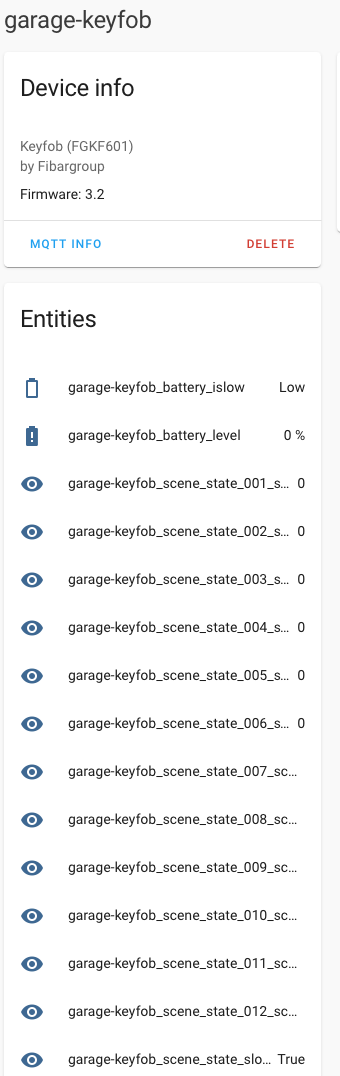
@robertsLando I have done some more testing and yes you are correct. The behaviour occurs when zwavejs2mqtt is restarted. This is a bit scary since the application / rpi can restart for several reasons. And especially when I dont sit and wait for it :)
When restarted zwavejs2mqtt restores the value back to 0. I think zwave2mqtt used a slightly different approach. There the state would be set to "inactive" until a button was pressed, and it got the scene state. Could that be the reason for why this did not happen in that version?
haavardNO
on 2 Feb 2021
@haavardNO Could you open an issue to keep track of this? I should skip sending cached values for stateless valueId (like this one) when application starts
robertsLando
on 3 Feb 2021
Related issues
 Lopton
·
5Comments
Lopton
·
5Comments
 jmgiaever
·
5Comments
jmgiaever
·
5Comments
 balloob
·
4Comments
balloob
·
4Comments
 kaaelhaa
·
4Comments
kaaelhaa
·
4Comments
 drjjr2
·
7Comments
drjjr2
·
7Comments