Zwavejs2mqtt: Monoprice door sensor no autodiscover of 2 entities in HA [bug]
Version
Build/Run method
- [X] Docker
- [ ] PKG
- [ ] Manually built (git clone - npm install - npm run build )
zwavejs2mqtt version: 1.0.0-alpha.1 from log, Docker is dev tag in place 12/28
HA: Hassio 2020.12.1
Describe the bug
Auto-discovery on HA finds the device and battery sensor but misses the door open/close sensor, and cover open/close sensor.
To Reproduce
Steps to reproduce the behavior:
- Setup HA to auto-discover MQTT
- Add node to ZWave network
Expected behavior
The device has 3 sensors. Expect all 3 of them to appear in HA. Only the battery sensor is discovered.
Additional context
JSON of node info:
    {
        "name": "Small_Bedroom_Closet_Door",
        "hassDevices": {
            "sensor_notification_Access Control": {
                "type": "sensor",
                "object_id": "notification_Access Control",
                "discovery_payload": {
                    "value_template": "{{ value_json.value }}",
                    "icon": "mdi:alarm-light",
                    "state_topic": "homeassistant/Small_Bedroom_Closet_Door/113/0/Access_Control/Door_state",
                    "json_attributes_topic": "homeassistant/Small_Bedroom_Closet_Door/113/0/Access_Control/Door_state",
                    "device": {
                        "identifiers": [
                            "zwavejs2mqtt_0xc3c70e48_node6"
                        ],
                        "manufacturer": "HANK Electronics Ltd.",
                        "model": "Door and Window Sensor (DWS01)",
                        "name": "Small_Bedroom_Closet_Door",
                        "sw_version": "1.5"
                    },
                    "name": "Small_Bedroom_Closet_Door_notification_Access Control",
                    "unique_id": "zwavejs2mqtt_0xc3c70e48_6-113-0-Access Control-Door state"
                },
                "discoveryTopic": "sensor/Small_Bedroom_Closet_Door/notification_Access Control/config",
                "values": [
                    "113-0-Access Control-Door state"
                ],
                "persistent": true,
                "ignoreDiscovery": false
            },
            "sensor_notification_Home Security": {
                "type": "sensor",
                "object_id": "notification_Home Security",
                "discovery_payload": {
                    "value_template": "{{ value_json.value }}",
                    "icon": "mdi:alarm-light",
                    "state_topic": "homeassistant/Small_Bedroom_Closet_Door/113/0/Home_Security/Cover_status",
                    "json_attributes_topic": "homeassistant/Small_Bedroom_Closet_Door/113/0/Home_Security/Cover_status",
                    "device": {
                        "identifiers": [
                            "zwavejs2mqtt_0xc3c70e48_node6"
                        ],
                        "manufacturer": "HANK Electronics Ltd.",
                        "model": "Door and Window Sensor (DWS01)",
                        "name": "Small_Bedroom_Closet_Door",
                        "sw_version": "1.5"
                    },
                    "name": "Small_Bedroom_Closet_Door_notification_Home Security",
                    "unique_id": "zwavejs2mqtt_0xc3c70e48_6-113-0-Home Security-Cover status"
                },
                "discoveryTopic": "sensor/Small_Bedroom_Closet_Door/notification_Home Security/config",
                "values": [
                    "113-0-Home Security-Cover status"
                ],
                "persistent": true,
                "ignoreDiscovery": false
            },
            "sensor_battery_level": {
                "type": "sensor",
                "object_id": "battery_level",
                "discovery_payload": {
                    "value_template": "{{ value_json.value }}",
                    "device_class": "battery",
                    "unit_of_measurement": "%",
                    "state_topic": "homeassistant/Small_Bedroom_Closet_Door/128/0/level",
                    "json_attributes_topic": "homeassistant/Small_Bedroom_Closet_Door/128/0/level",
                    "device": {
                        "identifiers": [
                            "zwavejs2mqtt_0xc3c70e48_node6"
                        ],
                        "manufacturer": "HANK Electronics Ltd.",
                        "model": "Door and Window Sensor (DWS01)",
                        "name": "Small_Bedroom_Closet_Door",
                        "sw_version": "1.5"
                    },
                    "name": "Small_Bedroom_Closet_Door_battery_level",
                    "unique_id": "zwavejs2mqtt_0xc3c70e48_6-128-0-level"
                },
                "discoveryTopic": "sensor/Small_Bedroom_Closet_Door/battery_level/config",
                "values": [
                    "128-0-level"
                ],
                "persistent": true,
                "ignoreDiscovery": false
            }
        }
    }
 decairn
All 12 comments
@decairn Do you see those sensors in control panel? Could you send me a screenshot of the node tab or the json export of the node?
 robertsLando
on 29 Dec 2020
robertsLando
on 29 Dec 2020
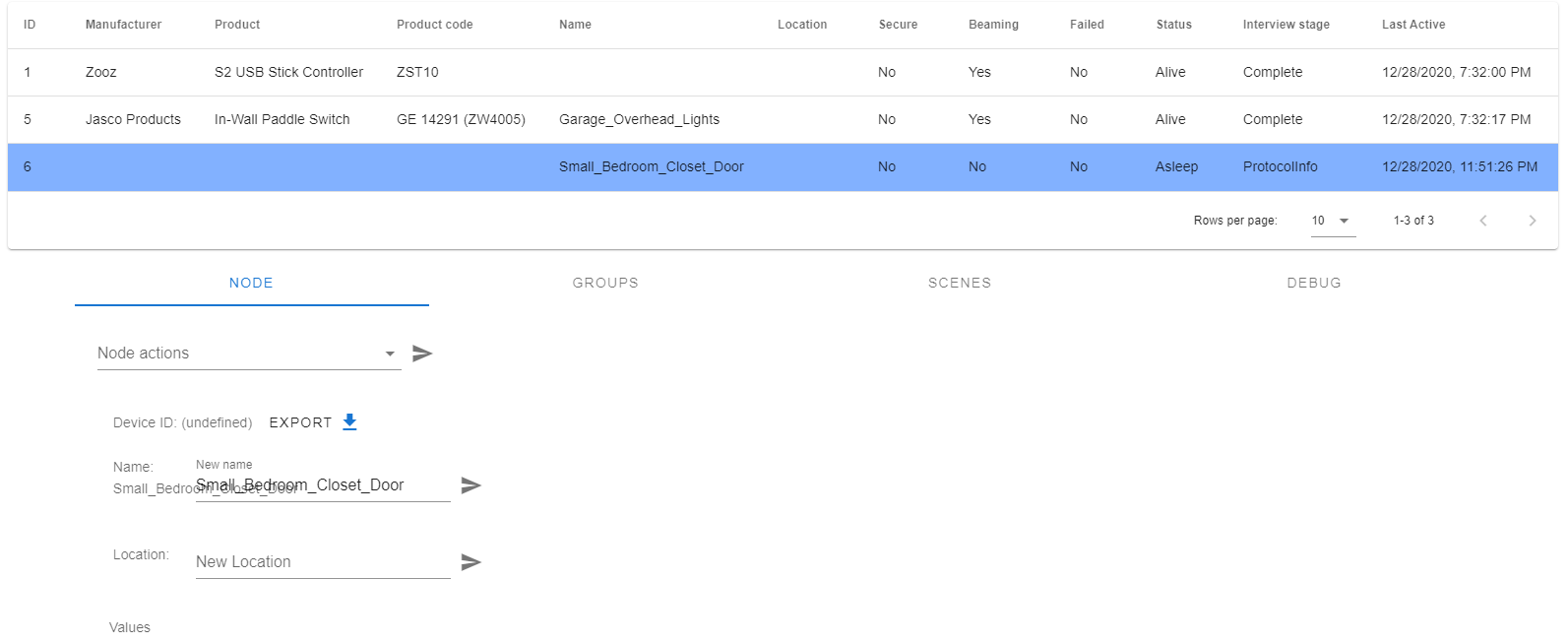
Currently none of those sensors show in the control panel. All 3 did originally (and HA had 1 device 1 battery sensor discovered) but after a couple of restarts of HA and ZWJS the control panel changed. The control panel is now missing manufacturer, product and product code for the node, it is responding as the last activity date is from just now when I opened/closed the door. The JSON above is captured from nodes,json which I thought on visual inspection at the time was the same as each of the sensor details in the control panel.
The device configuration itself I can confirm is defined here: https://github.com/zwave-js/node-zwave-js/blob/master/packages/config/config/devices/0x0208/dws01.json.
Attaching zwjs2mqtt.log and nodes.json files as well as the json export and control panel as it currently looks
node_6.zip
decairn
on 29 Dec 2020
@decairn It seems that your device is stucked in protocol info stage, maybe it needs to be weak up? @AlCalzone Ideas?
robertsLando
on 29 Dec 2020
Isn't that a side-issue? I see these staying on Initializing on regular HA ZWave integration and sensors are found and updated OK, so why not here? I'm still back at HA is not discovering 2 sensors using ZWJS2MQTT. When I look at MQTT activity and ZWJS logs the open/close of a door is clearing publishing data to a topic. My question would be what should the topic be to be discovered?
decairn
on 29 Dec 2020
The screenshot you provided isn't showing me node values, expecially I need to see the values you are missing from discovery.
Also a console log of zwavejs2mqtt output would be useful
robertsLando
on 29 Dec 2020
The Screenshot shows that the device is asleep. Wake it up manually.
 AlCalzone
on 29 Dec 2020
AlCalzone
on 29 Dec 2020
I excluded the device from network, factory reset it, and re-added it. It now imports all 3 sensors so I guess this is solved.
These particular devices don't respond to wake up (even the manual method from their manuals, a bunch of internet posts bitching about this are out there).
I have 3 more of these to do, if they fail I now have logging / steps to provide better info in future in case there is an underlying ZWJS improvement that is possible.
decairn
on 29 Dec 2020
Attaching "good" node json export while I have it.
node_7.zip
decairn
on 29 Dec 2020
@decairn let me know if you still have this problems. If so attach both zwavejs and z2m logs so we can debug this
robertsLando
on 30 Dec 2020
I got 30 devices added today - switches, dimmers, motion sensor, door sensors, double plugs, high power plugs. Definitely something not working right on rediscovery after a node rename but I have a workaround; will add details tomorrow. Have a couple more devices to add so can get clean logs.
decairn
on 30 Dec 2020
Definitely something not working right on rediscovery after a node rename but I have a workaround
If the node name is included in the topic you must press on rediscover node in order to fix discovery
robertsLando
on 30 Dec 2020
On initial inclusion to zwjs the new node is pushed over to hassio, it creates a device called "node34" and has 3 similarly prefixed sensors. All good. When the rename and rediscover of the node is done in zwjs side, the device name is updated in hassio but its 3 sensors do not change their name; I am expecting the sensors to update their name prefix in hassio. To get those to update require some extra work to force a new discovery (delete device in hassio, then restart zwjs and hassion is most reliable).
The hassio log complains about lack of unique ids. Is that something that can be managed on zwjs side?
2020-12-30 13:04:16 INFO (MainThread) [homeassistant.components.mqtt.discovery] Found new component: switch Test1 switch
2020-12-30 13:04:16 ERROR (MainThread) [homeassistant.components.switch] Platform mqtt does not generate unique IDs. ID zwavejs2mqtt_0xc3c70e48_34-37-0-currentValue already exists - ignoring switch.outdoor_garden_lights_switch
2020-12-30 13:04:16 INFO (MainThread) [homeassistant.components.mqtt.discovery] Found new component: sensor Test1 scene_state_sceneid
2020-12-30 13:04:16 ERROR (MainThread) [homeassistant.components.sensor] Platform mqtt does not generate unique IDs. ID zwavejs2mqtt_0xc3c70e48_34-43-0-sceneId already exists - ignoring sensor.outdoor_garden_lights_scene_state_sceneid
2020-12-30 13:04:16 INFO (MainThread) [homeassistant.components.mqtt.discovery] Found new component: sensor Test1 scene_state_dimmingduration
2020-12-30 13:04:16 ERROR (MainThread) [homeassistant.components.sensor] Platform mqtt does not generate unique IDs. ID zwavejs2mqtt_0xc3c70e48_34-43-0-dimmingDuration already exists - ignoring sensor.outdoor_garden_lights_scene_state_dimmingduration
decairn
on 30 Dec 2020
Related issues
 jonathan-reisdorf
·
3Comments
jonathan-reisdorf
·
3Comments
 kaaelhaa
·
4Comments
kaaelhaa
·
4Comments
 Lopton
·
5Comments
Lopton
·
5Comments
 dvbit
·
6Comments
dvbit
·
6Comments
 haavardNO
·
3Comments
haavardNO
·
3Comments
Most helpful comment
I excluded the device from network, factory reset it, and re-added it. It now imports all 3 sensors so I guess this is solved.
These particular devices don't respond to wake up (even the manual method from their manuals, a bunch of internet posts bitching about this are out there).
I have 3 more of these to do, if they fail I now have logging / steps to provide better info in future in case there is an underlying ZWJS improvement that is possible.