Zwavejs2mqtt: [bug] unsupported valueIds should be hidden (Single Switch 2)
Version
Build/Run method
- [x] Docker
- [ ] PKG
- [x] Manually built (git clone - npm install - npm run build )
zwavejs2mqtt version: master
Describe the bug
The switch is identified as a dimmer, and I cannot turn it on of of.
I can set Target value and Transition duration in the zwavejs2mqtt web UI, which doesn't work. The same happens in Home Assistant.
To Reproduce
Steps to reproduce the behavior:
- Include such switch into network
- Go to user values
- Observe dimmer properties
Expected behavior
Expected result is to have an on/off switch and not a dimmer value.
Additional context
The same happens with my Aeotec Smart Swich 6 wall switch. However, my Neo CoolCam NAS-WR01ZE wall switch works as expected.
 larstobi
All 23 comments
Can confirm the same issue with my Fibaro FGS213 & FGS223 (Single and double switch, built in wall box). I also noticed the same issue as @larstobi with my Aeotec Smart Switch 6. I can operate my devices 'normally' using the _switch topic, but I agree that the dimmer endpoint should not be there for these devices.



This produces the following error when using HASS discovery via MQTT:
2020-12-09 11:31:38 ERROR (MainThread) [homeassistant.helpers.template] Error parsing value: 'dict object' has no attribute 'value' (value: {"id":"8-38-0-currentValue","nodeId":8,"commandClass":38,"commandClassName":"Multilevel Switch","endpoint":0,"property":"currentValue","propertyName":"currentValue","type":"number","readable":true,"writeable":false,"label":"Current value","genre":"user","min":0,"max":99,"list":false,"isCurrentValue":true,"targetValue":"38-0-targetValue","lastUpdate":1607507618211}, template: {{ (value_json.value / 99 * 255) | round(0) }})
2020-12-09 11:31:38 WARNING (MainThread) [homeassistant.components.mqtt.light.schema_template] Invalid brightness value received
2020-12-09 11:31:38 ERROR (MainThread) [homeassistant.helpers.template] Error parsing value: 'dict object' has no attribute 'value' (value: {"id":"22-38-0-currentValue","nodeId":22,"commandClass":38,"commandClassName":"Multilevel Switch","endpoint":0,"property":"currentValue","propertyName":"currentValue","type":"number","readable":true,"writeable":false,"label":"Current value","genre":"user","min":0,"max":99,"list":false,"isCurrentValue":true,"targetValue":"38-0-targetValue","lastUpdate":1607507662260}, template: {{ (value_json.value / 99 * 255) | round(0) }})
2020-12-09 11:31:38 WARNING (MainThread) [homeassistant.components.mqtt.light.schema_template] Invalid brightness value received
edit: If needed, I can provide additional info and/or logs to help troubleshoot the issue. Please let me know!
 QNimbus
on 9 Dec 2020
QNimbus
on 9 Dec 2020
@larstobi Wait but it's reported as CC 38 that means it's a multilevel switch not a binary switch, or am I missing something? @AlCalzone
 robertsLando
on 9 Dec 2020
robertsLando
on 9 Dec 2020
It's definitely a regular switch, on or off, nothing in between.
larstobi
on 9 Dec 2020
Certainly looks like it. I'll need to see the zwave-js log of the interview to know for sure 😬
 AlCalzone
on 9 Dec 2020
AlCalzone
on 9 Dec 2020
Look for Node 64, which is the Fibaro Single Switch 2 FGS213.
larstobi
on 9 Dec 2020
@AlCalzone And Node 28 is the Aeotec Smart Switch 6.
larstobi
on 9 Dec 2020
Sorry, I wasn't clear. I need a fresh interview (refreshInfo or what its called here).
AlCalzone
on 9 Dec 2020
Here you go, @AlCalzone :-)
larstobi
on 9 Dec 2020
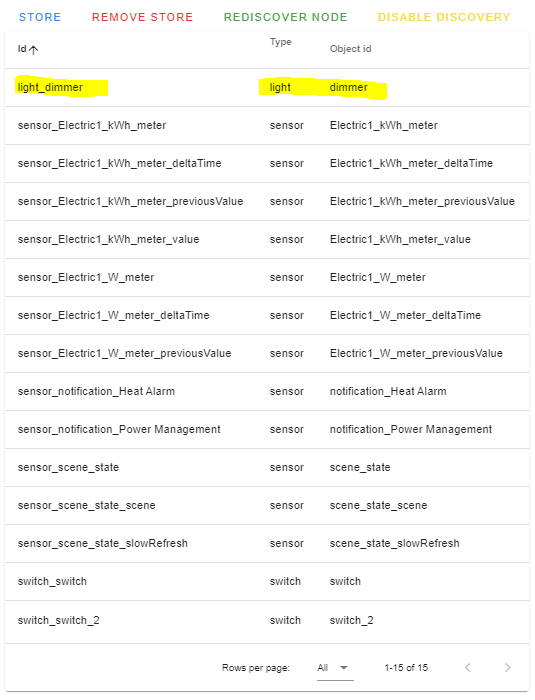
@larstobi In your image I don't see only the light dimmer but also 2 switch discovered switch_switch and switch_switch2.
Sorry the image was from @QNimbus. The light dimmer is there because seems it also supports the CC 38 that is for multilever switch and that's the discovery for that, you can disable it if you don't want (set ignore disocvery to true)
robertsLando
on 10 Dec 2020
When I add it to a Fibaro Home Center Light gateway, the switch actually shows two devices there: one is the switch and one is displayed as a "remote control". I'm not sure what the purpose of this is.
larstobi
on 10 Dec 2020
@larstobi I don't see a fresh interview of nodes 28 or 64 in that log. @robertsLando how can he restart the interview through the dashboard?
AlCalzone
on 10 Dec 2020
@AlCalzone refresh node info ?
robertsLando
on 10 Dec 2020
I did a fresh "Refresh info", and I watched it happening in the log. I can see it at "20:52:29.593 CNTRLR" in the -10 log.
larstobi
on 10 Dec 2020
Eh, something is wrong with that log. I can't see the messages and some of the info logs half the time - that's why I didn't notice that there's a complete interview.
AlCalzone
on 10 Dec 2020
I can check later if that is a problem on my end. But as far as I remember my console outputs during local testing were complete 🤷🏻♂️
AlCalzone
on 10 Dec 2020
What I can tell from that file:
Node 28 seems to support Multilevel Switch and responds to the Multilevel Switch interview.
Not sure about 64, I couldn't find any mention of Multilevel Switch that in the log.
AlCalzone
on 10 Dec 2020
Same issue reported by @larstobi and @QNimbus here with my Fibaro Single Switch FGS213.
It is detected a light_dimmer object I think shouldn't be there.
Node 8: json_values.zip
 katiuskt
on 13 Dec 2020
katiuskt
on 13 Dec 2020
@katiuskt Your cache files show the root endpoint controls Multilevel Switch in version 3, but does not support it. In this case, the value ID probably shouldn't be returned.
AlCalzone
on 13 Dec 2020
https://github.com/zwave-js/node-zwave-js/pull/1207 should fix the issue for some of the devices here (including the one from @katiuskt)
AlCalzone
on 13 Dec 2020
@AlCalzone @larstobi Can I close this as it's not something on my side? or should we move the issue to zwave-js repo?
robertsLando
on 14 Dec 2020
It's okay with me to close it here. I will include the Fibaro Switch into my Fibaro Home Center Light gateway, and take screenshots of how it looks there. Then I'll open an issue in zwave-js repo. I'll link back here.
larstobi
on 14 Dec 2020
@larstobi Have you tried the fix proposed by @AlCalzone ?
robertsLando
on 14 Dec 2020
No, not yet. Will do!
larstobi
on 14 Dec 2020
Related issues
 decairn
·
3Comments
decairn
·
3Comments
 LeoGr13
·
5Comments
LeoGr13
·
5Comments
 slobberbone
·
3Comments
slobberbone
·
3Comments
 bushvin
·
6Comments
bushvin
·
6Comments
 jonathan-reisdorf
·
3Comments
jonathan-reisdorf
·
3Comments