Zwavejs2mqtt: [bug] Missing CC 113-0-Home_Security-* in dashboard
Version
Build/Run method
- [x] Docker
- [ ] PKG
- [ ] Manually built (git clone - npm install - npm run build )
zwavejs2mqtt version: master
Describe the bug
Missing the 113-0-Home_Security-* command classes in the dashboard for motion and door sensors.

Expected behavior
I expect to see 113-0-Home_Security-Motion_sensor_status and 113-0-Home_Security-Cover_status in the dashboard under the User section
Additional context

 chilicheech
All 28 comments
@chilicheech Could you tell me what's the type of that valueId? I think that type may not be supported here
 robertsLando
on 9 Dec 2020
robertsLando
on 9 Dec 2020
both are numbers
 AlCalzone
on 9 Dec 2020
AlCalzone
on 9 Dec 2020
So the type of the valueId is "number" ? If so it's strange it doesn't appear. @chilicheech Could you check please?
robertsLando
on 9 Dec 2020
They should be... Maybe they are "any", I gotta check
AlCalzone
on 9 Dec 2020
So here's what z2m/ozw shows in the dashboard:
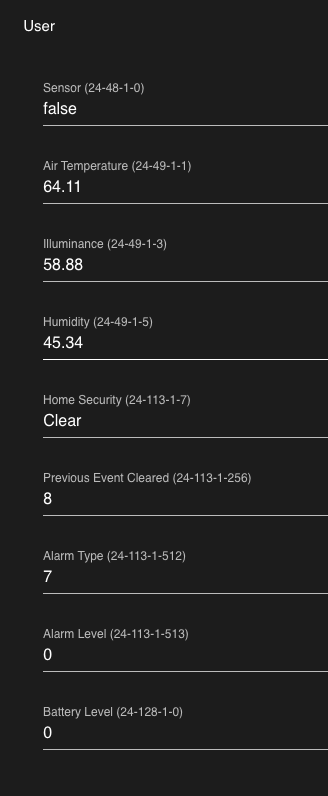
It has many more values in the user section than zjs2m/zjs. The way it's organized in a single column is also much nicer, with the proper labels/titles.
I'm rebuilding the image right now. I had to upgrade my rpi so I lost my config. I'll post here as soon as I find out what the type is..
chilicheech
on 9 Dec 2020
It has many more values in the user section than _zjs2m/zjs_.
That is not always a good thing. zwave-js tries to hide unnecessary ones. The information for the labels is also there:

@robertsLando All notification values should have the type "number", since they build on ValueMetadata.ReadOnlyUInt8.
AlCalzone
on 9 Dec 2020
It has many more values in the user section than _zjs2m/zjs_.
That is not always a good thing. zwave-js tries to hide unnecessary ones.
My opinion is different. As a user of zwave I want all values to be exposed to me so I can do what I please with them. That is one of the reasons I stopped using home assistant's zwave integration in favor of z2m/ozw. Home assistant hides values it thinks are unnecessary but that prevents users from hacking/doing what they want. So, I switched to z2m/ozw to gain access to those unnecessary values. Just my opinion.. 😄
chilicheech
on 9 Dec 2020
Here's the MQTT payload for the motion sensor value:
{
  "id": "24-113-0-Home Security-Motion sensor status",
  "nodeId": 24,
  "commandClass": 113,
  "commandClassName": "Notification",
  "endpoint": 0,
  "property": "Home Security",
  "propertyName": "Home Security",
  "propertyKey": "Motion sensor status",
  "type": "number",
  "readable": true,
  "writeable": false,
  "label": "Motion sensor status",
  "ccSpecific": {
    "notificationType": 7
  },
  "genre": "system",
  "min": 0,
  "max": 255,
  "list": true,
  "states": [
    {
      "text": "idle",
      "value": 0
    },
    {
      "text": "Motion detection",
      "value": 8
    }
  ],
  "value": 0,
  "lastUpdate": 1607541145879
}
Here's the MQTT payload for the cover value:
{
  "id": "24-113-0-Home Security-Cover status",
  "nodeId": 24,
  "commandClass": 113,
  "commandClassName": "Notification",
  "endpoint": 0,
  "property": "Home Security",
  "propertyName": "Home Security",
  "propertyKey": "Cover status",
  "type": "number",
  "readable": true,
  "writeable": false,
  "label": "Cover status",
  "ccSpecific": {
    "notificationType": 7
  },
  "genre": "system",
  "min": 0,
  "max": 255,
  "list": true,
  "states": [
    {
      "text": "idle",
      "value": 0
    },
    {
      "text": "Tampering, product cover removed",
      "value": 3
    }
  ],
  "lastUpdate": 1607538850881
}
Both of them report type number.
Cheers.
chilicheech
on 9 Dec 2020
Home assistant hides values it thinks are unnecessary but that prevents users from hacking/doing what they want
zwave-js doesn't hide values when there's no other (intended) way of accessing them. But some values just don't make sense in a vacuum and would just litter the UI. For example associations (which can be managed with an API), CC versions (which are used internally for checks), alarm type when there is a matching notification, root endpoint values that mirror a non-root endpoint value, etc...
If there's something you are really missing, just let me know and we can discuss.
AlCalzone
on 9 Dec 2020
@chilicheech They should be reported as list as they both have "list": true,. Could you check the chrome debugger console if there are errors?
The way it's organized in a single column is also much nicer, with the proper labels/titles.
I can revert to the old disposition using a single column if you think it was better :)
robertsLando
on 10 Dec 2020
+1
I guess the missing isn't specific for some brands or products but, just in case: I also miss information reported by @chilicheech for a Fibaro Motion Sensor (FGMS001):
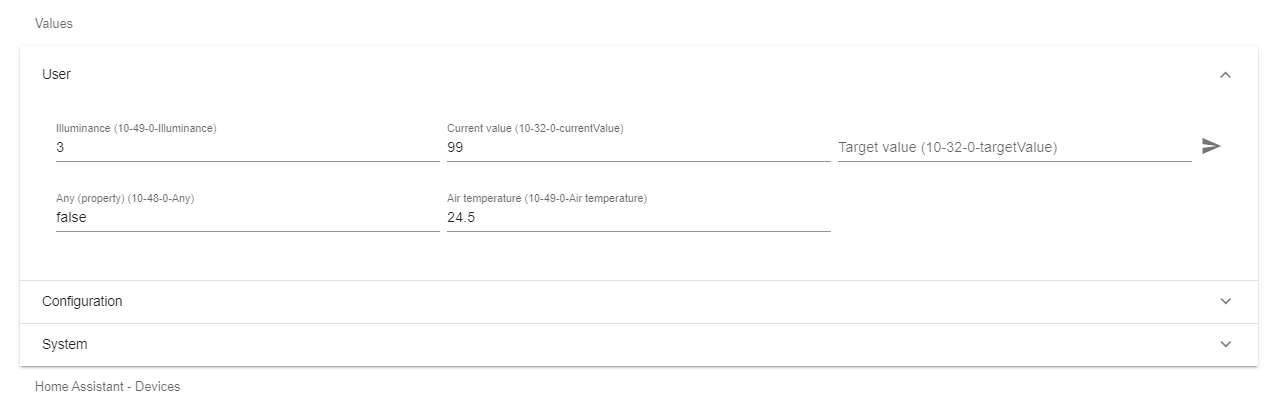
I can revert to the old disposition using a single column if you think it was better :)
My 2 cents: current implementation (several columns) makes harder to find things on devices with a lot of objects. For instance:
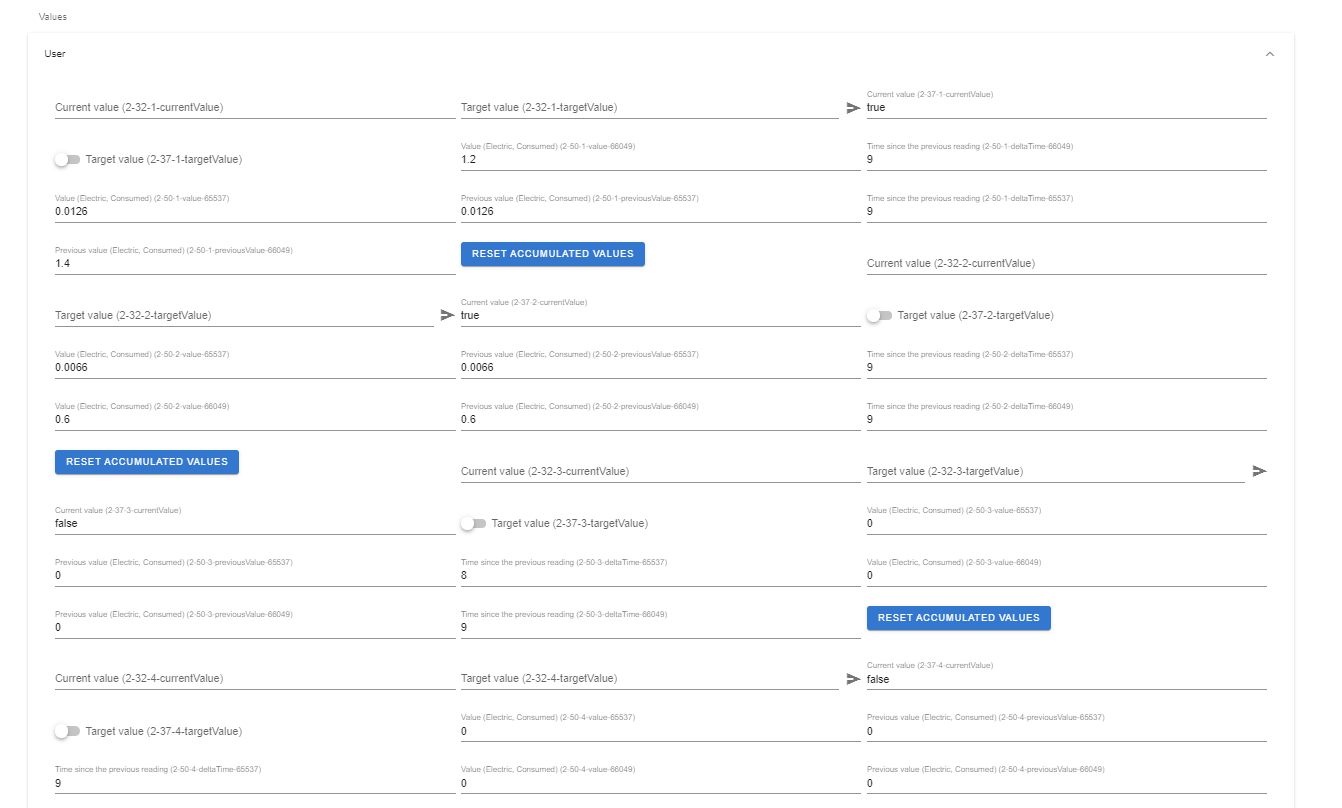
One column won't make things easier, though, because the scroll becomes too big but, if I may choose, I would say one column is slighty better on these scenarios.
 katiuskt
on 13 Dec 2020
katiuskt
on 13 Dec 2020
@katiuskt Could we speak about the best way to show values? I'm open to improve UI but I need some ideas :)
robertsLando
on 14 Dec 2020
I think grouping related values would go a long way.
AlCalzone
on 14 Dec 2020
@AlCalzone Grouping based on which logic?
robertsLando
on 14 Dec 2020
E.g. grouping by CC (which is how it is done in ioBroker - although that is a treeview):
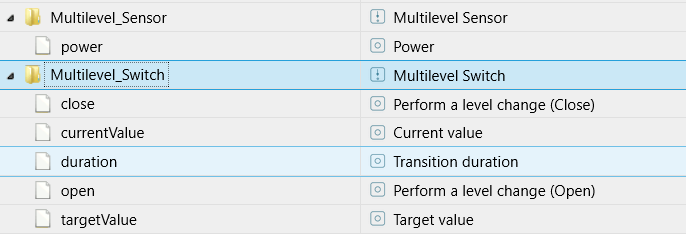
In zwave2mqtt, I think having a block of cells for each CC with a matching headline could work.
AlCalzone
on 14 Dec 2020
I will ask in slack what users prefer, I'm +1 for everything:
https://zwave2mqtt.slack.com/archives/CLBT7K407/p1607943724182900
robertsLando
on 14 Dec 2020
+1 for @AlCalzone suggestion
katiuskt
on 14 Dec 2020
Opened an issue for that #79 , can this be closed?
robertsLando
on 16 Dec 2020
Opened an issue for that #79 , can this be closed?
I think this issue and the #79 are different ones.
This case was raised by @chilicheech because Home_Security-Motion_sensor_status and Home_Security-Cover_status information aren't shown into User section of the GUI.
Yesterday I've updated the docker image (dev tag) and still that information was missing for my Motion Sensor (Fibaro FGMS001)
Issue #79 seems to be more related with the way to display UI user values (grouped by CC) in general but it doesn't seem to me it will solve this particular issue. Once solved this issue, thanks to #79 the values will be presented in a better way but it needs to be values to shown for that and right now they aren't :-)
katiuskt
on 16 Dec 2020
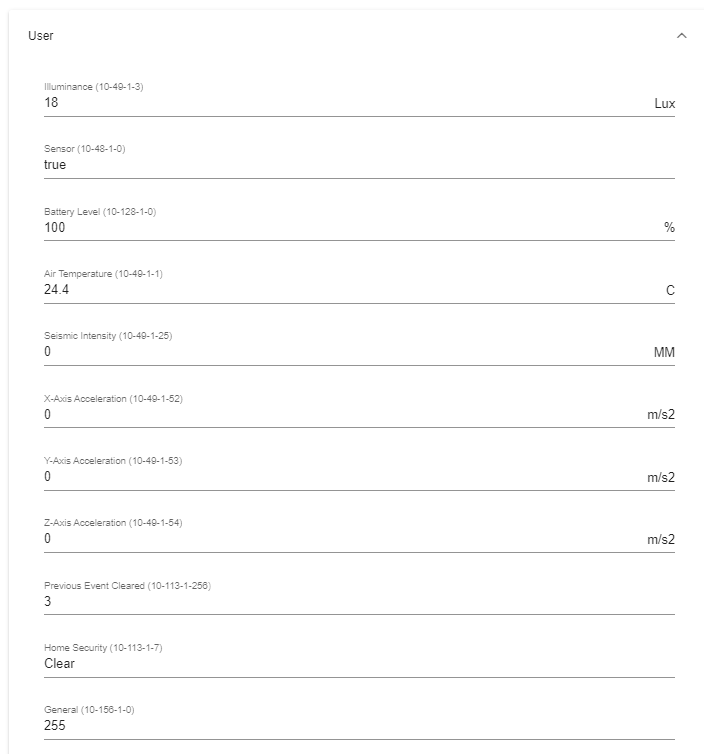
Just in case it helps, in ZWave2MQTT the information for the Fibaro FGMS001 is shown in GUI:
katiuskt
on 17 Dec 2020
I'm a bit lost here, @chilicheech is this fixed oin latest version? is this something on my side or related to zwavejs? Do you see that value added in console logs and it's not showed on UI ?
robertsLando
on 21 Dec 2020
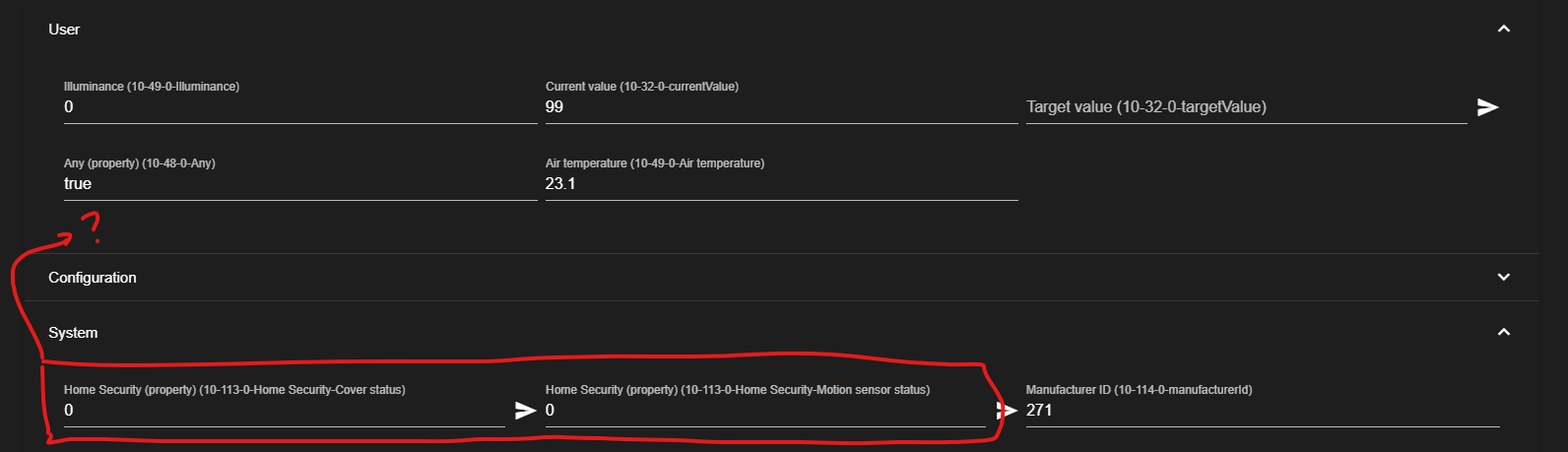
@robertsLando , I think the first issue reported by @chilicheech is those 113 objects aren't shown into zwavejs2mqtt "User" section.
In fact, I also expect to find them there (as they are there into Zwave2MQTT, see screenshots above). But taking a look deeper I see they are under "System" section! Is that place the expected one?
katiuskt
on 21 Dec 2020
hey @robertsLando the issue is as @katiuskt describes. I didn't look under the system section so i missed that they were already there. but, as @katiuskt mentioned, in z2m it shows up under the user section, which makes more sense. it would be nice to move them to the user section in zjs2m as well.
chilicheech
on 21 Dec 2020
In fact, I also expect to find them there (as they are there into Zwave2MQTT, see screenshots above). But taking a look deeper I see they are under "System" section! Is that place the expected one?
I have submitted a patch yesterday that now groups valueids by cc, check master or use dev tag if you are using docker :)
If this is the only one issue you are expecting I'm 99% sure that it's fixed now. Try master and let me know, if not fixed feel free to reopen it
robertsLando
on 22 Dec 2020
hey @robertsLando , thanks for your work on this. I built a new container from master and this is what i now see:
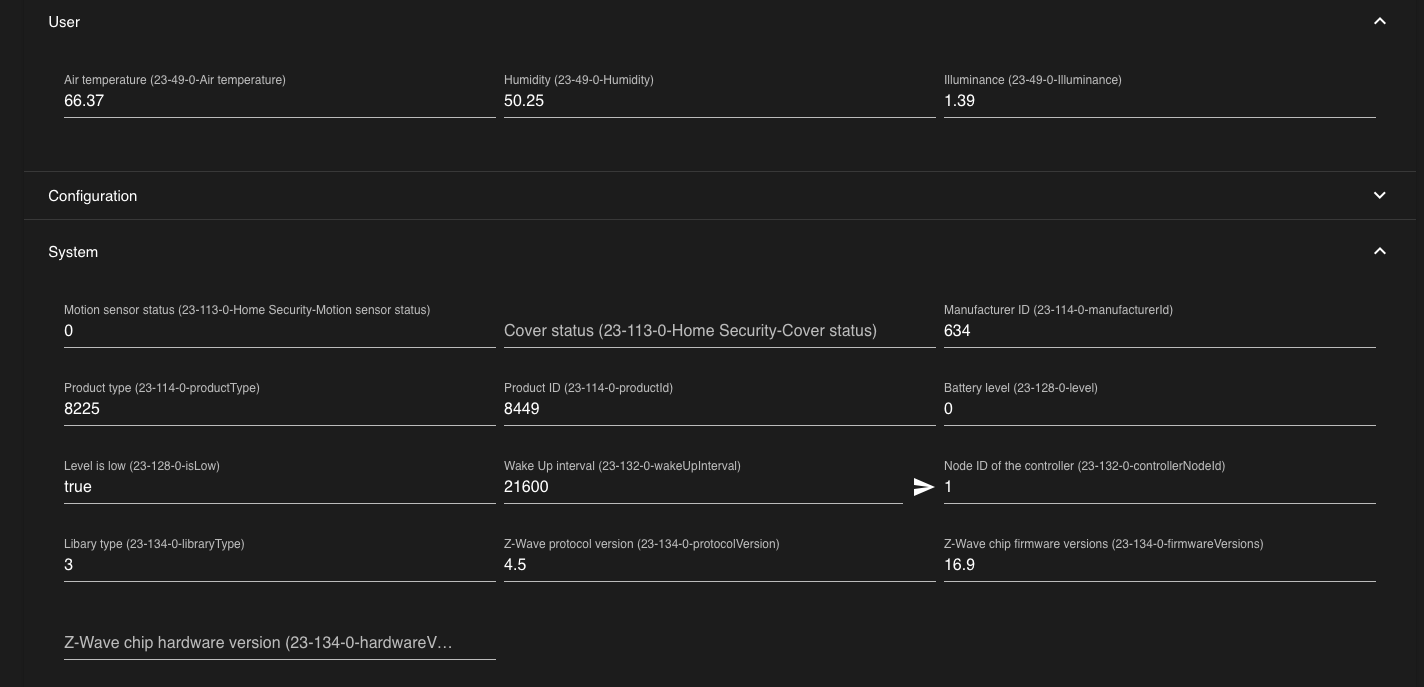
So the CCs are all grouped which is very nice. But the main issue still persists. The issue is that we believe the CC 113 should show up in the user section instead of in the system section, since those are motion detection and cover tampering values. Also, the CC 128 should be in the user section as well. That's how it was in z2m 😄 . @katiuskt posted a nice picture of what it looks like in z2m with the CCs 48, 49, 113, 128, and 156 in the user section: https://github.com/zwave-js/zwavejs2mqtt/issues/59#issuecomment-747713500
chilicheech
on 22 Dec 2020
@chilicheech I'm not really sure that is from muster, them are not grouped by CC.
robertsLando
on 23 Dec 2020
Ah, i forgot to build the image without using the cache. I was able to build a new one and i now see everything grouped by CC. Looks great! It would be nice to put them in some sort of order, maybe alphabetical?
chilicheech
on 23 Dec 2020
It would be nice to put them in some sort of order, maybe alphabetical?
I'm not really sure that would improve visualization, what's the benefit?
robertsLando
on 26 Dec 2020
Related issues
 crxporter
·
8Comments
crxporter
·
8Comments
 bushvin
·
6Comments
bushvin
·
6Comments
 kaaelhaa
·
4Comments
kaaelhaa
·
4Comments
 ODINServ
·
3Comments
ODINServ
·
3Comments
 haavardNO
·
3Comments
haavardNO
·
3Comments