Zwave2mqtt: EUR_SPIRITZ Thermostat broken in zwave2mqtt 3.02 ozw 1.6
Version
Build/Run method
- [x] Docker
- [ ] PKG
- [ ] Manually built (git clone - npm install - npm run build )
Zwave2Mqtt version: 3.02
Openzwave Version: 1.6.974
Describe the bug
Device Type: Thermostat HVAC
Product: EUR_SPIRITZ Wall Radiator Thermostat (EUROtronic)
Values to Set Temperature for Heat (xx-67-1-1) and Heat Econ (xx-67-1-11) are not listed in the Value-list
However they are still readable via mqtt but they cannot be changed via xx-67-1-1/set and 67-1-11/set
To Reproduce
Steps to reproduce the behavior:
- Add a EUR_SPIRITZ Wall Radiator to the z-wave network using openzwave V 1.6.974 and zwave2mqtt 3.02
- Open Control Panel and select the device
- Scroll down to User Values
- See that the fields to Set the Heat Temp (xx-67-1-1) and Heat Econ Temp (xx-67-1-11) are missing
Expected behavior
The mentioned fields should be visible containing the two set points of the themostat and the values should be changeable in the Control Panel as well
Additional context
This worked with zwavw2mqtt 2.x and ozw 1.4
Interestingly the two missing parameters are transferred via mqtt if they are changed at the device
 christoph-luebbe
All 8 comments
I just checked the openzwave 1.6 config for the Eurotronic SPIRIT-Z
there the Command Class 64 lists the modes as Heat, and Heat Eco. No idea why I get Heat Econ instead. And also the Command Class 67 lists 1 and 11 as the two parameters to change the target values. So the definition in openzwave 1.6 seems to be ok.
christoph-luebbe
on 21 Apr 2020
For me I think it's working?
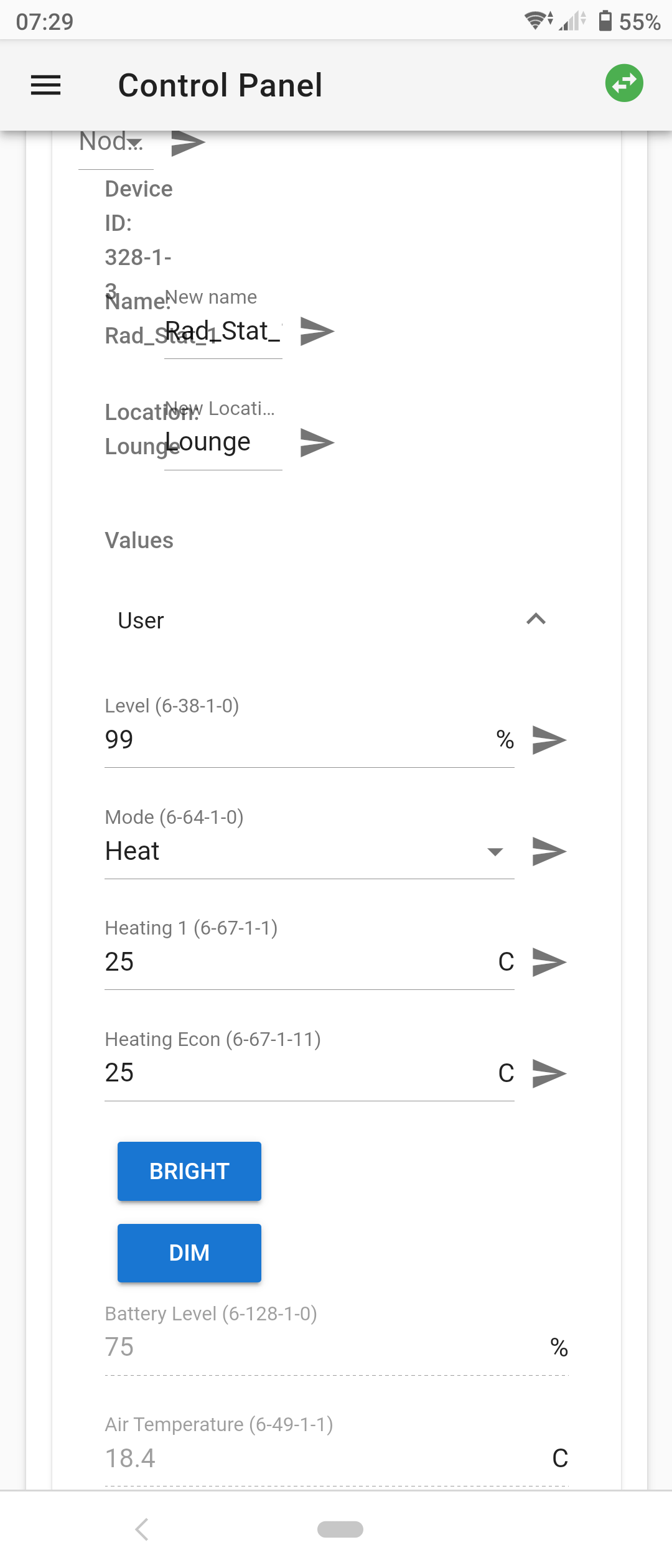
 jamesarbrown
on 22 Apr 2020
jamesarbrown
on 22 Apr 2020
Please try with latest version 3.0.3
 robertsLando
on 22 Apr 2020
robertsLando
on 22 Apr 2020
Hi Daniel, thanks. I will try
christoph-luebbe
on 22 Apr 2020
Hi James, Thanks for your comment. This is exactly what I would expect. I have no idea why I got this messed device config during the update. Daniel suggested to try 3.03. So I asked Frack from Home Assistant to provide us with an updated version of the zwave2mqtt add-on using 3.03.
Hopefully this solves this problem.
christoph-luebbe
on 22 Apr 2020
I am on 3.02... i think. Certaintly thats what the http page says in top left and from docker latest image a couple of days ago. I need to investigate that later tonight and get onto 3.03 for other reason
jamesarbrown
on 22 Apr 2020
Ok I found the root cause. I had a zwfgxxxx.xml file which contained the outdated info. After deleting this and restarting zwave2mqtt everything seems ok. The odd thing is that these wrong settings weren't used and they came up just after the upgrade.
I think it would be a good thing to mention this in the readme to check any zwfg files and consider delete it before the upgrade
christoph-luebbe
on 22 Apr 2020
@christoph-luebbe you don't have to delete the file, you could simply call the api refreshNodeInfo from the UI or via MQTT that will refresh the cache and use latest version of config available :)
robertsLando
on 22 Apr 2020
Related issues
 s-frei
·
6Comments
s-frei
·
6Comments
 larstobi
·
8Comments
larstobi
·
8Comments
 alex-savin
·
7Comments
alex-savin
·
7Comments
 chilicheech
·
9Comments
chilicheech
·
9Comments
 billiaz
·
8Comments
billiaz
·
8Comments