Zwave2mqtt: [bug] Inovelli LZW30-SN
Version
Build/Run method
- [X] Docker
- [ ] PKG
- [ ] Manually built (git clone - npm install - npm run build )
Zwave2Mqtt version: 2.1.1
Openzwave Version: 1.6.1008
Describe the bug
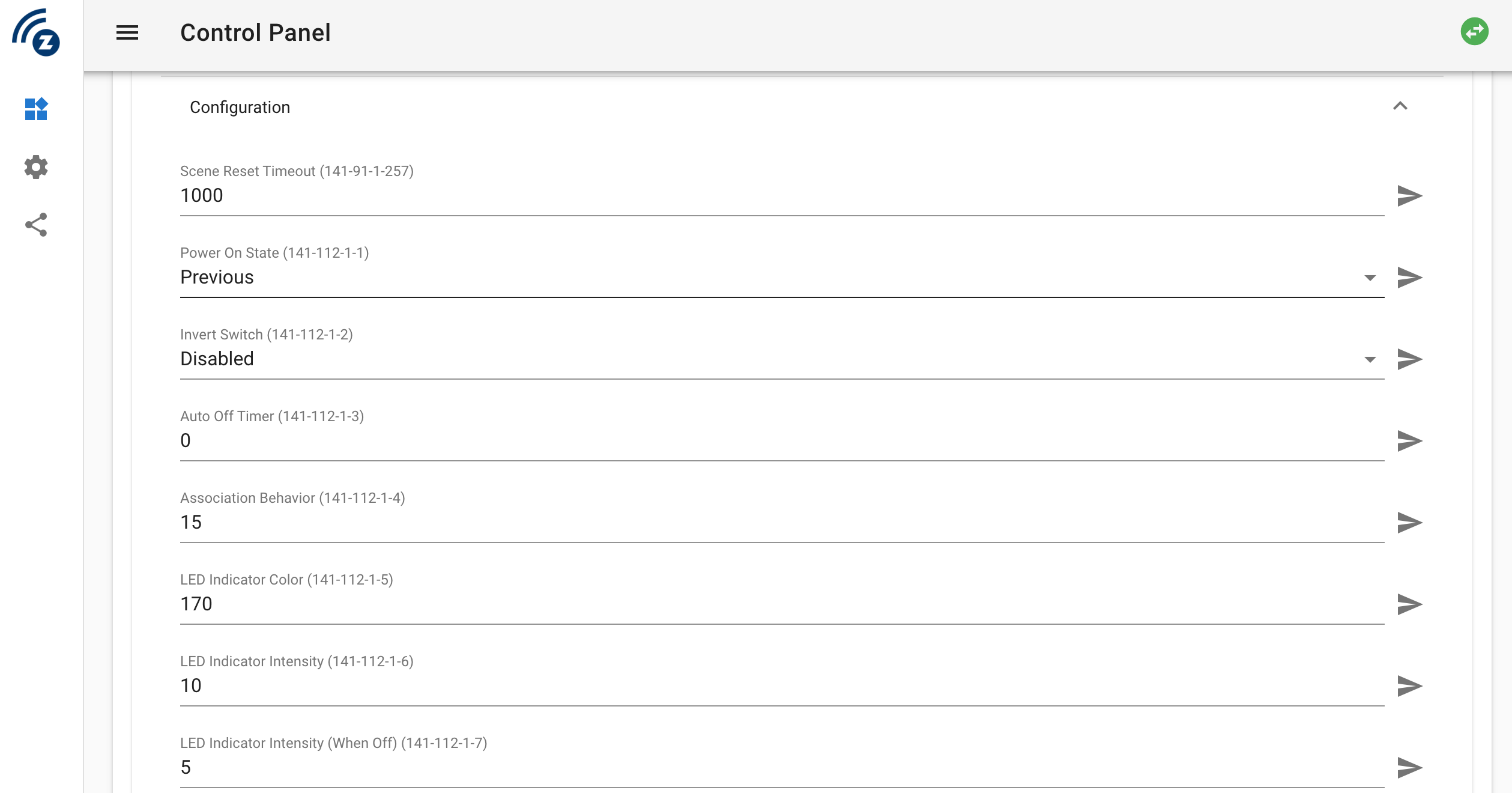
On very first run ZWave2MQTT starts, detects Inovelli LZW30-SN switch, all of the settings are available and it is possible to change any settings. But no of any switches sends Scenes Events.
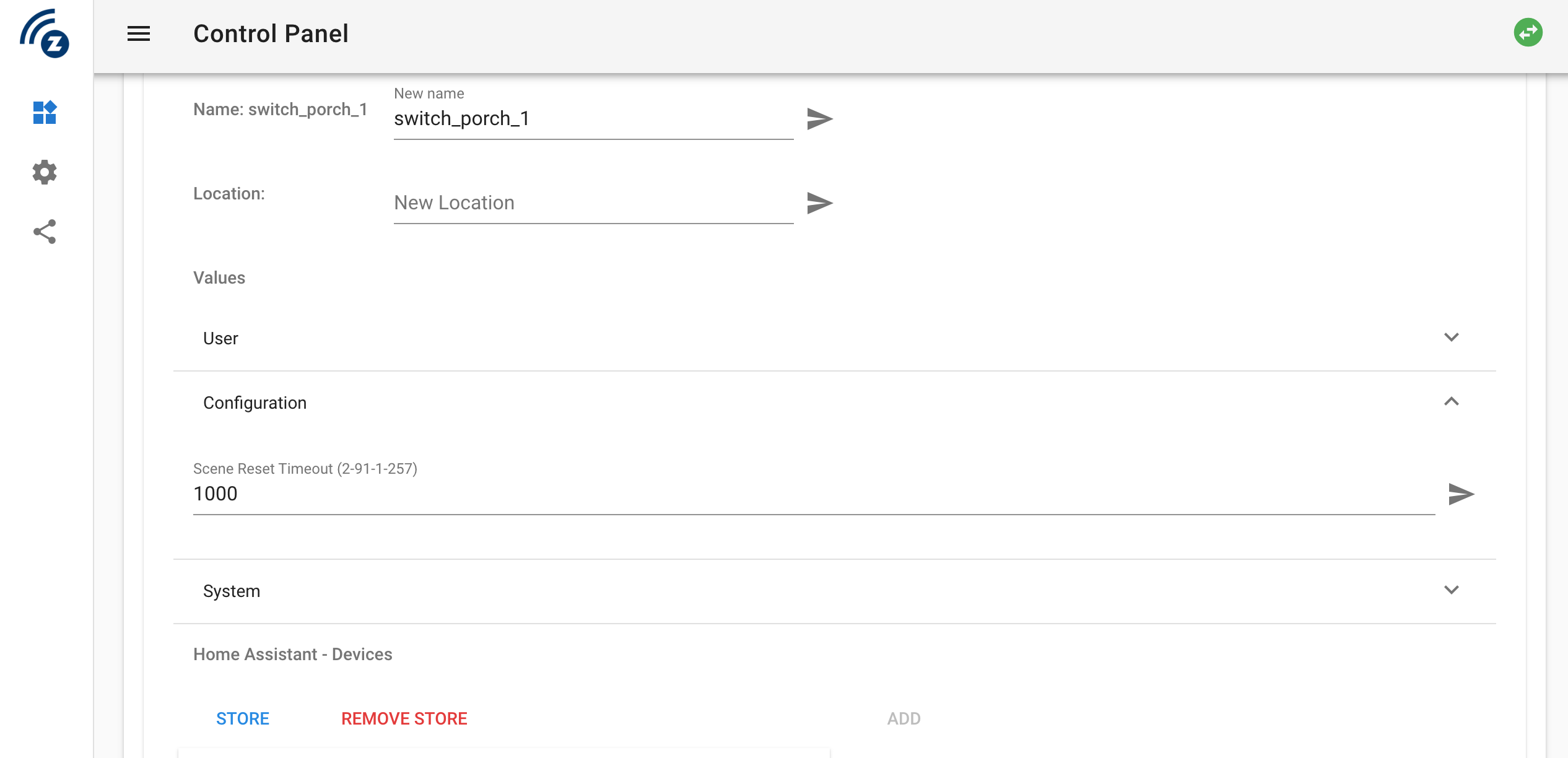
If I changes the ZWave2MQTT settings (Gateway, MQTT and etc), it restarts the process (not the docker container), and after that switches are being detected with something other schema, and I able to get Scenes Events, but all the node settings disappeared (only Scene Time Out Clearance is available)
Furthermore, If I tries to change something from Hass.IO, I'm facing up with an issue states that variable is not valid. But Z2M is able to send correct data about the switch state to Hass.IO
Additional context
Here you can see the different in between two XML record, at first start, and after service restarted
https://www.diffchecker.com/w1g4Dwxy
Settings at the very first start
Settings at the internal restart (not a docker restart)
 alex-savin
All 7 comments
@alex-savin Could you paste here the logs of z2m after the restart?
 robertsLando
on 22 Jan 2020
robertsLando
on 22 Jan 2020
I dont have access to my logs right now, but I was experiencing the same thing with both the LZW30-SN and LZW31-SN (I dont think config files for the LZW31-SN are not on github yet). Here is what I discovered:
- When OpenZwave 1.6 loads the config file the very first time, everything works except for scenes.
- If you restart z2m or use refresh note info, ozw appears to check for an updated config file online
- Ozw claims to find an updated config, so it renames the original config file to something like lzw31-sn.xml.1 and attempts to download the updated config
- The updated config file either does not download or does not save. Since the new config does not exist, none of the settings appear, but scenes now work
I think there is a problem with ozw downloading updated config files (or maybe a permission issue?). The problem with scenes appears to be caused by a combination of data in the config file and the way 1.6 detects scenes now.
My temporary solution was to disable the automatic download of new config files, and to edit the existing config files, removing the Central Scene Command Class from the Inovelli xml files. This allows me to have working settings and working scenes.
 jtronicus
on 24 Jan 2020
jtronicus
on 24 Jan 2020
@jtronicus would mind to share what kind of configuration files to you modify and when (before first restart or after)?
Thank you in advance
alex-savin
on 26 Jan 2020
@alex-savin here is everything I have done to get this working, as well as my OZW_Log.txt file (in case it is useful to @robertsLando in identifying the root cause)
From what I can tell, it doesn’t really matter when I modify the configuration files (before restart, or after restart, but changing the Auto Update option needs to be done prior to restart)
- If I leave Auto Update turned on, my config file gets renamed and scenes work, but no other parameters are present
- If I disable Auto Update and use the stock config files, scenes do not work, but all my device parameters work
- If I disable Auto Update and use the modified config files, both scenes and parameters work
As long as Auto Update is disabled, I can recreate the issue by swapping xml files and refreshing node info.
Docker-compose file:
  zwave2mqtt:
    container_name: zwave2mqtt
    restart: unless-stopped
    image: robertslando/zwave2mqtt:latest-dev
    tty: true
    stop_signal: SIGINT
    ports:
      - "8091:8091"
    devices:
      - /dev/ttyACM0:/dev/ttyACM0
    volumes:
      - /srv/docker/zwave2mqtt:/usr/src/app/store
      - /srv/docker/hass-config/zwave/open-zwave/config:/config
    networks:
      - zwave
I manually updated the /usr/src/app/node_modules/openzwave-shared/config/options.xml file within the docker image, adding the following line:
<Option name="AutoUpdateConfigFile" value="false" />
I manually updated the Inovelli section of manufacturer-specific.xml to add devices that have not been merged yet:
  <Manufacturer id="031E" name="Inovelli">
    <Product type="0002" id="0001" name="LZW30-SN Switch Red Series" config="inovelli/lzw30-sn.xml"/>
    <Product type="0004" id="0001" name="LZW30 Switch" config="inovelli/lzw30.xml"/>
    <Product type="0001" id="0001" name="LZW31-SN Dimmer Red Series" config="inovelli/lzw31-sn.xml"/>
    <Product type="0003" id="0001" name="LZW31 Dimmer" config="inovelli/lzw31.xml"/>
  </Manufacturer>
I manually removed the following lines from inovelli/lzw30-sn.xml (this fixed the non-working scenes):
  <!-- Central Scene Reports -->
  <CommandClass id="91">
    <Instance index="1" />
      <Value type="int" genre="system" instance="1" index="0" label="Scene Count" units="" read_only="true" write_only="false" verify_changes="false" min="-2147483648" max="2147483647" value="2" />
      <Value type="int" genre="user" instance="1" index="2" label="Top Button Scene" units="" read_only="false" write_only="false" verify_changes="false" min="-2147483648" max="2147483647" value="0" />
      <Value type="int" genre="user" instance="1" index="1" label="Bottom Button Scene" units="" read_only="false" write_only="false" verify_changes="false" min="-2147483648" max="2147483647" value="0" />
      <Value type="int" genre="user" instance="1" index="3" label="Config Button Scene" units="" read_only="false" write_only="false" verify_changes="false" min="-2147483648" max="2147483647" value="0" />
  </CommandClass>
I manually removed the following lines from inovelli/lzw31-sn.xml (this fixed the non-working scenes):
  <!-- Central Scene Reports -->
  <CommandClass id="91">
    <Instance index="1" />
      <Value type="int" genre="system" instance="1" index="0" label="Scene Count" units="" read_only="true" write_only="false" verify_changes="false" min="-2147483648" max="2147483647" value="2" />
      <Value type="int" genre="user" instance="1" index="2" label="Top Button Scene" units="" read_only="false" write_only="false" verify_changes="false" min="-2147483648" max="2147483647" value="0" />
      <Value type="int" genre="user" instance="1" index="1" label="Bottom Button Scene" units="" read_only="false" write_only="false" verify_changes="false" min="-2147483648" max="2147483647" value="0" />
      <Value type="int" genre="user" instance="1" index="3" label="Config Button Scene" units="" read_only="false" write_only="false" verify_changes="false" min="-2147483648" max="2147483647" value="0" />
  </CommandClass>
I have attached a copy of my OZW_Log.txt file after restarting the Docker image. At this point, Node018 was missing all config options, but when I hit "Refresh Node Info" on Node 18, it loaded the appropriate (modified) config file and started working normally.
Noteworthy Nodes:
- Node013: Inovelli LZW30-SN Switch Red Series
- Node014: Inovelli LZW31-SN Dimmer Red Series
- Node017: Inovelli LZW30-SN Switch Red Series
- Node018: Inovelli LZW31-SN Dimmer Red Series
Refresh node info for Node 18 starting at timestamp 2020-01-26 18:40:41.735. I can see at timestamp 2020-01-26 18:40:42.006 (during node refresh), ozw indicates the config file is out of date and attempts to download an updated version. This download fails at timestamp 2020-01-26 18:40:42.334. I assume this is because I edited the options.xml file to prevent Auto Update of config file. In the past (before editing the options.xml file), my lzw31-sn.xml config file was getting renamed to lzw31-sn.xml.1 when ozw was attempting to download the updated config. I assume ozw was then attempting to load lzw31-sn.xml (which no longer existed because it got renamed).
jtronicus
on 26 Jan 2020
@Fishwaldo
robertsLando
on 27 Jan 2020
@jtronicus Thank you very much!
This trick does very well!
PS: I created a new docker image, it you want I can share it
alex-savin
on 27 Jan 2020
Yes - Inovelli only just submitted new config files to the OZW repo. I will merge soon.
If your manually editing config files, make sure you set the revision number to a impossibly "high" number to stop OZW overwritting your changes when restarting. (I will add some details about this to the Wiki/Documentation etc)
 Fishwaldo
on 29 Jan 2020
Fishwaldo
on 29 Jan 2020
Related issues
 larstobi
·
8Comments
larstobi
·
8Comments
 christoph-luebbe
·
8Comments
christoph-luebbe
·
8Comments
 cyclops1982
·
8Comments
cyclops1982
·
8Comments
 dooz127
·
3Comments
dooz127
·
3Comments
 s-frei
·
6Comments
s-frei
·
6Comments
Most helpful comment
Yes - Inovelli only just submitted new config files to the OZW repo. I will merge soon.
If your manually editing config files, make sure you set the revision number to a impossibly "high" number to stop OZW overwritting your changes when restarting. (I will add some details about this to the Wiki/Documentation etc)