Zwave2mqtt: [question] Where can we change attributes and modes?
This is driving me crazy. I have 2 GOCONTROL GC-TBZ48 thermostats. Running ZWave2MQTT in docker, and Home Assistant. I have discovery turned on and everything shows up.
The problem I have is with the mode options and fan mode options.
ZW2M is setting the fan modes and operating modes to Capitals, like Heat, Cool, Auto. Home Assistant doesn't recognize Capitals and tells me invalid mode. When still running on OZW 1.4 I could edit the xml file and change these options to work. I updated tonight and it changed all my stuff back! Now I have no control from my Home Assistant GUI. :|
Where can I change this behavior?
 flamingm0e
All 24 comments
You can edit hass/devices.js file to change the way in which Zwave2MQTT exposes data to Home Assistant. If you are running Z2M in a docker container it may be easier to test your changes by editing store/customDevices.js instead (it's same thing but located in a folder which is easier to access).
With a thermostat you can use exisiting _Eurotronic Spirit Z_ and _Heatit TF 021_ thermostat definitions as a template, so it should be pretty straightforward.
Once you'll manage to get your device working, please dont forget to contribute.
Also can you write little bit more about your issue, maybe some examples? I dont really get it, HA indeed changes node names to all lowercase, but the values should still be case sensitive.
 Dinth
on 24 Jan 2020
Dinth
on 24 Jan 2020
When still running on OZW 1.4 I could edit the xml file and change these options to work
That is for sure the best thing to do to break OZW like it has happen :disappointed:
I suggest to do like @Dinth has suggested, hass discovery payloads allows to create templates to understand how to read incoming datas and how to write commands in mqtt. Check existing thermostats configurations inside hass/devices.js
 robertsLando
on 24 Jan 2020
robertsLando
on 24 Jan 2020
You can edit
hass/devices.jsfile to change the way in which Zwave2MQTT exposes data to Home Assistant. If you are running Z2M in a docker container it may be easier to test your changes by editingstore/customDevices.jsinstead (it's same thing but located in a folder which is easier to access).
With a thermostat you can use exisiting _Eurotronic Spirit Z_ and _Heatit TF 021_ thermostat definitions as a template, so it should be pretty straightforward.
I tried this but it didn't seem to change the right parameters.
Once you'll manage to get your device working, please dont forget to contribute.
If I can ever figure out the magic combination, I certainly will.
Also can you write little bit more about your issue, maybe some examples?
So using the default setup in ZWave2MQTT, the thermostat is presented over MQTT, and HA sees it. It seems that the modes are being passed through as ["Auto", "Heat", "Cool", "Off"], the fan modes are being passed as ["On Low", "Auto Low"], and HA expects them to be in all lowercase. In HA, the climate controls will present the dropdown with the options (because these are manually created in the MQTT Climate config), but selecting any option it reverts back to no option selected, and doesn't give the controls any feedback to report state. This causes my furnace blower to turn on and get stuck in between modes and I have to pull power to the furnace to get control back. To me the real fix is with Home Assistant, and it looks like I will have to write a new custom component to change this behavior, but I miss the ability to edit the options for zwave.
Prior to the move to OZW1.6, I could edit my zwcfg xml file and modify the way these parameters are presented. They were in COMMAND_CLASS_THERMOSTAT_MODE and all I had to do was change the case on the first letter. The same with the COMMAND_CLASS_THERMOSTAT_FAN_MODE section.
I know that 1.6 changed all that, and I tried to mimic this type of change through the customDevices.js but somehow it's still coming through as Uppercase. The documentation for this feature is still lacking and I am trying to weed through it to figure out what all it does and can do. It certainly isn't making my wife happy when I keep breaking the climate controls in our house. :(
That is for sure the best thing to do to break OZW like it has happen
How does this break things?
Check existing thermostats configurations inside hass/devices.js
I have been looking at this for a couple of weeks now, but it didn't really click. I noticed the documentation was updated sometime this week, so it definitely helps understand it a little better. I will certainly provide a config that works for the gocontrol thermostats as soon as I nail something down.
Now while I have been sitting here writing all this up, I just realized that using the customDevices.json probably was working, and creating a NEW entity in HA. FML. It was late last night and I did the best thing I knew at the time which was revert to a "known" working config, aka 2.0.6. Sure enough I check my HA dev tools states page and see
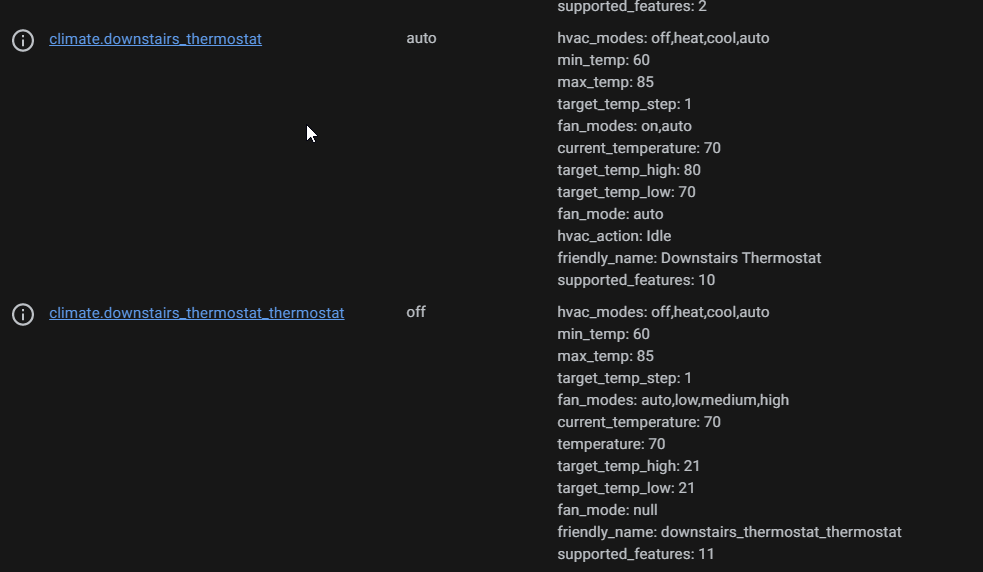
Sigh....I guess I wasted everyone's time including my own. I will test this out tonight when I get home. I will at least update you with what I find.
flamingm0e
on 24 Jan 2020
@flamingm0e Keep me updated :)
robertsLando
on 24 Jan 2020
@robertsLando
Do you have a list of available options we can put in customDevices.json?
flamingm0e
on 24 Jan 2020
@flamingm0e Check here
For the discovery_payload option check hass docs about mqtt auto-dscovery: https://www.home-assistant.io/docs/mqtt/discovery/
robertsLando
on 24 Jan 2020
I've seen the example for your customDevices.json, I just didn't know if there were other options we could set.
flamingm0e
on 24 Jan 2020
@flamingm0e Nope those are all the options available. There shouldn't be anymore needed
robertsLando
on 24 Jan 2020
OK. Thank you. I will play around with this.
flamingm0e
on 24 Jan 2020
Got home tonight and tried to update and use the customDevices.js.
module.exports = {
    '335-21559-21570': [{ // GoControl GC-TBZ48 (Linear Nortek Security Control LLC)
        "type": "climate",
        "object_id": "thermostat",
        "values": [
            "64-1-0",
            "49-1-1",
            "67-1-1",
            "67-1-2",
            "66-1-0",
            "68-1-0",
            "69-1-0"
        ],
        "mode_map": {
            "off": "Off",
            "heat": "Heat",
            "cool": "Cool",
            "auto": "Auto"
        },
        "setpoint_topic": {
            "Heat": "67-1-1",
            "Cool": "67-1-2"
        },
        "default_setpoint": "67-1-1",
        "discovery_payload": {
            "min_temp": 60,
            "max_temp": 85,
            "modes": [
                "off",
                "heat",
                "cool",
                "auto"
            ],
            "fan_modes": [
                "on",
                "auto"
            ],
            "action_topic": "66-1-0",
            "mode_state_topic": "64-1-0",
            "mode_command_topic": true,
            "current_temperature_topic": "49-1-1",
            "current_temperature_template": "{{ value_json.value }}",
            "temperature_state_template": "{{ value_json.value }}",
            "temperature_low_command_topic": true,
            "temperature_low_state_template": "{{ value_json.value }}",
            "temperature_high_command_topic": true,
            "temperature_high_state_template": "{{ value_json.value }}",
            "fan_mode_command_topic": true,
            "fan_mode_state_topic": "68-1-0"
        }
    }]
}
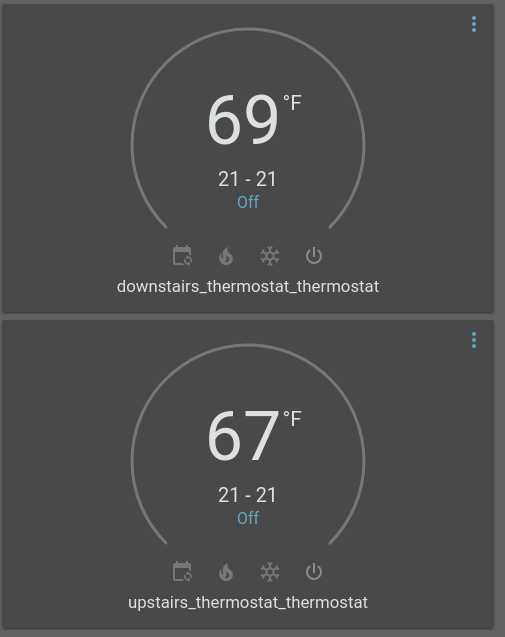
This still failed, and I had no fan mode options. I guess I will try to play around with it more this weekend and see what happens. I see no way to pass through my fan modes. I tried adding:
"fan_mode_map": {
            "on": "On",
            "auto": "Auto"
        },
But that obviously didn't work. Not only did I not have any fan modes, but my min and max temps weren't coming through properly either
flamingm0e
on 25 Jan 2020
Hi @flamingm0e. Thanks for doing this troubleshooting.
Can you check if your Devices.js file actually does what it's supposed to do, i.e. can you use mosquitto_sub or other MQTT listener to see if the messages being sent by Z2M match what you are expecting to see (lowercase fan modes).
also @robertsLando since it seems that HA likes lowercase characters so much, maybe applying lower() method to all such text variables would be feasible?
Dinth
on 25 Jan 2020
Can you check if your Devices.js file actually does what it's supposed to do, i.e. can you use mosquitto_sub or other MQTT listener to see if the messages being sent by Z2M match what you are expecting to see (lowercase fan modes).
The Devices.js file is actually creating an MQTT discovered device so it appears to be doing something, but looking at the topic for modes, I get
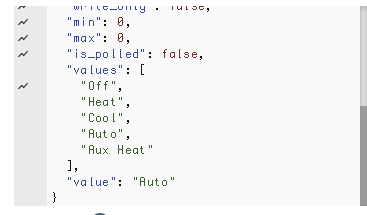
error log in HA says:
[homeassistant.components.mqtt.climate] Invalid modes mode: Off
[homeassistant.components.mqtt.climate] Invalid modes mode: Auto
[homeassistant.components.mqtt.climate] Invalid fan_modes mode: Auto Low
What's really confusing is in the ZWAVE2MQTT logs, when I select the options it appears to be responding, and the thermostat does what it is supposed to, but the HA UI doesn't reflect state and I get errors. I am at a complete loss and I feel like I am missing something here. I have never had a device give me so much trouble (I knew I should have bought the wifi thermostats).
flamingm0e
on 25 Jan 2020
More information just to annoy everyone getting these alerts. ;)
The HVAC Modes are working correctly.
On the latest version of zw2mqtt, I changed the name of the thermostats so they would create different topics in MQTT. The new topic created a new device in HA, and I have partial control of the thermostats.
What continues to be broken is:
- min/max set point
- fan modes/state reporting
So how can I get fan modes added using customDevices.js?
Any pointers on why min/max temps wouldn't be working correctly?
flamingm0e
on 25 Jan 2020
Found some more time to troubleshoot a little more.
Got this in my HA logs:
2020-01-25 20:54:50 INFO (MainThread) [homeassistant.components.mqtt] Updating component: climate.upstairs_thermostat_1_thermostat
2020-01-25 20:54:50 ERROR (MainThread) [homeassistant.components.mqtt.climate] Could not parse temperature from {"value_id":"12-67-1-1","node_id":12,"class_id":67,"type":"decimal","genre":"user","instance":1,"index":1,"label":"Heating 1","units":"F","help":"Set the Thermostat Setpoint Heating 1","read_only":false,"write_only":false,"min":0,"max":0,"is_polled":false,"value":70}
This is the /config payload going across MQTT, and it seems incorrect to me:
{
  "min_temp":60,
  "max_temp":85,
  "modes":[
    "off",
    "heat",
    "cool",
    "auto"
  ],
  "fan_modes":[
    "on",
    "auto"
  ],
  "action_topic":"66-1-0",
  "mode_state_topic":"homeassistant/downstairs/64/1/0",
  "mode_command_topic":"homeassistant/downstairs/64/1/0/set",
  "current_temperature_topic":"homeassistant/downstairs/49/1/1",
  "current_temperature_template":"{{ value_json.value }}",
  "temperature_low_command_topic":true,
  "temperature_low_state_template":"{{ value_json.value }}",
  "temperature_high_command_topic":true,
  "temperature_high_state_template":"{{ value_json.value }}",
  "fan_mode_command_topic":true,
  "fan_mode_state_topic":"68-1-0",
  "fan_mode_state_template":"{{ value_json.value }}",
  "mode_state_template":"{% set values = {\"Off\":\"off\",\"Heat\":\"heat\",\"Cool\":\"cool\",\"Auto\":\"auto\"} %} {{ values[value_json.value] if value_json.value in values.keys() else 'off' }}",
  "temperature_state_topic":"homeassistant/downstairs/67/1/1",
  "temperature_command_topic":"homeassistant/downstairs/67/1/1/set",
  "device":{
    "identifiers":[
      "zwave2mqtt_downstairs"
    ],
    "manufacturer":"Linear (Nortek Security Control LLC)",
    "model":"0x5437",
    "name":"GC-TBZ48 Battery Powered Z-Wave Thermostat",
    "sw_version":"Unknown"
  },
  "name":"downstairs_thermostat",
  "unique_id":"zwave2mqtt_downstairs_thermostat"
}
Still can't get fan modes to work in HA, and trying to change the low/high setpoints results in this error in HA:
voluptuous.error.MultipleInvalid: expected float for dictionary value @ data['target_temp_low']
I'm tired of messing with this for today. Reverting back to 2.0.6 for the time being (I have to work tomorrow and wife wants things to work for at least a day).
flamingm0e
on 26 Jan 2020
Hi @flamingm0e
Thanks for doing all that troubleshooting.
We are still missing one important thing though - what messages are being actually published to your MQTT server.
Can you run mosquitto_sub leeching on your server or alternatively if you dont have access to linux, one of those clients https://www.hivemq.com/blog/seven-best-mqtt-client-tools/? Connect to your MQTT server, subscribe to "zwave/#" topic (or whichever topic your Z2M messages are being published to) and so whats being posted there?
Ive got a similar problem here https://github.com/OpenZWave/Zwave2Mqtt/issues/214 and potentially it may be a bug in HA, not Z2M - as HA expects different values that are defined in discovery message. But this can be only verified by seeing if your MQTT messages are matching their definitions.
Dinth
on 26 Jan 2020
We are still missing one important thing though - what messages are being actually published to your MQTT server.
I provided the config payload of my customDevices.js device. If you want all the other payloads, there are a lot. Please specify which one.
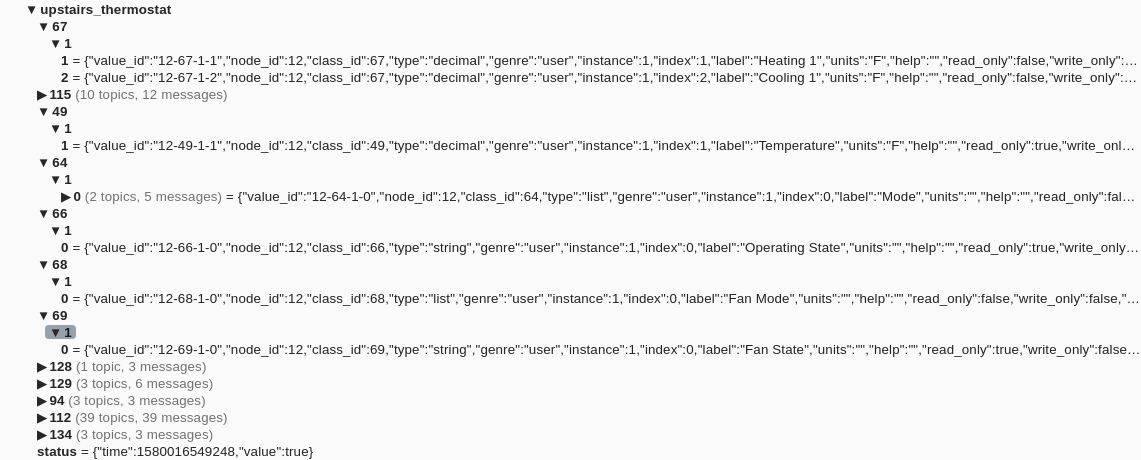
This is currently what I see on the 2.0.6 build (The only modifications done are in the xml to set the modes to lowercase):
I will be out of town tomorrow, but when I get a chance, I will get back to troubleshooting.
flamingm0e
on 26 Jan 2020
@flamingm0e The problem as you can see is that actually there is no support for thermostats with fans/fans modes. I will submit a commit for this
robertsLando
on 27 Jan 2020
Try with:
module.exports = {
    '335-21559-21570': [{ // GoControl GC-TBZ48 (Linear Nortek Security Control LLC)
        "type": "climate",
        "object_id": "thermostat",
        "values": [
            "64-1-0",
            "49-1-1",
            "67-1-1",
            "67-1-2",
            "66-1-0",
            "68-1-0",
            "69-1-0"
        ],
        "fan_mode_map": {
            "on": "On",
            "auto": "Auto"
        },
        "mode_map": {
            "off": "Off",
            "heat": "Heat",
            "cool": "Cool",
            "auto": "Auto"
        },
        "setpoint_topic": {
            "Heat": "67-1-1",
            "Cool": "67-1-2"
        },
        "default_setpoint": "67-1-1",
        "discovery_payload": {
            "min_temp": 60,
            "max_temp": 85,
            "modes": [
                "off",
                "heat",
                "cool",
                "auto"
            ],
            "fan_modes": [
                "on",
                "auto"
            ],
            "action_topic": "66-1-0",
            "mode_state_topic": "64-1-0",
            "mode_command_topic": true,
            "current_temperature_topic": "49-1-1",
            "current_temperature_template": "{{ value_json.value }}",
            "temperature_state_template": "{{ value_json.value }}",
            "temperature_low_command_topic": true,
            "temperature_low_state_template": "{{ value_json.value }}",
            "temperature_high_command_topic": true,
            "temperature_high_state_template": "{{ value_json.value }}",
            "fan_mode_command_topic": true,
            "fan_mode_state_topic": "68-1-0"
        }
    }]
}
In poor words just add this to your previous config:
 "fan_mode_map": {
            "on": "On",
            "auto": "Auto"
        },
If you make it work please remember to send a PR with this config inside hass/devices.js so every user can use it :)
robertsLando
on 27 Jan 2020
@flamingm0e With latest changes you should be able to do what you want. Let me know :)
robertsLando
on 28 Jan 2020
Thanks @robertsLando
I can't wait to try it out. I should have some time tomorrow evening.
flamingm0e
on 29 Jan 2020
I'm sure Robert knows what I'm about to say - Using "Strings" for comparisons is asking for trouble. In this case, I'd try to update the "mapping" to use the ValueItem "Value" (the integer that represents Heat/Cool etc) because it might change (by config file, discovery etc).
Then that way, spelling changes, enhancements to the Specification, users switching langugages in OZW etc will not be affected.
 Fishwaldo
on 29 Jan 2020
Fishwaldo
on 29 Jan 2020
Using "Strings" for comparisons is asking for trouble
Yes I know, until I don't find a better way to identify devices it is better than nothing... Actually there are too many wrongly discovered devices
robertsLando
on 29 Jan 2020
Related issues
 christoph-luebbe
·
8Comments
christoph-luebbe
·
8Comments
 jaburges
·
4Comments
jaburges
·
4Comments
 cyclops1982
·
8Comments
cyclops1982
·
8Comments
 hostrup
·
4Comments
hostrup
·
4Comments
 raspberrypython
·
5Comments
raspberrypython
·
5Comments