Zwave2mqtt: [feat] Node events and scene events on hass discovery
This might also be a feature request. It's unclear because the documentation for group association is fairly minimal today.
I've followed these instructions to make the double-tap work for my GE 14294 dimmer switch. I even see an event in mqtt (zwave2mqtt/Office/3/event {"time":1577849592927,"value":255}), so I know everything is working correctly on the zwave side all the way through mqtt. I do not see any way to add it so that hass can auto-discover it, however.
 sdwilsh
All 24 comments
I think we'd want this to show up as a sensor per https://www.home-assistant.io/integrations/sensor.mqtt/
sdwilsh
on 1 Jan 2020
Which OZW version are you using?
 robertsLando
on 2 Jan 2020
robertsLando
on 2 Jan 2020
If you are using OZW 1.6 you could manage events because they are associated to valueIDs, otherwise it needs some thoughts
robertsLando
on 2 Jan 2020
What I can suggest you is to manually create the entity on hass side: https://www.home-assistant.io/docs/configuration/devices/
robertsLando
on 2 Jan 2020
Yeah, I can set it up myself, but I put the feature request in because it'd be nice to have it automatically there. The GE 14294 is interesting because it has three different association groups, and all three have a different set of events, as far as I can tell.
It'd be nice if they were auto-populated as things for the device. That would require two changes, I think:
1) OpenZwave would have to have both association groups set to auto (which I think is okay per their guidelines, but I should start a discussion thread about it)
2) The automatic population of "Home Assistant - Devices" section should look at associated groups as well
Another option would allowing the manual addition to "Home Assistant - Devices".
sdwilsh
on 2 Jan 2020
I forgot to answer the OZW version question - I'm using whatever is part of the Docker install from the readme. I'm not sure how to check what version that is, to be honest.
sdwilsh
on 2 Jan 2020
What I can suggest you is to manually create the entity on hass side: https://www.home-assistant.io/docs/configuration/devices/
This turns out to not work as well as one might hope. As a concrete example, I want my blinds to go down if I double tap down on my light switch. If I closed them with the double tap, but something else opens them, once I double tap down again, nothing happens because there was no change of state. I thought about just listening for the mqtt topic as the trigger, but because I normally want my zwave status for devices retained, once home assistant starts and listens, it thinks there was a double tap when there was not one.
sdwilsh
on 3 Jan 2020
Sharing this here since I was able to make it work by exposing each double-tap direction as a binary sensor in home assistant with this:
binary_sensor:
   - platform: mqtt
     name: 'Office LightRoom Off Double-Tap'
     state_topic: 'zwave2mqtt/Office/3/event'
     json_attributes_topic: 'zwave2mqtt/Office/3/event'
     json_attributes_template: '{{ value_json | tojson }}'
     value_template: '{{ value_json.value }}'
     payload_on: '0'
     expire_after: 1
   - platform: mqtt
     name: 'Office LightRoom On Double-Tap'
     state_topic: 'zwave2mqtt/Office/3/event'
     json_attributes_topic: 'zwave2mqtt/Office/3/event'
     json_attributes_template: '{{ value_json | tojson }}'
     value_template: '{{ value_json.value }}'
     payload_on: '255'
     expire_after: 1
Downside with this approach is that most of the time the sensor is unavailable (due to expires_after), but without that the state will never change. Adding json_attributes_template (with json_attributes_topic) kept any automations from trigger on home assistant startup.
sdwilsh
on 4 Jan 2020
It turns out that I didn't test turning on the lights earlier because it was day time, but that appears to be broken. It seems like the single and double tap both get this event, which makes it hard to use correctly. Here are the logs I captured:
https://gist.github.com/sdwilsh/64d94016c3051cbd800ad734586faac2
sdwilsh
on 4 Jan 2020
I sincerly don't understand what you are tring to do here. You are speaking about associations groups, those are already supported just by going to groups tab of control panel. From there you can add/remove nodes associatons to a group of a specific node
robertsLando
on 7 Jan 2020
The real issue is how GE did the devices.
On some of them you use the BASIC report (0x20) for double tap. Out of the box, if you pair a 26933 motion dimmer, zwave2mqtt doesn't expose command 0x20/32 at all, it only shows up in "event":
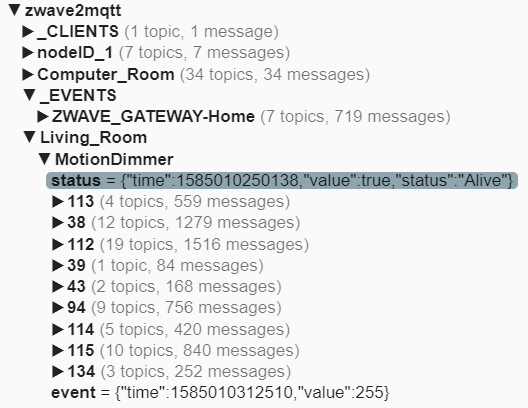
It would be better, in my opinion, if command 32 showed up in the tree just like all of the other commands.
The other problem is that setting associations doesn't seem to work right with this device in zwave2mqtt either.
Typically for these devices you have assoc group 1 set to the controller, and assoc group 3 set to the controller. But you should never set assoc group 2 to the controller as it will break the doubletap messages (by sending the single tap to basic set as well).
In zwave2mqtt interface, for groups there are:
- Lifeline
- Basic Set
- Basic Set
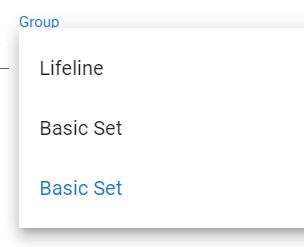
No idea which group # the two Basic Set ones are, but no matter which one I set to the controller it sends the single tap events. That only happens if assoc group 2 set., so there is something amiss here as you can't seem, to set only assoc group #3, and not set #2 as well.
 Botched1
on 24 Mar 2020
Botched1
on 24 Mar 2020
@Botched1 What z2m version are you running?
No idea which group # the two Basic Set ones are
That is an xml config file error If you see duplicated values, try to go to openzwave repo and check it
robertsLando
on 24 Mar 2020
Latest docker version of z2m, just set it up about 4 days ago.
I'll go peek at the openzwave repo, good idea. I'm not new to zwave, or the GE devices (write drivers for the device on multiple platforms), but I am new to openzwave and z2m.
EDIT: Indeed, here is what in the repo:
 <CommandClass id="133">
    <Associations num_groups="3">
      <Group index="1" label="Lifeline" max_associations="5"/>
      <Group index="2" label="Basic Set" max_associations="5"/>
      <Group index="3" label="Basic Set" max_associations="5"/>
   </Associations>
I guess I need to figure out how to file a feature request in openzwave.
Botched1
on 24 Mar 2020
I guess I need to figure out how to file a feature request in openzwave.
Absolutely
robertsLando
on 24 Mar 2020
I guess I need to figure out how to file a feature request in openzwave.
Absolutely
Feature request submitted over there. Thanks.
Botched1
on 24 Mar 2020
I guess I need to figure out how to file a feature request in openzwave.
Absolutely
And, it was already closed.
https://github.com/OpenZWave/open-zwave/issues/2166#issuecomment-603237823

Back in your court I guess?
Botched1
on 24 Mar 2020
I have added a comment
robertsLando
on 24 Mar 2020
So is there a guide on how to get a double tap working with z2m and ha? I had it working under ha zwave config, but haven’t gotten in working here yet. Is it just associate group 3 on the switch with the controller and then creating the template sensor from above? Or is there another step somewhere?
 broyuken
on 25 Apr 2020
broyuken
on 25 Apr 2020
@broyuken The question is how to make double tap working with Openzwave, I have no control ho devices behaviour I just send commands and receive updates from them
robertsLando
on 27 Apr 2020
@Botched1 were you ever able to find a way to get double tap working?
broyuken
on 5 May 2020
@Botched1 were you ever able to find a way to get double tap working?
Nope. Moved those devices back to Hubitat because of that.
Botched1
on 5 May 2020
So I basically just did what you had, and it seems to work fine. Turning on the lights doesn't trip the sensor.
  - platform: mqtt
    name: 'Chandelier Off Double-Tap'
    state_topic: 'homeassistant/Chandelier/event'
    json_attributes_topic: 'homeassistant/Chandelier/event'
    json_attributes_template: '{{ value_json | tojson }}'
    value_template: '{{ value_json.value }}'
    payload_on: '0'
    expire_after: 1
  - platform: mqtt
    name: 'Chandelier On Double-Tap'
    state_topic: 'homeassistant/Chandelier/event'
    json_attributes_topic: 'homeassistant/Chandelier/event'
    json_attributes_template: '{{ value_json | tojson }}'
    value_template: '{{ value_json.value }}'
    payload_on: '255'
    expire_after: 1
Yep, after more testing, this works great. I grouped group 3 and the controller together and we're in business. Thanks for the help everyone!
broyuken
on 7 May 2020
thanks @broyuken
robertsLando
on 8 May 2020
Related issues
 christoph-luebbe
·
8Comments
christoph-luebbe
·
8Comments
 CaCu15
·
9Comments
CaCu15
·
9Comments
 raspberrypython
·
5Comments
raspberrypython
·
5Comments
 chilicheech
·
9Comments
chilicheech
·
9Comments
 hostrup
·
4Comments
hostrup
·
4Comments