Zulip-desktop: When viewing an image, 'Download' does not work as expected
- Operating System:
- [ ] Windows
- [ ] Linux/Ubuntu
- [x] macOS
- Clear steps to reproduce the issue:
- click on an image to view it;
- click the Download button, in top right corner
- Relevant error messages and/or screenshots:
The image loads full screen inside Zulip, but it doesn't download. You have to click the Go Back icon to recover.
 peterdalydickson
All 16 comments
This works well for me -
https://cl.ly/7c9705203d0d
 akashnimare
on 3 Apr 2020
akashnimare
on 3 Apr 2020
@peterdalydickson what version do you have? Make sure it's the latest 5.0.0.
 timabbott
on 3 Apr 2020
timabbott
on 3 Apr 2020
I can reproduce with:
General -> Advanced -> Ask where to save file before downloadingoff- on 5.0.0
Here's a not-great screen recording:
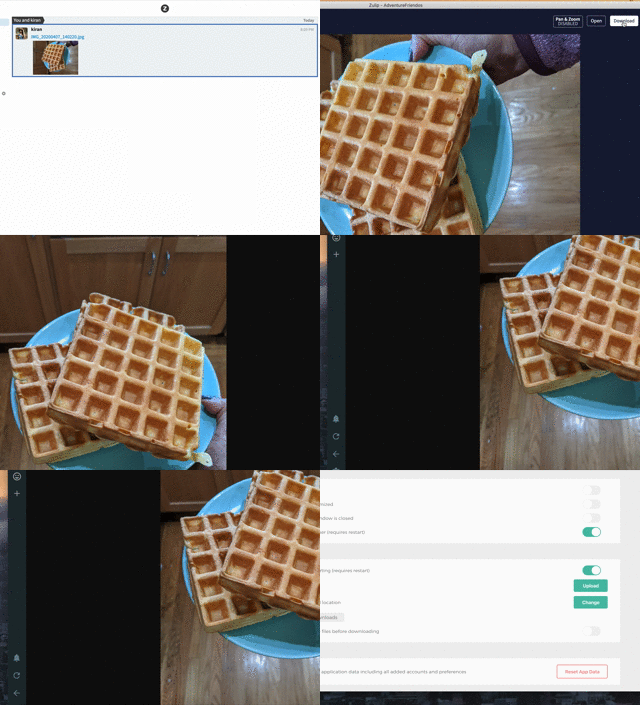
I suspect https://github.com/zulip/zulip-desktop/commit/a03f569af9c260a931cd71e5c3e489dfbc7a13e2
 kiran
on 10 Apr 2020
kiran
on 10 Apr 2020
@kiran @peterdalydickson are you folks on the latest version i.e. v5.0.0? Also, curious on the macOS version. I'm getting the "save to location" dialog on clicking the download button.
akashnimare
on 10 Apr 2020
@akashnimare yes, I'm on Zulip v5.0.0. You can also see the version number in the GIF above.
I just re-downloaded the Zulip desktop app & reinstalled it, and can still reproduce this behavior.
I'm on macOS Catalina 10.15.4 (19E266).
The image opens within Zulip both with the "Ask where to save file" setting on and off.
kiran
on 10 Apr 2020
Interesting. @manavmehta can you reproduce this issue?
akashnimare
on 11 Apr 2020
Is the setting General -> Advanced -> Ask where to save file before downloading off ?
This setting is off.
@peterdalydickson what version do you have? Make sure it's the latest 5.0.0.
The issue only started after upgrade to 5.0.0.
I'm on macOS Catlina 10.15.3.
peterdalydickson
on 16 Apr 2020
I see. @peterdalydickson, @kiran can you please tell us what version of Zulip server you folks are using?
your_zulip_server/api/v1/server_settings and check out the "zulip_version".
akashnimare
on 16 Apr 2020
We're on zulipchat.com
Peter Daly-Dickson
**
-
Signature powered by ( https://www.signitic.fr/ )
Sent via Superhuman iOS ( https://sprh.mn/[email protected] )
On Thu, Apr 16 2020 at 7:06 am, Akash Nimare < [email protected] > wrote:
I see. @peterdalydickson ( https://github.com/peterdalydickson ) , @kiran (
https://github.com/kiran ) can you please tell us what version of Zulip
server you folks are using?your_zulip_server/api/v1/server_settings and check out the "zulip_version".
—
You are receiving this because you were mentioned.
Reply to this email directly, view it on GitHub (
https://github.com/zulip/zulip-desktop/issues/917#issuecomment-614434734 )
, or unsubscribe (
https://github.com/notifications/unsubscribe-auth/AEFFBBFPZNBFM4OF7J6QBGTRM2N7JANCNFSM4L3QN4IQ
).
peterdalydickson
on 16 Apr 2020
@akashnimare Nope. It works well for me. See the attached gif
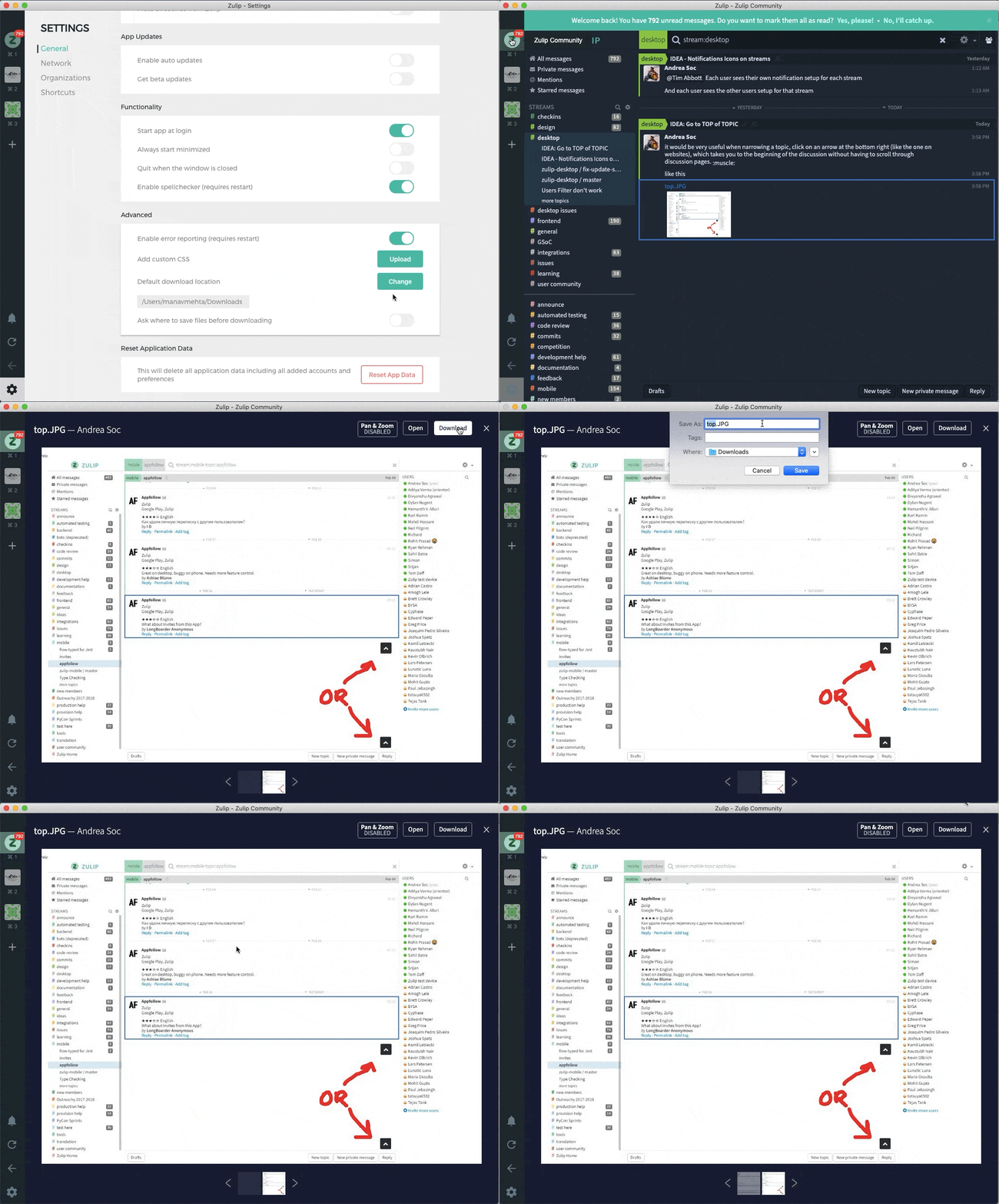
P.S. 10fps alert! Just wait, the download dialogue will appear in the gif.
The file is downloaded in the directory.
Also @peterdalydickson
You have to click the Go Back icon to recover.
As of now, that is necessary. ie. if the download is successful, user has to go back (or press esc)
 manavmehta
on 16 Apr 2020
manavmehta
on 16 Apr 2020
Tested with V5.0.0 desktop on windows 10 and mintOS 19.04. Both have the same issue when selecting download its unable to get back to the chat, unless you select back in browser or hard reload on client.
I then tested with v4.0.3 desktop and the download screen works correctly.
 downright-ux
on 28 Apr 2020
downright-ux
on 28 Apr 2020
For the record, this is a server frontend bug, not a desktop bug. It happens to be masked in Chrome, but you can see the same thing happen in Firefox.
 andersk
on 12 May 2020
andersk
on 12 May 2020
I'm facing a similar issue, where if I click download, the image opens in the whole window, and there is no button for me to go back. Pressing Esc does nothing, and I have to quit (Ctrl+Q) and start Zulip again.
 captn3m0
on 19 May 2020
captn3m0
on 19 May 2020
there is no button for me to go back.
The left sidebar has a back button (just above settings) that may serve till this issue is fixed
manavmehta
on 20 May 2020
For the record, this is a server frontend bug, not a desktop bug. It happens to be masked in Chrome, but you can see the same thing happen in Firefox.
@timabbott Should we move this to the webapp?
 abhigyank
on 2 Jun 2020
abhigyank
on 2 Jun 2020
The left sidebar has a back button
Realized now that I have the left sidebar hidden, so as a workaround - Ctrl+Shift+S to show the sidebar, and then going back works.
captn3m0
on 2 Jun 2020
Related issues
abhigyank
·
4Comments
 YJDave
·
6Comments
YJDave
·
6Comments
 develar
·
11Comments
timabbott
·
6Comments
develar
·
11Comments
timabbott
·
6Comments
 brainwane
·
5Comments
brainwane
·
5Comments
Most helpful comment
Realized now that I have the left sidebar hidden, so as a workaround - Ctrl+Shift+S to show the sidebar, and then going back works.