Zulip-desktop: Zulip not starting up in Windows
- Operating System:
- [x] Windows
- [ ] Linux/Ubuntu
- [ ] macOS
- Clear steps to reproduce the issue:
Simply install latesst version v4.0.0, ensure in settings startup at login enabled and restart - Relevant error messages and/or screenshots:
The zulip app is not started on startup (not on main desktop nor in system tray)
 parthi2929
All 23 comments
@parthi2929 have you turned on the following setting-

 akashnimare
on 11 Dec 2019
akashnimare
on 11 Dec 2019
yes, of course. These are set by default as well.
parthi2929
on 12 Dec 2019
Okay. Let me check. Are you on Windows 10? Can you tell me the build version etc?
akashnimare
on 12 Dec 2019
yes, please check below.

parthi2929
on 12 Dec 2019
any update?
parthi2929
on 13 Dec 2019
@parthi2929 tested this on my machine, works as expected. Can you toggle the startup setting again and see if it works?
akashnimare
on 14 Dec 2019
Can you check if it's registered properly -
\HKEY_CURRENT_USER\Software\Microsoft\Windows\CurrentVersion\Run
Same problem here (Windows 10 Pro 1903 18362.535), and no entry in registry.
Need to add manual entry by shell:startup
 sulian
on 17 Dec 2019
sulian
on 17 Dec 2019
@vsvipul, @kanishk98 can you guys reproduce this?
akashnimare
on 17 Dec 2019
This is what my Run area in registry looks like
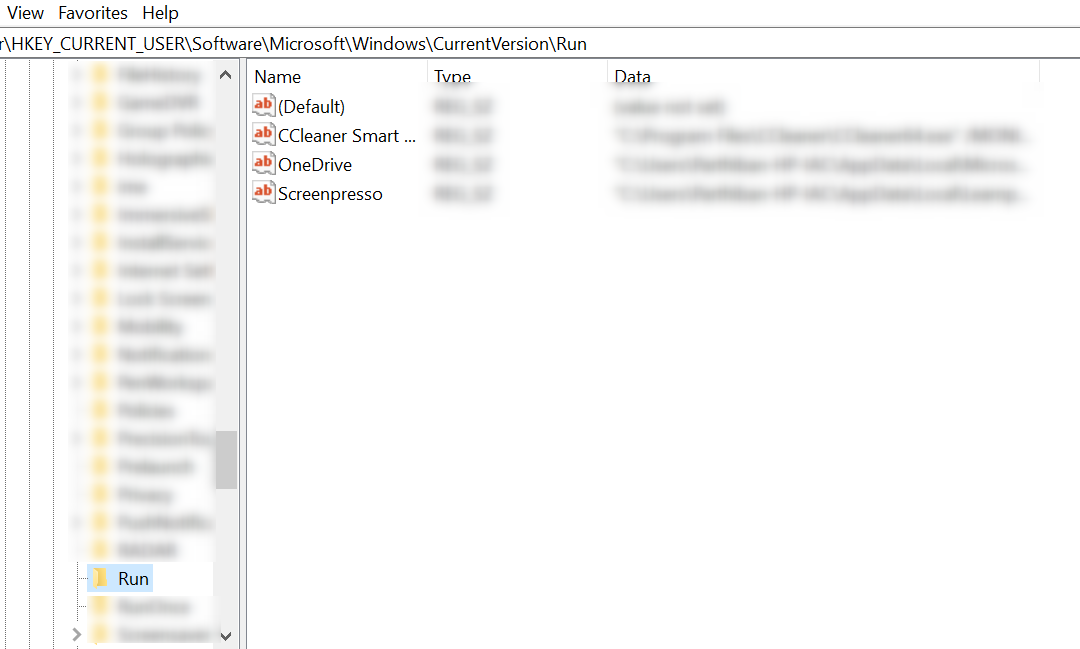
Should we add Zulip here? If so, how and what?
parthi2929
on 20 Dec 2019
Hello? Please update as we intend to use this in our company.
parthi2929
on 31 Dec 2019
@parthi2929 I'll test this on some other windows machines as well since it's working for me as expected.
we are currently using our own mechanism for auto-start. I'll dig deeper into this and if our mechanism doesn't work we'll go with the official electron API but we'll definitely fix this one way or another.
akashnimare
on 31 Dec 2019
Thank you @akashnimare In mean time, can we have any work around? Like tweaking registry with a manual addition etc?
parthi2929
on 1 Jan 2020
@parthi2929 you can add zulip manually to the registry and it should work. Just right-click in that area and add a new key + add the value (i.e. the path of the zulip app).
Here are the full-steps -
Let me know if it works.
akashnimare
on 2 Jan 2020
@parthi2929 Can you test this and see if works for your system ? https://github.com/zulip/zulip-desktop/pull/859
 vsvipul
on 10 Jan 2020
vsvipul
on 10 Jan 2020
@vsvipul I did not try as @akashnimare suggestion worked. Hope this fix is included (path was different, not Program Files) as we would need this to be automatic for all team members.
Actual path:
C:\Users\%username%\AppData\Local\Programs\Zulip\
Awesome. I'll update you once we push a proper fix for the same.
akashnimare
on 11 Jan 2020
Any update? It would be tedious for us to fix register in each and ever zulip team member PC.
parthi2929
on 27 Jan 2020
@parthi2929 yeah, we have pushed a fix in https://github.com/zulip/zulip-desktop/pull/859. Just need to test the same on Windows.
akashnimare
on 27 Jan 2020
@akashnimare great, I could not find when its planned. It could be available already in any beta?
parthi2929
on 28 Jan 2020
@parthi2929 I'll update here once we ship this to prod.
akashnimare
on 28 Jan 2020
@parthi2929 does this work for you in the latest release which is v5.2.0?
akashnimare
on 27 May 2020
yes, after I update it seems to be working, (but also I did not try removing the reg edit, so not sure if the zulip during startup is due to new update or the reg fix)
parthi2929
on 28 May 2020
Related issues
 dylnuge
·
5Comments
dylnuge
·
5Comments
 abhigyank
·
10Comments
vsvipul
·
11Comments
abhigyank
·
10Comments
vsvipul
·
11Comments
 zingmars
·
11Comments
zingmars
·
11Comments
 YJDave
·
6Comments
YJDave
·
6Comments
Most helpful comment
@vsvipul I did not try as @akashnimare suggestion worked. Hope this fix is included (path was different, not Program Files) as we would need this to be automatic for all team members.
Actual path: