Zulip-desktop: macOS dock icon is too large
The icon used on the macOS dock is too large and looks out of place compared to other round icons in the dock.

- Operating System:
- [ ] Windows
- [ ] Linux/Ubuntu
- [x] macOS
 schrej
All 12 comments
Hmm, this seems to be a problem with Linux too, so the app icon we use is simply too large. Thanks for bringing notice to this!
@rishig is this intentional or just an accident?
 kanishk98
on 7 Jul 2019
kanishk98
on 7 Jul 2019
It's definitely not intentional on our part.
 timabbott
on 9 Jul 2019
timabbott
on 9 Jul 2019
This could be improved. Let me check. @kanishk98 I have updated the icon for Linux. Build the app locally and see if it looks good.
 akashnimare
on 30 Aug 2019
akashnimare
on 30 Aug 2019
This is how it looks on my system and it looks okayish to me.
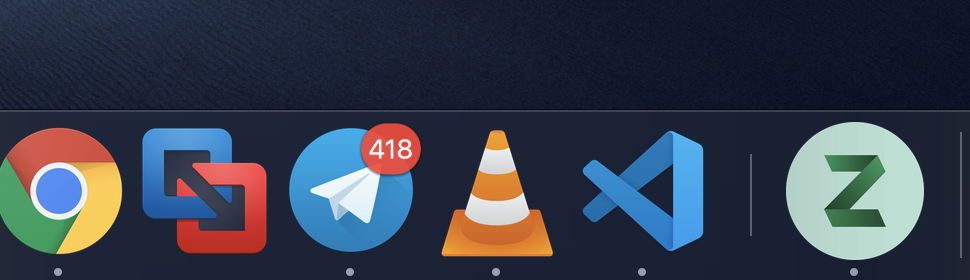
@schrej from too large do you mean the Z is large and misplaced? And if this is the case then we need to change the logo a bit i.e. make the z a bit smaller. cc @rishig
akashnimare
on 30 Aug 2019
Do we actually need to change the image, or just specify a different scaling?
timabbott
on 30 Aug 2019
Not sure, gotta check it. I'm using the 512x512 image which is the recommended for icon from Electron's side.
akashnimare
on 31 Aug 2019
In Akash's image our logo does look larger than the one for Chrome and Telegram.
I think the relative size and placement of the Z is ok.
 rishig
on 1 Sep 2019
rishig
on 1 Sep 2019
It definitely sticks out.

The name should be changed from Zulip to Jupiter 🤣
 aryyya
on 27 Sep 2019
aryyya
on 27 Sep 2019
 bdon
on 29 Nov 2019
bdon
on 29 Nov 2019
@zulipbot claim
 adityamudgil2505
on 7 Mar 2020
adityamudgil2505
on 7 Mar 2020
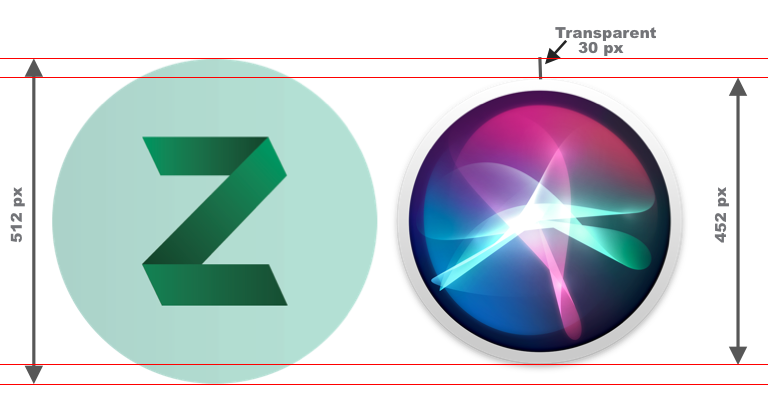
@timabbott @akashnimare We are not giving inner padding from all sides of 512x512 zulip logo. Whereas, other logos (example safari, launchpad, finder, etc.) are giving inner padding of 30px from all sides.
adityamudgil2505
on 7 Mar 2020
Hello @adityamudgil2505, you have been unassigned from this issue because you have not updated this issue or any referenced pull requests for over 14 days.
You can reclaim this issue or claim any other issue by commenting @zulipbot claim on that issue.
Thanks for your contributions, and hope to see you again soon!
 zulipbot
on 17 Mar 2020
zulipbot
on 17 Mar 2020
Related issues
 skewty
·
9Comments
skewty
·
9Comments
 zingmars
·
11Comments
zingmars
·
11Comments
 develar
·
11Comments
develar
·
11Comments
 brainwane
·
5Comments
brainwane
·
5Comments
 andersk
·
8Comments
andersk
·
8Comments
Most helpful comment
@timabbott @akashnimare We are not giving inner padding from all sides of 512x512 zulip logo. Whereas, other logos (example safari, launchpad, finder, etc.) are giving inner padding of 30px from all sides.