Zulip-desktop: Can't switch organizations (Just one organization is displayed despite switching)
Hi!
I just recently installed the Windows Desktop app, and immediately encountered an issue. I'm currently a member of 2 different organizations-- one is at "domain.com" and the other is at "sub.domain.com".
I was able to add and sign in to both orgs without issue. The icons/avatars for both orgs appear correctly in the sidebar, and the actual zulip interface showed correctly. But then I get a connection error (unfortunately no screenshot, but it said something like 'unable to connect to Zulip' or whatever), and upon retry, the sub.domain.com org no longer displays. I mean, I can still click on it on the sidebar, but what appears on the main content area is the GUI for the domain.com org.
I've tried deleting and re-adding the sub.domain.com org, and I've of course done reloads, hard reloads, and restarts of the app itself. No luck. I checked the sub.domain.com on my browser, and it's still good. So it's really just the app.
Any advice?
 Katylar
All 17 comments
This is quite interesting and must be a corner case of some sort. @akashnimare Can you reproduce this?I'll try reproducing this on linux also.
@Katylar Is it possible for you to mention the organization urls for testing purpose if they are public?
 abhigyank
on 24 Aug 2018
abhigyank
on 24 Aug 2018
Sure. They're brand new, though.
Unfortunately, they're private (they're for internal communications for my company)
For reference, though: vmgnet.work and vividhouse.vmgnet.work.
Video demonstrating the issue: https://gfycat.com/GreedySerpentineFrogmouth
Katylar
on 24 Aug 2018
@timabbott Do you think this might have something to with sessions or cookies being of the same base domain?
abhigyank
on 24 Aug 2018
@abhigyank I think so. @Katylar Zulip does not recommend hosting organizations at both a root domain and a subdomain of that domain on the same server; the way browsers handle cookies, no user can be logged into both from the same browser. So you should rename vmgnet.work to foo.vmgnet.work, and that should resolve the problem.
 timabbott
on 27 Aug 2018
timabbott
on 27 Aug 2018
@Katylar can you try above solution and see if this fixes the issue?
 akashnimare
on 27 Aug 2018
akashnimare
on 27 Aug 2018
@timabbott, how do I go about renaming the vmgnet.work organization?
I mean, when I was installing and configuring Zulip, the first organization created was at vmgnet.work (I wasn't really given a choice, and the subdomains only became available when I tried to create a 2nd organization).
No worries though. Does this mean if I just avoid using the vmgnet.work 'root' domain's organization and just create a new subdomain for the org that was supposed to be at the root domain, everything should work at fine?
I mean, currently we have this:
vmgnet.work
vividhouse.vmgnet.work
I'll instead do this:
vmgnet.work <-- we won't do anything here anymore. We'll never sign-in here, and we'll never open it on our apps.
vividhouse.vmgnet.work
main.vmgnet.work
Would that be fine?
Katylar
on 27 Aug 2018
Avoiding using it would probably work, but if you open a manage.py shell, you can rename that realm with the following process:
realm = get_realm("")
realm.string_id = "main"
realm.save()
and then /home/zulip/deployments/current/scripts/setup/flush-memcached.
You might need to clear cookies in the desktop app that had been logged into the vmgnet.work domain as well.
timabbott
on 27 Aug 2018
Hi @timabbott, I keep getting an error after trying the first line (get_realm):
bash: syntax error near unexpected token('`
Am I typing it wrong?
Katylar
on 28 Aug 2018
You need to do 'manage.py shell' first, and then enter the other commands.
On Mon, Aug 27, 2018, 6:26 PM Katylar notifications@github.com wrote:
Hi @timabbott https://github.com/timabbott, I keep getting an error
after trying the first line (get_realm):bash: syntax error near unexpected token('`
Am I typing it wrong?
—
You are receiving this because you were mentioned.
Reply to this email directly, view it on GitHub
https://github.com/zulip/zulip-electron/issues/545#issuecomment-416420348,
or mute the thread
https://github.com/notifications/unsubscribe-auth/ACnm2p7UP7uMhUWZ9eCi2ernVfhWleE6ks5uVJwsgaJpZM4WLNWB
.
timabbott
on 28 Aug 2018
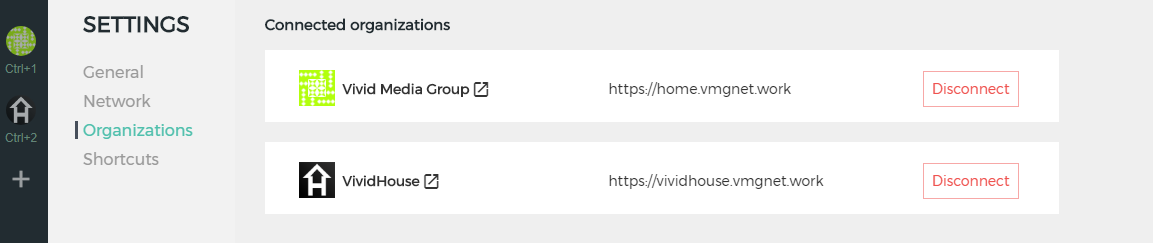
@timabbott I did what you explained, and also added the new subdomain to my certificates, etc. Now, home.vmgnet.work is working.
Note: When I go to vmgnet.work on my browser, I automatically get redirected home.vmgnet.work
Again, no issues when using my browser, but the desktop app still does the same error.
I've even uninstalled and reinstalled the app (although obviously some stuff was saved since when I put down 'home.vmgnet.work' as my first organization in the newly installed app, it automatically signed me in without asking for my username and password.
How do I clear cookies? Hopefully that'll do the trick.
Katylar
on 28 Aug 2018
@Katylar To reset the app, you can use the Reset Application Data option at the bottom of the Settings->General page. That should remove all the cookies.
abhigyank
on 28 Aug 2018
@abhigyank, I did as asked, and the app 'reset'. I needed to provide my organizations again, but once more, I wasn't asked for username/passwords (apparently this might be saved somewhere else? Like the Windows Credentials manager?)
At first the home.vmgnet.work wouldn't load (I got that error message that said "if this page persists, do a reload" or something, and so I did a hard-reload. After that, it loaded without issues.
When I added vividhouse.vmgnet.work, though, it again simply opened the home.vmgnet.work organization, instead.
Katylar
on 28 Aug 2018
That is strange. Just to make sure there is no confusion can you confirm that you have used the correct Reset Button as in the image below?

abhigyank
on 28 Aug 2018
@abhigyank Yes, I did.
Please see: https://gfycat.com/MarriedGiantCranefly
Katylar
on 28 Aug 2018
Okay, I see there is some permission issue going on Windows. Due to this, the app couldn't delete the cache files.

@Katylar can you try deleting the files manually? You need to delete following folder -
C:\Users\USERNAME\AppData\Roaming
akashnimare
on 28 Aug 2018
@akashnimare Excellent! Thank you, this seems to have done the trick.
One final question, though: the screencap you posted--is that for your own or were you somehow able to access/sign-in to our organization (not sure about privacy settings).
Thanks!
Katylar
on 28 Aug 2018
One final question, though: the screencap you posted--is that for your own or were you somehow able to access/sign-in to our organization (not sure about privacy settings).
I was using http://chat.zulip.org/ server.
akashnimare
on 28 Aug 2018
Related issues
 LeSeulArtichaut
·
3Comments
timabbott
·
6Comments
abhigyank
·
4Comments
LeSeulArtichaut
·
3Comments
timabbott
·
6Comments
abhigyank
·
4Comments
 brainwane
·
5Comments
brainwane
·
5Comments
 dylnuge
·
5Comments
dylnuge
·
5Comments