Zulip-desktop: Security/UI Issue: Images and Attachments Must Open in Electron
Using: Electron 1.9 for LInux
To Reproduce:
When you click on an image or uploaded file link (not the image thumbnail) within the Electron Client, electron parses this as a link. Therefore it tries to open in the Browser.
This is a problem. There is a reason I am not using my browser to view electron. Also this is a potential security risk if you are using Electron through a proxy but use a browser through a different proxy. It is also a security risk if your browser is less secure (many reasons a browser may be insecure including Apps, open pages, running javascript etc.) than electron client.
This is also a UI issue because I have to wait for the browser to open, or I have to go to a different monitor or I have to stop doing the browsing that I am doing in order to open an image/attachment. So this is an annoyance also.
Preferred Outcome:
Solution: Electron should allow you to save or open the file, using your system default application for viewing that type of application.
EDIT: The image thumbnail works great. The image link and file link could work the same and that would solve this problem.
 stone212
All 47 comments
If the image url in ends in an image format like jpg it'll indeed open in the app itself. However if it is a non image url it is bound to open in a browser.
Can you share a sample url you're referring to? In case it is an image that doesn't have a image format url, we can address this in the webapp itself to treat that url also as an image.
 abhigyank
on 2 Apr 2018
abhigyank
on 2 Apr 2018
This is the intentional behaviour. We do open files in the app. Instead of clicking on an image link try clicking on the image itself. There you will get the option to download, open link etc.

 akashnimare
on 2 Apr 2018
akashnimare
on 2 Apr 2018
@akashnimare
I may not share the URL since it is to a private system. But!
If I click on the thumbnail then what happens is what you show in your gif. However I never thought to do that. The ticket is for clicking on the link so I was clicking on the word "filename.jpg" above the thumbnail. (I didn't even think of the difference until I saw your gif.)
Please use the example in your gif. Do not click on the thumbnail. Please click on the filename "zulip-terminal.gif" and I think Electron will open firefox or some other image viewer to view the image. I will update my original Issue post.
stone212
on 3 Apr 2018
@akashnimare Unrelated but your example GIF shows a CLI-based zulip client. I need this in my life. How do I get it?
stone212
on 3 Apr 2018
However if it is a non image url it is bound to open in a browser.
Why? Any other program (like a browser) will open the file in whatever the system default is for that type of file. If I have an office document, are you saying that Electron will open it in a browser? Could you not open it with the system default for office documents, as Firefox would?
stone212
on 3 Apr 2018
@stone212 A browser would first download such a file (an office document) , and then you'd be able to open it in the system default. In our case we would first open it in a browser and then it'd download the file and open it in the system default.
I don't think a browser would be able to directly download a file without opening the URL.
@akashnimare I think it'd be possible to download a file from a link if the response is not a webpage. How difficult would it be?
abhigyank
on 3 Apr 2018
your example GIF shows a CLI-based zulip client. I need this in my life. How do I get it?
@stone212 That is the zulip-terminal. Repository is here
abhigyank
on 3 Apr 2018
I agree that opening a link in the default browser may create problems for some reasons (security issue, proxy, the default browser is work client etc).
@stone212 would a solution like this will work for you -

If you click on an image then it will open in the app itself (though you need to go back using CMD+left_Arrow or the back button) and if the media type is pdf, mp3, doc etc then you'll get an option to download.
akashnimare
on 3 Apr 2018
I think it'd be possible to download a file from a link if the response is not a webpage.
@abhigyank good news, electron automatically handles this 😄
akashnimare
on 3 Apr 2018
For clicking on an image we can open in the app itself but in a popup window (part of the app) then no need to use the back button. What do you think @akashnimare @stone212 ?
abhigyank
on 3 Apr 2018
Yeah, we need to find a way to re-use that lightbox if the media type is (png, gif etc).
akashnimare
on 3 Apr 2018
That part can go into the webapp itself. If not we can inject the code to use the lightbox.
abhigyank
on 3 Apr 2018
@akashnimare
I think it'd be possible to download a file from a link if the response is not a webpage.
good news, electron automatically handles this
Does electron respect the electron proxy settings when it handles this? Because the user is expecting anything that happens through the electron app to use the proxy settings it uses.
stone212
on 4 Apr 2018
@stone212 not 100% sure but it should respect the same settings. So if you're successfully running the server within the app then I don't think there will be a problem while downloading attachments.
akashnimare
on 4 Apr 2018
@akashnimare
would a solution like this will work for you -
I don't understand what I am seeing in the gif. But why did Google open?!? A solution using Google by default would not work. Why was it necessary to hit "back"? It is definitely not ideal to have to perform an extra step. but there is a more important point. You are talking about something different from what this Issue is about.
If you click on an image then it will open in the app itself
Yes that is basically what happens now. This Issue does not have anything to do with clicking on an image (aka thumbnail). It has to do with:
clicking on the link for an image because then the browser will open
clicking on the link for some other type of attachment (again, browser opens)
I never considered clicking on the thumbnail until it was suggested yesterday. Anyway the solution to the Issue has to make sure that when you click on an image or attachment link that the object is either handled in Electron itself or Electron opens another application but all internet traffic happens within the proxy settings
A quick fix for image links is to handle them the same way that image thumbnails are handled. Maybe that would be the fix for other attachments also if you are saying that they can be downloaded through Electron if they anything not specifically handled by Electron itself.
stone212
on 4 Apr 2018
@akashnimare
if you're successfully running the server within the app then I don't think there will be a problem while downloading attachments.
This is the whole point so if there is a way to make sure that when you click on links, Electron does not open a new application with a separate internet connection (and therefore proxy settings) then that is a solution to this Issue. If it's necessary to hit the "back" button then fixing that would be a UI improvement but this Issue would be solved.
stone212
on 4 Apr 2018
Okay, let me make clear what's happening in the gif (it shows the proposed behaviour)-
a) If you click on a link which is basically an attachment link; could be a pdf, doc, mp4 or anything then you'll get an option to download the same.
b) If you click on a link which contains an image (jpg, png, gif etc) then it will open in the electron itself but you gotta go back using the back button or shortcut. We can make it better in future like we could open it in the lightbox but for now, I'm putting it as a low priority since you could always see the image via clicking on the thumbnail.
akashnimare
on 4 Apr 2018
@akashnimare
a) If you click on a link which is basically an attachment link; could be a pdf, doc, mp4 or anything then you'll get an option to download the same.
That would solve the security Issue.
b) If you click on a link which contains an image (jpg, png, gif etc) then it will open in the electron itself but you gotta go back using the back button or shortcut.
That is annoying but it solves the security Issue.
I'm putting it as a low priority since you could always see the image via clicking on the thumbnail.
Forget Images We solved that a while back just as you said: by using the thumbnail. But what about attachments?
stone212
on 4 Apr 2018
But what about attachments?
If you click on an attachment link you'll get an option to download the same.

akashnimare
on 4 Apr 2018
@akashnimare Why does Google come up? Requiring Google is not acceptable. But if that is just the example you are using (something on the google cloud) then the rest of that movie looks perfect. How soon can we upgrade?
stone212
on 5 Apr 2018
@stone212 Google doesn't come up! That is actually the image itself. The image he demoed on had Google on it 😅
abhigyank
on 5 Apr 2018
@stone212 that is just an image. Are you using the AppImage or Debian installer? If you're using the deb then I can quickly release a new beta.
akashnimare
on 5 Apr 2018
I am working on opening the image link in lighbox.
abhigyank
on 5 Apr 2018
See if we can reuse the webapp lightbox here. We want the same behaviour as when a user clicks on the thumbnail.
akashnimare
on 5 Apr 2018
@akashnimare I see that this is fixed. That's amazing! How do I get the new changes? I'm new to Zulip workflow.
stone212
on 12 Apr 2018
@stone212 I'll push a new release this week.
akashnimare
on 12 Apr 2018
@akashnimare I do not want to rush you. I only want to make sure I am not missing something? I did an upgrade from git master yesterday. And I run Electron 1.9.0. Do I need to do something else? Maybe "wait" is what I need to do? That is OK if it is true.
stone212
on 14 Apr 2018
@stone212 I have to hold the release since I want to fix few more issues before that. I could do a beta release. Are you using the Debian installer or AppImage one?
akashnimare
on 14 Apr 2018
@akashnimare I'm using the AppImage but I could switch to Debian. But there is no rush and please do not push this forward for me. I just wanted to understand the workflow to be certain the release was not already out but I was not installing it. When Electron notifies me that there is a new release I will upgrade to it. Thank you for your replies and for working on this. I think this will be a great feature.
stone212
on 16 Apr 2018
The image link and file link could work the same and that would solve this problem.
@stone212 we currently don't support opening up the lightbox for mp4, pdf, doc etc but there is an open issue here - https://github.com/zulip/zulip/issues/9081.
akashnimare
on 20 Apr 2018
@akashnimare There is no reason to open the lightbox. Even for the images. That was your suggestion. My proposed solution was "Electron should allow you to save or open the file, using your system default application for viewing that type of application."
And it needs solving. There are dozens of files that I am waiting to open when this is fixed. How did people survive using Zulip this long without this feature? Did they always ignore their own security/proxy settings and have access to a browser they could use instead? What was the point of having Electron then?
stone212
on 23 Apr 2018
@akashnimare I downloaded 2.0.0 and images do work as talked about in this thread. But other files do not. They are worse than before. Instead of opening a browser like before, or opening in Electron, clicking on a link (to a .txt or .zip file) does nothing. No change from clicking.
stone212
on 1 May 2018
I see, we might have missed these file types. What happens when you click on a pdf/doc attachement link?
akashnimare
on 1 May 2018
Same thing with a pdf. I just tested now. We can only open (in a browser) if we right-click and choose "open" Do we need to update Zulip server also?
stone212
on 1 May 2018
Hmm, strange. It should so the following pop-up on clicking a pdf attachment link -
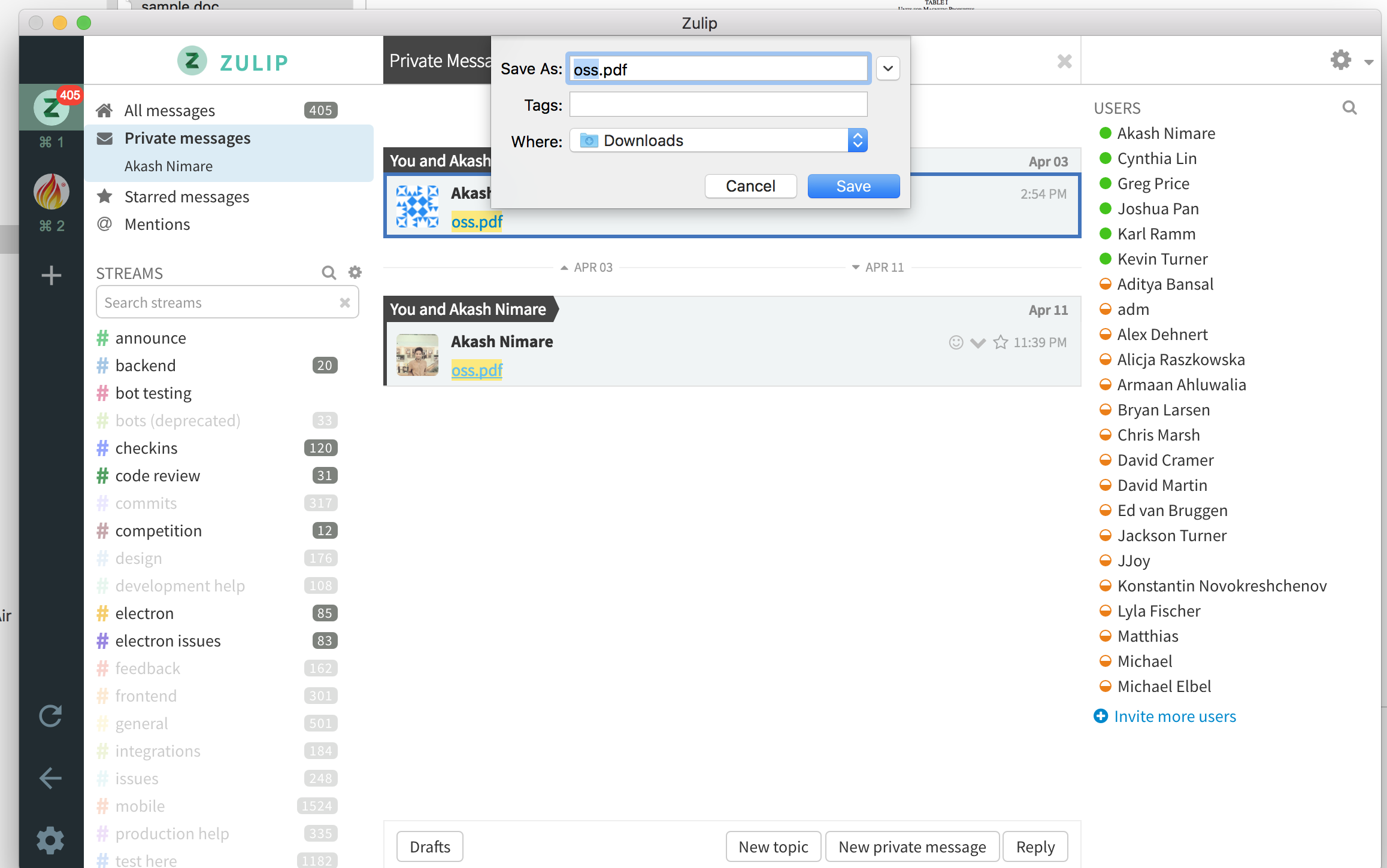
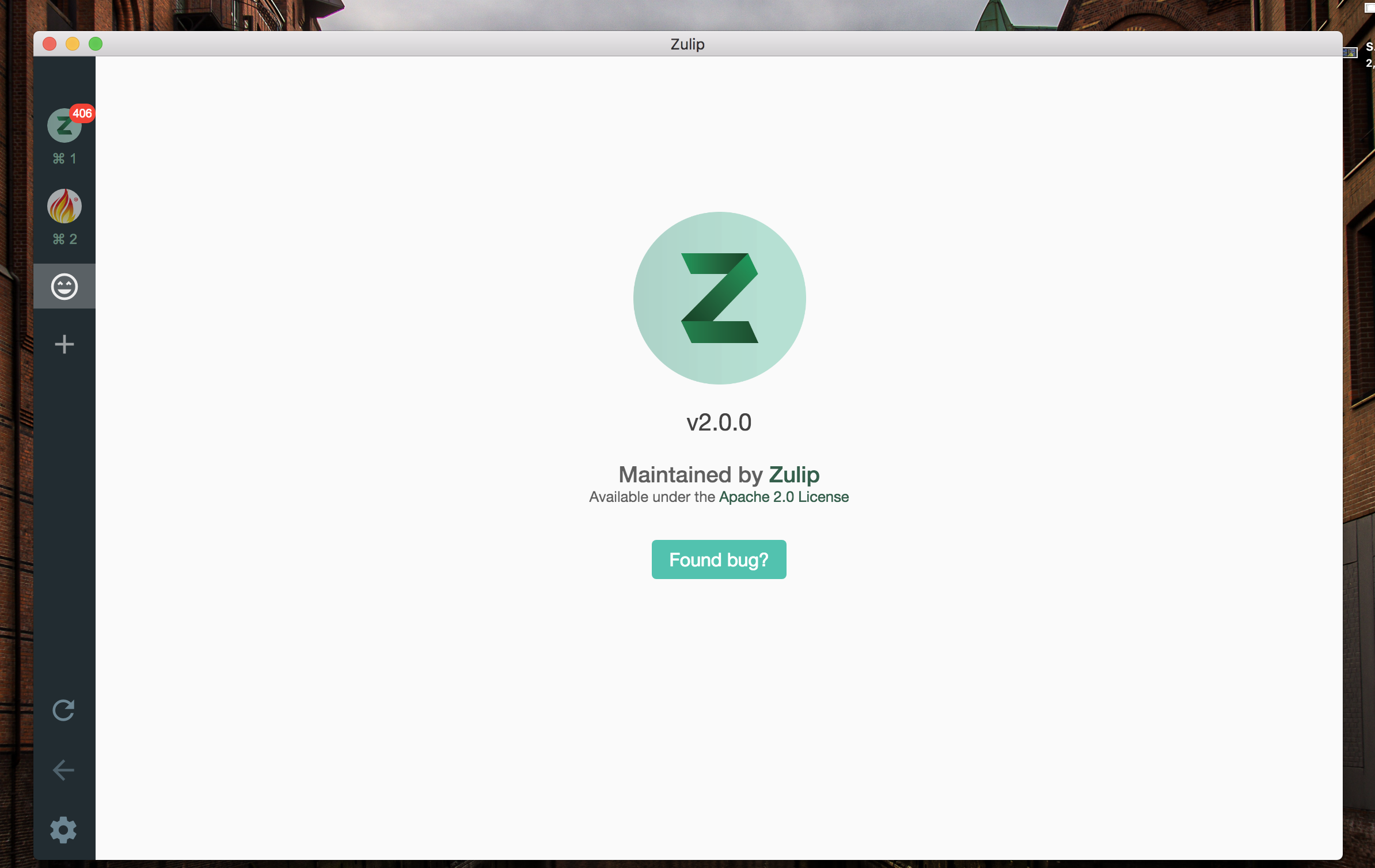
Can you make sure you're on the latest release (Menu > About Zulip)?
akashnimare
on 1 May 2018
That looks great. But it doesn't do that for me. Using the appimage 64 bit on linux. Also Electron on Mac. But I do have the update because image links now open like image thumbnails.
stone212
on 1 May 2018
Hmm, wierd. I get that download popup for pdf/doc/mp4/zip etc. Let me test this on Linux. Meanwhile can you reproduce the same on https://chat.zulip.org (I think we might have change the way we handle uploaded files).
akashnimare
on 1 May 2018
I'll get an account and test later.
stone212
on 1 May 2018
@stone212 okay, just found out there are couple of bugs -
- The download functionality we added doesn't work if you add/remove a server
- You might get that download popup after reloading the app
akashnimare
on 1 May 2018
The download functionality we added doesn't work if you add/remove a server
What does that mean? I have not added or removed servers in weeks. But are you saying that I also can't do that in the future?
You might get that download popup after reloading the app
I reloaded in order to install Electron 2.0.0 (auto-updating is broken) and I reloaded again now. No change.
stone212
on 1 May 2018
@priyankp10 But I did not add/remove any realms/orgs to Electron and this new feature does not work for me.
stone212
on 1 May 2018
@stone212 Can you try the v2.2.0-beta release, you shouldn't face this issue anymore there.
abhigyank
on 10 May 2018
@abhigyank Ok where do I find beta releases? I have clicked a few places and probably it is very obvious but I don't see it yet. Or should I compile from source? That will work for me but not for the other users so if compiling is necessary (except for a test) we will wait for a released binary. Anyway I am happy this is fixed. It will be extremely helpful.
stone212
on 12 May 2018
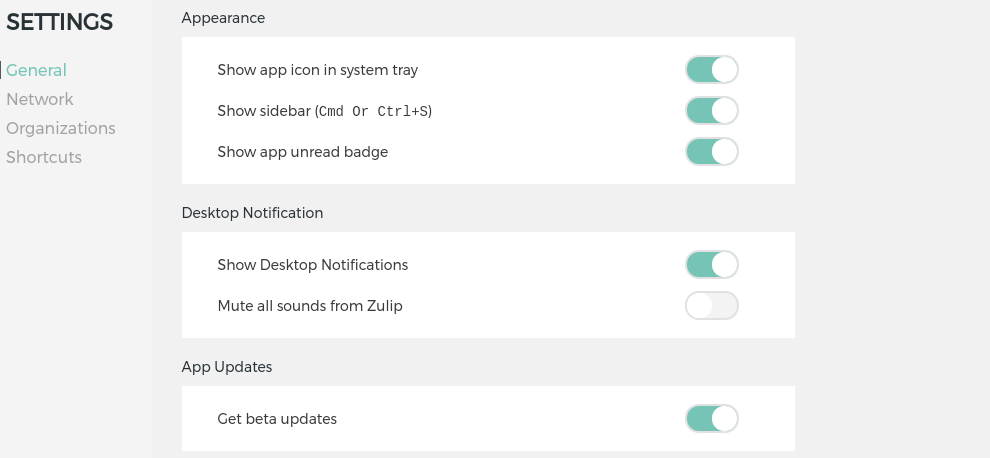
@stone212 To upgrade to the beta version, you need to check the Get beta updates option from app settings. Or manually download the one for your OS from here .
abhigyank
on 12 May 2018
@stone212 let us know if the beta option works for you.
akashnimare
on 12 May 2018
@akashnimare In-app upgrades do not function for Electron (at least not the AppImage version) so I downloaded the file. Thank you for showing me the location. I had trouble finding it.
This is a big improvement! Now when I click on a file in Electron I immediately see a download screen. I would have preferred an option to view in my system's default application, like Firefox does, to save me the extra step of manually opening the file but now at least I can actually access the files. Thank you.
stone212
on 15 May 2018
I would have preferred an option to view in my system's default application like Firefox does,
@stone212 yeah, I know this will make things a lot easier, will update you if electron decides to add an api for the same.
In-app upgrades do not function for Electron (at least not the AppImage version)
Can you open a new issue for this? Auto-updates do work for AppImage.
akashnimare
on 15 May 2018
Related issues
 vsvipul
·
11Comments
vsvipul
·
11Comments
 andersk
·
8Comments
andersk
·
8Comments
 timabbott
·
9Comments
timabbott
·
9Comments
 LeSeulArtichaut
·
3Comments
LeSeulArtichaut
·
3Comments
 swallitsch
·
7Comments
swallitsch
·
7Comments