Zulip-desktop: Zulip client (most of the time) won't reconnect after waking from hibernation
Hello,
As title says, after waking up the computer from hibernation the client won't reconnect to the server automatically - it gives the "Zulip can't connect" screen when you open (or 'Focus') the client. Clicking the "Try now" button will of course work, but you might not think to check it after booting up and might miss a private message or two.
-
Zulip 1.4.0
Electron 1.6.11
win32 x64 10.0.15063
 zingmars
All 41 comments
@zingmars how long did you wait before clicking the button? The code we have will automatically try to reconnect if you're off the Internet, with exponential backoff, so I wonder whether what happened here is that you first went off the Internet, then you hibernated, and so the exponential backoff had already gotten to its peak of "once a minute".
It's possible the issue could be something totally different, though.
 timabbott
on 6 Oct 2017
timabbott
on 6 Oct 2017
I think about 30 minutes? I'm not sure, I never actually timed it.
Is there a way to debug this? I.e. to see how long until it tries to reconnect again? rocket.chat just had a giant message that overlaid the window that said "Reconnecting in ... seconds".
zingmars
on 6 Oct 2017
OK, that definitely is outside the space of plausible with the theories I had.
We probably should open an issue over in zulip/zulip for doing that sort of countdown; it'd be easy enough to do. But since there's a cap on the timeout, what's happening here is something else.
If you see this again and want to help debug, ping me on chat.zulip.org -- there's some stuff we can do on the JS console to see where the failure is.
timabbott
on 6 Oct 2017
Alright, will do.
zingmars
on 6 Oct 2017
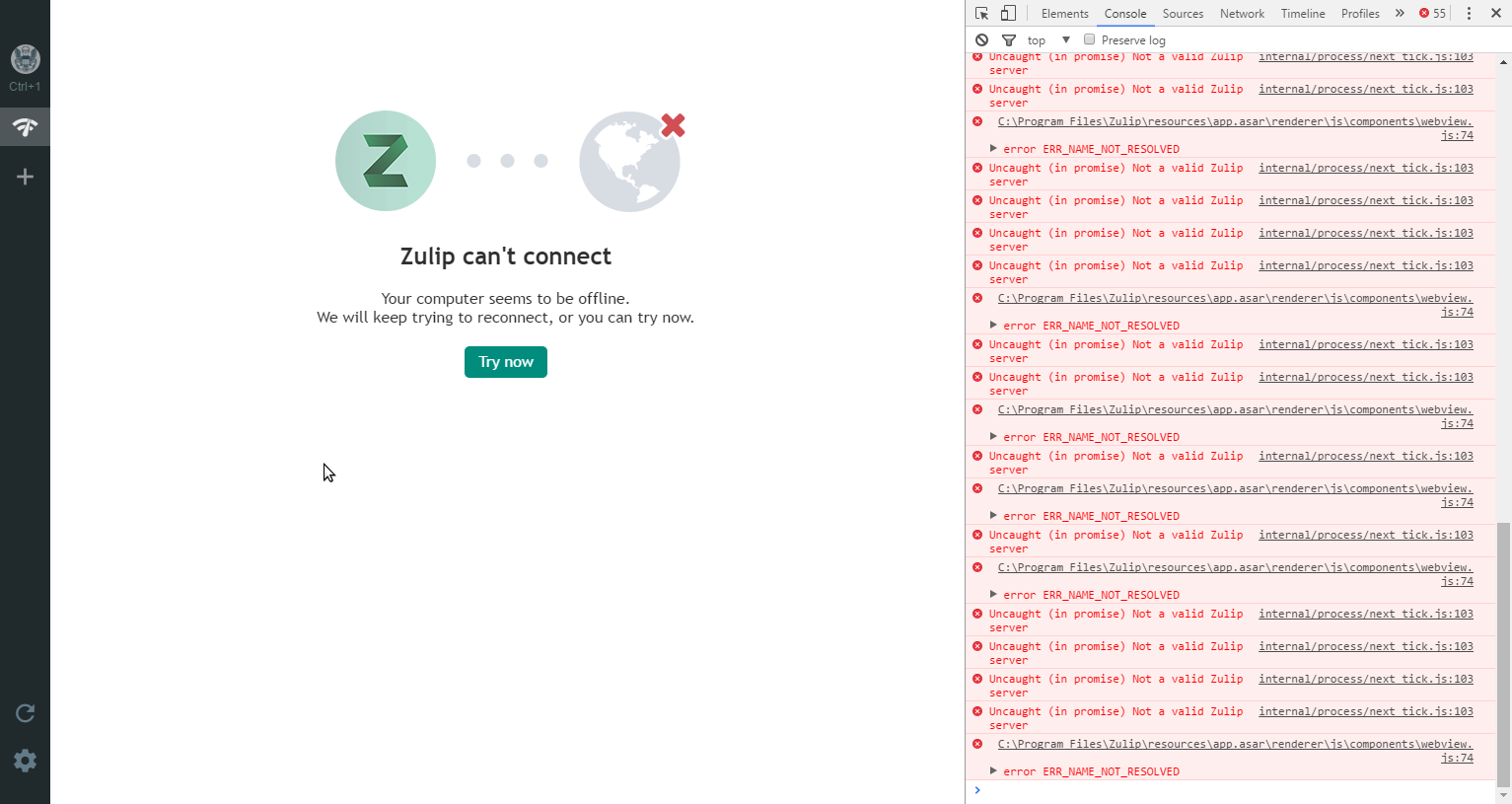
Per request - screenshot of the developer's console when the app is in the stuck state -
zingmars
on 9 Oct 2017
@akashnimare the reason I was confused here is that we have two "Try now" buttons for reconnecting; one for when you're already connected to the server in that session (totally within the webapp code), and this one, totally within the desktop app's code. It's not obvious to me from the screenshot or directly referenced code why retries aren't working, but hopefully you can figure it out.
As a sidenote, if we can figure out how to make electron include timestamps in its console logging, that would probably be a really good idea. We could think about whether static/js/blueslip.js in Zulip is helpful.
timabbott
on 9 Oct 2017
We can now log stuff with timestamps here are simple instruction to do so.
const Console = require('../js/console');
console = new Console({
  file: 'debug-zulip-client.log',
  timestamp: true
});
 priyank-p
on 19 Dec 2017
priyank-p
on 19 Dec 2017
I assume this isn't present in 1.7.0? Console says it cannot find the module.
zingmars
on 19 Dec 2017
@zingmars can you paste the content of console so that we can debug?
 akashnimare
on 19 Dec 2017
akashnimare
on 19 Dec 2017
Uncaught Error: Cannot find module '../js/console'
    at Module._resolveFilename (module.js:470)
    at Function.Module._resolveFilename (C:\Program Files\Zulip\resources\electron.asar\common\reset-search-paths.js:35)
    at Function.Module._load (module.js:418)
    at Module.require (module.js:498)
    at require (internal/module.js:20)
    at <anonymous>:1:17
(module.js:472)
zingmars
on 19 Dec 2017
Oh yes, it present it master.
priyank-p
on 19 Dec 2017
@zingmars Okay. Are you logged in into a Zulip server? Does it automatically reconnects when you disconnect and then connects to internet? Basically there are two cases -
a) When the machine is disconnected from internet
b) When you Resume Windows from sleep or something
In both the cases app should be able to auto-reload itself.
akashnimare
on 19 Dec 2017
My ability to test this properly rn is a bit limited as I'm on a vacation, but I can try testing it a bit on my laptop.
Yes, I'm logged in and when I disconnect from internet it shows the following message - https://i.imgur.com/zQeG764.png. Reconnecting will reload the page. However, I noticed that if you connect to the internet and it has no connectivity (i.e. the wi-fi has a in-browser login page as opposed to having a WPA2 key), the "Zulip can't connect" window will pop up and the only way to make it go away is to manually press the "Try now" button. Could it be related to the app attempting to reconnect before network interfaces are brought up properly?
zingmars
on 20 Dec 2017
@penCsharpener can you try to reproduce this when you get time?
akashnimare
on 20 Dec 2017
Allow me to add to the issue. I never had such problem before (when I was still on version 1.6). I skipped version 1.7 because my colleague said it works poorly. When version 1.8 came out, I installed an update and since then, everytime I come to work in the morning and wake up my machine from hibernation, I have to reconnect Zulip. Tomorrow I'll try to post screenshot with developers console.
Zulip 1.8.1
Electron 1.7.10
win32 x64 6.1.7601 (Win7 Pro)
 Yogislav
on 31 Jan 2018
Yogislav
on 31 Jan 2018

I would risk saying that maybe it's our intranet crashing everynight, but a) it didn't happen before; b) this error occurs in the morning, when I wake my computer, not in the middle of the night.
Yogislav
on 1 Feb 2018
@akashnimare it seems like this issue is worth investing effort into. Maybe the automatic retry described in that error message isn't working properly in the current version?
timabbott
on 1 Feb 2018
I have looked into this issue on my VM but for some reason, I don't have the hibernation option so can't cross-verify. I'll have access to a real W10 machine next week, will test it then. On macOS, if I put my system to sleep and wakes up, the app successfully auto-reloads and connects to the internet.
skipped version 1.7 because.
@Yogislav Ah, we don't support skipping of release so when a new version comes out, the app automatically updates to that version whether a user wants it or not.
akashnimare
on 1 Feb 2018
I get that console error message when my wifi i connecting, i don't remember if it connects back or not but i can check.
Edit: To this happens when i open my computer up and login, and when i internet i back it reconnects me instantly
priyank-p
on 1 Feb 2018
I'll have access to a real W10 machine next week, will test it then.
This happens for me on both Linux (Ubuntu 16.04, I use S3 sleep, not hibernation on this machine) and Windows 10 ( I use hibernation on this machine ), so I don't think it's not specifically a hibernation issue (or Windows only). Like I mentioned before I managed to run into this when connecting to a wi-fi with a captive portal (and @cPhost seems to get it when connecting to wifi as well), so it's more likely to be related to it trying to reconnect before the network interface comes up completely.
if I put my system to sleep and wakes up, the app successfully auto-reloads and connects to the internet.
This only happens for me if the system has been asleep/hibernated for a significant amount of time (don't know long specifically, but I always get this when I wake up and turn on my PC). Always reconnected just fine if I do that as well.
zingmars
on 1 Feb 2018
Another interesting behaviour that has been occurring for a while (only on Windows from what I have seen so far) - if Zulip was hidden to tray then after resuming from hibernation the client will pop up (the original issue with the Zulip can't connect message still persists).
zingmars
on 6 Feb 2018
if Zulip was hidden to tray then after resuming from hibernation the client will pop up
@zingmars do you want to hide the app when resuming from hibernation and the tray set to be off?
akashnimare
on 9 Feb 2018
No, I just want the app to be hidden to tray like it was before I
hibernated the machine.
On Feb 9, 2018 11:39, "Akash Nimare" notifications@github.com wrote:
if Zulip was hidden to tray then after resuming from hibernation the
client will pop up@zingmars https://github.com/zingmars do you want to hide the app when
resuming from hibernation and the tray set to be off?—
You are receiving this because you were mentioned.
Reply to this email directly, view it on GitHub
https://github.com/zulip/zulip-electron/issues/312#issuecomment-364384125,
or mute the thread
https://github.com/notifications/unsubscribe-auth/AA3-hrYxkuVxk06owA1-iZgu6d2DIPhnks5tTBJigaJpZM4PwtHa
.
zingmars
on 9 Feb 2018
@zingmars opened - https://github.com/zulip/zulip-electron/issues/412.
akashnimare
on 12 Feb 2018
@zingmars, @Yogislav so this is what happening under the hood -
a) Your computer wakes up from sleep/hibernation
b) App reloads
c) Since the computer is not connected to the internet at that time, app shows "Zulip Can't connect page"
d) App reloads again when the internet comes up
akashnimare
on 13 Feb 2018
Well, that's what should happen. Seems like d never happens.
On Feb 13, 2018 16:07, "Akash Nimare" notifications@github.com wrote:
@zingmars https://github.com/zingmars, @Yogislav
https://github.com/yogislav so this is what happening under the hood -
a) Your computer wakes up from sleep/hibernation
b) App reloads
c) Since the computer is not connected to the internet at that time, app
shows "Zulip Can't connect page"
d) App reloads again when the internet comes up—
You are receiving this because you were mentioned.
Reply to this email directly, view it on GitHub
https://github.com/zulip/zulip-electron/issues/312#issuecomment-365276575,
or mute the thread
https://github.com/notifications/unsubscribe-auth/AA3-hs4zhhCU0if3T_ueydRdGlEGhQmbks5tUZc3gaJpZM4PwtHa
.
zingmars
on 13 Feb 2018
@zingmars which one of the above points is not working for you? Is it the (d) one? I'm guessing app doesn't reload itself even when the internet comes up.
akashnimare
on 13 Feb 2018
Well yeah, it gets stuck in the position seen in this screenshot - https://github.com/zulip/zulip-electron/issues/312#issuecomment-335210158
zingmars
on 13 Feb 2018
Can you ping me on https://chat.zulip.org whenever you get time so I that I can debug this issue?
akashnimare
on 13 Feb 2018
Sure, will do.
On Feb 13, 2018 16:51, "Akash Nimare" notifications@github.com wrote:
Can you ping me on https://chat.zulip.org whenever you get time so I that
I can debug this issue?—
You are receiving this because you were mentioned.
Reply to this email directly, view it on GitHub
https://github.com/zulip/zulip-electron/issues/312#issuecomment-365289554,
or mute the thread
https://github.com/notifications/unsubscribe-auth/AA3-hq-gOeRDgUTMJBkhlk1z0_Azfgmkks5tUaF_gaJpZM4PwtHa
.
zingmars
on 13 Feb 2018
We have made few changes in the latest release v1.8.2. @zingmars, @Yogislav can you guys check if it makes any difference?
akashnimare
on 28 Feb 2018
Appears to be working on my end.
zingmars
on 2 Mar 2018
@akashnimare I'll check out during this week
Yogislav
on 5 Mar 2018
@akashnimare Everything seems to be OK. Everyday when I come to work and unlock my computer, zulip is up and running. So I think we're good.
Yogislav
on 7 Mar 2018
Awesome. Please re-open if this happens again.
akashnimare
on 7 Mar 2018
I'm sorry to say that this is back (I don't think I can reopen this).
Video: https://youtu.be/-ef5UlU63oE
zingmars
on 20 Apr 2018
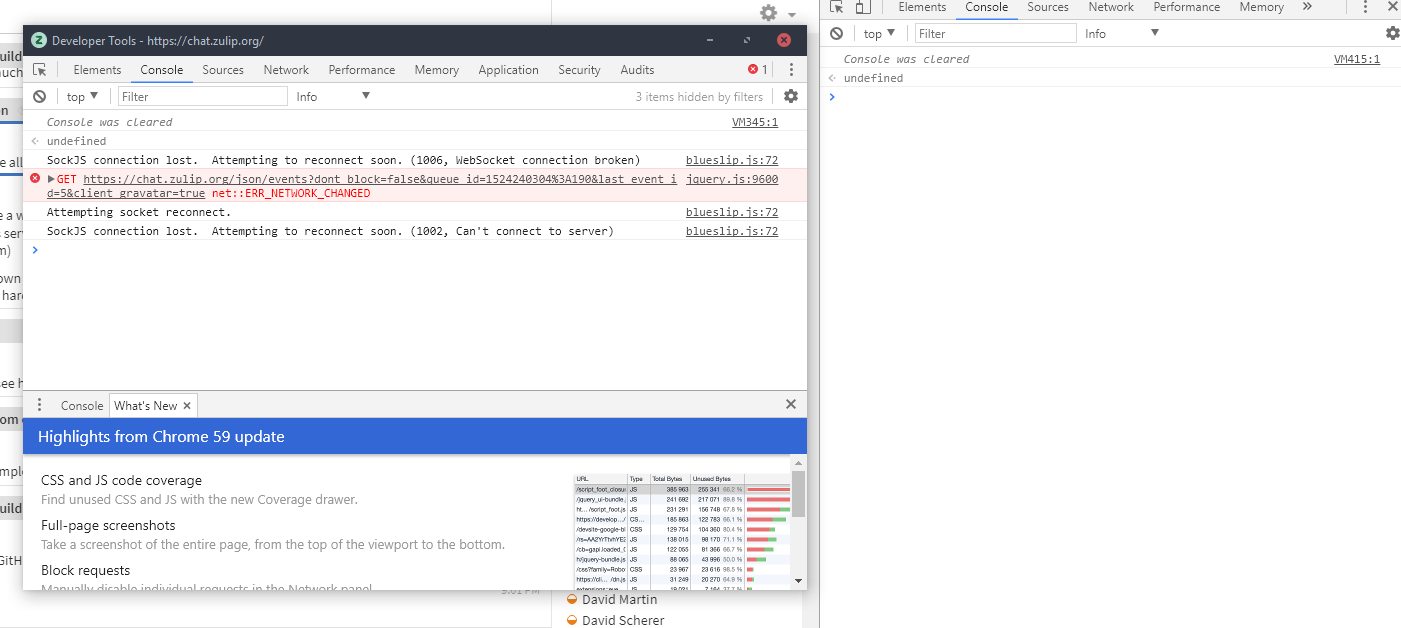
Wow. As for as I remember we haven't made any changes in this since v1.8.2. Can you paste the log of developer tools when this disconnect-reconnect thing happens?
akashnimare
on 20 Apr 2018
When I lose connectivity (right is system web tools, left is tab tools):
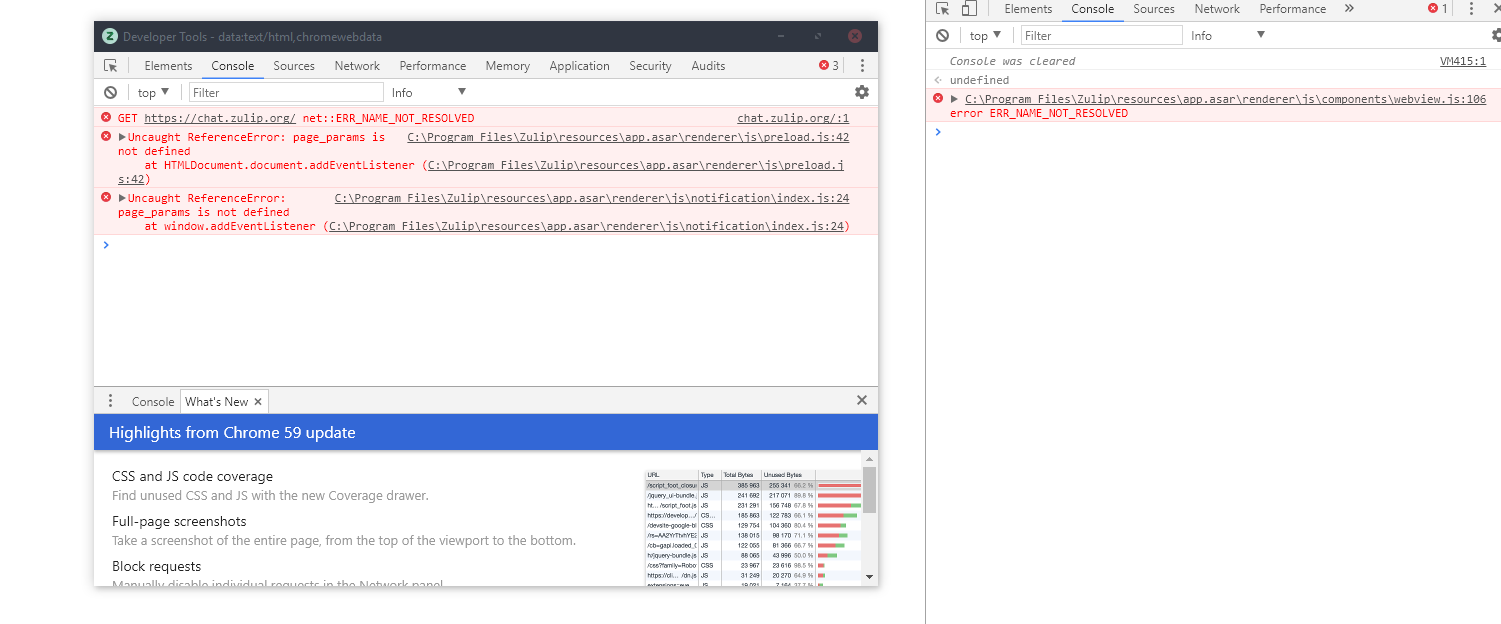
After reloading the tab (when the cannot connect window opens) - after reconnecting with the VPN interface on there is literally no change, it gets stuck here:
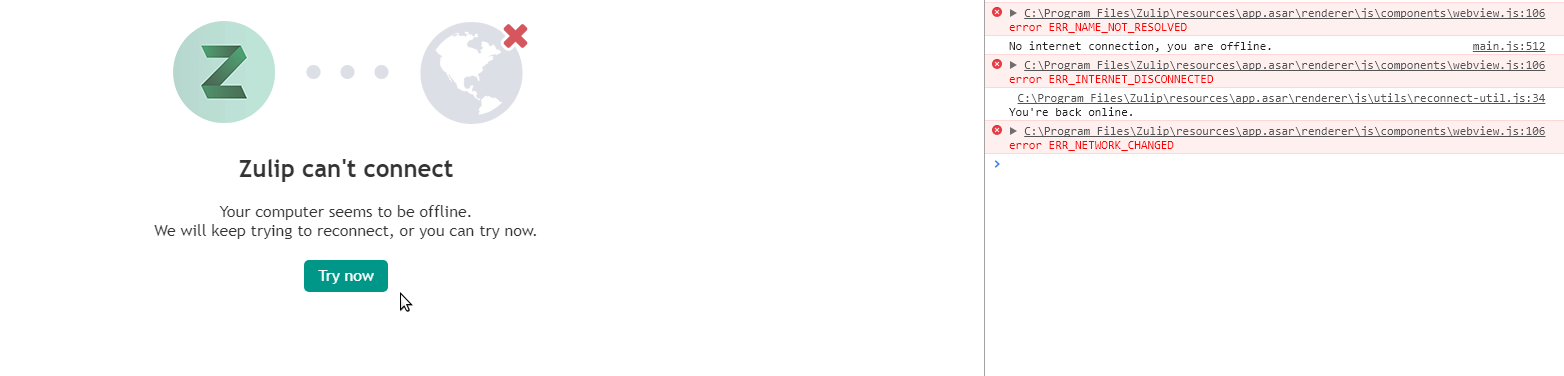
Bonus, and this happens only sometimes (it didn't in the video) - after reconnecting with the VPN/vbox interfaces off it reconnects, tries to open the chat tab but fails and goes back to can't connect page (but it's actually connected) - https://youtu.be/FKddlvOhI-U
zingmars
on 20 Apr 2018
If i switch between VPN and locate network, zulip will not auto reconnect again
 karllynnn
on 1 Mar 2019
karllynnn
on 1 Mar 2019
This sound similar to #591 and might get fixed by #723 as well
 schrej
on 4 Jun 2019
akashnimare
on 24 Sep 2019
schrej
on 4 Jun 2019
akashnimare
on 24 Sep 2019
Related issues
timabbott
·
9Comments
 dylnuge
·
5Comments
dylnuge
·
5Comments
 Mentalone
·
10Comments
Mentalone
·
10Comments
 andersk
·
8Comments
zingmars
·
11Comments
andersk
·
8Comments
zingmars
·
11Comments