Zulip-desktop: Add validation for custom/self-signed certificates
Zulip 1.5.1 running on Ubuntu 16.04.2 in hyper-V
the ubuntu machine is called zulip with a self-signed certificate
the settings.py has as external_host = 'zulip'
we only use it internally without access from the outside of the LAN
in the browser https://zulip works or https://localipaddress
in the electron app however this doesn't work (nor with the IP)

 penCsharpener
All 39 comments
@vbNETonIce Can you give a screenshot of opening this "https://zulip" server in your browser , i wanted to know if this server you want to access is accessible in your browser or not. https in localhost is quite unlikely
 Lplenka
on 8 Mar 2017
Lplenka
on 8 Mar 2017
yes, it is accessible. I'm on a Win10 machine and use zulip that runs on the hyper-v VM with Ubuntu. It works in all browsers and also in the legacy app but not in the electron app.

penCsharpener
on 8 Mar 2017
@vbNETonIce
First thing-
Make sure your server is running locally when you are tyring to access it in elctron (i.e make sure it is running in your browser at the same time when you are accessing it in electron).
Second-
Please check if this file "zulip.ogg" exists in your server root directory in the following path
root_directory_of_your_server/static/audio/zulip.ogg
Lplenka
on 8 Mar 2017
sorry. I'm not sure where to look for the file
/root/static doesn't exist
/home/zulip/deployment/current doesn't show a path static either
penCsharpener
on 8 Mar 2017
@vbNETonIce open your zulip(server) folder in ur VM and press Ctrl+ F , in the search bar type zulip.ogg and tell the path in which it exists.
It must exist somewhere in that server folder , I am pretty sure
Lplenka
on 8 Mar 2017
Ctrl + F doesn't seem to work (I tried Kitty and VM Connection of Hyper-V)
penCsharpener
on 8 Mar 2017
ah, locate zulip.ogg did the trick
/home/zulip/deployment/date and time/prod-static/serve/audio/zulip.ogg
/home/zulip/prod-static/serve/audio/zulip.ogg
penCsharpener
on 8 Mar 2017
Great! @vbNETonIce
It will be easy to fix this
Hopefully you start your server in your terminal at home/zulip/deployment path , if not tell me the folder(or path) you cd to your terminal where you start your server
Lplenka
on 8 Mar 2017
I use the path from the zulip documentation
/home/zulip/deployments/current/scripts/restart-server
which points to the latest deployments/datentime/ folder which contains zulip 1.5.1 and no zulip.ogg of it's own. It seems to share the one from the former version
penCsharpener
on 8 Mar 2017
Okay ! Thanks for informing
will fix this and ask for a PR
@zulipbot claim
Lplenka
on 8 Mar 2017
@vbNETonIce
so you have two zulip.ogg file
1-/home/zulip/deployment/date and time/prod-static/serve/audio/zulip.ogg
2-/home/zulip/prod-static/serve/audio/zulip.ogg
am i right?
Also,
In your terminal find in which you have run the server find this line
==> default: Setting up mount entries for shared folders...
    default: /srv/zulip => Path

Please tell me the path shown after /srv/zulip=> in your case
i need the path to handle this issue
Lplenka
on 8 Mar 2017
strangely enough I have three zulip.ogg files now
zulip@zulip:~$ locate zulip.ogg
/home/zulip/deployments/2016-09-29-16-14-21/prod-static/serve/audio/zulip.ogg
/home/zulip/deployments/2017-03-08-14-21-26/prod-static/serve/audio/zulip.ogg
/home/zulip/prod-static/audio/zulip.ogg
but I don't understand your screenshot.
/srv has these folders in it
zulip@zulip:/srv$ dir
zulip-emoji-cache  zulip-npm-cache  zulip-venv-cache
@vbNETonIce i wanted to know where your server points when you access https://zulip in your browser
Sadly I am facing some problem in installing the production server ,not able to reproduce this issue, hence asking you details
check in your browser after turning on the server if https://zulip/prod-static/audio/zulip.ogg opens or not (i.e you will hear an audio)
Lplenka
on 9 Mar 2017
I think you actually want to test https://zulip/static/audio/zulip.ogg since Zulip rewrites the URLs.
 timabbott
on 9 Mar 2017
timabbott
on 9 Mar 2017
that, Tim's link worked. It's the drum-like sound when a msg comes in
penCsharpener
on 9 Mar 2017
@vbNETonIce
https://zulip/static/audio/zulip.ogg
if this gives a drum-like sound then app should work because it's in the code
Lplenka
on 9 Mar 2017
nope, not working in version electron 0.5.8
penCsharpener
on 9 Mar 2017
It's not working because of self-signed certificate and we currently don't support this. It's #2, #25. This feature will be added soon....
 akashnimare
on 10 Mar 2017
akashnimare
on 10 Mar 2017
@akashnimare Got it , I thought path of 'zulip.ogg' is creating problem.
Lplenka
on 10 Mar 2017
Hello @Lplenka, you claimed this issue to work on it, but this issue hasn't been updated for a week. Are you still working on this issue?
If so, please update this issue by leaving a comment on this issue to let me know that you're still working on this issue within 3 days, or else I'll automatically remove your assignment from this issue.
If you've decided to stop working on this issue, simply comment @zulipbot abandon to abandon this issue so someone else can claim it and continue from where you left off.
Thank you for your understanding and your valuable contributions to Zulip!
 zulipbot
on 17 Mar 2017
zulipbot
on 17 Mar 2017
I am working on it 😄
Lplenka
on 17 Mar 2017
Will come back to this after completely solving another issue.
@zulipbot abandon
Lplenka
on 23 Mar 2017
@akashnimare I just removed the part of the code in domain.js that checked the presence of zulip.ogg in static folder.
else {
             const domain = 'https://' + newDomain;
            // const checkDomain = domain + '/static/audio/zulip.ogg';
            //
            // request(checkDomain, (error, response) => {
            //  if (!error && response.statusCode !== 404) {
            //      document.getElementById('main').innerHTML = 'Connect';
                    db.push('/domain', domain);
                    ipcRenderer.send('new-domain', domain);
            //  } else {
            //      document.getElementById('main').innerHTML = 'Connect';
            //      document.getElementById('server-status').innerHTML = 'Not a valid Zulip Server.';
            //  }
            // });
        }
And our app opened the https://localhost production server.

Can you please try to replicate this in your system?
Lplenka
on 9 Apr 2017
Can you please try to replicate this in your system?
@akashnimare Incase you missed this. I couldn't find any certificate error. "Not a zulip server" error only occurred because zulip.ogg file was not found. So please check this once in your system.
Lplenka
on 12 Apr 2017
Do you see zulip.ogg file at https://localhost/static/audio/zulip.ogg ?
akashnimare
on 12 Apr 2017
Now I checked if I can access the zulip.ogg file in the browser or not.
It is accessible.

Lplenka
on 12 Apr 2017
Got it, The request we send to check the presence of zulip.ogg fails because of certificate error.
If we don't check the presence of zulip.ogg the app loads the server somehow and everything works well after that but also throws a certificate error in the terminal :thinking: .
Lplenka
on 12 Apr 2017
I think we should just make the logic conditional on the nature of the failure. If zulip.ogg 404s, or DNS doesn't resolve, that means it's clearly not a Zulip server. If we get some other form of issue, such as a certificate error, we presumably want to present the certificate error to the user, so they can decide if they still want to connect.
timabbott
on 12 Apr 2017
I think we should just make the logic conditional on the nature of the failure. If zulip.ogg 404s, or DNS doesn't resolve, that means it's clearly not a Zulip server. If we get some other form of issue, such as a certificate error, we presumably want to present the certificate error to the user, so they can decide if they still want to connect.
Seems like the best solution, Will work on this
Lplenka
on 12 Apr 2017
I have pushed a fix. @Lplenka can you test it? As of now, I don't have access to Linux machine so I can't verify this.
akashnimare
on 18 Apr 2017
@akashnimare will verify as soon as I get time amidst exams :sweat_smile: , tonight most probably.
Lplenka
on 18 Apr 2017
Currently, I am getting this error in my Ubuntu 16.04.2 VM :confused: which was not there earlier.

I am not getting this error in my Linux Mint though.
Lplenka
on 18 Apr 2017
@Lplenka please see #139
akashnimare
on 20 Apr 2017
@Lplenka please see #139
Thanks! It worked.
I have pushed a fix. @Lplenka can you test it? As of now, I don't have access to Linux machine so I can't verify this.
This fix doesn't work because in domain.js zulip.ogg check fails because of certificate error. The URL is not sent to Main process from domain.js until zulip.ogg check is successful. So we have to deal with the error there too.
I will work on this issue :smile: . Have some ideas that can successfully solve this.
@zulipbot claim
Lplenka
on 20 Apr 2017
Self-signed/custom certificate support has been added in https://github.com/zulip/zulip-electron/commit/3dade768a750a9d0c08763ec6d9f347040f6807f + PR #141 . If possible could you guys verify if it works? Just pull the latest master :smile:
cc @vbNETonIce, @timapril, @steele, @mgrabow1
Note - Support for selecting appropriate certificate from keychain will be added soon (just like chrome).
akashnimare
on 27 Apr 2017
I can confirm that it does. Thanks a lot for your work! Thanks to Lplenka for guiding me through.
penCsharpener
on 5 May 2017
The current logic simply ignores the certs error and load it without validating the certs. Ideal solution would be -
- When a user enters a server which has self-signed cert we should check it against all the installed certs from user's keychain.
akashnimare
on 18 Aug 2017
@akashnimare can you explain in a bit more detail what exactly we're doing now? I think the flow we want is:
- If the server has a valid cert checkable via the user's keychain (including public keychains), accept
- If the server doesn't, prompt the user for whether they want to ignore the fact that the certificate isn't properly signed; I'd copy language from Chrome or Firefox for how to explain the situation, with maybe some specificity to Zulip. E.g. "Unless your IT administrator has told you specifically that you'll need to accept this self-signed certificate, you probably want to say no".
timabbott
on 22 Aug 2017
If the server has a valid cert checkable via the user's keychain (including public keychains), accept
^^ We're not doing this. The current logic works on the basis of certificate error, not on the validity of the server certificate. So when user enters a server which has custom certs we take this as a certs error and just ask this -
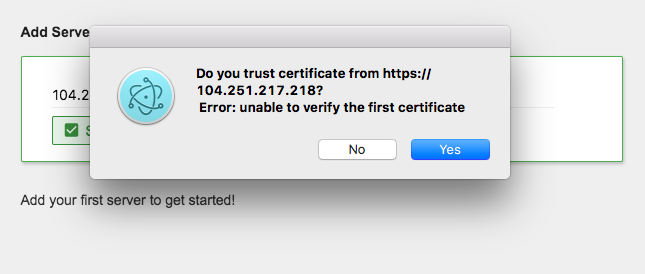
Ideally, we should validate the certs first and then prompt the user for whether they want to ignore
it or not. The flow you have mentioned is what we need to implement here.
akashnimare
on 22 Aug 2017
Related issues
 vsvipul
·
11Comments
vsvipul
·
11Comments
 brainwane
·
9Comments
timabbott
·
9Comments
brainwane
·
9Comments
timabbott
·
9Comments
 swallitsch
·
7Comments
swallitsch
·
7Comments
 dylnuge
·
5Comments
dylnuge
·
5Comments