Zim-desktop-wiki: Help wanted: owner needed for windows installer
A new owner is needed for the windows installer.
 jaap-karssenberg
All 40 comments
Hey, I'm currently in the process of trying to build v0.70rc1 on windows, encountered the dependency hell. I will update if I manage to do it. Wish me luck.
 SuperCuber
on 11 Feb 2019
SuperCuber
on 11 Feb 2019
Good luck !
On Mon, Feb 11, 2019 at 9:02 PM SuperCuber notifications@github.com wrote:
Hey, I'm currently in the process of trying to build v0.70rc1 on windows,
encountered the dependency hell. I will update if I manage to do it. Wish
me luck.—
You are receiving this because you authored the thread.
Reply to this email directly, view it on GitHub
https://github.com/zim-desktop-wiki/zim-desktop-wiki/issues/639#issuecomment-462473363,
or mute the thread
https://github.com/notifications/unsubscribe-auth/ABMMHlJ54MAWjoqrLnPnCJYcehNJy16Iks5vMcxYgaJpZM4aU3RB
.
jaap-karssenberg
on 11 Feb 2019
I have figured out how to build and run it. This is my notes from the process. TLDR at the bottom that includes steps that (hopefully) should work. Turns out the dependency hell was much shallower than expected if I use the installer.
ZimGtk3.txt
TLDR
- Install python 3.3 portable (not 3.7, does not work with that) from here.
- Use this blog which leads to this installer.
- Run the installer, point it at
WinPython-64bit-3.3.5.9/python-3.3.5.amd64. - Select the following in each of the 3 package lists:
a. GTK+
b. Nothing
c. GIR (Not sure if neccesary) - Everything should complete successfully.
- Run the portable python shell and use
import gito test. If it works, everything went well. - In my case, I used the following commands inside a git bash shell to get it to recognize the python installation:
ln -s /d/Downloads/WinPython-64bit-3.3.5.9/python-3.3.5.amd64/python.exe /usr/bin/python3.exe
ln -s /d/Downloads/WinPython-64bit-3.3.5.9/python-3.3.5.amd64/python.exe /usr/bin/python.exe
- Restart the shell, and use ./setup.py build. Should complete successfully.
SuperCuber
on 12 Feb 2019
In my testing I could run from source and build just following the
instructions from https://www.gtk.org/download/windows.php to install the
msys environment. Only tricky part is that you need to open the right msys
shell to see it work (e.g. the 64 bit shell for 64 bit packages).
Hoever being able to run "./setup.py build" does not yet mean we can build
an installer like the one Brendan build for the python2/Gtk2 branch. For
that we also will need some installer framework to package the build. But
it is a first necessary step.
-- Jaap
On Tue, Feb 12, 2019 at 3:54 PM SuperCuber notifications@github.com wrote:
I have figured out how to build and run it. This is my notes from the
process. TLDR at the bottom that includes steps that (hopefully) should
work. Turns out the dependency hell was much shallower than expected if I
use the installer.
ZimGtk3.txt
https://github.com/zim-desktop-wiki/zim-desktop-wiki/files/2856293/ZimGtk3.txt
TLDR
- Install python 3.3 portable (not 3.7, does not work with that) from
here
https://sourceforge.net/projects/winpython/files/WinPython_3.3/3.3.5.9/WinPython-64bit-3.3.5.9.exe/download
.- Use this blog
https://blogs.gnome.org/kittykat/2014/01/29/developing-gtk-3-apps-with-python-on-windows/
which leads to this installer
https://sourceforge.net/projects/pygobjectwin32/files/pygi-aio-3.24.1_rev1-setup_049a323fe25432b10f7e9f543b74598d4be74a39.exe/download
.- Run the installer, point it at
WinPython-64bit-3.3.5.9/python-3.3.5.amd64.- Select the following in each of the 3 package lists:
a. GTK+
b. Nothing
c. GIR (Not sure if neccesary)- Everything should complete successfully.
- Run the portable python shell and use import gi to test. If it
works, everything went well.- In my case, I used the following commands inside a git bash shell
to get it to recognize the python installation:ln -s /d/Downloads/WinPython-64bit-3.3.5.9/python-3.3.5.amd64/python.exe /usr/bin/python3.exe
ln -s /d/Downloads/WinPython-64bit-3.3.5.9/python-3.3.5.amd64/python.exe /usr/bin/python.exe
- Restart the shell, and use ./setup.py build. Should complete
successfully.—
You are receiving this because you authored the thread.
Reply to this email directly, view it on GitHub
https://github.com/zim-desktop-wiki/zim-desktop-wiki/issues/639#issuecomment-462789932,
or mute the thread
https://github.com/notifications/unsubscribe-auth/ABMMHohrO7s8g0z7dO-lF5867mzG49cmks5vMtWZgaJpZM4aU3RB
.
jaap-karssenberg
on 12 Feb 2019
OK. Any pointers on how to do that? For example, what does the python2 version use?
SuperCuber
on 12 Feb 2019
I messed around with it, and right now the problem is that python.exe setup.py py2exe --dist-dir 'windows\\build\\ZimDesktopWiki' results in ImportError: atk, and a similar one for pangocairo if atk is removed. Both of them are required here. Am I missing some dependency? Those packages don't exist in pip.
Additionally, seems like the ascii option is deprecated:
\py2exe\distutils_buildexe.py:164: UserWarning: The 'ascii' option is no longer supported, ignored.
@SuperCube: Brendan documented the process for python2/gtk2 in the
"windows" folder in the source. Unfortunately this is not straightforward
compatible with python3/Gtk3. This is the part where we need help to sort
it out and create a new build process. E.g. the packages you refer to are
related to Gtk2 and thus not relevant and are part of what needs to be
updated.
On Tue, Feb 12, 2019 at 5:50 PM SuperCuber notifications@github.com wrote:
I messed around with it, and right now the problem is that python.exe
setup.py py2exe --dist-dir 'windows\build\ZimDesktopWiki' results in ImportError:
atk, and a similar one for pangocairo if atk is removed. Both of them are
required here
https://github.com/zim-desktop-wiki/zim-desktop-wiki/blob/master/setup.py#L288.
Am I missing some dependency? Those packages don't exist in pip—
You are receiving this because you authored the thread.
Reply to this email directly, view it on GitHub
https://github.com/zim-desktop-wiki/zim-desktop-wiki/issues/639#issuecomment-462838983,
or mute the thread
https://github.com/notifications/unsubscribe-auth/ABMMHsu0G2ETjrNAu18YrNnrokrLTPjVks5vMvDsgaJpZM4aU3RB
.
jaap-karssenberg
on 13 Feb 2019
This page contains some links to strategies to turn an msys environment
into an installer: https://github.com/msys2/msys2/wiki/Distributing
On Wed, Feb 13, 2019 at 8:30 AM Jaap Karssenberg jaap.karssenberg@gmail.com
wrote:
@SuperCube: Brendan documented the process for python2/gtk2 in the
"windows" folder in the source. Unfortunately this is not straightforward
compatible with python3/Gtk3. This is the part where we need help to sort
it out and create a new build process. E.g. the packages you refer to are
related to Gtk2 and thus not relevant and are part of what needs to be
updated.On Tue, Feb 12, 2019 at 5:50 PM SuperCuber notifications@github.com
wrote:I messed around with it, and right now the problem is that python.exe
setup.py py2exe --dist-dir 'windows\build\ZimDesktopWiki' results in ImportError:
atk, and a similar one for pangocairo if atk is removed. Both of them
are required here
https://github.com/zim-desktop-wiki/zim-desktop-wiki/blob/master/setup.py#L288.
Am I missing some dependency? Those packages don't exist in pip—
You are receiving this because you authored the thread.
Reply to this email directly, view it on GitHub
https://github.com/zim-desktop-wiki/zim-desktop-wiki/issues/639#issuecomment-462838983,
or mute the thread
https://github.com/notifications/unsubscribe-auth/ABMMHsu0G2ETjrNAu18YrNnrokrLTPjVks5vMvDsgaJpZM4aU3RB
.
jaap-karssenberg
on 13 Feb 2019
First of all, thanks for great piece of sofware! ZIM seems to be really usefull application for managing and maintaining operational documentation that changes every while.
I was following SuperCuber's guide to build zim for windows. I was able to successfuly run ZIM by using WinPython 3.3 portable + PYGI-AIO 3.24.1 after running "python setup.py build" and running python zim.py.
While trying to prepare win executable I run into several issues with py2exe, so I tried pyinstaller instead. I managed to go through initial issues but then run into ZIM crashing/exiting without error. Everything was run on WIN 10 machine.
Steps I did:
- Install WinPython 3.3 portable
- Install PYGI-AIO 3.24.1 with following packages:
Gnome/Freedesktop
base
atk
GDK-Pixbuf
GDL
GEGLGTK -- probably not needed
GSpell -- not needed
GTK+
GTKSourceVIew -- not needed
Pango
Non-gnome
GTKSpell -- not needed
Dev
GIR
Additional Tools -- not needed
Most of "not needed" packages I installed since I wanted to be able to run ZIM with some plugins pre-installed.
- pip install PyInstaller==3.3 (higher versions seem to not like Python 3.3)
- copy zim.py into zim_start.py (without this it seems pyinstaller chooses to not use zim.py at all -- or maybe I misunderstood something here)
- run "pyinstaller zim_start.py"
- Modify zim_start.spec file with the following:
add: options = [ ('v', None, 'OPTION') ]
change: exe = EXE(pyz,
a.scripts,
options,
exclude_binaries=True,
name='zim_start',
debug=True,
strip=False,
upx=False,
console=True ) - Afterwards I run "pyinstaller zim_start.spec" and dist\zim_start was created. From this point on for further testing I always run "pyinstaller zim_start.spec" instead of "pyinstaller zim_start.py" -- this would overwrite our zim_start.spec file.
- Afterwards I copied gdkpixbuf and gmodule into gi_typelibs (.typelib).
- At the end I run dist\zim_start\zim_start.exe.
- Seems to load without errors, but it immediately closes. Seems it silently fails while/after "import zim.fs" or import "zim.errors" (file zim\applications.py) and I could not find any reason for that so far. sxstrace shows nothing, nor does the logfile (%TEMP%\zim.exe.txt)
I will continue with investigation in next few days and will let you know. Any hints are highly appreciated :)
EDIT: do we know the reason why we cannot use Python > 3.3? Seems it's a bit outdated now and some issues are fixed in higher versions (not only Python but any other packages requiring Python >= 3.4; For example you cannot upgrade pip since current version would require Python >= 3.4).
EDIT2: Steps I described should handle "missing atk" and "missing pangocairo" though this is just a test setup to see what are the dependencies and correct configuration to build working win32 package. I did not manage to have working msys2 setup (I always run into failed "import gi" error).
 lukas-jaros
on 25 Mar 2019
lukas-jaros
on 25 Mar 2019
@lukas-jaros I have only tried py3.3 and py3.7 and 3.7 didn't work. I don't remember really what broke sadly and I don't have the time to investigate, but perhaps versions inbetween could work. I also ran into the pip issue but I actually did upgrade it and broke it 😆 took a little effort to fix
SuperCuber
on 4 Apr 2019
This page has some links on building a full installer for windows based on the msys environment: https://github.com/msys2/msys2/wiki/Distributing
Styrene seems to work as advertised
- will need patch to also install from source into package tree
- code is easy to follow, can insert hook after installing pacman packages
- simple command to call setup.py and let it install in the same root
jaap-karssenberg
on 13 May 2019
Email from previous maintainer with some work notes here: https://lists.launchpad.net/zim-wiki/msg04848.html
jaap-karssenberg
on 18 Jul 2019
Thanks for everyone's advice. Follow the previous maintainer's note, I can run zim without error and follow jaap-karssenberg's recommendation, building a portable version with Styrene.
I made a cfg file by gtk3-examples.cfg and mypaint.cfg. It's just a prototype and I have not fully tested yet.
Here are some tips for who want to change the theme and sourceview style.
Change theme:
- download theme from https://www.gnome-look.org/
- extract to /mingw64/share/themes
- create settings.ini in /mingw64/etc/gtk-3.0
[Settings]
gtk-theme-name=THEMENAME
Change sourceview style:
- download style from https://wiki.gnome.org/Projects/GtkSourceView/StyleSchemes
- extract to /mingw64/share/gtksourceview-3.0/styles
- edit sourceview.py
class SourceViewBuffer(_bufferclass):

    def __init__(self, attrib, text):
        GtkSource.Buffer.__init__(self)
        self.set_highlight_matching_brackets(True)
        # scheme
        ss = GtkSource.StyleSchemeManager()
        sd = ss.get_scheme('STYLENAME')
        GtkSource.Buffer.set_style_scheme(self, sd)


        # end
        if attrib['lang']:
            self._set_language(attrib['lang'])
I hope this is helpful.
 qrsp
on 23 Dec 2019
qrsp
on 23 Dec 2019
Thanks to the comments on this thread, to the notes of Brendan Kidwell, the old maintainer and of course to the huge efforts of Jaap Karssenberg, I propose you a summary to build zimwiki, unluckily not final.
The installation does not come to an end, something with pyinstaller is missing. I install as well several variants of the same packages.
Install packages
MYSY2 (Reference)
Download msys2, currently msys2-x86_64-20190524.exe
Open MSYS2 from Start Menu
Update packages
pacman -Suy (if Pacman package is updated, close terminal, reopen MSYS2 and rerun the command to finish the update process)
Install Packages
Reference for using packages with msys2
Install Pip (Reference)
pacman -S mingw-w64-x86_64-python-pip
Install Python3, GTK3, Python bindings
pacman -S mingw-w64-x86_64-gtk3 mingw-w64-x86_64-python3 mingw-w64-x86_64-python3-gobject
Configure System environment variables (Reference)
C:\msys64\usr\bin
C:\msys64\mingw32\bin
C:\msys64\mingw64\bin
Python Windows package
Download from official website
Note: Py2exe (Reference) is incompatible with python3.4 and later (source), pyinstaller recommended
Install pyinstaller with pip: pip install pyinstaller
Install GTK3 Runtime for Windows
Download current version, currently gtk3-runtime-3.24.14-2020-02-21-ts-win64.exe from GTK for Windows Runtime
Visual C++ 2008 Redistributable Package (x86)
Download exactly this version
Git repository
In MSYS2, install git package with pacman -S git
execute git clone --depth=1 https://github.com/zim-desktop-wiki/zim-desktop-wiki.git
Alternative: download zim wiki current revision of master branch and unzip it to C:\msys64\home\Administrator\zim-desktop-wiki (remove -master from the directory name or adjust following lines)
jpeg62.dll
- Download jpeg-6b-4-bin from Website
- Extract jpeg-6b-4-bin\bin\jpeg62.dll and copy it in C:\msys64\home\Administrator\zim-desktop-wiki\windows\lib (create lib directory)
Note: assume current user is local built-in administrator
changes to C:\msys64\home\Administrator\zim-desktop-wiki\windows\build_win32.py
l.31, replace
GTK_ROOT = path.join(get_python_lib(), "gtk-2.0", "runtime")
with GTK_ROOT = "C:\Program Files\GTK3-Runtime Win64"l.70, Comment out check py2exe
- l.120 Replace gtk2 with gtk3:
f = open(path.join(EXE_ROOT, r"etc\gtk-3.0\gtkrc"), "w")
Build
Start program mingw64 (msys2 program group) and execute following commands:
cd zim-desktop-wiki
python windows/build_win32.py
python windows/make_installer_win32.py
python windows/make_installer_win32_portable.py
Note: Delete build directory (C:\msys64\home\Administrator\zim-desktop-wiki\windows\build) in case of error before restarting the command.
As mentioned above, the setups will be created, but the main program, zim.exe is not build correctly.
 CrushCrush1954
on 27 Apr 2020
CrushCrush1954
on 27 Apr 2020
I have a working installer and pushed the script for generating it to my branch. @jaap-karssenberg do you want to host the setup.exe somewhere or should I rather host it on my website? I plan to do some fine-tuning before making a pull request.
 fmos
on 7 May 2020
fmos
on 7 May 2020
Cool!
Can you send a pull request to have the script in the main branch? Ideally
I would want to run it every time as part of my release process.
Until then I can either host your installer or refer to your website -
whatever you prefer.
Regards,
Jaap
On Thu, May 7, 2020 at 11:03 PM Fabian Stanke notifications@github.com
wrote:
I have a working installer and pushed the script for generating it to my
branch. @jaap-karssenberg https://github.com/jaap-karssenberg do you
want to host the setup.exe somewhere or should I rather host it on my
website?—
You are receiving this because you were mentioned.
Reply to this email directly, view it on GitHub
https://github.com/zim-desktop-wiki/zim-desktop-wiki/issues/639#issuecomment-625496432,
or unsubscribe
https://github.com/notifications/unsubscribe-auth/AAJQYHTX4PE5BB2JDM3IA33RQMO3BANCNFSM4GSTORAQ
.
jaap-karssenberg
on 8 May 2020
Yes, I plan to send you a pull request. Before that I want to
- Add missing dependencies of packaged plugins (e.g. gtkspell, dot, etc).
- Integrate a Gtk3 theme that provides a more native look and feel to Windows users.
I don't think you can run that script as part of your release process, as PyInstaller does not cross-compile as far as I know. I assume your release process does not involve running a Windows instance?!
I think it makes more sense to host the installer on your official website in the long run.
You can download the current version here (link works for one week): https://fmos.at/jirafeau/f.php?h=28YKyT16&d=1
For now this is purely for testing purposes and considered beta.
fmos
on 8 May 2020
Btw: If you want, you can assign me this issue.
fmos
on 8 May 2020
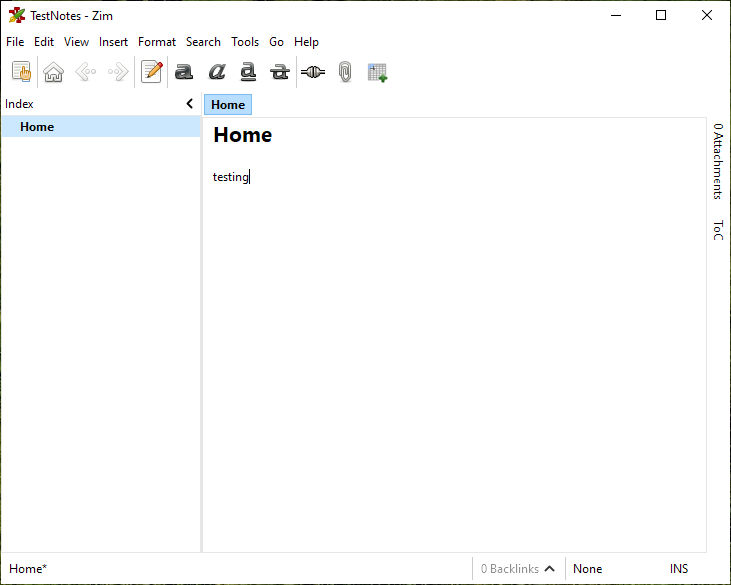
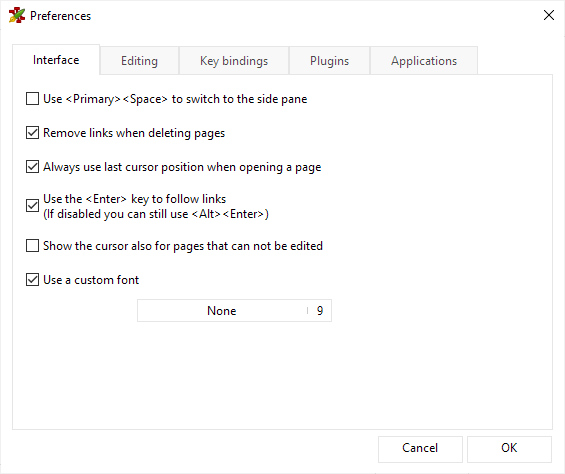
I have been using the following Gtk3 theme the last 6 month to make Zim look native on Windows 10, and it have been working great: https://github.com/B00merang-Project/Windows-10
Here are some notes i wrote to myself while figuring out how to install the theme:
- If installed with MSYS2 then gtk config is located at: msys64\mingw64\etc\gtk-3.0\settings.ini
- Themes are located in msys64\mingw64\share\themes
- Disable GTK window decorations to get windows native: setx -m GTK_CSD 0 (https://developer.gnome.org/gtk3/stable/gtk-running.html)
- Apparently gtk3 can't get a native windows theme right now, but gtk2 have MS-Windows http://gtk.10911.n7.nabble.com/gtk-on-windows-10-td93484.html
- But this theme gets close to native https://github.com/B00merang-Project/Windows-10 (to install place in theme folder and change gtk-theme-name in settings.ini)
Edit: Added screenshots
 seihtam
on 8 May 2020
seihtam
on 8 May 2020
Will give the installer a try on monday.
If the installer compiles in a virtual environment I could look into using
that for the release process, or I could setup a windows box specific for
this.
-- Jaap
On Fri, May 8, 2020 at 5:48 PM Mathies Svarrer-Lanthén <
[email protected]> wrote:
I have been using the following Gtk3 theme the last 6 month to make Zim
look native on Windows 10, and it have been working great:
https://github.com/B00merang-Project/Windows-10Here are some notes i wrote to myself while figuring out how to install
the theme:
- If installed with MSYS2 then gtk config is located at:
msys64\mingw64\etc\gtk-3.0\settings.ini- Themes are located in msys64\mingw64\share\themes
- Disable GTK window decorations to get windows native: setx -m
GTK_CSD 0 (https://developer.gnome.org/gtk3/stable/gtk-running.html)- Apparently gtk3 can't get a native windows theme right now, but gtk2
have MS-Windows
http://gtk.10911.n7.nabble.com/gtk-on-windows-10-td93484.html- But this theme gets close to native
https://github.com/B00merang-Project/Windows-10 (to install place in
theme folder and change gtk-theme-name in settings.ini)—
You are receiving this because you were mentioned.
Reply to this email directly, view it on GitHub
https://github.com/zim-desktop-wiki/zim-desktop-wiki/issues/639#issuecomment-625880475,
or unsubscribe
https://github.com/notifications/unsubscribe-auth/AAJQYHT7ITRJKPFEG4TMXUDRQQSWLANCNFSM4GSTORAQ
.
jaap-karssenberg
on 9 May 2020
@fmos i tried your build.sh. i got No such file or directory: 'src/zim.spec'. what did i do wrong? see the full log attached.
log1.txt
 chrysos349
on 12 May 2020
chrysos349
on 12 May 2020
@fmos i tried your
build.sh. i gotNo such file or directory: 'src/zim.spec'. what did i do wrong?
Thank you @chrysos349 for testing! It seems I forgot to commit the spec file. Sorry, my fault. I will fix this tonight.
fmos
on 12 May 2020
Hi @chrysos349 ! I have updated my branch. If you want to test, the updated commit is 472c969550fcb4c8fe914547ed9ace4a1a0e94c0
fmos
on 12 May 2020
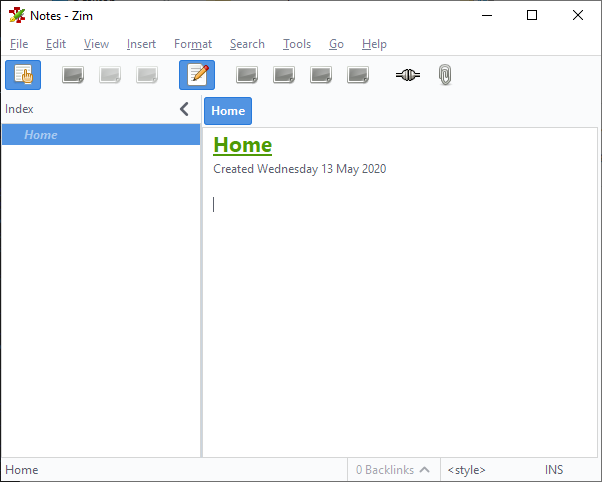
@fmos Thanks for the update. I built the installer, and installed the app successfully. The main toolbar has icons missing. I tried --skip-theme. The same problem. See the screenshot.
chrysos349
on 13 May 2020
This should be fixed with the present version. I also reopened the pull request #1077
fmos
on 14 May 2020
Thanks! I'm planning a new release in 2-3 weeks (most features are in
develop branch, want to use a bit longer to test and merge number of
smaller pulls) would be a good timing to announce this new installer with
that release.
-- Jaap
On Thu, May 14, 2020 at 11:15 PM Fabian Stanke notifications@github.com
wrote:
This should be fixed with the present version. I also reopened the pull
request.—
You are receiving this because you were mentioned.
Reply to this email directly, view it on GitHub
https://github.com/zim-desktop-wiki/zim-desktop-wiki/issues/639#issuecomment-628890581,
or unsubscribe
https://github.com/notifications/unsubscribe-auth/AAJQYHWOUKALOUC36255573RRRNPTANCNFSM4GSTORAQ
.
jaap-karssenberg
on 15 May 2020
One more question - I tried installing today on my work laptop but without
admin rights I cannot run the installer - is there a way to make the
installer run "portable" ?
Thanks,
Jaap
On Fri, May 15, 2020 at 8:43 AM Jaap Karssenberg jaap.karssenberg@gmail.com
wrote:
Thanks! I'm planning a new release in 2-3 weeks (most features are in
develop branch, want to use a bit longer to test and merge number of
smaller pulls) would be a good timing to announce this new installer with
that release.-- Jaap
On Thu, May 14, 2020 at 11:15 PM Fabian Stanke notifications@github.com
wrote:This should be fixed with the present version. I also reopened the pull
request.—
You are receiving this because you were mentioned.
Reply to this email directly, view it on GitHub
https://github.com/zim-desktop-wiki/zim-desktop-wiki/issues/639#issuecomment-628890581,
or unsubscribe
https://github.com/notifications/unsubscribe-auth/AAJQYHWOUKALOUC36255573RRRNPTANCNFSM4GSTORAQ
.
jaap-karssenberg
on 15 May 2020
Yes, I think it should be straightforward to build a portable using PyInstaller. As far as I understand, this unpacks into %TEMP% and runs from there each time you start it. So it would probably be more efficient for you to install somewhere you can write to.
@jaap-karssenberg is there a way to find out which Gtk icons must be shipped with Zim? At the moment the package includes the entire Adwaita icon set (Gtk 3 default). This needs roughly one third of the total installed disk space, which seems disproportionate to me.
fmos
on 15 May 2020
Hi Fabian,
To get the icons used, a grep like this should work - needs bit of post
processing to translate to direct icon names.
grep -REoh "icon=['\"]?gtk-\w+['\"]?'|Gtk.STOCK_\w*"
zim-desktop-wiki/zim/ | sort --unique
For the portable installer. I think you can install in a fixed location
without admin rights as long as you don't touch the registry. Typically an
installer would just prompt for the location and I choose a location where
I do have rights.
Regards,
Jaap
On Fri, May 15, 2020 at 1:21 PM Fabian Stanke notifications@github.com
wrote:
Yes, I think it should be straightforward to build a portable using
PyInstaller. As far as I understand, this unpacks into %TEMP% and runs from
there each time you start it. So it would probably be more efficient for
you to install somewhere you can write to.@jaap-karssenberg https://github.com/jaap-karssenberg is there a way to
find out which Gtk icons must be shipped with Zim? At the moment the
package includes the entire Adwaita icon set (Gtk 3 default). This needs
roughly one third of the total installed disk space, which seems
disproportionate to me.—
You are receiving this because you were mentioned.
Reply to this email directly, view it on GitHub
https://github.com/zim-desktop-wiki/zim-desktop-wiki/issues/639#issuecomment-629180706,
or unsubscribe
https://github.com/notifications/unsubscribe-auth/AAJQYHU6W7JRAM5QIIYC3FLRRUQUFANCNFSM4GSTORAQ
.
jaap-karssenberg
on 15 May 2020
Hi Jaap!
Thanks für the grep-magic! This does not seems to reveal the icons used for the toolbar (strong, italics, etc). I think those are selected by the ui_format_actions in lines 153 ff of pageview.py Strangely, though, the stock id there (gtk-bold) does not correspond to an icon image. What Comes closest is the "format-text-bold-symbolic", which is an Adwaita-icon. However this still Looks different than the button in Zim. I'm lost. Any idea where the Image data for those toolbar buttons comes from?
fmos
on 16 May 2020
Yes you are right, those actions are missed by the grep but are defined in
pageview.py from line 153.
I'm not 100% sure, but I think Gtk translates the (deprecated) stock IDs to
names according this standard list:
https://specifications.freedesktop.org/icon-naming-spec/icon-naming-spec-latest.html
This means you probably are looking for "text-format-bold" (without the
"-symbolic" postfix).
There is an application "gtk3-icon-browser" which defaults installs with
Gtk that is very helpful in searching icon names.
Hope this helps. If not, I'll need to clean up the code and get rid of the
stock IDs altogether and replace with the new icon names.
-- Jaap
On Sat, May 16, 2020 at 7:46 PM Fabian Stanke notifications@github.com
wrote:
Hi Jaap!
Thanks für the grep-magic! This does not seems to reveal the icons used
for the toolbar (strong, italics, etc). I think those are selected by the
ui_format_actions in lines 153 ff of pageview.py Strangely, though, the
stock id there (gtk-bold) does not correspond to an icon image. What
Comes closest is the "format-text-bold-symbolic", which is an Adwaita-icon.
However this still Looks different than the button in Zim. I'm lost. Any
idea where the Image data for those toolbar buttons comes from?—
You are receiving this because you were mentioned.
Reply to this email directly, view it on GitHub
https://github.com/zim-desktop-wiki/zim-desktop-wiki/issues/639#issuecomment-629682359,
or unsubscribe
https://github.com/notifications/unsubscribe-auth/AAJQYHQML7LAK4DUOJ2ZTXTRR3GOBANCNFSM4GSTORAQ
.
jaap-karssenberg
on 19 May 2020
Thanks! For now I used the warnings about missing Icons logged to the console. The version in my windows-deploy branch packages only the needed Icons and locales. It also supports portable install. It needs some more testing though. Feedback is very welcome.
fmos
on 20 May 2020
@fabian just released version 0.73, I'll give the installer another test
run and try compiling it myself on this version in the coming week or two
Regards,
Jaap
On Wed, May 20, 2020 at 7:45 AM Fabian Stanke notifications@github.com
wrote:
Thanks! For now I used the warnings about missing Icons logged to the
console. The version in my windows-deploy branch packages only the needed
Icons and locales. It also supports portable install. It needs some more
testing though. Feedback is very welcome.—
You are receiving this because you were mentioned.
Reply to this email directly, view it on GitHub
https://github.com/zim-desktop-wiki/zim-desktop-wiki/issues/639#issuecomment-631250561,
or unsubscribe
https://github.com/notifications/unsubscribe-auth/AAJQYHSNYYJ627NISM2INQTRSNVBPANCNFSM4GSTORAQ
.
jaap-karssenberg
on 6 Jun 2020
@jaap-karssenberg Thanks for the new release!
Concerning the Windows deployment, I was wondering whether Zim should be started with --standalone by default. I think the debug log to the temporary file only works with this option. Are there any downsides that you would expect?
fmos
on 7 Jun 2020
Yes downside is that you can open the same notebook multiple times causing
conflicts. Also opening a new notebook will be slower because the whole
process is initialized again.
Is there something I can fix to make the logging work?
Op zo 7 jun. 2020 15:33 schreef Fabian Stanke notifications@github.com:
@jaap-karssenberg https://github.com/jaap-karssenberg Thanks for the
new release!
Concerning the Windows deployment, I was wondering whether Zim should be
started with --standalone by default. I think the debug log to the
temporary file only works with this option. Are there any downsides that
you would expect?—
You are receiving this because you were mentioned.
Reply to this email directly, view it on GitHub
https://github.com/zim-desktop-wiki/zim-desktop-wiki/issues/639#issuecomment-640219991,
or unsubscribe
https://github.com/notifications/unsubscribe-auth/AAJQYHWLBHL7Y3FSVN6EZC3RVOJKTANCNFSM4GSTORAQ
.
jaap-karssenberg
on 7 Jun 2020
I'll see if I can find out how to fix the logging. Meanwhile I've rebased my branch to 0.73.
fmos
on 9 Jun 2020
OK, it seems to work just fine. I didn't get that the log file is switched during startup.
fmos
on 13 Jun 2020
@fmos,
Thanks to your hard work, I have successfully build Zim-Wiki on a clean Windows 10 (1909 dev VM, as provided by Microsoft) (*),
-> On Start, Zim wiki proposes to create a notebook within "~/Notebooks\Notes". This path does not mean much for Windows users as it links to 'C:\Users\User\Notebooks\Notes' and not to 'Documents' which is linked per default to C:\Users\User\Documents (Sub-directory) on disk.
=> Can you change the default path to 'Documents' instead of ~ ? You may use the environment variable '%USERPROFILE%\Documents'
*: What I did in case someone would like to double-check:
- Download msys2 64-bit from https://www.msys2.org
- Follow instructions on https://msys2.org (Updates package, restart msys2 x64 and re-update)
- Run pacman -S git to install git
- Run git clone https://github.com/fmos/zim-desktop-wiki.git
- git checkout windows-deploy
- Change directory with cd zim-desktop-wiki/windows
- Execute ./build.sh: all required dependencies are downloaded and installer is build
- Installer zim-desktop-wiki-0.73.0-setup.exe to be found within C:\msys64\home\User\zim-desktop-wiki\windows\dist
CrushCrush1954
on 14 Jun 2020
Now I also managed to build my own version in a virtualbox environment.
Will proceed to merge with 0.73.1 branch and publish on the zim main site.
Thanks Fabian - looks great !
-- Jaap
On Sun, Jun 14, 2020 at 4:13 PM CrushCrush1954 notifications@github.com
wrote:
@fmos https://github.com/fmos,
Thanks to your hard work, I have successfully build Zim-Wiki on a clean
Windows 10 (1909 dev VM, as provided by Microsoft) (*),-> On Start, Zim wiki proposes to create a notebook within
"~/Notebooks\Notes". This path does not mean much for Windows users as it
links to 'C:\Users\User\Notebooks\Notes' and not to 'Documents' which is
linked per default to C:\Users\User\Documents (Sub-directory) on disk.
=> Can you change the default path to 'Documents' instead of ~ ? You may
use the environment variable '%USERPROFILE%\Documents'*: What I did in case someone would like to double-check:
- Download msys2 64-bit from https://www.msys2.org
- Follow instructions on https://msys2.org (Updates package, restart
msys2 x64 and re-update)- Run pacman -S git to install git
- Run git clone https://github.com/fmos/zim-desktop-wiki.git
- git checkout windows-deploy
- Change directory with cd zim-desktop-wiki/windows
- Execute ./build.sh: all required dependencies are downloaded and
installer is build- Installer zim-desktop-wiki-0.73.0-setup.exe to be found within
C:\msys64\home\User\zim-desktop-wiki\windows\dist—
You are receiving this because you were mentioned.
Reply to this email directly, view it on GitHub
https://github.com/zim-desktop-wiki/zim-desktop-wiki/issues/639#issuecomment-643772166,
or unsubscribe
https://github.com/notifications/unsubscribe-auth/AAJQYHW5XAPBQ4T74SV3MSLRWTLJPANCNFSM4GSTORAQ
.
jaap-karssenberg
on 24 Jun 2020
Installer is published on https://zim-wiki.org/downloads/
Any issues with the installer can be reported as new issues. Please put clearly "windows installer" in the subject.
Regards,
Jaap
jaap-karssenberg
on 30 Jun 2020
Related issues
 ghost
·
7Comments
ghost
·
7Comments
 sineway
·
4Comments
sineway
·
4Comments
 kofesutra
·
6Comments
kofesutra
·
6Comments
 ppsilva
·
7Comments
ppsilva
·
7Comments
 lowk3y
·
7Comments
lowk3y
·
7Comments
Most helpful comment
Installer is published on https://zim-wiki.org/downloads/
Any issues with the installer can be reported as new issues. Please put clearly "windows installer" in the subject.
Regards,
Jaap