Zigbee2mqtt: Error: SRSP - ZDO - mgmtPermitJoinReq after 6000ms
What happened
This issue has happened with two CC2531s, I ordered the second because I assumed the first was defective.
After a device is flashed, I'm able to associate with all of my ZigBee devices.. this error appears after a few minutes on the first run, the device stops functioning, including on subsequent runs
Error from the first run
(node:17) UnhandledPromiseRejectionWarning: Error: SRSP - ZDO - mgmtPermitJoinReq after 6000ms
    at Timeout._onTimeout (/app/node_modules/zigbee-herdsman/dist/utils/waitress.js:46:35)
    at listOnTimeout (internal/timers.js:549:17)
    at processTimers (internal/timers.js:492:7)
(node:17) UnhandledPromiseRejectionWarning: Unhandled promise rejection. This error originated either by throwing inside of an async function without a catch block, or by rejecting a promise
which was not handled with .catch(). To terminate the node process on unhandled promise rejection, use the CLI flag `--unhandled-rejections=strict` (see https://nodejs.org/api/cli.html#cli_unhandled_rejections_mode). (rejection id: 1)
Error from the subsequent runs
?[31mZigbee2MQTT:error?[39m 2020-11-19 17:39:52: Error while starting zigbee-herdsman
?[31mZigbee2MQTT:error?[39m 2020-11-19 17:39:52: Failed to start zigbee
?[31mZigbee2MQTT:error?[39m 2020-11-19 17:39:52: Exiting...
?[31mZigbee2MQTT:error?[39m 2020-11-19 17:39:52: Error: Failed to connect to the adapter (Error: SRSP - SYS - ping after 6000ms)
    at ZStackAdapter.<anonymous> (/app/node_modules/zigbee-herdsman/dist/adapter/z-stack/adapter/zStackAdapter.js:92:31)
    at Generator.throw (<anonymous>)
    at rejected (/app/node_modules/zigbee-herdsman/dist/adapter/z-stack/adapter/zStackAdapter.js:25:65)
npm ERR! code ELIFECYCLE
npm ERR! errno 1
npm ERR! [email protected] start: `node index.js`
npm ERR! Exit status 1
npm ERR!
npm ERR! Failed at the [email protected] start script.
How to reproduce it (minimal and precise)
Using the following config, run zigbee2mqtt, wait for all the devices to join
      advanced:
        log_level: debug
        network_key: [<redacted>]
      devices:
        "0x00158d000533c498":
          friendly_name: Nursery Environment
        "0x680ae2fffef91e07":
          friendly_name: En Suite Motion
        "0xccccccfffe9dcaf9":
          friendly_name: Bedroom Lamp
        "0xccccccfffea9121b":
          friendly_name: En Suite Spot Left
        "0xccccccfffeb7e9f9":
          friendly_name: En Suite Rail Center
        "0xccccccfffeb8bf1a":
          friendly_name: En Suite Rail Near
        "0xccccccfffebac0e8":
          friendly_name: Kitchen Rail Near Outer
        "0xccccccfffee4f302":
          friendly_name: Kitchen Rail Far Outer
        "0xccccccfffee4f36c":
          friendly_name: En Suite Spot Right
        "0xec1bbdfffe2de199":
          friendly_name: Kitchen Rail Far Inner
        "0xec1bbdfffe2f4999":
          friendly_name: En Suite Rail Far
        "0xec1bbdfffe432007":
          friendly_name: Kitchen Rail Near Inner
        "0xec1bbdfffe87fcd9":
          friendly_name: En Suite Remote
        "0xec1bbdfffe8c83e7":
          friendly_name: Kitchen Remote
        "0xec1bbdfffe9eb6b1":
          friendly_name: Bedroom Remote
      groups:
        "1":
          devices:
            - "0xec1bbdfffe432007"
            - "0xec1bbdfffe2de199"
            - "0xccccccfffee4f302"
            - "0xccccccfffebac0e8"
          friendly_name: Kitchen
          retain: false
        "2":
          devices:
            - "0xccccccfffee4f36c"
            - "0xccccccfffea9121b"
          friendly_name: En Suite
          retain: false
      homeassistant: true
      mqtt:
        server: "mqtt://vernemq"
Debug info
Zigbee2MQTT version: 1.15.0
Adapter hardware: CC2531
Adapter firmware version: latest
 ChipWolf
All 10 comments
Looks like your CC2531 crashed, reflashing your CC2531 will likely fix it, to prevent this from happening:
- Make sure to not use the availability feature (disabled by default): https://www.zigbee2mqtt.io/information/availability.html
- Try switching to the source routing firmware, this provides more stability: https://github.com/Koenkk/Z-Stack-firmware/tree/master/coordinator/Z-Stack_Home_1.2/bin/source_routing
- If this doesn't help you have to upgrade to a more powerful coordinator: https://www.zigbee2mqtt.io/getting_started/what_do_i_need.html#supported-zigbee-adapter
 Koenkk
on 19 Nov 2020
Koenkk
on 19 Nov 2020
Looks like stopping zigbee2mqtt, unplugging the adapter, plugging it back in, and starting zigbee2mqtt in that order fixes it briefly.
I'll flash the source routing firmware next time.
I only have a handful of devices, so I'd be surprised if I needed a more powerful one, but I'll consider it. Do you have a specific recommendation @Koenkk?
ChipWolf
on 19 Nov 2020
Hi
I think he will recommand to you the ZZH that he have for his own production setup ;)
 kevincaradant
on 19 Nov 2020
kevincaradant
on 19 Nov 2020
Looks like flashing source routing worked. I was previously flashing default for anyone reading this in future.
ChipWolf
on 20 Nov 2020
Thanks @kevincaradant I'll pick up a couple when they're back in stock
ChipWolf
on 20 Nov 2020
I'm unable to join any more than 5 devices with source routing, same issue as #2448
ChipWolf
on 20 Nov 2020
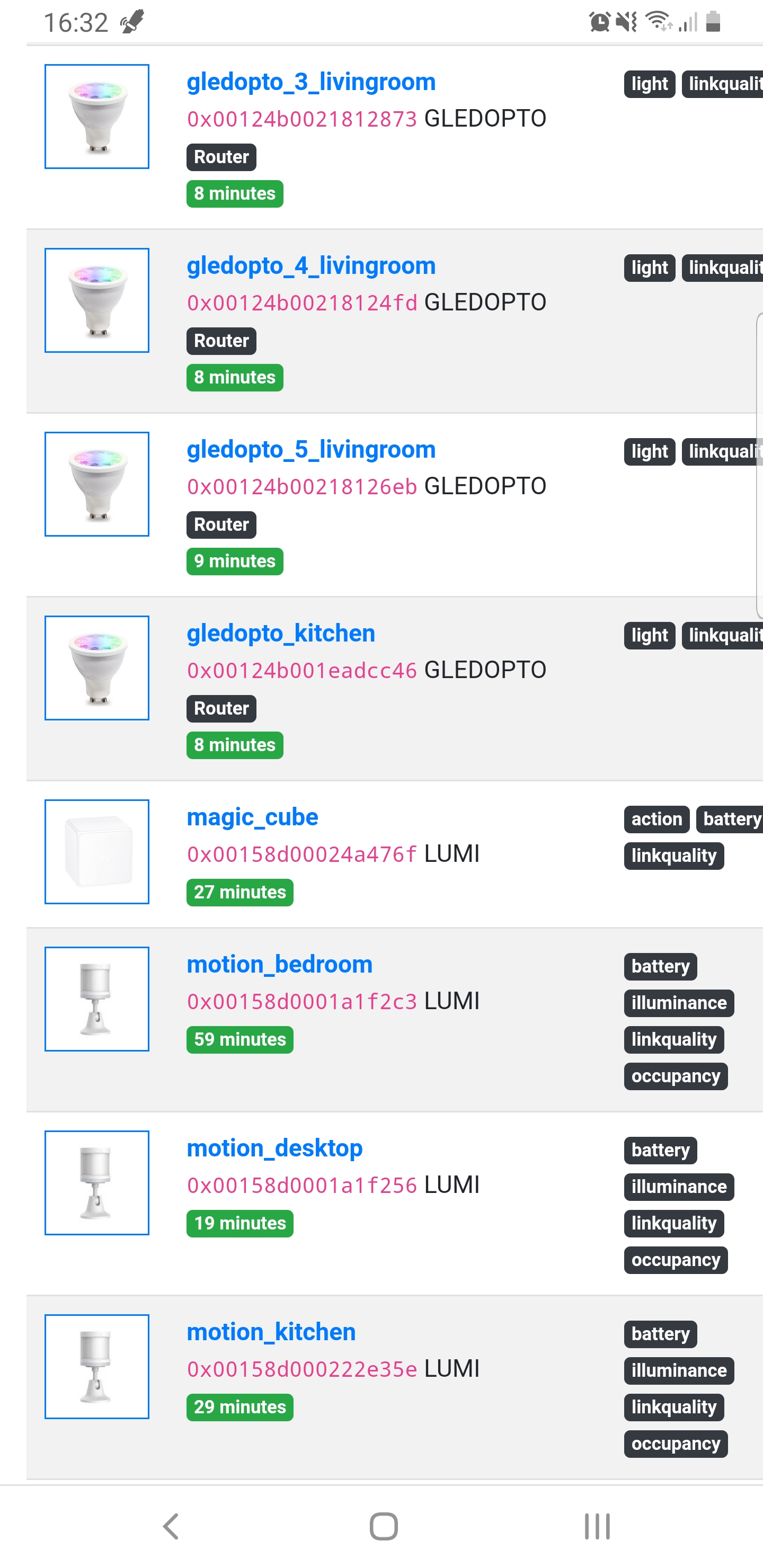
Hoping what I m going to say could help you but If you installed the source routing firmware, it's normal to have only 5 devices on the co-ordinator because you can only have 5 direct childrens like that.
If you want more than 5 devices keeling the source firmware routing, I think you need at least one router on your production devices. That could be a bulb, a plug ect.
Look the readme of the @Koenkk github with firmware. This is a screenshot from my phone but you can see direct children 5 :)

Here (some devices in my home) I have motion sensors and bulbs which can do router if needed by them self. I didn't do the calcul, but I can have a lot of devices connected bypassing the limit of 5 in direct children for the co-ordinator.
However I don't use the source routing firmware personnaly but, on the main idea, you see the possibilities.
kevincaradant
on 20 Nov 2020
TIL @kevincaradant. Thanks again
I'll investigate how to set this up, is there a good Slack/Discord for this kind of support?
ChipWolf
on 20 Nov 2020
@ChipWolf , @kevincaradant is right, to fix this reflash your CC2531 again with the source routing FW and first pair your routers.
Koenkk
on 20 Nov 2020
Worked perfectly, lots of bulb removing and replacing later and it looks like the environment is sorted.
Thanks for your help!
ChipWolf
on 20 Nov 2020
Related issues
 jerrychong25
·
4Comments
jerrychong25
·
4Comments
 Underknowledge
·
4Comments
Underknowledge
·
4Comments
 andreasbrett
·
4Comments
Koenkk
·
3Comments
andreasbrett
·
3Comments
andreasbrett
·
4Comments
Koenkk
·
3Comments
andreasbrett
·
3Comments
Most helpful comment
Worked perfectly, lots of bulb removing and replacing later and it looks like the environment is sorted.
Thanks for your help!