Zigbee2mqtt: Danalock v3 not respond after successful join
Bug Report
What happened
After successfull joining my Danalock v3 i could open and close it with Homeassistant a few minutes. After a few minutes the device did not response. I get the following Log message:
zigbee2mqtt:info 2020-07-01 15:03:01: MQTT publish: topic 'zigbee2mqtt/bridge/log', payload '{"type":"zigbee_publish_error","message":"Publish 'set' 'state' to
'wohnungstuer' failed: 'Error: Command 0x000b57fffe59ce99/1 closuresDoorLock.lockDoor({\"pincodevalue\":\"\"}, {\"timeout\":10000,\"disableResponse\":false,\"d
isableDefaultResponse\":true,\"direction\":0,\"srcEndpoint\":null,\"reservedBits\":0,\"manufacturerCode\":null,\"transactionSequenceNumber\":null}) failed (Erro
r: Timeout - 39459 - 1 - 43 - 257 - 0 after 10000ms)'","meta":{"friendly_name":"wohnungstuer"}}'
Zigbee2mqtt Assistant tells that everything seems ok:
This device seems to work correctly. Last seen 5 minutes, 40 seconds ago.
I already tried to reconfigure the device wiht Zigbee2mqtt Assistant but then i get the following error:
zigbee2mqtt:error 2020-07-01 15:05:36: Failed to configure 'wohnungstuer', attempt 1 (Error: Bind 0x000b57fffe59ce99/1 closuresDoorLock from '0x00124b001caabc06
/1' failed (Error: AREQ - ZDO - bindRsp after 10000ms)
at Endpoint.
at Generator.throw (
at rejected (/app/node_modules/zigbee-herdsman/dist/controller/model/endpoint.js:6:65))
I have tried multiple times to delete the device and rejoin and it is always the same behaviour. After a few minutes the device does not respond.
The danalock app shows Battery has 96% and with the app i could open / close the lock.
What did you expect to happen
Device will respond always
How to reproduce it (minimal and precise)
Joining Danalock and wait a few minutes. Then try to unlock / lock the device
Debug Info
Zigbee2mqtt version: 1.14.1
Adapter hardware: CC26X2R1
Adapter firmware version: 20200417
 mullischlumpf
All 8 comments
Can you create a sniff of both the working and not working situation? https://www.zigbee2mqtt.io/how_tos/how_to_sniff_zigbee_traffic.html
 Koenkk
on 3 Jul 2020
Koenkk
on 3 Jul 2020
Is there a good way to sniff zigbee traffic in a docker container? I run zigbee2mqtt on NAS and could not use wireshark in this environment.
mullischlumpf
on 5 Jul 2020
@mullischlumpf I'm not aware of this, note that you can also do this on a laptop (doesn't have to be done on the same system)
Koenkk
on 5 Jul 2020
Hi i have the same issue. The Danalock paring correctly and then after a few minutes it don´t response.
 Maddin2020
on 6 Jul 2020
Maddin2020
on 6 Jul 2020
Good to know that i'm not the only one with this problem :-)
@Maddin2020: Could you do a zigbee sniff of that behaviour?
If i get it right i do have to sniff the traffic with the zigbee stick and my zigbee stick is in my NAS without a option to install wireshark.
mullischlumpf
on 6 Jul 2020
Hi guys, Looks like we are all having a similar issue.
I have managed to do a sniff...however i have zero clue as to what I am looking for. I have managed to identiy the Unlock Door sequence. However what is it that is of use to show here?
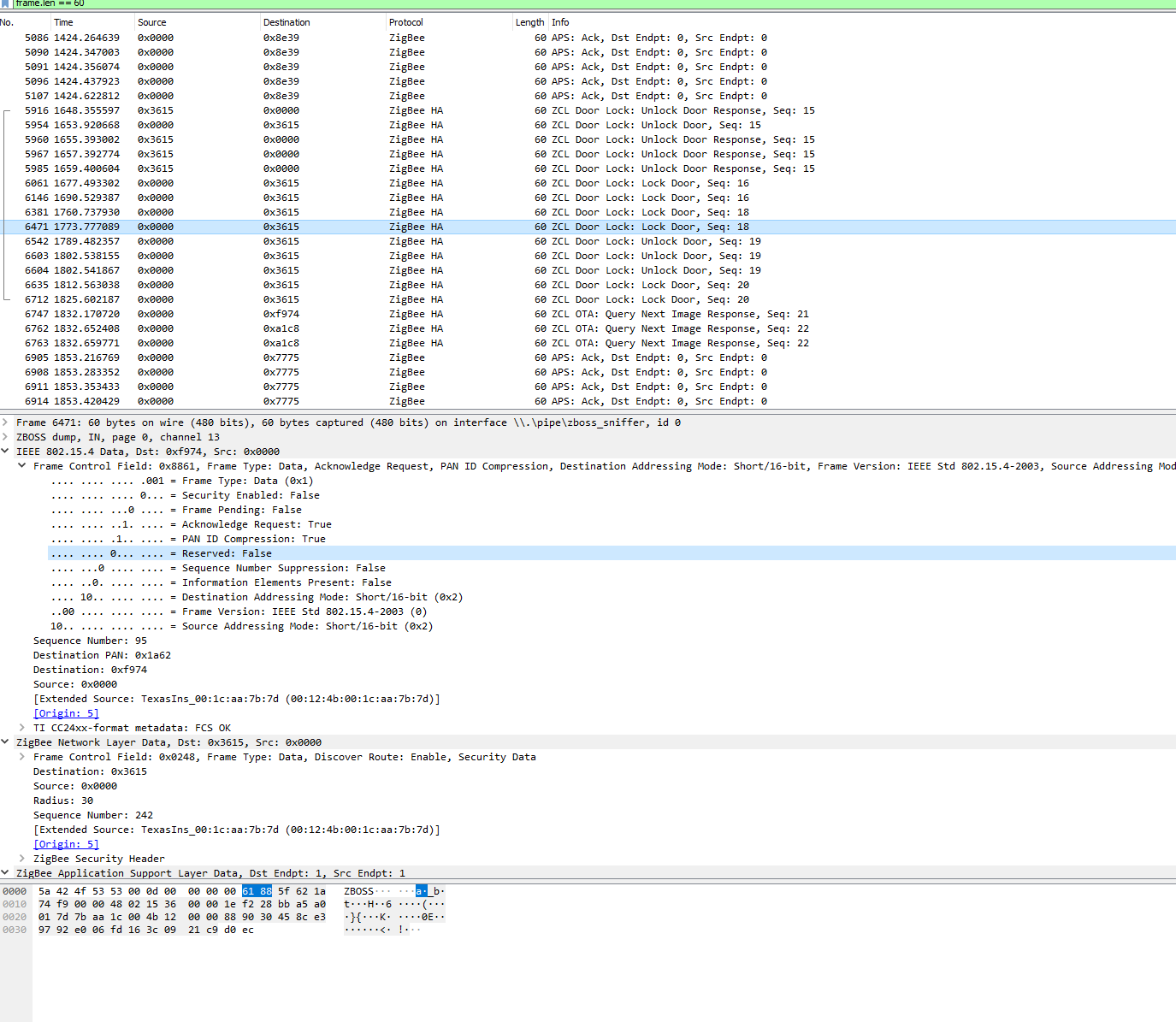
This is basically giving me same errors as OPs, the lock locks and unlocks. But status does not update. It seems that when it doesnt connect to coordinator directly this happens as per linked issue above. I have not tried this yet as I have not been able to remove the lock again.
Happy to be the guinea pig on this as long as someone is able to let me know what I need to do :)
EDIT: Added .pcapng
wireshark-danalock-filter.pcapng.zip
 nickcj931
on 14 Jul 2020
nickcj931
on 14 Jul 2020
@nickcj931 can you try to reconfigure the device via https://www.zigbee2mqtt.io/information/mqtt_topics_and_message_structure.html#zigbee2mqttbridgeconfigure and provide the the sniff of this (please keep the sniff as small as possible, start wireshark right before executing the command)? Make sure to wake up the device right before doing this (by clicking a button on it) and check the zigbee2mqtt log if if configured succesfully. Does it work after this?
Koenkk
on 14 Jul 2020
This issue is stale because it has been open 30 days with no activity. Remove stale label or comment or this will be closed in 7 days
![github-actions[bot] picture](https://avatars2.githubusercontent.com/in/15368?v=4&s=40) github-actions[bot]
on 14 Aug 2020
github-actions[bot]
on 14 Aug 2020
Related issues
 tb-killa
·
3Comments
tb-killa
·
3Comments
 CodeFinder2
·
4Comments
CodeFinder2
·
4Comments
 jeroenterheerdt
·
3Comments
jeroenterheerdt
·
3Comments
 sylarevan
·
5Comments
sylarevan
·
5Comments
 andreasbrett
·
4Comments
andreasbrett
·
4Comments
Most helpful comment
@nickcj931 can you try to reconfigure the device via https://www.zigbee2mqtt.io/information/mqtt_topics_and_message_structure.html#zigbee2mqttbridgeconfigure and provide the the sniff of this (please keep the sniff as small as possible, start wireshark right before executing the command)? Make sure to wake up the device right before doing this (by clicking a button on it) and check the zigbee2mqtt log if if configured succesfully. Does it work after this?