Zigbee2mqtt: Add support for Blitzwolf BW-SHP13...gets recognised as TuYa TS0121...how to proceed?
Received the new Blitzwolf BW-SHP13 smart plugs today so I was starting up the procedure for adding the support (https://www.zigbee2mqtt.io/how_tos/how_to_support_new_devices.html).
Upon pairing they got recognised as TuYa TS0121. I did not test them further but from https://www.zigbee2mqtt.io/devices/TS0121.html it already becomes clear it does not support electricity monitoring. Please instruct me how to proceed.
Received Zigbee message from 'ac', type 'attributeReport', cluster 'seMetering', data '{"currentSummDelivered":[0,431]}' from endpoint 1 with groupID 0
 SaturnusDJ
All 118 comments
There is a chance it is actually the rebrand of the TuYa device with some more optioned configured in the firmware...
Perhaps a good start would be to append fz.metering_power to the fromZigbee array for the TS0121 and see if you get anything useful.
 sjorge
on 26 Jun 2020
sjorge
on 26 Jun 2020
Thanks. Got that suggestion too on Tweakers forum. Also added fz.ignore_basic_report. No MQTT output for power yet.
In the metering_power code is mentioned:
* When using this converter also add the following to the configure method of the device:
* await readMeteringPowerConverterAttributes(endpoint);
I have not been able to figure this out. Tried a lot of code that is used for other devices, can't get it to work.
It seems to me that the output as shown in the first post is the cumulative power in decawatt. Needs to go times 10 to make sense for the device I am running on the plug.
SaturnusDJ
on 26 Jun 2020
    {
        zigbeeModel: ['TS0121'],
        model: 'TS0121',
        description: '10A UK or 16A EU smart plug',
        supports: 'on/off',
        vendor: 'TuYa',
        fromZigbee: [fz.on_off, fz.metering_power],
        toZigbee: [tz.on_off],
        meta: {configureKey: 1},
        configure: async (device, coordinatorEndpoint) => {
            const endpoint = device.getEndpoint(1);
            await bind(endpoint, coordinatorEndpoint, ['genOnOff', 'seMetering']);
            await configureReporting.onOff(endpoint);
            await readMeteringPowerConverterAttributes(endpoint);
            await configureReporting.instantaneousDemand(endpoint);
        },
    },
Just taking a stab in the dark here, the endpoint might be wrong. But based on the log entry i think EP1 is the good one.
sjorge
on 26 Jun 2020
Thanks, this is the error it gives:
zigbee2mqtt:error 2020-06-26 22:53:19: Failed to configure 'ac', attempt 3 (Error: ConfigureReporting 0x..../1 genOnOff([{"attribute":"onOff","minimumReportInterval":0,"maximumReportInterval":3600,"reportableChange":0}], {"timeout":10000,"disableResponse":false,"disableDefaultResponse":true,"direction":0,"srcEndpoint":null,"reservedBits":0,"manufacturerCode":null,"transactionSequenceNumber":null}) failed (Error: Timeout - 7015 - 1 - 6 - 6 - 7 after 10000ms)
    at Endpoint.<anonymous> (/app/node_modules/zigbee-herdsman/dist/controller/model/endpoint.js:341:23)
    at Generator.throw (<anonymous>)
    at rejected (/app/node_modules/zigbee-herdsman/dist/controller/model/endpoint.js:6:65))
    {
        zigbeeModel: ['TS0121'],
        model: 'TS0121',
        description: '10A UK or 16A EU smart plug',
        supports: 'on/off',
        vendor: 'TuYa',
        fromZigbee: [fz.on_off, fz.metering_power],
        toZigbee: [tz.on_off],
        meta: {configureKey: 1},
        configure: async (device, coordinatorEndpoint) => {
            const endpoint = device.getEndpoint(1);
            await bind(endpoint, coordinatorEndpoint, ['genOnOff', 'seMetering']);
            await readMeteringPowerConverterAttributes(endpoint);
            await configureReporting.instantaneousDemand(endpoint);
        },
    },
Lets try without reporting for genOnoff.
sjorge
on 26 Jun 2020
Thanks. Next error is:
Failed to configure 'ac', attempt 2 (Error: Read 0x..../1 seMetering(["multiplier","divisor"], {"timeout":10000,"disableResponse":false,"disableDefaultResponse":true,"direction":0,"srcEndpoint":null,"reservedBits":0,"manufacturerCode":null,"transactionSequenceNumber":null}) failed (Error: Status 'UNSUPPORTED_ATTRIBUTE')
    at Endpoint.<anonymous> (/app/node_modules/zigbee-herdsman/dist/controller/model/endpoint.js:192:23)
    at Generator.next (<anonymous>)
    at fulfilled (/app/node_modules/zigbee-herdsman/dist/controller/model/endpoint.js:5:58))
Interesting, so it doens't support reporting at all probably.
    {
        zigbeeModel: ['TS0121'],
        model: 'TS0121',
        description: '10A UK or 16A EU smart plug',
        supports: 'on/off',
        vendor: 'TuYa',
        fromZigbee: [fz.on_off, fz.metering_power],
        toZigbee: [tz.on_off],
        meta: {configureKey: 1},
        configure: async (device, coordinatorEndpoint) => {
            const endpoint = device.getEndpoint(1);
            await bind(endpoint, coordinatorEndpoint, ['genOnOff', 'seMetering']);
            await readMeteringPowerConverterAttributes(endpoint);
        },
    },
Lets try the absolute minimal then.
sjorge
on 26 Jun 2020
The same error comes up.
SaturnusDJ
on 26 Jun 2020
I'm guessing it's not liking the readMeteringPowerConverterAttributes also :(
No idea how to proceed from here. Hopefully Koen will once he's online
sjorge
on 26 Jun 2020
Thanks for the time. 👌
SaturnusDJ
on 26 Jun 2020
When did you receive Received Zigbee message from 'ac', type 'attributeReport', cluster 'seMetering', data '{"currentSummDelivered":[0,431]}' from endpoint 1 with groupID 0 ? When adding fz.metering_power this should already work.
 Koenkk
on 27 Jun 2020
Koenkk
on 27 Jun 2020
That must have been after adding fz.metering_power. So that it looks like:
    {
        zigbeeModel: ['TS0121'],
        model: 'TS0121',
        description: '10A UK or 16A EU smart plug',
        supports: 'on/off',
        vendor: 'TuYa',
        fromZigbee: [fz.on_off, fz.metering_power],
        toZigbee: [tz.on_off],
    },
But you don't get any power messages now?
Koenkk
on 28 Jun 2020
Reading with MQTT Explorer: Power field stays at "null".
SaturnusDJ
on 28 Jun 2020
Can you try with:
    {
        zigbeeModel: ['TS0121'],
        model: 'TS0121',
        description: '10A UK or 16A EU smart plug',
        supports: 'on/off',
        vendor: 'TuYa',
        fromZigbee: [fz.on_off, fz.metering_power],
        toZigbee: [tz.on_off],
        meta: {configureKey: 2},
        configure: async (device, coordinatorEndpoint) => {
            const endpoint = device.getEndpoint(1);
            await bind(endpoint, coordinatorEndpoint, ['genOnOff', 'seMetering']);
        },
    },
attach a load to the plug, stop zigbee2mqtt and share your debug log and data/dabase.db?
To enable debug logging set in configuration.yaml:
advanced:
  log_level: debug
Ok thanks.
One of the Blitzwolf BW-SHP13 is called ac, the other has no friendly name yet.
Filtered log:
info  2020-06-28 18:25:40: Logging to console and directory: '/app/data/log/2020-06-28.18-25-40' filename: log.txt
debug 2020-06-28 18:25:40: Removing old log directory '/app/data/log/2020-06-26.18-38-47'
debug 2020-06-28 18:25:41: Loaded state from file /app/data/state.json
info  2020-06-28 18:25:41: Starting zigbee2mqtt version 1.14.0 (commit #9009de2)
info  2020-06-28 18:25:41: Starting zigbee-herdsman...
debug 2020-06-28 18:25:41: Using zigbee-herdsman with settings: '{"network":{"panID":6754,"extendedPanID":[221,221,221,221,221,221,221,221],"channelList":[11],"networkKey":"HIDDEN"},"databasePath":"/app/data/database.db","databaseBackupPath":"/app/data/database.db.backup","backupPath":"/app/data/coordinator_backup.json","serialPort":{"baudRate":115200,"rtscts":true,"path":"/dev/ttyACM0"},"adapter":{"concurrent":null}}'
info  2020-06-28 18:25:42: zigbee-herdsman started
info  2020-06-28 18:25:42: Coordinator firmware version: '{"type":"zStack12","meta":{"transportrev":2,"product":0,"majorrel":2,"minorrel":6,"maintrel":3,"revision":20190608}}'
debug 2020-06-28 18:25:42: Zigbee network parameters: {"panID":6754,"extendedPanID":"0xdddddddddddddddd","channel":11}
info  2020-06-28 18:25:42: Currently 14 devices are joined:
info  2020-06-28 18:25:43: ac (0x....1): TS0121 - TuYa 10A UK or 16A EU smart plug (Router)
info  2020-06-28 18:25:43: 0x....2 (0x....2): TS0121 - TuYa 10A UK or 16A EU smart plug (Router)
info  2020-06-28 18:25:43: Configuring 'ac'
info  2020-06-28 18:25:43: Successfully configured 'ac'
info  2020-06-28 18:25:43: Configuring '0x....2'
info  2020-06-28 18:25:43: Connected to MQTT server
info  2020-06-28 18:25:43: MQTT publish: topic 'zigbee2mqtt/ac', payload '{"state":"ON","linkquality":0,"power":null}'
info  2020-06-28 18:25:43: MQTT publish: topic 'zigbee2mqtt/0x....2', payload '{"state":"ON","linkquality":2}'
info  2020-06-28 18:25:43: MQTT publish: topic 'zigbee2mqtt/bridge/config', payload '{"version":"1.14.0","commit":"9009de2","coordinator":{"type":"zStack12","meta":{"transportrev":2,"product":0,"majorrel":2,"minorrel":6,"maintrel":3,"revision":20190608}},"log_level":"debug","permit_join":false}'
info  2020-06-28 18:25:44: Successfully configured '0x....2'
debug 2020-06-28 18:26:11: Received MQTT message on 'zigbee2mqtt/ac/set' with data 'OFF'
debug 2020-06-28 18:26:11: Publishing 'set' 'state' to 'ac'
info  2020-06-28 18:26:11: MQTT publish: topic 'zigbee2mqtt/ac', payload '{"state":"OFF","linkquality":0,"power":null}'
debug 2020-06-28 18:26:11: Received Zigbee message from 'ac', type 'attributeReport', cluster 'genOnOff', data '{"onOff":0}' from endpoint 1 with groupID 0
info  2020-06-28 18:26:11: MQTT publish: topic 'zigbee2mqtt/ac', payload '{"state":"OFF","linkquality":0,"power":null}'
debug 2020-06-28 18:26:14: Received MQTT message on 'zigbee2mqtt/ac/set' with data 'ON'
debug 2020-06-28 18:26:14: Publishing 'set' 'state' to 'ac'
info  2020-06-28 18:26:14: MQTT publish: topic 'zigbee2mqtt/ac', payload '{"state":"ON","linkquality":0,"power":null}'
debug 2020-06-28 18:26:14: Received Zigbee message from 'ac', type 'attributeReport', cluster 'genOnOff', data '{"onOff":1}' from endpoint 1 with groupID 0
info  2020-06-28 18:26:14: MQTT publish: topic 'zigbee2mqtt/ac', payload '{"state":"ON","linkquality":0,"power":null}'
debug 2020-06-28 18:27:16: Received Zigbee message from 'ac', type 'attributeReport', cluster 'genBasic', data '{"65506":30,"appVersion":64}' from endpoint 1 with groupID 0
debug 2020-06-28 18:27:16: No converter available for 'TS0121' with cluster 'genBasic' and type 'attributeReport' and data '{"65506":30,"appVersion":64}'
debug 2020-06-28 18:27:36: Received Zigbee message from '0x....2', type 'attributeReport', cluster 'seMetering', data '{"currentSummDelivered":[0,100]}' from endpoint 1 with groupID 0
debug 2020-06-28 18:28:00: Received Zigbee message from '0x....2', type 'attributeReport', cluster 'genBasic', data '{"65506":30,"appVersion":64}' from endpoint 1 with groupID 0
debug 2020-06-28 18:28:00: No converter available for 'TS0121' with cluster 'genBasic' and type 'attributeReport' and data '{"65506":30,"appVersion":64}'
debug 2020-06-28 18:28:54: Received MQTT message on 'zigbee2mqtt/ac/set' with data 'OFF'
debug 2020-06-28 18:28:54: Publishing 'set' 'state' to 'ac'
debug 2020-06-28 18:28:55: Received Zigbee message from 'ac', type 'attributeReport', cluster 'genOnOff', data '{"onOff":0}' from endpoint 1 with groupID 0
info  2020-06-28 18:28:55: MQTT publish: topic 'zigbee2mqtt/ac', payload '{"state":"OFF","linkquality":0,"power":null}'
info  2020-06-28 18:28:55: MQTT publish: topic 'zigbee2mqtt/ac', payload '{"state":"OFF","linkquality":0,"power":null}'
debug 2020-06-28 18:30:03: Received Zigbee message from 'ac', type 'attributeReport', cluster 'seMetering', data '{"currentSummDelivered":[0,1218]}' from endpoint 1 with groupID 0
debug 2020-06-28 18:30:29: Received Zigbee message from 'ac', type 'attributeReport', cluster 'genBasic', data '{"65506":30,"appVersion":64}' from endpoint 1 with groupID 0
debug 2020-06-28 18:30:29: No converter available for 'TS0121' with cluster 'genBasic' and type 'attributeReport' and data '{"65506":30,"appVersion":64}'
debug 2020-06-28 18:30:41: Saving state to file /app/data/state.json
debug 2020-06-28 18:30:51: Saving state to file /app/data/state.json
info  2020-06-28 18:30:51: MQTT publish: topic 'zigbee2mqtt/bridge/state', payload 'offline'
info  2020-06-28 18:30:51: Disconnecting from MQTT server
info  2020-06-28 18:30:51: zigbee-herdsman stopped
The two db entries of the two plugs:
{"id":14,"type":"Router","ieeeAddr":"0x....1","nwkAddr":7015,"manufId":4098,"manufName":"_TZ3000_3ooaz3ng","powerSource":"Mains (single phase)","modelId":"TS0121","epList":[1],"endpoints":{"1":{"profId":260,"epId":1,"devId":81,"inClusterList":[0,4,5,6,1794,2820],"outClusterList":[25,10],"clusters":{"genBasic":{"attributes":{"65503":"\u0000\u0000\u0000\u0000\u0005","65506":30,"modelId":"TS0121","manufacturerName":"_TZ3000_3ooaz3ng","powerSource":1,"zclVersion":3,"appVersion":64,"stackVersion":0,"hwVersion":1,"dateCode":""}},"genOnOff":{"attributes":{"32769":1,"32770":2,"32771":1,"onOff":0,"onTime":0,"offWaitTime":0}},"seMetering":{"attributes":{"currentSummDelivered":[0,1218]}}},"binds":[{"cluster":6,"type":"endpoint","deviceIeeeAddress":"0x....","endpointID":1},{"cluster":1794,"type":"endpoint","deviceIeeeAddress":"0x....","endpointID":1}]}},"appVersion":64,"stackVersion":0,"hwVersion":1,"dateCode":"","zclVersion":3,"interviewCompleted":true,"meta":{"configured":2},"lastSeen":1593361829500}
{"id":15,"type":"Router","ieeeAddr":"0x....2","nwkAddr":59768,"manufId":4098,"manufName":"_TZ3000_3ooaz3ng","powerSource":"Mains (single phase)","modelId":"TS0121","epList":[1],"endpoints":{"1":{"profId":260,"epId":1,"devId":81,"inClusterList":[0,4,5,6,1794,2820],"outClusterList":[25,10],"clusters":{"genBasic":{"attributes":{"65503":"\u0000\u0000\u0000\u0000\u0005\u0000\u0000\u0000\u0000\u0005","65506":30,"modelId":"TS0121","manufacturerName":"_TZ3000_3ooaz3ng","powerSource":1,"zclVersion":3,"appVersion":64,"stackVersion":0,"hwVersion":1,"dateCode":""}},"seMetering":{"attributes":{"currentSummDelivered":[0,100]}},"genOnOff":{"attributes":{"32769":1,"32770":2,"onOff":1,"onTime":0,"offWaitTime":0}}},"binds":[{"cluster":6,"type":"endpoint","deviceIeeeAddress":"0x....","endpointID":1},{"cluster":1794,"type":"endpoint","deviceIeeeAddress":"0x....","endpointID":1}]}},"appVersion":64,"stackVersion":0,"hwVersion":1,"dateCode":"","zclVersion":3,"interviewCompleted":true,"meta":{"configured":2},"lastSeen":1593361680987}
I see that the plug without friendly name has no 'power' field in MQTT. For the ac one I made an entry in HA (manually) to be able to read the power field. Maybe that caused the field to appear in MQTT Explorer while Zigbee2MQTT itself does not even publish anything to it yet and neither announces the field. Not sure, no MQTT expert.
SaturnusDJ
on 28 Jun 2020
Can you try with:
{
    zigbeeModel: ['TS0121'],
    model: 'TS0121',
    description: '10A UK or 16A EU smart plug',
    supports: 'on/off',
    vendor: 'TuYa',
    fromZigbee: [fz.on_off, fz.metering_power],
    toZigbee: [tz.on_off],
    meta: {configureKey: 3},
    configure: async (device, coordinatorEndpoint) => {
        const endpoint = device.getEndpoint(1);
        await bind(endpoint, coordinatorEndpoint, ['genOnOff', 'seMetering']);
        await configureReporting.instantaneousDemand(endpoint);
    },
},
attach a load and provide the complete log again? (from the point where you attached the load).
Koenkk
on 29 Jun 2020
Thanks.
Here it is:
zigbee2mqtt:debug 2020-06-29 16:23:19: Received Zigbee message from 'ac', type 'attributeReport', cluster 'seMetering', data '{"currentSummDelivered":[0,1224]}' from endpoint 1 with groupID 0
zigbee2mqtt:error 2020-06-29 16:23:28: Failed to configure 'ac', attempt 3 (Error: ConfigureReporting 0x..../1 seMetering([{"attribute":"instantaneousDemand","minimumReportInterval":0,"maximumReportInterval":3600,"reportableChange":1}], {"timeout":10000,"disableResponse":false,"disableDefaultResponse":true,"direction":0,"srcEndpoint":null,"reservedBits":0,"manufacturerCode":null,"transactionSequenceNumber":null}) failed (Error: Timeout - 7015 - 1 - 8 - 1794 - 7 after 10000ms)
    at Endpoint.<anonymous> (/app/node_modules/zigbee-herdsman/dist/controller/model/endpoint.js:341:23)
    at Generator.throw (<anonymous>)
    at rejected (/app/node_modules/zigbee-herdsman/dist/controller/model/endpoint.js:6:65))
Can you try with:
{
    zigbeeModel: ['TS0121'],
    model: 'TS0121',
    description: '10A UK or 16A EU smart plug',
    supports: 'on/off',
    vendor: 'TuYa',
    fromZigbee: [fz.on_off, fz.metering_power],
    toZigbee: [tz.on_off],
    meta: {configureKey: 4},
    configure: async (device, coordinatorEndpoint) => {
        const endpoint = device.getEndpoint(1);
        await bind(endpoint, coordinatorEndpoint, ['genOnOff', 'seMetering']);
        endpoint.saveClusterAttributeKeyValue('seMetering', {
            divisor: 100,
            multiplier: 1,
        });
    },
},
with this I expect the energy attribute to change to a meaningful value after some time. This will indicate the total deliver energy in kWh.
Koenkk
on 29 Jun 2020
Yes thanks that is working as you describe. 👌
As I have no experience with other electricity monitoring plugs...what else can it do? Or what can Z2M do with it?
At time of buying I expected that the plug would publish the current watt usage every x seconds but so far the only thing that shows up is a message for each decawatt increase.
SaturnusDJ
on 29 Jun 2020
At time of buying I expected that the plug would publish the current watt usage every x seconds
We need to check if the plug supports this. When running with the code below, does the device configure successfully?
{
    zigbeeModel: ['TS0121'],
    model: 'TS0121',
    description: '10A UK or 16A EU smart plug',
    supports: 'on/off',
    vendor: 'TuYa',
    fromZigbee: [fz.on_off, fz.metering_power],
    toZigbee: [tz.on_off],
    meta: {configureKey: 4},
    configure: async (device, coordinatorEndpoint) => {
        const endpoint = device.getEndpoint(1);
        await bind(endpoint, coordinatorEndpoint, ['genOnOff', 'seMetering']);
        endpoint.saveClusterAttributeKeyValue('seMetering', {
            divisor: 100,
            multiplier: 1,
        });
       await endpoint.read('seMetering', ['instantaneousDemand']);
    },
},
Hi,
Actually I got three of them today. Bought hoping they'll work like Innr SP 120, but supporting higher wattage.
The device doesn't configure using this code
Failed to configure '0x...', attempt 1 (Error: Read 0x.../1 seMetering(["instantaneousDemand"], {"timeout":10000,"disableResponse":false,"disableDefaultResponse":true,"direction":0,"srcEndpoint":null,"reservedBits":0,"manufacturerCode":null,"transactionSequenceNumber":null}) failed (Error: Status 'UNSUPPORTED_ATTRIBUTE')
 piotrekoo
on 29 Jun 2020
piotrekoo
on 29 Jun 2020
Here the added line of code from https://github.com/Koenkk/zigbee2mqtt/issues/3812#issuecomment-651200047 seems to do nothing. No error and no new features. Or is remove and pair again needed?
SaturnusDJ
on 29 Jun 2020
@SaturnusDJ I suppose configuration takes place when pairing. I got the error when repairing the plug.
piotrekoo
on 29 Jun 2020
deCONZ is somehow able to read the _haElectricalMeasurement_ cluster of this device: https://github.com/dresden-elektronik/deconz-rest-plugin/issues/2988
I'll try some tinkering on my own, but if you have any suggestions or snippets to test, I'll be happy to test them.
piotrekoo
on 29 Jun 2020
It is also possible to force the configure via https://www.zigbee2mqtt.io/information/mqtt_topics_and_message_structure.html#zigbee2mqttbridgeconfigure and watch the logging at this moment.
deCONZ is somehow able to read the haElectricalMeasurement
Try with:
{
    zigbeeModel: ['TS0121'],
    model: 'TS0121',
    description: '10A UK or 16A EU smart plug',
    supports: 'on/off',
    vendor: 'TuYa',
    fromZigbee: [fz.on_off, fz.metering_power, fz.electrical_measurement_power],
    toZigbee: [tz.on_off],
    meta: {configureKey: 4},
    configure: async (device, coordinatorEndpoint) => {
        const endpoint = device.getEndpoint(1);
        await bind(endpoint, coordinatorEndpoint, ['genOnOff', 'seMetering', 'haElectricalMeasurement']);
        // Return UNSUPPORTED_ATTRIBUTE upon reading divisor/multiplier
        endpoint.saveClusterAttributeKeyValue('seMetering', {
            divisor: 100,
            multiplier: 1,
        });

        await readEletricalMeasurementPowerConverterAttributes(endpoint);
        await configureReporting.activePower(endpoint);
    },
},
Gives:
Configuring 'ac'
zigbee2mqtt:debug 2020-06-29 19:49:57: Received Zigbee message from 'ac', type 'readResponse', cluster 'haElectricalMeasurement', data '{}' from endpoint 1 with groupID 0
zigbee2mqtt:error 2020-06-29 19:49:57: Failed to configure 'ac', attempt 1 (Error: Read 0x..../1 haElectricalMeasurement(["acVoltageMultiplier","acVoltageDivisor","acCurrentMultiplier"], {"timeout":10000,"disableResponse":false,"disableDefaultResponse":true,"direction":0,"srcEndpoint":null,"reservedBits":0,"manufacturerCode":null,"transactionSequenceNumber":null}) failed (Error: Status 'UNSUPPORTED_ATTRIBUTE')
    at Endpoint.<anonymous> (/app/node_modules/zigbee-herdsman/dist/controller/model/endpoint.js:192:23)
    at Generator.next (<anonymous>)
    at fulfilled (/app/node_modules/zigbee-herdsman/dist/controller/model/endpoint.js:5:58))
And:
{
    zigbeeModel: ['TS0121'],
    model: 'TS0121',
    description: '10A UK or 16A EU smart plug',
    supports: 'on/off',
    vendor: 'TuYa',
    fromZigbee: [fz.on_off, fz.metering_power, fz.electrical_measurement_power],
    toZigbee: [tz.on_off],
    meta: {configureKey: 4},
    configure: async (device, coordinatorEndpoint) => {
        const endpoint = device.getEndpoint(1);
        await bind(endpoint, coordinatorEndpoint, ['genOnOff', 'seMetering', 'haElectricalMeasurement']);
        // Return UNSUPPORTED_ATTRIBUTE upon reading divisor/multiplier
        endpoint.saveClusterAttributeKeyValue('seMetering', {
            divisor: 100,
            multiplier: 1,
        });

        await configureReporting.activePower(endpoint);
    },
},
Gives:
zigbee2mqtt:info  2020-06-29 19:55:38: Configuring 'ac'
zigbee2mqtt:error 2020-06-29 19:56:02: Failed to configure 'ac', attempt 1 (Error: ConfigureReporting 0x..../1 haElectricalMeasurement([{"attribute":"activePower","minimumReportInterval":5,"maximumReportInterval":300,"reportableChange":1}], {"timeout":10000,"disableResponse":false,"disableDefaultResponse":true,"direction":0,"srcEndpoint":null,"reservedBits":0,"manufacturerCode":null,"transactionSequenceNumber":null}) failed (Error: Timeout - 7015 - 1 - 3 - 2820 - 7 after 10000ms)
    at Endpoint.<anonymous> (/app/node_modules/zigbee-herdsman/dist/controller/model/endpoint.js:341:23)
    at Generator.throw (<anonymous>)
    at rejected (/app/node_modules/zigbee-herdsman/dist/controller/model/endpoint.js:6:65))
do you get any power values when now attaching a load to the plug?
@piotrekoo do you get the same error?
Koenkk
on 29 Jun 2020
Looks like it:
20:06:54: Received Zigbee message from 'ac', type 'attributeReport', cluster 'seMetering', data '{"currentSummDelivered":[0,1234]}' from endpoint 1 with groupID 0
@Koenkk Yes, I get the same error. I'm tinkering now a bit with overriding the reporting parameters. Just checking if it configures with the values used by deCONZ.
piotrekoo
on 29 Jun 2020
Got my old ConBee from the drawer.
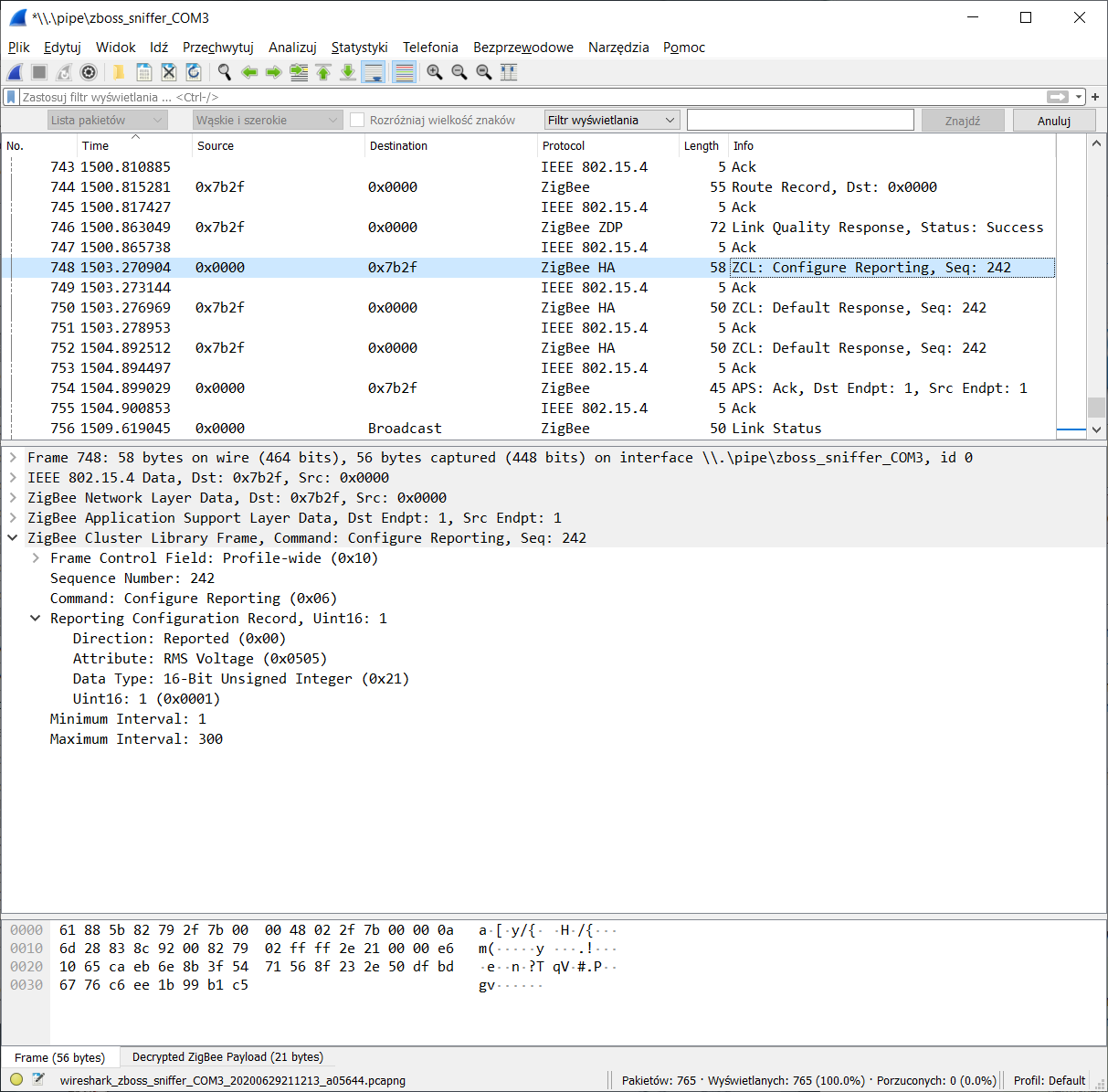
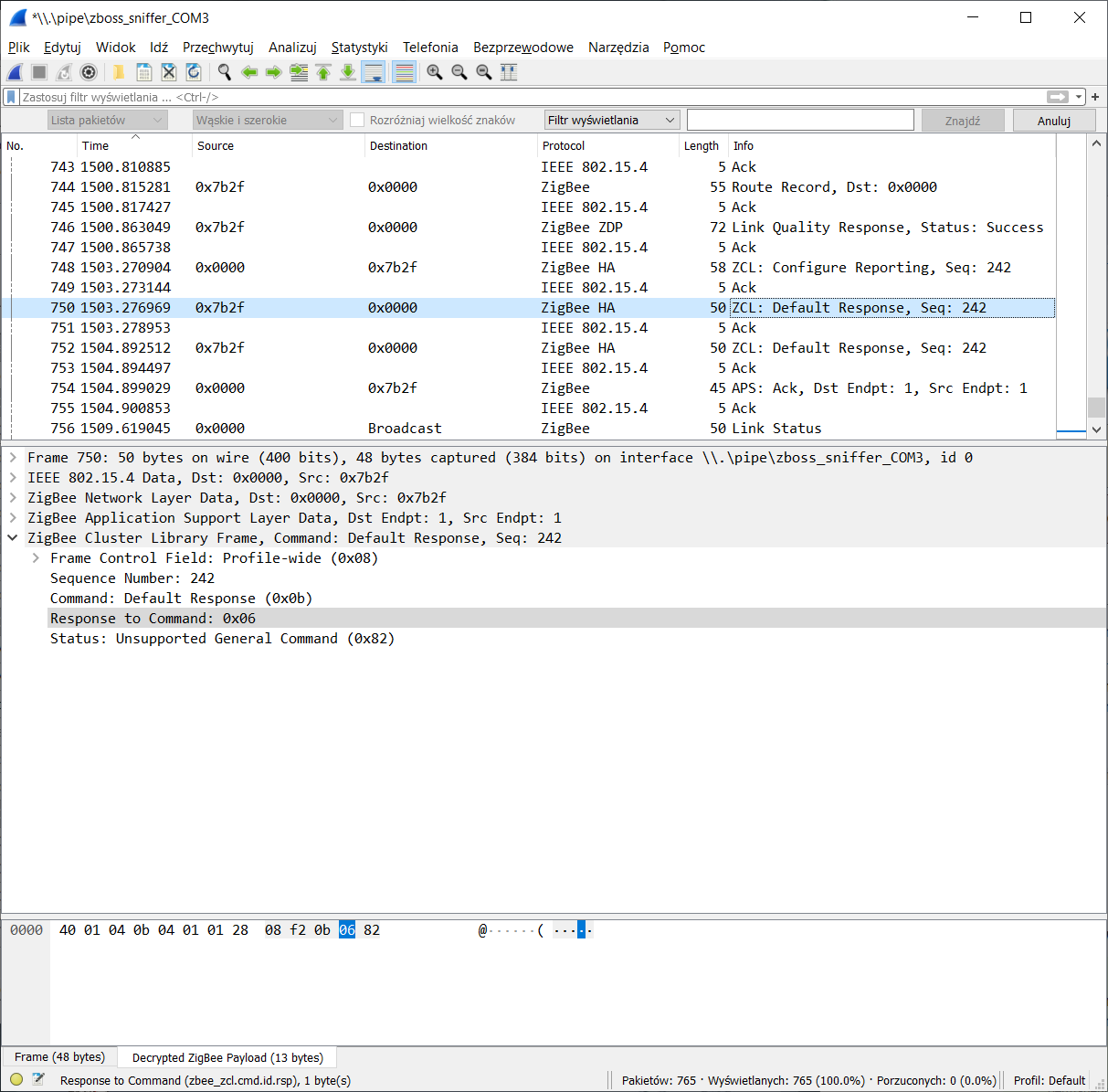
At first the device reports only On/Off, Simple Metering and Basic clusters. After clicking Read Simple Descriptors it reported Groups, Scenes, Electrical Measurement, as well as OTAU and Time clusters.
It reports RMS Voltage, RMS Current and Active Power on demand (ZCL: Read Attributes). When I tried setting Reporting from GUI, I got UNSUP_GENERAL_COMMAND.
I have near-zero knowledge of how Zigbee works underneath but it looks like the device doesn't support reporting configuration.
EDIT: It reports _Current Summation Delivered_ every 5 minutes. No need to set anything.
That's how it looks sniffed in Wireshark:
piotrekoo
on 29 Jun 2020
@piotrekoo thanks for sniffing this, those findings seems to be consistent with ours. The current summation delivered is exposed as energy with the following config: https://github.com/Koenkk/zigbee2mqtt/issues/3812#issuecomment-651171671
Next question is on how to deal with the voltage, current and power (as the device does not support reporting of those). One thing we can do is poll those every X seconds (60?). But this will break certain use cases which require more frequent updates on large changes (e.g. the kettle detection use case).
Koenkk
on 30 Jun 2020
As these plugs support 16A and "monitoring", many will buy them to monitor kettles, washing machines.., just as I did. The choice is pretty limited. You get either 16A support or monitoring or.. spend around €50 on a Salus or a Bitron to get both ;)
The MCLH-03 from LifeControl needs polling too if I understand the code correctly. Possibly a similar solution can be used here.
Just noticed in logs that the BW-SHP13 also sends regular _Basic_ reports:
No converter available for 'TS0121' with cluster 'genBasic' and type 'attributeReport' and data '{"65506":30,"appVersion":64}'
So a fz.ignore_basic_report converter will be needed too.
piotrekoo
on 30 Jun 2020
@Koenkk Thanks for your help here! In case it would speed-up this, would you like access to my test server so you can just play around? I sent you a DM on Tweakers in case that'll help. Thanks!
 daxy01
on 30 Jun 2020
daxy01
on 30 Jun 2020
@piotrekoo That seems to be quite a good call! 😀 I just tested the code from MCLH-03 and added those specifics to the TS0121 and now I do get current usage! Still an error and no clue how to fix this though. This is the config I used:
    {
        zigbeeModel: ['TS0121'],
        model: 'TS0121',
        description: '10A UK or 16A EU smart plug',
        supports: 'on/off',
        vendor: 'TuYa',
        fromZigbee: [fz.on_off, fz.electrical_measurement_power],
        toZigbee: [tz.on_off],
        meta: {configureKey: 1},
        configure: async (device, coordinatorEndpoint) => {
            const endpoint = device.getEndpoint(1);
            await bind(endpoint, coordinatorEndpoint, ['genOnOff', 'haElectricalMeasurement']);
            await configureReporting.onOff(endpoint);
            await readEletricalMeasurementPowerConverterAttributes(endpoint);
        },
        onEvent: async (type, data, device) => {
            // This device doesn't support reporting correctly.
            // https://github.com/Koenkk/zigbee-herdsman-converters/pull/1270
            const endpoint = device.getEndpoint(1);
            if (type === 'stop') {
                clearInterval(store[device.ieeeAddr]);
            } else if (!store[device.ieeeAddr]) {
                store[device.ieeeAddr] = setInterval(async () => {
                    try {
                        await endpoint.read('haElectricalMeasurement', ['rmsVoltage', 'rmsCurrent', 'activePower']);
                    } catch (error) {
                        // Do nothing
                    }
                }, 10*1000); // Every 10 seconds
            }
        },
    },
This is in the logs now, last ones showing power usage:
error 2020-06-30 13:46:57: Failed to configure '0x842e14fffee1aad4', attempt 3 (Error: ConfigureReporting 0x842e14fffee1aad4/1 genOnOff([{"attribute":"onOff","minimumReportInterval":0,"maximumReportInterval":3600,"reportableChange":0}], {"timeout":10000,"disableResponse":false,"disableDefaultResponse":true,"direction":0,"srcEndpoint":null,"reservedBits":0,"manufacturerCode":null,"transactionSequenceNumber":null}) failed (Error: Timeout - 51224 - 1 - 18 - 6 - 7 after 10000ms)
    at Endpoint.<anonymous> (/app/node_modules/zigbee-herdsman/dist/controller/model/endpoint.js:341:23)
    at Generator.throw (<anonymous>)
    at rejected (/app/node_modules/zigbee-herdsman/dist/controller/model/endpoint.js:6:65))

debug 2020-06-30 13:48:58: Received Zigbee message from '0x842e14fffee1aad4', type 'attributeReport', cluster 'genBasic', data '{"65506":30,"appVersion":64}' from endpoint 1 with groupID 0

debug 2020-06-30 13:48:58: No converter available for 'TS0121' with cluster 'genBasic' and type 'attributeReport' and data '{"65506":30,"appVersion":64}'

debug 2020-06-30 13:48:58: Received Zigbee message from '0x842e14fffee1aad4', type 'attributeReport', cluster 'genBasic', data '{"65503":"�\u0011t&\u0017�\u0011t&\u0013�\u0011t&\u0012\u0000\u0000\u0000\u0000\u0005\u0000\u0000\u0000\u0000\u0005"}' from endpoint 1 with groupID 0

debug 2020-06-30 13:48:58: No converter available for 'TS0121' with cluster 'genBasic' and type 'attributeReport' and data '{"65503":"�\u0011t&\u0017�\u0011t&\u0013�\u0011t&\u0012\u0000\u0000\u0000\u0000\u0005\u0000\u0000\u0000\u0000\u0005"}'

info  2020-06-30 13:49:35: MQTT publish: topic 'zigbee2mqtt-zolder/0x842e14fffee1aad4', payload '{"state":"ON","linkquality":99,"power":41,"current":214,"voltage":226}'

debug 2020-06-30 13:49:45: Received Zigbee message from '0x842e14fffee1aad4', type 'readResponse', cluster 'haElectricalMeasurement', data '{"rmsVoltage":227,"rmsCurrent":202,"activePower":41}' from endpoint 1 with groupID 0

zigbee2mqtt:debug 2020-06-30 14:26:13: No converter available for 'TS0121' with cluster 'seMetering' and type 'attributeReport' and data '{"currentSummDelivered":[0,0]}'
Update 16:29 CEST:
I've added the last line as that one is also showing in my logs.
So far it does look good in Home-Assistant. I did also update the TS0121 line in homeasisstant.js to match it with MCLH-03 of course.
daxy01
on 30 Jun 2020
I'm out of home so I won't be able to check it on my own soon.
I got rid of remaining configureReporting as the device definitely doesn't support this command. Added fz.ignore_basic_report, so we're no longer bothered with mysterious 65503 and 65506 values. Added fz.metering_power, so the currentSummDelivered is converted, but I'm not sure if we should take it or ignore it.
    {
        zigbeeModel: ['TS0121'],
        model: 'TS0121',
        description: '10A UK or 16A EU smart plug',
        supports: 'on/off',
        vendor: 'TuYa',
        fromZigbee: [fz.on_off, fz.electrical_measurement_power, fz.metering_power, fz.ignore_basic_report],
        toZigbee: [tz.on_off],
        meta: {configureKey: 1},
        configure: async (device, coordinatorEndpoint) => {
            const endpoint = device.getEndpoint(1);
            await bind(endpoint, coordinatorEndpoint, ['genOnOff', 'haElectricalMeasurement']);
            await readEletricalMeasurementPowerConverterAttributes(endpoint);
        },
        onEvent: async (type, data, device) => {
            // This device doesn't support reporting correctly.
            // https://github.com/Koenkk/zigbee-herdsman-converters/pull/1270
            const endpoint = device.getEndpoint(1);
            if (type === 'stop') {
                clearInterval(store[device.ieeeAddr]);
            } else if (!store[device.ieeeAddr]) {
                store[device.ieeeAddr] = setInterval(async () => {
                    try {
                        await endpoint.read('haElectricalMeasurement', ['rmsVoltage', 'rmsCurrent', 'activePower']);
                    } catch (error) {
                        // Do nothing
                    }
                }, 10*1000); // Every 10 seconds
            }
        },
    },
I can confirm that @piotrekoo his code is working for me. It does throw the error below 3 times, but then all is fine. I'm not sure if this is a zigbee2mqtt issue or Blitzwolf, but I can live with it as it has no further impact 😀
Although this is working fine for this Blitzwolf, I do not know if this (potentially) has any complications for other (let's say older) TuYa TS0121's out there.
zigbee2mqtt:info  2020-06-30 20:32:20: MQTT publish: topic 'zigbee2mqtt-zolder/Wasmachine', payload '{"state":"ON","linkquality":92,"power":0,"current":0,"voltage":226}'
zigbee2mqtt:info  2020-06-30 20:32:20: Configuring 'Wasmachine'
zigbee2mqtt:debug 2020-06-30 20:32:20: Received Zigbee message from 'Wasmachine', type 'readResponse', cluster 'haElectricalMeasurement', data '{}' from endpoint 1 with groupID 0
zigbee2mqtt:error 2020-06-30 20:32:20: Failed to configure 'Wasmachine', attempt 2 (Error: Read 0x842e14fffee1aad4/1 haElectricalMeasurement(["acVoltageMultiplier","acVoltageDivisor","acCurrentMultiplier"], {"timeout":10000,"disableResponse":false,"disableDefaultResponse":true,"direction":0,"srcEndpoint":null,"reservedBits":0,"manufacturerCode":null,"transactionSequenceNumber":null}) failed (Error: Status 'UNSUPPORTED_ATTRIBUTE')
    at Endpoint.<anonymous> (/app/node_modules/zigbee-herdsman/dist/controller/model/endpoint.js:192:23)
    at Generator.next (<anonymous>)
    at fulfilled (/app/node_modules/zigbee-herdsman/dist/controller/model/endpoint.js:5:58))
Obviously the same here. Nice work.
I thought that here it should be voltage * current = power however; not true.
SaturnusDJ
on 30 Jun 2020
I added missing multipliers and divisors that went forgotten after copy-pasting the MCLH-03 code. Hopefully, this will make the _voltage * current = power_ formula valid again ;)
Again, I'm not home and I left the SHP13 without any load, so I can't test whether it works properly.
    {
        zigbeeModel: ['TS0121'],
        model: 'TS0121',
        description: '10A UK or 16A EU smart plug',
        supports: 'on/off',
        vendor: 'TuYa',
        fromZigbee: [fz.on_off, fz.electrical_measurement_power, fz.metering_power, fz.ignore_basic_report],
        toZigbee: [tz.on_off],
        meta: {configureKey: 1},
        configure: async (device, coordinatorEndpoint) => {
            const endpoint = device.getEndpoint(1);
            await bind(endpoint, coordinatorEndpoint, ['genOnOff', 'haElectricalMeasurement']);
            endpoint.saveClusterAttributeKeyValue('seMetering', {
                divisor: 100,
                multiplier: 1,
            });
            endpoint.saveClusterAttributeKeyValue('haElectricalMeasurement', {
                acVoltageMultiplier: 1,
                acVoltageDivisor: 1,
                acCurrentMultiplier: 1,
                acCurrentDivisor: 1000,
            });
            await readEletricalMeasurementPowerConverterAttributes(endpoint);
        },
        onEvent: async (type, data, device) => {
            // This device doesn't support reporting correctly.
            // https://github.com/Koenkk/zigbee-herdsman-converters/pull/1270
            const endpoint = device.getEndpoint(1);
            if (type === 'stop') {
                clearInterval(store[device.ieeeAddr]);
            } else if (!store[device.ieeeAddr]) {
                store[device.ieeeAddr] = setInterval(async () => {
                    try {
                        await endpoint.read('haElectricalMeasurement', ['rmsVoltage', 'rmsCurrent', 'activePower']);
                    } catch (error) {
                        // Do nothing
                    }
                }, 10*1000); // Every 10 seconds
            }
        },
    },
Hmm here the current is still doubtful.
  "power": 114,
  "current": 633,
  "voltage": 227
Power and voltage make sense, verified before as well at least in the big scheme, therefore the current should be about 114W / 227V = 0.5022A = 502mA.
502 vs 633...A bit too much off.
I will have a check with a standalone watt meter to see if the watts/power is accurate.
SaturnusDJ
on 1 Jul 2020
Auch...
[ Wall socket ] - [ Blitzwolf BW-SHP13 ] - [ Watt meter ] - [ Freezer ]
Blitzwolf reports 127W
Watt meter reports 111W
swapping the meters:
Blitzwolf reports 122W
Watt meter reports 108W
The watt meter could be 10 years old and is just a basic one.
I guess one of them is not doing so well. 🤣
SaturnusDJ
on 1 Jul 2020
[ Socket ] - [ Watt-o-meter ] - [ BW-SHP13 ] - [ Laptop charger ]
|| Power | Current |
-------------|--------|---------|
Watt-o-meter | 32.8 W | 0.241 A |
BW-SHP13 | 36 W | 0.272 A |
When readings are about 10-15% off, I think I get why these sockets are so cheap 🙄
I'll try to get an incandescent light bulb and have a test with a known load.
EDIT:
Watt-o-meter - 40W light bulb: 42 W
BW-SHP13 - 40W light bulb: 48 W
piotrekoo
on 1 Jul 2020
@daxy01 thanks for the offer, but based on the good progress here I don't think that is needed.
The configuration from https://github.com/Koenkk/zigbee2mqtt/issues/3812#issuecomment-652266693 looks good to me.
Regarding the off power measurements, please figure out if it's a static deviation (e.g. always 10 watts) or a percentage deviation (e.g. always 15%). If it's a percentage one we should be able to easily fix this by changing:
            endpoint.saveClusterAttributeKeyValue('haElectricalMeasurement', {
                acVoltageMultiplier: 1,
                acVoltageDivisor: 1,
                acCurrentMultiplier: 1,
                acCurrentDivisor: 1000,
            });
to (for e.g. 0.85 correction)
            endpoint.saveClusterAttributeKeyValue('haElectricalMeasurement', {
                acVoltageMultiplier: 1,
                acVoltageDivisor: 1,
                acCurrentMultiplier: 1,
                acCurrentDivisor: 1000,
                acPowerMultiplier: 0.85, // Power pulished to MQTT = reported power * 0.85
                acPowerDivisor: 1,
            });
Well, we've got four observations. That's not enough to tell the final correction value, but I'd assume a correction by 0.88 for current and power.
I'm wondering whether it's correct for higher power/current values.
piotrekoo
on 1 Jul 2020
I will check 1000W on two plugs and one normal meter tomorrow.
Worst case the correction is variable per load and per plug, that would be something...
SaturnusDJ
on 1 Jul 2020
Hello everybody. I also followed last days and nights here and tried everything.
This works perfectly for me:
js
    {
        zigbeeModel: ['TS0121'],
        model: 'TS0121',
        description: '10A UK or 16A EU smart plug',
        supports: 'on/off',
        vendor: 'TuYa',
        fromZigbee: [fz.on_off, fz.electrical_measurement_power, fz.metering_power, fz.ignore_basic_report],
        toZigbee: [tz.on_off],
        meta: {configureKey: 1},
        configure: async (device, coordinatorEndpoint) => {
            const endpoint = device.getEndpoint(1);
            await bind(endpoint, coordinatorEndpoint, ['genOnOff', 'haElectricalMeasurement']);
            endpoint.saveClusterAttributeKeyValue('seMetering', {
                divisor: 100,
                multiplier: 1,
            });
            endpoint.saveClusterAttributeKeyValue('haElectricalMeasurement', {
                acVoltageMultiplier: 1,
                acVoltageDivisor: 1,
                acCurrentMultiplier: 1,
                acCurrentDivisor: 1000,
            });
//            await readEletricalMeasurementPowerConverterAttributes(endpoint);
        },
        onEvent: async (type, data, device) => {
            // This device doesn't support reporting correctly.
            // https://github.com/Koenkk/zigbee-herdsman-converters/pull/1270
            const endpoint = device.getEndpoint(1);
            if (type === 'stop') {
                clearInterval(store[device.ieeeAddr]);
            } else if (!store[device.ieeeAddr]) {
                store[device.ieeeAddr] = setInterval(async () => {
                    try {
                        await endpoint.read('haElectricalMeasurement', ['rmsVoltage', 'rmsCurrent', 'activePower']);
                    } catch (error) {
                        // Do nothing
                    }
                }, 30*1000); // Every 30 seconds
            }
        },
    },
I think the interval of 10 seconds is too short, 30 seconds would be ok, so that the network is not overloaded with several sockets.
 dimaiv7
on 2 Jul 2020
dimaiv7
on 2 Jul 2020
I tried the configs as suggested by @dimaiv7 and by @piotrekoo ... None of these worked for me - "readEletricalMeasurementPowerConverterAttributes" errors out with an exception about UNSUPPORTED_ATTRIBUTE:
Failed to configure '0x842e14fffe51c655', attempt 1 (Error: Read 0x842e14fffe51c655/1 haElectricalMeasurement(["acVoltageMultiplier","acVoltageDivisor","acCurrentMultiplier"], {"timeout":10000,"disableResponse":false,"disableDefaultResponse":true,"direction":0,"srcEndpoint":null,"reservedBits":0,"manufacturerCode":null,"transactionSequenceNumber":null}) failed (Error: Status 'UNSUPPORTED_ATTRIBUTE')
    at Endpoint.<anonymous> (/app/node_modules/zigbee-herdsman/dist/controller/model/endpoint.js:192:23)
    at Generator.next (<anonymous>)
    at fulfilled (/app/node_modules/zigbee-herdsman/dist/controller/model/endpoint.js:5:58))
I modified readEletricalMeasurementPowerConverterAttributes to try the attributes one by one in a loop and report the failing ones - all six of them failed.
Also, after configuration, I get periodically following messages (I put some logging into the "catch" block of the "onEvent" handler):
Read 0x842e14fffe51c655/1 haElectricalMeasurement(["rmsVoltage","rmsCurrent","activePower"], {"timeout":10000,"disableResponse":false,"disableDefaultResponse":true,"direction":0,"srcEndpoint":null,"reservedBits":0,"manufacturerCode":null,"transactionSequenceNumber":null}) failed (TypeError: Cannot read property 'frame' of null)
 DBa2016
on 3 Jul 2020
DBa2016
on 3 Jul 2020
owerConverterAttributes
"readEletricalMeasurementPowerConverterAttributes" errors out with an exception about UNSUPPORTED_ATTRIBUTE:
look in the typo:
readElectricalMeasurementPowerConverterAttributes
 mabosch74
on 3 Jul 2020
mabosch74
on 3 Jul 2020
If you look closely, the line is by me commented out. Works perfectly with 6 plugs.
Can anyone say what is the line for?
dimaiv7
on 3 Jul 2020
If you look closely, the line is by me commented out. Works perfectly with 6 plugs.
Can anyone say what is the line for?
Yeah, I tried with it commented out - all the same, no metering, only on/off and linkquality.
DBa2016
on 3 Jul 2020
readElectricalMeasurementPowerConverterAttributes
While you are certainly right, the typo is in the entire file, so the correct function is picked.
DBa2016
on 3 Jul 2020
Bad news...
Here are my supposed 1000W (quick) test results.
The code used is from earlier in this topic by someone:
    {
        zigbeeModel: ['TS0121'],
        model: 'TS0121',
        description: '10A UK or 16A EU smart plug',
        supports: 'on/off',
        vendor: 'TuYa',
        fromZigbee: [fz.on_off, fz.electrical_measurement_power, fz.metering_power, fz.ignore_basic_report],
        toZigbee: [tz.on_off],
        meta: {configureKey: 1},
        configure: async (device, coordinatorEndpoint) => {
            const endpoint = device.getEndpoint(1);
            await bind(endpoint, coordinatorEndpoint, ['genOnOff', 'haElectricalMeasurement']);
            endpoint.saveClusterAttributeKeyValue('seMetering', {
                divisor: 100,
                multiplier: 1,
            });
            endpoint.saveClusterAttributeKeyValue('haElectricalMeasurement', {
                acVoltageMultiplier: 1,
                acVoltageDivisor: 1,
                acCurrentMultiplier: 1,
                acCurrentDivisor: 1000,
            });
            await readEletricalMeasurementPowerConverterAttributes(endpoint);
        },
        onEvent: async (type, data, device) => {
            // This device doesn't support reporting correctly.
            // https://github.com/Koenkk/zigbee-herdsman-converters/pull/1270
            const endpoint = device.getEndpoint(1);
            if (type === 'stop') {
                clearInterval(store[device.ieeeAddr]);
            } else if (!store[device.ieeeAddr]) {
                store[device.ieeeAddr] = setInterval(async () => {
                    try {
                        await endpoint.read('haElectricalMeasurement', ['rmsVoltage', 'rmsCurrent', 'activePower']);
                    } catch (error) {
                        // Do nothing
                    }
                }, 10*1000); // Every 10 seconds
            }
        },
    },
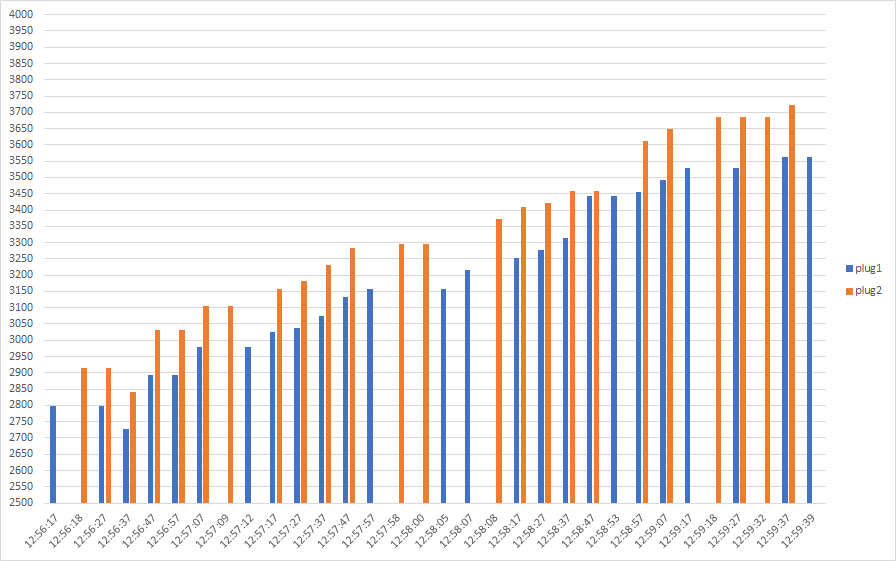
In the below results mind the axis scale of the graphs, they are set specifically to see the difference.
[ Wall socket ] - [ Non-pro watt meter ] - [ Plug 1 ] - [ Plug 2 ] - [ AC ]
Power:
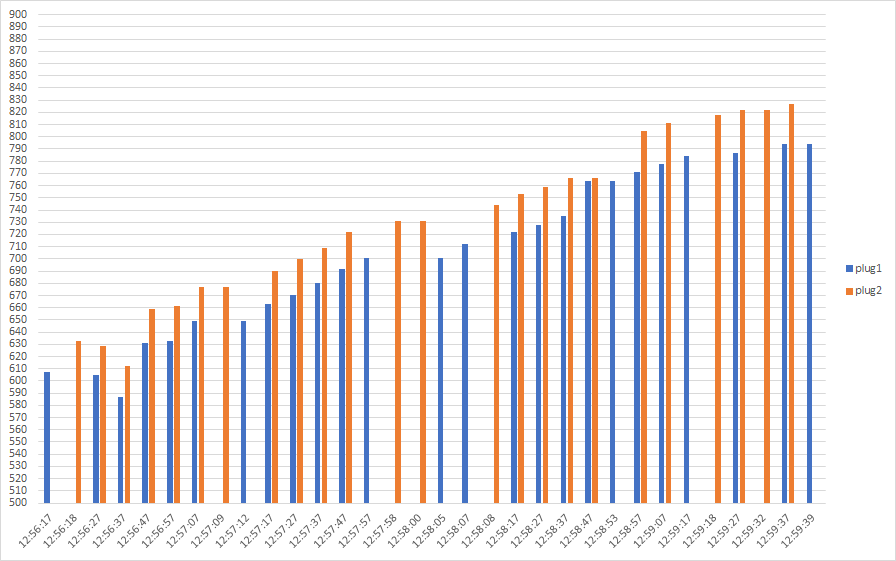
Here the non-pro watt meter towards the end was giving values around 726-734W.
Current:
Voltage:
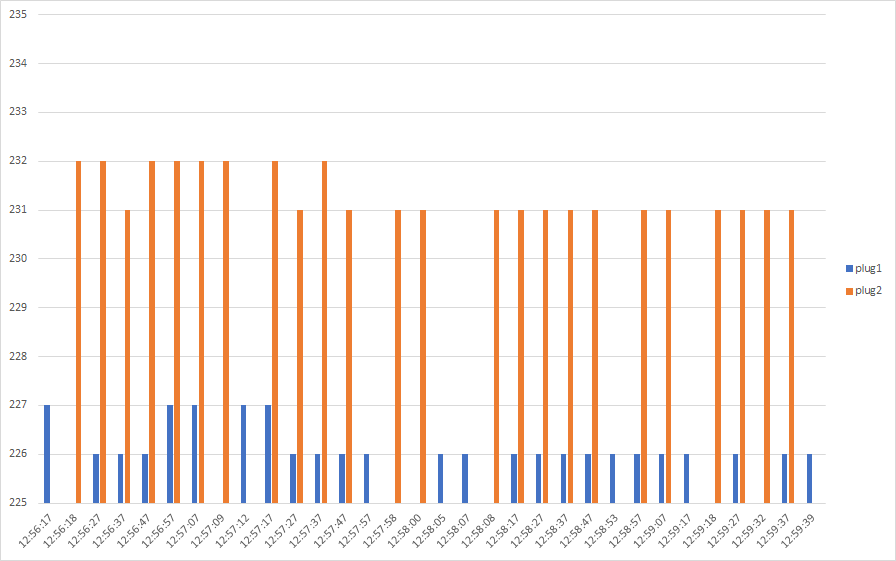
Swapping the plugs. Note that the AC is reaching its target power.
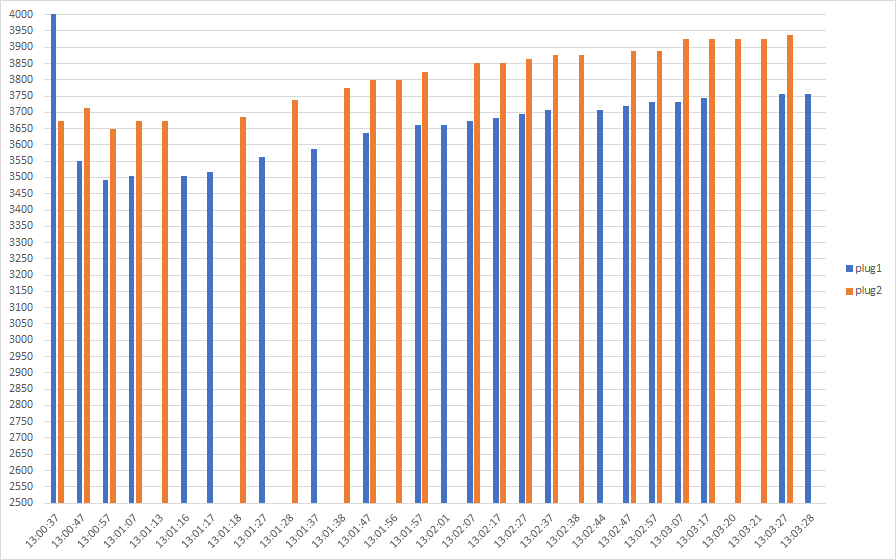
[ Wall socket ] - [ Non-pro watt meter ] - [ Plug 2 ] - [ Plug 1 ] - [ AC ]
Power:
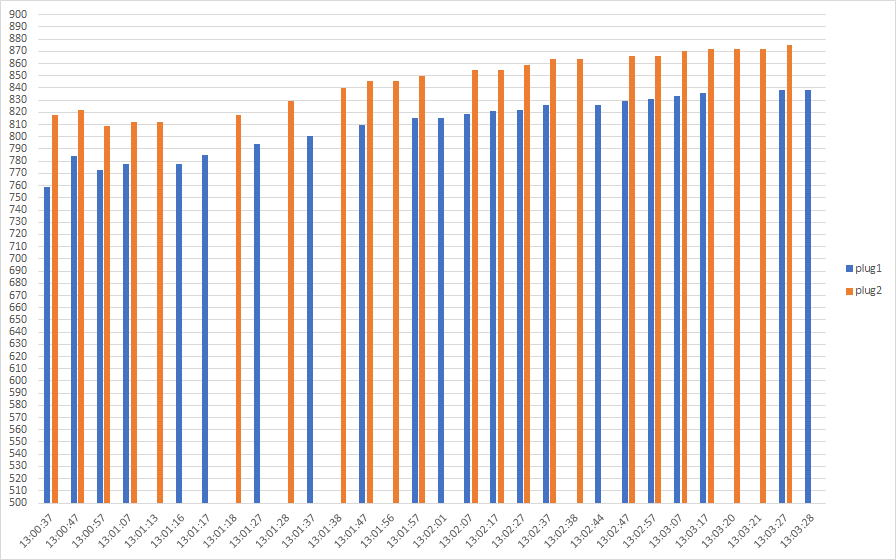
Here the non-pro watt meter towards the end was giving values around 774-779W.
Current:
Voltage:
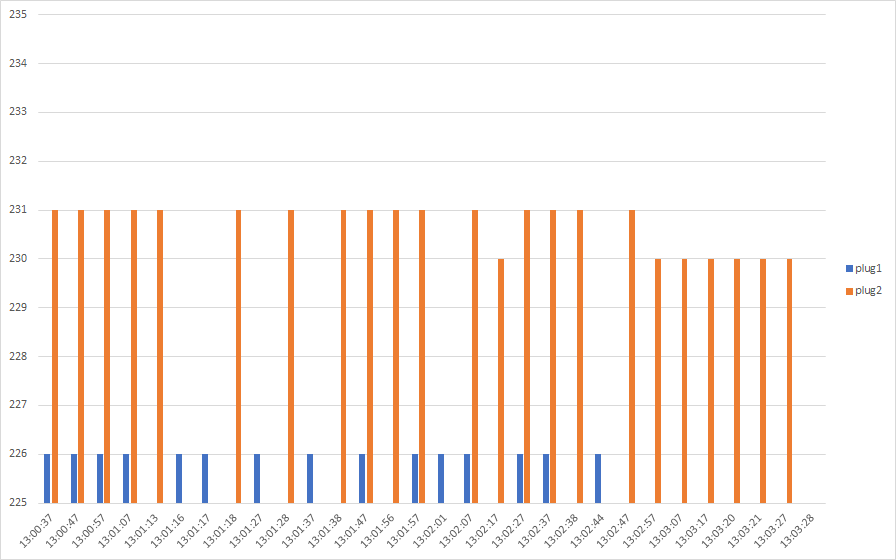
As far as I am concerned each plug requires individual calibration. The offset seems to be a percentage.
A bit of a difference would be forgivable, but this is huge.
Data:
Run1:
time | plug | power | current | voltage
-- | -- | -- | -- | --
12:56:17 | plug1 | 607 | 2799 | 227
12:56:18 | plug2 | 633 | 2916 | 232
12:56:27 | plug1 | 605 | 2799 | 226
12:56:27 | plug2 | 629 | 2916 | 232
12:56:37 | plug1 | 587 | 2727 | 226
12:56:37 | plug2 | 612 | 2840 | 231
12:56:47 | plug1 | 631 | 2894 | 226
12:56:47 | plug2 | 659 | 3030 | 232
12:56:57 | plug1 | 633 | 2894 | 227
12:56:57 | plug2 | 661 | 3030 | 232
12:57:07 | plug1 | 649 | 2978 | 227
12:57:07 | plug2 | 677 | 3106 | 232
12:57:09 | plug2 | 677 | 3106 | 232
12:57:12 | plug1 | 649 | 2978 | 227
12:57:17 | plug1 | 663 | 3026 | 227
12:57:17 | plug2 | 690 | 3156 | 232
12:57:27 | plug1 | 670 | 3038 | 226
12:57:27 | plug2 | 700 | 3181 | 231
12:57:37 | plug1 | 680 | 3074 | 226
12:57:37 | plug2 | 709 | 3232 | 232
12:57:47 | plug1 | 692 | 3133 | 226
12:57:47 | plug2 | 722 | 3282 | 231
12:57:57 | plug1 | 701 | 3157 | 226
12:57:58 | plug2 | 731 | 3295 | 231
12:58:00 | plug2 | 731 | 3295 | 231
12:58:05 | plug1 | 701 | 3157 | 226
12:58:07 | plug1 | 712 | 3217 | 226
12:58:08 | plug2 | 744 | 3371 | 231
12:58:17 | plug1 | 722 | 3253 | 226
12:58:17 | plug2 | 753 | 3409 | 231
12:58:27 | plug1 | 728 | 3277 | 226
12:58:27 | plug2 | 759 | 3421 | 231
12:58:37 | plug1 | 735 | 3313 | 226
12:58:37 | plug2 | 766 | 3459 | 231
12:58:47 | plug2 | 766 | 3459 | 231
12:58:47 | plug1 | 764 | 3444 | 226
12:58:48 | plug2 | 800 | 3598 | 231
12:58:53 | plug1 | 764 | 3444 | 226
12:58:57 | plug1 | 771 | 3456 | 226
12:58:57 | plug2 | 805 | 3611 | 231
12:59:07 | plug1 | 778 | 3492 | 226
12:59:07 | plug2 | 811 | 3648 | 231
12:59:17 | plug1 | 784 | 3528 | 226
12:59:18 | plug2 | 818 | 3686 | 231
12:59:27 | plug1 | 787 | 3528 | 226
12:59:27 | plug2 | 822 | 3686 | 231
12:59:32 | plug2 | 822 | 3686 | 231
12:59:37 | plug1 | 794 | 3564 | 226
12:59:37 | plug2 | 827 | 3724 | 231
12:59:39 | plug1 | 794 | 3564 | 226
Run 2:
time | plug | power | current | voltage
-- | -- | -- | -- | --
13:00:37 | plug1 | 759 | 4102 | 226
13:00:37 | plug2 | 818 | 3674 | 231
13:00:47 | plug1 | 784 | 3552 | 226
13:00:47 | plug2 | 822 | 3712 | 231
13:00:57 | plug1 | 773 | 3492 | 226
13:00:57 | plug2 | 809 | 3648 | 231
13:01:07 | plug1 | 778 | 3504 | 226
13:01:07 | plug2 | 812 | 3674 | 231
13:01:13 | plug2 | 812 | 3674 | 231
13:01:16 | plug1 | 778 | 3504 | 226
13:01:17 | plug1 | 785 | 3516 | 226
13:01:18 | plug2 | 818 | 3686 | 231
13:01:27 | plug1 | 794 | 3564 | 226
13:01:28 | plug2 | 829 | 3737 | 231
13:01:37 | plug1 | 801 | 3588 | 226
13:01:38 | plug2 | 840 | 3775 | 231
13:01:47 | plug1 | 810 | 3636 | 226
13:01:47 | plug2 | 846 | 3800 | 231
13:01:56 | plug2 | 846 | 3800 | 231
13:01:57 | plug1 | 815 | 3660 | 226
13:01:57 | plug2 | 850 | 3825 | 231
13:02:01 | plug1 | 815 | 3660 | 226
13:02:07 | plug1 | 819 | 3672 | 226
13:02:07 | plug2 | 855 | 3851 | 231
13:02:17 | plug1 | 821 | 3684 | 225
13:02:17 | plug2 | 855 | 3851 | 230
13:02:27 | plug1 | 822 | 3696 | 226
13:02:27 | plug2 | 859 | 3863 | 231
13:02:37 | plug1 | 826 | 3708 | 226
13:02:37 | plug2 | 864 | 3876 | 231
13:02:38 | plug2 | 864 | 3876 | 231
13:02:44 | plug1 | 826 | 3708 | 226
13:02:47 | plug1 | 829 | 3720 | 225
13:02:47 | plug2 | 866 | 3888 | 231
13:02:57 | plug1 | 831 | 3732 | 225
13:02:57 | plug2 | 866 | 3888 | 230
13:03:07 | plug1 | 833 | 3732 | 225
13:03:07 | plug2 | 870 | 3926 | 230
13:03:17 | plug1 | 836 | 3744 | 225
13:03:17 | plug2 | 872 | 3926 | 230
13:03:20 | plug2 | 872 | 3926 | 230
13:03:21 | plug2 | 872 | 3926 | 230
13:03:27 | plug1 | 838 | 3755 | 225
13:03:27 | plug2 | 875 | 3939 | 230
13:03:28 | plug1 | 838 | 3755 | 225
SaturnusDJ
on 3 Jul 2020
@SaturnusDJ how did your code work? It is lacking the "zigbeeModel" attribute...
DBa2016
on 3 Jul 2020
@DBa2016
It is code from here, not mine. Nano was being annoying with copy paste, let me fix it now then.
Edit: fixed now.
SaturnusDJ
on 3 Jul 2020
I've used this one which seems to work flawlessly: https://github.com/Koenkk/zigbee2mqtt/issues/3812#issuecomment-652928634
I do like the 30sec interval better than the 10sec one. No errors anymore. I would vote to use this version 😀
There is still the outstanding question of what impact this might have to the original TS0121's and how they would react on this change. I believe this is quite important to understand prior to committing this fix. Perhaps @Koenkk can comment on this based on his experience?
daxy01
on 3 Jul 2020
I found something now... Lookslike the metering mesages are received over ZB and posted to MQTT:
zigbee2mqtt:debug 2020-07-03 16:59:22: Received Zigbee message from '0x842e14fffe51c655', type 'readResponse', cluster 'haElectricalMeasurement', data '{"rmsVoltage":225,"rmsCurrent":0,"activePower":0}' from endpoint 1 with groupID null
zigbee2mqtt:info  2020-07-03 16:59:22: MQTT publish: topic 'zigbee2mqtt/0x842e14fffe51c655', payload '{"power":0,"current":0,"voltage":225,"linkquality":200,"energy":0}'
However, none of the metering attributes are posted to discovery, and also Z2MA does not show anything in that context.
DBa2016
on 3 Jul 2020
I found something now... Lookslike the metering mesages are received over ZB and posted to MQTT:
zigbee2mqtt:debug 2020-07-03 16:59:22: Received Zigbee message from '0x842e14fffe51c655', type 'readResponse', cluster 'haElectricalMeasurement', data '{"rmsVoltage":225,"rmsCurrent":0,"activePower":0}' from endpoint 1 with groupID null
zigbee2mqtt:info  2020-07-03 16:59:22: MQTT publish: topic 'zigbee2mqtt/0x842e14fffe51c655', payload '{"power":0,"current":0,"voltage":225,"linkquality":200,"energy":0}'
However, none of the metering attributes are posted to discovery, and also Z2MA does not show anything in that context.
If you see those in your logs, it seems to work!
As for "posted to discovery", what do you mean? Is that Home-assistant by any chance?
If that's the case you'll need to edit the file "homeassistant.js" in your z2m directories and copy the MCLH-03 line to TS0121. This way HA will know about these values coming in.
daxy01
on 3 Jul 2020
Tested a kettle and 60W incandescent light bulb.
Kettle:
Power:
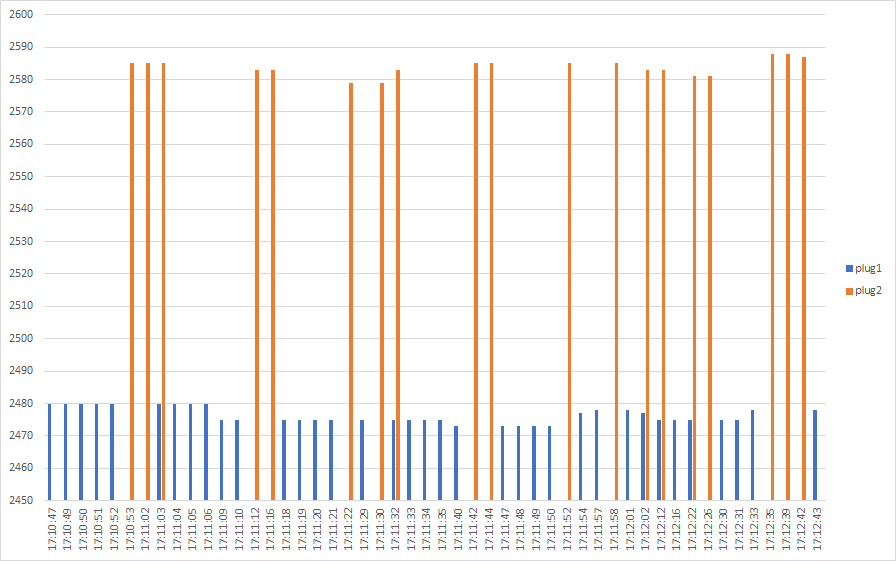
The non-pro watt meter ranged between 2078-2370W for the time interval 17:11:18 - 17:11:35.
Current:
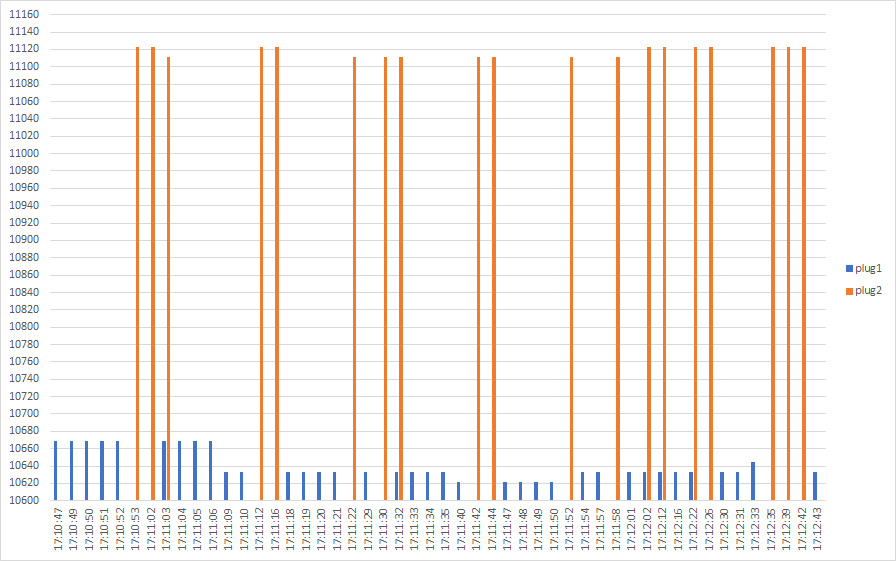
Voltage:
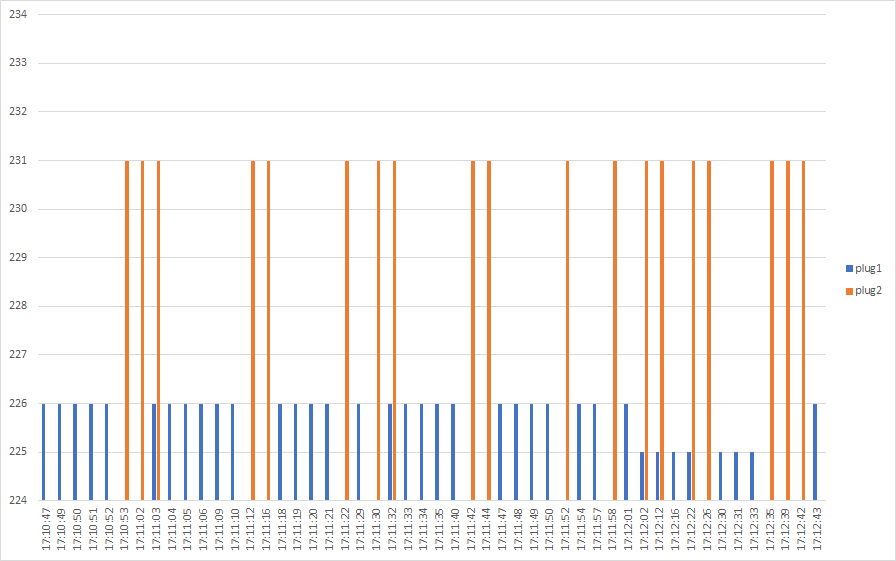
As people here and elsewhere say it is a good method, I also tested with an incandescent light bulb. It took the bulb a while to climb from ~57W to 59.5W (non-pro watt meter), were it stabilized.
60W bulb | Power | Current | Voltage
--|--|--|--
Plug1 | 63-64 W | 275 mA | 228-229 V
Plug2 | 66-68 W | 290 mA | 233-234 V
Meter | 59.5 W | - | -
Plug 1 had one hit of 263mA, plug 2 had one hit of 277mA, not included above.
So I guess we need some extra "device type specific" configuration options for these things, as mentioned in https://www.zigbee2mqtt.io/information/configuration.html. Unless the other devices.js config makes a differences.
SaturnusDJ
on 3 Jul 2020
I found something now... Lookslike the metering mesages are received over ZB and posted to MQTT:
zigbee2mqtt:debug 2020-07-03 16:59:22: Received Zigbee message from '0x842e14fffe51c655', type 'readResponse', cluster 'haElectricalMeasurement', data '{"rmsVoltage":225,"rmsCurrent":0,"activePower":0}' from endpoint 1 with groupID null
zigbee2mqtt:info  2020-07-03 16:59:22: MQTT publish: topic 'zigbee2mqtt/0x842e14fffe51c655', payload '{"power":0,"current":0,"voltage":225,"linkquality":200,"energy":0}'
However, none of the metering attributes are posted to discovery, and also Z2MA does not show anything in that context.
If you see those in your logs, it seems to work!
As for "posted to discovery", what do you mean? Is that Home-assistant by any chance?
If that's the case you'll need to edit the file "homeassistant.js" in your z2m directories and copy the MCLH-03 line to TS0121. This way HA will know about these values coming in.
Shame on me, I totally forgot the HA part!
DBa2016
on 3 Jul 2020
There is still the outstanding question of what impact this might have to the original TS0121's and how they would react on this change. I believe this is quite important to understand prior to committing this fix. Perhaps @Koenkk can comment on this based on his experience?
I don't expect this change being a problem. In https://github.com/Koenkk/zigbee2mqtt/issues/3302 (were we initially added support for this device) we also expected this device to support power measurements but we got stuck and didn't get beyond the configure reporting problem (which we did now). I still believe this is the same device.
Worst case: the configure() fails and shows an error in the log but functionally nothing changes (not a big deal).
I didn't read everything 100%, but once you guys feel it's ready please submit a PR.
Koenkk
on 3 Jul 2020
I have the original Tuya TS0121 and I expect that the BlitzWolf shp-13 also arrives any moment.
If there is a PR I can test them.
 vdbrink
on 4 Jul 2020
vdbrink
on 4 Jul 2020
I have the original Tuya TS0121 and I expect that the BlitzWolf shp-13 also arrives any moment.
If there is a PR I can test them.
Today I received also the BlitzWolf SHP-13, which code can I use to test them?
vdbrink
on 6 Jul 2020
I updated my devices.js with the script from @dimaiv7 and I stacked 3 power metered sockets on each other to have (almost) the same load and these are the outputs of them:
Output:
The payload of the old TS0121 (Rehentronix) is (zigbeeModel: TS0121)
You can buy it from https://a.aliexpress.com/_B0KP2J
{"state":"ON","linkquality":31,"power":140,"current":0.61,"voltage":230,"energy":1.63}
The payload of the Blitzwolf BW-SHP13 (zigbeeModel: TS0121)
{"state":"ON","linkquality":34,"power":132,"current":833,"voltage":222,"energy":8.56}
The payload of an other device with power metering, the innr SP-120 (zigbeeModel: SP 120)
{"state":"ON","linkquality":42,"power":125,"current":0.75,"voltage":234}
Finding:
- The first 2 use the same config from devices.js but ONLY the output for the BW-SHP13 must still be divided by 100. Is this possible in one configuration?
- The energie values are not close together
- Only for the Blitzwolf BW-SHP13 I got this error during startup
info : Configuring 'blitzsmartplug1'
error : Failed to configure 'blitzsmartplug1', attempt 2 (Error: Read 0x842e14fffee1a932/1 haElectricalMeasurement(["acVoltageMultiplier","acVoltageDivisor","acCurrentMultiplier"], {"timeout":10000,"disableResponse":false,"disableDefaultResponse":true,"direction":0,"srcEndpoint":null,"reservedBits":0,"manufacturerCode":null,"transactionSequenceNumber":null}) failed (Error: Status 'UNSUPPORTED_ATTRIBUTE')
at Endpoint.(/opt/zigbee2mqtt/node_modules/zigbee-herdsman/dist/controller/model/endpoint.js:192:23)
at Generator.next ()
at fulfilled (/opt/zigbee2mqtt/node_modules/zigbee-herdsman/dist/controller/model/endpoint.js:5:58))
I expect the Lonsonho Tuya ZigBee Smart Plug Socket from https://a.aliexpress.com/_BSY2AL will also be recognized as this model. I ordered it also. I wonder what the output of this device will be!
vdbrink
on 9 Jul 2020
@vdbrink
1/3. can you try with the definition from: https://github.com/Koenkk/zigbee-herdsman-converters/pull/1385/files, configure error should be fixed and power values should be correct. Please cross-check with the Rehentronix one, before checking first remove both with https://www.zigbee2mqtt.io/information/mqtt_topics_and_message_structure.html#zigbee2mqttbridgeconfigremove
- I'm afraid we cannot do much about this, it seems that the used sensor is just not very accurate.
Koenkk
on 10 Jul 2020
I've tested the definition from https://github.com/Koenkk/zigbee-herdsman-converters/pull/1385/files but it seems the power is off. I'm getting values of 2.35 while laundry is running so it should be 2350W. Would that be the acPowerDivisor causing this?
daxy01
on 12 Jul 2020
That’s right. Only current needs division by 1000.
piotrekoo
on 12 Jul 2020
Anything on the device specific configuration to allow correction?
SaturnusDJ
on 13 Jul 2020
I've tested the definition from https://github.com/Koenkk/zigbee-herdsman-converters/pull/1385/files but it seems the power is off. I'm getting values of 2.35 while laundry is running so it should be 2350W. Would that be the acPowerDivisor causing this?
Please shoot me, I'm completely lost. I've removed the divisor, actually went back to my previously known working config from piotrekoo as well, but my power remains wrong. Enabling debug does show the correct values being received, then translated wrong I believe. This is what I have now, who can enlighten me? I did upgrade to zigbee2mqtt v1.14.1 (from .0 before).
Logs:
zigbee2mqtt:debug 2020-07-13 13:03:16: Received Zigbee message from 'Wasmachine', type 'readResponse', cluster 'haElectricalMeasurement', data '{"rmsVoltage":227,"rmsCurrent":10265,"activePower":2341}' from endpoint 1 with groupID 0
zigbee2mqtt:info  2020-07-13 13:03:16: MQTT publish: topic 'zigbee2mqtt/Wasmachine', payload '{"state":"ON","linkquality":162,"power":2.34,"current":10.27,"voltage":227,"energy":6.63}'
Config:
    {
        zigbeeModel: ['TS0121'],
        model: 'TS0121',
        description: '10A UK or 16A EU smart plug',
        supports: 'on/off',
        vendor: 'TuYa',
        fromZigbee: [fz.on_off, fz.electrical_measurement_power, fz.metering_power, fz.ignore_basic_report],
        toZigbee: [tz.on_off],
        meta: {configureKey: 1},
        configure: async (device, coordinatorEndpoint) => {
            const endpoint = device.getEndpoint(1);
            await bind(endpoint, coordinatorEndpoint, ['genOnOff', 'haElectricalMeasurement']);
            endpoint.saveClusterAttributeKeyValue('seMetering', {
                divisor: 100,
                multiplier: 1,
            });
            endpoint.saveClusterAttributeKeyValue('haElectricalMeasurement', {
                acVoltageMultiplier: 1,
                acVoltageDivisor: 1,
                acCurrentMultiplier: 1,
                acCurrentDivisor: 1000,
            });
            await readEletricalMeasurementPowerConverterAttributes(endpoint);
        },
        onEvent: async (type, data, device) => {
            // This device doesn't support reporting correctly.
            // https://github.com/Koenkk/zigbee-herdsman-converters/pull/1270
            const endpoint = device.getEndpoint(1);
            if (type === 'stop') {
                clearInterval(store[device.ieeeAddr]);
            } else if (!store[device.ieeeAddr]) {
                store[device.ieeeAddr] = setInterval(async () => {
                    try {
                        await endpoint.read('haElectricalMeasurement', ['rmsVoltage', 'rmsCurrent', 'activePower']);
                    } catch (error) {
                        // Do nothing
                    }
                }, 10*1000); // Every 10 seconds
            }
        },
    },
@daxy01 You need to re-configure or re-pair the plug, to apply these changes.
piotrekoo
on 13 Jul 2020
That's it indeed!
I've reverted back to Koenkk's released version minus the "acPowerDivisor: 1000" and "acPowerMultiplier: 1" and it works fine now after repairing.
@Koenkk, for the official version may I suggest removing lines 1156 and 1157 from the devices.js?
Also we shouldn't forget to adjust https://github.com/Koenkk/zigbee2mqtt/blob/master/lib/extension/homeassistant.js#L1653
from
'TS0121': [cfg.switch],
to
'TS0121': [cfg.switch, cfg.sensor_voltage, cfg.sensor_power, cfg.sensor_current],.
As mentioned by @SaturnusDJ, it would be nice to be able to configure the off-set through acPowerMultiplier in a device-specific configuration, but unfortunately I have no clue where to begin to implement this.
daxy01
on 13 Jul 2020
@daxy01 done!
Changes will be available in the latest dev branch in a few hours (https://www.zigbee2mqtt.io/how_tos/how-to-switch-to-dev-branch.html)
Regarding the offset, in case you want to give this a shot you can look at the illuminance_lux_calibration (https://www.zigbee2mqtt.io/devices/9290012607.html) which is applied here: https://github.com/Koenkk/zigbee-herdsman-converters/blob/707a16d57751eb58378d217f96371a0663430692/converters/fromZigbee.js#L454
Koenkk
on 14 Jul 2020
I bought a Blitzwolf BW-SHP13 a while back and was happy to find this thread when it arrived last week. I have deployed the latest -dev container and can confirm it is reporting correctly.
Thanks for the effort guys!
 dietah
on 20 Jul 2020
dietah
on 20 Jul 2020
Cool, I assume this can be closed now since the device is supported.
Koenkk
on 20 Jul 2020
I will come back here when I have time to try to figure out how to code for the calibration/correction. Or if you prefer, I can make a specific issue for that.
SaturnusDJ
on 20 Jul 2020
I just try to add a BW-SHP13 as well, but it is not recognised by [email protected]:
Zigbee2MQTT:info  2020-08-25 19:39:17: Successfully interviewed 'switch_playbar', device has successfully been paired
Zigbee2MQTT:warn  2020-08-25 19:39:17: Device 'switch_playbar' with Zigbee model 'undefined' is NOT supported, please follow https://www.zigbee2mqtt.io/how_tos/how_to_support_new_devices.html
Zigbee2MQTT:info  2020-08-25 19:39:17: MQTT publish: topic 'zigbee2mqtt/bridge/log', payload '{"type":"pairing","message":"interview_successful","meta":{"friendly_name":"switch_playbar","supported":false}}'
Zigbee2MQTT:warn  2020-08-25 19:39:19: Received message from unsupported device with Zigbee model 'undefined'
Zigbee2MQTT:warn  2020-08-25 19:39:19: Please see: https://www.zigbee2mqtt.io/how_tos/how_to_support_new_devices.html.
Zigbee2MQTT:warn  2020-08-25 19:39:21: Received message from unsupported device with Zigbee model 'undefined'
Zigbee2MQTT:warn  2020-08-25 19:39:21: Please see: https://www.zigbee2mqtt.io/how_tos/how_to_support_new_devices.html.
Zigbee2MQTT:warn  2020-08-25 19:39:23: Received message from unsupported device with Zigbee model 'undefined'
Zigbee2MQTT:warn  2020-08-25 19:39:23: Please see: https://www.zigbee2mqtt.io/how_tos/how_to_support_new_devices.html.
According to this issue, it should be supported correct?
 TribuneX
on 25 Aug 2020
TribuneX
on 25 Aug 2020
@TribuneX correct it's supported. I have multiple blitzwolf shp-13 running with this (latest version).
Sometimes joining is not working at all for me, I have to remove the coordinator stick and replug it, restart zigbee2mqtt and than it can find new devices.
(Yes permit_join was enabled)
vdbrink
on 25 Aug 2020
Hi there!
Is there any information available on how to perform the calibration? I have one and I would like to calibrate it.
 krasny2k5
on 30 Aug 2020
krasny2k5
on 30 Aug 2020
Hey guys,
is there an option in z2m to restrict chatty Devices? The BW-SHP13 is sending every 10 seconds a message. For me, every 60 seconds would be enough. If you have about 10 of this devices, about every second a message is received and json needs to be decoded.
 maumi
on 3 Sep 2020
maumi
on 3 Sep 2020
Hey guys,
is there an option in z2m to restrict chatty Devices? The BW-SHP13 is sending every 10 seconds a message. For me, every 60 seconds would be enough. If you have about 10 of this devices, about every second a message is received and json needs to be decoded.
There is an example earlier (https://github.com/Koenkk/zigbee2mqtt/issues/3812#issuecomment-652928634) where the updates are sent every 30 seconds. You will need to manually edit your node_modules/zigbee-herdsman-converters/devices.js file (everytime you update Zigbee2Mqtt), but at least you can set it to 30 or even 60sec. Do remember to re-pair the plugs when updating the timer, otherwise it won't take the changes.
daxy01
on 3 Sep 2020
I would also prefer to reduce the interval of each plug sending their report.
Is it planed to make it configurable?
I do not want to do change the source files..
 Ulli2k
on 7 Sep 2020
Ulli2k
on 7 Sep 2020
Is it planed to make it configurable?
+1 it would be really nice to be able to set a 'override' from the default configureReporting for a device, not just limited to this plug but also other plugs or temperature sensors that support it.
Edit:
@Koenkk I thoight about this on my walk just now... would something like this in theory work:
- pass 'meta' to the configureReporting functions so they have access to the device options
- then when configuring use in the following order for min, max, change values:
- default
- argument (whatever is in the devices configure block)
- device options
That still leaves the issue of the reconfigureKey though, unless you make the configure mqtt endpoint always do the reconfigure... and document that if you set custom values you need to run it at least ones for the device?
sjorge
on 7 Sep 2020
@sjorge Since this is a fairly detailed operation (I don't expect many users will use this) I think it would be easier to expose an api via zigbee2mqtt/bridge/request/device/configure_reporting with e.g. payload {"cluster": "genLevelCtrl", "min": 0, "max": 1, "change": 2}. This can be realised in a few lines of code.
Note that the BW-SHP13 doesn't support reporting as the power value is actually read every 10 second (polling). I've added a measurement_poll_interval to control the interval, docs: https://github.com/Koenkk/zigbee2mqtt.io/blob/develop/docs/devices/TS0121_plug.md#device-type-specific-configuration
Changes will be available in the latest dev branch in a few hours (https://www.zigbee2mqtt.io/how_tos/how-to-switch-to-dev-branch.html)
Koenkk
on 7 Sep 2020
@Koenkk that might indeed be easier, maybe once 'configure_reporting' is called stop calling the normal configuration flow if the configureKey is increased.
So you have the 'auto configure' flow, but once you manually set it, z2m switch back until the normal configure topic is called.
So the flow is something like
- deviceJoined, configure ? all done : run configure step
- zhc update for device? reconfigure
- manual call to configure_reporting
- zhc update for device? don't reconfigure because in 'manual' mode
- manual call to configure endpoint? reconfigure (even if configKey was not increased) to restore normal configuration
That does leave the issue open for trådfri devices though, as they need configuration on every deviceAnnounce IIRC. Not sure maybe just an XXX fix later if needed for those, as I think the configure_reporting will mostly be used on sensors and the like to get more or less updates.
sjorge
on 7 Sep 2020
@sjorge what is your use case for changing the reporting?
Koenkk
on 8 Sep 2020
personally I'd use it to configure some reporting for sensors different interval/thresholds. (Not ones that would be OK as a default)
sjorge
on 8 Sep 2020
Why would these not be ok for default?
Koenkk
on 8 Sep 2020
Because some people want more or less reporting?
e.g. my balcony sensor reports a lot, I'd love to cap it at say 4x hour max, but the one in the bedroom only updates about 1x hour on average unless, for example when I open a window. So I'm OK with it updating faster while the humidity/temperature is changing.
They are all the same model, I currently worked around it by setting the configureKey pretty high and changing the values and reconfiguring just that one sensor (others had batteries remove) then restoring devices.js, seems to work fine but it's a bit annoying.
I never mentioned it in a separate issue because I thought it was just me, (And I assume the Blitzwolf mentioned here also was done via reporting, hence my comment here)
So it's mostly about finding a sweet spot between battery usage / interval / accuracy that works for the location/user.
sjorge
on 8 Sep 2020
@sjorge I think in that case https://github.com/Koenkk/zigbee2mqtt/issues/3812#issuecomment-688436105 won't cover it, since it will be overwritten on repair or when a device is reconfigured. Please create a feature request so we can see how many people are interested in this and how they want to use this.
Koenkk
on 9 Sep 2020
Hey guys,
is there an option in z2m to restrict chatty Devices? The BW-SHP13 is sending every 10 seconds a message. For me, every 60 seconds would be enough. If you have about 10 of this devices, about every second a message is received and json needs to be decoded.There is an example earlier (#3812 (comment)) where the updates are sent every 30 seconds. You will need to manually edit your node_modules/zigbee-herdsman-converters/devices.js file (everytime you update Zigbee2Mqtt), but at least you can set it to 30 or even 60sec. Do remember to re-pair the plugs when updating the timer, otherwise it won't take the changes.
Thanks, but koenk built an alternative to set it permanently in config file.
maumi
on 10 Sep 2020
@sjorge Since this is a fairly detailed operation (I don't expect many users will use this) I think it would be easier to expose an api via
zigbee2mqtt/bridge/request/device/configure_reportingwith e.g. payload{"cluster": "genLevelCtrl", "min": 0, "max": 1, "change": 2}. This can be realised in a few lines of code.Note that the BW-SHP13 doesn't support reporting as the power value is actually read every 10 second (polling). I've added a
measurement_poll_intervalto control the interval, docs: https://github.com/Koenkk/zigbee2mqtt.io/blob/develop/docs/devices/TS0121_plug.md#device-type-specific-configurationChanges will be available in the latest dev branch in a few hours (https://www.zigbee2mqtt.io/how_tos/how-to-switch-to-dev-branch.html)
Works flawless koenk. Thanks a lot
maumi
on 10 Sep 2020
I also tested the new measurement_poll_interval and can confirm it working. Thanks!
Next to that I previously used the debounce and debouce_ignore options which can be a great combo with the new option.
dietah
on 14 Sep 2020
I updated zigbee2mqtt and added measurement_poll_interval to the specific device in the configuration.yaml file, restarted zigbee2mqtt but the intervall time did not change.
What did I wrong?
Ulli2k
on 21 Sep 2020
Did you the change to the dev branch?
maumi
on 21 Sep 2020
Hello, I switch to the dev branch...
When I turn on my BW-SHP13 device in the log I see:
debug 2020-09-22 22:33:42: Received Zigbee message from '0x842e14fffe1395be', type 'attributeReport', cluster 'seMetering', data '{"currentSummDelivered":[0,0]}' from endpoint 1 with groupID 0
warn  2020-09-22 22:33:42: Received message from unsupported device with Zigbee model 'undefined'
warn  2020-09-22 22:33:42: Please see: https://www.zigbee2mqtt.io/how_tos/how_to_support_new_devices.html.
in database.db I have
{"id":8,"type":"Router","ieeeAddr":"0x842e14fffe1395be","nwkAddr":19709,"manufId":4098,"epList":[1],"endpoints":{"1":{"epId":1,"inClusterList":[],"outClusterList":[],"clusters":{"genOnOff":{"attributes":{"32769":1,"32770":2,"onOff":1,"onTime":0,"offWaitTime":0}},"seMetering":{"attributes":{"currentSummDelivered":[0,0]}}},"binds":[],"meta":{}}},"interviewCompleted":false,"meta":{},"lastSeen":1600807654007}
Should not be the BW-SHP13 supported in the dev branch?
Thanks
 matteopiccioni
on 22 Sep 2020
matteopiccioni
on 22 Sep 2020
The device should be supported in dev and in master branch. I can confirm both working (but cannot help you otherwise with your problem)
Maybe check another device or forget it and pair again?
maumi
on 23 Sep 2020
Maybe should I put the device in pairing mode?
In which way? I cant understand how.
I just plug the device in the power socket
matteopiccioni
on 23 Sep 2020
Try to long press power button. Should blink blue
maumi
on 23 Sep 2020
Thanks
For the first device I solved pressing the power button for 10 second.
The next two devices was paired as soon as I plug them in the power socket. (I am in dev branch)
I dont know why ... however now all 3 devices are working well
Thanks
Thanks
matteopiccioni
on 24 Sep 2020
The device should be supported in dev and in master branch. I can confirm both working (but cannot help you otherwise with your problem)
Maybe check another device or forget it and pair again?
I have just update from my previous dev branch to the master 1.15.0 version...and my three BW-SHP13 disappear from my Devices.....should I switch to dev branch?
matteopiccioni
on 9 Oct 2020
I also had connection issues, switching to the dev branch solved my issues.
 nekeress
on 15 Oct 2020
nekeress
on 15 Oct 2020
1.15.0-dev? a few days ago I tried with no luck
I'm now at 1.14.4
matteopiccioni
on 15 Oct 2020
I am not a programmer and I do not understand your conversation above exactly. So it is possible to get the kWh or Wh etc meassurement attribute from the socket or not? I am using zigbee2mqtt in Home assistant.
 Lipown
on 22 Oct 2020
Lipown
on 22 Oct 2020
I am not a programmer and I do not understand your conversation above exactly. So it is possible to get the kWh or Wh etc meassurement attribute from the socket or not? I am using zigbee2mqtt in Home assistant.
In short.
Yes :-)
maumi
on 22 Oct 2020
I am not a programmer and I do not understand your conversation above exactly. So it is possible to get the kWh or Wh etc meassurement attribute from the socket or not? I am using zigbee2mqtt in Home assistant.
In short.
Yes :-)
Short question: How :)
Lipown
on 22 Oct 2020
I can confirm power measurement is working for me after updating to zigbee2mqtt 1.16.0! Thanks guys.
 bramvdpol
on 3 Nov 2020
bramvdpol
on 3 Nov 2020
will this work with HA and Deconz Conbee ii? I am interesting to buy 2-3 plugs
 userMak
on 3 Nov 2020
userMak
on 3 Nov 2020
Hey guys,
Is the poll_interval still only at dev branch or also on master?
maumi
on 3 Nov 2020
Also master
Koenkk
on 3 Nov 2020
I have problem... Why BW-SHP13 as Unsupported?

 allmoney
on 4 Nov 2020
allmoney
on 4 Nov 2020
Thank you for new support of power metering. Any idea how to reset the meter to zero please?
Lipown
on 6 Nov 2020
Where do I set measurement_poll_interval ?
 Pete118
on 9 Nov 2020
Pete118
on 9 Nov 2020
Where do I set measurement_poll_interval ?
https://github.com/Koenkk/zigbee2mqtt.io/blob/develop/docs/devices/TS0121_plug.md#device-type-specific-configuration
maumi
on 9 Nov 2020
Where do I set measurement_poll_interval ?
https://github.com/Koenkk/zigbee2mqtt.io/blob/develop/docs/devices/TS0121_plug.md#device-type-specific-configuration
Sorry, I am new in Zigbee2mqtt.
I have to write a "line measurement_poll_interval: 60" in the configuration.yaml
Pete118
on 9 Nov 2020
Where do I set measurement_poll_interval ?
https://github.com/Koenkk/zigbee2mqtt.io/blob/develop/docs/devices/TS0121_plug.md#device-type-specific-configuration
Sorry, I am new in Zigbee2mqtt.
I have to write a "line measurement_poll_interval: 60" in the configuration.yaml
Yep.
Device (0x...)
Friendly_name:...
measurement...:60
So you need to set it for every device where needed.
maumi
on 9 Nov 2020
I have problem... Why BW-SHP13 as Unsupported?
I experienced the same issue after plugging in the SHP13 the first time. It was detected by zigbee2mqtt but was listed as unsupported.
Fix: Long press the button of the SHP13 while having pairing activated. Now it should show up correctly.
 jbbr
on 23 Nov 2020
jbbr
on 23 Nov 2020
Fix: Long press the button of the SHP13 while having pairing activated. Now it should show up correctly.
Please can you explain step by step? I need to delete and add again? When I need long press? When the device was added as unsupported or when?
allmoney
on 23 Nov 2020
Related issues
 ophilips
·
4Comments
ophilips
·
4Comments
 alwashe
·
4Comments
alwashe
·
4Comments
 andreasbrett
·
3Comments
andreasbrett
·
3Comments
 mpuff
·
4Comments
mpuff
·
4Comments
 pepp86
·
4Comments
pepp86
·
4Comments
Most helpful comment
I bought a Blitzwolf BW-SHP13 a while back and was happy to find this thread when it arrived last week. I have deployed the latest
-devcontainer and can confirm it is reporting correctly.Thanks for the effort guys!