Zigbee2mqtt: device in networkmap detached
I'm using networkmap and there is one device which I can see the values off, detached.
First open this issue, but was pointed to zigbee2mqtt:
Home Assistant version
v0.101.3
Zigbee2mqtt version
v1.7.1
OS and browser version
MacOS Firefox v70.0.1 or Chrome v78.0.3904.108
Error message on browser
No error
State attributes of sensor.zigbee2mqtt_networkmap
nodes:
  - ieeeAddr: '0x00124b00193648ca'
    friendlyName: Coordinator
    type: Coordinator
    networkAddress: 0
    failed: []
    lastSeen: null
  - ieeeAddr: '0x00158d0002b5196f'
    friendlyName: XiaomiAqara-1
    type: EndDevice
    networkAddress: 26058
    manufacturerName: LUMI
    modelID: lumi.weather
    lastSeen: 1575015908044
  - ieeeAddr: '0x00158d0002e23355'
    friendlyName: XiaomiSmart-1
    type: EndDevice
    networkAddress: 11126
    manufacturerName: LUMI
    modelID: lumi.sens
    lastSeen: null
  - ieeeAddr: '0x00158d00025ee3a6'
    friendlyName: XiaomiAqara-2
    type: EndDevice
    networkAddress: 36594
    manufacturerName: LUMI
    modelID: lumi.weather
    lastSeen: 1575016030142
  - ieeeAddr: '0x000b57fffe271050'
    friendlyName: '0x000b57fffe271050'
    type: EndDevice
    networkAddress: 19118
    manufacturerName: IKEA of Sweden
    modelID: TRADFRI wireless dimmer
    lastSeen: null
links:
  - source:
      ieeeAddr: '0x000b57fffe271050'
      networkAddress: 19118
    target:
      ieeeAddr: '0x00124b00193648ca'
      networkAddress: 0
    linkquality: 170
    depth: 1
    routes: []
    sourceIeeeAddr: '0x000b57fffe271050'
    targetIeeeAddr: '0x00124b00193648ca'
    sourceNwkAddr: 19118
    lqi: 170
    relationship: 1
  - source:
      ieeeAddr: '0x00158d0002b5196f'
      networkAddress: 26058
    target:
      ieeeAddr: '0x00124b00193648ca'
      networkAddress: 0
    linkquality: 5
    depth: 1
    routes: []
    sourceIeeeAddr: '0x00158d0002b5196f'
    targetIeeeAddr: '0x00124b00193648ca'
    sourceNwkAddr: 26058
    lqi: 5
    relationship: 1
  - source:
      ieeeAddr: '0x00158d00025ee3a6'
      networkAddress: 36594
    target:
      ieeeAddr: '0x00124b00193648ca'
      networkAddress: 0
    linkquality: 26
    depth: 1
    routes: []
    sourceIeeeAddr: '0x00158d00025ee3a6'
    targetIeeeAddr: '0x00124b00193648ca'
    sourceNwkAddr: 36594
    lqi: 26
    relationship: 1
  - source:
      ieeeAddr: '0x001788010479f6d9'
      networkAddress: 45798
    target:
      ieeeAddr: '0x00124b00193648ca'
      networkAddress: 0
    linkquality: 0
    depth: 1
    routes: []
    sourceIeeeAddr: '0x001788010479f6d9'
    targetIeeeAddr: '0x00124b00193648ca'
    sourceNwkAddr: 45798
    lqi: 0
    relationship: 1
  - source:
      ieeeAddr: '0x0000000000000000'
      networkAddress: 11126
    target:
      ieeeAddr: '0x00124b00193648ca'
      networkAddress: 0
    linkquality: 0
    depth: 255
    routes: []
    sourceIeeeAddr: '0x0000000000000000'
    targetIeeeAddr: '0x00124b00193648ca'
    sourceNwkAddr: 11126
    lqi: 0
    relationship: 3
friendly_name: Zigbee2mqtt Networkmap
Home Assistant log
nothing relevant
 hajo62
All 32 comments
If only the end devices are detached, this is not really strange, they can sleep for a long time causing them to drop from the routers routing tables.
 Koenkk
on 30 Nov 2019
Koenkk
on 30 Nov 2019
It's an end device.
The only one device, always the same and it sends values...
It has been connected for a while, but since some weeks, it isn't anymore.
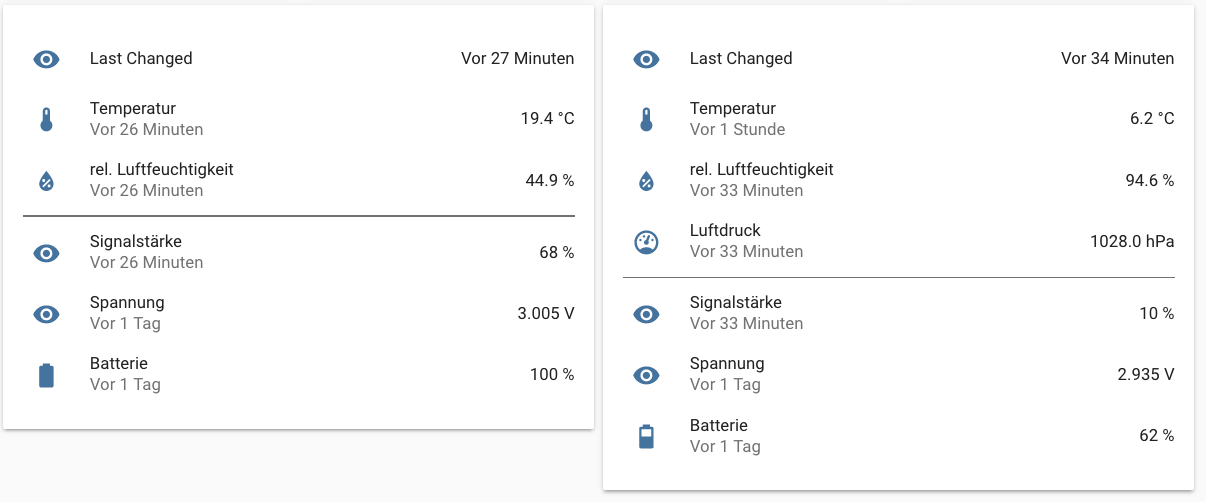
The one on the left isn't connected in the map, the one on the right is...
hajo62
on 3 Dec 2019
I have the same issue after swapping one CC2531 adapter for another. All end devices are detached, even when they all work just fine. Bridge v 1.7.1., firmware rev 20190608.
The only thing that could be different is some kind of UUID but I can't find one for the bridge (adapter), only for the end devices. Any tips?
 Stooovie
on 3 Dec 2019
Stooovie
on 3 Dec 2019
This is not an issue at all, I have a load of end devices showing as not connected in my map, it's a cosmetic issue only, makes absolutely no difference to operation.

 pcb1962
on 4 Dec 2019
pcb1962
on 4 Dec 2019
Sorry, but we are not discussing if the devices are working.
Here we discuss, that the networkmap does not show them as connected... It's cosmetic, but that the thing the network map does...
hajo62
on 4 Dec 2019
It's the entire point of the zigbee map :)
Stooovie
on 4 Dec 2019
This issue has been automatically marked as stale because it has not had recent activity. It will be closed if no further activity occurs. Thank you for your contributions.
![stale[bot] picture](https://avatars3.githubusercontent.com/in/1724?v=4&s=40) stale[bot]
on 2 Feb 2020
stale[bot]
on 2 Feb 2020
@Koenkk : Do you need some additional information/logs etc.?
hajo62
on 2 Feb 2020
@hajo62 What kind of devices show disconnected?
Koenkk
on 2 Feb 2020
I have three xiaomi sensors (plus my neighbors ikea).
Two Xiaomi Aqara - which are _connected_
One Xiaomi Smart - not connected, but has been some month ago...
hajo62
on 2 Feb 2020
@Koenkk I have the same problem. Xiaomi MiJia switches, Xiaomi Aqara switches, Xiaomi MiJia door & window contact sensors and Xiaomi Aqara door & window contact sensors are disonnected.
 definitio
on 2 Feb 2020
definitio
on 2 Feb 2020
For Xiaomi battery powered devices this is common, my assumption is that the devices sleep a long time causing them to be removed from the router table. Therefore they will not be included in the link quality queries. Functional wise it doesn't matter, but they just don't show up in the network map.
Koenkk
on 2 Feb 2020
And there is no (easy) way to re-include those in the router table?
hajo62
on 2 Feb 2020
I don't think so, note that this is not the routing table of the coordinator but of the e.g. bulbs (ac powered devices) in your network. Zigbee2mqtt doesn't have influence on that.
Koenkk
on 3 Feb 2020
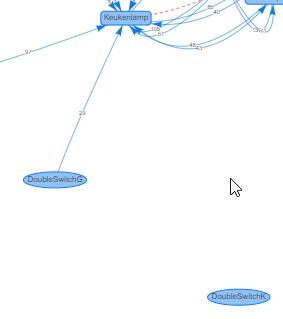
I have the same issue. BUT! I have 2 identical devices: https://www.zigbee2mqtt.io/devices/WXKG02LM.html (DoubleSwitchG and DoubleSwitchK)
They are both close to an AC powered device: https://www.zigbee2mqtt.io/devices/ZNLDP12LM.html (Keukenlamp)
The one that has a little bit more distance to the bulb is ALWAYS connected to the bulb and the other one is never connected to the bulb or any other device in the networkmap.
Is n't that strange? Version of Zigbee2Mqtt: 1.10.0-dev
 SargonofAssyria
on 24 Feb 2020
SargonofAssyria
on 24 Feb 2020
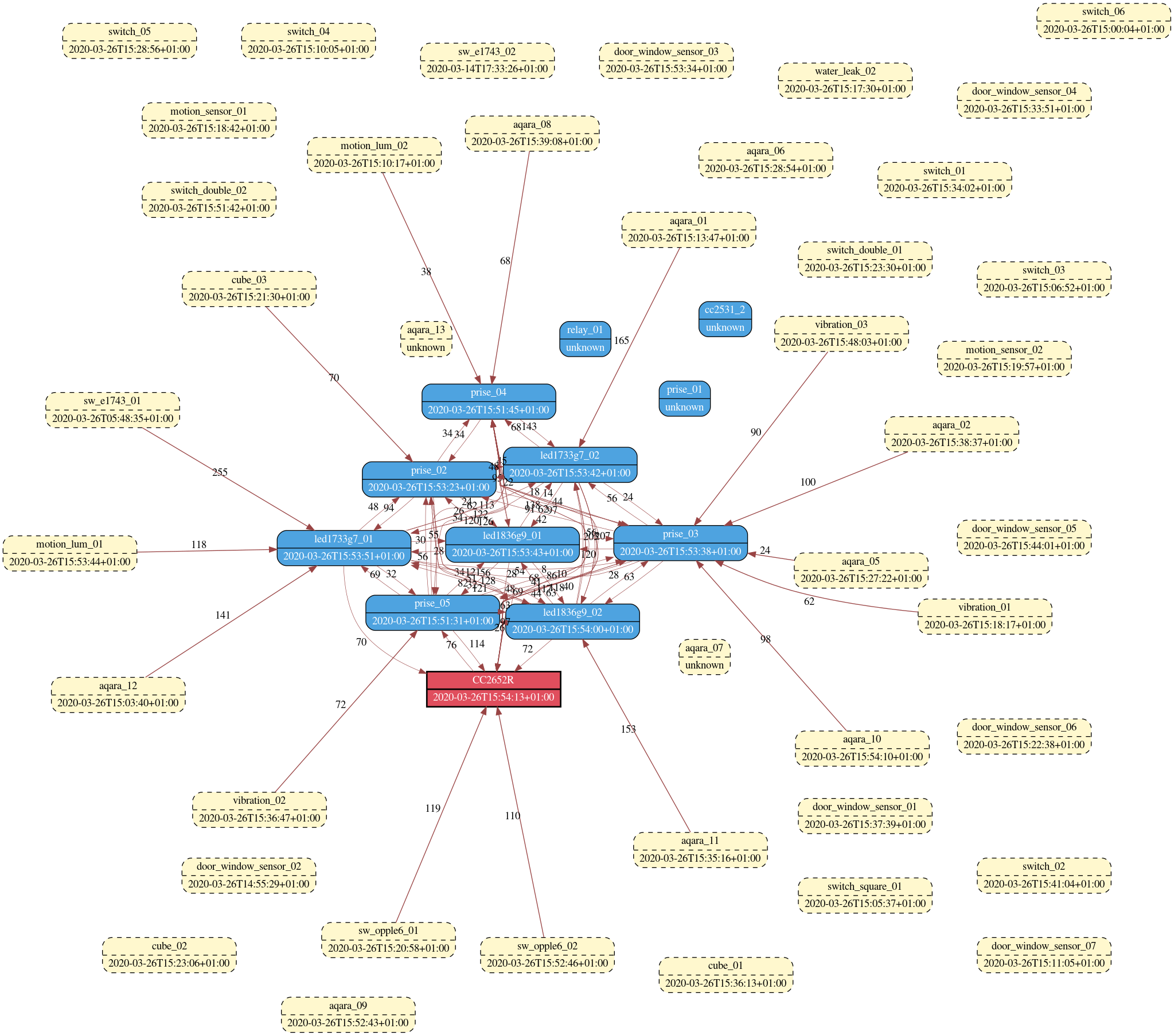
after upgrading my cc2652r to firmware 20200312, a lot of devices are working but shown as disconnected.
(don't know if it comes from the firmware upgrade or from the cc2652r being power cycled)
re-pairing a devices makes it "connected" on the map again.
before the upgrade/power cycle all devices were connected on the map (apart from the 2 or 3 unpowered)
 lolorc
on 26 Mar 2020
lolorc
on 26 Mar 2020
This issue has been automatically marked as stale because it has not had recent activity. It will be closed if no further activity occurs. Thank you for your contributions.
stale[bot]
on 25 May 2020
this is not the routing table of the coordinato
I have only the coordinator and Xiaomi 3 edge devices. No other device.
hajo62
on 25 May 2020
This issue has been automatically marked as stale because it has not had recent activity. It will be closed if no further activity occurs. Thank you for your contributions.
stale[bot]
on 19 Jul 2020
@Koenkk same problem here, after replacing my cc2531 i have some disconnected device in my map but device works correctly
 Maurotb
on 26 Jul 2020
Maurotb
on 26 Jul 2020
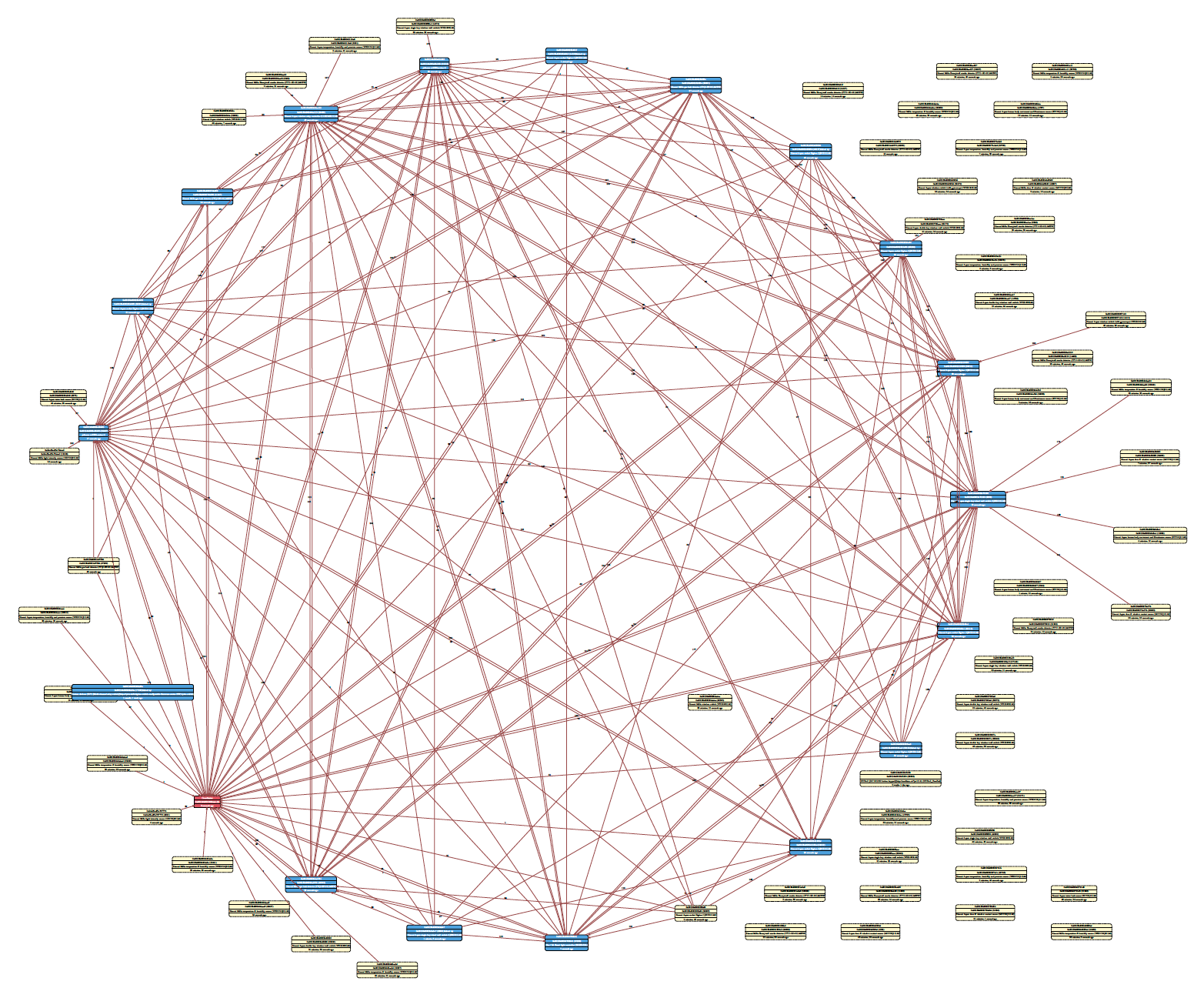
same problem here, devices not sleep a long time (PIR and switches in use)
all devices working correct
 Smitkas
on 29 Jul 2020
Smitkas
on 29 Jul 2020
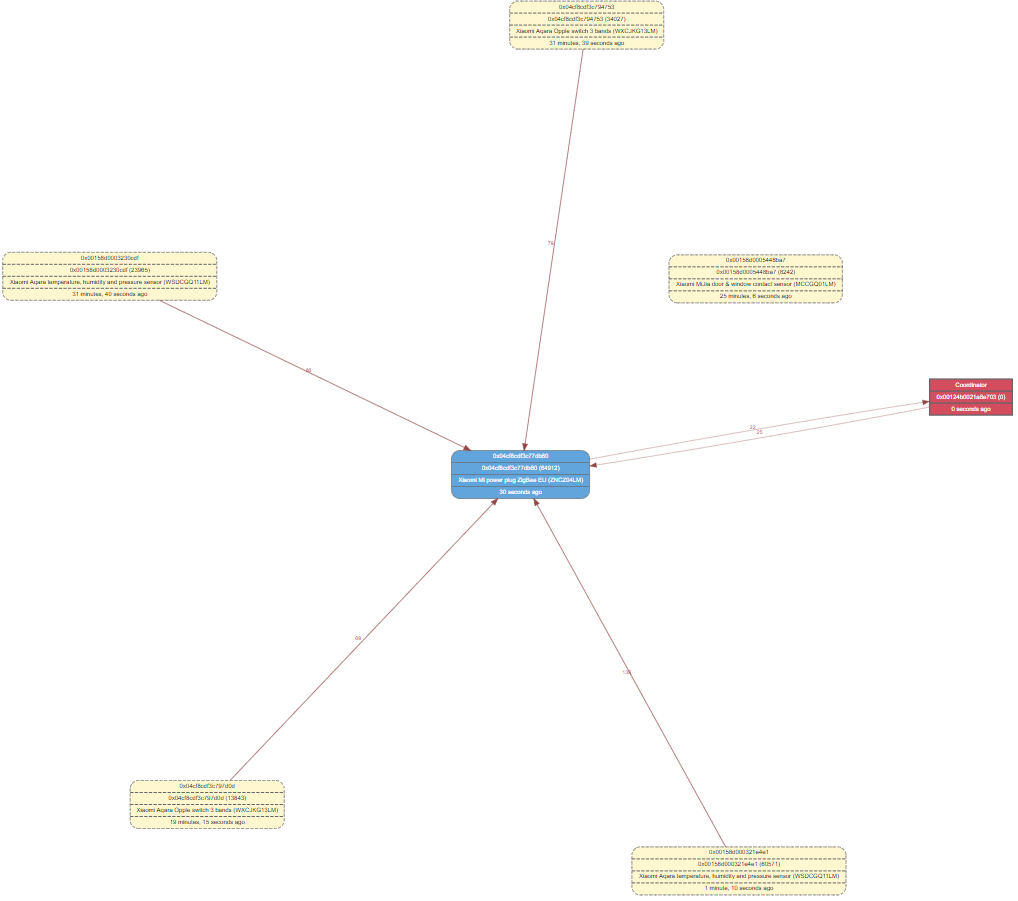
Have exactly the same problem as @Maurotb. I replaced my cc2531 with an CC2652RB. the network works correctly but 2 devices where shown detached. I repaired one of this devices again and now it shows connected.
But one thing is strange (except for the one not connected device).
The coordinator is in room 1, and a router is in room 2. I have several battery powered devices in both rooms. But all end devices are shown as connected to the router. No device seems to be connected directly to the coordinator.
 tbnobody
on 3 Aug 2020
tbnobody
on 3 Aug 2020
I have replaced cc2531 with another cc2531 (same firmware) and have a problem...
This issue is now closed, @Koenkk no solution for this issue?
Maurotb
on 8 Aug 2020
@Maurotb end devices can shown as deattached in the networkmap when they are sleeping for too long, the routers mark them as inactive (there is nothing z2m can do about this). This does not mean that they are not in the network anymore!
Koenkk
on 8 Aug 2020
@Koenkk
I have try with latest zigbee2mqtt , the problem is present for active sensor (i have open a door with door sensor)
In network map is disconnected
I have try with webgraphviz and zigbee2mqtt-networkmap plugin
The problem for me begin after a cc2531 replacement. I have try other cc3531, same problem
Maurotb
on 1 Sep 2020
The problem for me begin after a cc2531 replacement. I have try other cc3531, same problem
In what sense is it a problem?
pcb1962
on 2 Sep 2020
Before changing cc 2531 the network map was correct.
After changing the cc2531, while the zigbee network is working, the network map from several disconnected devices (almost all)
Is not a sleep problem, i have try to trigger some sensors but in network map stay disconnected (the trigger is correctly detected by zigbee2mqtt and passet to mosquitto)
Maurotb
on 2 Sep 2020
So your zigbee network is working correctly, the only 'problem' is that you see disconnected devices in the network map.
The reason for that has been explained, it is not a 'problem', it is a cosmetic issue only.
pcb1962
on 2 Sep 2020
@pcb1962 yes is a cosmetic issue,
I wanted to report that it doesn't look like a sleep problem but other problem if you want to solve it
Maurotb
on 2 Sep 2020
fo info,
i have change my cc2531 with a new zig-a-zig-ah! CC2652R , firmware CC26X2R1_20200925.
Rejoin all devices.
Same problem, some device are disconnected, all bticino switch (with router cappabilities) and two aquara device.
maybe the problem is that you can't see the routers?
Maurotb
on 27 Oct 2020
I've upgraded zigbee2mqtt to 1.16 and the firmware to CC2652RB_20201026.hex
For me the issue seems to be resolved. No orphan devices anymore.
tbnobody
on 9 Nov 2020
Hi, for me no luck, i have upgrade firmware and zigbee2mqtt to version 1.16.1, now i have all devices disconnected in my map
Edit: wrong, in my hass interface i have all in isasibiling
Maurotb
on 10 Nov 2020
Related issues
 pepp86
·
4Comments
pepp86
·
4Comments
 jerrychong25
·
4Comments
jerrychong25
·
4Comments
 alwashe
·
4Comments
alwashe
·
4Comments
 LCerebo
·
3Comments
LCerebo
·
3Comments
 Underknowledge
·
4Comments
Underknowledge
·
4Comments
Most helpful comment
It's the entire point of the zigbee map :)