Zigbee2mqtt: Xiaomi Motion Sensor RTCGQ11LM not reporting occupancy:true the second (like#1498)
Bug Report
I have the same issue like described in the closed issue #1498: sensors don't report occupancy:true.
I have two RTCGQ11LM sensors, ran for a long time at an Aqara Hub, without any issues. Since I am working with zigbee2mqtt I've noticed that they shows the same behavior @zerofruchtshake desribed in issue #1498: the occupancy value is not set properly. I am currently not able to get a message with "true".
What happened
Two sensors:
Sensor 1 (friendly name Bew_unten) is hardware modified like discribed in the documentation to shorten the time the sensor ignores any movements.
Sensor 2 (friendly name Bew_oben) is not modified.
Both have the same issue.
What did you expect to happen
sensors value "occupancy" should be set to "true"
How to reproduce it (minimal and precise)
It happens every time with every sensor; sensors were resetted,
Debug Info
zigbee2mqtt version: 1.6.0,
CC253X firmware version:20190608
I've collect some debug messages with the option DEBUG=zigbee-shepherd*-option, might be that helps? Currently I am not able to sniff with a second CC253x..
sensor 1
zigbee-shepherd:msgHdlr IND <-- AF:incomingMsg +114ms
zigbee-shepherd:af dispatchIncomingMsg(): type: zclIncomingMsg, msg: {"groupid":0,"clusterid":1024,"srcaddr":33408,"srcendpoint":1,"dstendpoint":1,"wasbroadcast":0,"linkquality":34,"securityuse":0,"timestamp":8829962,"transseqnumber":0,"len":8,"data":{"0":24,"1":47,"2":10,"3":0,"4":0,"5":33,"6":18,"7":0},"zclMsg":{"frameCntl":{"frameType":0,"manufSpec":0,"direction":1,"disDefaultRsp":1},"manufCode":0,"seqNum":47,"cmdId":"report","payload":[{"attrId":0,"dataType":33,"attrData":18}]}} +92ms
zigbee2mqtt:debug 11/4/2019, 12:27:34 PM Received zigbee message of type 'attReport' with data '{"cid":"msIlluminanceMeasurement","data":{"measuredValue":18}}' of device 'lumi.sensor_motion.aq2' (0x00158d0002b48ee2) of endpoint 1
zigbee2mqtt:info 11/4/2019, 12:27:34 PM MQTT publish: topic 'zigbee2mqtt/Bew_oben', payload '{"illuminance":18,"linkquality":34,"occupancy":false,"battery":100,"voltage":3035}'
zigbee2mqtt:debug 11/4/2019, 12:27:34 PM Received zigbee message of type 'devChange' with data '{"cid":"msIlluminanceMeasurement","data":{"measuredValue":18}}' of device 'lumi.sensor_motion.aq2' (0x00158d0002b48ee2) of endpoint 1
zigbee-shepherd:msgHdlr IND <-- ZDO:srcRtgInd +31ms
sensor 2
zigbee-shepherd:msgHdlr IND <-- AF:incomingMsg +8ms
zigbee-shepherd:af dispatchIncomingMsg(): type: zclIncomingMsg, msg: {"groupid":0,"clusterid":1024,"srcaddr":40372,"srcendpoint":1,"dstendpoint":1,"wasbroadcast":0,"linkquality":31,"securityuse":0,"timestamp":8830101,"transseqnumber":0,"len":8,"data":{"0":24,"1":24,"2":10,"3":0,"4":0,"5":33,"6":44,"7":0},"zclMsg":{"frameCntl":{"frameType":0,"manufSpec":0,"direction":1,"disDefaultRsp":1},"manufCode":0,"seqNum":24,"cmdId":"report","payload":[{"attrId":0,"dataType":33,"attrData":44}]}} +9ms
zigbee2mqtt:debug 11/4/2019, 12:27:34 PM Received zigbee message of type 'attReport' with data '{"cid":"msIlluminanceMeasurement","data":{"measuredValue":44}}' of device 'lumi.sensor_motion.aq2' (0x00158d0002b42bd0) of endpoint 1
zigbee2mqtt:info 11/4/2019, 12:27:34 PM MQTT publish: topic 'zigbee2mqtt/Bew_unten', payload '{"illuminance":44,"linkquality":31,"battery":100,"voltage":3035,"occupancy":false}'
zigbee2mqtt:debug 11/4/2019, 12:27:34 PM Received zigbee message of type 'devChange' with data '{"cid":"msIlluminanceMeasurement","data":{"measuredValue":44}}' of device 'lumi.sensor_motion.aq2' (0x00158d0002b42bd0) of endpoint 1
Any ideas? What can I additionaly provide? Does this debug output help to determine what the stick have received? I assume that the data item in the incoming message stores this information? Am I able to figure out how the software translate the data into the payload (if so, where I can find it)?
data 1 {"0":24,"1":47,"2":10,"3":0,"4":0,"5":33,"6":18,"7":0}
data 2 {"0":24,"1":24,"2":10,"3":0,"4":0,"5":33,"6":44,"7":0}
payload 1 {"illuminance":18,"linkquality":34,"occupancy":false,"battery":100,"voltage":3035}'
payload 2 {"illuminance":44,"linkquality":31,"battery":100,"voltage":3035,"occupancy":false}
Sincerly..
 e-t-h
e-t-h
All 131 comments
In the log I see that only the illuminance level is reported and no occupancy, can you check again with the xiaomi hub if they work there?
 Koenkk
on 5 Nov 2019
Koenkk
on 5 Nov 2019
I've just did it, and it works. I get the message "Motion detected, Illumination is: xx Lux.
Today I've observed the sensors and found messages with occupancy = true. Here a corresponding log:
zigbee-shepherd:af dispatchIncomingMsg(): type: zclIncomingMsg, msg: {"groupid":0,"clusterid":1024,"srcaddr":40372,"srcendpoint":1,"dstendpoint":1,"wasbroadcast":0,"linkquality":105,"securityuse":0,"timestamp":5300358,"transseqnumber":0,"len":8,"data":{"0":24,"1":11,"2":10,"3":0,"4":0,"5":33,"6":36,"7":0},"zclMsg":{"frameCntl":{"frameType":0,"manufSpec":0,"direction":1,"disDefaultRsp":1},"manufCode":0,"seqNum":11,"cmdId":"report","payload":[{"attrId":0,"dataType":33,"attrData":36}]}} +9ms
zigbee2mqtt:debug 11/4/2019, 10:13:34 PM Received zigbee message of type 'attReport' with data '{"cid":"msIlluminanceMeasurement","data":{"measuredValue":36}}' of device 'lumi.sensor_motion.aq2' (0x00158d0002b42bd0) of endpoint 1
zigbee2mqtt:info 11/4/2019, 10:13:34 PM MQTT publish: topic 'zigbee2mqtt/Bew_unten', payload '{"illuminance":36,"linkquality":105,"battery":100,"voltage":3035,"occupancy":true}'
zigbee2mqtt:debug 11/4/2019, 10:13:34 PM Received zigbee message of type 'devChange' with data '{"cid":"msIlluminanceMeasurement","data":{"measuredValue":36}}' of device 'lumi.sensor_motion.aq2' (0x00158d0002b42bd0) of endpoint 1
zigbee-shepherd:af dispatchIncomingMsg(): type: incomingMsg, msg: {"groupid":0,"clusterid":1030,"srcaddr":40372,"srcendpoint":1,"dstendpoint":1,"wasbroadcast":0,"linkquality":105,"securityuse":0,"timestamp":5300370,"transseqnumber":0,"len":7,"data":{"type":"Buffer","data":[24,12,10,0,0,24,1]}} +22ms
Where can you see that no occupancy is reported? For me it looks quite similar..
Thx
e-t-h
on 5 Nov 2019
If occupancy is reported you will find msOccupancySensing in the log, you should find it above the log you currently posted (otherwise occupancy won't be true).
Koenkk
on 6 Nov 2019
I just posted #2364.
I wanted to let you know that I once again was able to get the faulty sensor to work again. I re-paired it several times and suddenly it started working again.
Normally it works for a few weeks or months and then it starts failing again. The procedure to get it cooperate again is not exactly reproducible and simply restarting zigbee2mqtt can make it fail again.
 guardiande
on 18 Nov 2019
guardiande
on 18 Nov 2019
I have the same problem
 Sepultura22
on 20 Nov 2019
Sepultura22
on 20 Nov 2019
Now we are three of us ;-)
In the meanwhile I've tested both of my sensors at the Xiaomi Hub with no errors. The sensors reports the illuminance from time to time and also every event of movement correctly. Next step in my case is to update the Zigbee2MQTT software to the newest version, reconnect the sensors to it and test again (with the knowledge of what guardiande wrote).
I'll be back ;-)
e-t-h
on 20 Nov 2019
I have the latest version of [email protected] and the latest firmware in CC2531 (20190608), but the problem persists.
Sepultura22
on 21 Nov 2019
To further debug this issue, could you sniff the traffic while the sensor should detect occupancy when connected with zigbee2mqtt (https://www.zigbee2mqtt.io/how_tos/how_to_sniff_zigbee_traffic.html)?
Koenkk
on 21 Nov 2019
I suppose I need another CC2531? I will order one and come back with the results. It's gonna take some time.
e-t-h
on 21 Nov 2019
Yes you need another one
Koenkk
on 21 Nov 2019
I will wait patiently for e-t-h to do the test, because I don't have another dongle either. :)
Sepultura22
on 21 Nov 2019
Hi Koenkk,
I've got my second receiver, flashed it, installed Wireshark and ZBOSS on my Windows Laptop like described in your doc. I can start the system, the green LED is flashing. But I don't see any traffic although there is something.
I am not sure which Zigbee-page I have to select, I've tried all of them. Also the hex value after the page select box...
Are there known pitfalls?
e-t-h
on 16 Dec 2019
Okay, thank you for your support, surprisingly it is now working! Please ignore the posting before ;-)
e-t-h
on 16 Dec 2019
Hi Koenkk,
amusingly the sensors do now what I expect they have to do.
Did you change anything in the software?
I've done what you've suggested regarding the sniffing and additionally I've updated the zigbee2mqtt to the latest version 1.8.0. After that I've begun the tests. Everything works well with the motion sensors now. They report the status "occupancy=true" and after a time with no movement the status is set to "false".
Might be you've changed something? Or: I've been running the sensors together with the XIAOMI-hub meanwhile I've been waiting for the USB stick. Is it possible that an update of the firmware of the sensor have happened in this period?
I'll observe the behavior and will report here if something different happens.
Is there anything I can read to be able to understand the data packets I receive with my brand new sniffer what you can recommend? I would appreciate any advice.
By the way, is it possible to initiate a transmit of the illumination value by sending a request from the stick?
Last but not least: Thank you for your work!
Ekkehard
e-t-h
on 17 Dec 2019
Hi @e-t-h,
I'm afraid that you most likely experience the same symptoms in the future again. I'm having this problem for many months now and the problem normally persists only for a week or something and then the sensor stops working again.
Sometimes it happened right after just restarting z2m and I think it also happened during normal operation. Then it takes me many re-pairing to get it work again and then it works stable for some time.
It could be that the behaviour is more likely to happen if the sensor connects via a router but I'm not sure.
Jan
guardiande
on 17 Dec 2019
Hi Jan,
I am also not very convinced that the issue simply disappeared. Thats why I've asked for hints how to work with the sniffing tool. Unfortunately I'm not experienced with Zigbee messages.
I'll observe the behavior and when it'll changes I'll come back to this post. Currently I don't see much more opportunities. I'm waiting for the reply of Koenkk also.
Did you upgrade to 1.8.0? This update is only just two days old. If not it would be helpful if you can check if it includes the solution. I had the 1.6.0 running when the issue appeared.
Ekkehard
e-t-h
on 17 Dec 2019
Xiaomi devices can drop off the network when the linkquality is low, this can be improved: https://www.zigbee2mqtt.io/how_tos/how_to_improve_network_range.html
Koenkk
on 17 Dec 2019
Hi @Koenkk,
The sensors don't completely drop off the network since they're still reporting luminance and battery levels every hour our so (as you already saw from analyzing the logs a few posts above).
Jan
guardiande
on 17 Dec 2019
@guardiande that's even more interesting. When this happens, could you sniff the zigbee traffic when you expect occupancy being detected? In this way we can determine if it's an issue of zigbee2mqtt or the sensor itself. https://www.zigbee2mqtt.io/how_tos/how_to_sniff_zigbee_traffic.html
Koenkk
on 17 Dec 2019
@Koenkk I just got myself a second CC2530 for that but (un-)fortunately it's working now. Will have to way for the next failure :)
guardiande
on 17 Dec 2019
Hi @e-t-h,
I'm afraid that you most likely experience the same symptoms in the future again. I'm having this problem for many months now and the problem normally persists only for a week or something and then the sensor stops working again.
Sometimes it happened right after just restarting z2m and I think it also happened during normal operation. Then it takes me many re-pairing to get it work again and then it works stable for some time.
It could be that the behaviour is more likely to happen if the sensor connects via a router but I'm not sure.
Jan
Hi Jan,
you are right, one of my sensors shows this behavior again, the other one works fine. After that happens I've updated zigbee2mqtt to 1.9.0 and removed the battery from the faulty sensor - without success. I do not use repeaters, the distance is maximum 5 meters. Link quality is reported by the sensors as 73 and 55. I'll sniff it in the next few days and report it here.
See you..
e-t-h
on 21 Jan 2020
I'm having the same issue. Some of Aqara PIRs working fine, others not reporting occupancy change (but reporting other parameters the same time, and when movement present in front of sensor). I sniffed traffic from that sensor (and it happened that during recording it reported once occupancy). As this was my first time with wireshark, can someone please advise how (and in what format) export data for sharing here (I would like to keep security key private)? If just share privately with @Koenkk , then I can send unfiltered recordings.
 kluszczyn
on 21 Jan 2020
kluszczyn
on 21 Jan 2020
Hi all,
i have the same issue too with my Aquara PIR´s. The description of kluszczyn is very similar to my issue.
6 PIR are working right but 2 sends never an occupancy true. When they discovered a movement they send an occupancy 'false' instead of 'true'. i was on Software level 1.8.0 and made an update to 1.9.0 but the behavoir did´nt changed.
I did an repairing an now they are working as expected.
But some is strange. When movement is detected the PIR send an occupancy 'false' and e very little time later it send an occupancy 'true'
Event Listing:
2020-01-24 17:45:05.125 MQTT2_DEVICE MQTT2_zigbee_akz illuminance: 7
2020-01-24 17:45:05.125 MQTT2_DEVICE MQTT2_zigbee_akz occupancy: false
2020-01-24 17:45:05.125 MQTT2_DEVICE MQTT2_zigbee_akz linkquality: 0
2020-01-24 17:45:05.125 MQTT2_DEVICE MQTT2_zigbee_akz battery: 86
2020-01-24 17:45:05.125 MQTT2_DEVICE MQTT2_zigbee_akz voltage: 2975
2020-01-24 17:45:05.186 MQTT2_DEVICE MQTT2_DVES_5BAB7D on
2020-01-24 17:45:05.196 DOIF MQTT2_zigbee_akz_DOIF_1 cmd_nr: 1
2020-01-24 17:45:05.196 DOIF MQTT2_zigbee_akz_DOIF_1 cmd: 1
2020-01-24 17:45:05.196 DOIF MQTT2_zigbee_akz_DOIF_1 cmd_event: MQTT2_zigbee_akz
2020-01-24 17:45:05.196 DOIF MQTT2_zigbee_akz_DOIF_1 cmd_1
2020-01-24 17:45:05.199 MQTT2_DEVICE MQTT2_zigbee_akz battery: 86
2020-01-24 17:45:05.199 MQTT2_DEVICE MQTT2_zigbee_akz voltage: 2975
2020-01-24 17:45:05.199 MQTT2_DEVICE MQTT2_zigbee_akz illuminance: 7
2020-01-24 17:45:05.199 MQTT2_DEVICE MQTT2_zigbee_akz occupancy: true
2020-01-24 17:45:05.199 MQTT2_DEVICE MQTT2_zigbee_akz linkquality: 0
Very strange.
Any idea´s ?
 essera
on 24 Jan 2020
essera
on 24 Jan 2020
Hi essera,
what does repair mean exactly?
e-t-h
on 24 Jan 2020
Oh sorry - repair means i did an "repairing" with any device with the this issue. now there are working. I cannot say how long it takes til the device have the same issue again. But then i will post it here.
essera
on 24 Jan 2020
I too am having similar issues with the RTCGQ11LM. Movement is triggering messages in the Zigbee2MQTT log but message shows occupancy=false. Also shows illuminance.
zigbee2mqtt:info 2020-02-11 19:40:32: MQTT publish: topic 'zigbee2mqtt/laundry_ceiling_light', payload '{"state":"OFF","brightness":255,"color_temp":250,"linkquality":107,"color":{"x":0.383,"y":0.382}}'
zigbee2mqtt:info 2020-02-11 19:40:36: MQTT publish: topic 'zigbee2mqtt/office_motion_sensor', payload '{"illuminance":9,"linkquality":105,"occupancy":true,"battery":100,"voltage":3045,"illuminance_lux":9}'
zigbee2mqtt:info 2020-02-11 19:40:36: MQTT publish: topic 'zigbee2mqtt/office_ceiling_light', payload '{"state":"ON","brightness":255,"color_temp":250,"linkquality":105,"color":{"x":0.383,"y":0.382}}'
zigbee2mqtt:info 2020-02-11 19:40:36: MQTT publish: topic 'zigbee2mqtt/office_ceiling_light', payload '{"state":"ON","brightness":255,"color_temp":250,"linkquality":105,"color":{"x":0.383,"y":0.382}}'
zigbee2mqtt:info 2020-02-11 19:40:36: MQTT publish: topic 'zigbee2mqtt/office_ceiling_light', payload '{"state":"ON","brightness":255,"color_temp":250,"linkquality":105,"color":{"x":0.383,"y":0.382}}'
zigbee2mqtt:info 2020-02-11 19:40:36: MQTT publish: topic 'zigbee2mqtt/office_ceiling_light', payload '{"state":"ON","brightness":255,"color_temp":250,"linkquality":105,"color":{"x":0.383,"y":0.382}}'
zigbee2mqtt:info 2020-02-11 19:40:36: MQTT publish: topic 'zigbee2mqtt/office_ceiling_light', payload '{"state":"ON","brightness":255,"color_temp":250,"linkquality":105,"color":{"x":0.383,"y":0.382}}'
zigbee2mqtt:info 2020-02-11 19:40:36: MQTT publish: topic 'zigbee2mqtt/office_ceiling_light', payload '{"state":"ON","brightness":255,"color_temp":250,"linkquality":105,"color":{"x":0.383,"y":0.382}}'
zigbee2mqtt:info 2020-02-11 19:40:36: MQTT publish: topic 'zigbee2mqtt/office_ceiling_light', payload '{"state":"ON","brightness":255,"color_temp":250,"linkquality":105,"color":{"x":0.383,"y":0.382}}'
zigbee2mqtt:info 2020-02-11 19:40:36: MQTT publish: topic 'zigbee2mqtt/office_ceiling_light', payload '{"state":"ON","brightness":255,"color_temp":250,"linkquality":105,"color":{"x":0.383,"y":0.382}}'
zigbee2mqtt:info 2020-02-11 19:40:36: MQTT publish: topic 'zigbee2mqtt/office_ceiling_light', payload '{"state":"ON","brightness":255,"color_temp":250,"linkquality":105,"color":{"x":0.383,"y":0.382}}'
zigbee2mqtt:info 2020-02-11 19:40:36: MQTT publish: topic 'zigbee2mqtt/office_ceiling_light', payload '{"state":"ON","brightness":255,"color_temp":250,"linkquality":105,"color":{"x":0.383,"y":0.382}}'
zigbee2mqtt:info 2020-02-11 19:40:36: MQTT publish: topic 'zigbee2mqtt/office_ceiling_light', payload '{"state":"ON","brightness":255,"color_temp":250,"linkquality":107,"color":{"x":0.383,"y":0.382}}'
zigbee2mqtt:info 2020-02-11 19:40:36: MQTT publish: topic 'zigbee2mqtt/office_ceiling_light', payload '{"state":"ON","brightness":255,"color_temp":250,"linkquality":107,"color":{"x":0.383,"y":0.382}}'
zigbee2mqtt:info 2020-02-11 19:40:36: MQTT publish: topic 'zigbee2mqtt/office_ceiling_light', payload '{"state":"ON","brightness":255,"color_temp":250,"linkquality":107,"color":{"x":0.383,"y":0.382}}'
zigbee2mqtt:info 2020-02-11 19:40:36: MQTT publish: topic 'zigbee2mqtt/office_ceiling_light', payload '{"state":"ON","brightness":255,"color_temp":250,"linkquality":107,"color":{"x":0.383,"y":0.382}}'
zigbee2mqtt:info 2020-02-11 19:40:36: MQTT publish: topic 'zigbee2mqtt/office_ceiling_light', payload '{"state":"ON","brightness":255,"color_temp":250,"linkquality":105,"color":{"x":0.383,"y":0.382}}'
zigbee2mqtt:info 2020-02-11 19:40:36: MQTT publish: topic 'zigbee2mqtt/office_ceiling_light', payload '{"state":"ON","brightness":255,"color_temp":250,"linkquality":105,"color":{"x":0.383,"y":0.382}}'
zigbee2mqtt:info 2020-02-11 19:40:36: MQTT publish: topic 'zigbee2mqtt/office_ceiling_light', payload '{"state":"ON","brightness":255,"color_temp":250,"linkquality":105,"color":{"x":0.383,"y":0.382}}'
zigbee2mqtt:info 2020-02-11 19:40:36: MQTT publish: topic 'zigbee2mqtt/office_ceiling_light', payload '{"state":"ON","brightness":255,"color_temp":250,"linkquality":107,"color":{"x":0.383,"y":0.382}}'
zigbee2mqtt:info 2020-02-11 19:40:39: MQTT publish: topic 'zigbee2mqtt/lounge_rm_lamps_pwr_plug', payload '{"state":"OFF","power":0,"voltage":null,"consumption":84.48,"temperature":31,"linkquality":105}'
zigbee2mqtt:info 2020-02-11 19:41:36: MQTT publish: topic 'zigbee2mqtt/office_motion_sensor', payload '{"illuminance":9,"linkquality":105,"occupancy":false,"battery":100,"voltage":3045,"illuminance_lux":9}'
zigbee2mqtt:info 2020-02-11 19:41:37: MQTT publish: topic 'zigbee2mqtt/office_ceiling_light', payload '{"state":"ON","brightness":255,"color_temp":250,"linkquality":105,"color":{"x":0.383,"y":0.382}}'
zigbee2mqtt:info 2020-02-11 19:43:06: MQTT publish: topic 'zigbee2mqtt/office_ceiling_light', payload '{"state":"OFF","brightness":255,"color_temp":250,"linkquality":105,"color":{"x":0.383,"y":0.382}}'
zigbee2mqtt:info 2020-02-11 19:43:06: MQTT publish: topic 'zigbee2mqtt/office_ceiling_light', payload '{"state":"OFF","brightness":255,"color_temp":250,"linkquality":105,"color":{"x":0.383,"y":0.382}}'
zigbee2mqtt:info 2020-02-11 19:43:07: MQTT publish: topic 'zigbee2mqtt/office_ceiling_light', payload '{"state":"OFF","brightness":255,"color_temp":250,"linkquality":105,"color":{"x":0.383,"y":0.382}}'
zigbee2mqtt:info 2020-02-11 19:43:07: MQTT publish: topic 'zigbee2mqtt/office_ceiling_light', payload '{"state":"OFF","brightness":255,"color_temp":250,"linkquality":105,"color":{"x":0.383,"y":0.382}}'
zigbee2mqtt:info 2020-02-11 19:43:10: MQTT publish: topic 'zigbee2mqtt/office_motion_sensor', payload '{"illuminance":0,"linkquality":105,"occupancy":false,"battery":100,"voltage":3045,"illuminance_lux":0}'
zigbee2mqtt:info 2020-02-11 19:44:28: MQTT publish: topic 'zigbee2mqtt/office_motion_sensor', payload '{"illuminance":0,"linkquality":102,"occupancy":false,"battery":100,"voltage":3045,"illuminance_lux":0}'
The first time the sensor is triggering correctly and reporting occupancy = true.
1 minute later is then reports occupancy = false which is expected as the timeout is set to 60 seconds in devices.yaml. The 3rd and 4th message contain occupance=false despite obviously detecting
my movement. The sensor / or the zigbee2mqtt interpretation of the message seems to be haphazard, reporting false more times than true to a detection of motion.
Has anyone done a network trace (sniff) yet or do I need to buy and second C2531 board to do this?
 mprice43
on 11 Feb 2020
mprice43
on 11 Feb 2020
I have the same issue for ~1 year. Somtimes RTCGQ11LM sensors stop to send occupancy: true and instead of that send occupancy: false. Repairing fixes the issue for some time (days or even weeks).
I tried to narrow the scope by doing these experiments:
- Change the disstance to the sensor. It does not have affect. No meter is it close to router as 50 cm or 10 meters.
- Change the version of zigbee2mqtt to 1.6.0, 1.8.0 and 1.9.0. Same issue appears on any of them in some time.
- Change the sensors, bought new ones. It did not help.
Very often the issue disappears just by itself, without repairing. So reproduce the issue isn't an easy task.
Thanks
 phplego
on 15 Feb 2020
phplego
on 15 Feb 2020
I noticed the same behaviour with one of my PIR sensors (5 in total).
However additional to the missing occupancy message i'm also missing the correct illuminance value. I always got illuminance 0 (this happens with 3 of my sensors):
zigbee2mqtt:info  2020-02-17 06:09:21: MQTT publish: topic 'zigbee2mqtt/0x00158d0001e50d78', payload '{"battery":100,"voltage":3175,"illuminance":0,"linkquality":18,"occupancy":false,"illuminance_lux":0}'
zigbee2mqtt:info  2020-02-17 06:10:56: MQTT publish: topic 'zigbee2mqtt/0x00158d0001e50d78', payload '{"battery":100,"voltage":3175,"illuminance":0,"linkquality":12,"occupancy":false,"illuminance_lux":0}'
zigbee2mqtt:info  2020-02-17 06:12:14: MQTT publish: topic 'zigbee2mqtt/0x00158d0001e50d78', payload '{"battery":100,"voltage":3175,"illuminance":0,"linkquality":0,"occupancy":false,"illuminance_lux":0}'
zigbee2mqtt:info  2020-02-17 06:13:42: MQTT publish: topic 'zigbee2mqtt/0x00158d0001e50d78', payload '{"battery":100,"voltage":3175,"illuminance":0,"linkquality":0,"occupancy":false,"illuminance_lux":0}'
zigbee2mqtt:info  2020-02-17 06:15:19: MQTT publish: topic 'zigbee2mqtt/0x00158d0001e50d78', payload '{"battery":100,"voltage":3175,"illuminance":0,"linkquality":0,"occupancy":false,"illuminance_lux":0}'
zigbee2mqtt:info  2020-02-17 06:19:08: MQTT publish: topic 'zigbee2mqtt/0x00158d0001e50d78', payload '{"battery":100,"voltage":3175,"illuminance":0,"linkquality":6,"occupancy":false,"illuminance_lux":0}'
zigbee2mqtt:info  2020-02-17 06:24:37: MQTT publish: topic 'zigbee2mqtt/0x00158d0001e50d78', payload '{"battery":100,"voltage":3175,"illuminance":0,"linkquality":0,"occupancy":false,"illuminance_lux":0}'
zigbee2mqtt:info  2020-02-17 06:26:00: MQTT publish: topic 'zigbee2mqtt/0x00158d0001e50d78', payload '{"battery":100,"voltage":3175,"illuminance":0,"linkquality":0,"occupancy":false,"illuminance_lux":0}'
zigbee2mqtt:info  2020-02-17 06:27:00: MQTT publish: topic 'zigbee2mqtt/0x00158d0001e50d78', payload '{"battery":100,"voltage":3175,"illuminance":0,"linkquality":15,"occupancy":false,"illuminance_lux":0}'
zigbee2mqtt:info  2020-02-17 06:30:30: MQTT publish: topic 'zigbee2mqtt/0x00158d0001e50d78', payload '{"battery":100,"voltage":3175,"illuminance":0,"linkquality":0,"occupancy":false,"illuminance_lux":0}'
zigbee2mqtt:info  2020-02-17 06:37:45: MQTT publish: topic 'zigbee2mqtt/0x00158d0001e50d78', payload '{"battery":100,"voltage":3175,"illuminance":0,"linkquality":0,"occupancy":false,"illuminance_lux":0}'
zigbee2mqtt:info  2020-02-17 06:38:47: MQTT publish: topic 'zigbee2mqtt/0x00158d0001e50d78', payload '{"battery":100,"voltage":3175,"illuminance":0,"linkquality":15,"occupancy":false,"illuminance_lux":0}'
zigbee2mqtt:info  2020-02-17 06:39:59: MQTT publish: topic 'zigbee2mqtt/0x00158d0001e50d78', payload '{"battery":100,"voltage":3175,"illuminance":0,"linkquality":15,"occupancy":false,"illuminance_lux":0}'
zigbee2mqtt:info  2020-02-17 06:42:08: MQTT publish: topic 'zigbee2mqtt/0x00158d0001e50d78', payload '{"battery":100,"voltage":3175,"illuminance":0,"linkquality":0,"occupancy":false,"illuminance_lux":0}'
zigbee2mqtt:info  2020-02-17 06:44:10: MQTT publish: topic 'zigbee2mqtt/0x00158d0001e50d78', payload '{"battery":100,"voltage":3175,"illuminance":0,"linkquality":42,"occupancy":false,"illuminance_lux":0}'
zigbee2mqtt:info  2020-02-17 06:45:15: MQTT publish: topic 'zigbee2mqtt/0x00158d0001e50d78', payload '{"battery":100,"voltage":3175,"illuminance":0,"linkquality":0,"occupancy":false,"illuminance_lux":0}'
zigbee2mqtt:info  2020-02-17 06:47:28: MQTT publish: topic 'zigbee2mqtt/0x00158d0001e50d78', payload '{"battery":100,"voltage":3175,"illuminance":0,"linkquality":72,"occupancy":false,"illuminance_lux":0}'
zigbee2mqtt:info  2020-02-17 06:48:35: MQTT publish: topic 'zigbee2mqtt/0x00158d0001e50d78', payload '{"battery":100,"voltage":3175,"illuminance":0,"linkquality":72,"occupancy":false,"illuminance_lux":0}'
zigbee2mqtt:info  2020-02-17 06:49:36: MQTT publish: topic 'zigbee2mqtt/0x00158d0001e50d78', payload '{"battery":100,"voltage":3175,"illuminance":0,"linkquality":0,"occupancy":false,"illuminance_lux":0}'
zigbee2mqtt:info  2020-02-17 06:52:42: MQTT publish: topic 'zigbee2mqtt/0x00158d0001e50d78', payload '{"battery":100,"voltage":3175,"illuminance":0,"linkquality":72,"occupancy":false,"illuminance_lux":0}'
zigbee2mqtt:info  2020-02-17 07:15:51: MQTT publish: topic 'zigbee2mqtt/0x00158d0001e50d78', payload '{"battery":100,"voltage":3175,"illuminance":0,"linkquality":78,"occupancy":false,"illuminance_lux":0}'
zigbee2mqtt:info  2020-02-17 07:19:50: MQTT publish: topic 'zigbee2mqtt/0x00158d0001e50d78', payload '{"battery":100,"voltage":3175,"illuminance":0,"linkquality":9,"occupancy":false,"illuminance_lux":0}'
zigbee2mqtt:info  2020-02-17 07:21:52: MQTT publish: topic 'zigbee2mqtt/0x00158d0001e50d78', payload '{"battery":100,"voltage":3175,"illuminance":0,"linkquality":18,"occupancy":false,"illuminance_lux":0}'
zigbee2mqtt:info  2020-02-17 07:25:57: MQTT publish: topic 'zigbee2mqtt/0x00158d0001e50d78', payload '{"battery":100,"voltage":3175,"illuminance":0,"linkquality":3,"occupancy":false,"illuminance_lux":0}'
zigbee2mqtt:info  2020-02-17 07:28:22: MQTT publish: topic 'zigbee2mqtt/0x00158d0001e50d78', payload '{"battery":100,"voltage":3175,"illuminance":0,"linkquality":12,"occupancy":false,"illuminance_lux":0}'
zigbee2mqtt:info  2020-02-17 07:30:07: MQTT publish: topic 'zigbee2mqtt/0x00158d0001e50d78', payload '{"battery":100,"voltage":3175,"illuminance":0,"linkquality":21,"occupancy":false,"illuminance_lux":0}'
zigbee2mqtt:info  2020-02-17 07:33:14: MQTT publish: topic 'zigbee2mqtt/0x00158d0001e50d78', payload '{"battery":100,"voltage":3175,"illuminance":0,"linkquality":0,"occupancy":false,"illuminance_lux":0}'
zigbee2mqtt:info  2020-02-17 07:34:40: MQTT publish: topic 'zigbee2mqtt/0x00158d0001e50d78', payload '{"battery":100,"voltage":3175,"illuminance":0,"linkquality":0,"occupancy":false,"illuminance_lux":0}'
zigbee2mqtt:info  2020-02-17 07:36:17: MQTT publish: topic 'zigbee2mqtt/0x00158d0001e50d78', payload '{"battery":100,"voltage":3175,"illuminance":0,"linkquality":0,"occupancy":false,"illuminance_lux":0}'
zigbee2mqtt:info  2020-02-17 07:39:19: MQTT publish: topic 'zigbee2mqtt/0x00158d0001e50d78', payload '{"battery":100,"voltage":3175,"illuminance":0,"linkquality":0,"occupancy":false,"illuminance_lux":0}'
zigbee2mqtt:info  2020-02-17 07:41:31: MQTT publish: topic 'zigbee2mqtt/0x00158d0001e50d78', payload '{"battery":100,"voltage":3175,"illuminance":0,"linkquality":51,"occupancy":false,"illuminance_lux":0}'
zigbee2mqtt:info  2020-02-17 07:44:26: MQTT publish: topic 'zigbee2mqtt/0x00158d0001e50d78', payload '{"battery":100,"voltage":3175,"illuminance":0,"linkquality":6,"occupancy":false,"illuminance_lux":0}'
zigbee2mqtt:info  2020-02-17 07:45:26: MQTT publish: topic 'zigbee2mqtt/0x00158d0001e50d78', payload '{"battery":100,"voltage":3175,"illuminance":0,"linkquality":0,"occupancy":false,"illuminance_lux":0}'
zigbee2mqtt:info  2020-02-17 07:46:43: MQTT publish: topic 'zigbee2mqtt/0x00158d0001e50d78', payload '{"battery":100,"voltage":3175,"illuminance":0,"linkquality":9,"occupancy":false,"illuminance_lux":0}'
zigbee2mqtt:info  2020-02-17 07:49:52: MQTT publish: topic 'zigbee2mqtt/0x00158d0001e50d78', payload '{"battery":100,"voltage":3175,"illuminance":0,"linkquality":0,"occupancy":false,"illuminance_lux":0}'
zigbee2mqtt:info  2020-02-17 07:51:36: MQTT publish: topic 'zigbee2mqtt/0x00158d0001e50d78', payload '{"battery":100,"voltage":3175,"illuminance":0,"linkquality":3,"occupancy":false,"illuminance_lux":0}'
zigbee2mqtt:info  2020-02-17 07:52:38: MQTT publish: topic 'zigbee2mqtt/0x00158d0001e50d78', payload '{"battery":100,"voltage":3175,"illuminance":0,"linkquality":0,"occupancy":false,"illuminance_lux":0}'
zigbee2mqtt:info  2020-02-17 07:56:33: MQTT publish: topic 'zigbee2mqtt/0x00158d0001e50d78', payload '{"battery":100,"voltage":3175,"illuminance":0,"linkquality":6,"occupancy":false,"illuminance_lux":0}'
zigbee2mqtt:info  2020-02-17 07:58:26: MQTT publish: topic 'zigbee2mqtt/0x00158d0001e50d78', payload '{"battery":100,"voltage":3175,"illuminance":0,"linkquality":0,"occupancy":false,"illuminance_lux":0}'
zigbee2mqtt:info  2020-02-17 08:15:01: MQTT publish: topic 'zigbee2mqtt/0x00158d0001e50d78', payload '{"battery":100,"voltage":3175,"illuminance":0,"linkquality":9,"occupancy":false,"illuminance_lux":0}'
zigbee2mqtt:info  2020-02-17 08:15:01: MQTT publish: topic 'zigbee2mqtt/0x00158d0001e50d78', payload '{"battery":100,"voltage":3175,"illuminance":3,"linkquality":9,"occupancy":false,"illuminance_lux":3}'
zigbee2mqtt:info  2020-02-17 08:16:46: MQTT publish: topic 'zigbee2mqtt/0x00158d0001e50d78', payload '{"battery":100,"voltage":3175,"illuminance":0,"linkquality":12,"occupancy":false,"illuminance_lux":0}'
 hdo
on 17 Feb 2020
hdo
on 17 Feb 2020
Hi all,
i promised in my last post to give you an update if the issue happens again - it happens again :-(
It happend to my test PIR on my desk and one in my cellar.
Meanwhile i tried the same Things to get the PIR back to work.
- PIR is not working so i tried
- Reinstalling the Batterie - doesn´t work
- install a new Batterie - doesn´t work
- Rebooting zigbee2mqtt - doesn´t work
- updating from earlier Version of zigbee2mqtt - doesn´t work
- RePairing the PIR works for a while -
One PIR stops working only one time - after ReParing , he is working since 5 weeks.
One PIR works after rePairing only a few day´s , after a while he started working with no action from my side.
In the time he was not working he Shows occupany: false and illuminance 0 (same as hdo postet).
i was on Holiday for a week and in that time all PIR´s worked OK, now.
@Koenkk
do you have any idea´s what we can do to solve the issue or help you to fix it ?
essera
on 17 Feb 2020
@essera check https://github.com/Koenkk/zigbee2mqtt/issues/2274#issuecomment-557133101
Koenkk
on 18 Feb 2020
To further debug this issue, could you sniff the traffic while the sensor should detect occupancy when connected with zigbee2mqtt (https://www.zigbee2mqtt.io/how_tos/how_to_sniff_zigbee_traffic.html)?
I finally started to sniff, and it works!! :)
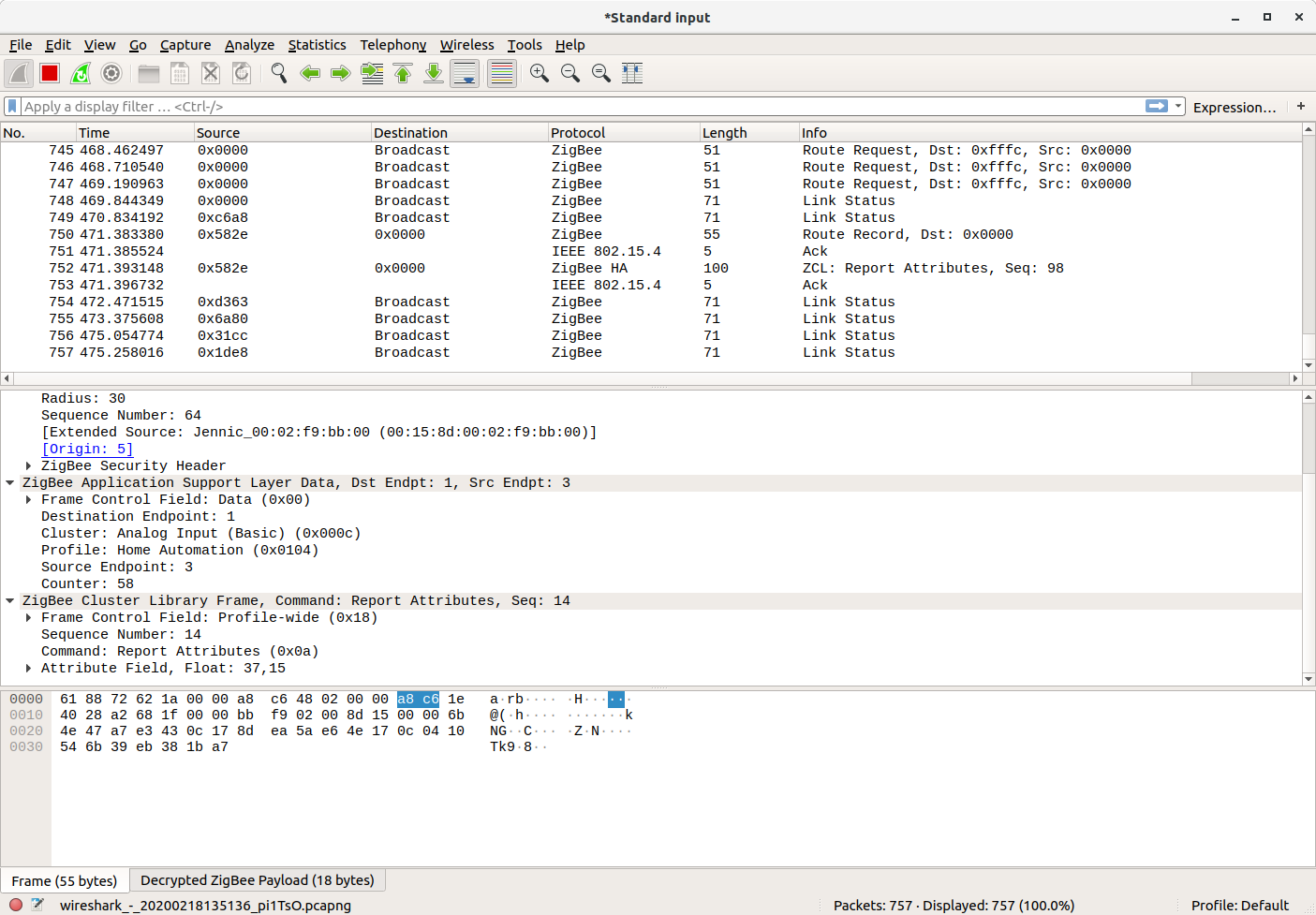
Does anyone know how to identify messages from the particular device? Thanks
phplego
on 18 Feb 2020
@phplego the cluster should be Occupancy sensing
Koenkk
on 18 Feb 2020
I have catched the exact moment when my sensor "fails" to report about occupancy. Looks like sensor itself reporting Occupancy=true
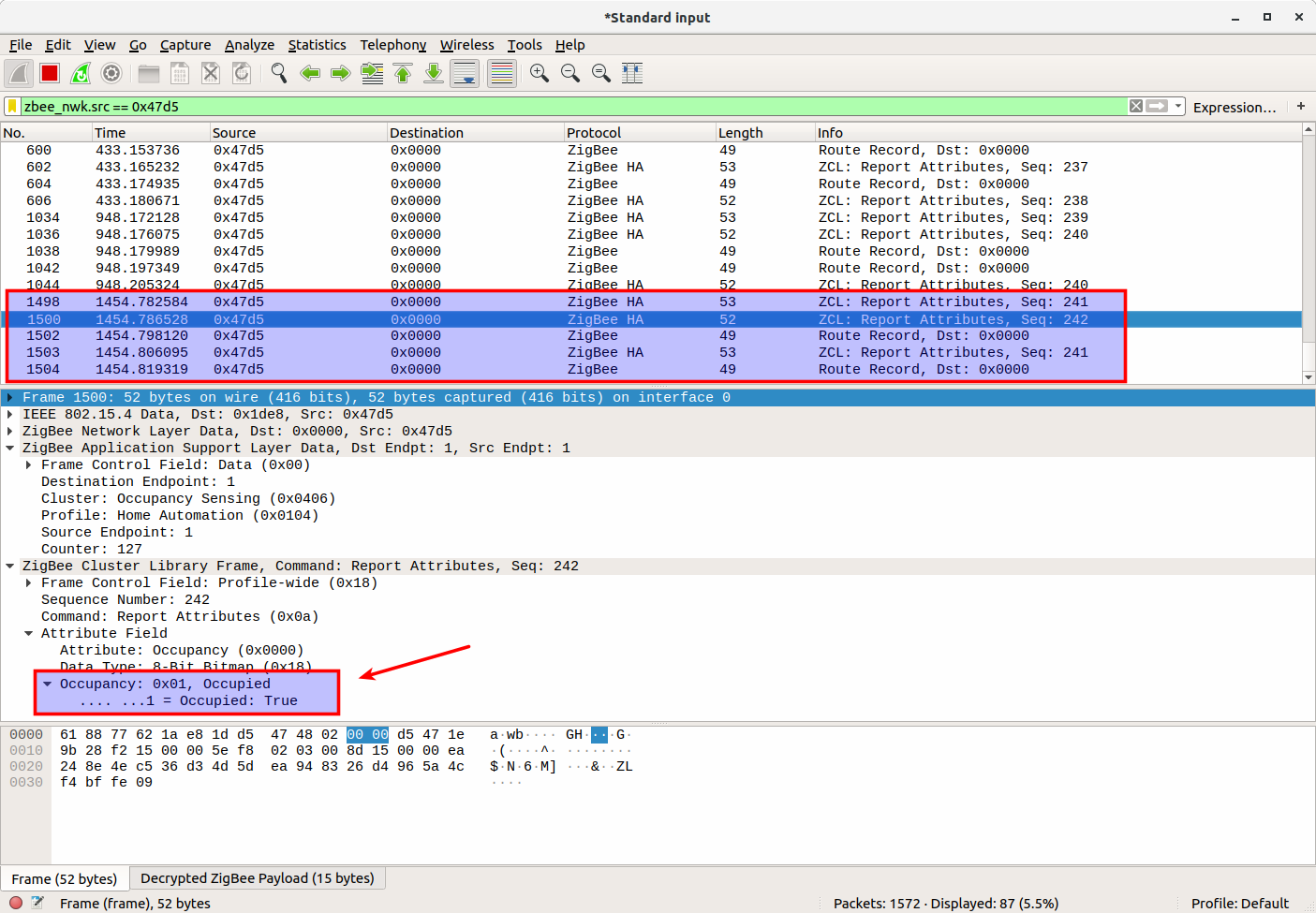
Extended screenshot of the packet: https://imgur.com/a/kFPhUVA
But zigbee2mqtt sends "occupancy":false in the MQTT message:
2020-02-18T13:49:18.075580141Z zigbee2mqtt:info 2020-02-18 13:49:18: MQTT publish: topic 'zigbee2mqtt/closet_ms', payload '{"illuminance":0,"linkquality":168,"occupancy":false,"battery":100,"voltage":3025}'
@Koenkk
phplego
on 18 Feb 2020
@phplego very interesting, this indicates that the sensor itself is not the problem. Therefore we need to look further into the whole zigbee2mqtt/zigbee-herdsman/adapter stack. While this happens, can you capture the logging when running zigbee2mqtt with DEBUG=zigbee-herdsman* npm start (https://www.zigbee2mqtt.io/information/debug.html#zigbee-herdsman-debug-logging)
Koenkk
on 18 Feb 2020
@phplego very interesting, this indicates that the sensor itself is not the problem. Therefore we need to look further into the whole zigbee2mqtt/zigbee-herdsman/adapter stack. While this happens, can you capture the logging when running zigbee2mqtt with
DEBUG=zigbee-herdsman* npm start(https://www.zigbee2mqtt.io/information/debug.html#zigbee-herdsman-debug-logging)
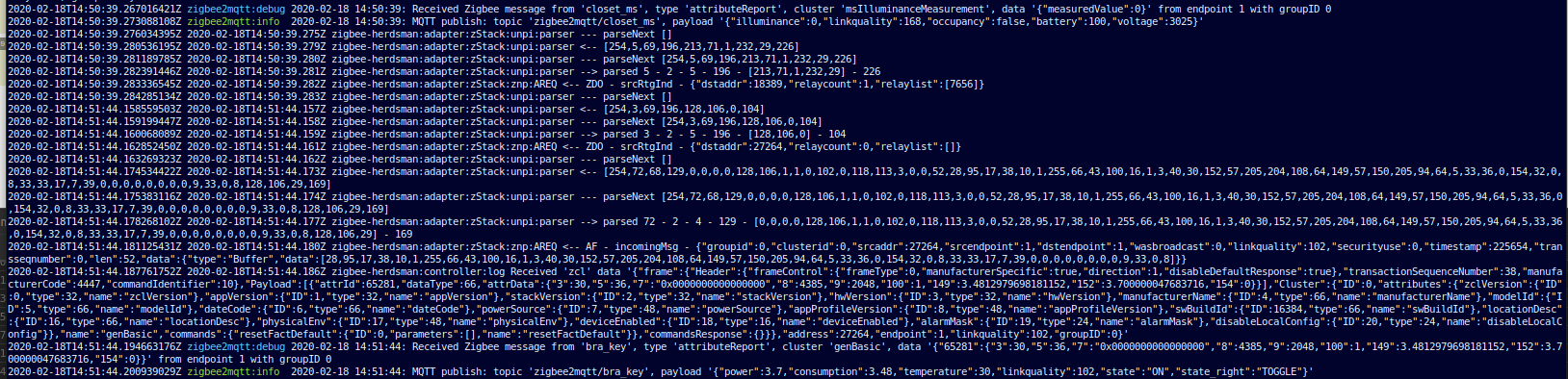
The only thing, that appears in the log is that ^
Looks like it reports only illumination, right?
In the same time, in the sniffer we can see Occupancy packet:
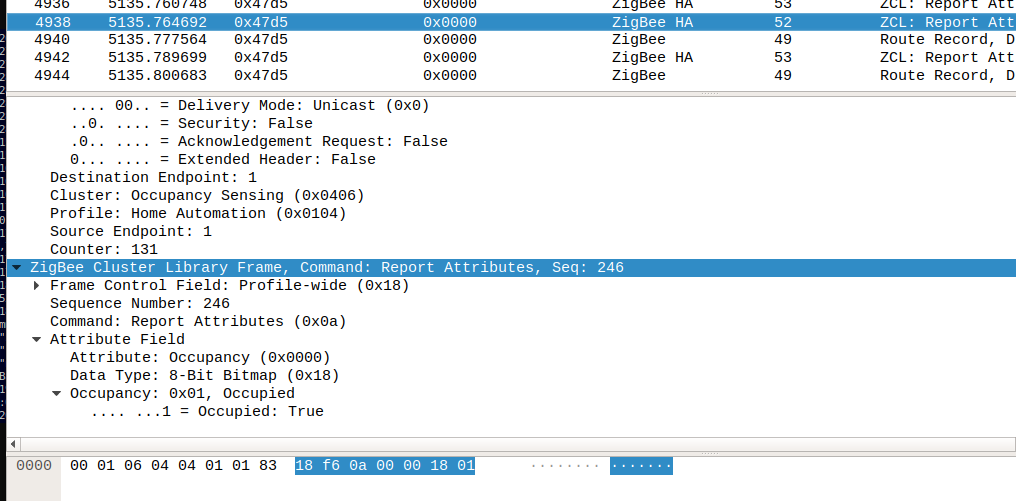
phplego
on 18 Feb 2020
For comparision, this is the log records in case, when the occupancy reported properly:

In this case we can see next record with cluster 'msOccupancySensing'
phplego
on 18 Feb 2020
I have one possible idea to ivestigate. I noticed, that in the database the record, related to this (buggy) sensor is a bit shorter, than others:
Buggy sensor record. Click to expand
{
   "id":11,
   "type":"EndDevice",
   "ieeeAddr":"0x00158d000302f85e",
   "nwkAddr":18389,
   "manufId":4151,
   "manufName":"LUMI",
   "powerSource":"Battery",
   "modelId":"lumi.sensor_motion.aq2",
   "epList":[
      1
   ],
   "endpoints":{
      "1":{
         "epId":1,
         "inClusterList":[

         ],
         "outClusterList":[

         ],
         "clusters":{
            "msIlluminanceMeasurement":{
               "attributes":{
                  "measuredValue":0
               }
            },
            "genBasic":{
               "attributes":{
                  "65281":{
                     "1":3025,
                     "3":30,
                     "4":12712,
                     "5":22,
                     "6":[
                        0,
                        3
                     ],
                     "10":7656,
                     "11":7,
                     "100":0
                  },
                  "modelId":"lumi.sensor_motion.aq2",
                  "appVersion":5
               }
            },
            "msOccupancySensing":{
               "attributes":{
                  "occupancy":1
               }
            }
         },
         "binds":[

         ]
      }
   },
   "appVersion":5,
   "stackVersion":2,
   "hwVersion":1,
   "dateCode":"20170627",
   "swBuildId":"3000-0001",
   "zclVersion":1,
   "interviewCompleted":true,
   "meta":{

   },
   "lastSeen":1582035024556
}
In the same time, the record for the working sensor is a bit different:
Working sensor record. Click to expand
{
   "id":20,
   "type":"EndDevice",
   "ieeeAddr":"0x00158d000313a331",
   "nwkAddr":53568,
   "manufId":4151,
   "manufName":"LUMI",
   "powerSource":"Battery",
   "modelId":"lumi.sensor_motion.aq2",
   "epList":[
      1
   ],
   "endpoints":{
      "1":{
         "profId":260,
         "epId":1,
         "devId":263,
         "inClusterList":[
            0,
            65535,
            1030,
            1024,
            1280,
            1,
            3
         ],
         "outClusterList":[
            0,
            25
         ],
         "clusters":{
            "genBasic":{
               "dir":{
                  "value":3
               },
               "attributes":{
                  "65281":{
                     "1":3045,
                     "3":32,
                     "4":5032,
                     "5":69,
                     "6":[
                        0,
                        1
                     ],
                     "10":50856,
                     "11":6,
                     "100":0
                  }
               }
            },
            "genPowerCfg":{
               "dir":{
                  "value":1
               },
               "attributes":{

               }
            },
            "genIdentify":{
               "dir":{
                  "value":1
               },
               "attributes":{

               }
            },
            "genOta":{
               "dir":{
                  "value":2
               },
               "attributes":{

               }
            },
            "msIlluminanceMeasurement":{
               "dir":{
                  "value":1
               },
               "attributes":{
                  "measuredValue":46
               }
            },
            "msOccupancySensing":{
               "dir":{
                  "value":1
               },
               "attributes":{
                  "occupancy":1
               }
            },
            "ssIasZone":{
               "dir":{
                  "value":1
               },
               "attributes":{

               }
            },
            "manuSpecificCluster":{
               "dir":{
                  "value":1
               },
               "attributes":{

               }
            }
         },
         "binds":[

         ]
      }
   },
   "appVersion":5,
   "stackVersion":2,
   "hwVersion":1,
   "dateCode":"20170627",
   "swBuildId":"3000-0001",
   "zclVersion":1,
   "meta":{

   },
   "lastSeen":1582037125743
}
UPD. Looks like it does not correlate to the problem. Because I have another buggy sensor, with usual db record. Anyway, I keep it here. Maybe it helps
phplego
on 18 Feb 2020
@phplego the incomplete database entry is probably not related, do you see anything more when the occupancy is send (checked via sniffing) and the debug output in zigbee2mqtt?
Koenkk
on 20 Feb 2020
@Koenkk
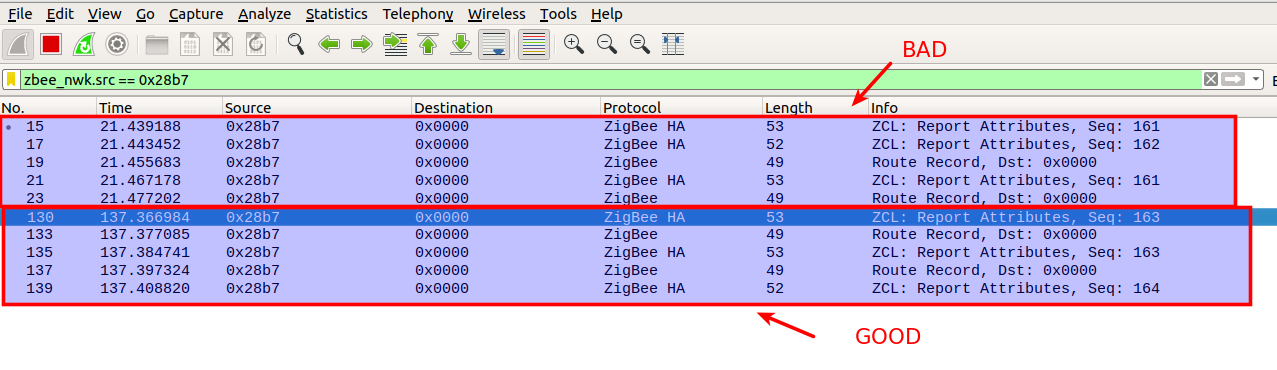
I tried to compare bad packet sequence (when I get occupancy:false) with good sequence (when occupancy:true). They are pretty the same, have no difference in the packet content. Only order of messages may differ (illuminance before occupancy and vise versa).
Here is a dump of two sequences in the wireshark export format:
https://github.com/phplego/phplego.github.io/blob/master/two_sequences.pcapng
(first one, where time = ~0 is failed. And second one, where time = ~115 is success)
The only thing that I have noticed is that "bad sequence" happens only after some long time of silence. Lets say I did not touch sensor for several hours. Then, after that period of peace, first time I entered in the sensor field may become "bad". After "bad" heppened then next time always working good
do you see anything more when the occupancy is send (checked via sniffing) and the debug output in zigbee2mqtt?
Could you tell what we are looking for? What attributes of debug log should I pay attention?
Thank you!
And, by the way, If you have any ideas what may went wrong (in the herdsman, usb dongle firmware and etc), please share, I will try to do my best to prove/disprove that hypothesises. For example I can edit JS code and put debugging "printlns" to interest places. Thanks
phplego
on 21 Feb 2020
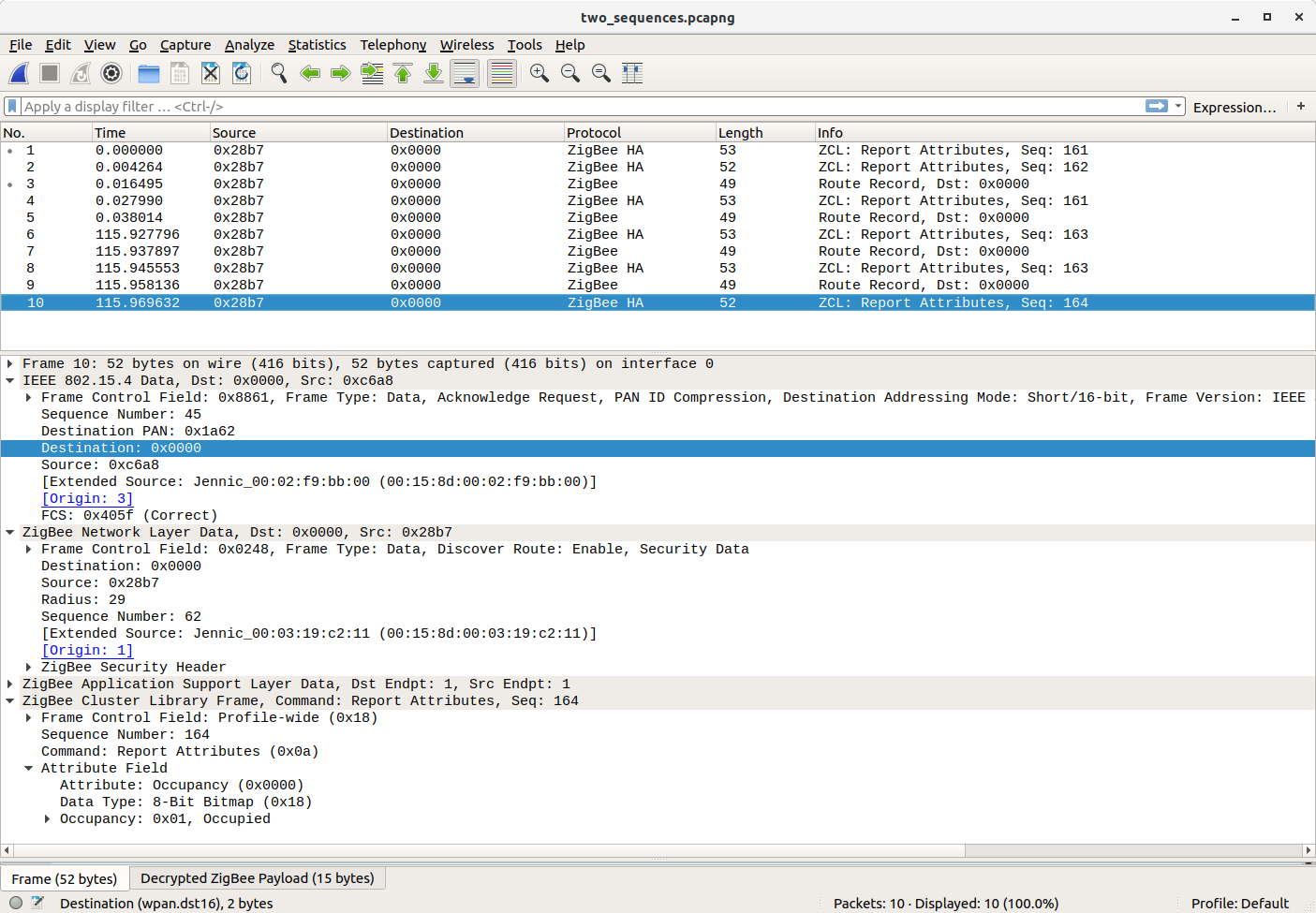
I have noticed that in failed packet in the "IEEE 802.15.4 Data.." section there is different Destanation
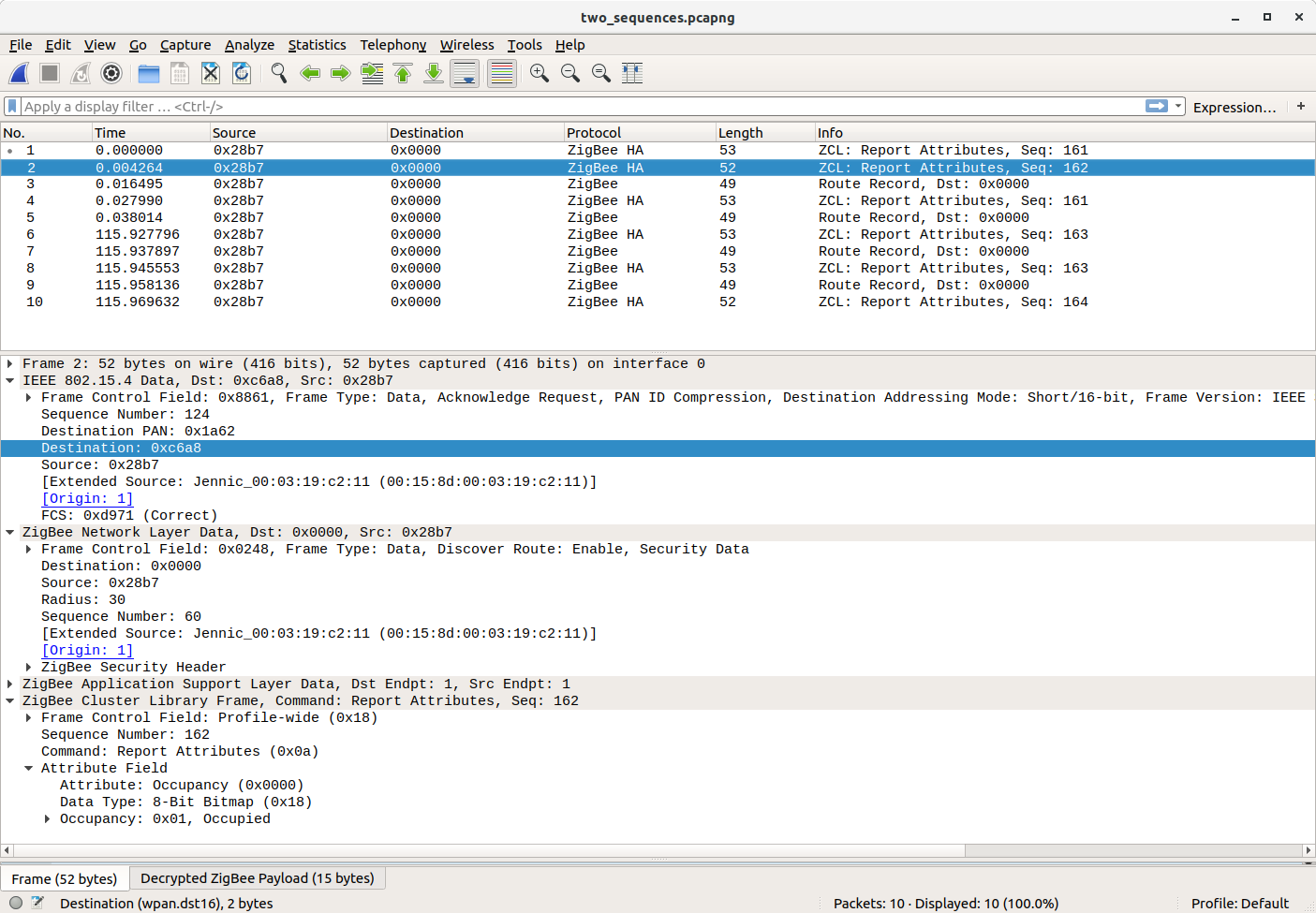
Success packet:
phplego
on 21 Feb 2020
@phplego good finding, it means that the sensor will send the message via a router, the router is responsible for sending it to the coordinator. What kind of device is this? Search for the 50856 networkaddress in your database.db.
Koenkk
on 21 Feb 2020
@Koenkk
What kind of device is this?
It is my Aqara double key wired wall switch (with neutral line) https://www.zigbee2mqtt.io/devices/QBKG12LM.html
phplego
on 21 Feb 2020
@Koenkk I have 8 routers in my house (aqara wall switches) and I think some of them may not work properly. Is it possible to disable zigbee device to operate as router? Or maybe you know some another way to debug the network?
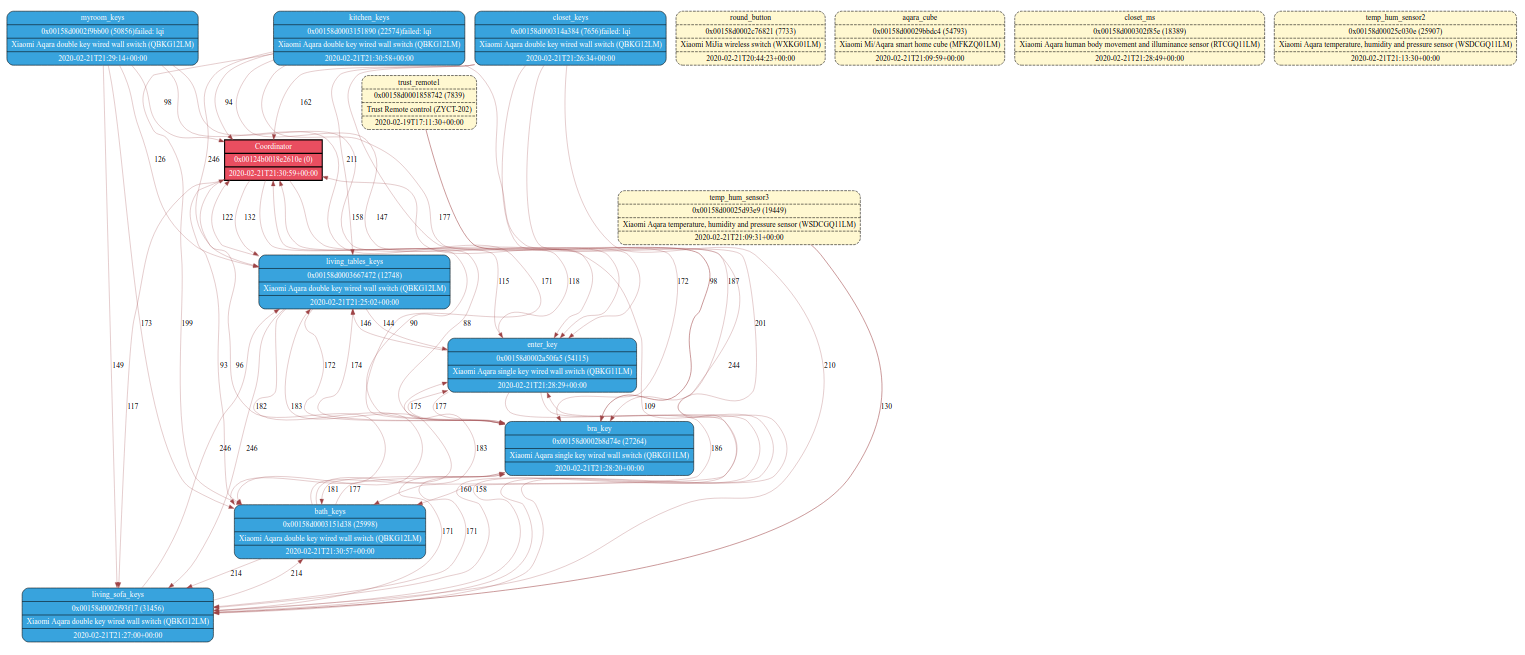
Thank you.
phplego
on 22 Feb 2020
@phplego it's not possible to disable the routing functionality on a device.
Can you try pairing the RTCGQ11LM close to the coordinator (this should make the coordinator the parent) and then move the RTCGQ11LM to the desired location? Does it keep working?
Koenkk
on 23 Feb 2020
Hello!
Do you have some updates on this problem?
It seems I have the same problem now.
I have 3 motion sensors
- one Xiaomi RTCGQ01LM
0x00158d0002b48e80_occupancy in hallway - two Aqara Xiaomi RTCGQ11LM
0x00158d0004466abd_occupancy in workroom
0x00158d000224ba4a_occupancy in kitchen
They all worked flawlessly for 1-2 month after migrating to zigbee2mqtt 1.10, but yesterday for some period of time (like 2 hours) they mostly don't send occupancy true.
I went from Workroom to Hallway. Workroom sends occupamcy True, but Hallway sends signal as well but occupancy False
in logs
Mar 22 15:50:35 pi4 npm[507]: #033[32mzigbee2mqtt:info #033[39m 2020-03-22 15:50:35: MQTT publish: topic 'zigbee2mqtt/0x00158d0004466abd', payload '{"battery":100,"voltage":3015,"illuminance":8,"illuminance_lux":8,"linkquality":47,"occupancy":false}'
Mar 22 15:50:35 pi4 npm[507]: #033[32mzigbee2mqtt:info #033[39m 2020-03-22 15:50:35: MQTT publish: topic 'zigbee2mqtt/0x00158d0004466abd', payload '{"battery":100,"voltage":3015,"illuminance":8,"illuminance_lux":8,"linkquality":47,"occupancy":true}'
Mar 22 15:50:36 pi4 hass[645]: #033[32m2020-03-22 15:50:36 INFO (MainThread) [homeassistant.components.automation] Executing Workroom Motion#033[0m
Mar 22 15:50:36 pi4 hass[645]: #033[32m2020-03-22 15:50:36 INFO (MainThread) [homeassistant.helpers.script] Script Workroom Motion: Running script#033[0m
Mar 22 15:50:36 pi4 hass[645]: #033[32m2020-03-22 15:50:36 INFO (MainThread) [homeassistant.helpers.script] Script Workroom Motion: Executing step call service#033[0m
Mar 22 15:50:39 pi4 npm[507]: #033[32mzigbee2mqtt:info #033[39m 2020-03-22 15:50:39: MQTT publish: topic 'zigbee2mqtt/0x00158d0002b48e80', payload '{"battery":100,"voltage":3025,"illuminance":0,"illuminance_lux":0,"linkquality":39,"occupancy":false}'
I've updated to zigbee2mqtt 1.12 - and now sensors seems to work Ok. Will see...
 bongiozzo
on 22 Mar 2020
bongiozzo
on 22 Mar 2020
I'm having the exact same problem with 2 out of 3 RTCGQ11LM.
I'm using a CC2531 and four OSRAM Lightbulbs as routers.
 jcobreros
on 3 Apr 2020
jcobreros
on 3 Apr 2020
This problem still exists, even after update to zigbee2mqtt 1.12
 tpftpf
on 4 Apr 2020
tpftpf
on 4 Apr 2020
Interestingly, the problem solved itself after a couple long button presses and some time for the network to settle (For 5 minutes I was getting data from the RTCGQ11LM every second. It looked like a backlog of data).
jcobreros
on 4 Apr 2020
I was hoping to do some debugging today as I ordered a programmer to flash my zigbee stick with the sniffer firmware but I received the wrong item from the seller :(
I don't know if this information is helpful, TLDR:
- 6 motion sensors stopped working pretty much completely after upgrading from unknown version of dev branch (around May 2019) to 1.11 and subsequently 1.12.
- When going into a room, messages get sent but with occupancy: false, which makes me think it's not a battery issue and instead a software issue
- All 6 sensors are routed through a wall switch with neutral wire (QBKG12LM)
- Repairing 3 of them close to coordinator fixed the issue, they started transmitting occupancy: true reliably. Network map confirms that they are now direct with the coordinator.
- Repairing 1 of them further away which ended up still going through the wall switch didn't fix the issue, it started rapidly sending occupancy: false.
- Repairing the same one but closer fixed the issue, and the remaining sensors.
Bit more detail:
- 6 motion sensors (RTCGQ11LM), 1 wall switch with neutral wire (QBKG12LM), and 1 door/window sensor (never had issues with this), and 2 cubes (no issues either).
- I was running a
devbranch version of Zigbee2mqtt, unfortunately I can't remember what version as I didn't backup, I cloned it around mid-May 2019. My motion sensors were working fairly well. - Upgraded to Zigbee2mqtt 1.11 and they pretty much completely stopped working. occupancy: true messages are being sent but sometimes with a 5 minute delay of entering a room and having since left the room so there is no motion. Most of the time I don't get occupancy: true messages at all. I am now Zigbee2mqtt 1.12 and the problem still persists. What's weird is when I go into a room, it does send a message straight away but with occupancy: false, so there is definitely something being triggered.
Generating a network map shows that all of the occupancy sensors go through the wall switch. Some of them have lines going to both the wall switch AND the coordinator, not sure what this means, but still those sensors are unreliable.
I am in the process of repairing my sensors to see if it makes any difference and I am monitoring the logs.
Repaired 2 sensors close to the coordinator (before repairing they were erroneously sending occupancy: false). As soon as they repaired, occupancy: true was sent and they seem to be working fine. Generating a network map shows that they are going direct to the coordinator, not the wall switch.
Repaired 1 sensor further away from the coordinator. Also erroneously sending occupancy: false before repairing. After repairing, it is rapidly sending messages but with occupancy still
falseeven though I am in the room and moving around. Generating a network map shows that this sensor is going to the wall switch, _not_ the coordinator. Repairing but closer to the coordinator fixed the issue.
Because of this, I'm fairly certain the issue lies with the wall switch and something to do with the way it is acting as a router/relay (whatever it is called!).
This behaviour is in line with what was experienced further up this thread https://github.com/Koenkk/zigbee2mqtt/issues/2274#issuecomment-590104511 @Koenkk @phplego. Unfortunately I don't have the device to flash the firmware to debug further, I have contacted the seller to ship one but this will take a couple of months to arrive :(
I have had my sensors for around 8 months and they are reporting 91-100% battery but because the messages are still being sent on motion, just with the incorrect occupancy value, it makes me think that it's a software issue? When the sensor is talking direct to the coordinator it appears to be working absolutely fine. I will update if I have any more findings.
 madjam002
on 5 Apr 2020
madjam002
on 5 Apr 2020
When going into a room, messages get sent but with occupancy: false, which makes me think it's not a battery issue and instead a software issue
Could you provide the zigbee2mqtt debug logging of this?
To enable debug logging set in configuration.yaml:
advanced:
  log_level: debug
Hi!
I'd like to help
Added to configuration.yaml
advanced:
log_level: debug
And I've got some question because this problem is very very annoying when house light doesn't work as used to be :))
We noticed that after upgrade and fresh install system works Ok for some time.
Could you provide some example of flush script which I can add to cron or systemctl to return the system to initial state every day?
bongiozzo
on 8 Apr 2020
Logfile Initialization with 3 motion sensors:
info  2020-04-08 08:19:23: Logging to console and directory: '/opt/zigbee2mqtt/data/log/2020-04-08.08-19-22' filename: log.txt
debug 2020-04-08 08:19:23: Removing old log directory '/opt/zigbee2mqtt/data/log/2020-03-22.16-25-35'
debug 2020-04-08 08:19:23: Loaded state from file /opt/zigbee2mqtt/data/state.json
info  2020-04-08 08:19:23: Starting zigbee2mqtt version 1.12.0 (commit #840b9d9)
info  2020-04-08 08:19:23: Starting zigbee-herdsman...
debug 2020-04-08 08:19:23: Using zigbee-herdsman with settings: '{"network":{"panID":6754,"extendedPanID":[221,221,221,221,221,221,221,221],"channelList":[11],"
networkKey":"HIDDEN"},"databasePath":"/opt/zigbee2mqtt/data/database.db","databaseBackupPath":"/opt/zigbee2mqtt/data/database.db.backup","backupPath":"/opt/zigb
ee2mqtt/data/coordinator_backup.json","serialPort":{"baudRate":115200,"rtscts":true,"path":"/dev/ttyACM0"}}'
info  2020-04-08 08:19:25: zigbee-herdsman started
info  2020-04-08 08:19:25: Coordinator firmware version: '{"type":"zStack12","meta":{"transportrev":2,"product":0,"majorrel":2,"minorrel":6,"maintrel":3,"revisi
on":20190608}}'
debug 2020-04-08 08:19:25: Zigbee network parameters: {"panID":6754,"extendedPanID":"0xdddddddddddddddd","channel":11}
info  2020-04-08 08:19:25: Currently 11 devices are joined:
info  2020-04-08 08:19:25: 0x00158d0002b8d9ea (0x00158d0002b8d9ea): MFKZQ01LM - Xiaomi Mi/Aqara smart home cube (EndDevice)
info  2020-04-08 08:19:25: 0x00158d0004466abd (0x00158d0004466abd): RTCGQ11LM - Xiaomi Aqara human body movement and illuminance sensor (EndDevice)
info  2020-04-08 08:19:25: 0x00158d0002b48e80 (0x00158d0002b48e80): RTCGQ11LM - Xiaomi Aqara human body movement and illuminance sensor (EndDevice)
info  2020-04-08 08:19:25: 0x00158d00012414a2 (0x00158d00012414a2): ZNCZ02LM - Xiaomi Mi power plug ZigBee (Router)
info  2020-04-08 08:19:25: 0x00158d00042c00e8 (0x00158d00042c00e8): MCCGQ11LM - Xiaomi Aqara door & window contact sensor (EndDevice)
info  2020-04-08 08:19:25: 0x00158d00027b3ba7 (0x00158d00027b3ba7): MCCGQ01LM - Xiaomi MiJia door & window contact sensor (EndDevice)
info  2020-04-08 08:19:25: 0x00158d00044c33eb (0x00158d00044c33eb): SJCGQ11LM - Xiaomi Aqara water leak sensor (EndDevice)
info  2020-04-08 08:19:25: 0x00158d000224ba4a (0x00158d000224ba4a): RTCGQ01LM - Xiaomi MiJia human body movement sensor (EndDevice)
info  2020-04-08 08:19:25: 0x00158d00020f55fd (0x00158d00020f55fd): WXKG01LM - Xiaomi MiJia wireless switch (EndDevice)
info  2020-04-08 08:19:25: 0x00158d0002728a26 (0x00158d0002728a26): ZNMS12LM - Xiaomi Aqara S2 lock (EndDevice)
info  2020-04-08 08:19:25: 0x00158d00042d8a97 (0x00158d00042d8a97): SJCGQ11LM - Xiaomi Aqara water leak sensor (EndDevice)
info  2020-04-08 08:19:25: Zigbee: disabling joining new devices.
info  2020-04-08 08:19:25: Connecting to MQTT server at mqtt://192.168.1.6
info  2020-04-08 08:19:25: Connected to MQTT server
info  2020-04-08 08:19:25: MQTT publish: topic 'zigbee2mqtt/bridge/state', payload 'online'
And just after restart I went to sensor (0x00158d0004466abd) in my workroom
info  2020-04-08 08:19:25: MQTT publish: topic 'homeassistant/sensor/0x00158d00042d8a97/linkquality/config', payload '{"icon":"mdi:signal","unit_of_measurement":"lqi","value_template":"{{ value_json.linkquality }}","state_topic":"zigbee2mqtt/0x00158d00042d8a97","json_attributes_topic":"zigbee2mqtt/0x00158d00042d8a97","name":"0x00158d00042d8a97_linkquality","unique_id":"0x00158d00042d8a97_linkquality_zigbee2mqtt","device":{"identifiers":["zigbee2mqtt_0x00158d00042d8a97"],"name":"0x00158d00042d8a97","sw_version":"Zigbee2mqtt 1.12.0","model":"Aqara water leak sensor (SJCGQ11LM)","manufacturer":"Xiaomi"},"availability_topic":"zigbee2mqtt/bridge/state"}'
debug 2020-04-08 08:19:41: Received Zigbee message from '0x00158d00012414a2', type 'read', cluster 'genTime', data '["time"]' from endpoint 1 with groupID 0
debug 2020-04-08 08:19:41: No converter available for 'ZNCZ02LM' with cluster 'genTime' and type 'read' and data '["time"]'
debug 2020-04-08 08:20:19: Received Zigbee message from '0x00158d0004466abd', type 'attributeReport', cluster 'msIlluminanceMeasurement', data '{"measuredValue":0}' from endpoint 1 with groupID 0
info  2020-04-08 08:20:19: MQTT publish: topic 'zigbee2mqtt/0x00158d0004466abd', payload '{"battery":100,"voltage":3015,"illuminance":0,"illuminance_lux":0,"linkquality":89,"occupancy":false}'
As you can see event was fired but occupancy is false.
bongiozzo
on 8 Apr 2020
@bongiozzo in your log I can see that the sensor only reports illuminance and not occupancy. At what time did you walk into the room, 08:19:41 or 08:20:19?
Koenkk
on 8 Apr 2020
It's core problem that sensor sends illuminance and keeps occupancy false.
Of course I should be noticed by sensor 08:19:41 or 08:20:19 - I was right ahead of it.
In normal conditions sensor doesn't sent illuminance changes (AFAIK), only when motion was detected.
After 1 (or 2?) minutes in case occupancy wasn't detected anymore it should send "occupancy false" state (For turning lights off).
But here we see only illuminance and occupancy false events.
bongiozzo
on 8 Apr 2020
Hi,
@bongiozzo and @Koenkk .
The problem bongiozzo describe is the problem i have. (I wrote a post some weeks ago).
Meanwhile:
I added an entry in the configuration.yaml (there was a post from koenkk)
advanced:
  log_level: debug
  **cache_state: false**
The Parameter "cache_state: false" reduce the problem for me but it wasn´t gone.
In the most cases the motions sensor doesn´t switch on/off the light. I checked the log - there was the wrong Event in the log ( occupancy: false instead of occupancy: true)
I think there is still something wrong there…
essera
on 8 Apr 2020
@bongiozzo the problem is that it doesn't report occupancy, only illuminance. In order to further investigate it we need to sniff the traffic when trigger the sensor and no occupancy is send. https://www.zigbee2mqtt.io/how_tos/how_to_sniff_zigbee_traffic.html
Koenkk
on 8 Apr 2020
I was hoping to do some debugging today as I ordered a programmer to flash my zigbee stick with the sniffer firmware but I received the wrong item from the seller :(
As I understood i have to have additional stick for sniffing. Don't have it...
@koenkk am I right?
bongiozzo
on 9 Apr 2020
cache_state: false
Optional: state caching, MQTT message payload will contain all attributes, not only changed ones.
Has to be true when integrating via Home Assistant (default: true)
cache_state: true
I use it with Home Assistant.
Should I try it with false anyway?
bongiozzo
on 9 Apr 2020
@bongiozzo
- Yes: you need an additional stick.
- I have no Home Assistant so i think you must not change it.
essera
on 9 Apr 2020
I used to have a similar issue for about a month. I have several Xiaomi occupancy sensors and a door sensor. Some time ago they became unreliable and some messages were just lost somewhere. I use CC1352P2 board for coordinator and a couple of cc2531 as routers. Faulty sensors connected to the coordinator through the router. Usually the latest dev version of z2m was used.
I tried to do many different things like log analysis, trying to re-pair, restarting the routers, downgrading z2m but nothing really helped. Finally I lost my patience and re-flashed the coordinator with the latest firmware from the dev branch (previously it used the firmware from mid-October). Since then the network has been very stable (for about three weeks already), I did not notice any single fault.
I do not know what was the exact reason: firmware upgrade or cleaning the coordinator flash memory, or probably something else.
 Ton1965
on 9 Apr 2020
Ton1965
on 9 Apr 2020
@Koenkk could you recommend and direct to the most right coordinator zip :) to try reflash it?
This situation with not working sensors very very annoying and I don't have second stick and can't get it quickly
I used zip from manual https://github.com/Koenkk/Z-Stack-firmware/raw/master/coordinator/Z-Stack_Home_1.2/bin/default/CC2531_DEFAULT_20190608.zip
bongiozzo
on 10 Apr 2020
@bongiozzo that is the most recent firmware.
Koenkk
on 11 Apr 2020
@bongiozzo that is the most recent firmware.
Uh.., I'm talking about firmware that @Ton1965 mentioned above
bongiozzo
on 11 Apr 2020
Hi @bongiozzo
Sorry if I have not made it clear enough. I am using CC1352P2 board as a coordinator so I used the latest firmware for it from the dev branch. As far as I understand you are using CC2531 and I do not know if my approach will help you. Actually I do not even know the exact thing that helped me 😄 But I am quite happy now with how everything is working.
Ton1965
on 13 Apr 2020
Happy for you :) And we are still waiting for the solution, cause automation with there sensors stops working completely after some time.
@Koenkk could you suggest some approach to clear the most cached info and restart z2m environment as daily script? But not destructive.
Аfter fresh reinstall sensors worked Ok
bongiozzo
on 13 Apr 2020
@bongiozzo stop zigbee2mqtt, remove data/state.json and start zigbee2mqtt. Would be interesting to see if this fixes the issue (because then I don't understand what difference this would make).
Koenkk
on 13 Apr 2020
You are right.
Sensor worked Ok right after restart but after 3 minutes stopped again.
It's very strange, because 1 month ago they worked just fine.
bongiozzo
on 13 Apr 2020
Can anyone check if they see the following message in the debug log:
Skipping re-transmitted Xiaomi message
To enable debug logging set in configuration.yaml:
advanced:
  log_level: debug
i checked my logs from the 8. of march til now but no message with skip(ed) was found. And the most time my log Level is set to debug.
i never seen this message bevor.
essera
on 15 Apr 2020
@Koenkk No mention of the skipped messages in the logs... where does that get logged from? zigbee2mqtt or zigbee-herdsman? I've got debug logging turned on.
Update on my situation, all of the sensors I re-paired directly with the coordinator are still working fine. One sensor is still going through the wall switch and doesn't work. Here's logs immediately after starting zigbee2mqtt and triggering that sensor after no occupancy:
Apr 15 22:08:17 raspberrypi node[10952]: zigbee2mqtt:debug 2020-04-15 22:08:17: Received Zigbee message from '0x00158d00030a3204', type 'attributeReport', cluster 'msIlluminanceMeasurement', data '{"measuredValue":0}' from endpoint 1 with groupID 0
Apr 15 22:08:17 raspberrypi node[10952]: zigbee2mqtt:info  2020-04-15 22:08:17: MQTT publish: topic 'zigbee2mqtt/0x00158d00030a3204', payload '{"illuminance":0,"linkquality":118,"occupancy":false,"battery":100,"voltage":3015,"illuminance_lux":0}'
.... nothing else
Those logs were triggered immediately when I moved the sensor.
As you can see it's just reporting the illuminance. It was in a box with no movement whatsoever until just now so there's no chance of it previously having occupancy.
Other sensors get the occupancy readings just fine, for example:
Apr 15 22:18:59 raspberrypi node[10952]: zigbee2mqtt:debug 2020-04-15 22:18:59: Received Zigbee message from 'server_room_occupancy', type 'attributeReport', cluster 'msOccupancySensing', data '{"occupancy":1}' from endpoint 1 with groupID 0
These appear every couple of minutes for rooms with active occupancy.
madjam002
on 15 Apr 2020
After reading Ton1965's input I also tried this.
I flashed my coordinator (CC1352P-2) with the latest firmware from the DEV branch (CC1352P_2_20200312.hex) and voila all my Xiaomi motion sensors work well again.
I did not analyze the changes between the stable and the dev branch however. Maybe Koenkk can check that.
Here is Ton1965's input:
I used to have a similar issue for about a month. I have several Xiaomi occupancy sensors and a door sensor. Some time ago they became unreliable and some messages were just lost somewhere. I use CC1352P2 board for coordinator and a couple of cc2531 as routers. Faulty sensors connected to the coordinator through the router. Usually the latest dev version of z2m was used.
I tried to do many different things like log analysis, trying to re-pair, restarting the routers, downgrading z2m but nothing really helped. Finally I lost my patience and re-flashed the coordinator with the latest firmware from the dev branch (previously it used the firmware from mid-October). Since then the network has been very stable (for about three weeks already), I did not notice any single fault.
I do not know what was the exact reason: firmware upgrade or cleaning the coordinator flash memory, or probably something else.
tpftpf
on 16 Apr 2020
@madjam002 if you don't have this message don't worry.
Next step forward for users having this issue is to sniff the traffic when triggering occupancy on the sensor without occupancy: true being send to MQTT. (https://www.zigbee2mqtt.io/how_tos/how_to_sniff_zigbee_traffic.html)
Koenkk
on 16 Apr 2020
Very annoying situation, but i don't want to buy cheap but honestly useless second device for sniffing one bug.
Anybody tried to downgrade z2mqtt?
My setup worked ok from the start and after some updates it was degraded
2.
About CC1352
https://a.aliexpress.ru/_eNET7C
This is it?
If it is more productive and modern solution - im ready to rebuild home setup.
How i can rebuild my setup with it? Any suggestion?
bongiozzo
on 23 Apr 2020
It takes a month to get device from AliExpress.
bongiozzo
on 23 Apr 2020
I've spotted, that when Z2M reports occupancy "true" via mqtt, then it sends two messages in row, with ~40ms diference. First is "false", then after ~40ms second message "true". I was able to capture two similar cases. Attached is log from mqtt + from wireshark, filtered just for this sensor.
All mqtt messages, even if not reporting occupancy true, was triggered by moving hand in front of the sensor. In wireshark log, sensor always reports occupancy "true".
Hope this helps.
aqara_pir - mqtt_log.txt
aqara_pir - mqtt_log_extract.txt
aqara_pir - wireshark.txt
kluszczyn
on 23 Apr 2020
One of my sensors sends false in 95%, but it fires when real occupancy was occured.
debug 2020-04-24 15:53:12: Received Zigbee message from '0x00158d0004466abd', type 'attributeReport', cluster 'msIlluminanceMeasurement', data '{"measuredValue":0}' from endpoint 1 with groupID 0
info 2020-04-24 15:53:12: MQTT publish: topic 'zigbee2mqtt/0x00158d0004466abd', payload '{"battery":100,"voltage":3015,"illuminance":0,"illuminance_lux":0,"linkquality":78,"occupancy":false}'
Other two also send occupancy status as false in 60-70%, but also very accurate in time.
I solved this annoying problem for me by converting automations to mqtt platform from platform state
This automation works, doesn't matter occupancy is false or not.
- alias: Workroom Motion
  trigger:
    platform: mqtt
    topic: zigbee2mqtt/0x00158d0004466abd
  action:
    - service: script.turn_off
      data:
        entity_id: script.workroom_light
    - service: script.workroom_light

scripts:
  workroom_light:
    sequence:
      - service: light.turn_on
        entity_id: light.philips_bulb
      - delay: 00:02:00
      - service: light.turn_off
        entity_id: light.philips_bulb
Thanx all for support :)
bongiozzo
on 24 Apr 2020
I've spotted, that when Z2M reports occupancy "true" via mqtt, then it sends two messages in row, with ~40ms diference. First is "false", then after ~40ms second message "true". I was able to capture two similar cases. Attached is log from mqtt + from wireshark, filtered just for this sensor.
It is some well known problem. Xiaomi sensor sends two different messages in quick succession when it detects occupancy: one message is for illuminance, the second is for occupancy.
HA always expects a full set of attributes from a sensor, so Z2M also sends two mqtt messages: one with the previous set of values (including occupancy = false) and new illuminance, then again the previous set with occupancy = true.
This can be changed by setting debounce option for the device but it will delay all responses by at least 1 second. In that case Z2M will wait for a second to collect the data from all messages within this time interval and then send a single combined mqtt message to HA.
Ton1965
on 24 Apr 2020
Hi there,
I've been following this problem since the beginning but for me a little workaround solved it and I have no issues with that since 1.5 month even with restarts of the RPi via unplugging the power cable or with commands. That's why I would like to share my workaround with you, maybe it solves it for you too.
I have 4 RTCGQ11LM and everything worked fine until the upgrade from November or so.
My workaround that solved it for me (let me know if it helps you too):
- delete every device in the configuration.yaml file and set permit_join to true and channel set to default (important)
- restart system and remove the battery from every motion sensor so it can't reconnect after the restart
- now for every RTCGQ11LM do the following:
-1. insert battery, connect with the zigbee2mqtt system, and wait for it to appear in the configuration.yaml.
-2. as you might see in your mqtt server, it starts to send every second or so a motion:true
-3. wait for the notifications to stop after 1 or 2 minutes or so (you can put the RTCGQ11LM in a motion free corner of your house for that time)
-4. do that with all RTCGQ11LM you have but only one after another - now that you have added all the device, you can make the changes of your choice inside your config.yaml as you like (no_occupancy_since, occupancy timeout, ...)
- now that all devices are inside the config.yaml you need to change the channel to 20
- restart your system by the restart command of your system (I use OpenHab but the restart command should be sth. like "sudo reboot"
- after restart wait 2 minutes and still with no motion
- theoretically, if you now walk in front of a RTCGQ11LM it should send motion:true twice (actually first motion:false and then shortly after it sends motion:true)
- the settings should be applied for every sensor and a restart via unplugging the power cable should not delete any of your changes or connections
I had twice a power loss due to accidently walking over the power cable and unplugging it. Also I restarted it several times with the commands for a RPi without any issues,
I want to mention that I use the "Running as a daemon with systemctl" from point 5 of the Manual here
And I'm using the version of February of Zigbee2mqtt and I have not upgraded it yet because everything works just fine.
Please let me know if this helps you. For me it did but I don't know if it works for other people also.
One of my rules since then: never change a running system :)
 BroboLederbeutel
on 25 Apr 2020
BroboLederbeutel
on 25 Apr 2020
@madjam002 if you don't have this message don't worry.
Next step forward for users having this issue is to sniff the traffic when triggering occupancy on the sensor without occupancy: true being send to MQTT. (https://www.zigbee2mqtt.io/how_tos/how_to_sniff_zigbee_traffic.html)
I finally succeeded in sniffing the zigbee traffic!
My motion sensor is placed in a closed room. At ~20:18 I entered the room while sniffing the traffic.
Sensor configuration
'0x00158d00019fdd44':
friendly_name: aqara_motion_lavanderia
debounce: 0.5
Z2m log (only relevant part, referring to the above sensor)
debug 2020-05-10 20:18:09: Received Zigbee message from 'aqara_motion_lavanderia', type 'attributeReport', cluster 'msIlluminanceMeasurement', data '{"measuredValue":4}' from endpoint 1 with groupID 0
info 2020-05-10 20:18:10: MQTT publish: topic 'zigbee2mqtt/aqara_motion_lavanderia', payload '{"battery":91,"voltage":2985,"illuminance":4,"linkquality":0,"last_seen":"2020-05-10T18:18:09.589Z","occupancy":false,"illuminance_lux":4}'
debug 2020-05-10 20:20:04: Received Zigbee message from 'aqara_motion_lavanderia', type 'attributeReport', cluster 'genBasic', data '{"65281":{"1":2985,"3":29,"4":17320,"5":54,"6":[0,327687],"10":35779,"11":8,"100":0}}' from endpoint 1 with groupID 0
info 2020-05-10 20:20:05: MQTT publish: topic 'zigbee2mqtt/aqara_motion_lavanderia', payload '{"battery":91,"voltage":2985,"illuminance":8,"linkquality":30,"last_seen":"2020-05-10T18:20:04.906Z","occupancy":false,"illuminance_lux":8}'
The complete log is attached to this post: log_motion.log
In the Wireshark capture, at frame 9 I see the message coming from this sensor with the lux reading.
At frame 13 I can see the "Occupancy: 0x01 Occupied" frame.
Frame 9 and 13 relates to 20:18 when I entered the room.
How can I post the wireshark capture without any sensitive data?
Hope this helps!
In the mean time here it is the JSON export for the wireshark capture.. hope this helps too!
gotcha.json.zip
 mr2c12
on 10 May 2020
mr2c12
on 10 May 2020
Even with
debounce: 1
the problem occurred. A few minutes ago, no motion had been triggered. Once I press the button on the device (single press, not to repair!) I finally got a presence=true and the automation has been triggered.
Unfortunately I wasn't capturing the traffic with wireshark.
Edit: the problem occurred again, but I was ready to capture!
Again, I can see the two messages (illuminance, and then occupancy) in the wireshark capture (frame 8 and 10)
relevant z2m debug log:
debug 2020-05-11 11:05:39: Received Zigbee message from 'aqara_motion_lavanderia', type 'attributeReport', cluster 'msIlluminanceMeasurement', data '{"measuredValue":0}' from endpoint 1 with groupID 0
info 2020-05-11 11:05:40: MQTT publish: topic 'zigbee2mqtt/aqara_motion_lavanderia', payload '{"battery":91,"voltage":2985,"illuminance":0,"linkquality":0,"last_seen":"2020-05-11T09:05:39.717Z","occupancy":false,"illuminance_lux":0}'
debug 2020-05-11 11:06:40: Received Zigbee message from 'aqara_motion_lavanderia', type 'attributeReport', cluster 'msIlluminanceMeasurement', data '{"measuredValue":0}' from endpoint 1 with groupID 0
info 2020-05-11 11:06:41: MQTT publish: topic 'zigbee2mqtt/aqara_motion_lavanderia', payload '{"battery":91,"voltage":2985,"illuminance":0,"linkquality":0,"last_seen":"2020-05-11T09:06:40.650Z","occupancy":false,"illuminance_lux":0}'
Attached an archive with:
- z2m debug log (starting a few seconds before I entered the room)
- json export of wireshark capture
mr2c12
on 11 May 2020
Since yesterday, the problem was consisten with the sensor. I was able to get it back working re-pairing the motion sensor (long press of the button).
Until the re-pairing process, I always got what reported in my previous messages: missing occupancy=true in z2m log, while present in the zigbee sniff.
mr2c12
on 11 May 2020
@mr2c12 you can send the sniff together with your network key on telegram (@koenkk)
Koenkk
on 11 May 2020
@Koenkk investigated the data I sent him.
In my case, the motion sensor sent two messages (illuminance, then occupancy) but the router to which the sensor was connected didn't forward the second message.
The very same behaviour in the both of logs I captured.
In my case, the router was a Innr Smart Plug SP 120.
I re-paired the motion sensor to a CC2530+CC2591 router and.. no problem so far.
As I said via telegram to Koenkk, from time to time I have a similar problem with another motion sensor that is not connected to this Innr smartplug. I will try my best to capture the traffic when this happens to be able to see whether is the same problem.
mr2c12
on 14 May 2020
Hello Koenkk
I have the same problem with Aqara lumi.sensor_motion.aq2 it does not report occupancy in iobroker. I bought the CCDEBUGGER and took a wireshark trace using ZBOSS.
I ran into 2 PIRS - 1 aqara and 1 xiaomi (wo illuminance-sensor) installed on the same location.
The trace is brief if you need more info let me know.
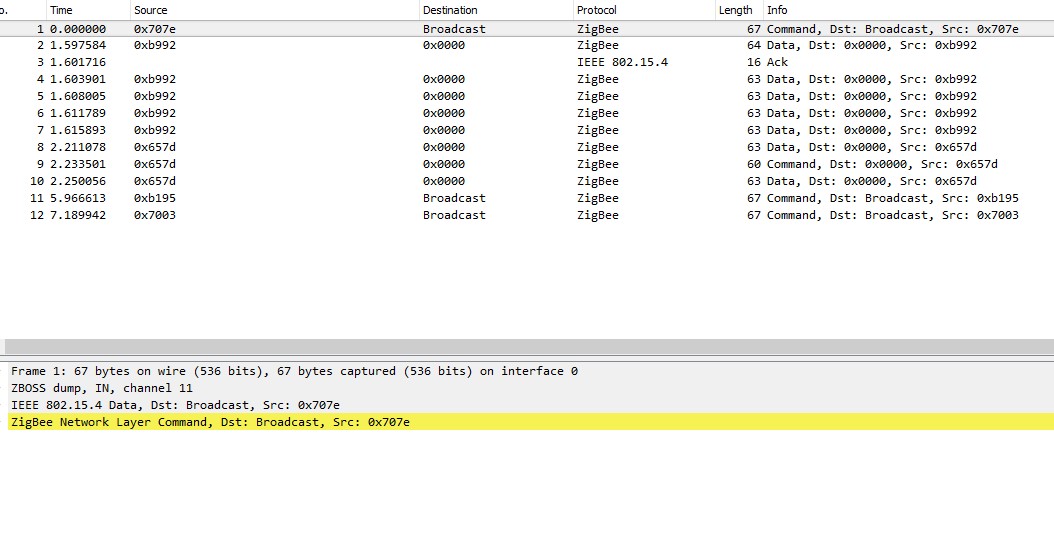
- 0xb992 is the aqara it never reports occupancy in iobroker but it does something.
- 0x657d is the xiaomi it does report occupancy it only sends 3 frames when motion is detected.
If I can do something let me know I really appreciate your efforts and work. Please find in attach a jpeq that shows wireshark output - i cannot upload the file cause *.pcapng is not supported.
Regards,
Dirk
 dirkve
on 24 May 2020
dirkve
on 24 May 2020
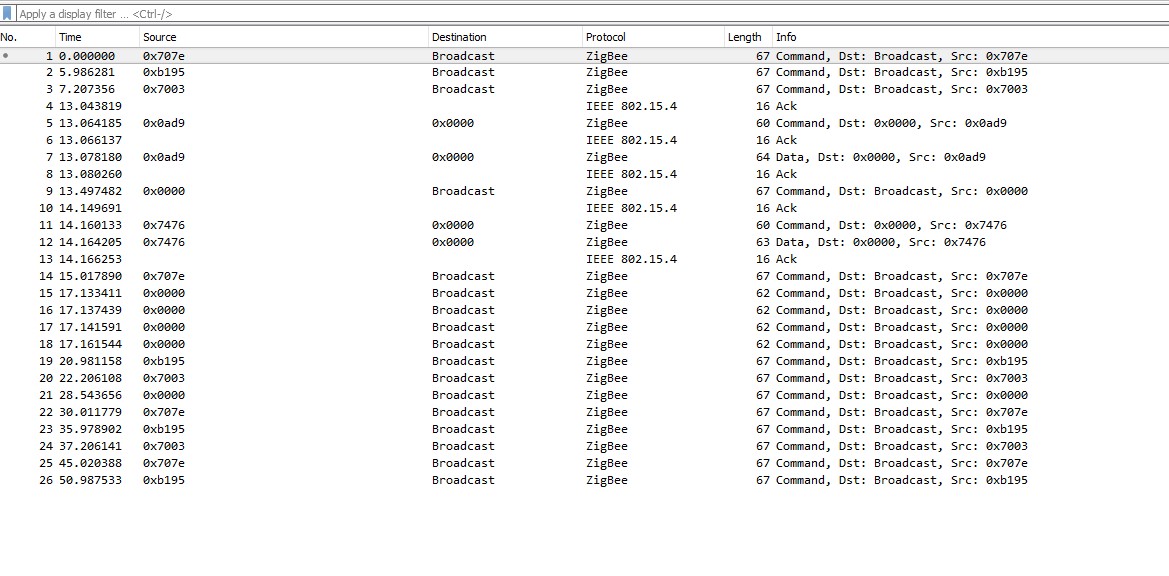
- 0xad9 = aqara -> occupancy is false
- 0x7476 = xiaomi wo illuminance -> occupancy is true
both installed on same location (glued on each other)
dirkve
on 24 May 2020
@dirkve Probably the same issue as https://github.com/Koenkk/zigbee2mqtt/issues/2274#issuecomment-628685834 but cannot confirm because the sniff was taken out of range of the occupancy sensor itself.
I expect when you do you can see the following:
0x0ad9 sends illuminance and occupancy to it's parent (OSRAM router with ieeeAddr 0x7cb03eaa0a038173) but the OSRAM router only forwards the illuminance message to the coordinator.
I've seen exactly the same issue with another user yesterday, where the RTCGQ11LM parent was an OSRAM Smart+ plug.
So it seems that in case you are experiencing this issue with an RTCGQ11LM AND the parent of the RTCGQ11LM is an Osram or an Innr device this issue cannot be solved by zigbee2mqtt/zigbee-herdsman/firmware as it's an interoperability issue (bug in the Osram/Innr firmware). To workaround it make sure the RTCGQ11LM uses a different parent. To do this re-pair the RTCGQ11LM close the the desired parent.
Koenkk
on 25 May 2020
Thank you very much Koenkk I was not aware of Osram bulbs having the capability of a ZR.
I will temporary remove these and try a re-pair. Do RTCGQ11LM also have router capabilities as well?
Now I 've also learned that i can look up 64-bit Zigbee extended addresses just like 48-bit ethernet mac addresses. Big Thanks! Regards, Dirk
dirkve
on 25 May 2020
Battery powered devices never act as routers!
Il lun 25 mag 2020, 19:51 dirkve notifications@github.com ha scritto:
Thank you very much Koenkk I was not aware of Osram bulbs having the
capability of a ZR.
I will temporary remove these and try a re-pair. Do RTCGQ11LM also have
router capabilities as well?
Now I 've also learned that i can look up 64-bit Zigbee extended addresses
just like 48-bit ethernet mac addresses. Big Thanks! Regards, Dirk—
You are receiving this because you were mentioned.
Reply to this email directly, view it on GitHub
https://github.com/Koenkk/zigbee2mqtt/issues/2274#issuecomment-633667483,
or unsubscribe
https://github.com/notifications/unsubscribe-auth/AATG2PGH4S32DVRMGEROEFLRTKV2RANCNFSM4JIXEDAA
.
mr2c12
on 25 May 2020
Ok Thx mr2c12 but I was surprised that osram bulbs can apparently.
dirkve
on 25 May 2020
Afaik every non-battery powered device is also a router (e.g., smart plug,
smart bulbs, etc..)
Il lun 25 mag 2020, 20:06 dirkve notifications@github.com ha scritto:
Ok Thx mr2c12 but I was surprised that osram bulbs can apparently.
—
You are receiving this because you were mentioned.
Reply to this email directly, view it on GitHub
https://github.com/Koenkk/zigbee2mqtt/issues/2274#issuecomment-633671866,
or unsubscribe
https://github.com/notifications/unsubscribe-auth/AATG2PFMP6VGHPDHRACPRQTRTKXRZANCNFSM4JIXEDAA
.
mr2c12
on 25 May 2020
This issue has been automatically marked as stale because it has not had recent activity. It will be closed if no further activity occurs. Thank you for your contributions.
![stale[bot] picture](https://avatars3.githubusercontent.com/in/1724?v=4&s=40) stale[bot]
on 19 Jul 2020
stale[bot]
on 19 Jul 2020
Just reporting in that the bug still exists. I have multiple Xiaomi Motion Sensors (RTCGQ11LM). The one that's connected via the OSRAM Plug (AB3257001NJ) reports its "occupancy" status incorrectly (95% of the time).
I'd love to dig into this issue. Unfortunately I have little spare time to invest at the moment 😔. So all I can say is big thanks to all participants! 🙏
 NullEnt1ty
on 19 Jul 2020
NullEnt1ty
on 19 Jul 2020
My problem was solved when I replaced the Osram bulbs with Aqara ones. Thanks Koen for the correct analysis. Rgds Dirk
Outlook voor Android downloadenhttps://aka.ms/ghei36
From: Dominique Mattern notifications@github.com
Sent: Sunday, July 19, 2020 7:50:35 AM
To: Koenkk/zigbee2mqtt zigbee2mqtt@noreply.github.com
Cc: dirkve dirk_versavel@hotmail.com; Mention mention@noreply.github.com
Subject: Re: [Koenkk/zigbee2mqtt] Xiaomi Motion Sensor RTCGQ11LM not reporting occupancy:true the second (like#1498) (#2274)
Just reporting in that the bug still persists. I have multiple Xiaomi Motion Sensors (RTCGQ11LM). The one that's connected via the OSRAM Plug (AB3257001NJ) reports the "occupancy" status incorrectly.
I'd love to dig into this issue. Unfortunately I have little spare time to invest at the moment 😔. So all I can say is big thanks to all participants! 🙏
—
You are receiving this because you were mentioned.
Reply to this email directly, view it on GitHubhttps://github.com/Koenkk/zigbee2mqtt/issues/2274#issuecomment-660592312, or unsubscribehttps://github.com/notifications/unsubscribe-auth/AFCZTR4S7TR5A2KIDPKVZ7TR4KCSXANCNFSM4JIXEDAA.
dirkve
on 19 Jul 2020
Thanks for the update @dirkve. I guess I have to replace my Osram switches with something else 🙂
NullEnt1ty
on 19 Jul 2020
Can confirm. Since I removed the Osram Plug it runs without problems.
 mar565
on 19 Jul 2020
mar565
on 19 Jul 2020
Probably the best way forward should be to contact Osram and explain to them in details what is going on (maybe with a sniffer log?).
An Osram firwmare update that fixes this issue would be really great.
 RyuzakiKK
on 19 Jul 2020
RyuzakiKK
on 19 Jul 2020
Osram was sold to Ledvance and they announced the termination of Lightify support.
https://www.smart2zero.com/news/osram-discontinue-cloud-support-lightify#:~:text=Osram%20announced%20it%20has%20decided,lighting%20system%20within%2018%20months.&text=The%20company%20will%20shut%20down,at%20the%20start%20of%202019.
tpftpf
on 19 Jul 2020
Please note that this is not limited to osram devices. In my case (after
Koenkk help me analyze my data) also a Innr smart plug caused the problem.
I think at the moment the only devices 100% comaptibles are Aqara and
cc2530/cc2531 routers..
Il dom 19 lug 2020, 15:44 tpftpf notifications@github.com ha scritto:
Osram was sold to Ledvance and they announced the termination of Lightify
support.https://www.smart2zero.com/news/osram-discontinue-cloud-support-lightify#:~:text=Osram%20announced%20it%20has%20decided,lighting%20system%20within%2018%20months.&text=The%20company%20will%20shut%20down,at%20the%20start%20of%202019
.—
You are receiving this because you were mentioned.
Reply to this email directly, view it on GitHub
https://github.com/Koenkk/zigbee2mqtt/issues/2274#issuecomment-660645723,
or unsubscribe
https://github.com/notifications/unsubscribe-auth/AATG2PCNDS4U7ITTOYKZSXLR4L2ERANCNFSM4JIXEDAA
.
mr2c12
on 19 Jul 2020
Wow. So the only solution is to create a separate network with only aqara devices on it... there goes my mesh.
i have over 60 mixed devices innr osram aqara heiman....
Atleast it is nice to know now where the problem comes from :).
 vikinghts
on 27 Jul 2020
vikinghts
on 27 Jul 2020
If you do not need the illuminance value (but this is a limited scenario, I know), you could "hack" your motion sensor to block its illuminance sensor.
That way, it will report just a few illuminance changes and the problem described in this issue seems to disappear.
Unforunately, even if completely blocking the illuminance sensor, the motion sensor seems to send a few updates a day.
mr2c12
on 27 Jul 2020
Oke so if i am getting this. The problem goes away if i disable the illumance?
I am not using the illumance at all.
How do i block the illuminance sensor?
vikinghts
on 28 Jul 2020
As the initiator of this issue I want to share my observation results:
I did what Ton1965 commented on 24 Apr. I've set debounce: 0.5 in the configuration.yaml.
Since then I had no issues- the reason for staying silent..
BTW I have 2 Osram Plugs close to the sensors.
Might be this works you anybody else?
e-t-h
on 28 Jul 2020
E-t-h Will try this first. thanks for the tip. how many motion sensors do you have? At this time i have 11 aqara motion sensors.
vikinghts
on 28 Jul 2020
Wow! No, only two of them.. Cross the fingers !
e-t-h
on 28 Jul 2020
Guys, my issues stoped since I re-pair the senosors close to the coordinator. In my case the problem was because some of my zigbee routers (aqara wall switch) become "parent" of the sensor.
So maybe it will help in your cases too..
phplego
on 28 Jul 2020
@e-t-h it is becomming a real mess in the house with sensors ;).
Will tell if it fixes the problem for me.
vikinghts
on 28 Jul 2020
Guys, my issues stoped since I repair the senosors close to the coordinator. In my case the problem was because some of my zigbee routers (aqara wall switch) become "parent" of the sensor.
So maybe it will help in your cases too..
Can echo this. Swapped the nearby Osram bulb yesterday with a Trådfri bulb and that fixed the issue. Its a pain longer term since I'm sitting on a few spare Osram bulbs so I will have to be strategic in their placement.
If I get some spare time I'll swap the bulb back and test the debounce change e-t-h had luck with
 matstrange
on 28 Jul 2020
matstrange
on 28 Jul 2020
... so I will have to be strategic in their placement.
As Koenkk suggests in this comment https://github.com/Koenkk/zigbee2mqtt/issues/2274#issuecomment-590104511
you don't have to care where your sensors/router are. But you have to keep it close to the coordinator during pairing only. Then you can move it to the desired location and it should work OK. (because it remembers its parent).
I have tested this "solution" for several months and my sensors didn't have any troubles since then
phplego
on 28 Jul 2020
Pairing the affected motion sensors close to the coordinator seems to fix the problem for me for a while, but after a few days the problem is back.
My guess is that the motion sensor does not stay connected to the coordinator as a parent, but now the traffic goes through my osram bulb for instance. That is how zigbee works right? The path to the coorinator can be relayed through a router device if the router device is closer than the coordinator. So in this case, repairing close to the coordinator is not a permanent solution.
I tried debounce also, this does not solve the problem for me.
 freakshock88
on 24 Aug 2020
freakshock88
on 24 Aug 2020
The debounce option does not work for me either. I even moved all motion sensors to a fully seperate zigbee network with its own stick. And still the problems remain. Going to try to figure out what is going wrong tonight.
vikinghts
on 24 Aug 2020
My guess is that the motion sensor does not stay connected to the coordinator as a parent, but now the traffic goes through my osram bulb for instance. That is how zigbee works right? The path to the coorinator can be relayed through a router device if the router device is closer than the coordinator. So in this case, repairing close to the coordinator is not a permanent solution.
You can check which device actually work for your sensor as a parent in the "networkmap":
https://www.zigbee2mqtt.io/information/mqtt_topics_and_message_structure.html#zigbee2mqttbridgenetworkmap
In my understanding zigbee network "rearranges" during pairing only. But I may be wrong. Does anyone have proofed info about this?
phplego
on 24 Aug 2020
In my understanding zigbee network "rearranges" during pairing only. But I may be wrong. Does anyone have proofed info about this?
Is this not the issue instead? I think it is specific to Xiaomi
https://www.zigbee2mqtt.io/information/zigbee_network.html
If a parent router goes offline all traffic to its children will cease until those end devices time out and attempt to find a new parent. Some models of end device, notably Xiaomi, don’t attempt to find a new parent so will remain isolated until re-paired with the network.
This implies that Xiaomi end devices only pair with a parent device on pairing.
madjam002
on 24 Aug 2020
So looked into it. Apparently the motion detector devices where added 2 times in home assistant. 1 time from the "normal" zigbee network and 1 time from the dedicated zigbee network. When i removed the "normal" network ones everything is working fine again. But time wil tell. So wil run with this config for a little while.
Btw it is an easy solve to run an extra zigbee network. Just add a extra stick run a second docker container change the panid and you are done. Easy as pie.
vikinghts
on 24 Aug 2020
Regarding Innr devices: I use almost exclusively Innr Bulbs and with the bulbs the Xiaomi sensors work fine. Could be the routing issues are specific to the Innr Smart Plug then.
 wzbfyb
on 25 Aug 2020
wzbfyb
on 25 Aug 2020
Could be the routing issues are specific to the Innr Smart Plug then.
@wzbfyb Unfortunately not. It's happening with Osram Smart Plugs as well :(
NullEnt1ty
on 25 Aug 2020
Just my luck, I have Osram bulbs, Osram smart plugs and Innr smart plugs sigh. Do we know of any more affected devices? And are the xiaomi motion sensors the only end devices affected?
I'll look into creating a separate Xiaomi network over the weekend indeed, but it's an unfortunate workaround.
freakshock88
on 25 Aug 2020
Do we know of any more affected devices?
Philips Hue bulbs. I suffer from this problem with an Innr Smart Plug (downstairs) and a Philips Hue bulb (outside).
And are the xiaomi motion sensors the only end devices affected?
It seems so. The problem occurs when a sensor send two message really close one to each other. This happens with motion sensor (illuminance message and presence message). I can't think of a similar behavior with other sensors at the moment.
In my case, I just bought two Aqara presence sensor without the illuminance sensor. It's a huge pain when the motion is not triggered.
mr2c12
on 25 Aug 2020
I most likely could mitigate this problem this way:
Change the "type" of "OSRAM" and "innr" devices to "EndDevice" in the file database.db
Restart the Zibee2MQTT afterwards.
Hope this helps...
tpftpf
on 25 Aug 2020
Thanks for your suggestion @tpftpf but it won't work. Those devices will continue to act as routers. Changes in dabase.db do not affected real devices (they will probably change something in the network map created by z2m, but not the real network topology).
mr2c12
on 25 Aug 2020
I bit the bullet and used an old CC2531 device as a second coordinator, running in a second zigbee2mqtt docker instance. I put only my Aqara motion sensors in the second zigbee network. Now indeed the device updates are not failing anymore :)
freakshock88
on 26 Aug 2020
Having the same issue with the Xiaomi RTCGQ11LM devices.
As soon as the traffic gets routed through another device to the coordinator, the state does not get reported.
(Re)pairing close to the coordinator fixes the issue for 2-3 days until the network gets rearranged.
@Koenkk is there a way we can somehow prevent network rearrangement as a workaround until a proper fix is found?
 milaq
on 14 Sep 2020
milaq
on 14 Sep 2020
@milaq unfortunately not, we have no control over what parents will be used by the devices. Note that we cannot fix this issue from Zigbee2MQTT, it's an issue in the firmware of the routers.
Koenkk
on 14 Sep 2020
Do we know which routers are affected?
With my Innr bulbs it works fine for example.
Am 14.09.2020 um 22:21 schrieb Koen Kanters notifications@github.com:
@milaq unfortunately not, we have no control over what parents will be used by the devices. Note that we cannot fix this issue from Zigbee2MQTT, it's an issue in the firmware of the routers.—
You are receiving this because you were mentioned.
Reply to this email directly, view it on GitHub, or unsubscribe.
wzbfyb
on 14 Sep 2020
Reading this issue, lot of people experience it with OSRAM devices.
Koenkk
on 14 Sep 2020
Innr smartplug in my case. And osram bulbs.
Il lun 14 set 2020, 22:40 Koen Kanters notifications@github.com ha
scritto:
Reading this issue, lot of people experience it with OSRAM devices.
—
You are receiving this because you were mentioned.
Reply to this email directly, view it on GitHub
https://github.com/Koenkk/zigbee2mqtt/issues/2274#issuecomment-692301334,
or unsubscribe
https://github.com/notifications/unsubscribe-auth/AATG2PHXY4SPHJRA3JFVED3SFZ5SJANCNFSM4JIXEDAA
.
mr2c12
on 14 Sep 2020
@milaq unfortunately not, we have no control over what parents will be used by the devices. Note that we cannot fix this issue from Zigbee2MQTT, it's an issue in the firmware of the routers.
Thanks for the swift response!
Well, that's unfortunate. Guess the workaround would be new hardware then; I'll test the Xiaomi smart plugs and report back here in this thread.
Maybe this could be worth a wiki update?
At least for the AB3257001NJ I can confirm the issue (https://www.zigbee2mqtt.io/devices/AB3257001NJ.html).
Do we know which routers are affected? With my Innr bulbs it works fine for example.
At least routing via my "Osram Smart +" plugs (AB3257001NJ) didnt't work; no occupancy updates.
Further up there were a few users with Innr plugs with the same issue.
I ordered these Xiaomi plugs (https://www.amazon.de/dp/B083F91ZX3/) and will test them in the exact same constellation as parent for the RTCGQ11LM.
milaq
on 14 Sep 2020
And Philps Hue bulbs too, sorry.
Il lun 14 set 2020, 22:44 Michele roncallim@gmail.com ha scritto:
Innr smartplug in my case. And osram bulbs.
Il lun 14 set 2020, 22:40 Koen Kanters notifications@github.com ha
scritto:Reading this issue, lot of people experience it with OSRAM devices.
—
You are receiving this because you were mentioned.
Reply to this email directly, view it on GitHub
https://github.com/Koenkk/zigbee2mqtt/issues/2274#issuecomment-692301334,
or unsubscribe
https://github.com/notifications/unsubscribe-auth/AATG2PHXY4SPHJRA3JFVED3SFZ5SJANCNFSM4JIXEDAA
.
mr2c12
on 14 Sep 2020
Well yes I read that.
Interestingly enough I never had this happen although I have two Lightify plugs in my network. Maybe luck.
Am 14.09.2020 um 22:40 schrieb Koen Kanters notifications@github.com:
Reading this issue, lot of people experience it with OSRAM devices.—
You are receiving this because you were mentioned.
Reply to this email directly, view it on GitHub, or unsubscribe.
wzbfyb
on 14 Sep 2020
I ordered these Xiaomi plugs (https://www.amazon.de/dp/B083F91ZX3/) and will test them in the exact same constellation as parent for the
RTCGQ11LM.
Today the Xiaomi plugs arrived.
I tested them in the exact same constellation as with the Osram plugs before and they are indeed able to route all attributes correctly, including occupancy.
They cost ~7€ more than the Osram plugs but the build quality is way better and they also pass power as well as circuit temperature measurements. The relay is also quieter when switching.
To sum things up: After short testing, the 'Xiaomi Mi Smart Plugs' (ZNCZ04LM) plugs are the better and fully working alternative to the Osram Smart+ plugs.
milaq
on 18 Sep 2020
Since this issue cannot be solved from Zigbee2MQTT I will close this. I've updated the docs: https://www.zigbee2mqtt.io/devices/RTCGQ11LM.html#troubleshooting-no-occupancy-only-illuminance-is-published
Koenkk
on 25 Sep 2020
Thanks Koen everything is working fine since.
Outlook for Androidhttps://aka.ms/ghei36 downloaden
From: Koen Kanters notifications@github.com
Sent: Friday, September 25, 2020 7:57:40 PM
To: Koenkk/zigbee2mqtt zigbee2mqtt@noreply.github.com
Cc: dirkve dirk_versavel@hotmail.com; Mention mention@noreply.github.com
Subject: Re: [Koenkk/zigbee2mqtt] Xiaomi Motion Sensor RTCGQ11LM not reporting occupancy:true the second (like#1498) (#2274)
Closed #2274https://github.com/Koenkk/zigbee2mqtt/issues/2274.
—
You are receiving this because you were mentioned.
Reply to this email directly, view it on GitHubhttps://github.com/Koenkk/zigbee2mqtt/issues/2274#event-3808803359, or unsubscribehttps://github.com/notifications/unsubscribe-auth/AFCZTR7FVYVI5IY3XFPXAULSHTKZJANCNFSM4JIXEDAA.
dirkve
on 25 Sep 2020
Related issues
 alwashe
·
4Comments
alwashe
·
4Comments
 Underknowledge
·
4Comments
Underknowledge
·
4Comments
 LCerebo
·
3Comments
LCerebo
·
3Comments
 pepp86
·
4Comments
pepp86
·
4Comments
 RefineryX
·
4Comments
RefineryX
·
4Comments